 Problems? See this thread at archive.org.
Thanks for the answer
Well, I won't be buying the premium version with carbon fibre so that's why I have my doubts - I saw it in saloon, and it looked pretty but not so durable. I also think about Samsung Series 5 which is made completely of alloy, although it doesn't have a dedicated graphic card. Will it be tougher?
Btw. I also wanted do ask what games will it be possible to play smoothly on GeForce 640M LE (no BIOS mods, because of Win8 version) and intel core i3-3100M?
I'm interested in titles like:
- Gothic 3;
- GTA IV;
- Skyrim;
- Borderlands 2;
- The Witcher;
- Neverwinter Nights 2;
Is is possible to play them smoothly? Also, on what details?
-
-
Really strange, I had the option to change the ventilation option in windows 8. Unfortunately, I don't use W8 anymore as I find it Windows 7 in 16-bit
Have you tried also installing VAIO Power Management? I had it also in Power Management in Windows 8 as a tab. -
Win8 version can now be OCed without BIOS mod.... http://forum.notebookreview.com/sony/677079-sony-vaio-s-bios-mod-gt640m-le-182.html#post9227365 - thanks to Myst3ri0n
-
Wow, thanks! That will be really helpful in future
I asked about that couple of posts back, but nobody answered, so I assumed nothing changes over the first post.
-
You're welcome... Just check the thread I mentioned above regularly for OC updates
-
Okay.
So, I'll be able to play games I mentioned above, right?
-
So...I seem to have trashed the headphone jack on my S15. Does anyone know if this part is easy to replace without sending the whole laptop back to Sony for a warranty repair?
-
I got my Sony Vaio S 15" (SVS151290X) around January. I've noticed that the Intel® Centrino® Advanced-N 6235 card isn't working all that well. I have sporadic internet connection. When I did a Google search I found out that many people are having problems with the same card on Windows 8, but on Samsung laptops. I was wondering how easy it will be to switch my wireless card on my laptop? Can I just get a Killer wireless card and replace it myself? Thanks.
-
Switching wifi card is easy and it is plug&play. I have bought the SVE17 and it came with poor Atheros card and I installed my AGN 6200 without any problems and this card works like a charm with 300mbps.
Here are the photos of the modification in my sve:
Pictures are big and need time to appear after you click the thumbnails:
![[IMG]](images/storyImages/acwoYEof.jpg)
![[IMG]](images/storyImages/abomrjwV.jpg)
![[IMG]](images/storyImages/achF4rTk.jpg)
![[IMG]](images/storyImages/abmF63fD.jpg)
In SVS, you do not need even to remove entire back, only the hdd and battery plate and wifi card is fully exposed:
![[IMG]](images/storyImages/csm_Sony_SVS1511X9EB_Unterseite_Offen_01_09efcce553.jpg)
-
Hey Guys
So I have a Sony Vaio S 13" Windows 8 Model and I am having a bit of problems with the Vaio Software.
In particular I've lost the Vaio Control Center among other applications.
Now I've searched through the thread and the solutions seem to be mostly for people upgrading the Windows 8 from the 2012 model rather than the Windows 8 model of the Vaio S that I have.
Also many people report seeing a yellow exclamation mark in device manager, however I don't have such a warning.
I've tried to re-download the software from the support website but that dosnt seem to improve anything.
If someone here can point me in the right direction that would be great.
Thanks
Madaimer -
I´m a bit confused about my new SVS1313 european model. I´ve choosen the HD Display and i think it is a bit of "washed out" - my first Intention was this is caused by the automatic colour control but this effect is also there when this mode is off. maybe it is the Screen itself? i must say i come from a vaio z with perfect Screen so this is was my direct compare...
-
In US and Asia the SVS15 has a really washed up display, and the "Premium" option that is available in Europe does not seem to have absolutely anything related to the Z's quality of Premium screen
-
Since the AW, F and Z series, premium display in other series is actually defining only resolution like FullHD because the rest and collor pallette is really medicore. My SVE with premium full hd panel is quite bad comparing to my previous F12S.
-
Any advice? Or does anyone else have this problem?
Can everyone just please check? It literally takes 2 seconds of your life...and it will help my OCD.
(Just move your finger from the trackpad to the laptop...it will feel pushed downwards on the left side and will be pretty flat on the right side of the trackpad) -
I´m very unhappy about the Display and now, after releasing the new refresh series, i´m angry about me...
-
Ur screen is a standard complaint for the s13. Everyone buys this laptop for every other reason except the screen. Nothing else like it. If u can't stand it, return and get 15 inch s15. Otherwise get different brand.
Sent from my SCH-I535 using Tapatalk 2 -
Does anybody use Rapid Wake? I switched it on, but I don't really see a dedicated partition for it in the Disk Management. I did bump the RAM from 6 to 12 GBs, but there's no 6 GB partition either. I do see a hibernate file (about 10 GB) there still so maybe this is used instead?
-
I think is uses one partition, I got something like Sony partition without any letter, it got around 20 GB in my case.
-
Which refresh are you referring to?
There is no dedicated partition, it uses the hibernation file I think (since Hibernation is disabled when RapidWake, i.e.HybridSleep, is enabled) -
I've got an W8 S15 1080p with no orange-gate. Beautiful screen, but I think the content is displayed too small in the native resolution (letters are rather small). I set the scaling to 125% in Windows and my browser (Chrome), which I found much more inconvenient, but it introduced some artifacts and not all programs scale (like Photoshop, Illustrator and InDesign CS6). Is there something else that I can do to reduce the artifacts and to scale CS6 programs?
I'm considering to buy a S13 instead. I've had a 1600x900 S13, but that screen was horrible, especially the screen-door effect. Does the 1366x768 S13 version suffer from the screen-door effect too? -
@Runordie
Hey I have the same problem. It's easy to press down on the left side.
If i keep pressing when i move to the right, it is only getting slightly more resident.
The upper part of the click pad needs more force. Upper right corner is where I need by far the most force. -
I've been in Sony Centre today and looked at Vaio S13 white and silver. Am I wrong or silver models is metalic and cold in touch, while the white model looks like made from plastic...?
-
Black one is definitely fully plastic. Got no idea about white version though.
-
Is it possible that they are made from different materials? I'm like totally sure that the silver one is cold and metalic, looks like alloy.
-
Hi all,
quick question. Is there another way to access the home key function other than "fn+home"? Trying to find a one handed way to go 'home' on any given page.
Thanks,
Ho'okani -
It's the type of paint they have to use for each color. That affects the feel of the machine
Sent from my SCH-I535 using Tapatalk 2 -
If I update Nvidia drivers of Nvidias website what would happen?
-
It IS definitely possible to play most (dont know all of them) of them smoothly. I used to (before windows 8 -.-) play skyrim on high smoothly
-
Sorry for the late reply, been busy lately. I think the VAIO power managment was installed with the VAIO upgrade tool sooo idk.. Oh and i realized that it always starts to lag on all games but some later than others. For example less "intense" games or on lower graphical settings can be playable on the nvidia (i presume) untill up to 1 hour + depending on the game and then suddenly it goes down in frames ALOT and becomes unplayable, games that look "good" like far cry 3 start to lag after only a few seconds of gameplay. I am pretty sure its throttling down to intel but i cant seem to find the solution, plz help anyone
-
It depends on GPU usage probably. FC3 is a demanding title. I think the problem lies in CPU or GPU throttling. Check the power management options once more. First check High Performance settings and go to CPU settings. Set minimal usage to 100%. What about NVIDIA Control Panel, give me some screenshot, so I can check if you've set them correctly.
-
Here (click images):
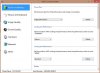
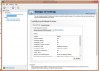
-
Could you slide down a bit in NVIDIA Control Panel, it's set to High Performance, but there's another setting there - NVIDIA dedicated / Integrated graphics. Please post it. I'll reply once I get back from work.
-
I purchased an SVS131290X thinking I would upgrade the hard drive to a Samsung 840 Pro 512GB.
It didn't work for me.
I tried installing Windows 7 in UEFI mode but the installer never properly initialized for it. I then tried installing in Legacy mode, where the installer got running but windows installation crashed in the middle. I then tried with a spare 250GB 2.5in HDD, and the installation of windows succeeded (only in legacy mode).
Is there a problem somewhere with this laptop? There is nothing wrong with the installation medium. The medium installs just fine in UEFI mode and Legacy mode on my mini-ITX system.
Any help? -
Thanks! But what happened "after Windows 8"?
-
Hi everyone,
I have a problem with my S15 (with GT640), the fan is making a sound like it´s hitting something ...
I habe tried to open it and have used canned air on it to clean it from dust or anything .. But the result is the same.
I couldnt however access directly to the fan since when opening the case I didnt dare detach the 3 (i think) super slim and thin cables that connected the two parts.
Therefore I could blow air on everything but could not access the fan.
Any ideas ? Anyone with the same problem ? It´s not a noisy it s a repeated *flap* sound
Thank you all. -
This could happen. Mine was dead silent and then after few months I could hear it grinding from time to time like it either hitting something or one of the fins are damaged due to friction. Still its not too bad and it doesn't happen all the time.
I see you tried with air compressor so you either didn't unclogged it or there is some micro damage on the fan -
My first post :
HELP PLEASE ANYONE! I HAVE A BIG PROBLEM THAT HAS MADE ME VERY ANNOYED FOR A LONG TIME. I could NOTTTT find any solution to my problem and it is really making me hate my laptop . Ok, so my laptop was fine and amazing with windows 7, however i upgraded to windows 8 CLEAN installation and have nothing... Now when i play any game, with speed on it does not lag but in a few seconds (for "good" games like far cry 3 and need for speed most wanted it starts to lag ALOT in a few seconds, or lags after a few hours depending on how good graphics options are or how "bad" the game is (like minecraft or less demanding GPU games lag after a few hours) and the fan gets quiter.. I think it has a problem similar to this:
- To ensure the CPU/GPU don't throttle or revert to the HD4000 when gaming, open Vaio Control Centre and go to Power Management. Within the Power Management settings, under Cooling Fan Control, set the "Speed" setting to "Priority to Ventilation"
HOWEVER!! THERE IS NO COOLING FAN CONTROL in the vaio control center for windows 8 from the sony drivers website HELP
I'm still trying to find the solution through this thread I think the problem is with throttling down from Nvidia to intel maybe when it gets too hot or too loud like when i used to but the priorety to silence in the VAIO control panel in windows 7 but when i put priorety to ventilation in the control panel it plays the games without lag forever (the problem is i cannot find these settings in the VAIO control panel anymore when i installed windows 8)
-
Im not sure what u mean but i tried my best :
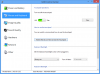 I just want to put the VAIO power management option to priorety to ventilation first cuz i thiink that will fix the problem but i cannot find that option in the VAIO control panel.. ur the only one who really understands my problem and im hoping u can fix it
cuz sony live chat do nothing but download random stuff that do not solve my problem..
I just want to put the VAIO power management option to priorety to ventilation first cuz i thiink that will fix the problem but i cannot find that option in the VAIO control panel.. ur the only one who really understands my problem and im hoping u can fix it
cuz sony live chat do nothing but download random stuff that do not solve my problem..
-
Install all the shared library and Sony Prepariatals, power management etc drivers under Windows 7 category.
-
Can you please give me exact links cuz i ithnk ive done that and still nothing got fixed, maybe i did it wrong . Model No: SVS13A190S. Thanks!
-
I have a Sony Vaio S series laptop bought last year.It came with 750 HDD and recently i have decided to upgrade to SSD.
I have bought Samsung 840 Pro 512GB and have tried to replace the HDD but with no success so far.
My 1st attempt was to clone the SSD which worked fine for some time but after a while the system become unresponsive.So i had to go back to HDD to be able to use the laptop.
I have formatted the SDD and tried a clean install of Windows 8 from and ISO, the installation went fine until 1st restart when i got a blue screen and an error and Windows 8 won`t boot at all.I have sent the SSD for a replacement and while waiting for the new one have made the recovery DVD`s.
After receiving the new one i have replaced the HDD again with the clean SDD and have installed Windows 8 using my recovery DVD`s. The installation went fine but again after the 1st restrat it just won`t boot.
As i know AHCI is already on and i can`t find and change any setting in BIOS.
Where i`m doing wrong?
I have formatted the SSD again and cloned a freshly recovered Windows 8 from HDD , replaced the drives and run the Windows updates on SSD , after 1st restart same story again, error and windows won`t boot.
I`m desperate and tired of all this.
Any advise would be much appreciated. -
They look good. Unfortunately I have no idea why you still don't have ventilation control under Control Center. What's your exact model? I'm using SVS1511C5E. Have you tried using VAIO Update to install necessary updates? Maybe they released some stuff during that time.
-
@dzhoshkun
Have you formatted your SSD in GPT mode? I think that's necessary if you are in UEFI mode... Or, you could switch to bios legacy mode, but startup will be quite a bit slower.
See this post for details: http://forum.notebookreview.com/son...y-s-series-owners-thread-594.html#post9078469. I followed this guide for my 256 GB 840 pro and it works fine... -
I have the recovery disks with my Windows 8 and all the Sony drivers. If i will format the SSD in GPT mode (i`m in UEFI mode ) , will this help to transfer my copy of Windows 8 with the recovery partition and all the drivers? If so how to format in GPT ?
I don`t need a clean install as i can get rid of unnecessary Sony bloat manually.
-
S Series Wireless Adaptor connection issues
I have two S Series laptops. 1 S13 and 1 S15, both bought December 2012.
Both of these machines have unreliable wireless connectivity and it is rare when I can have a decent browsing session without having to run the Network adaptor trouble shooter wizard to fix the issue.
I can't find any evidence of others with a similar problem but it's too easy to think this i s normal behaviour so i'm wondering what others think.
This problem has been evident since new on both machines. It smore common when coming waking from sleep but can happen randomply for no reason. It just loses the network and requires the troubleshooter to reset the wireless adaptor before wit will reconnect; even if it can see the wireless network.
I asked Sony support and they gave a generic 'oh its a problem on all laptops'.
Well its not; I have used many laptops and my current HP laptop never loses wireless connectivity. Nor did previous thinkpads and nor do many other machines. These machines have a problem and I would liek to find out if others have this issue and/or if anyone has resolved the issue?
Both machines are fully up to date (windows and viao software), stock configurations, and I am reasonably technical and cannot find any driver/adaptor/hardware issues.
There are events in the event viewer but these seem to be fairly common issues so I am not ocnvinced they are the issue in question:
e.g. this event: WLAN Extensibility Module has stopped
This looks like a clue but I think it may be a red herring.
Any thoughts/directions or help much appreciated. -
Installing SFEP properly on a fresh windows 8 requires a workaround, search the thread
Sent from my GT-I9000 using Tapatalk 2 -
Thanks for advice. Maybe the user can solve his problem now. I wonder why he gets such problems, I installed Windows 8 once and after that installed VAIO Upgrade Tool (couldn't install drivers separately, got battery issues) and everything was working fine. I switched back to Windows 7, I find Windows 8 quite primitive OS.
-
Are you running Windows 8? When did the issue start?
I have had my S-series since last August. Never had any wifi issues while I was on Win7 and even with Win8 up until 2 months ago. Then something happened and now every once in a while the wireless connection would drop and it won't reconnect until I disable/enable the wireless adapter. I'm thinking it's a driver issue, but it hasn't annoyed me that much to mess with it yet. -
I'd blame router for connection issues, not WiFi adapter in S13/S15. Never had any sudden disconnections, anything regarding WiFi.
-
Yes, your router based on chips et, implementation of code, antenna design, and wireless standard could affect ur laptop connectivity compatibility.
Sent from my SCH-I535 using Tapatalk 2
Official 2012 Sony S Series Owners Thread
Discussion in 'VAIO / Sony Owners' Lounge Forum' started by Petrov, Jun 9, 2012.


