 Problems? See this thread at archive.org.
Hi all.
I have a Sony Vaio SVS1513. I wanted to replace the old HDD to SSD OCZ Vertex 460 (480Gb). But the disk is often lost in the BIOS. Who knows how to solve the problem?
What SSD drives >=480Gb work with SVS1513 correct?
-
Hi all,
I'm having issues with my S13's fan. It is spinning full blast as soon as I power on the laptop.
I opened a dedicated thread.
Thanks for taking the time to help me diagnose the issue. -
I have Crucial m4/512GB in the S15, working fine since the start. The only issue being that it does not work in SATA3, but that is a known issue.
Check the power connection, it is unlikely anything more than a connector on either side. -
Hey guys I recently upgraded to Windows 8.1 and just realized that my web camera doesn't work anymore. I tried to install the previous drivers from Windows 8 and 7 to try and get it to at least come up in device manager but got nothing. Anyone have any ideas on what I can do?
Edit: Fixed by mass deleting Vaio specific stuff in device manager and reinstalling. But now bluetooth is gone so I am working on that... -
Morning all,
I own a SVS13A2C5E (8gb ram, 256 SSD) which is a fantastic machine originally on windows 8 pro 64 bit, I asked the IT to upgrade to 8.1 and a clean reinstall. I am now left with a few problem that I want to get fix and asking for your advices here.
1/ 2 things are left in the device panel with question marks and here are the IDs:
ACPI/SNYA008
ACPI/SNY5001
2/ How to get the stamina/speed switch to work? I am not sure if the nvidia card is used or not...
Any ideas? Your help would be very much appreciated.
Thanks in advance
For the rest so far so good, I had trouble with wifi connnection that seems to be solved now (only a couple of days of testing) and trouble using Touro 1To USB 3.0 external disk (discussed here Windows 8 - Hitachi Touro Pro - Microsoft Community) that could not connect on any of the 2 USB3 plugs and now solved. -
Is there any way to install old bios version for SVS13A laptop? I think the battery issue i'm encountering (battery does not charge or is not recognize by the laptop even the sheet battery) was caused by last bios update available on the sony site. Or is there any other bios version i could use just to have the problem fixed

-
Guys... This thread is perfect for me! =D
I have a Sony Vaio SVS13A17GBB. I think that is an exclusive brazilian version. Just for the record, I am from Brazil and I upgrade the Windows from 7 to 8... I am kind of scared to update it for 8.1 because of some bugs with nVidia driver in the first release of driver after the 8.1 release. But mainly it is not my concern right now...
Here in Brazil, we have a lot of purshase limitation because of the internal taxes and stuffs... I wish to substitute my ODD (currently a non-working DVD-RW) with my old 750GB spin HD that cames with the notebook (my main HD is a Samsung SSD 250GB 840 Evo that my friend bought for me in US). So, here in Brazil I have only available a caddy by Akasa ( Akasa Thermal Solution). I would like to know if someone already used it for replace the ODD for a SATA HD drive.
I am sorry for my bad English if I make any mistake. =)
Thanks in advance! -
Did you already tried to unplug and plug the battery? When I received my Vaio, the Vaio Care, IIRC, alerted me of a battery problem. And with a quick search in Google I found out that some models came with this little issue... I only unplugged it and plugged back and the problem never popped out again.
I hope to be helpful.
[ ]'s -
I've used aluminum Apple caddy - worked just fine except for one known issue. Check more info in my signature's links.
-
With "one known issue", you mean the problem with high CPU usage?
Which 9.5mm caddy that does not have problem with our notebook?
Thanks in advance!Darkimmortal likes this. -
You can easily tell its state using HWiNFO64 - there's a few possibilities:
- GPU #1 Nvidia section is empty: GPU is completely disabled with maximum power savings and minimum fan noise; this state indicates optimus is doing its job correctly
- GPU #1 Nvidia clock speed is visible and < 550mhz: GPU is enabled but in power save mode: moderate power savings and fan is forced to run at medium speed regardless of temps or load; should never be in this state except for misconfigured games (e.g. LoL where by default the launcher triggers optimus) and perhaps video playback
- As above but >=550mhz: GPU is properly in use, loads of power/noise/etc
Note that you have to completely restart HWiNFO64 after opening or closing a game for this to be an accurate testhirata likes this. -
Anyone have an issue where after the clean install, the Windows product key doesn't work anymore? I contacted both Microsoft and Sony, with Microsoft saying the product key is blocked by Sony for too many uses (this is only my first clean install) and Sony says to take it to Geek Squad at Best Buy.
Has this happened to anyone else and does anyone have any solutions? I don't want to have to buy another product key for $100... -
In my second clean install (after install a SSD), when I tried to authenticate the Windows 8 (not 8.1) the Windows showed that the authentication was not successfully and I was not able to validate my Windows, but after a day or so, I tried again and it warned me that the key that I purchased was only for update system. I did some registry changes in Windows enabling upgrade install... Using:
Probable Fix: Problem Activating Windows 8 After Clean Install
And after that, I was able to validate my Windows...
I know that it is not exactly what happened to you, but it maybe help.
Thanks! -
Hello Friends!
Hit me with the link of clean windows 8.1 install FAQ
I have two SVS1511 with Win8 installed and don't want to upgrade each from the Store. Wanna create ISO or something like that
Please advice -
Hi people!
I have a SVS13A1C5E for 2 years and enjoy it every day! I installed Windows 8.1 which seems to work but i still have some issues. The stamina switch doesn't seem to work and when i try to install Sony Control Center i get the message that a newer version is installed already,....thing is that i can't find it on my laptop. I tried different drivers with no luck so far. I'm also looking out for drivers for my trackpad, tried the 8.0 ones but that didn't work. Suggestions and tips are very much appreciated! -
I just tried your link and it didn't work thanks for the suggestion though! Guess I'm SOL...
-
Model : SVS151290S-LBOM-2
Has anyone fit a Samsung 840 pro 256gb inside that tiny space
From what I measured the available space is 2.5in x 3.5in while the drive is supposed to 2.5 x 3.75in.
I'm not sure if the drive include the ''connector'' in it's dimension or not.
Has someone did this before? I would like not to buy a Smasung 840 pro and that it would not fit in it
(Picture would be nice )
-
Does anyone know why my S15 refuses to charge it's battery to 100%? It always stops between 70-80% and tells me it's "Plugged In, Not Charging".
-
Most likely reason is that you have it set that way in the VAIO Control Center.
-
No, it's not the Battery Care. It's the first thing I checked and it is turned off.
-
Mine no longer charges beyond 89%
Probably just battery wear -
Damn, my battery's worn all the way to 71% then. My S15's been faithful for more than 2 years now, I guess it's time to think about buying a new battery. >_>
Speaking of which, now that Sony has sold their PC business, I don't know if I'll ever be able to buy another laptop with an IPS screen ever again. ;_; -
I´m not sure if someone can help me - on my VAIO SVS1313 running Windows 8.1 - european device - the Bluetooth stack is disabled on every reboot in device manager. Drivers are up to date, did severall reinstallations. Not sure what i can do? After reactivate the bluetooth stack through the device manager, everything is right during next reboot...
-
I cannot imagine that it wouldn't fit...
I've have a Samsung 830 256GB, but why would Samsung use different form factors for SSD. You can check the dimensions of the normal 830 against the 840EVO version. I'm pretty sure they equal. -
SSD form factor is the standard 2.5" notebook hard drive form factor.
Why do I always have to log out and log in just so I can post? -
Hello there!
I have a problem with recovery in my SVS1312Q9ES (i3-3110M, GeForce 640M LE 1gb, 4gb RAM, 3G, 720p). I have Windows 8.1 updated from Win8. Recently I have experienced some slowdowns, so I decided it's time for full reset (after almost a year). However, trying to reset results in error saying that a recovery partition can't be find. The same thing happens when I insert my recovery DVDs made same day when I bought this device.
I have created another partition couple of months ago and I've read that it needs to be the same as it was at the beggining, so I deleted it and expanded my C:\. Error persists.
Does anybody know the solution, how to restore original recovery partitions? The files are there, I've seen them (I also have DVDs) -
Just reinstall from scratch, less bloat that way
-
Hello,
Does anyone have the fix for battery "plugged in, not charging" problem. I have a sony SVS151190X. The battery light kept blinking fast. I have tried several methods posted on the internet without success.
1. Plugged in a known good battery ==> does not help.
2. Took off battery, unplug cord, press an hold start button for 1 min, and left the laptop overnight, then reinstatll the battery ==> does not help
3. press the RAM for 30 seconds ==> does not help
4. remove the Microsoft ACPI driver and reinstall ==> does not help
5. press the battery reset button on the back of the laptop ==> does not help
6. IBS utility turned off ==> does not help.
7. Factory restore windows 7 and software ==> does not help.
8. Clean install either windows 7 or windows 8 ==> does not help.
9. Tried BIOS either EFI or legacy ==> does not help.
10 Disabled TPM ==> does not help -
How? I can't reset the PC, it doesn't work either and I don't have OS on a DVD.
-
I'm thinking of installing an SSD drive on my SVS13A190X but my concern is losing the Vaio Assist Button and such. I remember I made a USB backup through the VAIO care tool, would that basically work as a factory reset image on a brand new drive?
-
^ yes.
10char -
Hi everyone, this is my first post here.
I have Vaio SVS 13A1U9ES with 128GB SSD and I want to change this disc for bigger.
Have to buy original Sony ssd
- 256GB MZRPA256HMDR-000SO or
- 512 GB MZRPC512HAFU-000SO.
Is there any other way to change for bigger ssd from other company like Kingston, Samsung Crucial ? -
I´m not sure but i think the partitions on my SVS13 are a bit out of standard? Don´t know why but i think this is not normal?
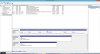
And one thing i´m not sure - the driver for the integrated LTE modem, MC7710 can only be installed through recovery? Can´t find a sony driver on the website, right?
On of the mayor which i can´t fix is the 3G/LTE switch - is it only possible to switch from 3G to LTE band within the AirCard Watcher Software by changing radio technology? -
Anybody have a problem with the print spooler not loading at startup in Windows 8.1? This makes printing unusable until the print spooler is started manually after every startup. Here is the problem I'm talking about, discussed by someone else in a different thread. There seems to be different triggers for the problem, as people are doing different methods yet a few of them managed to solve the problem. The way I'm managing it now is by running a batch script as administrator when i need to print after a restart. i was wondering if there's a specific driver causing this and if anybody else has the same issue on the vaio s series (I have the s13), that way we can find what is triggering the issue.
-
Hi all. I am on my second S series (first had a faulty GPU) and now less than 6 months later the fan on my replacment now sounds like its going bad (grumbling and growling). Anyone know where I can find a fan for this POS?
-
Hi, guys... I JUST installed my caddy into my SVS13A.... Actually, the complete model is SVS13A17GBB. This model, AFAIK is only sold here in Brazil. It is from 2012.
It is alike done in the video posted.
My caddy was bought in eBay... The post was:
New SATA HDD Hard Drive Caddy for Sony Vaio SR Series 9 5mm | eBay
I ordered and arrived pretty quick... Recomended!!! The construction is great. It looks like pretty strong. The caddy comes with a driver compatible with screws used in it.
If anyone have any doubt/difficulty regarding this, please let me know.
Thanks! -
Hey everyone,
I have a SVS131190X. I've been having some major hardware issues lately. Namely, the power button, stamina/speed switch, trackpad, SD card slot, headphone jack, and web/vaio buttons have limited or no functionality. If I'm not mistaken, all of these components are attached to the board in the palmrest (part# 045-0001-228_A), but I have some questions:
- Is this even the correct part?
- Does anyone have any recommended sellers for this part? (With the sellers I've found, I can't really tell if the part they're selling includes all of the daughter boards and cables I need to replace, or if it's just the palmrest shell and keyboard.)
- How do I go about replacing this part? (I have opened the laptop up before, but this part in particular seems really difficult to remove, so if anyone has any disassembly instructions or tips, those would be greatly appreciated.)
-
Hi,
I am struggling to get my windows get activated using a clean install method. I got my lap with windows 8.1 single language OS. How to get an exact matching OS for successful activation using a clean install.
Regards,
Razak -
Hey guys, I just bought a replacement fan and am trying to figure out the best way to go about installing it. I've gotten as far as taking out the blu-ray drive...but I'm confused how to get the fan itself out. Does anyone know if I have to take the entire motherboard off just to replace it? Any help would be greatly appreciated.
-
do you know sony vaio model SVS151A12M???
-
Can you tell me what is the latest intel driver for hypbrid intel/nvidia i can install after a fresh windows 8.1 installation? the latest one gives me an error, can´t install it on a notebook with a special oem driver...
-
SVS151190X is my model #btw
I've been kind of a lurker, but I just wanna say I've done a clean install of Windows 10 with no hiccups. Everything is running as before on 8.1 with Fn keys working. Control Center works, and zero unknown devices in Device Manager. I'm not interested in VAIO Care. This has the most recent patch for the Control Center which eliminates fluctuating dimmer for the screen.
I installed everything in this order (modified from an earlier post). The number in parenthesis indicates what OS I found the driver. So far, everything has been compatible with 10.
Restart after each driver installation.
01 - Intel Chipset Driver Ver. 9.3.0.1021.0831 (8.0)
02 - Intel SATA Driver Update 12.8.0.1016 (8.1)
03 - Intel Management Engine Interface Update 8.1.0.1248.1514 (8.0)
04 - Intel SATA Driver Registry Patch 120417 (7.0)
05 - Synaptics Pointing Device Driver for Windows 8 Update 16.2.10.5 (8.0) (WIN10 will update this)
06 - Microsoft Hotfix KB2708549 Update 6.1.7601.17832/6.1.7601.21854 (7.0)
07 - Intel PROSet/Wireless Software for Windows 8.1 (Intel Website)
08 - Intel HD Graphics 3000 / 4000 Update 9.17.10.2843 (8.0) (WIN10 will update these)
09 - Intel Wireless Display Driver 3.5.34.0.0926 (8.0)
10 - NVIDIA GeForce GT640M LE Update 9.18.13.2762 (8.1) (use WIN10 version if using 10)
11 - Intel Bluetooth Driver Update 3.1.1307.0362 (8.1)
12 - Realtek PCIe GBE Family Controller 7.53.216.2012 (7.0)
13 - Realtek PCIE CardReader Update 6.2.9600.28145 (8.1)
14 - Realtek High Definition Audio Driver 6.0.1.6570 (7.0)
15 - Audio Driver Registry Patch 20120308 (7.0)
16 - Sony Firmware Extension Parser Device Driver 8.0.2.3 (8.0)
17 - Sony Shared Library 5.10.0.12150 (8.0)
18 - VAIO Control Center Update 6.0.5.10150 (8.0)
19 - VAIO Control Center Update 6.0.12.05100 / 6.1.5.05100 / 6.2.2.05100 (8.0)
20 - VAIO Control Center Update 6.0.20.09270 / 6.0.19.09270 / 6.1.12.09270 / 6.2.11.09270 / 6.3.6.09270 (8.1)
21 - Sony Wireless State Device Driver 1.0.0.6110 (8.0)
Microsoft - 3-4 passes of Windows updates after all of the above
This install order works for a clean 8.1 install too.
EDIT: Some of the links are broken, and the site won't let me update working links because they link directly to .exe's. Did a clean install for Win10 build 10122 and everything still works great, but Windows is automatically replacing the Dolby drivers with incompatible drivers. I'm rolling back to 8.1 now.
Some hiccups I ran into along the way was using a USB 2.0 thumbstick for a clean install. Make sure you are using USB 2.0 rather than 3.0. For whatever reason, 3.0 is really glitchy. I also used NVIDIA's 10 drivers rather than the VAIO drivers and the NVIDIA one's work better for 10.
Once 10 rolls around a a few updates are released to stabilize performance, I will do another clean install and update with any changes.Last edited: May 27, 2015Sensination, Big_Blue79, ndndr and 1 other person like this. -
Thanks for that list. I will download them for future reference once 10 hits RTM.
-
Hi, I`m not sure if this is the right forum. I have a sony Vaio SVS13A1W9ES and I`m trying to replace the ssd with a bigger and faster one. I`ve looked through this thread, but the pictures of the ssds are not the same as rhe one in my vaio. It should be a 120 gb samsung 830. But it seems to be just a board with some memory chips.furthermore I can`t seem to figguer out what kind of a cable connection it has. I already have a samsung evo 840 but I`m not sure if it would even fit in the compartment, not forgetting the cable that doesn`t seem to have a sata connetor. Can anyone please help me
-
Hi, I`m not sure if this is the right forum.
I have a sony Vaio SVS13A1W9ES and I`m trying to replace the ssd with a bigger and faster one.
I`ve looked through this thread, but the pictures of the ssds are not the same as rhe one in my vaio. It should be a 120 gb samsung 830. But it seems to be just a board with some memory chips.furthermore I can`t seem to figguer out what kind of a cable connection it has. I already have a samsung evo 840 but I`m not sure if it would even fit in the compartment, not forgetting the cable that doesn`t seem to have a sata connetor.
I'm sorry that I'm such a Noob, but can anyone please help me ?? -
I have a request for the owners of series svs vaio. It would be a huge help for me.
If you still have the original bios R0140C5 it would be awesome if you could take a bios backup of it and upload the ROM.
The reason I ask is that I bought a 900p IPS panel but it does not seem to work with newer bios versions. I need to try the older bios, I don't want it to be unusable.
You can use this to make the backup: https://www.sendspace.com/file/5i78hl -
Hi all, please what is last bios (oficial and unoficial) for Sony VAIO SVS1311P9EB?
Last edited: Jan 30, 2015 -
It is my first time connecting my SVS13a to an external monitor by VGA cable since I got the notebook two years ago. For some reason I cannot get the native 1920x1080 resolution on the monitor. It is stuck at 1024x768. Any one know how to fix this?
-
The VGA output on this laptop is poorer than average and I'd be surprised if it would output 1080p60 even with a well-shielded cable
-
Has anyone had any luck using an external graphics dock with their S13? I'm thinking of buying an EXP GDC Beast dock for a 750Ti and connecting it to the mini-pcie port where the WLAN card is currently.
Official 2012 Sony S Series Owners Thread
Discussion in 'VAIO / Sony Owners' Lounge Forum' started by Petrov, Jun 9, 2012.


