 Problems? See this thread at archive.org.
Thank you very much for the guide. do you think i can replace the screen by myself or i just leave it to a professional technician? thanks.
-
Hi,
damn, the whole keyboard? That's quite a bad news... Where could I find one? Are there somewhere instructions for the disassembly? Can I buy a keyboard with any layout and then just use the old keys to recreate the layout I need? -
if u feel confident .. yeah .. but there are some hard parts .. how to run cables tho ..
-
am selling one ..

-
Do you know which AW series laptops came with Adobe Lightroom 2 license? I have an AW11XU/Q (UK version).
It has adobe lightroom sticker on the bezel, and looking for the license code I even restored Vista rescue image. Unfortunately it only constains an installer, not the pdf guide which is supposed to include the code. I contacted Sony support and (after a long while) they said first that they do not suppot Adobe programs (i don't want support I just want the code!), and then that the included copy of Adobe Lightroom was just a trial. I can't believe it. They did put full versions of Photoshop Elements and Premiere Elements (I got these numbers, at least) on the machine. -
So, my laptop stopped working last week. The battery would not charge, and the computer would not recognize that the computer was plugged in, so I could not boot up. I tried another power adapter, and the same problem, so it appears to be a problem with the computer. I took out the battery, and the same problem. I played around with it a bit (unpluging, pluging in, etc) and it started working again. And then it happened again today. Anyone else had this problem? Any ideas?
-
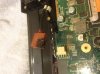 I figured out the problem. I opened up the machine and the DC connector was fried. I hard soldered the connectors and everything is fine now. I attached a pic in case anyone else has the same problem.
 -
So when I fixed my DC short, I figured I would clean out the heat sink while the machine was opened. My computer had been in regular use for almost 5 years now, so about time. I just used some compressed air on the fins and bunch of gunk flew out. And now, the computer runs MUCH cooler! You could fry an egg on the top left corner before, and now it is just barely warm. It is definately worth opening up the machine just to clean it out. Who know what damage is being done with those high temperatures.
-
You cannot change the screen / video card or the resolution on this model. You can use an external screen to get HD picture
-
Hi
so how come it fried? ? what u ve done ? never seen this bfor -
The motherboard was replaced about 3 years ago by Sony, but other then that, the computer has never been opened up. My guess is that one of the 4 connectors was not making good contact, resulting in an arc, that over time, resulted in the housing melting. Apparantly, this is a very common problem as when I did a search on ebay for vgn-aw190, some guy is selling the DC port with a circle around the 4 pin connector! I needed my machine fixed ASAP, so I soldered the wires directly to the board. Not the best solution, but this problem caused me to realize that I needed a new computer. I just ordered a Asus G750JW, and my Sony will become my backup machine (previously a 12 year old Gateway; having a 12 year old laptop as a backup is maybe not a good idea). My Asus also has the two drives bay and a big screen, so I should be happy with it.
-
yeah
can't believe how long this laptop staying last.. it is great laptop... -
I also have the UK version AW11XU/Q from year 2009. I am using it right now and still love it! See my large posting a couple of pages ago. I have a full version of Adobe Lightroom on my machine. It has been there for a long time. I can't remember what I did to set it up. I thought it was on the computer when new, a full licence was certainly sold with the laptop, but you could be right, maybe I had to run a setup to install it. Is there anything I could look up which might help you?
-
That's very kind - if you could please search the machine for something like "lightroom installation guide" and direct me to the right directory... I am still exchanging emails with Sony support, but that's hardly supportive.
On another note - if anyone wishes to use the fingerprint sensor on a modern OS on the AW Vaio, Lenovo's software works great with Windows 8 ( http://download.lenovo.com/ibmdl/pub/pc/pccbbs/mobiles/g1f814ww.exe for 64bit version). While drivers were never a problem, a program allowing for login in was, lenovo solution seems not to mind working with the Vaio. Also, it is maintained, presumably lacks the gaping security hole exhibited by the original software (passwords written as open text in the registry. -
Hi again mateusz_szczurek
I've looked in my programs by simply clicking the START button and PROGRAMS (I'm still on Vista).
In the program list there is of course 'Adobe Photoshop Lightroom 2', but there is also 'Adobe Photoshop Lightroom 2 Installer.'
It gives the location as C:\Program Files\Adobe\Installer\Adobe Photoshop Lightroom 2.0
In that actual folder there are the following files:
Install Lightroom 2.exe
Lightroom 2 Read Me.pdf
Version.txt
and a folder with a setup32.exe
I've looked at the .pdf text however it is not specific to this Sony situation but seems to be for all customers. It says, put in the CD and follow the on screen instructions. It says you can find the 24 digit PIN in the format 0000-0000-0000-0000-0000-0000 on the back cover of your CD holder, which of course we do not have. It says if you have trouble contact Adobe on 800-833-6687 for assistance in USA and outside USA contact Adobe Customer Service in your region.
I don't recall whether I ever had to put in a code or not, don't think so. I probably just clicked the Program 'Install Photoshop Lightroom 2 Installer' and followed on screen instructions. -
Thank you, this is the same setup and pdfs as I have after recovery. While Photoshop and Premiere Elements and Acrobat 8.0 recovery wims come with a fancy xml automatically entering the respective serial numbers, lightroom on recovery image does not, possibly because of different licencing, or something. When you click on the installer, the behaviour is the same as with the standard trial installer downloaded from adobe.com. Somehow the serial is not on the recovery image, it seems. Advise: copy your Lightoom serial from the Help/About menu and store it in case you need it for upgrade pricing (my scenario) or system recovery.
I finally installed the remaining drivers - the trick to do the TV card and ricoh memory stick reader was not to use the sony .exe directly, but the drivers unpacked in the c:\users\??\App Data\Temp folders. Too bad now fn keys (incl volume!!) stopped working. Volume on the remote does work, go figure. -
Hi all
I got my AW laptop back from repair and decided to do a clean install of windows 8 but i have a problem. S1, S2, play/pause. Stop. Skip back, Skip forward, AV Mode media buttons do not work at all not even lighting up when touched.
When i had windows 7 installing these made them work : Sony Shared Library - Setting Utility Series - VAIO Event Service - VAIO Control Center.
The drivers i installed are all from the sony EU website for my model of laptop so 2009. So im wondering if those drivers dont work with windows 8 or I am missing something since Galexy SII said he is using windows 8 pro and his laptop is working perfectly.
Any help from anyone who is smarter than me would be very much apreciated as I would like to get everythign working eventally. -
I am intersted in picking up this old aged cougar
can anyone confirm if she has appetite for a 8gb ram with no issues or shall I have problem putting it in her? -
Hay Corrado85
Yes she can take 8GB of ram with no problems, however 4GB DDR2 sticks are not cheap. Currently on Ebay 1 x 4GB DDR2 SDRAM at 800mhz will cost you at least £50 or more. -
Hi Guys,
I have a Sony Vaio VGN-AW41XH/Q which has 2 x 64 GB Samsung 1.8 SSD’s running as the C drive in a stripe Raid config giving 128 GB. I would like to upgrade my disk space to at least double. Does anyone have any suggestions as to what product I should buy.
Cheers
Mike -
Hi there,
I own a VAIO VGN-AW11XU/Q.
I would like to swap the palmrest from the new AW series to mine because is in very poor condition.
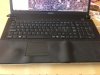

I´m wondering if the following item (palmrest for VGN-AW11S VGN-AW11SR VGN-AW11Z VGN-AW11ZR) is fully compatible with my AW series.
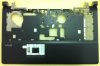
Please kindly let me know your opinion.
Thank you very much for your support!
Rgds, -
oh dear .. what hapened? ??
but do NOT buy expensive palmrest ..
this is complete
SONY VAIO VGN-AW SERIES PALMREST TOUCHPAD UPPER KEYBOARD COVER BLACK (E017) | eBayvkhann likes this. -
A quick question for those of you who owns a AW190 and have upgraded to Windows 8. I'm thinking of doing this upgrade but just curious what kind of improvement for the booting time can I expect? I don't care about the finger print driver and so on... I just want it to BOOT much faster (I'm still using the stock Windows Vista 64bit that come with the laptop)... any thoughts or comments? Thanks!
-
Yeah it will I am running Win 8 Pro on mine .. ... but obviously u need SSD drive instead of HDD
-
I'm still running one of the first AW machines AW11XU and for a while now I keep getting 'Windows Media Center Receiver Service Has stopped Working and Closed.' I get this message 4 or five time each time I boot-up has anyone had this and know how I can either fix the problem or switch off the receiver service. Thanks,
-
Galaxy SII, I have the same model of Vaio AW11Z/B and I want to replace the two HDD with an SSD drive and a HDD at 7200rpm to work at more hi speed. please to informed me what type of these drives can I use to be compatible with controler of my laptop.
-
Nvidia GeForce 9600M GT
Nvidia 320.49 for Windows 8,1 pro tested and works with modded inf
-
I finally decided to get a new palmrest in Ebay and this is how it looks like now
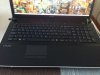
Many thanks for your kind advice -
Hi does it looks like new? brand new Vaio AW ?
Yeah I did same .. i purchased used but like new and even lid and my AW is like new ..
vkhann likes this. -
Hello ooh nice
can u please give us link for download and even that inf ?
thank you -
Hi
oviously u need to have sata connectors on both sides ,.. u have Z/B means u will have only two drives
cos u have only two sata connectors .. I have XU/Q model so I have two sata on right and one on the left
I suggest u to buy one samsung 1TB on the left and one decend SSD (depends on your budget u can have 512GB SSD bit costly but 256GB is OK) on the right and u will be set -
It is best reinstall whole windows ,, get WIndows 8.1 it works flawlessly on mine AW .. and get media center too new .. u will get even latest IE browser.. 11
-
Hey All
I Have Sony Vaio AW11Z And I Installed 2 Days Ago Windows 7 (Clean Install)
And Vaio Update Doesn't Find Any Updates What Can I Do?
This Is The Order I Installed Windows 7
1: Clean Installed Of Windows 7
2: Graphic Driver & Touch Pad Driver
3: All Windows Update (Successfully Installed)
4: All Software (Like Skype, Itunes )
5:Application Utility In This Order:
1: Sony Shared Library *
2: Setting Utiliy Series *
3: Vaio Event Service *
4: Vaio Control Center *
5: Vaio Battery Checker *
6: Vaio Control Color Setting *
7: Vaio Launcher *
8: Vaio Presentation Support *
9: Vaio Smart Network *
10: Vaio Update *
All Application Utility And Drivers Are From Sony Site ( Beside Vaio Launcher It Doesn't Appear There )
Sony : VGN-AW11Z/B updates | Download updates for VGN-AW11Z/B
The Only Utility That I Do Not Installed Is Vaio Power Management Because I Couldn't So I Skip It
What Can I Do With This Problem ?!?!
And If The Order Was Wrong Please Tell Me How To Install Windows 7 64 Bit
Because My Computer Is Working Good Now But I Cant Find Any Updates From Vaio Update
Vaio Update Version : 6.3.0.08010
Thanks All
P.S
What Can I Do With Very Low Internet Connection ? I Have Problem With 2 Cards (Marvell & Intel WiFi Link 5100) On The Computer And I Cant Find The Solution Like 2 Years \:
When I Connect Other Computer To Check The Internet Connection EveryThing Is Fine
Please Help Me This Time I Really Wants Everything Will Work Good Maybe The Windows 7 Is Not Good Maybe The Drivers I Install Doesn't Improve My Computer I Don't Know -
Hi
For your question I could give you quick answer ..
I suggest you to NOT install vaio software .. it is outdated and you do not need it any more ..
I suggest you to install Win 8.1 it will install everything .. some of then you will have to install manually ..
But dont instal Vaio software .. vaio update wont find any updates bcos sony not seeding this anymore on this model .. it will be always blank .. so I didnt bother .. I never used vaio soft much .. -
Hi folks,
I apparently have a not so popular model - VGN-AW420D. There are so many different model numbers that I have no idea if I can take the same info I read about other ones and apply them to mine. I'm looking to upgrade my machine but having a hard time finding anything on my specific model number.
More specifically, I'm looking to upgrade my model with at least one SSD. My model does not have an extra cable so from what I've read in this forum, I'll simply need to order a new cable. However, before I go off and do that, I was hoping to see if the info I've read is applicable to my model as well.
If nobody knows that detail, does anyone know if there's a more popular model that is equivalent to mine so that I can search that model number instead?
Thanks for any pointers. -
Hi everybody,
I didn't know there were so many of us..... The thread has Views: 911,132.... wow!!!
I have a VGN-AW41ZF for 5 years now, used mainly for graphics and DJ music. Runs smoothly, never let me down.
Now its time for upgrade to 8GB RAM and 2TB HD's(1tbx2)..... and maybe Windows8.1
Any suggestions welcomed
Glad to be here!!!. -
u can have 8gb on this machine and win 8.1 too .. runs perfecty
-
Finally got around to changing the thermal paste on the CPU/GPU. Wasn't too difficult, although there are a ton of screws to get through and keep sorted. My AW is quite as a mouse again. What a dream computer this thing is.
-
Heh and imagine designed in 2006/2007 and released in 2008 !!
I still comparing the screen and NO ONE device beats this screen !!!
BEST screen in the world ! -
Images of the AW RGB LED version are simply awesome, but video quality is not as great. Compared to my Macs, video appears much more grainy and less sharp. I've tried adjusting the video card settings, but I just can't seem to get great video quality. Very high resolution video looks good, but anything less, not so much. Perhaps the contrast ratio is very low on this display. I wonder what it is.
-
Which driver u using ?
Thing is this screen is designed for photos mostly and for bluray 1080p . If u try playing low quality videos of course it will be not nice
apple software will auto smooth video .. on AW it will stay original ..
Try do comparison please ; go here on both laptops play it simultaneously : Katy Perry - Roar (Official) - YouTube
make sure both are on 1080p -
Hello all!
I'm really sorry if I'mposting this in the wrong place, but I'm at my wit's end and am desperate for help.
I own a VGN-AW31M and need to replace the power jack. The problem I have is that after taking off the back of the laptop and removing the screw for the DC jack cover (the plastic cylinder), I still canot get this cover off to gain access to the DC jac which I need to remove.
The cap waggles when I try to move it, but I don't want to force it and break something. Is it attached anywhere else other than the single screw?
I've looked at the technical (service) manual for this model, but it tells me nothing about removing this cap and have spent the last two days searching for a solution on the internet.
Any help would be much appreciated - though feel free to remove this post if it'sin the wrong place!
If it helps, I haven't yet removed the heatsink or motherboard, do they need to come out for some reason?
Thank you all in advance. -
Hello!
Well after 5 years of faithfull service, today my loved AW290 turn its screen to green color only after several funky change of background colors... I mostly sure that the video card is fine since I am typing right now form an external monitor and everything colors seems fine, and the the dark green lsc omy my AW seems that is also recognized and barely could be used in the dark green screen, but in external monitor all fine.
I would like to ask for help with some questions about replacement (I had some electronic skills for replace lcds and other parts on other notebooks, including macbooks pro), but I have several doubts about the AW screen options so, I would be very gratefull for help, advice and tips...
1) My Aw290 came with the not really glossy (Matte?) Adobe Gamma type display, that I understand that is LED Backlight, Imlike it, but I main work on Ubuntu and the NVIDIA driver for Linux never goes to the level of the Windows Dirver, so the backlight control was never full supported with the screen backlight control (not even the keys work on lInux side), so, I mainly use windows to set parameters and in linux it dont change the backlight level, so was semi-usable up to date.
2) Right now the spare parts that seems that are available, the description talks about 1920x1080 with 2 CCFLs and 30pins, but sellers put a warning about backlight and resolution must match, I am pretty clear about resolution match but I am wonder about backlight of the adobe version is with white leds (as far I understand up to date, since the change of the backlight colours that appears when the lcd works fine, and setting diferent scenerios on VAIO control in windows driver...) or if the gamma lcd came with CCFLs... so I and not sure by now if the CCFL sparee really could be used in my AW290.
3) Even if the gamma lcd seem pretty nice when I bought my AW290 years ago, on my real work I became somewhat weird since the low support of linux NVIDIA driver and the issues of the extended gamma making weird colos if not use color profile, so, I wonder if may be a better option for me if may be posible to replace with the standard NO-adobe-gamma LCD version, and I wonder if may be posible that in such case the CCFL baclight could be properly manage by Linux NVIDIA driver.
4) If somebody may used an AW in UBUNTU or some other linux if may share the experience about if the backlight is recognized and working with the keyboard Backlight UP/DOWN keys ( Blue Fn+ F5,F6), and in such case wich linux, and wich AW model and screen resolution.
Thanks in advance for any help and best regards to all. -
Guys
I already decided ...
I am selling this laptop ..
I going to buy Acer Aspire V7
I realised that I need to move on
It was great experience with it.. -
Be sure to sell it or you'll just come running back to the AW.
-
Just ordered Intel X9100 to do a little upgrade on my AW21XY. Anyone out there can recommend the good bios version for unlocked?
-
Haha yeah .. But NO defo sold .. previoously I had 3 AWs tho .. repaired them and sold .. this was last .. which I kept . But now it is sold ..
-
You do not need to do it .. just replace CPU and you are setHDVader likes this.
-
Nvidia GeForce 9600M GT v.335.23 for Vaio VGN AW190J Windows 8.1 Pro x64
Tested and work properly for me with modified inf. -
hey
I just install windows 8.1 on my aw11z
what drivers I need to install after clean install? I only install touchpad driver (from sony site vista driver works fine)
can someone tell me how to install graphic driver and how to change inf
thanks
Official Sony VAIO AW Series 18.4" Owners thread
Discussion in 'VAIO / Sony Owners' Lounge Forum' started by Phil, Sep 9, 2008.


