Problems? See this thread at archive.org.
Are you saying that after the first clean boot in Windows, with the OS running in normal mode, you inserted discs #1 and you did not get the install Vaio_Care option?Was Autoplay enabled for your ODD? Are you sure you used discs #1 and not one of the others?
I plan on doing it again with a spare drive & create a system image on an external drive with Windows Backup after the OEM clean install first boot & try different ways of installing the necessary basic Vaio_software.
The point of the system image being to be able to easily go back to the OEM clean install state.
-
Revo is a fun program. I had enjoyed it quite a bit. But, when the time came for Google Chrome, I had already run my trial period to its end.
-
I know some people have been asking for Sony wallpapers. I stumbled upon this website:
Mr. B's Domain - VAIO Wallpapers -
Qu: could i have used the recovery discs instead of the recovery partition to do my clean install , still wanting to keep the recovery partition and the OEM HDD ?
It was not entirely clear to me from the guide , hence why i used the recovery partition as the guide explicitly states that it can be used:
"Note that if you are installing on the OEM drive and want to keep the OEM recovery partition, you can use that partition to do the clean install described here w/o using the recovery discs buy hitting F10 when booting or if the F is turned off: by simply hitting the ASSIST key.
If you want the following then you need the recovery discs:
1- Clean install w/ formatting the OEM drive to eliminate the recovery partition
2- Clean install w/ formatting a brand new drive w/ or w/o that recovery partition". -
You posted this:
![[IMG]](images/storyImages/54564d1282200675-official-sony-vaio-f-series-i5-i7-owners-thread-part-3-snip.png)
Wow, 88 processes & 48% memory usage @ idle is quite a lot. I'm not surprised that your fan is working hard. And that is not even knowing what these processes are actually doing in the background (drive scanning by anti virus or Windows indexing or Media software looking for content, etc, etc). Is that with all your programs closed, nothing showing in the task bar?
Download the free, small & standalone Autoruns and check under Logon tab to see all your added programs that are loading on startup. You can disable some there just by un-checking them & can easily re-enable them later if you wish.
"Sorry, I have no idea how to get the other info, the fan speed, temperature etc. Once i check all of the options you listed, then what do i do?" - OSD stands for On Screen Display.
Again: Download the free trial of Everest v5.50. Under File > Preferences > OSD > OSD Items, select CPU, HDD, Fan, etc like I did. Maybe I forgot to mention that you must select Show OSD Panel? This annotated screen capture may help (#4):
![[IMG]](images/storyImages/Everest_OSD_preferences.jpg)
-
That actually sounds normal when all of the bloatware is installed. Mine was idling at 46% in the beginning. Got it down to 35% after doing a ton of uninstalling and disabling PMB/Metadata. When I did my clean install, I got it don to 22%. Am at 30% as I write this, which is 20% lower than it would have been with bloatware running.
There isn't an option for Fan Speed. It's actually called CPU, and is one of the last option listed. I think you changed its title on yours when you renamed a bunch of other item. -
I didn't quite do it that way, which may explain the difference. The first thing I tried after rebooting was downloading and installing the required Sony software from eSupport, but I kept getting "This program may not have installed correctly" dialogs and the software didn't show up in my installed programs list in Control Panel. Then I popped in the recovery DVD, launched autorun when prompted, and got a dialog asking me if I want to install programs (or cancel & reboot to restore complete system). After hitting OK, I got nothing. So I went back to eSupport, got the VAIO Care update and patch, and was able to launch VAIO Care from the programs menu and install the rest from the recovery partition.
I suppose the first set of failed installs may have confused whatever process auto-runs from the recovery DVD. If I do another install, I'll try your suggestion of letting VAIO Care install itself from the recovery discs immediately after the reboot.
I did notice that the set of programs available on eSupport for my model is different than the set of programs on my recovery discs, and in some cases there are different versions. So my preference is to install from the recovery media first and then let VAIO Update pull any required updates. -
It says CPU ------ Cooling Fan in the OSD Items & yes I edited the label as mentioned in the previous post so my screen captures would be more informative.
I just noticed that memory size was 4 GB hence the 48% maybe? I would spend $100-130 & get a 4 GB stick & ebay one of the 2 GB sticks to recoup some costs. 6 GB is awesome when running a ton of stuff. -
Nice article from Digital Trends and their favorite computer speakers.
Best Computer Speakers -
"I kept getting "This program may not have installed correctly"" - Win 7 often gives me that even if the program perfectly installed but in your case maybe because of the specific order, some library or required programs were not installed first.
"Then I popped in the recovery DVD, launched autorun when prompted, and got a dialog asking me if I want to install programs (or cancel & reboot to restore complete system)" - Yes, this is what I now get as Vaio_Care is installed but not the first time I used the disc just after the clean install & first boot. Maybe from your downloads, you installed Vaio_Care hence the disc not offering the option.
Look top left of this screen capture, notice the Vaio_Care?
"I'll try your suggestion of letting VAIO Care install itself from the recovery discs immediately after the reboot." - No, don't install it first. As noted in the guide, install the other stuff first hence the suggestion to download the stuff from Sony_support & last, install Vaio_Care from support download or recovery disc #1. -
Yes as I did exactly that as written in the guide. New blank HDD or OEM HDD, it's the same if choosing Full Restore & recovery discs.
"...It was not entirely clear to me from the guide" - It will never be otherwise where is the fun? But thanks for the quote, I made it clearer by editing
buy to
by.
But thanks for the quote, I made it clearer by editing
buy to
by.
***** -
Definitely something to consider. Since my clean install, I'm hard pressed to go over 50%. Even my games don't take me much over that. Well, my new game demands a paging file, and that kind of pisses me off a bit, cuz I've got the RAM for it.
-
Yeah, the initial failed attempts to install stuff from eSupport could have left a semi-working or even fully working version of VAIO Care that just didn't show up in my programs list.
FWIW, I tried to install stuff from eSupport in the same order you specified and not only was I getting the errors but nothing was showing up in my programs list. I thought maybe something was wrong with your order, so I tried following the order Sony suggested in their generic clean install guide (starting with the Shared Library) and got the same result. However, when I later installed from the recovery disks, I followed your order and everything worked. So in my case, I think the key to success was in using the software shipped with my computer instead of the stuff from eSupport (and yes, I did make sure I had the correct model - F115FM). -
Amazing ! Thanks for this !
-
Many of you are obviously posting alot about clean installs. I have only a passing interest since I went with a fresh install which worked well for me. However, I found this: DevCon a Microsoft tool. The DevCon utility is a command-line utility that acts as an alternative to Device Manager. Using DevCon, you can enable, disable, restart, update, remove, and query individual devices or groups of devices. DevCon also provides information that is relevant to the driver developer and is not available in Device Manager.
The DevCon command-line utility functions as an alternative to Device Manager
DevCon allows someone to write scripts to backup drivers without having to search all INF files "manually"
Using DEVCON to manage devices and drivers
Another great feature is DEVCON's built-in Reboot command.
Might this help some of you? -
Joe when you did your clean install I thought you said it was to a new HDD not the OEM one ... Or is it the same either way ?
Sorry disregard, I can see you already said it's the same, above. -
![[IMG]](images/storyImages/4908237330_d6149a0856_z.jpg)
Pretty cool. -
yes indeed, I already bookmarked the page.Thanks! How do the 16:10 (1920x1200)
wallpapers look on the vaio's 16:9 screen, has anyone tried out? -
if you have the rescue partition still on the oem drive you can reinstall the
system from there then. If not than both type of drives behave exactly the
same way.
Anyway you have an option from vaio rescue to (re-)make a rescue partition on both types from the dvds. -
So I have an issue making recovery discs... When I go to Assist-restore- create recovery media, it says no optical media is found, and won't let me proceed. What's going on with this thing?
I have a DVD in the drive, should I try to reinstall VAIO care?
EDIT: I fixed it! Daemon tools had to be uninstalled -
Yippee ! My ASSIST key is now working.
I uninstalled Vaio Care. Rebooted. Installed VaioCare6.1. Rebooted. Voila
Anseio I bottled out of v5 as I got cold feet over the warning that it was intended for the Americas. But all is well now. Now to carry on where I left off...
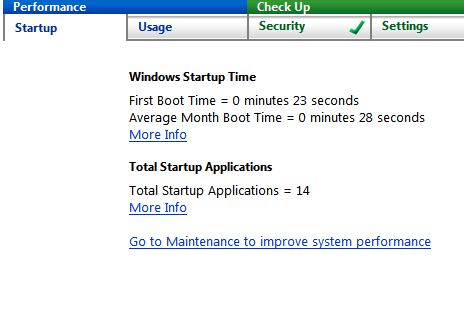
BTW , in One click report it says 1st boot up time 1 min 8 sec (previously 43 sec). Average month boot time 1 min 0sec (same).
8 start up applications. -
Hi people, just to let you know District 9 works fine on Total Media Theatre 3!
I'd never heard of that software before, but lo and behold it plays the movie.. There are still some shenanigans - expected I suppose - when I switched to CUDA support out of curiosity mid play (lose the picture), but otherwise everything is behaving as I'd expect it to! -
What does Explorer or a DVD burner software say about the DVD? Did you try w/ an other one? What if you insert a DVD with content, can the ODD play it? Check your Sony_Support page to see if there is an update to your Vaio_Care.
*****
Congrats!
"One click report it says 1st boot up time 1 min 8 sec (previously 43 sec)" - Well your new Vaio_Care can't know what happened before it was there, can it?
"1 min 8 sec" because you started installing some cr@p.
-
Joe When I plug it in now nothing at all happens. I found the driver on Startech.com/support .
I am still kind of curious about doing another clean install this time with the recovery discs. I think I will backup first though.
I might be able to get my startup time down by changing automatic calling home vaio update .
Which of the following is the cr@pware then ?
Bluetooth Driver broadcom
chipset driver intel
colour setting file
devices and printers Ricoh registry patchy
ethernet driver marvel
evernote
flash player
google toolbar
graphics driver NVIDIA
IPS driver
memory card reader x3 installs
pointing device ALPS
SATA driver Intel non-RAID
Sony FW extension parser
Vaio BD movie data
Vaio Control colour setting
vaio data restore tool
vaio power management
vaio screensaver
Vaio smart network (same as smartWi I think)
Vaio userguide
Vaio wallpaper contents
WinDVD
Wireless LAN driver Atheros
Wireless LAN driver Intel
Its a serious question, I honestly want you to tell me in your opinion. -
Sony FW extension parser. That's another name for the Sony Notebook Control device. Together with the Programmable I/O device, they add proper ACPI support to control the various features like Fn functionality, button assignment, brightness control and power management settings on the notebook.
Sony Notebook Control ACPI support
Bogart posted this before. Also, you can probably take the Google Toolbar off the list.
-
That's fine except for Google bar which some like & find useful, no crapware there.
If everything works fine, install only your most important software, clean & defrag disc & create a system image with Windows Backup on an external drive so you can go back easily to your customized clean install state if your HDD dies of an heart attack or something worst.
Unless you want to do it again as it's educational.
Just kidding.
Do what Startech.com/support says: sometimes it's insert card then run driver (like my other brand card) or it's driver first then insert card or insert card & reboot, etc, etc. You could also try: connect drive via eSATA or POeSATA to card > insert card > and it may install the driver or ask for it. If it does not, leave everything connected & reboot. My POeSATA Expresscard/34 was finiky to install.
Edit: Just noticed this, do you have a special F w/ 2 WiFi cards? "Wireless LAN driver Atheros and Wireless LAN driver Intel"
-
Joe, Ansiou,
What are your current average month boot up times ?
I just backed up. I still need to install other programs like Norton 2010, handbrake, imgburn, sony vegas movie studio. Then I will clean, defrag and backup again. When I use the same ext HDD , will it automatically write over the previous backup so I don't have to manually delete it ?
BTW, before I did not need to go to Startech for the Driver, Windows found a driver and installed it automatically. Also I really like my backlit keyboard and that startup video with black background and rotating colours making the Win7 logo is back so thats good. Now I also have to find the original wallpaper.
Before my clean install , I had downloaded a new BIOS for my F11. Will I need to reinstall that or will it have been kept ? R0280Y6 is my current bios.
Also on the NVIDIA website, it says 258.96 version driver is for Windows XP operating system 32 bit. Is there another one for the f11's specs ?
EDIT- the Startech PoEsata expresscard adapter is working now ! I simply needed to enable Windows to automatically search for drivers. It did that and now the HDD is recognised . -
Look back a page and the dude with the dpc latency checker has no latency.mine does running stock! Also after dropping 2g on a vaio I will waste all sonys time. I dont care what parts they used if this laptop does not work for the reason I bought it sony will get an earful. Ill the sell the pos and get 1 that does the job this one should. btw I dont use legacy drivers and my dell 1720 has the richoh chipset that works pls dont try to school me. Im only asking for help
-
A few pages back I posted a link to a reg hack, to eliminate googleupdate.exe. But instead I went to task manager and just disabled there. This would be my recommendation.
-
Don't waste your time with Norton. It's a resource hog. I'm perfectly fine using Avast.
If you click on the driver version by NVIDIA in my sig, it will take you to the correct driver.
Congrats on getting things up and running. -
Thanks bro looks you dont have my issue/ Also thanks for your time.
-
I agree. don't use Norton. I use Microsoft Security Essentials and have had no problems and it's free. It has gotten some decent reviews also. Here's my startup time (SSD Intel X25 G2 160):
Attached Files:
-
-
I think Norton uses far fewer resources than before. However I use Avast Pro, Malwarebyte (paid version), and use only the Windows firewall.
-
Joe I understand your point but heres the deal. my vaio is fully formatted to factory. no additional software except this latncy checker. When i kill the atheros 827 wlan card it will give me about 4-to 6 hours of no latency. Teir 2 sony tech is sending it to there research team to see what is going on with my unit. there supervisor wanted to personally look @ it. One teir 2 tech agent duplicated the same problem on a z model with the atheros card same as mine.
I was curious to see if any other f owners had the same problem. Melody master is more than likely correct about the i-link richoh card. Ill report back if and when sony is done.
The thing that makes ponder is when the wifi is off it helps kill the latency.
could be a combination of the 2 components.
Thanks to all who responded and tried to help much respect. -
Wow ok good info. I bought the vaio because it is a beast with my daw. I just cant use my studio monitors like before and its really annoying. I might have to do just as you suggested. My dells worked flawlessly with it like you mentioned.
-
Then what is the big story if you found the source of your problem? I was not using wifi when I ran your DPC Latency Checker, maybe that's why my graph was perfect. From what I've read so far, people with DAW use it all the time to spot & fix latency problems, they don't sue of bash the laptop maker everytime they find a conflict or glitch.
Just turn off the front switch to disable the wifi or use SmatWi when you are working with streaming audio or video & connect with a wire to the web which I do because it's more effecient anyway.
I disable & enable stuff all the time depending on task @ hand. For example, on battery I disable the HDD in my ODD bay & do not use my Bluetooth mouse to extend battery life. If I'm offline, I often disable or put in slilent mode my Norton anti virus if I'm processing a huge batch of photos, etc. -
Oh yeah, forgot to mention my startup time. I don't use VAIO Care to judge my start up time. I was using WinBootInfo, then found a free program somewhere else. After clean install, I was about 45 seconds.
-
Can anyone here make some recommendations on portable speakers to use with the F? Maybe something that packs a bit of bass without being too bulky? I plan on wearing headphones for gaming, but I wouldn't really plan on having them on for every bit of audio that comes out.
-
Ooh, look what I just stumbled upon!
NotePal U3 - Cooler Master -
Not anymore IMO. Symantec is well aware of their earned bad resources hog image & that's why Norton 2010 includes a resources usage panel.
Do you know about AV-Comparatives.org (an independent non-profit Austrian comparatives of antivirus software for Windows)? Check their Summary Reports where they gave their 2009 Product of the Year Award to Symantec/Norton. In the previous years, they awarded AVIRA, ESET NOD32, Kaspersky, etc.
PassMark, the well known benchmark utilities maker executed a ton of performance benchmark testing on a bunch of security software, check their full report here (pdf).
Next was the question of Norton's price. I searched ebay as I knew some re-sellers were selling cheap product keys from Symantec-India (I think) and found one for $14 (2 years for 3 PC): Norton 2010. My security check before buying was: check the seller's reputation (100%) & it must have at least 100 feedback's. Then check who gave the feedback about the Norton keys & many buyers had 100+ feedback's, all 100%.
So I bought the key which I received via email an hour later, had to download a non-US trial (as Symantec US requires a credit card for the trial) as I removed it from my F, used the key, checked with Symantec by activating it & updated it: all OK & legit! It's been running fine since 2 months on my 2 computers.
This said, several F users like jjthenovice above, Willscary, etc reported here that they like their free Microsoft Security Essentials.
*****
"Oh yeah, forgot to mention my startup time. I don't use VAIO Care to judge my start up time. I was using WinBootInfo, then found a free program somewhere else. After clean install, I was about 45 seconds." - That's great but since most of us already have Vaio_Care, it makes it easy to compare apples to apples by using the same measuring stick. -
I cant do that while I collab and I never had a laptop give this trouble. There should be no work around it show work as advertised. Anyways I just talked to Sony and they are sending me a box so I can send my audio card to them so they can test the whole rig. Sony also know about the atheros card problem with certain f models causing latency and perhaps the 2 devices together cause more of an underlying problem.
I don't accept dysfunctional products period. If certain people are happy with going out of their way to make things work for them that is fine but it is not how I work. Either this laptop will work for me which a computer of this caliber should or its a complete wast of my purchase.
Its a shame because the laptop really excels in almost every area. after i get the end result from sony I will update with my info.
Btw has anyone tried any audio/video streaming threw the firewire port. Im curious if anyone does any video editing with this model and if they have had any issues similar too mine.
Thanks joe for your help and I totally understand your points
-
I like Norton. I used Norton for about a decade. 2008 was not a good program, but 2010 is outstanding. Very good on resource usage.
That being said, I have switched all machines that I manage to Microsoft Security Essentials. Free, fast and very lite, I have had NO problems in 6 months, while watching others get several infections during that time. -
That one looks quite well-made, well-spec'ed - but really seems to be desinged for desktop use, and not as a "pillow" between lap & laptop...
I've ordered one that looks like one of these, which appears to be quite similar to the one I had and used successfully with my 17" HP a number of years ago, back when I had a 17" HP... Less heavy duty and less adjustable than the Cool Master (and not optimized for a 16"-17" size), but better designed for on-lap use... (These are pretty ubiquitous on eBay... can't say much more about it at this time, though, because both it and my F12 are still in shipping...)
![[IMG]](images/storyImages/USB-2-0-HUB-4-Port-Notebook-Cooling-Pad-14163033885.jpg)
-
400 pages, I suspect this thread is about to be closed.
-
Incompatability is not "dysfunctionality." No computer does everything as it should. I remember all too well a wonderful system our company put together in the mid-1990s as a sound editor, best of everything, yet we never, ever could get it to work properly with CD writing, a new technology at the time. We replaced everything one at a time, with variants if possible, yet, nada, the buffer kept emptying. Just for curiosity we threw together a cheapy, with no-name motherboard etc. - It worked perfectly for CD writing. Through the years I've often encountered a system that just would not do something or another.
The F-series is a BUDGET line! How often does that have to be stated!? Every possible hardware compromise has been made to keep production costs down while maintaining good performance. And Sony suceeded, not only is this a lower-price unit han any with similar listed specs, but it is the FASTEST of ALL i7 laptops!. Frankly I have no sympathy for a fellow who gets more than average for his money, then complains because it won't do one particular thing. NO laptop that doesn't use the TI, and that is MOST on the market now, avoids streaming dropouts and timing errors through 1394.
If you want a system for audio, then BUY a system for audio, a Dell or Mac, check what has TI 1394, and maybe optical in and out. Look before you leap, the F won't do firewire audio, that's your problem, not Sony's, they've met their production target, you just don't happen to agree with it. -
Well before it closes out, I got my F12 yesterday and I just completed all of the software updates and backups. I still need to make a set of start up disks but it's late so I'll do it tomorrow.
And my first impression of the F12 is that it's outstanding. I seriously doubt that there's a better laptop on the market right now that can touch the features, performance and software for this price. -
Have you not been following this thread for very long? I meant my post to be towards those who discussed the NotePal U2 since everyone seemed unaware that there is now a new model that would seem to better fit the F. You say it's not "pillow" enough, but I'd rather have this new model rather than have the sides of the laptop sticking out...
-
I LOVE my Notepal U2.
-
No, I've only been following this thread for about the past 2 weeks or so (starting when my prior laptop gave out & I began looking at the F12 as its replacement). Since then, I did randomly scroll through some of what came before, but there's far, far too much to read everything - guess I don't recall encountering an ongoing discussion of a NotePal U2 - sorry if I inadvertently butted into a resumption of an old discussion in which a newcomer's post is not welcome - that was not clear from your post to which I responded...
All that not withstanding, it does seem that for those of us who use our laptops on our lap and are looking for a fan assembly for such use, the NotePal's general design is ill-suited to such a use, regardless of its width - though I certainly could be wrong. Do you or anyone else here have any experience using it on one's lap? Is it better suited to such a use than it appears to be? -
Sitting with mine on my lap as I write this, just to see what it's like. Since it doesn't have a filled in base, I'm limited to the rear portion of the cooler setting on my knees, but no further back. I'm ok with that, as it's near ideal typing position.
Regarding the size of the Notepal U2. My VAIO F has exactly .75" overhang on either side. I much prefer laptop overhang to having a stand that is wider than the laptop. To each of us our own.
Official Sony VAIO F Series i5/i7 owners thread *Part 3*
Discussion in 'VAIO / Sony Owners' Lounge Forum' started by eagle17, Jan 7, 2010.