Problems? See this thread at archive.org.
Is this the 11.5b hotfix?
Do I need to do anything special prior to installation, like remove existing drivers or doing other driver updates first?
I don't really know much about drivers and such so I'm a bit wary...
-
There is a package for DirectX.Likewise,is there an package for openGL?
Can u provide a link?
List of OpenGL programs - Wikipedia, the free encyclopedia
This link shows a list of games and softwares that uses openGL..
It says all call of duty games uses openGL.But i have played call of duty 2,modern warfare.just installed black ops..plays just fine...
Im Still downloading Brink..take ten more hours...
There are updates available for brink.will that help TT193's problem.?i guess not.
thanks
bipin -
That's the speed the drive has. You'd need to have a Raid or a revodrive to go to the 600 MB/s.
Check the review of the drive, it has very similar speeds in a desktop PC:
Crucial M4 128GB SATA3 SSD Review - Initial Tests - The SSD Review
Now, find me a SATA II drive that can do 384 MB/s
You can't, because SATA II top speed is below the 300 MB/s mark:
Serial ATA - Wikipedia, the free encyclopedia
Next time, check your sources before making wrong statements. -
I'm from the UK, using PS CS4 and PS is recognising the graphic card.
I don't understand why there's so much variation in people's laptops.
-
Yes completely erase the old drivers and install this one. This is the latest catalyst + Open GL drivers.
-
Yes the link I posted above in this page include both catalyst + OpenGL drivers. And I don't think any updates will help if the card is not recognized.
-
Bios version: R0240V2
Driver Version: 8.850.6.0
Imported in: June 2011 from China
No mfg date on package. -
To help you all, you can see some configs of mine vpccb17fx (from 2011-03)
switchable_gpuz_capture.avi‏ - YouTube
Thats for SneezyLarry...
Virtua Tennis 4 on Sony Vaio vpccb 17fx Switchable‏ - YouTube
I have the dynamic CCC switchable (pop-ups, choosing High or Save)...
-
What's the best way to completely erase the old drivers? Is there a step-by-step guide anywhere?
I'm still learning all this stuff. Thanks. -
Thanks for your feedback Electrobix, it's much appreciated. So have you tried taxing the AMD gpu under Photoshop using complex 3d models. Maybe test it out with Google Sketchup, download a really complex model of a building or something and play about with that to see if their is any real noticable lag.
-
@blazedout
Elektrobix has somekind of wierdness, he don't have the intel HD recognized on his machine. It only use the amd -
@ paul
It seems like the bios 240v2 is really can recognise the openGL..
Maybe it's brink that have problem with the muxless card configuration... As the intel always on, and amd card must transfer to intel before the monitor -
I downloaded Brink from steam (free to play this weekend) and it's playing fine - well the game is but damn it's a learning curve figuring out how to control him!?
-
Out of curiosity i downloaded the AMD hotfix and it changed my driver name but that's it. Still no intel HD3000 showing up.
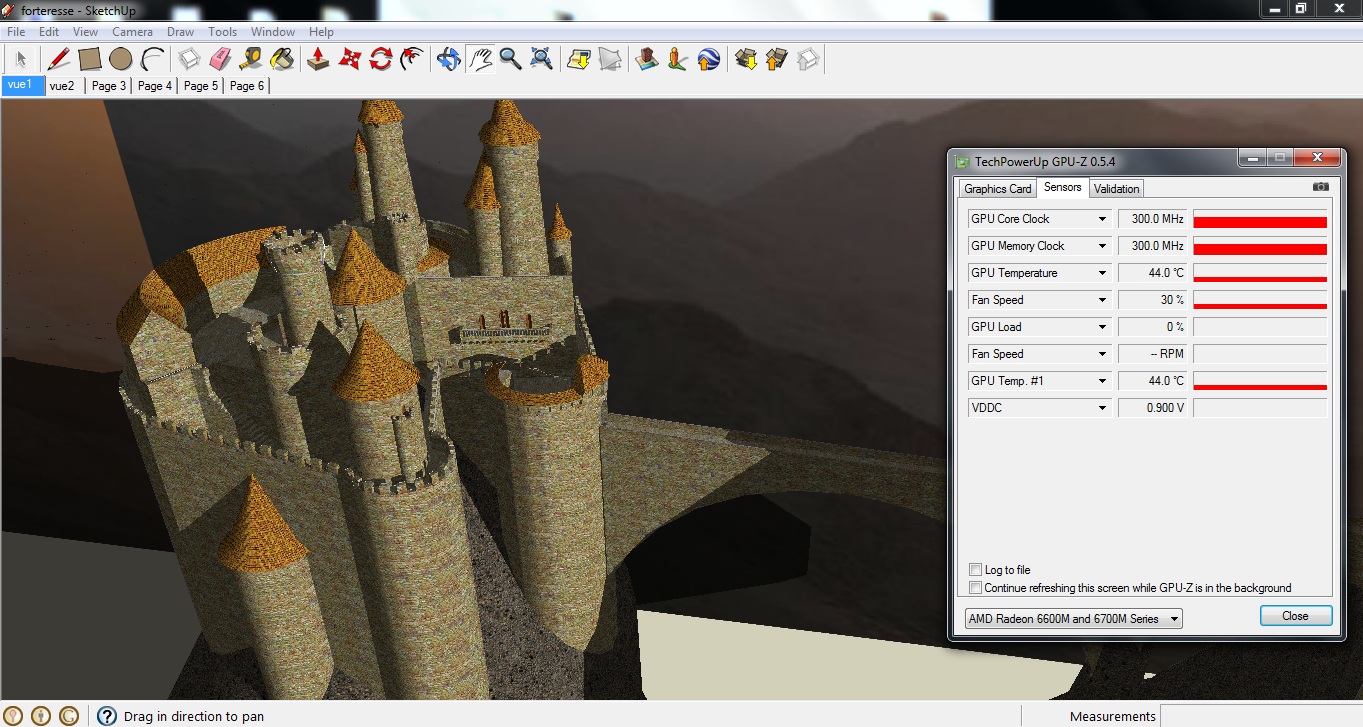
I don't know how to use 3D models but i tried a sample model in PS and it was fine. I've just downloaded a model of a chateau in google sketchup and CPUz shows that it's using the graphic card.Attached Files:
-
-
Would someone please help me with this? I'd like to try this while Brink is still free. -
use add and remove program and clean it with device cleaner twice... that would do it
-
@accel, thanks
Thanks Elektrobix, that seems promising but shame about the intel HD3000 not showing up. What is your model number and have you installed the latest drivers from the vaio support site? -
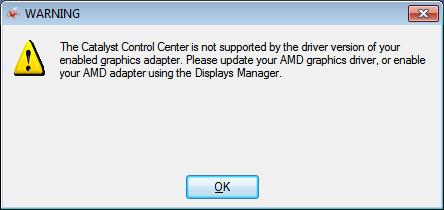
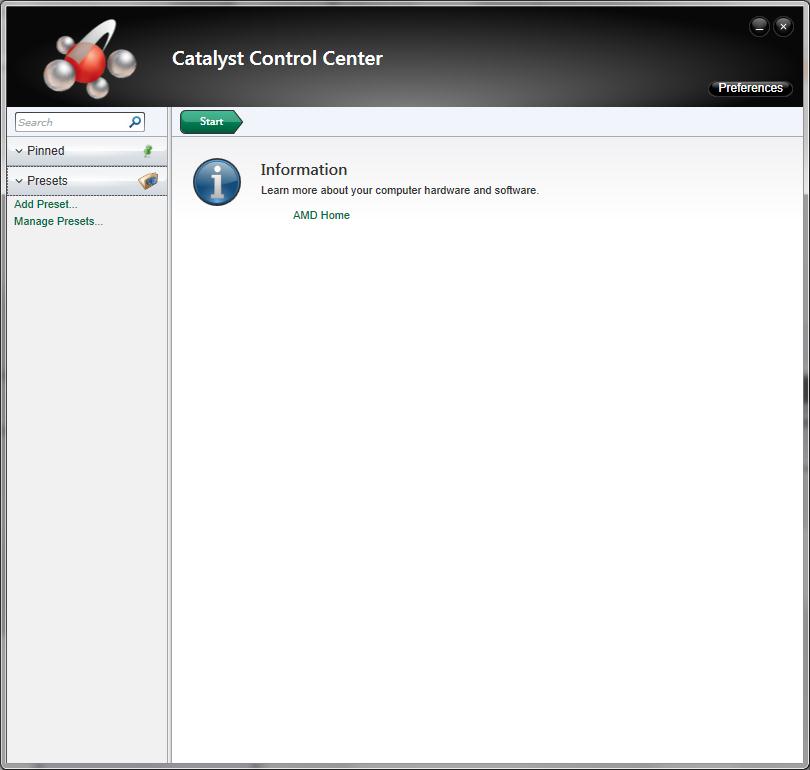
I gave it a try... didn't work out too well. On startup, I get the attached error message. I wasn't able to open CCC at first, until installing some Intel driver from Windows Update. Now I can open it, but it doesn't have any options (see second pic).
Given the error message, I went into Device Manager and first disabled, and then enabled the 6630. Device Manager says it's working properly, but obviously, something isn't right...
My driver version now reads as 8.850.0.0. CCC is 2011.0106.1235.22490
Any ideas?Attached Files:
-
-
you messed up the mux driver... reinstall the one come with your laptop
could you tried using openGL program first? see if amd is working ? -
How did the mux driver get messed up?
Brink doesn't work with my settings right now.
How do I reinstall the mux driver that came with my laptop? I have the system recovery discs I created, but I don't know how to use them for only the mux driver. -
you could used vaio care to reinstall your driver if you still used the drive came with the laptop... it has recovery partition, and vaiocare will recognise the driver... just go to vaiocare > restore > reinstall driver and application > graphic drivers and switchable driver
-
It's the same that is posted on VAIO Europe, R1101v2
-
a different bios....can u try angry birds rio...
-
yeah, i try in R0230v2 opengl applications - they works with amd. Wow perfect in fullHD resolution, PS CS4 and Blender works fine. My porblem is DX applications - they work only with Intel GMA.
-
really? mine is reverse... DX application works like charm, the OpenGL looks like crap... tested with WoW with DX and OpenGL approach
-
But Angry birds i can't run cause writes that opengl renderer not supported. How to test wow with DX?
-
installed Brink....Wont work...
@accel which WoW.i am not a fan of it..i played one long before..
I Would like to try it...
thanks
bipin -
do you use another driver other than sony provided? might be the case that larry encountered last time...
WoW with DX is run by default...
WoW in OpenGL mode :
make a shortcut, in that shortcut properties, at target,
add (sp)-opengl
sp = space
so if your target is "C://Program Files/ Blizzard Entertainment/Wow.exe"
make it like this "C://Program Files/ Blizzard Entertainment/Wow.exe" -opengl -
Sony scoff at us, i'm shure)
when i run wow amd card raise temporarily, then off again) driver not original, its amd catalyst fix, 8.850.6.0 -
could you try with the original drivers? it should make us to pinpoint problem easier
-
ok i'll try it later and post.
-
Brink didn't work when i first installed it, but after closing down Steam and re-opening it, it downloaded an update for Brink and it worked fine after that. It wouldn't start at all originally.
I've installed Drivers through Vaio update, and then by going to the sony site and downloading the latest ones myself and the AMD hotfix - all of which have worked (apart from me not seeing the Intel card).
Do different countries get slightly different drivers or something? -
i wouldn't say countries, more like regions.. asian, US and Canada, European, Australia
wierd actually... every regions has different Options of laptops and drivers, even if the hardware is the same... well, don't know about the Motherboard, but, they should have make it more easier to us...
in Asian there are only 5 Option of new C series, VPCCA15FG , VPCCA16FG, VPCCB15FG, VPCCB16FG, and VPCCB17FG
all the driver is the same... that's why i'm sure the difference of CCC lays on the bios.. after all only by Bios Changes you can bring out the fixed option. -
I have the same error when i start Brink...i updated it with Brink.Update.9-SKIDROW,,still no good....anyone got it working?
-
it seems like brink is using the intel name... that's why brink didn't work...
could anyone try angry bird without using any hotfix / driver? it seems like hotfix messed up with AMD, causing AMD works all the time, but in very small clock..
when i use the 11.5b hotfix, my AMD works with 100 core clock and 150 memory clock all the time and OpenGL in WoW still using intel, when i back with the original driver, the amd didn't work all the time and it's back to normal -
I used Trixx today.i tried to change the settings,but i didnt save it cause i had no idea what i was doing..after accel post i looked at my card and some things are disabled.....i am putting my old photo along with this ...what happened?what to do?...
edit: it happens when gpu is not used..i guess thats normal...Attached Files:
-
-
I used Vaio Care's recovery partition to restore the AMD driver, and some AMD driver registry entry or something. I still get the same error on startup, and Brink also does not work.
Can I use a windows restore point to return everything to how it was? -
well i install original driver. So, my DX applications works with amd, but it's not writed in CCC, and i don't understand it first time. trouble is a like @accel, opegl not working well. Angry birds not work, run with error. i don't understand anything( how working this swithch, driver, vaio(((
-
Angry birds run perfect. Attached is my GPU-Z reading. BIOS R0230V2, 2/17/2011, using AMD catalyst 11.7. driver 8.871.0.0. Does that mean Open GL is working for me?
Attached Files:
-
-
Black Ops
lags on my CA. Has anyone else played it .. and on what settings. GPU Core and memory clock jump to 300MHz while playing as per GPU-Z. Any suggestions? -
at the old gpu-z shot it's not normal... the new is normal...
it's cos the AMD is not working at all when it is not using on programs.
the old one, you used the hotfix or driver from AMD or whatever it is you use... it makes your AMD card working all the time, even when you're only using it with word / excel. you can check it yourself...
it's just how the switchable works... you switched the graphic card and AMD works. when you're using power saving, the amd go into power saving mode, that's why GPU Z didn't recognise the core clock and memory clock -
what kind of error? could you make screen shot?
@ dendy
could you also make a screenshot when you're having an error?
@ibee review
you use the other driver than the one came with the laptops right? it messed your card making it on all the time... i've just realised it, it makes your card like the desktop one, when idle it used the minimal clock, but OpenGL still won't work.
about Black Ops, use High performance power option to play... it's DX application, 6630M should be able to play it -
I played Black Ops on High with no AA It runs very smoothly with pretty good graphics quality, resolution 1360 × 768, 25-35 to 45 FPS
-
I tried it a few days ago and it worked. I DO select the GPU manually.
-
It's just the same error/screenshot from post #1118.
Would Windows Restore Point get my computer exactly the way back to how it was before? -
Could you go into the System Information program included with Windows and let us know what date it says next to your BIOS version? It will be on the first screen that comes up, System Summary.
-
hmm, have you try uninstalling all AMD feature in add and remove programs? and also use the driver sweeper and ccleaner to make sure it is clean?
i dont have problem when i restoring AMD card driver from vaio care after i did that -
Why? Opengl 2.0 not supported. That's it
-
do you have any hotfix installed?
intel should be able to run it, except your driver is messed up... try the uninstalling all the driver and everything related to AMD and installing it back with the vaio care restore -
I install oroginal driver on video, fully. I can do it normally, I'll try to install fix which installed earlier, and post results.
Sony Vaio CB Official Owners' Thread
Discussion in 'VAIO / Sony Owners' Lounge Forum' started by thegreatlarrybird33, Mar 22, 2011.