Problems? See this thread at archive.org.
1. yes, minecraft use some opengl that intel doesn't support
2. it should be powerful enough, makesure your power option to be high performance when you play
3. i don't really know about this camera thing
4. only 3-4 laptops configured with 3D
yes, confirmed. same with mine...
-
Someone try the BIOS update already
@tat10
What do you mean your Intel desktop IGP came with 3D ? AFAIK Intel IGP does not support stereoscopic 3D. What 3D are you referring to? -
thank you again accel.
-
i am not expert in the computers.
i just found that my deskptop at work, when i click on graphics, the intel appears and there appears a section for 3D to optimisze. I played minecraft perfectly without lagging +without switching!
i wondered why laptops could not have just one intel card with 3D instead of two. -
power option? you should find it in control panel. power option... set it to high performance, so the processor is not clock down...
-
Hmm. I really don't understand what you mean by 3D there

Anyways the reason why the CB and other new laptops this year come with hybrid graphics is to have high performance GPU for gaming and other tasks and for the rest of the time use Intel for better battery life.
@accel
Try the BIOS update. Somebody needs to do it
-
thank you very much accel. I will try this very soon. -
i do not know if there are many types of 3d. It just mention 3D! i only know 3-dimentioanl graphics! sorry
ok.. now i see the point of having hybrid graphics. But previously I assume laptops were using one card only? was 3D option included in this card in most laptops? or special ones?
i could check my bios version as my vaio cb is only one week old, and see if it similar to any versions mentioned so far.
thank you. -
Well if you are talking about 3D graphics then all laptop GPUs support 3D graphics. Transition from 2D to 3D graphics was made years back.
-
it would be appreciated
-
ok guys, I contacted sony support regarding the poor images (granulated images) from the webcam. they sugggested to reinstall the camera controller? any idea how to do this? do you think this will solve the problem?
They say if this failed to solve the problem, i can submit a request for hardware repair issue. But i feel this is the max. that this camera can do!!
can you guys check the webcam on your cb and share your thoughts please.
many thanks. -
no it wouldn't solve the problem... someone from CA thread did that
-
so, is this camera poor images common? did anyone manage to get clear high quality images by the webcam?
thanks. -
Well yeah the webcam isn't that great but you can improve it significantly if you tweak the settings.
-
thanks for your reply.
I tried to play with the advanced setting, the image improved a little bit.
but i thought this is a HD webcam and should give good images. my old vaio give better images than this.
can anyone share their advanced settings for the webcam please? or attach an image that you think should be the standard?
thanks. -
My experience with this webcam is that its pretty crappy especially under low light. The image has terrible color and always seems dark.
Can someone please try the bios update already?? -
Did you try it yet?? -
ok... guys i called sony about the poor camera and after some trouble shooting, it did not work. so they offer either a repair cause it is a hardware issue. they also offered a refund cause i only have this laptop for 7 day only.
i am really thinking of having a refund! what do you think? it is a cutom made vaio.
i wonder why not alot of people complained about webcam it is bad. it is supoosed to be HD right? the image quality not HD so there is something fault, right?
by the way, (before i return the laptop) my bios: R1100V2 ---
thanks. -
Everybody is returning their laptops...I think we cant do that in India...I wont be returning it...
BTW i installed witcher2 game..plays fine... -
Can somebody help me on my webcam ?
The picture displayed/transmitted is Black & white . When i go to the webcam settings, there is a box of "color enable", but i cannot check it ?
Please help . -
@tat10
Can you check in catalyst control center if you have the manual switching option? If so, it should appear just under the powerplay option, and look like this:
-
yes, i have this option. i can switch manually to high performance GPU or power saving.
also, i realized that the machine will not automaitcally switch cards even if you specify this in the application. -
Everyone with the 6630m has the option for setting to low/high performance.
Hes asking if you have an option for a fixed mode which allows for only running the intel or radeon card. -
yes, i have the option to choos high performance GPU radeon card or power saving intel. in fact, i switched to high performance GPU to play minecraft online. while the deafult power saving card did not open the game.
-
Thank you very much! It DOES work, people! I've just tried it on my CB190X - and it worked! Even no need to reinstall any drivers - the Switching Graphics Method entry appears straight in. All is the same as in the CB2xx series I recently played around in a local store.
I was a bit afraid because it is the machine I go to work with, and I live in Russia, although I have ordered the laptop from the US in early June, so there's hardly a way to fix it if it went wrong, but I took a risk. Voila - everything does work, and DXVA in MPC-HC works, too (the decoding filter now recognizes the Radeon card) - this is the main reason I was pissed off by the issue.
DXdiag now says the GPU is "AMD Radeon 6600M and 6700M Series" Manufactured by "ATI Technologies Inc." instead of "Intel HD Graphics" (or whatever it was, can't recall it exactly) manufactured by "ATI Technologies Inc."
So guys, go on and update it. It does boot after that and it works like a charm, so I can't see any reason not to update.
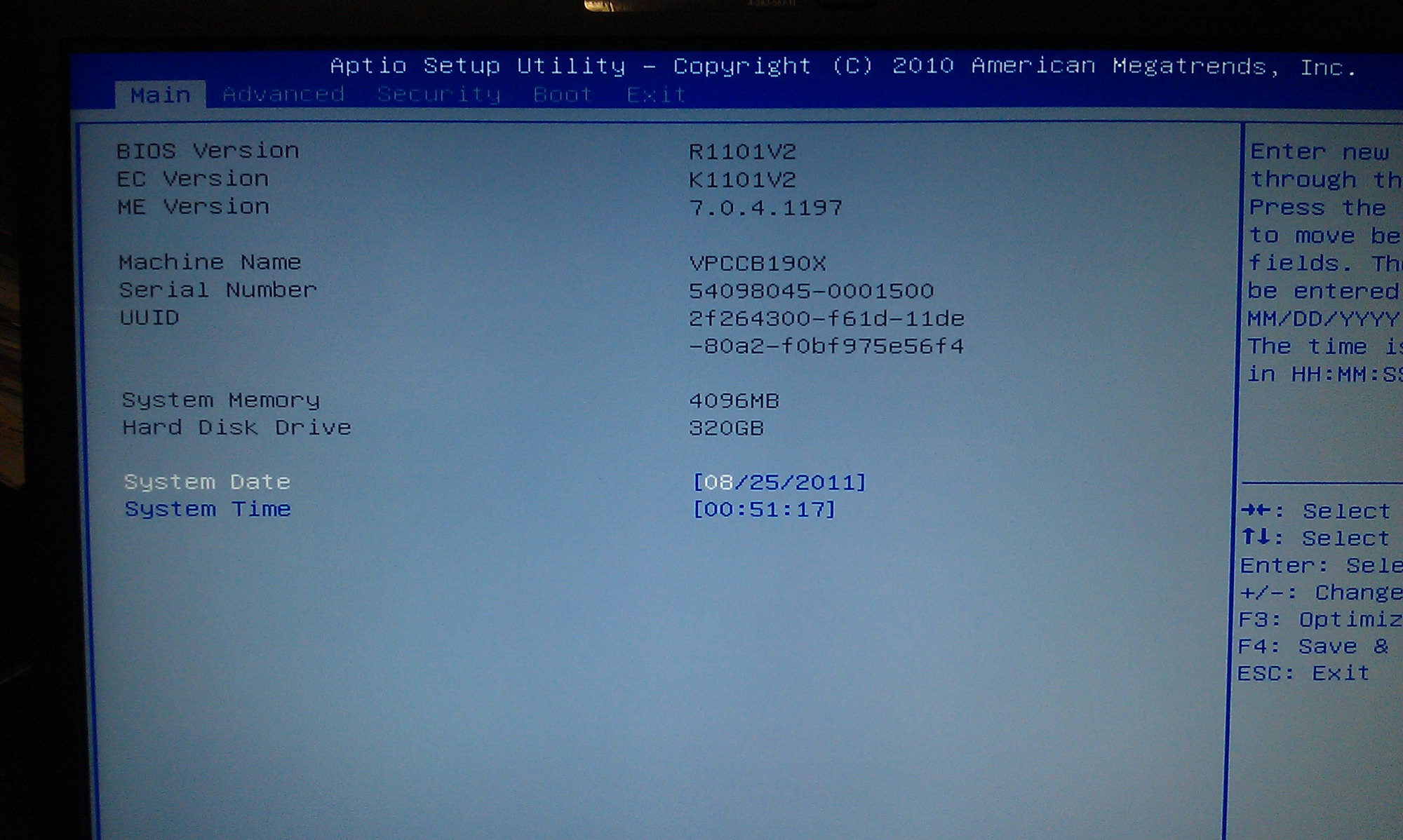
BIOS setup utility says BIOS version is R1101V2, EC version is K1101V2.
The only question that remains now is what model to install updates for - the CB1xx or the CB2xx, but I don't think there's much of a difference.Attached Files:
-
-
this is great...!
though very RISKY!!! i also owns a CB190X, i would like to try this, and so as the others with CB i suppose..
can you post more screenshots, ... the dxdiag, the Catalyst, and all..
thanks... -
I tried running it on my CB and it said my computer doesnt support it. Why?!?
-
hmm, the bios update still won't work on asia models...
-
SS for angry birds rio
Attached Files:
-
-
no, your AMD is not working on openGL. it cos, your hotfix made it always on like old models with only amd card
-
ok guys i did it on my CB model and got it working!
I tried running the wbflash.exe file but that didnt work.
When i ran the
UpdTW64.exe file it worked like a charm.
Now i can manually config my graphics card from CCC
-
Hi what is your model number and did u know what bios you upgraded from?
Mine is the VPC CB15FGL, just wondering if u can run the update on that, I not sure of the bois version at the moment -
Worked for me aswell ... VPCCA15FG! how do i see if its working
-
i can do it as well... it works like charm
-
GPU-Z no longer shows AMD when i goto power saving mode ... now the big question is OPEN GL running. Damn we solved something what Sony was too lame to solve for us!
-
you could do it by siwtch the method to AMD, and go to dxdiag see the display
mine is amd -
have u tried WoW .. running fine on Open Gl for me
-
so is mine noe
-
Did you have to run the UpdTW64.exe like i did for it to update or did the wbflash.exe file work for you?
For me it didnt work that way. Im running a custom build vaio cb with the 2450m i5. -
no harm done here... sony sucks... many thx to alex who made this possible
i ran updTW64.exeAttached Files:
-
-
Ok cool, i will give it try on mine later on tonight
-
yes the other way didnt work, said laptop model not compatible. Hope there are no other issues.

-
shame, cassy and the other didn't see this coming...
-
Glad people got it working. I much prefer my new machine, but good to see this was fixable
-
just out of curiosity, what machine do you buy to replace this?
-
Is your webcam working? mine give rendering failed check you ve got a valid direct x smthing
-
i'm not with my laptop now, i'll check it after i get back
-
Asus N53SV-XV1. So with the fix obviously being the bios, wonder where the idiot is now that kept saying we were all wrong and it was an AMD issue. Yeah, thought so
-
yeah, sony support is suck... didn't even know this were the issue
-
JOY!!!!
It works!!! it really workss!!!!!!!!!!!!!!!!!!!!
Graphics issues are gone!!!!!!!!!!!!!!
Whoever did this fix, THANK YOU SO MUCH!!!!!!!!!!!!!
THANKS Aleksandras!! AND unplugged!! for being the first one to apply the fix
Sony Vaio CB Official Owners' Thread
Discussion in 'VAIO / Sony Owners' Lounge Forum' started by thegreatlarrybird33, Mar 22, 2011.