Problems? See this thread at archive.org.
I use the EVGA Precision, and the settings are:
Core Clock: 650
Shader Clock: 1430
Memory Clock: 820
I copied the settings from thomaskc.dk and so far I haven't had any problems, even with videogames and 3d modelling. The temperature is about 75-80°C under load.
Since it's a frequently asked questions why not to stich in the first topic the overclocking values?
-
650 and 820 thats pretty lucky, or maybe a stronger stresstest is needed.
I wont go over 575, think thats already a lot for that gpu. (under heavy load youre about to reach 95) -
I still have full control of my LCD brightness mate, the keyboard buttons work too?
I have random times where they didnt after installing new drivers (while using hybrid) but after another reinstall of drivers it went away. So I think that if people are having problems it's due to driver screw ups, not the dedicated gpu setting. -
Yup, im still running with those OC's as a permanent solution. I have even disabled powermizer for more stable fps in games, which means my gpu never downclocks from those speeds, and still everything runs fine. My idle temp is up a few degrees but my max is the same just below 80 degrees.
-
I have never seen my gpu higher than 81 degrees efter a couple of hours of gaming, while the weather was close to 30 degrees outside. Not sure where you get those 95 from?
-
Hmm, i've seen 90 frequently when i game BFBC2 with 550, 1210, 800 clocks. max i've seen is 94 though. Are you using a notebook cooler or something?
-
Yeah I am, and I have for several years so im so used to it being a part of things. That will explain why probably. I have an old Zalman 1000 and a new smaller (can't remember the name) but same concept.
Edit: how ever coolers can't do magic.. they usually will lower the max temp with around 5-8 degrees in total, so 90+ still seems very high to me.
I will make a test tonight! have a game of Sc2 without my cooler and see what happens
-
You didn't disable the intel graphics in bios? Maybe I misunderstood your post.
-
Yes I did, but I still do have my LED control for the brightness.
-
Thank you Mesenzio and thomaskc.dk
-
So disable intel in the bios, and just install regular nvidia drivers, eg from laptopvideo 2 go etc and all buttons work? nothing else to watch out for?
-
^I'm really surprised that works. The backlight is clearly connected to the Intel Graphics in DSDT.
-
ha ha I finally got tired about this VAIO Messenger pop-up window/message when unplugging the DC power. I went into Control Panel - Programs and Features... found the VAIO Messenger software down the list and uninstalled it!!
-
Yeah pretty much sometimes I need to tweak the modded inf, but yes, there is no problems getting the hybrid part to work or anything. All my buttons works like a charm.
-
Well not sure hehe but I get onscreen display and everything, volume and brightness. both work just fine.
On a different note, I always use 100% brightness so wouldn't care much if it didn't. anyway all good. -
@thomaskc.dk
260.99's inf and 266.58's inf have a lot of differences... would you like to give a try with the new inf?
edit:
file attachedAttached Files:
-
-
i have the vaio z117
will this work with hybrid graphics? which files should i use
the specs are
NVIDIA® GeForce® GT 330M GPU with CUDA Technology (SPEED MODE) / Intel® Graphics Media Accelerator HD (STAMINA MODE) -
nvidia 263.14 - intel 2266 is the latest available
-
Are the 263.14 for VPCZ available? I haven't see them posted. If so can someone please share a link? Thank you!
A question: when I render with Maxwell my GPU doesen't work, is that normal? -
263.09 and 263.14 inf is same just replace all the file with 263.14
-
Hi,
I've tried installing the drivers on to my VPCZ13 and although the Nvidia installer claims success, when I reboot windows the drivers don't seem to work. I tried cleaning off all the original drivers first and then re-installing but to no avail.
Any ideas?
Thanks and I really appreciate your work on this. Don't get me started on Sony's lack of driver updates on such an expensive laptop! -
you need to sign the driver
please read the first page -
I downloaded thomas.dk's installer package in the OP and followed the instructions carefully (the one thing I'm worried about is I may not have cleaned out the old drivers well enough).
I used the driver signing program to reboot in test mode and signed both of the driver files. Now when I reboot I get to the login screen but the computer crashes after logging in. I hear an error message sound and it stalls out at "Welcome.." It seems the only thing I can do then is restart. Haven't tried loading in safe mode or anything yet.
The last drivers I used before this was a dual driver package in another thread on notebook review (unsuccessfully tried to find the thread). Any advice would be greatly appreciated! -
Another thing to mention is that I have the Vaio Z plugged into a Dell 2711 running at the max VGA resolution (2xxx x 1xxx). I was using the monitor + laptop screen on extend.
(A unrelated question: is it possible for the Vaio Z to run the 2711 at it's max resolution (2560x1440) and if so - how?) -
Thanks for your reply. Turns out I'd tried to sign the driver before install. All working now as is the Mercury engine in Premiere CS5. Thanks!
-
try running without the monitor
to run in max resolution you can only use the single external monitor not duplicate display because vpcz1's display only support 1920x1080
edit:
forgot to mention. need some modification to the driver before you can use the maximum resolution. -
i have manage to run the thomaskc version and signed the files.
are there any additional settings or nvidia control panel i need to make? cannot find any info in the first post.
how can i see any performance increase? -
performance increase only happen if you play a lot of games. games that the code have been optimized for newer nvidia driver. what do you mean by additional settings?
-
Hi - I:
- disconnected the external monitor
- started the computer in safe mode (successfully)
- resigned both driver files in system32\drivers
- checked that both files existed in the driver folder
- set it to boot in that mode
Still having the same exact error - after I log in, it stalls at the "Welcome" screen after playing an error sound. Really confused as to what to do - any advice would be appreciated! -
Uninstalled and put in Nautis's package. Successfully completed the process but now my hybrid graphics system isn't lit up on the laptop and there is no switch icon in the corner of the start bar.
I can't switch to anything and it seems I am not running the intel or the nvidia driver at the moment. In the screen resolution section I am capped at 1024x768 and nothing is detected... -
It seems the actual nvidia driver didn't successfully install, seeing how there is only physx and something else (don't think the driver installed). I did have UAC disabled but I'll keep troubleshooting.. Will revert to official Sony if everything fails.
-
Is your system in test mode? Switch set to speed?
-
ok... take it easy...
first of all check device manager
start > computer(right click) > manage
can you see nvidia there?
If yes, do you see any yellow icon? if yes then you need to sign and run your system in test mode
If no, you need to uninstall everything then reboot your vpcz1, after that it will indicate some driver failed to work, if you can see nvidia in device manager then, install the new driver, sign and reboot in test mode.
note: If you still can not see nvidia graphic card(device id 0A2B) in device manager then this mean that you haven't uninstall the driver completely, check again. -
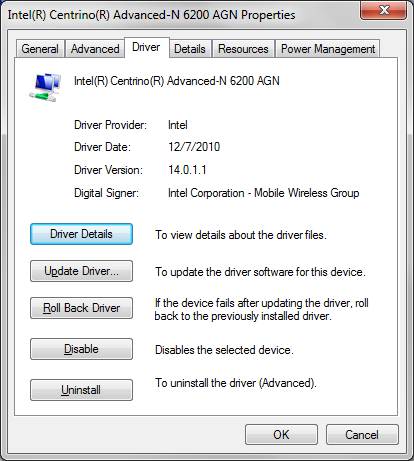
Has anyone had any success using intels wireless display with the hybrid grpahics system or with any of these updates. I tried the driver changes as described here but still no luck. Any thoughts?
-
do you have Intel® My WiFi Technology (Intel® MWT) π2 and Intel Wireless Display π1 ?
beside you will need to install intel wireless driver 14.x and intel hd graphic 2266 -
i believe I have all of that except 2266. Is there a driver package that uses 2266 for the z1290? Right now I'm on the thomaskc.dk 263.00 and 2202 version.
-
Also the driver for the wireless card only goes up to 13.4 but I am current there.
-
intel wireless display require 14.x as you can see mine...
download it from station driver site.
for graphic it is above 2246 or 2253 cant remember properlyAttached Files:
-
-
i play starcraft 2 and i can't really tell a performance increase. i still cant increase the graphics settings in the game without getting some lag.
i was wondering if i need to change anything in the nvidia control panel to enable my comp to make full use of the new drivers. -
if i remember correctly nvidia improved starcraft II.
if you don't like the new driver you can simply downgrade back to sony one.
for the rest:
i managed to get cuda reloaded, but i got memory leakage problem, what i do is using the hybrid graphic menu and i can see cuda is back but with memory leakage, means you need to restart your computer. -
yeah starcraft 2 runs really strange on the Vaio Z. "OKAY" on low settings but medium shaders completely kill it, even though the nvidia card pretends to be a 1gb card. It just can't handle it.
-
thomaskc.dk have you tried the 266.58 inf?
-
Ok so I downloaded 263.09 + 2266 from above and then downloaded 263.14. I've attempted to copy the files from 263.14's "display.driver" folder into the 263.09 + 2266 "display.driver" folder and overwrite anything it asks me about. When I run the setup on the new 263.09 + 2266 + 263.14 files it gives me an error and won't install.
So as it stand now I am running 263.09 + 2266. I also now have the display 14.0.1.1. I tried again and the wireless display will not work.
More help would be very much appreciated! Thanks. -
Sorry No, but was it for Dedicated or hybrid installs?
-
dedicated
10 char -
Okay, ill have a go at them then, do a driver reinstall.
Edit:
the one I use now works fine though, so I don't see how I would know or what difference there actually would be?
edit2:
I just tried your inf, all works fine, see no difference, except that I had to revert to my other since yours are missing 50% of the resolutions in games like sc2. you need to fill those out so all options are available, otherwise they are somewhat useless install wise they work like like a charm (like my other one).
-
So i disabled the intel gpu fine, running on the nv card, installed new drivers, all works fine...but then no display brightness control.
thomaskc.dk are you using new/fresh drivers, or is a special vaio-z like inf required? I'm using this on a vgn-z, rather than the newer release. Advice?
Funny enough the w7 dim feature works...ugh. -
did some more testing...w7 allows me to control brightness...the fn keys only allow me to increase brightness, not decrease...now getting powermizer flicker as well ugh, usually from 100% power to 90% introduces the flicker...other states seem fine.
-
Could someone post or PM me the files for 263.14 + 2266 or a newer version that is working? I tried using the above posted 263.09 + 2266 and then just copying the nvidia version of 263.14 as described above but that causes install errors.
Many thanks! -
Ok, so now I have finally gotten 263.14 and 2266 running on my computer so disregard my last post. However, I still have the wireless display problem. When I install intel wireless display with the hybrid button in the stamina position I get the error "unable to send desktop to the remote display". When I install intel wireless display with the buttom in the speed position it tells me to please go to intel HD graphics mode and try again - when I do that it gives me the same error.
Anyone have any insight?
My discoveries on Vaio Zs Hybrid Graphics
Discussion in 'VAIO / Sony' started by Nautis, Jan 16, 2009.