 Problems? See this thread at archive.org.
Hi,
got everything working including Hybrid drivers (I run an external monitor with the Sony docking station). I run Win 8.1 and The Nvidia 26314 - Intel 2266 (great job Andrew08!). My only niggle is that sometimes when I reboot, the Nvidia driver does not load and my external monitor remains black. When this happens, I have to reboot 2-3 times or shut down/restart to get the external monitor back. Initially, I thought that switching off fastboot as suggested by Andrew would do the trick, but occasionally I still end up with a dark external monitor - quite annoying.
Does anybody (read Andrew08) have an idea on how to fix the issue?
Thanks in advance!
-
-
One problem I have noticed, which is probably graphics card driver related is that when I am using Visual Studio and try to start and debug any OpenGL program. ChoosePixelFormat or DescribePixelFormat will always crash. But if I run the program without hooking on the debugger, it will work!
Is there any Nvidia driver besides 26314 (preferable a much newer version) which I can somehow use?
Edit:
I modified my bios to enable the advanced menu. Set mode to static. This allows me to install inf-patched nvidia drivers. After having updated to the one from the thread: http://forum.notebookreview.com/sony/602497-latest-vpc-z1-330m-drivers-bios-hack-people.html
which is: 331.65.zip
Debugging started working!
So if anyone else wants to "debug Open GL programs on a Vaio Z with Windows 8, this is the way to go!
-
I have the same issue as relating to Windows 8.1 (x64) and the hybrid drivers not always loading. Besides that, I can confirm that Windows 8.1 works fine, including all hot keys and hardware. Not sure if disabling the fast boot setting in Windows 8.1 really made a difference. About half of the time, my green LED light next to the hybrid switch is not activated and the hybrid drivers are not loaded (not switching possible). Hard to tell when the issue happens and when not. A reboot generally fixes the issue.
Here is my routine for Widows 8.1 (on a VPC-Z13Z9E). For me, it was important to start with Windows 8.0 and install everything before upgrading to Windows 8.
- First install Windows 8.0 (from scratch / clean install)
- Install the below Vaio drivers etc in Windows 7 compatibility mode and administrator access!
- Then install Vaio Notebook Utilities for Win 7 (original files from Sony))
- Then the original Nvidia Hybrid Graphics driver
- Then Intel Management Engine Interface
- Then Sony Firmware Parser
- Then Vaio Power Management
- The last trick should enable Hybrid switching and enable the FN brightness buttons
- Then install all Windows 8 updates
- Then install Windows 8.1 update from the MS Market Place (update shows automatically after other updates)
- The update to Win 8.1 hoses the original Nvidia drivers, so hybrid switching will be gone after update!
- Then remove the original Nvidia drivers and the Intel drivers so that they show as a basic video card (remove manually via hardware overview panel).
- Then unpack the Andrew08 (Nvidia 26314 - Intel 2266)drivers somewhere.
- Then reboot in 'allow unsigned drivers' mode (hold SHIFT while pressing reboot etc)
- After reboot, install the extracted Andrew08 drivers under one of the video cards manually.
- Then disable fast boot under configuration screen - power options to prevent the Nvidia drivers from not loading due to fast boot (not sure if this really helps!).
- Then install the latest Intel RST for windows 8.1 drivers v12.5 and up
-
Thousands of posts here - can someone point me in the right direction.
I just did a clean install of Windows 8.1 on Sony VPCZ1 (VPC-Z1190X).With Hyprid Graphics.
I was able to install "Nvidia 26314 - Intel 2266 signed"
However I get the yellow "!" next to the device - NVIDIA GeForce GT330M.
I also have "Base System Device" with the same thing - not sure what that is.
Can someone point me in the right direction? what do I need to do to get this thing working.
Appreciate all the help.
Thank you. -
Are you in Speed or in Stamina mode? Try speed to use dedicated graphics.
-
When installing the drivers - I have been in speed mode - almost never use stamina mode.
-
Can you post a screenshot? Mine is this just after installing Windows 8.1 (no additional driver yet).
http://forum.notebookreview.com/att...indows-8-windows-8.1-vpcz1-device-manager.png
After you install the modded driver Microsoft Basic Display Adapter should change to nVidia or something and don't show any warning there. I used Andrew08 version of the nvidia drivers:
Andrew08 links -
Here is what my device manager looks like.
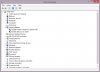
Here is what I have done -
Shut down with special reboot to allow unsigned driver install.
Installed this drive - VPCZ1 26314 2266 291112084512
Found on this post - http://forum.notebookreview.com/son...vaio-z-s-hybrid-graphics-252.html#post7176699
During install the Speed light turns on - which to me indicates that the driver is working.
On reboot the driver fails. I have even disabled fastboot.
No luck. Any suggestions? -
Did you disable wifi while installation?
http://forum.notebookreview.com/sony/699021-vpcz1-how-clean-install-windows-8-a.html -
Disabled the wifi using the switch. Again the driver seems to install just fine - then when I reboot it again fails. Still can't figure it out. -
Did you perform 3d benchmark to see if you have acceleration?
Click on the icon and try to see more information about the error. -
Hey Andrew08, hey guys,
I'm happy find to your expertise during setting up my VPCZ1 from scratch on Windows 8.1. It helps me a lot.
Unfortunately not with my key problem - the hybrid graphic mode.
My problem is that the installation of NVIDIA driver fails (I tried Hybrid graphic driver 26314 - 2266 signed).
The installation program shows an error during intallation procedure (grafic component) and driver installation fails.
Any idea what I can try? I tried various installations with disabled WLAN (hardware key) and in Win 7 compatibility mode and not.
My system is Win 8.1 from scratch - clean install (not an update from Win 8).
All other Sony drivers are installed and the icon with stamina switch is shown in Win Taskbar.
Any idea how to get the Hybrid Driver to work; is there anything I haven't seen - first step should be a successful installation procedure.
Thanks for your help.
Sven -
Always disable driver signature verification, in both windows 7 and 8.
-
Hi,
Can anyone help me? I've got a VPCZ115GG, and when it came in it was just randomly locking up in speed mode.
I've formatted the hard drive and re-installed Windows 7 from scratch. I then added all other drivers EXCEPT for the graphics driver off the Sony website, as this seems to be the cause of all the problems it would appear, so all other hardware was correctly installed.
Upon installing Andrew08's 26314-2266 drivers, the Intel drivers are installed (device manager isn't showing any nVidia drivers as installed now though), and the laptop seems to work ok in stamina mode. However the laptop was continually crashing (black screen until turned off manually) on speed mode, and the nVidia drivers did show at one point but the driver had an issue (can't remember exactly sorry). They are now not showing and the laptop seems as stable as it has ever been to date.
I've seen this is a Sony driver issue hence the re-written drivers, but have any of these problems been due to the graphics chip just being knackered, as have seen other nVidia based laptops (Toshiba's, Acer's, HP's to name a few) with this issue?
Any help would be greatly appreciated before I decide to scrap the VPC on eBay as a lost cause. Apologies for not having read all several hundred pages (it is a rather long thread!).
Thank you. -
I hope someone (anyone) here can answer this simple question; I've poured through hundreds of messages and can't seem to see the answer or clear mention of this.
I am running Windows 7. I know most in this thread are concerned about Windows 8.x - but I am trying to install Andrew's signed drivers under Wiindows 7.
Mid-way through the installation process, a big red message box pops up saying "Windows can't verify the publisher of this driver software" - and (in the Details) says that the driver "does not have a valid digital signature that verifies who published it".
IS THIS NORMAL TO GET THIS MESSAGE when installing under Windows 7? Do I just ignore it and continue with installation? Will everything then be fine?
I'm asking because it was my understanding that these drivers were signed. But perhaps they are signed, but Windows just doesn't find the signature to be perfectly valid.
Do others get this message during a normal install?
Thanks so much,
Steve -
It happened to me also under Windows 7. The drivers are supposed to be signed, however it looks like they aren't properly. You must disable driver signature verification in order to be able to install the nvidia driver.
-
The driver files themselves are signed; the .inf is not. You need to disable driver signature enforcement and install the driver. Once installed, there is no problem with this because each of the driver files installed is individually signed by either nVidia or Intel. You can check the properties of each file in the package one by one if you like.
-
Whether I disable driver signature enforcement or not - I still get this warning message asking if I'm sure I want to install it. I install it (even without signature enforcement disabled) and it installs, and seems to be fine.
All that I'm asking (and no one is giving me a clear answer on) is if the red warning message during installation (that I detailed in my message above) is normal or not. I mean "normal" when installing the community-built signed drivers from this thread.
In other words - is the red warning message something that everyone sees when they install these signed community drivers (from this thread) under Windows 7 - and click to ignore/continue as part of the installation of these (Andrew's) signed drivers? -
Yes, it's normal. Even with the driver signature enforcement you get notified that you are about to install unsigned drivers.
-
Thank you! That's exactly what I wanted to know.
I wish that somewhere in this thread someone had said that.
Something like: "NOTE: Even though these drivers are referred to as "signed" drivers - and no longer need driver signature enforcement to be turned off - you will still get a big red warning message during installation saying they don't have a valid signature. Just ignore this warning and continue and the drivers will install fine and work fine".
You know, something that simple. -
Yes, Andrew08 should mention it in the post.
-
^mentioned
report for windows 8.1
I have a hard time using this driver for photoshop cc.
It will crash when saving using speed mode.
now using optimus -
Can anybody find my bios chip Vaio Z . Here is Photos. I bricked my Vaio while flashing bios. Want to replace bios
Pictures HQ and 14MPX
https://www.dropbox.com/sh/lscd6m4ufbc8afq/2hmG1bcu6i -
that is why I am scared to change to hacked bios *sigh*
have you tried searching "Undocumented INSYDE BIOS recovery method Use andy s tool to obtain possible names"
I hope you can recover your bios using that, I have no idea where to buy bios except buying other vaio z from ebay or anywhere else that don't have bricked bios.Paloseco likes this. -
I COULDN'T AGREE MORE! THE CABLE FROM THE PALMREST TO THE MOTHERE BOARD ON THE VGN-Z's IS VERY DELICATE! I've already trashed one and may have killed another! I recommend lifting the palmrest as little as possible until you can get your fingers inside and gently pry up the connector to the motherboard with you fingernails. DO NOT bend or unbend the cable! That seems to b what kills it.
Good news is they are available on ebay now....bought a new one for only $26. Search for: VGN-Z PALMREST RIBBON 1-877-129-11 FPC-130 187712911. Make sure to get one WITH INTERFACE! Otherwise it comes without the mobo connector. A MUST HAVE spare part for every VGN-Z owner who opens their case!Paloseco likes this. -
Yes i am trying to buy new bios chip.. But i can not find bios chip model no. Anybody can help me ?
Can not find in ebay too -
Hi. I have a VGN-Z11XN/B laptop. I installed Windows 7 Pro SP1 x64, but the Brightness keys (F5 + F6) dont' function. Also, I can't revert from Stamina to Speed and vice versa. Can someone help? The only Graphic driver i found was for Vista 32 bit and doesn't work on other OS. Also, is there a chipset driver available for Win 7 x64 that I need to install first? Thanks in advance.
Edit: I have finally resolved the Hybrid Graphics problem for my case. I have downloaded and installed the well-hidden driver from inside Sony. It can be found here (for 9300M GS).
Unfortunately, the brightness keys still don't work...
-
The special function keys are dependent on careful installation of a whole set of Sony drivers. Step 1...locate the section of the Sony Esupport website...for you that will be one of the websites in Europe since that's a European model number. Step 2: Do a clean install of Windows...this would be easier if you had the restore discs but since you're asking this question I'm assuming you don't. Step 3: start installing drivers as follows: 1 chipset 2 Firmware Extension Parser 3 Programmable I/O Device Driver 4 Sony Shared Library 5 Sony Setting Utility Series 6 VAIO Event Service 7 VAIO Control Center. That SHOULD give you access to all the original special functions. I would test them all at this point...reaccomplish the install if necessary. ALL drivers except VAIO Control Center (VCC is optional but quite useful IMHO) must be installed...AND in this sequence! Which is stolen from failure13's post but is what I remember to be correct. Once all of that is working install the video driver...either from this thread ( https://dl.dropboxusercontent.com/u/35043569/26308 2020 101112.rar)...Andrew08's post 2512...OR from the Esupport website. Caution: Windows 7 & 8 will install an organic driver for the Intel Graphic chip...you MUST redirect Windows to install the STANDARD VGA GRAPHICS ADAPTER (or it's Windows 8 equivalent) before you install Andrew08's driver or the installation will fail! If you use multiple displays simultaneously or an extended desktop on multiple displays you will need to install the Sony Video driver as Andrew08's driver doesn't seem to support these functions...and so far there seems to be no real fix for this problem.
Once all that is done....install remaining drivers as desired from the Esupport website.
These are still GREAT machines....as indicated by the fact this thread is still so active...but they do require finesse when doing a DIY (clean) install to retain all of the original functionality.
Good luck!anytimer likes this. -
Have installed 187.35 and the stamina/speed mode works. But i can't change the brightness with the FN keys anymore. it show only brightness level 1 and it does not change. Volume change works fine..
And the Graphic performance is slow e.q with AutoCAD its much slower than with Vista. Maybe i have done a mistake?
Can someone upload the vgn Z11MN 263.08 Graphical driver? All links are dead. Or wich i Should install to work? -
Hi, installed almost everything I could find but hybrid graphics on my Vaio VGN-Z11VN doesn't work
Installed clean Windows 8.1 64bit and followed above orionz's instructions, everything correctly working but nvidia card
when I try to install Andrews' drivers, I'm in Speed mode, device manager has a Yellow triangle on standard vga card, launch the setup and after a few seconds a Windows popup says to revert back to stamina. I click OK, the installations continues for another 5-10 seconds then it stops with error saying that can't install those drivers
I'm wondering if I may have more luck installing a 32bit version of the OS or an older Windows 7 64bit maybe... -
You should be seeing TWO entries in device manager, BOTH showing Microsoft Basic or standard VGA depending on the OS.
You should disable driver signature enforcement during driver installation (this is not needed once the driver is installed).
I find it useful to disconnect from the internet while doing this. If you are connected, Windows looks for a better driver via Windows Update. This is usually a good thing, but not in this case. -
I am NOT an expert in Windows 8...I am still on Win7x64 but several other members who are have posted detailed guides in the last 30 pages or so of this thread...take the time to find and review them!
That said it sounds like windows is installing it's organic driver for the intel graphic...if it does Andrew08's driver will fail in the manner you have described. As ANYTIMER stated above: you should see TWO entries for graphics adapter in device manager: BOTH should say STANDARD VGA GRAPHICS ADAPTER (or it's Win8 equivalent), ONE of the two (standard VGA) graphics adapters should show the EXCLAMATION POINT for a malfunctioning device (this is NORMAL at this point), the other should not! If one of these entries shows INTEL GM45 GRPAHICS ADAPTER (or something similar) windows has installed it's own organic driver and MUST be redirected to the STANDARD VGA GRAPHICS ADAPTER (or it's Win8 equivalent) before you can successfully install the Andrew08 drivers. -
Yes it's right, all links are down / dead.
Can anyone send here or via mail a correct working link?
I need it for my Vaio Z13
thx -
Normally I never have a problem tweaking this machine, but I can't install Andrew08's hybrid drivers no matter how I go about it.
- I'm on Windows 8.1 on a VPCZ1390X
- Dynamic selected in my modified BIOS
- Test mode permanently on
- Every device/driver uninstalled from control panel and removed manually with files deleted from Device Manager
- Driver signature enforcement off through advanced startup with F7
- Wifi switched off
- Heck I even got UAC off and manual signature on files. Nothing works.
Below is a screenshot:
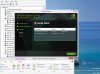
Pray help me. What's wrong? -
Before installing the driver, run NFR.exe (nasty file remover) or Driver Sweeper to get rid of the nVidia files lying around in your system from previous installations. The installer will not overwrite newer files, hence this problem.
Why do you want this driver if you already have a hacked BIOS? Set the mode to static and use ComputerCowboy's driver.woodsielord likes this. -
I enjoy the flexibility of switching from speed to stamina especially in meeting environments where I might have to conserve battery, but then suddenly switch to HDMI for a presentation and switch back to conserving battery. However, the switch has been not working more than it's been working lately.
If Andrew08's version doesn't fix that, I will go static and just restart every time I need a switch. Oh the God awful things we are made to do on a $5k machine. Sony, Vaio won't miss you... -
If you are running Windows 8, be aware that there is an issue with the fast startup feature in power options> choose what the power button does. It appears that only the drivers currently in use are restored on startup after a shutdown. This causes switching to not work. It will work after a restart, though.
E.g. after a shutdown, start up the laptop, then restart. Now switching will work.
You can work around this by turning off the fast startup feature.woodsielord likes this. -
So I am one of the few that got the drivers running on my Z series with windows 8.....
But does anyone think the apps and resolution does not seem "right"? Things just don't look as crisp as it used to. Apps like skype, chrome, etc look terrible now.
Seriously considering to go back to Windows 7... -
This was the case, but disabling fast startup wasn't the solution. My drivers must have been messed up. I used your previous advice and used Driver Sweeper (now called Display Driver Uninstaller), which let me install Andrew08's drivers, which happened to fix the hardware switch issue too. Spot on advice on all counts. Thanks!
I'm not experiencing your problems, but I'm considering rolling back too. This machine caused enough headaches before trying to force Windows 7 drivers on a Windows 8 OS. -
I think that's because Windows 8 doesn't have Aero, like win 7 does.
http://superuser.com/questions/493292/looking-at-the-screen-in-windows-8-hurts-my-eyesanytimer likes this. -
-preview.JPG)
25X32 VSIG chip winbond
But not as easy as you think search and read my recent posts.
If you find a solution please let me know. -
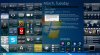
Hey guys I have a VAIO VPCZ117GG, one of the rare CARBON FIBER ones that never made it to the US. I bought it in HK. I have been trying to update my NVIDIA drivers for it for like a week and I am unable to do so! I download sony's latest official release and this is the weird part. I get it to update but before I restart the computer AERO WORKS GOOD on my computer and after it restarts AERO does not work and it says that my video card does not support aero. If I install it again, AERO will work again, but then after restarting, it wont work again....I have attached an image of when it works. Any ideas?? This started when I tried to install ANDREW's last update to the NVIDIA drivers then I went back to just try to install the sony released driver which is like 2010 verson. I just wanna make my AERO work again regardless of what version I use. I even uninstalled the drivers and put back the STOCK ORIGINAL 2009 driver and it still does not work. Any ideas??
My System: Windows 7 Ultimate 64 BIT
NVIDIA GeFORCE GT 330M
Installed Driver: 8.16.11.9024
I am also unable to to have my computer's Windows Entertianment Idex. It says all UNRATED and when I try to rate it, it gives me an error that says it cannot compute. I don't know if this is relevant. -
Your driver installation is probably effed up. Uninstall the driver, run NFR.exe (nasty file remover) or driversweeper or equivalent and get rid of all nvidia files left cluttering up your system. Then install Andrew08's driver (following the instructions).
-
I'm with Anytimer on this....even though mine is a VGN-Z. I would uninstall all video drivers....be sure that the intel graphics chip shows up as the generic VGA driver...and the NVIDIA chip shows with an exclamation mark. NOW run NFR or driversweeper and have it delete anything to do with video drivers for intel or NVidia. Then reinstall the driver of your choice. That should do it...if not let us know!
-
I forgot to mention that all is OK when I did not install the DISPLAY LINK drivers for the USB to VGA adapter that I have. SO it is the INTEL video driver causing problems. Not NVIDIA I guess. Both of my drivers say they are from 2010 and the intel version driver is 8.16.11.9024 and the NVIDIA is the same. Its a package that I got from Sony so this is the last known official driver released by Sony. I tried Andrews first by uninstalling and it says the installation was stopped and did not do anything. Then after installing everything I ran Andrew's stuff again and it was able to install on top of everything but the driver did not change date or version number. Am I missing something??? I need to keep my hybrid graphics switch usable. Thanks guys
-
It appears that all the links are down and I can't download any of the drivers, if any one has them it would be great help if you can send it to me here or by message. I'd really appreciate anyone's help with this
-
Go to THIS post: http://forum.notebookreview.com/son...vaio-z-s-hybrid-graphics-252.html#post7176699
Then go to the very BOTTOM of that post where it says "Attached Files"...there you will find two text files...one for the VGN-Z and one for the VPCZ...open the appropriate one...it will contain a web address. Paste the web address into your browser and the file will download. Just checked and they both work just fine.anytimer likes this. -
Just a heads-up: AutoCAD 2015 doesn't work with 263.14 drivers (and presumably with neither of the earlier drivers). It doesn't find the NVIDIA card, which results in abysmal performance (0.5-1 fps)
Paloseco likes this. -
So, any version newer than 8.17.12.6315 that works on Vaio Z?
-
I don't think so. There are problems (flickering) on other computers with fairly recent 30x and 31x drivers. It only works with the latest 32x and newer drivers, which are not available for the Z
My discoveries on Vaio Zs Hybrid Graphics
Discussion in 'VAIO / Sony' started by Nautis, Jan 16, 2009.


