Problems? See this thread at archive.org.
In this case you have several options:
- Run a virtual machine with VMWare Workstation or Virtualbox, but probably won't work. 3D acceleration is still experimental on guests.
- Install linux natively on the Vaio Z. How to install Geforce 330m nvidia drivers ?. You can try running linux into virtual machine too.
- Buy an external graphic card. Review External Graphics Cards for Laptops and External GPU for laptops. Supercharge your graphics.
- Install Windows 8.1. [VPCZ1] [How To] Clean Install Windows 8
-
Or you can get the BIOS Hack and use static graphics mode - to change, set the position of the mode switch and reboot.
To try before committing, try running Optimus on Hybrid Graphics. This has several issues - power consumption and HDMI - but lets you use later drivers. -
I've got Autocad 2015 working with 8.17.12.6315 nvidia drivers on Vaio Z: You have to install the hacked BIOS and change the graphics policy from dynamic to static. Doing this Autocad will see the Nvidia Geforce GT 330M instead of Intel HD Graphics.
AUTOCAD OPTIMUS HYBRID GRAPHICS NVIDIA GEFORCE GT 330M
VGA Switching Policy: Static


VGA Switching Policy: Dynamic
Insyde hacking - New Vaio Z - Advanced menu in BIOS -
I did exactly with Andrew08 post on my Vaio Z114GX and after first boot, everything is working fine (include Hybrid). But when I rebooted, the driver of GT 330M in the Device Manager has error because the drivers are not sign and my laptop switch to stamina mode, cannot use speed mode. I have used Driver Signature Enforcement Overrider to signed the drivers and reboot and it's worked fine after several reboots. But the error continue happen after 1 day. Please note that I'm running in test mode all the time. I'm using 26314 2266 driver and perform clean install Windows 8.1 update 1 build 9600.
Does someone can help me to sign the Andrew08 driver? -
You can't sign a driver with nvidia signature if you don't have the master key. You should insist on avoiding sig checking when after reboot, you must be missing something. Can't help you since I'm on windows 7.
-
Hi,
just wanted to let you know that on two VPCZ1 with Windows 7 (pro and ultimate) NFR and driver sweeper didn't lead to success.
I had to use Driver Fusion to successfully remove all nvidia crap.
There I deleted Display -> Intel and Display -> Nvidia as well as the Physx entries.
Otherwise the setup did not work and could not install the new driver.
HTHanytimer likes this. -
Yes, those are rather old cleaners and might not get everything on Windows 8 and above.
How long does it take for Driver Fusion to complete a first time missing driver scan? There is no progress indicator, so I'm wondering if it is doing anything at all. -
I'm having some issues with Windows 8.1 Update 1 clean install.
1. While installing Andrew08's driver, the installation froze the display. Waited several minutes to see if it would recover. Had to do a hard shutdown (press and hold the power button until system switches off).
2. On restarting, the Intel part worked. Device Manager showed the nVIDIA adapter disabled. Tried to enable - took a couple of minutes, but Windows successfully enabled the device. After that everything worked.
3. Today I got an Error 31. This device is not working properly because Windows cannot load the drivers required for this device. (Code 31) The lights around the mode switch are all off.
I'll try fiddling around with DSEO and see if disabling driver signature enforcement and signing the various unsigned drivers in the driver details list can fix this issue permanently. -
OK. Seems to be working now.
1. I disabled driver signature enforcement.
Command Prompt (Admin)> bcdedit -set loadoptions DDISABLE_INTEGRITY_CHECKS
Command Prompt (Admin)> bcdedit -set TESTSIGNING ON
restart.
note the double D in DDISABLE.
2. Deal with blocking programs.
I found glcnd.exe which turned out to be Windows Reader app (which I never use). Right clicked the tile for this and selected uninstall.
Next was wwahost.exe which is the javascripting host for Windows apps. Added this to the 'allow' list for override blocking apps. (You get there by right clicking the graphics icon in the system tray and clicking the link on the popup).
You might find more of these on your system. If you set your browsers to not use hardware graphics acceleration, they will not interfere in the switching. (E.g. in FF, uncheck 'use hardware acceleration when available'.)
3. Disable fast restart. (Power options> Choose what the power button does> Change settings that are currently unavailable> uncheck the box for 'turn on fast startup'.Paloseco likes this. -
Still one remaining issue - nVIDIA driver does not load on start after shutdown. However, if you simply restart, everything works fine. This might need intervention by one of the big guns, Andrew08 et. al.
Note: this seems to be specific to Windows 8.1 (I'm using Update 1) 64bit. -
I decided to do a clean install of Windows 8.1 Pro 64-bits on my old Vaio VGN-Z570N. It still had Vista Business on it (which came pre-installed).
Now, of course, I'm having problems with the discrete graphics. After countless hours of reading these forums, I came to the conclusion that, in order to enable the nVidia GeForce 9300M GS GPU, I would have to mod the BIOS and lose the switchable function, which I'm fine with. There are no customized hybrid graphics drivers for Windows 8.1, correct?
I followed the procedure mentioned on this thread, but I'm getting an "Invalid VSS signature" when trying to run advanced_menu.py. It is mentioned that I should find my VSS offset if such error occurs, but I have no idea how to this or modify the script with the correct values. Can anyone help me?
My current BIOS is INSYDE R2171M3, 10/11/2009 (the latest version available). -
Hi Andrew08, I've got a VGN-Z530N and just installed Vista Ultimate 64.
I tore the Stamina-Speed switch cable (FPC-136) during a chip replacement, so I'm trying to use these drivers to both reenable NVidia card and be able to use a software-switch in lieu of Stamina-Speed.
Couple of questions:
1. Is there a download link for a Vista 64 version of the file? When I go to install 263.08 2020 it tells me it's only for Windows 7.
2. Post says Special Features 1 and Special Features 2 are not in the file. How could I enable those features / have them available?
(3. Also, is there a way to enable taskbar graphic card switch?)
Thank you!!! -
So I tried the "VGNZ 26308 2020" drivers and I can't get multi-monitor to work on the Nvidia side. Only one display will work at a time. The error is "This GPU only supports 1 display".. Any ideas?
-
I think it's was mentioned before that with new drivers you lose the multi monitor feature
-
I have VPC Z11 with Win 7 x32 wih pathced for 4Gb+ availability (there are 6Gb in my laptop) . So, x32 Intel video driver do not want to work with PAEed kernel.
But I saw some dead links where guy posted modded x32 Intel driver which works with PAE kernel.
Can somebody tell where is to get drivers or/and may be some has ready Nvidia/Intel patched gybrid driver ? -
Hi Andrew,
A bit late in the game, but I have had a VPCZ129GG for about 4 years. Changed the motherboard a couple of times. I am having an issue with using one piece of software that may be related to the graphics side of things and was thinking of trying to upgrade the drivers beyond teh Sony ones. I still have the Nvidia 8.16.11.8880 drivers. I tried your download links but they do not exist on MegaUpload. Are you able to supply the 26314-2266 for a Windows 7 64-Bit machine.
Many thanks, Cass. -
Hmmm,
I must be missing something. JUst downloaded the latest VPCZ1 Driver and tried to install...the Installation quits by saying Installation failed?? What might be the Problem? I removed the old nvidia Drivers in safe mode while on pseed, then rebooted and tried andrews Driver...
Reinstalled original Driver and tried to install over it...same thing
Not that I am so keen on the new Drivers but AutoCAD 2015 sees only Intel and Cinema 4D would immediately complain and not start due to old graphics.
Any advice?
Timiboy -
Cant add 2nd external monitor to my VPCZ117GG W8.1 and Docking station
I used Andrews Clean install instructions a few months back and all went well
Recently i wanted to add a second external monitor - ie happy to be with out Laptop screen - just use HDMI port plus any other (Dock VGA, DVI) or USB external - or any combination really
My reading concluded only ONE external Monitor is supported ie can be HDMI OR doc VGA OR dock DVI - bu no HDMI AND a dock port.
so attempted to ad USB external - tried a friends VGA - no good, purchased a StarTech USB2DVI3E - both have sam issue - sees the monitor cannot save a duplicate or extend config
contacted USB external vendor - they have com back with as the graphic driver is not supported under 8.1 - no support available - fair enough
maybe i have something not quite right - is see others talk about "custom" resolutions and resolutions above 1920 - i never see that
any suggestions of how to get a 2nd external working? -
Hello,
With the latest Andrew08 driver I get sometimes in device manager:
This device is not working properly because Windows cannot load the drivers required for this device. (Code 31)
Insufficient system resources exist to complete the API.
and then only the Intel Graphics is active. This about 30% of the time, otherwise the nvidia GPU works fine (and the speed stamina switch works).
Does anyone know about this ? Is there an older driver by Andrew08 that I may try ?
Thanks -
Yes, this is happening to me too, usually after a cold start (after shutdown). I fix it by wiggling the switch and then restarting.
You can expect more and more problems the further we get from the Windows 7 that this hardware and these drivers were designed for. I'm kind of dreading the release of Windows 10 - will our old laptops finally bite the dust? -
I just acquired an old Vaio Z1 with an 330M and Intel i5 gpu.
What do you people consider the best solution for graphics on this laptop? Using the bios hack and static gpu switching, I can use the newest drivers for both graphiccards but, in your experience, do they do much better than the last hybrid ones? I sometimes play old games on the intel card if I cant be bothered with a reboot when switching and the intel gpu definitely did better when using the new drivers compared to the old hybrid ones.
But the dynamic switching could also be cool to have
-
If you are looking for hybrid drivers you have to use the official from Sony, there are no patched ones as far as I know. The problem with them is that they are too old and they give the error "Nvidia driver has stopped working and has successfully recovered" or something alike.
For newer versions you have to use the nvidia standalone with static setting on the bios. You have to patch them to allow the installation of unsigned drivers and to make them compatible.
http://www.sweclockers.com/forum/125-geforce/1213917-nvidia-drivers-stopped-working-has-recovered/ -
The hybrid drivers in this very thread are the best available. They are way better than the stock drivers that shipped with my Z1.
So, these are your choices:
1. stock drivers (these totally suck; I am not surprised Sony has quit the laptop business)
2. Andrew08's drivers found in this thread (these are the best if you want hybrid switching)
3. Optimus on hybrid graphics (these have power consumption issues; no HDMI at all; other than that, not too bad)
4. Bios hack (best performance, latest drivers, but you have to flip the switch and reboot to change mode; you also risk bricking your laptop if you mess up the BIOS hack, so proceed with extreme caution). -
Thanks for the replies guys.
Im already on bios hack with the latest drivers (mate help med set it up) and he said that he got occasional BSOD with Andrew08's hybrid drivers, although that might just be him? Like I mentioned, Intel drivers did feel quite better using the newest ones and newest nvidia is also available but I dont know if theres actually a difference there, compared to the Andrew08 driver.
What have you guys personally went with?
Also, judging from this thread I really get this "late to a party" feel.. I got the laptop cheap and so far, Im really quite satisfied and I had trouble finding something similar that could give me ssd and space for another hdd, so yeah...
One last thing; it's not possible to undervolt the 330M is it? -
Tell your mate to check his GPU temperatures; primary cause of BSODs. I'm using Andrew08's drivers for years; never had a problem except the Windows 8 faststart related stuff where the unused drivers are not loaded sometimes and you have to reboot.
This is a really good laptop. If you got it cheap, congratulate yourself on a great deal. It still outperforms most laptops in its weight class. If you already have SSDs, great; if, like me, you have the HDD version, replace it with a 2.5" SSD like I did. Money well spent. -
Which exact version of the driver are you using from Andrew08's?
-
2x64GB SSD and dvd drive removed to fit a 1TB hdd. Pretty good..
The 263.14/2281, I guess? Didnt really run into any troubles. But yeah, now I'm on static.. I like to control the clocks on my videocards so I guess using static is more optimal for that. Giving 3d clock a bit of an overclock. -
Dear Friends,
I've successfully hacked the BIOS on my Vaio VPCZ12 and installed the newest Nvidia Drivers from the Official Website.
For this I used the guide by 'compuercowboy' from computercowboy.com/VAIO/VPC-Z1/BIOS_Hack/
I ran into two issues:
1. When booting up in STAMINA MODE, the max screen resolution is 1024x768...and everything is blurry (the native resolution of my vaio's screen is 1600x900). Does anyone know a workaround for this?
2. Screen brightness cannot be adjusted by the FN keys (a menu appears on the screen but the brightness itself doesn't change) AND in Windows 7 Power Options there is no brightness slider!
I would really appreciate help!
Is it even possible to fix these issues?
Tom
EDIT1: computercowboy suggested that I run my pc in stamina mode and reinstall the Intel Graphics Driver. Could anybody tell me where I can get a separate file for that driver? On the Sony Website, both drivers: for Nvidia and Intel Graphics Cards are put together in one installer....and that doesn't work.
Also, I tried downloading the newest Intel Driver from the Intel Website and during installation I am getting an error message saying 'your hardware doesn't meet the minimum requirements'.
Could anybody please enlighten me? Thanks
-
Search Intel's website for your CPU model. The graphics driver should be in the related software list.
-
Thanks anytimer! Stamina and Speed mode back to their full functionalities!
Successfully hacked bios, installed newest Nvidia drivers and Intel Drivers for Embedded HD Graphics on my Sony Vaio Z VPCZ12M9E/B.
In Windows 7, the PC was rated by the lowest score of 5.9 before, now it's upped to 6.4.
Thanks for all the previous posts, it took a lot of work to get this done but was totally worth it!
Peace Guys! -
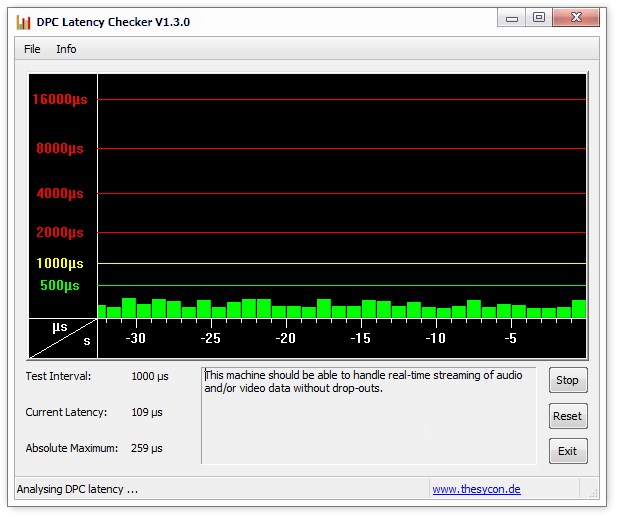
So, I'm a happy user of Andrews drivers. Obviously they're dated but there's no solution to that, I guess, but while using the nvidia card I get alot higher dpc latency. Not quite in the red zone but still..
Any solution to this? I've analyzed it, and it's definitely nvlddmkm. Most of the time its a switch between green and those yellow bar, you can see in the screenshot below. The green bars after the big red one was when I switched to intel.
![[IMG]](images/storyImages/2tAA4jS.png)
-
I have hacked the bios, running the Nvidia card on the newest drivers and I get the same graph (lows in green around 500ms and peaks in yellow a little above 1000ms). So no, you won't change it.
I've talked to the NVIDIA 3 years ago about this, they say that because this card is modified so much for laptops it behaves like this.
In other words, I know that this laptop is expensive, mine costed 2,500 euro, but it is not a PC designed for I dunno, music conversion or video rendering...but for business use.
My friend built a PC for 5000 euro with three graphics cards and the newest i7 core extreme CPU, she has DCP latency of maybe 10-50ms. Good luck -
It must be a problem of the latest driver, since with stock nvidia driver 8.16.11.9024 seems to work perfectly. It gives randomly the error "Nvidia driver has stopped working but has recovered" nevertheless.
![[IMG]](images/storyImages/118204d1417381498-my-discoveries-vaio-z-s-hybrid-graphics-nvidia-8.16.11.9024.png)
Attached Files:
Last edited: Nov 30, 2014 -
-
Tried to update nvidia driver 8.16.11.9024 to 263.14 but fails. Turned off integrity checks and enabled test, uninstalled previous driver and tried to install new one, but nvidia driver fails to install. Followed instructions here:
http://forum.notebookreview.com/son...vaio-z-s-hybrid-graphics-252.html#post7176699
This is the capture, "Install failed". Can anybody help with the issue? It's windows 7.
![[IMG]](images/storyImages/118235d1417447718-my-discoveries-vaio-z-s-hybrid-graphics-nvidia-263.14-intel-2266-install-failed.png)
Attached Files:
-
-
Myeah I dont know.. When on Intel it's alright, most of the time. As long as it isn't as bad as my old laptop which had this godawful wlan card which created MASSIVE dpc latency. Here it's not really that noticeable, I don't think? I can't switch drivers cause I'm using Andrews latest hybrid ones, which ofc are dated as hell too, but non the less, I don't like static switching.
Idling with Intel:
![[IMG]](images/storyImages/fs08MiC.jpg)
Anyway, a whole new issue is pressing for poor me. Just before I was watching an episode of x-files (very relevant) on "power saver" profile (a profile I've made so cpu is limited at lowest clock) and when finished I switched back to balanced only to experience an imminent freeze. Completely freeze. Sound from the credits of the show were looping, I guess you all know that deal.
So I force shut down the PC and reboot. After Windows boot logo showing I get a short BSOD.. Couldn't get time to see it because the PC was set to autoreboot. Then I got into Windows without issue. I tried switching between balance and power saver like multiple times and the freeze was back.
After reboot I tried setting intel power profile on both power profiles to be balanced (before the one was max perf and other max battery) and now I can switch between without freezing - so far.
Is the Intel driver really that broken? How much DOES this power control actually differ on an intel card? Looking in GPU-z the clocks don't seem very different.Attached Files:
-
-
where can i get Andrew08's drivers? megaupload is down and links do not work on the first page. Thanks!
-
Hey! I am also to late. I got cheap a Vaio VPCZ13 an now searching for days for Andrews08 drivers. But all links are dead in every thread i have found yet. I am really frustrated. I would like to use Win8.
Please can someone reupp this! Thank you in advance -
For win8 it is better to do the bios hack so you can use the latest nvidia drivers.
Sent from my GT-I9505 using Tapatalk -
I would really like to do the bios hack. But also the files in the BIOS Hack Thread are offline incl. the driver patcher 4.7
So as long as the files aren't available / reupped i can't do nothing. -
I have found the " Nvidia 26314 - intel 2281 " driver and installed them sucessfully like described in this thread. And they work for me with Win8.1 flawless until know. I have uploaded them if someone needs them, too.
http://www.share-online.biz/dl/2WVE5ZJN6G -
Good for you, Wanes085. I don't have the original files any more - I have customised it to my device and don't remember what I changed - so I was unable to upload it for you guys.
-
Hello everyone! Long time lurker, first time poster. I've used the custom drivers posted on this thread for my VPCZ-1290X for many years and I've experienced practically no troubles at all with them. A couple months ago I started experiencing some sort of issue with my Windows 7 installation where my SSDs kept getting packed up all the way to capacity with what seemed to be temporary files. Unless I cleared them with ccleaner ever day, the drives got packed to such an extent that I'd find my system partition with just some KBs free after a couple hours of usage, which began messing with OS stability. Either way, I reinstalled my system with the custom drivers just as before but I've experienced serious graphics performance issues since and I'm wondering whether folks here could help me out.
Anything particularly graphics-intensive has been very slow after the reinstallation, and anything graphics-intensive puts a serious load on the CPU unlike before. In fact, I'm unable to run the graphics-intensive applications I've used prior to the reinstallation altogether. I imagine that my system is simply ignoring the dedicated graphics chip - even when the system is set to speed - and relies solely on the integrated chip. Any clue what might be wrong and whether I can get it fixed without wiping my computer all over again? -
In case somebody needs these:
nvidia 26314 - intel 2281 signed.rar 167.5 MB
https://mega.co.nz/#!6gN2wLwK!dNEr2o-qN4aDZQNAeHMMIVBvxNrEf4yfraD_20TLPeA
Nvidia 26314 - Intel 2266 signed.rar 173.8 MB
https://mega.co.nz/#!etdlAYha!z7zSLSRj_3SqFz-2RYnr7GiinDyo_9UMUnUXHgZCq_8
BTW. I installed Windows 10 TP few days ago on my Z1 and I can report it's working fine. All functions work like on Windows 7, even those Nvidia drivers. Happy Days for my old beast
-
hi everybody,
i bought an vpcz1 5 years ago and 2 months ago an wqhd display. i never thought that something like modded graphic drivers exist but came here while searching on how to get the external display working with full resolution. i downloaded the drivers from blc above but couldnt find a manual on how to install them. as i am not a complete noob according to computers ;P i am pretty sure that simply installing them wont work?! can you please give me advice for that or the link in this 203 page topic where everything is written step by step?
Thank you
-
Hi guys!
Spent a good 4 days around the forum and specially around this thread. Thank you for all the good stuff
My 2008 VGN-Z21WN_B still rocks.
I´ve successfully hacked the bios (recently installed W10 preview and so I struggled with drivers)
Unfortunately it will not work on speed mode - on power on the screen will have a weird rainbow effect... any ideas?
![[IMG]](images/storyImages/FzcVmH.jpg)
Thank you again!Last edited: Apr 21, 2015 -
Hi: Can I use the intel signed driver with Vaio SB series? -
As I type this request on my Vaio Flip15, I'm sad that I have a great Vaio VPCZ1290x with windows 8.1 pro that can no longer run my programs that need the updated drivers and the newer OpenGL! There's a lot of info in this thread......I'm not sure where to land and find out how to "step-by-step" update the drivers! Can someone lead me to the post of what to download and how to go about it?
-
For the latest drivers, you HAVE to go the BIOS HACK route.
http://forum.notebookreview.com/threads/latest-vpc-z1-330m-drivers-for-the-bios-hack-people.602497/ -
Hi
I own a VPCZ1190X. I'm trying to follow the instructions to change the BIOS to "static" the Nvidia adapter on my laptop.
I've downloaded the USB program and installed the FreeDos Distribution. It boots finely.
I've copied the requisite files to the USB root as well. But after its booted, and I need to backup and replace the BIOS, it says the command "flash" does not exist.
What am I doing wrong here? I'm running Windows 7 64 Bit.Last edited: May 20, 2015 -
The bad language filter on this board does some stupid things sometimes. The actual command is "flash-it", without the quotes and hyphen. Unfortunately, the board thinks you are using a bad word (the last 4 letters) and edits it.
My discoveries on Vaio Zs Hybrid Graphics
Discussion in 'VAIO / Sony' started by Nautis, Jan 16, 2009.