Problems? See this thread at archive.org.
Any body yet heard anything of a UK release/prices?
-
-
Props to Laptopmag as they actually say that Sony was the first one to implement this style of keyboard like the Z has. And not Apple.
-
no HD3650??? WTF? come on...
-
I think that it looks a bit thicker because the other dimensions are all smaller, so given the scale, it would appear to be thicker.
-
It looked thicker because of the angles at which they were photographing.
-
Ok, Which of the 2 would you choose? I'm going to place my order Wednesday and sleep on this one.
Choice 1 Z570N/B $2349.99 Pre-Configured
Hard Drive
Capacity : 320GB2
Impact Protection : G-Sensor™ Shock Protection - Hard Disk Drive Protection
Interface : Serial ATA
Speed : 5400rpm
Processor
Front Side Bus Speed : 1066MHz
L2 Cache : 6MB
Speed : 2.53GHz1
Technology : Intel® Centrino® 2 processor technology
Type : Intel® Core™ 2 Duo Processor P9500
Display
Back Light Technology : LED
Resolution : 1366 x 768
Screen Size : 13.1"6
XBRITE-DuraView™ Technology : Yes
Memory
Installed : 3GB PC3-8500 (2GBx1 + 1GBx1)
Maximum : 4GB15
Speed : 1066MHz
Type : DDR3 SDRAM
Graphics
Chipset : Mobile Intel® GM45 Express Chipset
Interface : HDMI™17 and VGA out w/ Smart Display Sensor
Processor : NVIDIA® GeForce® 9300M GS GPU with Total Available Graphics Memory of 1370MB (max.) and Mobile Intel® Graphics Media Accelerator 4500MHD with Intel® Clear Video Technology with Total Available Graphics Memory: 1300MB (max.)10
Technology : Hybrid Graphics System
Video RAM : 128MB of dedicated video RAM
Choice 2 Z590 CTO $2539.99
Intel® Core™ 2 Duo Processor P9500 (2.53GHz)
Microsoft® Windows Vista® Business with Service Pack1
4 GB DDR3-SDRAM (DDR3-1066, 2GBx2)
250 GB SATA Hard Disk Drive [5400 rpm]
Fresh Start™
Premium Z features:
* Intel® Core™ 2 Duo Processor (up to 2.53GHz) with Centrino® 2 technology
* Genuine Windows Vista® with Service Pack 1
* 13.1" LED backlit display (1600x900 resolution ), 3.42 pounds
* Hybrid Graphics System with 256MB dedicated video RAM
* Up to 320GB disk drive, available Solid State Drive
* Up to 6 hours standard battery life
* Built in 1.3 megapixel camera and microphone
* HDMI™ output
* Optional Blu-ray Disc™ optical drive
___________________________________________
I really wanted the following, but the price....YIKES!
Option 1: 64 GB Solid State Drive [add $700.00]
Option 2: 128 GB Solid State Drive with RAID (64GBx2 dual channel) [add $1300.00]
Is there a benefit to having the following:
200 GB SATA Hard Disk Drive [7200 rpm] [add $80.00]
verus 5400rpm?
And is the Blu-Ray drive offered only with SSD? I don't see the cost for this option.
Thanks...
Edit: Just found out from a previous post that you can't customize Blu-Ray with SSD. But cost of optional Blu-Ray did not display on CTO page.Last edited by a moderator: May 8, 2015 -
Geee it's hard to see what are exactly the differences between your configs.
In general 320GB 5400rpm perform better than 250GB 5400 rpm because of the data density. -
If you were sure it's a Hitachi 7K200 it would be kind of worth it. But you're not. So go for 320GB 5400rpm if possible.
Or SSD ofcourse, it makes a lot of difference. (I'm trusting Sony to pick a good SS) -
Where did you find this cus, I didn't see it on the CTO page?
-
lol I cant believe we're all still posting. Dont u guys have school? Im at work on a midnight shift so bored outta my mind.
The Z series laptops that are at the bottom of the page, like the prebuilt ones, can you buy them in the store when they come out? I assume so? -
Sorry,......... Ok I used Red-Colored Text for Choice 1 or Choice 2. And a a couple questions below... -
Yeah, Those pre-built will definitely be in the stores. I just spoke to someone I know that works at an electronic store and says the SR and FW's pre-built will be in stores this week. Not sure how accurate that is considering what I've read about not getting your orders until end of July or early August.
-
Sure as heck hope so. The reason im getting prebuilt is cuz the quality will be better and u get it right there. Or do you think I should CTO and get the 2.5ghz vs the 2.4ghz? Thats my only concern.
-
2.4 vs 2.5............you wont notice any difference
-
Yeah I noticed that. it's just that it was not very clear which were the key differences, since you listed so many specs.
1366*768 vs. 1600*900 is really a choice you have to make for yourself.You know the pros and cons.
I would not even be sure what to pick. I'd sure like the premium carbon finish though.
Better 4GB than 3GB because of the dualchannnel. -
I've read somewhere that some montevina/penryn CPU's will require higher TDP.
Because of this it may even be that the 2.4 is the better choice...
Not sure though. -
either way you look at it, placing a bluray drive in a 13.x" laptop, let alone ANY laptop is more of a gimmick than a regularly-used function. I believe the bluray option is there for the Z to add on to its prestige and a way to market the larger resolution on the higher end Z models. No one can trully appreciate the capabilities of bluray on such a small viewing estate. (Unless business executives are expected to play a bluray disc in a presentation, during which the laptop will be good as a makeshift bluray player /w the HDMI output)
The SR I've assumed to be considered the gapfiller between the CRs and SZs, hence the clever naming 'SR', and I've never expected sony to throw in the bluray drive due to its nature and the market segment its catering towards. It seems Sony has caught on to Apple's marketing scheme for the macbook - that 13.3"s aren't necessarily made for business individuals but for the wider market out there too. I believe the SR is more of a direct competition to the macbook than the SZ ever was.
As for me personally, i'm definitely looking at purchasing the SR over the Z as well. With little to no difference between the SR and Z's design, and being a student with no real need for a portable bluray drive, I believe a beefed up SR will suit me better than the Z as well. -
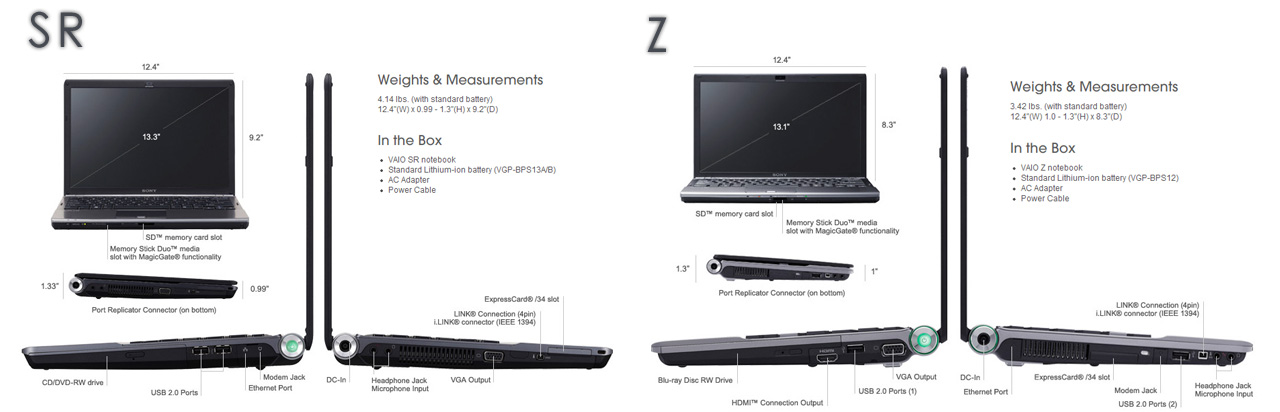
The main difference being 400 grams and magnesium alloy SR vs. carbon fibre on the top Z models.
(not sure what the cheapest Z model is made of) -
Explain the Z being for executives on the go. Is it because of the price, 1 lb. less than SR. Because I could definitely see the SR for executives as well.
What did you get for your SR?
I definitely want the Z, but it's placed me $500 over my budget of $2k with tax. I think I am going to just go for the pre-built Z570NB. Forget Blu-Ray, Forget SSD, at least I got the P9500 CPU. I'll just think of it as an SZ upgrade. -
i was referring to the outlook of the laptop more specifically.
but yea due to the Z's starting price, i would probably end up with the lower end Z if I decided on getting it. ANd if that means magnesium alloy, I might as well go down the SR path .
.
for me, whether i get the Z or the SR, the laptops aren't gonna be moved around much, it's gonna be sitted at my desk most of the time, but i've this infatuation for 13.x" laptops and vaios, else if i were to buy something that i really need specs wise, i would've went for a 15.4" macbook pro or some asus gaming laptop. -
I thought all the Z's were carbon. I guess not. Maybe that's what the "B" stands for in their models "Black" Magnesium. I didn't noticed a C on any of the Z models. Hmmm?
It says, available colors black, but nothing notating "C" Carbon. -
The europeans are not all carbon fibre it seems. Maybe the US are...
![[IMG]](images/storyImages/vgnz11mnls6.th.jpg)
-
side by side comparison
Attached Files:
-
-
Half an hour ago I got to see a glimpse of the new models, then started to read the last 30 pages of this thread, and now SonyStyle.com seems to be offline :S
Is it just me or is no-one able to get on SonyStyle.com? -
Im trying to justify to myself buying the entry level Z for $400 more than the equivalent SR... anyone else succeed at that? I Think the Z only makes sense if you go for the higher end models, and I cant afford them.
-
sonyStyle.com works for me.
Dont forget this page guys!
http://club.vaio.sony.co.uk/clubvaio/gb/en/vaio10/
its started in less than 10 minutes. -
I'm on it! 5 minutes to go.
It seems all our american friends have gone to bed now. It's time for the europeans. -
I believe they (Sony) has different numbering now. That "B" stands for Vista BUSSINESS. In Europe, only Z11VN is in Carbon fibre option, although new Vaio range is still not presented in Europe (UK and Germany).
For those who have had Crabon SZ, logical move would be top spec. Z series with Carbon, for others having "regular" SZ I guess SR will be ok as well. But I think the major difference will be in processor speed, as for European SR you can only get (well at least at this stage) 2,26GHz unlike 2,53GHz (Z series)
Cheers,
Miki -
Oh..I noticed there is nothing about the "standard" 2 years warranty on the new models, as some fellow said earlier...
he also said Z and BZ would have 3 years and SR and FW 2 years...
guess we are out of luck here, because that would be awesome. -
Z/WN is carbon fibe too.
Z/MN is not carbon fibre it seems. Strange thing is that it does weigh 1.49kg. So what is it made of?
Edit: no stream for me either. It also says afternoon... maybe it's later? -
Hm..the stream is not working for me
is it ON? -
Let's not forget the asians! The time difference is perfect!
-
Has anyone noticed something strange about the Z590 CTO?
When you go to configure the optical drive, and click more info, it says:
Optical Drive Information
DVD±R DL / DVD±RW / DVD-RAM Drive
The drive is capable of burning to Rewritable DVD media. There are currently two types of Rewriteable DVD technology: DVD-RW and DVD+RW. This drive supports reading and writing of both of these media types. In addition, this drive supports the DVD±R Double layer standard.
Blu-ray Disc Read/Write Drive
An economical option for those who would only need to read Blu-ray media. This drive gives you the same capabilities to read Blu-ray movies and data disks minus the option of writing to Blu-ray recordable media.
This leads me to believe there will be a blu ray reader option and someone made a mistake.... -
There is also another big difference between Z and SR:
Z has DDR3-1066 memory
SR has DDR2-800 -
I wonder how does that effect real life performance...
-
And the Z has the stamina/speed option. Anyone know how beneficial this is, I never had an SZ but I'll be on the go all the time. Is the 6 hours standard batttery life assuming stamina mode?
-
At SZ its about 3 hours for speed and 5 hours for stamina.
By my experience, it was about 1 hours, but thats just because I used speed mode in "office" terms... -
Well, it surely reduces the bottleneck between CPU and memory. (I mean DDR3-1066)
It has transfer rate of 8,5Gb/s compared to 6,4Gb/s of DDR2-800 -
If I understand correctly only VN is carbon fibre, WN is just black
-
Have u guys noticed that the new laptops are suddenly gone off sony.com?? the f man.
-
Hm. All new laptops are there. I just checked it
-
try sonystyle.com
-
So, can one say the Z beats the FW performance wise?
-
no, why would you saythat?
-
Not in gaming.
IMO. -
Exactly!
Office applications wise, they are pretty much the same (top models), but when it comes to gaming (if you mean gaming when you say "performance"), FW is better by far! (due to kick a$$ GPU) comparing to somewhat lame 9300M GS. -
well with two SSD in Raid 0
Z would be weaker only in GPU performance I think.
btw this two SSD in raid, is it only available from manufacture, or i can buy Z and then modify it with ssd on my own. because they sell 64Gb ssd for 700$, when you can buy now OSZ ssd 128gb for 500$ -
at the top-end models;
- FW's T9600 is just barely better than the Z's P9500, but takes a whole lot more energy I read
- Z has got DDR3, FW DDR2
- Z has got Stamina mode
- I don't know much about graphic cards; is the Z really much less good than the FW's?
- And then I remember having read the FW HDD will only come at 4200rpm
edit: I missed the two last replies above; 9300M GS is at least already better than the FZ's graphics card, right? -
Nvidia 9300M GS equals nvidia 8400m gs in performance, but yes, 9300 is 30% faster.(according Nvidia)
-
Has anybodey else noticed when you customise an FW if you choose the ATI HD3470 it says "You must select 15.4 WXGA (XBRITE-ECO™
for this option" is this a mistake (obviously the 15.4 v 16.4 is) but does it make sense that you can't choose the XBRITE-HiColor.. and if not, is the XBRITE-ECO an inferior lcd than the HiColor?
New Vaio 2008 model listing with indication prices - FW - Z - SR - BZ
Discussion in 'VAIO / Sony' started by Phil, Jun 23, 2008.


![[IMG]](http://img140.imageshack.us/my.php?image=vgnz11mnls6.jpg)