 Problems? See this thread at archive.org.
I just noticed an interesting detail..
On the UK Sony site it used to list the display as:
Display: 39.5cm LCD, 1920x1080+webcam
Whereas now it's listed as:
Display: 39.5cm LED, 1920x1080+webcam
Why change LCD for LED? Are these terms interchangeable?
I am not well versed in the display technologies, but doesn't it refer to backlight?
Could backlight affect the colour tone?
-
I've been a lurker for a while, I put in my order for an S15 Win8 model and just received it yesterday. Has a build date of December 2012.
Orangegate is there and in full force. It's VERY noticeable compared to my iPad 3, which has a near perfect screen.
I'm not sure what I'm going to be doing with it yet... It's unfortunate because I truly love everything about this notebook, but every time I see orange in place of red, it's driving my OCD absolutely crazy. More than likely will end up sending it back if I can't get over it in the next week... It looks atrocious when compared side-by-side, but not as bad when there isn't as much red on the screen. Just simple things bother me like the o in google search is an off color. Ahhh......

-
this sucks
-
Here is my Ipad 2, Sony S15 and Iphone 4S. Seems I have orange gate as well. New windows 8 model build Nov 2012. Had it a few days. Love the machine but knowing this is off will more than likely drive me crazy so will probably end up returning it.
![[IMG]](images/storyImages/scuu4m.jpg)
-
You should also return the Iphone and Ipad then as their reds aren't accurate as well, and you can easily see they even differ from one another. The Ipad one especially has a very bluish tint.
If you're seriously considering return a great laptop because of what I see in that image, I'm not sure I have the words to properly describe my feeling towards you right now. I'm sure many people with a real "orangegate" problem will follow. -
That is as red as it gets, no need to return it.
Sent from my SPH-L900 using Tapatalk 2 -
+1, that is not orange gate.
Nbender29 has an orange gate, not you. By the way, if you want to return it you're free to do it.
-
Well if you like at mike_d's photo a few pages back his screen is very similar to mine. I think while the new screens are more red than the old win7 batch, it is still not true red. For the most part it's not jump at you noticeable until you visit sites like netflix or espn which have a lot of solid red graphics.
Big picture though most other notebooks with Ips screens have a very glossy finish . Not many options if you want an Ips non glossy screen with discrete graphics. Now if the bios mod would just work on the win8 machines that would make my decision much more clean cut. -
Well, so far it seems some of the new screens are awfully orange, some others are orange-redish and lucky ones are completely red. This was my netflix page pic, red as hell.
So no conclussion here, it's just a lottery I think.
![[IMG]](images/storyImages/87237d1352820744-s15-orange-gate-fixed-20121113161923.jpg)
-
For comparison purposes here is my Netflix page. I agree with you , yours seems like actually red. Mine is more orange/ red and than there are those full blown orange.
Oddly enough this photo look more red than when looking at the screen itself. I guess I could roll the dice and exchange this one since I bought it locally, but knowing my luck I would get an orange one
![[IMG]](images/storyImages/o9ir0o.jpg)
-
All of your screens look orange to me... because I'm on last years SE 15.
Seriously though, nbender has OrangeGate, I don't think Nemesis does. -
Just bough a S15. I will receive it around Christmas. I hope I will not have this red/orange problem.
-
Kiowa, you're very lucky. That is a beautiful screen.
Good luck shootingstar, looks to be about 50/50 for whether you receive orangegate or not.
Nemesis, yours is most definitely an orange-red and you don't have as nice of a screen as Kiowa, but I don't know if I'd say that's full orangegate either. Since we're all comparing Netflix screens...

I think I'm going to be returning it. Mine is just too bad. Will Sony pay for return shipping if the product is defective? Mine is so bad I'm wondering how it even got past QC... -
huh that pic seems really bad even compared to my W7 S15... this is a pic i took just comparing what im seeing on my screen. the colors are accurate if the pic is low on detail.
Attached Files:
-
-
Refined is yours a windows 7 model? Seems like you have a great screen. If it is newer where did you purchase from? Sony or a retailer?
-
mine is a W7 model I purchased online through Sony back near the end of October (08/27/2012). all I did was run it through the basic W7 screen calibration. Adjusted the reds a little till I liked how it looked.
-
I returned mine this afternoon. Even though the photos I posted did not look horrible the best I could get was a dark orange even using a Spyder to calibrate it. I will wait a bit and see if the good panels become more wide spread.
Enjoy your machine, nice screen and you can OC the 640!! -
SVS1512V1ES purchased from Amazon(.it) just arrived. Reds look pretty good to me.
![[IMG]](images/storyImages/aclQ9akz.jpg) taken with iPhone 5 camera.
taken with iPhone 5 camera.
I don't know how to check build date. -
Yup, got the exact same kind of reds on my VAIO_SVS151290S manufactured Nov 2012. The reds are not as orange as the S15 I saw in a store last September (using PBrush @ 255). That one was pretty bad.
I must say, reds look like pale reds to me but not as orange as it used to be. Yes, slightly washed out red but not orange which has a decent amount of yellow...
And BTW, when taking a picture of your S15, from my experience, one must admit you get thousand of different reds depending of you shooting mode/camera...
Took few pictures beside my Sharp Aquos LED, two Dell, and Acer and a Gateway. As I was using Auto mode on my Pentax DSR, reds were all over the place. I could not dare sending a picture on this forum, I could not pick one without being baised. IE, if I was looking for a reds screen on the S15 I had a perfect shot for it. And if I was looking for an orangegate S15 I had one, etc...
You know what, for an IPS 1080, the weight, the 101 keyboard, the price and a SONY, I just can't complaint. -
yea all for around $800 to boot. gotenks screen looks good to me... he could def deepen the reds a little with some calibration.
-
Guys, i have to been to VAIO store in Turin (TO) here in Italy. I went there to try personally one of those S15. There were only W8 models there. The shop agent there told me that sony began with this new models a month ago. I was impressed when I did not notice any oranging reds on a full pure mspaint red.
Since I am about to buy the same model, but from an online store where it costs about 300$ less, and it will probably still have orange-gate issue i'd like to ask:
- for how long it is possible to request a FULL replacement laptop? And for what means?
- has anyone asked sony to have JUST its own panel/screen replaced for warranty? -
In the US you get a 30 day no questions asked return policy from date of purchase. Not sure if its different in Italy but I'm sure you could just use the chat feature on Sony's website to check with a rep.
-
no questions asked. That's good! No limits in how many times you can do that?
It should be the same for me even if I don't buy it from the sony official website (the warranty is the same as if you bought it from the store)
Of course, Tomorrow i will ask for sure (here is midnight now) and let you know.
Did anyone out of these 30 days request sony just a panel replacement? -
I think the 30 days apply to refund only. If you want the panel to be replaced, you will have to return it under warranty, and that is 1-2 years depending on your sales contract -- granted Sony will accept the screen is more than a "cosmetic" defect..
Also here in the UK statutory rights says you have up to 6 months to return products for refund or replacement if they don't meet reasonable quality standards. -
Anyone succeeded in doing that so far?
-
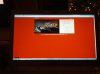
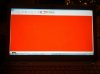
hi all... first time posting here... i just got my s15 delivered on friday. it's got a build date of nov 2012. it was not a pre-built machine but rather a cto. i've attached my netflix startup page. my reds don't seem quite as orange as others, but it's definitely noticeable compared to my vaio fw190. let me know what you guys think. picture on the right is from ms paint 255, 0, 0 red... like others have said, this machine would be perfect if not for this issue!!!!!


-
Is this a photo or a screenshot? I think you need to take an actual photo for everyone to make a judgement. Both look red to me. netflix is darker but your paint screenshot is identical to a 255,0,0 color on my Dell U30
-
yeah.. these were screenshots... i'll take some shots with my galaxy nexus....
here are pics taken from my galaxy nexus
-
Yours is pretty close to what mine displayed. Much better than some of the really bad orange screens but not quite as nice as refinedpower's. Ultimately I returned mine as it just tended to bother me. Really just a matter of preference.
I will tell you that overall those small things tend to bother me more than most. My son and wife thought it was "good enough" -
that's my problem too... i KNOW it's there.... therefore i'll look for it... but having played around with the laptop more, i SO want to just ignore it.... but i don't know if i can!!! arrrgggghhhh
-
funny thing is you never really notice reds most of the time. very few sites use lots of red because its actually a very harsh color on the eyes. its used more as an accent color.
@kdfdaw your screen looks similar to what mine did when I just got it from sony. you can probably adjust the calibration a little to get a "reder" red. I would say play around with it for a couple weeks and if you still cant stand it return the laptop. -
@refinedpower - do you have a screenshot of what calibration settings you're using to get your reds? you're right about the reds - i'm just now going thru and moving some pictures over from my external hd and for everyday pictures, it's really hard to tell the difference.
-
hmm not sure how to share my settings since W7 just has you walk through a few steps to calibrate the screen and your done. I just played around with the sliders in the W7 color calibration tool till I liked how the screen looks, not very scientific but I'm not doing any kind of photo editing on this laptop. As you can see from the pic i posted its fairly decent.
-
Since this problem will be fixed for sure within this next year (at least with a new serie of models), I like to believe that since warranty is two years long we should not worry
-
That's kinda my thought too.
Sent from my SPH-L900 using Tapatalk 2 -
Well I'm sending back mine. Sony support was really good and offered to pay for return shipping. I might just end up repurchasing after all of these problems are sorted out. I don't have an immediate need for now anyways.
-
Was it within your 30 days of "no questions asked" return?
-
Yes It was.
-
So my brand new Vaio had to go into the service shop because it was constantly restarting itself. It's been there for about a week. While she was there dropping it off, my wife mentioned the orange issues with the monitor. They had never heard of such an issue. They were shocked to hear about it and seem genuinely concerned. They have called 3 times to discuss the display and update on the progress of their attempts to find a solution. They are not taking it lightly, and I am confident that it's the first time the service shop themselves have heard about it. They have put the issue through to Sony Canada, and they in turn have put the issue through to Sony Japan.
As far as Sony is concerned, there is no fix for this at the moment. They are sending back my laptop since they've fixed the rebooting issues, but they are leaving my file open until they figure out a way to fix/replace the screen. They've read the forums and everything online and have personally seen the images posted and see that this is an issue. They have seen that there are red displays in the mix. They can not explain why, and assured us there are no different displays. There is one display that gets put in all of the S series.
Personally, I think the inconstancy of the displays is of more concern than the orangegate, because it doesn't sound intentional. If you have a red display, it sounds like you don't have a "fixed" display, as nobody has ever fixed the broken one. It sounds more like you were lucky enough to receive a defective product... that's messed up!
Through reading this thread, I am not sure how many of you have shown a human at Sony the issue. It seems like people have simply returned their computers or made phone calls, but not many that can make a difference have actually seen the issue themselves. I didn't think that showing it to the service center would achieve anything, but so far, they have been the most helpful and the most concerned about the issue so far. I am shocked considering the crappy service we received when purchasing the computer online.
I will keep this thread posted on any updates, but in the meantime, I suggest you take your computer to your local service shop and show them the problem in person. The number of people in the Official Owners thread and in this thread that are content with the orangegate suggests to me that enough people haven't complained about this issue to Sony themselves. So make sure you're doing your part by making sure someone can see it with their own eyes and raise a flag on the issue.
Fingers crossed that my next phone call from the service center is a positive one. -
Just got the S15 today and here are the pictures. (The pictures may seem orange, but it is absolutely red seeing it with your own eyes.)






Devices used:
Panasonic DMC-TZ10 Lumix
Dell Inspiron 6400
Sony Vaio S15
Sony KDL-32D3000
Sony PlayStation 3
Sony PlayStation Vita
Sony Walkman S545
I was surprised it looked orange-ish in the picture when it was clearly red in my point of view.
On another note, the touchpad IS kinda twitchy as some people had said. It was not near as smooth as the Dell Inspiron 6400 which is annoying. Playing a video on 1080p also seems like its lagging in the beginning, maybe it's the software... I still need to install VLC. Now I'm deciding whether to return it for a Dell Inspiron 15R SE, because of the touchpad I use all the time and not because of the screen because it's perfectly red. -
The rest of the pictures...



I also might say I ordered this laptop on 4th of December from Sony.nl and was made in China and shipped to the Netherlands. I can't find any date on the back of the laptop tho. -
Those pictures really don't show anything besides that you have some serious issues with your camera settings.
-
Seems like your lighting varies a lot from pic to pic. Some it looks red others orange. But all your screens vary depending on your pic. These all with the same camera?
-
Yes. Btw, I'm keeping this laptop.
-
It's a Panasonic Lumix HD camera, which is a great camera. I think it's because of the backlight of the devices that brightens up the screen so much that it'll display orange in the pictures instead of red, which actually is red.
-
purchase a new windows 8 model or refurb win 7 model?
-
Just went to a local computer store and the Win 8 S15s still show OrangeGate, especially compared to the S13 or the T right next to it.
But I actually looked at a bunch of different models, HP, Dell, Acer and Asus and they all display some type of OrangeGate. Only a few were really red (like the S13). -
Was it the S13P? If so that might not be a fair comparison because it has a somewhat higher than average color gamut, roughly 85% of sRGB. Which HP model were you comparing it to?
-
I didn't pay attention to what models... just whatever was nearby so I can compare. I did specifically look for an Envy 15 since supposedly they fixed it but they didn't carry it.
It was interesting that the ones with 1080p also showed some orange... while the ones with Bleh-tina Display (1366x768) were redder. -
Got a question guys, what if you are viewing a picture of let's say a red car or a girl in red bikini via windows photo viewer like the baywatch babes wearing red bikini, will it show as orange colored car and orange bikinis instead?
S15 Orange-gate fixed?
Discussion in 'VAIO / Sony' started by Flickster, Nov 13, 2012.


