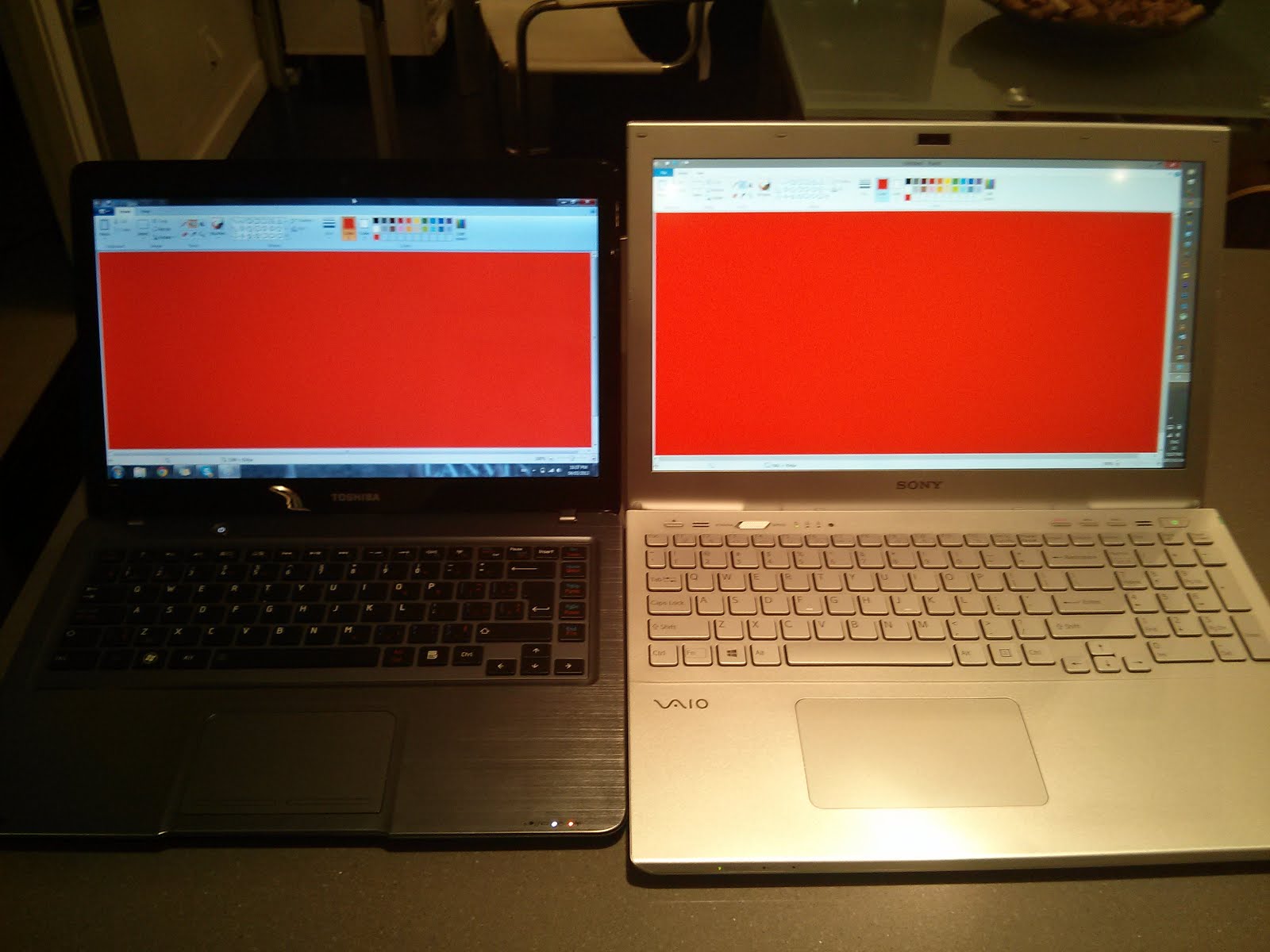
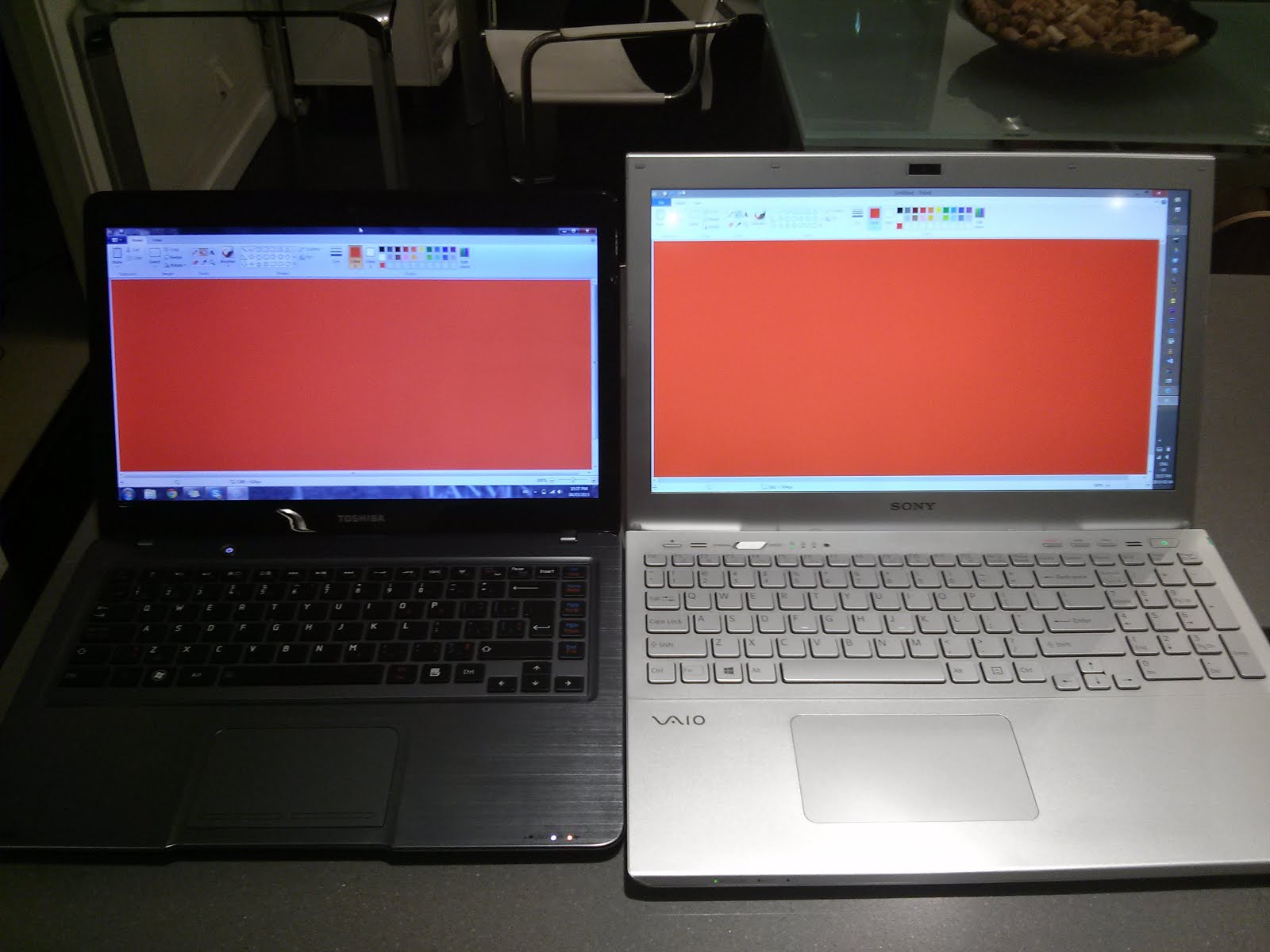
Problems? See this thread at archive.org.
Hello I'm Spanish, I will buy this sony vaio s15 internet. The manufacturer code is SVS1512Z1ES. Will this version has the orangegate fixed?
Web url: Sony VAIO S1512Z1 i7-3632QM/8GB/1TB/GT 640M/15.5" SVS1512Z1ES.ES2 Portátil or Sony PORTATIL 15,5" SVS1512Z1ES.ES2 ALUMINIO CEPILLADO INTEL I7-3612QM 8GB 1TB INTEL HD GRAPHICS FRE SVS1512Z1ES en Acuista.com
Thank you very much, I'm a student of architecture that is very important to me.
pd- sorry for my english.
-
There is no fix for Orange on S15s yet. You can either get really ugly orangy reproduction or muted red reproduction. I had two new S15s within last two weeks and they were still showing orange on large red areas. If red is saturated it will be shown as orange, if it's not saturated then you will see it as muddy red.
Mind as well it's not the red that are the problem, but pink as well, violets and all other colors that have red in it. Whole RGB gamut looks muddy on S15 anyway. -
Does the orange-gate can fix by patch/driver ? Because I found this Sony Vaio S15 Orange-gate - Sony Community - 44313
Thank ! -
It's a hardware/screen issue... not drivers.
-
El primero es exactamente mi portátil, pero comprado en Acuista. Las capturas que le hice fueron las que abrieron este hilo porque en ellas se ve claramente que no hay naranjas y sí rojos perfectos en él. Tienes las imágenes en la primera página. No te garantizo que todos los que vende Acuista sean así, sólo hablo del mío y de mi caso, pero si tuviera el problema siempre puedes devolverlo.
Traslation:
The first one is exactly my laptop, but bought in Acuista. Captures I made were the reason for opening this thread because in them it is clear that there is good red and no orange. You have the images on the first page. No guarantee all Acuista laptops are well, I speak only of myself and my case, but if you have the problem you can always return it. -
Muchísimas gracias kiowa, ya he realizado el pedido. Pondré fotos de la pantalla de mi s15 cuando me llegue. Por cierto, ¿puede ser que los modelos europeos sean distintos a los americanos ? porque he visto que hay mas gente con el orange-gate arreglado, pero no todo el mundo.
pd- Pccomponentes me ha contestado, me asegura con total seguridad que el s1512 que venden no presenta el problema de orange-gate.
translation.
Kiowa Thank you, I've placed the order. I will put photos on the screen of my s15 when I arrive. By the way, can it be that European models are different from Americans? I have seen that there are more people with the orange-gate fixed, but not everyone.
pd-pccomponentes safely assures me that the selling s1512 does not present the problem of orange-gate. -
Ok, post pics when you receive the laptop. And if something is not correct return it to pc componentes. I returned an SSD disc to them with no problem but obviously you have to pay the shipping cost.
-
I bought a SVS15123CXB from B&H and it appears to have orange gate. I first noticed something was off when going to CNN and then found some of these threads. Here is a picture that I took compared to two calibrated Dell monitors.
-
My sony vaio s15 has orange-gate fixed.


The comparison is with a laptop hp 4520s.
Model Sony Vaio: SV1512Z1ES -
Congrats, it seems "spanish" S15 has not orange gate present.
-
Looks like I've got anti orange gate. My old aspire one on the left, new S15 on the right. Same image.

-
Tocirahi- So your screen's colors still good then? Just wondering since I'm thinking about buying an S15, but I'm really worried that I'll end up hating the screen. When and where did you order yours? Just wondering.

-
B&H probably has old stock they are getting rid of... your best bet to get a non orangegate is to buy from Sony direct.
-
You just got less orange screen They've been around for some time, mine is like that.
-
I'm on the phone right now with Sony tech support. The guy admitted that Orangegate is a known issue, but he said it's a problem with the video card, not the screen. So I can send it in for repair and get the video card replaced if I want.
Does that make sense? I've only ever seen Orangegate referred to as an LCD issue, not a video card issue... -
Nah the orangegate is an issue on other laptops that have the same LCD but different GPUs, HP envy 15 used the same screen and had the same orangegate issue until they got a newer version of the LCD from LG.
-
I posted this in the main S Series owner's thread, figured i'd post this here as well.
Just got my S151290x a few days ago, went ahead and checked whether or not I have the orangegate issue.
You be the judge...
Same images from same website on for both ferrari and netflix images.
Left: first Gen MacBook (2006 model I believe), so DARK, oh how technology has changed !! LOL
Middle 2: Samsung SyncMaster T220 & Samsung Galaxy Tab 10.1 (GT-P7510)
Right: SVS151290x
![[IMG]](images/storyImages/2013-01-24233830.jpg)
![[IMG]](images/storyImages/IMG_20130124_233946.jpg)
![[IMG]](images/storyImages/2013-01-24235830.jpg)
![[IMG]](images/storyImages/2013-01-24235904.jpg)
To me I think I got lucky and DON'T have the orangegate issue! =) REDs look as RED as they can be in my opinion. -
m.lam, where did you purchase yours? I'm thinking/hoping Sony Direct might have purged it's old stock.This is the only thing holding me back from buying.
-
Also, has anyone tried to color calibrate the display? If so, what kind of results did you get (sRGB/AdobeRGB gamut)?
-
I'm also interested in bhart11's questions since this is also the only reason I've been holding back on buying this computer!
-
Just got my S15. I haven't even done the Orangegate test yet.. but I thought I would share a discovery I just made. I downloaded the Netflix logo image that everyone is using, and It looked Orange... on a DIFFERENT monitor. I thought.. wow that's odd. This is a good monitor. Then I looked at it in my browser. RED.
It turns out that Windows Photo Viewer is doing something terrible to the colors of the Netflix logo. Check out this screen capture.. these two windows are side by side on the same monitor, and displaying the same PNG file. One in the browser and one in Photo Viewer.
Just MAKE SURE you're comparing apples to apples.. because maybe some other people used Photo Viewer as a comparison tool.. which seems to mangle the colors for some reason.

-
I bought mine from Sony.com (US site)
My laptop was shipped from China as it was a CTO. So I don't think it was old stock...but I could be wrong. -
I'm assuming CTO = configure to order? That's good to know because that's what I would be doing too.
-
I've tried calibrating the monitor with Huey Pro and it made it worse. It basically turned everything more orange. I think it's trying to compensate for something that the screen is physically impossible to do (display red).
-
Will anyone post a color profile (icm-file) that came along with s1512, so that we can analyze the gamut? Or better yet post a calibrated icm-profile?
-
I understand you want to try fix this issue/make it better but... do you think this thread would be 18 pages long if all that was needed to resolve the issue was a calibrated icm profile?
It is a hardware problem with the physical screen, no amount of calibration or analysis will make an orange-gate affected screen display true reds correctly, it's simply not capable of doing so.
Sometimes trying to compensate for the off reds makes all the other colours even worse. -
The point is that the original or calibrated color profile would give a much better understanding of color gamut that any side-by-side pictures. At least, it will show that the matix in this laptop is the same as in envy, previous Sony S models and some lenovo models.
Since I don't have this book and can't get the icm-profile by itself from the official site, I humbly ask to post one so that I can make my final decision of whether to buy this device or not. Thanks! -
I understand where you are coming from and it's great that you are doing all this research, I wish I had done the same before I purchased the S15.
I personally thought the S15 was a great laptop in terms of weight and general good build quality. The screen also has a fairly good contrast ratio but unfortunately the orange-gate issue really let it down. Had it not been for that problem I would of kept my Vaio S15 but I couldn't stand looking at images which I knew should be a rich red but looked an orange-red.
I returned my S15 for a full refund after 1 week so I no longer have it to give you a profile but I do however know where you can download a calibrated profile of the screen:
ICC Profile created using a X-Rite i1 display 2 - Download here (save as .icc) : http://www.notebookcheck.net/uploads/tx_nbc2/Monitor_01.08.2012_1_01.icc
Source: Review Sony Vaio SV-S1511X9E/B Notebook - NotebookCheck.net Reviews - If you scroll down towards the bottom of the review, they talk about the display but don't mention the orange-gate problem.
I ended up purchasing a Lenovo W530 with FHD 95% Adobe Gamut display. No orange-gate and accurate colour reproduction but it's not IPS like the Sony which had richer colours and better contrast ratio but a narrow colour gamut which is an issue if you work with Photography/Video editing.
I can tell you now, that unless you are one of the lucky people who receive a display without the orange-gate issue, the orange-gate affected display is not like your standard Sony S13 or Lenovo W/T model display. It is a hardware fault.
Hope the icc profile helps you make a decision. If you can look beyond this issue, it is a good laptop. -
Yeah, you can see that the gamut completely fails to cover any red whatsoever.
![[IMG]](images/storyImages/35cf9be2ac.jpg)
-
Correct, It dismally fails to cover the REDS, GREENS and MAGENTA, two of the three primary colours and that is vs the sRGB gamut profile which is not as wide as Adobe RGB. In other words, if you care about accurate colour reproduction / do any type of video/photo editing work, run away from this display.
-
Thank you for the profile, yet it is for 1511 and as I understand people insist that the late Y2012 editions of 1512 don't have the orange-gate problem.
This picture looks no different than envy, sony se and lenovo gamuts. The same LG matrix. -
Sorry but there seems to be no confirmation yet of a orange-gate fix with the late 2012 models. It seems to be totally random, some people have received notebooks with screens that don't seem to have the orange-gate issue while others have received one with a later production date but with the orange-gate problem.
In other words, it's currently a gamble. -
So it would be interesting to see how the gamut of the non-orange-gate screen looks like and what has been done to improve the issue. In my understanding there shouldn't be any colors in green-yellow spectre that exceed regular sRGB limits. Otherwise it probably would be the same 60-70% of sRGB.
-
Just got my S15 CTO yesterday and I'm happy to report no orangegate. Reds are crisp reds and I think this has an excellent screen. I can do screenshots if people want but I'm 100% positive this display is producing reds.
-
I posted a message on this in another thread back in November. In October, 2012 I bought a Vaio S 15 from the Sony online store. I added more RAM and the 2/128GB SSDs. I state this because it was custom and it was not a ready to ship version. The colors on my machine are awesome. Absolutely no problems with oranges/reds and I did a lot of testing when I first got it. I have had it several months and I am still very impressed with the screen and overall machine.
My friend bought a Vaio S 15 in September, 2012 from Best Buy. His screen is great too, that's why I decided to get one. Since he got his in September from Best Buy, Sony had to fix at least one supply chain on newly made machines around August/September or before that.
If you get an "orange" version today you are getting an old panel and need to return it ASAP. Below is the link to my original message. I really like the machine and I highly recommend it.
http://forum.notebookreview.com/sony/673678-vaio-s15-orangegate-again-14.html#post8932939 -
Hello!
I got my S15 in December too, bought from a secondary store but with Sony warranty and never used.
I have orangegate problem and possibly want sony to change my panel. Even if I DON'T WANT WIN8 installed.
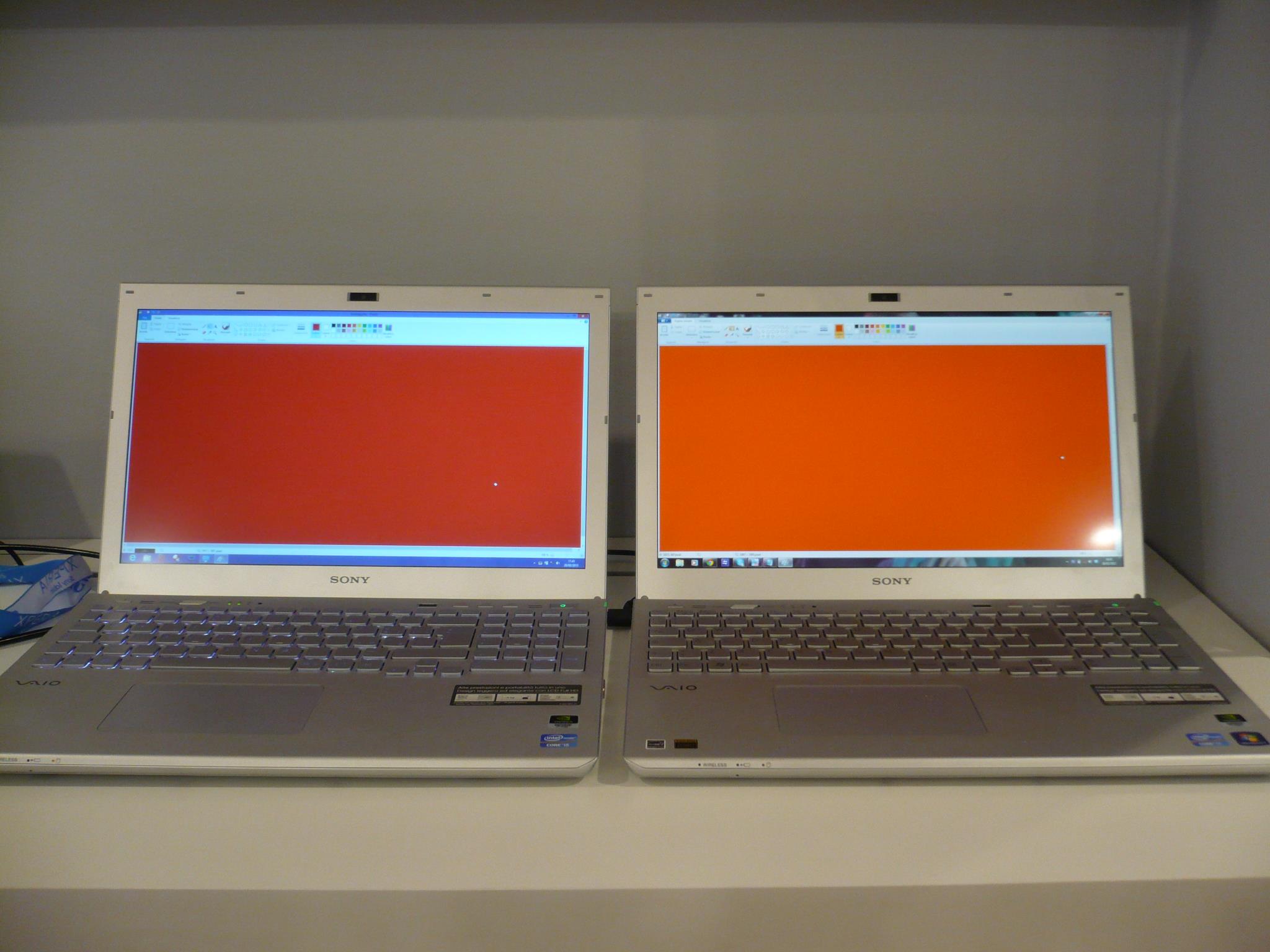
As proof, now I am in Turin and asked to the Vaio Store (the only one in Italy) to get some proof of the problem. They were not aware of it! After that, they "kindly" told me to never come back, since I had to contact the sony assistance.
AND NOW I WILL, with this
![[IMG]](images/storyImages/857647_505251446187617_478664253_o.jpg)
THIS was taken in a VAIO store. It compares a WIN7 with a WIN8 S15 2012. At the store they had still a WIN7 vaio and it suffered from the same issue too!
Now I am hoping sony will listen to me. I went to a VAIO store after all!Attached Files:
-
-
FYI, no orange-gate on new SVS13A2 either (TN panel).
-
The 13 never had that issue - its color gamut is fine, it's just everything else that sucks
-
isn't that the truth...
-
OK, it's been months since I've posted here about this issue, but it's been months that I've been without my computer.
My rebooting issue was not fixed as they had said it was, so back my computer went to the service center. They had kept it so long the first time that I was past my 30 replacement limit. They had it for almost a month again this second time before I got a call from Sony of Canada saying they had been looking into the Orange Gate issue. I explained that my computer was still in the local service shop for other issues. He looked up the service order and noticed a new hard drive and motherboard were ordered (interesting, as no one told me they were replacing them). The wonderful man on the phone, on the other side of the country said not to worry about it, he was cancelling that service order and ordering me a brand new computer!!! He acknowledged the Orange Screen was a huge problem now that he's looked into the forums online, and assured me if my new computer came with an orange screen Sony would do everything they could to fix the problem, even though they can't tell were the problem is coming from.
Well almost 2 months after that, my computer finally came!!! Hahaha!! I originally ordered it in the middle of Nov 2012, it's March 2013 and I finally have a working computer. No wonder people buy Apple products
It's running so good! And even more importantly, the display is definitely more red that it was on the last machine they sent me. It's still not a perfect red, but it's definitely red!!! I will provide pictures soon.
To refresh, I have a custom built S15. The sticker on the bottom confirms that it is a Feb 2013 build. So, red panels are definitely available on a custom order.
Call Sony customer service and have them replace your panel. According to the man I spoke with, they should be willing to do this. -
Do you guys know where I can find a LCD replacement panel for a SVS15? Mine has brighter spots due to the pressure of the VAIO logo, light leaks and of course orange gate.
-
These pictures were taken with my nexus 4 which tends to produce warmer colours. The images aren't a great representation. The display it's being compared to isn't great either. When netflix images are compared to my nexus 4 ips display, the nexus definitely produces more "red" image. Still an improvement from my first machine, but still not as good as some of the images posted here.
First with Auto WB
And the second with "incandescent WB"Attached Files:
-
-
In my new SVS1513 there is no trace of orange problem as described in this thread, is just a good IPS panel
-
Well I know my question is not related to orange gate problem, but as you are an owner of the new 1513 series, please may you make a little benchmark with a SATA3 ssd and report if they finally solved this problem ?
Would be very nice if you can, because I'am still hesitating to buy a new 1513 serie aswell.
Many thanks! -
Still sata 2 (checked before whit a benchmark), i installed a samsung 840 250gb ssd but in normal use i can't see difference between sata 2 and 3.. So in my opinion is a theorical problem.. Sorry for my bad english
Sent from my iPad using Tapatalk -
Do you mean that everything else about the display sucks, or the build quality other than the display? I was looking at the 13.3" model, so it'd be a great help if you could provide more info.
-
Your english is good
Thanks for sharing this information.
By the way, I ordered a screen calibrator recently and will receive it soon, so if you guys are interested and once I will receive my new 1513, I will share my ICC profile for the S15 (without orange gate bug, .. I hope!). This IPS panel needs to receive a proper color calibration I guess
Stay tuned! -
Build quality is the same as the S15 (if not a bit better because of size - less chassis flex). The display is "OK", not terrible but not as good as it should have been at that price point. Otherwise it's a very good laptop.
-
Hi Guys,
I've just received my Sony SVS1512DCXB (Win8) from B&H. I worry about it's color accuracy.
Sometimes, just for some seconds, I feel the screen light flickering (looks like 20Hz screen), specially when a notification pops in the screen and the screens gets dim automatically!
Would you please tell me how I can check it's red & orange color accuracy in a technical way (not comparing with other non calibrated screens)?
Thanks -
I've been on the hunt for a orange-gate free S series 15.5" with no luck. I went down to my local Sony store yesterday and they happened to have one last windows 7 SVS15113FXS in silver. I take it home.....orange-gate. I returned it today with the intention of exchanging it for a Win 8 model despite not being a fan of Windows 8 and knowing there is no overclock for the 640 LE. However, before I perform the exchange I decide to check the 2 display models they had out on the floor just to confirm that these new Windows 8 have new panels......both display models had orange-gate. No exchange for me. Tonight I got home and found a decent Refurb SVS151190X with Windows 7 on SONY.com and ordered it. Here is to hoping it has a good panel!
S15 Orange-gate fixed?
Discussion in 'VAIO / Sony' started by Flickster, Nov 13, 2012.