Problems? See this thread at archive.org.
Somebody help me with the WEBCAM! STILL DIDN'T GET IT WORKING...!
-
Savio86, try the drivers in the first post.
If none of those work for you i think the below could be your problem may be.
If you've not tried this then give it a go.
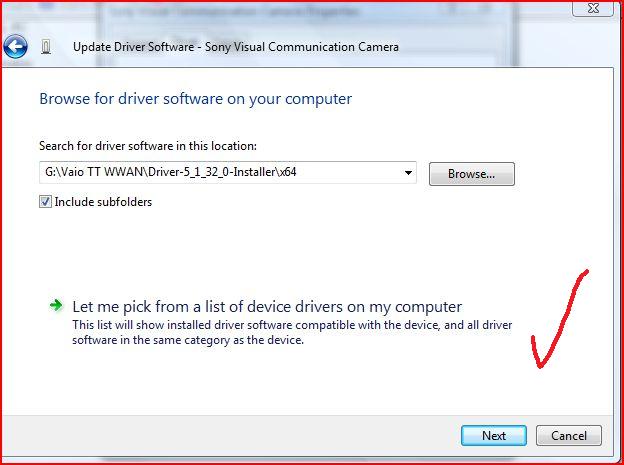
Browse my computer for software-->Let me pick from a list of device drivers on my computer--->have disk-->then select one of the drives and try it.Attached Files:
-
-
i did but it doesn't work! i used the file on the pack...
-
Hi all,
I read the whole thread and I am still not sure where to go.
i am trying to install Win7 64bit (since I have 8 GB RAM in there) on my SZ71 WN/C
@Rachel: I read that you got a SZ71 as well and you had it working except for the webcam. Could you tell me which drivers and versions you exactly used? I've tried various combinations now and could not get WWAN, camera or sound working properly. Neither the function bars.
As much information (or maybe you even got the files laying around) would be very helpful and much appreciated.
of course, if anyone else can help, you are very welcome as well!
Thanks for your help already
Andreas -
I already replied to your post with the drivers i used.
Remove whatever smart network you have installed and restart. This works for the SZ7.
http://support.vaio.sony.eu/computi...165709.exe&m=VGN-SZ71WN_C&ip=EP0000165709.htm
Put the wwan on.
Go here and download the connection software and install it.
http://www.option.com/en/support/software-download/modules/gtm378e/
Go here and download the wwan driver
http://dls.update.sony.net/pub/oth/64/EP0000144650.zip
Update the modem in the device manager and the unknown devices that come up with the wwan driver above.
If your control centre and ultilty software is installed it should work.
If your looking for a ready made package to download i suggest also try the SZ6 thread that i linked to in the other thread you posted in today. -
Apologies Rachel, I didn't see your reply to my other post. Didn't want to hassle!
I will try what you suggested. thanks! -
I tried using the 19040 drivers here - the ones prepatched. Checked my registry settings as per Nvidia patch file. Brightness controls work OK until I close and re-open my lid, then I have to restart again. Does anyone know how to solve this problem? I'm on an SZ-583/N (equivalent to 650).
-
Hi Rachel,
thanks for the advise. Unfortunately it didn't work.
I installed everything and then the smart network 2.1 as you advised.
After the reboot, the Smart Network starts up but with no buttons (as described by others).
So back to square 1. Will try a couple of other versions now.
-
Well it worked for me flawlessly. I don't know why you have a problem with it. May be it might have to do with some of the other software you have installed but i don't know.
I hope you find a solution to your problem. -
can anyone make a tutorial with all the drivers and utilities for SZ650 (Windoes 7 64bit)???
I used those files in this thread and it didnt work....
Camera, brightness keys, shortcut keys, fingerprint reader, sd card slot...all not working
please help out thanks!! -
sorry to double post but does anyone has all the drivers etc. for Win7 32bit and 64bit for SZ650??
-
shungo, please see this thread for possible helpful links.
A lot of this is just trial and error and you may not see a complete guide posted for your model but one similar etc.
http://forum.notebookreview.com/showpost.php?p=2471168&postcount=1 -
thankyou for the links Rachel!!
Ok now i finally got the bluetooth to work. Camera, FN Keys, and S1, S2 keys, and the fingerprint reader.
for the Camera, it say VCC 7 in Device manager already but when I go on msn, it won't show up.
for the finger print reader, it give me this "fingerprint reader is not connected. please connect the reader to USB port" everytime i turn on my laptop.
for the FN, S1,S2 keys, they never worked from the beggining.
and also, the memory stick pro duo slot and sd card slot never worked too.
maybe I am doing something wrong or miss some steps but i don't really know. can anyone help me out?
thanks -
The same happens to me with the 19040 drivers, I suspect it's a power management issue that is causing a conflict with the X64 drivers... I suggest removing the sony power management software and see what happens..
Those having problems with the webcam, as Rachel says, use the drivers from the first post. Myself, i'm using my unsigned drivers (also in the first post) and my CAM works.. Sometimes, it only works in B&W and this has baffled me.... but I won't loose any sleep over that minor issue...
All the best... -
As Rachel says, use the drivers from the first post. Myself, i'm using my unsigned drivers (also in the first post) and my CAM works.. Note, you have to install this driver by manually selecting it (see Rachel's post above), then do a reboot..... Should then appear in MSN.....
-
Ahh. If I remove the Vaio Power management software won't I lose my brightness keys all together? Oh, I'm on 32-bit... I upgraded from Vista 32-bit.
-
I've just tried this and affraid that it does not work...mmmm, so you're on 32bit not 64bit...this is interesting.. I thought it was probably down to the 64bit Nvidia driver... seems not now..... I'll try a newer driver over the weekend and report back.......
-
First of all, let me say THANK YOU to everyone who has gone through a WHOLE LOT of work and took the time to share their results with others!!! Especially thank you to Leslieann, Rachel, and James007Bond! It is greatly appreciated by me, and Im SURE countless others.
Im someone who uses a lot of information on boards like this, but doesnt typically contribute. (I know, that makes me a leech ) But Im going to take some time and try to make up for that here.
I am working off of a SZ79GN (its an international model I bought while overseas), as far as I can tell, it has identical hardware to the SZ750 including the exact same video card signature.
I have installed both the 64bit and 32bit versions of Windows 7 and came across similar problems in both. Specifically:
- Heat & noise issues (fan is working hard),
- and brightness F6/F7 stops working if the lid is closed then opened.
Interestingly enough, running windows 7 64bit, I do not seem to have the camera problem others have mentioned. My camera DOES work even when I completely shut down the machine, then turn it back on again. No need to change drivers.
Anyway, I wanted to share what I found to fix the brightness issue (as it appears others have had this problem as well), and something to help with the heat issue:
===========================================
Brightness F6/F7
After hours of searching, I found a few vague fixes that werent very clear, and that I didnt see posted here. So heres the solution that FINALLY got it fixed for me.
The problem seems to be related to the closing of the screen putting the computer into a type of sleep mode that messes up the controls. Heres the fix:
1) Go into [Control Panel] then [power management] and set the power option to do nothing when you close thelid.
a. Note: there appears to be reports that this will work for some, but wasnt successful in fixing the problem for me
2) Go into Device Manager. There, under Services youll find a device called: ACPI lid. We want to get rid of this, because for some reason this thing is the source of the problem, and it isnt really needed. Right click on the ACPI lid and select update driver software Browse my computer for driver software let me pick from a list of device drivers on my computer . Here you need to UNCHECK Show compatible hardware under the Model area, scroll down to the bottom, and select Volume Manager Next and finish the update.
a. That should do it. It takes out the problem driver (which again, doesnt appear to be helpful at all) and now when I close the lid, the screen turns off, but I dont lose the F5/F6 controls
===========================================
For the heat/noise issue, I found this thread here: http://forum.notebookreview.com/showthread.php?t=235824
It talks about how to undervolt your processor so it doesnt consume as much power which gives you both longer battery life AND less heat (quieter operation).
With my 2.5mhz intel processor, starting voltage was around 1.135 volts. I have tested my processor stable at .9875 volts at 100%cpu. This dropped my processor temp during a sustained full load CPU test from a max of 83 degrees to a max of about 60 degrees without ANY loss in performance. And it runs much quieter. The setup takes some time, and some basic ability of following instructions, but it works! And it is giving me an additional 45 min in battery life.
===========================================
I now have running a sweet, up to date, cool, 100% fully functioning Sony SZ running Windows 7 64bit, and I can put off the $2,500 cost of upgrading to a Z for another year and eventually get more bang for the buck.
Leslieann, can you please add these to the install guide (your first post), at least the F5/F6 solution, as I have seen many people come across this problem. That is, of course, unless there is another or better solution that exists. After several hours of searching, I have not been able to find one.
I hope this helps someone! And thank you again to everyone. I love you guys!
-
I'm going to update the guide in the next week or so, I will add some of this to it when I do.
I'm currently experimenting with Linux, but I plan another round with Win7 next week.
Goals:
Settle the camera issues.
Update the mice drivers (with the menu/scroll options)
I also have some graphics tweaks to add as well to stop some annoyances. -
A little blurb on ACPI:
The acronym ACPI stands for Advanced Configuration and power interface. ACPI Function Key Handler applies to all types of computers. The ACPI Function Key Handler may be defined as an industry specification that is used for purposes of handling the consumption of power in desktop and mobile computers. Accordingly, it gives details on how the output/input systems, operating systems and other peripheral devices communicate each other on the use of power. For instance, it is with the help of the ACPI Function Key Handler that a computer is able to enter to stand by mode when not in use and get back on when the user presses any key on the keyboard.
In order for the ACPI Function Key Handler to work effectively on any computer, such components as the operating system, the mother board plus input/output devices need to be present. Furthermore, the ACPI Function Key Handler may not work on a user’s computer unless the BIOS is installed with the appropriate ACPI software. ACPI Function Key handler may also not work if the operating system in use is compatible with ACPI....
I personally prefer my system to go into suspend when I close the lid, as that's how I have it configured.... however, coming back to whether it's ACPI related or power related, what's simply bizzare is that this issue seems to affect only some of us? What do our machines have in common that the non affected machines have or vice versa? I looked at the ACPI lid in the device manager and it's using a Microsoft driver 6.1.7600.16385..... is this the same on those working machines?
This mystery deepens..... lol -
Guys !
This is an amazing guide !
I did tried couple months a go a windows 7X64 at my vaio sz-780n.
I quit trying after 80hours on it (and finalize it without camera working, shortcut keys not working, wwan not working and HDD security not working).
Now i'm gonna thinking in another trial !
Leslieann, do you have another post about your linux experience ?
BTW .. i'm running actually the original configuration back with a 320gb HD (7200rpm) and 4gbs ram in a 32bits vista business (only recognizes 3.2gbs).
Cheers,
Fábio -
No Linux guide yet, and probably never I don't know.
I was just toying with it mostly, Ubuntu 9.10 64bit runs great on it. I haven't checked the camera or WWAN, and the lid doesn't seem to do anything when closed I have to check, but other basic functions work in Intel mode or Nvidia, though to use both takes some work..
There are some guides out there describing how to deal with the hardware switch and fix the lid close problem. So really it works as well as Win 7 pretty much. -
I friend of mine has ubuntu 64 running in a HP dv2000. The only thing that looks not working well is the wifi network and the camera. All the rest work 1000X better and faster than win 7 64bits (that he already tested with the same issues on the same HP laptop).
Besides, I'm wondering if your guide would be helpfull to get my vaio 780n 99% running ! I'm pretty excited to get it next weekend and try it again !
There is a final solution for the camera issues ? Have anyone tested the memory stick card reader and SD reader ? Has some one also tested the HDD security software and the pcmcia card slot ?
Tks,
Fábio -
On Win7, yes all of those work.
-
Great step by step...Its helped a lot. I have had a few problems with the sd reader and was wondering if anyone else has been able to view SDHC files. For a while I thought it was a driver issue, but I tested a regular sd card it worked perfectly. It seams sdhc isnt supported on the 750 with W7. I cant remember if it was ever with Vista? Has anyone worked out a fix for this and was it ever available on Vista?
Thanks! -
You're welcome.
The Expresscard reader does not support SDHC, no matter the operating system.
There is a newer version of it that does, on occasion you can find them on Ebay, but it's cheaper to just buy a generic. -
I tried installing the 64-bit nvidia driver posted here, and i have a SZ650. when i tried to install, it says that the program is not for this os (i think) something along those lines. has anyone encountered this and has a fix?
-
Leslieann,
I'm going to do a fresh install of Windows 7 and am wondering which version you recommend with the SZ691N/X - 32-bit or 64-bit. I upgraded the RAM to 4GB and used RAMDisk to allocate 1GB of that to a virtual disk that I use as my pagefile, as Vista 32-bit would only recognize ~3GB. Is the install on Windows 7 32-bit easier than the install of the 64-bit version on the SZ6? I'd like to get everything working, especially the camera, FN keys and S1/S2 keys. I am willing to disable UAC.... I've read this may help. -
Merry Xmas everyone....
Yes I know it's Xmas day and i'm online.... lol
Anyway, I installed new video drivers version 195.62 using a modified inf file and my system is very stable. These drivers have some Adobe related fixes so I recommend this new version if you have any stability issues with Adobe products....
I noticed my system was really slowing down, so I went through msconfig and knocked out those startup processes which I figured I did not need.... This improved startup and shut down times......
The F5/F6 issue is still there when the laptop awakes from sleep mode.... I now beginning to think i've missed a step and I reckon it's coz I did not install the drivers when the laptop is in stamina mode....any thoughts on this? -
Gin you need to use a modified inf file to install that GRsphics drivers.... Just place that inf into the setup folder of the graphics driver.... see Leslieann's first page on where to get this...
-
awesome james007bond, thanks!
I also have another problem, which is the Alps touchpad program. When I install it (or at least try) it installs very fast (less than 1 second) and when i restart the system, the scroll doesn't work. Any suggestions on how to fix? -
My router is acting up and my server is down, which has my files...
In the file pack, I included the wrong alps driver this last time. I think this is it.
http://www.mediafire.com/?zgv2gmwzzjm -
Hey leslieann,
I tried the link you gave me, but the driver didn't work. It installed in less than a second, but the scroll still doesn't work. I also tried setting the compatibility to Vista, but no success. I'll try restarting, but i doubt that will fix it. any other suggestions? If i go into device manager, i don't remember what im supposed to look for to manually update the driver. -
Try going into the sub-directory and running it.
I still don't have my server up, so I can't be sure. -
Hey guys, im new to the forum and i need some help with my VGN SZ740. I've upgraded my OS to Windows 7 ult 64 bit clean install (i guess thats why im posting in this thread
) and encountered some problems. The answers are probably in between page 1 to 24 but forgive me but thats alot of pages for me to read thru
. If anyone can provide me a page number or a link i will be happy with that and thank you.
list of my probs.
1. Camera: Device manager states "Imaging devices" - "Sony Visual Communication Camera VGP-VCC8".
I right click it - properties and it says that the drivers are up to date and the device is working properly.
The problem is when i use AIM to use webcam it doesnt showing anything. When I use VAIO Camera Capture Utility it also shows blank (it used to be "no input" but now its just blank).
2.Battery: For some reason it won't charge past 50%.
3.When i used vista i can hear and talk via AIM, but now i can't. I can record though via windows accesories and play songs. Is the problem with AIM then?
Anyway, again, sorry if im being lazy about browsing thru 24 pages. Any help would be appreciated i need this laptop at 100% in 5 days! Im going back to IL for school soon!
-
leslieann, i also tried going into the subcatagory and installing it there (i believe its called dpinst.exe). tried it there, didin't work.
-
You could at least have bothered to read the first post, it explains everything except the battery. I think it even mentions a page discussing the camera, though the camera is explained quite thoroughly in the original post. The whole thread can be read in under 45 minutes probably as many posts are quite short.
The battery is only charging to 50% because you probably set it to 50% on battery care when using Vista, this setting will remain until you use another copy to turn it back up. The only Battery care that runs on the SZ with win7 64bit that will work is mentioned, again, in the first post. If you did not set battery care to 50%, then your battery is toast. Vista adjusted the battery capacity to match the battery care setting, so even though you were using only 50% it showed 100% full, Win7 doesn't do that. If you set it to 50% it shows you at 50% and that it is no longer charging. The reason is that WIn7 reads the actual battery, not what Sony's app tells you.
Sorry, but if you needed it 100% in a few days, you probably should have stuck to Vista instead of installing an unsupported OS and then expect everyone else to do the work for you when something goes wrong. -
I did read the first post, like i said, the driver for the camera seem to be "working" i just don't understand why it would only show blank screen when i test it with VCCU.
As for the battery, it was set to 80% when i had vista..
well i guess ill get on to reading while im at the base lol. thanks -
There seems to be a new Vaio Update App on the Sony website under the Windows 7 tab for the SZ71.... Mmmmm i'm downloading it now and will see what it does...... (if anything)
-
Update: Ok that Vaio update utility is a complete waste of time for me as it found no updates.... lol. (no surprise there I guess)
-
I would image the drive and put Vista back on just to see what the battery is doing. Something sounds fishy there.
The Vaio camera utility will ONLY work with an actual Sony encoded driver. Even if you use the factory Ricoh driver that Sony modifies, it will not work.
The Sony drivers re-initialize the camera on startup. Win7 64bit, does not do this but Vista and XP did which is why the Sony driver doesn't work. It was a last minute change to Win7 64bit. I think RC1 was the last version to have this function. -
Ok, i guess i was testing it with the wrong program. I just want it to work as a webcam. Do you know if there's a program i can use? AIM and YIM didn't work.
Sorry if im asking dumb questions. I used to "mess" around with these stuff before and I remember and forgot some. I really appreciate the responses though
-
leslieann
you might wish to link to some other helpful OS related threads at the bottom of your post. Those that may not get an answer they need with this thread if the own a EU model or a SZ6 may find it helpful. It may also cut down on some of the repeated threads and questions.
100% Working Clean Vista x64 Install on SZ6
http://forum.notebookreview.com/showthread.php?t=222729
Windows 7 Build 7000 on my Vaio SZ680
http://forum.notebookreview.com/showthread.php?t=336895
SZ6 W7 32bit
http://forum.notebookreview.com/showthread.php?t=428592
SZ7 webcam alternative post
http://forum.notebookreview.com/showthread.php?t=430604
VGN-SZ71 WN/C with Windows 7 x64 (64 bit)
http://forum.notebookreview.com/showthread.php?t=433043 -
Hey Rachel, the "sz7 webcam alternative post" worked perfect for me. Thank you very much. I appreciate your help too leslieann.
-
Hi, I am new to all this, but I don't really understand how to do all this =/.
I have the VGN-SZ660n, and I need help with the webcam, audio, and mic.
My Webcam doesn't work and I don't understand how to fix it, my audio is all weird, and my mic doesn't work so well... please help.
Thanks -
lesliann, i have it almost fully operational, but the annoying thing is the scroll (i want to be able to scroll with the mousepad). were you able to find the working driver?
-
Try this, it's the alps driver for the VGN-Z790.
This is likely what I used last time.
I'm not in a position to re-load the laptop and test it, so I am trying to re-trace my steps.
I will add those Rachel when I have some time. -
lesliann, did you post the link somewhere? I can't find it
-
I could have sworn I put the link in.
http://esupport.sony.com/US/perl/swu-download.pl?mdl=VGNZ790&upd_id=4377&os_id=36 -
I'm new to this forum. I have Vaio VGN SZ-75GN running Vista 32bit. Lately, I add memory to 4GB, and I'm planning to fresh install with Windows 7 Professional x64. I've already installed Win7Pro x64 in 2 HP notebooks succesfully without any unknown device and both are working normally.
Reading this thread globally, I think that isn't easy for SZ-75GN to working properly using Win7 x64. Sony doesn't officially support it to work with Win7 x64, does it?
Hi Leslieann, do you think SZ-75GN will be 100% working with Win7Pro x64? Thanks for your kind information.
Regards,
LimLim
Sony SZ750 Win7 64bit clean install (should help on other SZ's)
Discussion in 'VAIO / Sony' started by leslieann, Oct 24, 2009.