 Problems? See this thread at archive.org.
I flashed the 950 bios and did some testing. If you want to utilize fully the 950mhz clock setting in any game or application, you should select the application in nvidia control panel, otherwise it will run on the original bios speed. The problem I found is if you use the higher settings in games the video will crash at some point. I played Bf2 on max clock and it took less than 15 min to crash. What it means is that no matter which bios you flash it will crash at some point. Every crash I suspect reduces the live of your motherboard because it is a result of overheating.
I don't recommend running games on full clock speed!!!
Back on the question!Is there a way of flashing the original bios?
-
first... each gpu is different i run BF3 full 1080 with med high settings for hours and have no problems... i also believe that the temps get better as time goes on( so after 2 weeks the temps will be lower then when it first arrived dont ask me why it was a simple non scientific observation) but it looks like you didnt get a good one
why dont you try a lower clock, esp keep the mem clocked to stock 900. that causes more instability than anything else. so it is not whatever bios you flash it is just the 950 (unless you already tried the others and they crashed too)
the pc will not let the cores get over 80C which is hot but not enough to kill a pc. heat does kill so your right some life may be lost but i wouldnt count on it being anything significant.
and your question was answered and then clarified by me. the instructions are in the first post. with a file for the stock bios. you cannot use the official bios flashing tool from sony because it checks ver. number before flashing. since this is the same ver. number it believes everything is stock but it isnt. amal has ones that dont check that... therefore they flash over same bios ver.
EDIT:
i would like to point out that before ANYONE (not just the person im responding to who flashes this should read the whole first post)... where they can find this:
To flash it back to stock, use the file from the link, because if you use the file from Sony, it will say that yours do not need an update and then close :
https://rapidshare.com/files/2518519...rMod_STOCK.zip
in plain text even with an explanation. -
I'm using the 1000MHz MOD and NEVER got any crash after hours of playing.
Have you monitor the temperature? What's the max temperature?
Go to the first page on how to flash back to Stock BIOS. -
Thanks for the quick response!
Did you change the power management mode to Prefer maximum performance for the particular game you played in the nvidia control panel, because this is when you get the 1000MHz to work, otherwise you are running lower clock speed. If i stay on (Adaptive) I can play non stop, but then there is no point to overclock because the fps are almost the same. On maximum performance my fps playing BF2 doubled from 32 to almost 70 that's when the video crashed!
I think the max temp was about 73-74.
Haven't flashed the stock bios yet but I forgot to ask you is it just me or happened to other people for not being able to access the BIOS settings? Tried all F1 through F12 keys and it does not work.
Thanks for your time guys! Appreciate your help! -
You have to be pressing the key before you press the power button and through the loading screen... then it should work. Idr which button... maybe delete.
And yes amal knows. Remember he made this mod and if you read the thread that is the first thing anyone suggests to noobs.
74 is not enough to cause thermal shutdown. Did you set priority to ventilation? And I'm assuming its not windows crashing but the game. Is there a little popup that says nvidia drivers crashed. If so. Then your problem is you are clocked too high most likely on your memory. Over voltage would help but that hasent been released yet
Sent from my SGH-I777 using Tapatalk 2 -
vaio s13p received and flashed to 950/1000mhz, no problems so far, guild war 2 seems to work ok with priority ventilation and full power on nvidia settings(all max , shaders mid, shadows high = 45-60fps open world). Temp is like 85ºc at max but ambient temp is like 35-38º. Im suprised how good is the ventilation, lapton never goes hot, just warm, and this is only in one small part of lapton just ontop graphic chip which is located near screen , faraway from keys from keyboard
. very happy!. by the way my version is i7 with 2gb vram.
-
Hi all,
I just wanted to chime in with my experience as I have been a lurker for months. I just received my computer yesterday (SVS13A190X), I bought it specifically to play Guild Wars as my M11x r2 wasn't really cutting it. After upgrading the hdd to an ssd, reinstalling Windows and all drivers I started testing out each of the mods.
In terms of performace, it was great. Like many others, my 3D mark went from 1300 to 2200 (aprox) but unfortunately my temps didn't fare well. With the 900/1000 mod after 10 - 15 mins of playing my temps went up to 96, so I went down to 835 and 735 but the temps kept hovering around 83 - 85 and only after 5 or so minutes of playing. I really didn't feel comfortable with those temps (I'm afraid of losing my computer on the first day) so I went back to stock clock.
Going to stock clock however, showed me that the computer is just running hot for some reason, as after playing for about an hour, max temp was 79 (which is what I was expecting with the higher clocks). It's not all bad news, even with stock clocks I can play Guild Wars 2 at medium - low and at a steady 35 - 45 fps (45 - 65 medium - high with mods) on open world and it goes down to the 20's on major events. I'm going to wait a bit, since I've read temps get better and try the mod again in a week or so.
I made sure I had:
- Ventilation set to priority
- Turned max processor usage to 99%
I'm now looking into buying a cooling pad and re-trying again when the weather is a bit colder, see if that makes a different. That being said, I used the computer on an "iLap" I had for my MB pro, which is supposed to keep it rather cool. It's amazing the kind of things you guys accomplish with these machines and for that I'm super grateful, so Thanks Amal! and keep up the great work.
Hopefully the temps will go down soon and I'll get to reap the rewards! -
Hi there.
First off, congrats on your purchase.
Btw, sorry to hear about the high temp.
What's weird is that your GPU manage to reach 96 celsius without getting throttled. Usually it won't even reach 90 celsius.
Can you share us your GPU-Z sensor tab screenshot after 5-10 minutes of gaming on BIOS MOD?
Hopefully it does get cooler over time.
I can't comment much about that, coz I didn't OC it straight when I got them(no available MOD yet).
-
Yes I agree these temp we've been seeing are odd. Crashing at 74? 96!?!? I remember reading somewhere that with priority set to ventilation it will not let the process go over 80C in my own testing hard gaming I maxed out at 80 and had no throttling of the GPU. Idk about cpu
Sent from my SGH-I777 using Tapatalk 2 -
Thanks for the quick reply!
Alright, I guess I bring back semi-good news. I wasn't able to push it back to the 90's. Came close though My room is about 20 degrees cooler than it was last night.
I ran 2 - 30 mins tests. One at 835/1000 and another at 900/1000. I took screenshots. Some with max temp as the second I alt tabbed the temps would drop down really fast (I actually love that).
835/1000 - Start

835/1000 - 10 mins

835/1000 - 30 mins

900/1000 - Start

900/1000 - 10 mins

900/1000 - 30 mins

I'm not sure if the computer started throttling last night when it hit 96. To be honest I had a small heart attack and quickly shut down the game, gpu-z (since I read it keeps the gpu at max) and went to Stamina mode. By the time I started breathing again the temperatures were cool enough.
As you can see in the images above, it went up to 86 with the 900/1000 mod, which I'm guessing it's not ideal. In your experience, what should be the max temps the computer should reach? From what I've read it seems that we are comfortable as long as it doesn't get higher than the mid 80's is that correct?
Thanks again for your thoughts! -
This results seems more normal than before(96c, yikes).
Probably your ambient is quite high I guess?
Actually, if you ask me, 86 celsius is still considered ok, as long as it is below 90 celsius. Previous GPU easily go above 90 celsius yet still hold on for quite long.
What concerned me is the throttling. Coz our GT640M LE will throttled when it reaches around 86-89 celsius, as this will effect gaming experience significantly.
Sorry, forgot to ask about your CPU temp as well.
Try set it to 90% instead of 99%, and see how it goes. -
Yeah it was really hot yesterday, I will try again tonight, supposed to be the last hot day where I live (yay!). I'll also run some tests with the CPU on 90% and take screenshots of that as well, will report back later on!
Thanks for the suggestions! -
Hey guys, I just thought I'd share my results so far with the 1000/1000 BIOS in an S15 with i5-3210M and 1 GB 640M LE:
3DMark11: P2171
NVIDIA GeForce GT 640M LE video card benchmark result - Intel Core i5-3210M Processor,Sony Corporation VAIO score: P2171 3DMarks
Skyrim 1080P custom settings:
Stock: 26,3 FPS
1000/1000: 45,9 FPS
MSI Kombustor max temps:
Stock: <70C (varied a bit during different runs 65-70c)
1000/1000 <80C (only one run so far)
Haven't yet come across any instability. Memory OC peaked 3DMark11 at around 1050 MHz, but Skyrim still artifacted at that point, so 1 GHz seems to be the highest 24/7 clock. -
Nice results there on Skyrim(Might get it when there's any discount ).
That's about 74% increased over the stock! -
Yeah, that ended up being the highest scaling so far.
![[IMG]](images/storyImages/10869952.jpg)
Too bad about the memory, the games would probably scale a lot better if it could reach higher levels. I wonder if they have the chips without any heatsink in the build. Not that I'd bother to add any at least yet. Most likely the problem is that the chips simply won't operate at higher levels, regardless of temps. -
Thanks for sharing!
Yeah, too bad we have a crappy memory(DDR3) on our GPU.
There may be a way of increasing the memory voltage by pencil MOD I guess. But not sure whether the risk is worth it. -
would you mind to share the ambient temperature in each case for the purpose of comparison ? estimates are also ok i guess
I am still waiting for my laptop, but i also plan to
examine the heat quite thoroughly.
-
It was around 85 F in my room when I first ran the tests and on the following morning when I ran them again and took screenshots it was around 65 F.
I still need to run the tests with 90% cpu see if it improves. Last night I ran the 735/1000 mod and the temp still went up to 85, which is not bad according to Amal but based on other results people are getting I would like it if it would go to 85 when I'm on the 900/1000 mod instead.
One thing to keep in mind is that I've been only testing with Guild Wars 2, which is new and far from optimized. I have a cooling pad on it's way and then I'm going to try again, same with other games. It seems that Skyrim is performing quite well and I still have Dawnguard to finish
-
Hi, Amal77.
I'd like to ask your permission to feature direct links to the BIOS Mods under my thread that you are welcome to examine ****HERE****.
I made sure that the credit is given where it was due so far. Looking fwd to hear from you soon!
GREAT JOB,GUYS! REALLY! YOU'VE TURNED MY SONY INTO COMPETENT GAMER W/STYLE
-
Sure there, I wont mind. Have fun with it.
-
Hi all,
Very good news!! I managed to bring my temps down using the 835/1000 mod and left extra room to go 900/1000 or even 950/1000
I believe the main cause of the issue was my actual "laptop cooler" the "iLap". I believe that since this laptop has half of the vent on the bottom the iLap was actually blocking it and making it heat up way more than it was supposed to. I did not think of this before because the iLap has been successfully keeping my Macbook Pro's cool for years. Of course vents are located in another spot on Macbooks.
I switched to another cooling pad that has a fan and it's made of mesh and the temps never went above 77. Another thing I did was lower the max cpu power to 90%, however I believe this to be irrelevant.
The main lesson here and the most simple one of course is, check for proper ventilation
If it helps anyone out there, here's the link to the cooling pad I'm using right now. The computer fits and it's comfortable to use to play while laying down in bed (my preferred method of course).
Amazon.com: Cooler Master NotePal U1 Laptop Cooling Pad with One Configurable 80mm Fan (R9-NBC-8PAK-GP): Electronics
That being said, I have this one on the way. I'll update if anything significant happens when I receive it.
Amazon.com: Cooler Master NotePal X2 Laptop Cooling Pad with 140mm Blue LED Fan (R9-NBC-4WAK-GP): Electronics
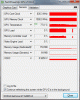
Here's a screenshot of GPU-Z after 30 minutes of Guild Wars 2 in medium-high settings:
I'm too lazy to keep flashing my bios but if anybody wants me to test anything let me know.
Thanks! -
Terrific! Thanks a lot, mate. I will be posting some runs with 950/1000 clocks once I have Windows 8 RP up and runnng.
Once again, really apprecite your hard work!:thumbsup: -
The lower temps may mainly be a result of replacing the cooling pad as you said, but as you might know lowering cpu power disables Turbo Boost.
On a really hot day I once decided that I didn't want my CPU to run at 89°C (I know it's not critical, but nevertheless) so I set max power to 99% and the temps went down to 83°C. -
@Amal77
I was wondering how you actually modded the BIOS. Can you point me toward resources where I could learn to mod the BIOS myself?
Thank You -
Hmm, looking at this pic from the Clevo W110ER thread, it might be..
11 650mOC-3 - 800x433
P2829 graphics score with the DDR3 memory at 1180 (quad CPU, though, but I don't think that influences the graphics score much in the 3dMark 11).
EDIT: It also uses the 306.XX drivers so there might be some improvement from those (didn't follow this thread closely, sorry if this has already been discussed). -
Glad to know that.
Btw, did some testing of mine on Guild Wars 2.
100% settings = 82c(GPU Max Temp) 96c(CPU Max Temp)
99% settings = 77c(GPU Max Temp) 88c(CPU Max Temp)
90% settings = 73c(GPU Max Temp 80c(CPU Max Temp)
Ambient was warm I guess, roughly 28c.
So, it does actually help on the temp.
Like I said before, what we have to be concerned about is the throttling.
Since your max temp is quite worrying, that's why I suggest to try with 90%, so that it will avoid your GPU from throttling while gaming.
But if your GPU max temp on 100% CPU settings is 80c(throttling kick in around 86c and above) or below, then it should be fine.
First identify your BIOS ROM file.
Decompress/dump(Phoenixtool) the BIOS ROM, and search for your VBIOS ROM file.
Manually edit the VBIOS(There are 2 VBIOS, 1 for S13 and the other 1 for S15) using a hex editor, and look for the base clock speed, Boost clock speed, and memory clock.
Compress the BIOS ROM with the new editted VBIOS ROM.
Please be VERY VERY VERY CAREFUL.
Looks like it is running on 1140MHz GPU clock(due to boost), and 1180MHz Memory clock.
Quad CPU does influence a bit I guess, but very little.
Those GPU are also running on a higher and much stable voltage for such clock.
The Sony Vaio S GT640M LE BIOS MOD is running on a 1000MHz(higher than the boost clock(950MHz) for GT650M DDR3) GPU clock, and on a lower voltage level than even the standard GT640M(709MHz Boost clock).
I'm guessing, that might also limit some potential of the GT640M LE.
It's like having a standard GT650M DDR3 on a lower voltage settings.
-
the quad does a little you can check the first post and compare them but as far as i know i have not seen a quad hit 2800... so yes the oc of graphics will help. but the fact is that we will never hit the performance of ddr5 there is just no way. ddr5 is quad pumped so effectively 2x as fast as our ddr3 when clocked similarly... so we would need to double our clock speed. the only relief from this is that the bus speed is also a factor. we unfortunately have a 128 bus... i believe that some 650 also share this bus... and so we would have to so a lot less to match those cards... how much less idk. again... i could have this completely backwards
-
Oh, sry, missed that turbo boost clock; thought it was running at 1025 MHz. I guess those extra 20% on the GPU clock help a bit to reach 3000 points
-
Yes, a GDDR5 will help the GPU noticeably.
It also seems to be able to overclock much better than the DDR3 some more.
That said, a small increase(example: from 1100MHz to 1150MHz) of the Memory clock on our GT640M LE can make a noticeable different when we OC it to 1000MHz or above, due to the memory bottleneck.
In case you are not aware about the link by ijozic. Those are on DDR3, just like ours.
No worries.
Let say if we compare to Faceless Rebel scores, which is P2431(2239 graphics) running on 950 core 1050 Memory, based on the 4th page of this thread.
core : 950 vs 1140 = 20%
Memory : 1050 vs 1180 = 12%
Total : P2431 vs P3019 = 24%
Graphics : 2239 vs 2829 = 26%
Looking at the differences above, my guess is that it seems about right.
Even though the GPU is only 20% higher, but the extra 12% from the memory might give some extra performance of roughly 4% to 6%. Thus explain the 24% difference on the total and 26% difference on the graphics.
-
I've got this new Vaio S15, already tried the stock BIOS, the 835/1000, 900/1000 and 950/1000 ones.
There seems to be some sort of bug with the 900 and the 950 ones, as the GPU will not idle at 135\405 normally but always on full clock, unless I open MSI Afterburner, then it'll idle at the 135/405 clocks.
Note that I don't actually have GPU-Z or any other monitor running meanwhile so it's not the GPU-Z bug, and also didn't happen with the 835/1000 one, which is weird.
Does someone have any idea?
Edit: Went back to the 835/1000 BIOS and same problem happened again. Tested stock and same, at the desktop it runs at full clocks.
With Chrome opened (set to use integrated) it went back to 135/405 idle clocks with the stock BIOS. This is a very weird behaviour.
I'm using the latest drivers, 306.02 from NVidia site. -
How do you determine the clock speed the GPU is running without any monitoring software?
-
Fan speed, it goes up with increased usage of the GPU, and being idle at the desktop doesn't use CPU or GPU.
Also, when I start MSI Afterburner the clocks are at the maximum and the temperature a few degrees higher than it should be while idling. It then goes down to idle clocks for a while, raises to the max, goes down, etc.
It might be an Optimus problem and not related directly with the BIOS, as it happened as well when I reflashed the stock clocks one.
I reflashed the 900/1000 BIOS now and the clocks aren't stuck anymore at maximum, they go up and down for a while (after opening Afterburner) and seem to go steady at idle afterwards, at least while writing this post. -
Fan speed might be an indicator, but you can't be sure that the clocks are running at max. Both GPU and CPU could be taxed by something in the background, like some simple flash content on an inactive tab in a minimized browser. Even immediately after boot you can't tell it's max speed only by fan speed because fan speed depends on temperatures, not on clock speeds.
That makes it hard to determine if it's a bug in the BIOS or something related only to your machine or the software you are running.
I didn't test any BIOS mod but the 950/1000 but I don't have any issues with it... -
No open browser, just the desktop open. Also by monitoring CPU usage with task manager I know there isn't some random ghost process magically eating up CPU time.
I don't monitor the temps right after boot, as usually the fans get a bit uncontrolled there, even in my desktops during boot sometimes fans randomly speed up.
As for temps, they didn't pass 65º C (GPU) while gaming \ 3DMark, so I very doubt they're at play there. With idle clocks, the NVidia GPU sits around 37-38º C maybe, while with full clocks it goes up to 43 or so, and the fan speeds up a bit.
At any rate, these BIOS mods are great. I'd try the more aggressive ones but as I'm not going to use the laptop for gaming that much (a but of GW2 now and then maybe), so I don't think it's worth it for me.
Great job on the modded stuff anyway, these BIOS are great. -
What is the difference in heat production between the i5-3210M and the i7-3520M after applying the 950Mhz bios mod?
I'm considering the i7, but heat is my main concern.
Amal77 has told me his reaches about 95 degrees C° max., in very hot ambient temperatures.
This is however, very hot for a system that only allows a maximum temperature of 105 degrees C°.
At 99%, it reaches about 89 degrees C°, which is more acceptable, but without turbo boost it only works at i5 levels, possibly with greater heat production?
My apologies if this question has been asked many times, I've tried searching for it but I can't seem to find an exact answer. My main concern is durability. -
Hello, Low Life and everyone.
I've got the same processor as yours (i5-3210M) and 1 GB of VRAM and I tried the 1000/1000 and 950/1000 mods, but my 3DMark 11 score didn't get even close to yours. Here's my result with the 950/1000 mod.
I've compared both results from yours and mine, and despite the absence of a SSD disk and lower amount of RAM in my case, my processor clock frequency is shown as 1996 MHz while yours is 2893MHz, so that I understand that Turbo Boost is not working as expected here.
I've already enabled the maximum performance options for both Nvidia Control Panel and Power management mode.
Could anyone give any clue about what I've missed?
Thanks a lot! -
Well, I actually redid the 3DMark 11 test, and now my processor frequency was marked as 2893MHz too: NVIDIA GeForce GT 640M LE video card benchmark result - Intel Core i5-3210M Processor,Sony Corporation VAIO score: P1541 3DMarks
So, I'm out of clues. Does anyone know what else should I try to get a higher score? By the way, the notebook is a Vaio S 13.3 Series, standard model.
Thanks again! -
I'm still unable to make the decision.
Is there any review out there that confronts both cpus? I would love to see a one vs the other.
It's only 90 bucks here to upgrade to the i7, but I don't want my laptop to become useless after a year of playing BF3 occasionally (with this mod).
Please help me out here
-
Can someone run 3dmark 06? I am just curious.
-
listen.... i have a 3612QM 35watt tdp proc and i dont overheat.. i played a mission in bf3 and only hit 51 c... idk how it seems like a fluke but it is definitely not too hot. you will not have heat issues because of the processor.
theoretically the i7 will have better battery life and temp as it has better performance at a given clock meaning that it can run at a lower clock to get the same performance... however in real world the difference is negligible...
many believe that the i7 upgrade is not worth it unless you go full scale... i cant comment too much because i just went for the quad core... now please stop asking constantly (btw save the 90 and get a sheet battery... ) -
Priority to ventilation?
-
Nice score! I am very impressed. It performs better than my HD 5870. I am in the market for a 15 incher with a better GPU than my current. seems good!
-
ATI 5870 is quite a powerful card. You might not notice the differences.
If you're looking for a better replacement of your 5870, you better get something with at least a GTX660M and above. Something like the Y580 with GTX660M or those with a working 7970M(NP9150 still have a problem last time I read).
But if you're looking for something of a similar performance of your current laptop but cost cheap and lightweight, then Vaio S15 is a good choice.
Please research on the pro and con of the S15 first before buying though, just in case. -
Hey Amal77,
First of all, thanks for the reply and congratulations for the work done with the mod.
I just did a new try by setting the priority to ventilation on speed mode, but sadly it didn't solve my problem
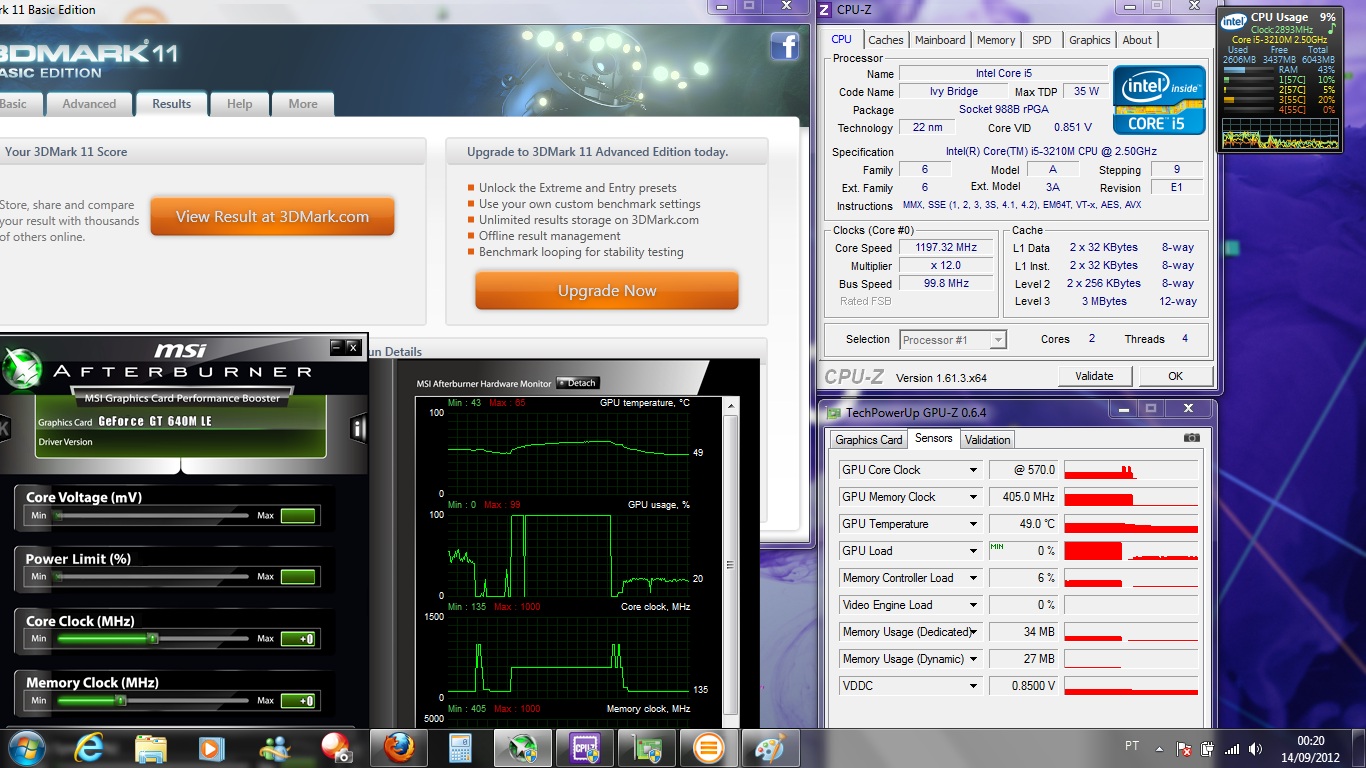
Running the tests with CPU-Z in background, I saw that in fact the processor frequency is kept high under load, but returns immediately to lower levels when the benchmark is finished. I also installed the newer Geforce drivers released today (306.23), but no progress was made. My score keeps around 1500 points on 3DMark11: NVIDIA GeForce GT 640M LE video card benchmark result - Intel Core i5-3210M Processor,Sony Corporation VAIO score: P1553 3DMarks
I also noticed that the GPU/VRAM frequencies were not at full load during all the test time. I took this screenshot right after 3DMark was finished:
![[IMG]](images/storyImages/shot2y.jpg)
You can see there are two GPU frequency peaks when the test is almost finished, but before that it remained @570MHz.
Is there a chance of me still doing something wrong? Any other config to be done?
PS: My vaio S 13 has arrived two days ago, and practically all the system is still on "factory defaults" (exception for the configs you recommended on the first post). Could be that an issue?
Please, help!Attached Files:
-
-
ive been running a very modest OC like 950/1000 i think so i sat down to test a few more out... 1000/1000 had artifacting in furmark and driver crashes... i stepped down to 975/1100 and got 1 more frame in furemark and no artifacts and very stable... so that is what ill stick with!
-
Hmmm... So, you've done this :
![[IMG]](images/storyImages/priority.png)
and this :
![[IMG]](images/storyImages/programa.png)
OR this :
![[IMG]](images/storyImages/globale.png)
And you are on AC and speed mode switch? -
Was in a good mood yesterday, so I decided to switch from the 900/1000 mod to the 1000/1000 mod. Runs beautifully with only 1-2C temperature difference that I have noticed. Scored 2270 in 3DMark11 with the i5-3210m CPU.
Played some BF3 for an hour and got no artifacting or anything at all. Also tried Skyrim and Crysis 1.
Still regretting not getting the S15 though! I take my laptop off my desk way less than I originally thought I would! Oh well, S13A will suffice. -
i dont want to push you into committing suicide but im at college and take my laptop everywhere and the s15 is magnificent... the sheet battery makes it a little bit bulkier. but it gives me tremendus battery life and is still thinner and lighter then the alien's i see... idk how they do it.
you got lucky with the being able to run the highest mod... and i do agree. the temp difference is next to nothing. i ran full 15 min of furmark 1080 and only hit 70C -
Finally, some factual evidence!
In Review: Intel Ivy Bridge Dual-Core CPUs - Notebookcheck.net Reviews
Sony Vaio S Bios Mod For Gt640m Le
Discussion in 'VAIO / Sony' started by Amal77, Jul 14, 2012.


![[IMG]](http://imageshack.us/photo/my-images/17/3dmark06r.png/)
![[IMG]](http://imageshack.us/photo/my-images/821/shot2y.jpg/)
![[IMG]](http://imageshack.us/photo/my-images/685/priority.png/)
![[IMG]](http://imageshack.us/photo/my-images/802/programa.png/)
![[IMG]](http://imageshack.us/photo/my-images/19/globale.png/)
