 Problems? See this thread at archive.org.
It depends a lot either way the cooling pad blows.
laptops need more cool air so the ones that push air away from the computer are completely doing the reverse what they are meant to do = bad cooling
-
So using a cooling pad dosnt help???????
-
I don't see that it would make much difference for a Vaio S, since it vents out the back rather than the bottom like older laptops back in the day.
-
Yeah, that's what I thought too... so I've already check the Nvidia setting before posting...And I didn't have anything else running while I was watching my movie. Weird... :s
How long is your battery life when you're using it on Stamina mode and doing basic task? (Websurfing,video and common stuff...)?
EDIT: Found it! It was coming from the software that I was using for monitoring my CPU/GPU temp! Pretty much the same problem with using GPU-Z in fact ^^ -
I have the same thing with OpenHardwareMonitor and Steam. So I just kill them whenever I don't need them.
My GPU stays nice and cool at 80C even after prolonged periods of gaming on the 1000/1000 mod, so that's perfect.
The CPU however is getting rather toasty. 88C and 93C for both cores. Had it on 99% and it still went up to 3.6Ghz playing Mass Effect 3. Whoops.
Back to 90% in the energy settings and it should stay a lot cooler.
Otherwise I might just crack it open and swap some paste.
To answer your other question, I get roughly 5-6 hours on my external battery only. So that is excluding the internal battery of the laptop itself, but it should be similar. I have only one day at school where I am there from 8 till 17 and only at like 16:00 is the external battery depleted. By the time I leave, the laptop reports 95% internal battery left, worth of 5:30 hours.
I have mine set to a max cpu of 60% when on battery power and the screen is set to 2 or 3 out of the 15 possible. So that is very battery saving, but it is still perfectly workable when in class.
I'll be bringing it along for the weekend to do some work on my laptop when traveling. I don't think I will bring my power brick with me. I will get back to you after this weekend. -
just so you guys realize. you will loose a bit on some physix intensive games as the cpu is not the best physix executor in the first place... like a graphics card will run circles around cpu's
-
Open Hardware monitor! That what I was using! I've closed it and again a nice ~3h30 battery! I'll try today with a full charge without plugin it... but it will definitely be interesting to get yours testimonial!
Used to have pretty much the same temp as you (not as hot for the CPU, but still >82°). I've limit it to 95%, and it doesn't goes anymore above 80°...pretty sweet! Result: It made the GPU temp cool down under 70° under the full load! But I'm only on the 950/1000 mod...
I'm curious about the 1000/1000 mod, what's your 3Dmark score buddy? -
i use msi after burner to monitor my temps/clocks ect and it doesnt do what yours was doing.. and i would suggest sticking to 900/900 or 950/900 as the 1000 clocks can and will significantly decrease the life of your sony laptop
-
That's what I understood from the previous posts... I'm really a newbie on all the overclocking stuff... What's the difference between the clock speed and the memory speed? I'll give a try to the 950/900 mod then...
Will I get noticeable decrease of performance from the 950/1000 mod?
Is someone got a 3dmark11 comparison? -
You wont notice the difference in gaming between the 950/900 MOD and the 950/1000 MOD, the only place you will really see any difference is in benchmarks like 3dmark11 and even then it wouldn't be more than maybe 100points.
The difference between core speed and memory speed is, core speed is the actual speed of the GPU 640LE graphics chip, while memory is the speed of the DDR3 ram connected to the graphics card, similar to the RAM on your laptop.
The GPU on your 640LE graphics card seems to actually be the same as used in the 650M which means it is actually built for the 900Mhz speeds only that it's been underclocked, probably because of cooling restrictions on the VAIO S13/S15 line of laptops. The memory on the other hand is not designed for speeds beyond 900Mhz, possibly 933Mhz hence why you get a number of people here experiencing issues if they try OC the memory beyond 1000Mhz which is only a 100Mhz OC from the stock speed vs most people having no problem OC'ing the core by 450Mhz from stock.
Don't get too greedy with the OC'ing, if I was you I would flash the 900/900mhz OC as that seems to give 650M performance levels without pushing the temps or memory to the limit. It is still worth keeping an eye on temps when you are going to be gaming for awhile or on a hot day. You can do like other have said and limit the CPU to 95% in your power options, this will help with temps on hot days and have a very small impact on gaming performance for majority of games.
Enjoy. -
Just a side question lads, I am wondering about the WiDi function on these laptops, the intel centrino wireless card used in my S15 should support WiDi (Wireless Display) but I don't see any software installed on the laptop to enable that function. Does the Sony Vaio S15 or S13 support WiDi? If so what extra software do you need to install to enable it?
Thanks -
Thank you very much for this very clear explanation, will definitely flash the 900/900 then.
+ rep! -
So after a bit, I finally got word from sony that my motherboard was defective due to overclock of the gpu and as a result my warranty is void
. They said they detected the gpu was overclocked and as a result my gpu died because of it and I would need to replace the entire motherboard. To recap what happened prior, when I got my laptop I just flashed the bios to 950/1000 and it would shutdown due to temperature (even just doing wei). I then went to the the 850 bios and it still died. I even went back to stock and temperatures would still go to 90c and shut off. To just use it I had to revert to stamina mode and if I wanted to use the gpu I would have to restrict my cpu to 80% even then It died after about 40 min or so. Before I sent it to sony I was at stock bios and stock speeds. So as a warning to others please be careful! I am going to have to live with my laptop as is unfortunately. But if you get high temperatures just be careful and just stick to what you have! I guess I was unlucky and could not get the same performance as you guys did.
-
Man... That's a very bad news there...
How did they detect the GPU was OC?
Did you just admit that you did OC it?
Did they come out with a report showing a proof that you did OC or MOD the BIOS?
Appreciate that you're sharing this with us.
Edit :
I'm very sorry that this happened to you.
So, to others, PLEASE think more than twice before you decide to OC or MOD the GPU.
As for me, I'll take the chance and leave it with the MOD, and wish nothing bad will happen to my Laptop. -
I played dumb and didnt understand what they meant. I said I only used it on the desk and my other laptop had a faulty gpu chip, so the heat be from that? ( I had an xps 1530 with the faulty 8600mgt). They said the technicians tested and found it to be overclocked and not a faulty chip. So I don't really know what they did. It could be a lie. Dell claimed I overclocked my laptop too. It wasn't until nivida had that huge case did I get a replacement. I have american express and turns out they'll give me a replacement so it should all hopefully turn out well. I have an extra warranty on it so I may try my luck again.... Has anyone returned theirs due to over heating? I noticed some people had like 82c+
-
Thank goodness you can still get warranty via AMEX, it's the same reason I purchased my Laptop and many other electronic goods using my AMEX, for the extra year warranty.
I think you could of tried to just call their bluff and asked for solid evidence but if AMEX will give you a replacement then I guess it don't matter.
This is why I think people need to be very careful with the MOD, I use the 825/900 version and wouldn't think of going over 900. -
Amal77,
Quick question mate, that stock BIOS you are providing, is it completely factory stock, the same as the version you download from the Sony website?
If it is, I don't see how they could prove that you OC'ed the GPU. They may have some type of Bios flash counter but that don't confirm an OC.
If there is some difference, is there any way you could provide a method to flash to an older flash which would allow users to simply download the newest BIOS version from the Sony website and flash to that original version? This is only if there is some difference between Sony's stock bios file and yours. -
No difference there mate.
Exactly the same BIOS. Just that by using the one I provided, we skip the BIOS version detection, while it still flashes the same BIOS file(same MD5 Checksum) as the stock.
Let us wait for more info from drofu.
He also did mentioned that Sony told him that the GPU was OCed, while not mentioning it was MODded through BIOS(vBIOS to be exact). -
The way I see it. Is they are lying or you were having trouble flashing in the fist place and it didn't get back to stock... there is no way they could tell.
Sent from my SGH-I777 using Tapatalk 2 -
Yes there is..
Take the Raspberry Pi for example - it has an irreversible hardware flag to say it's been oc'd. And people only know this because the hardware design is public. I would be willing to bet the vast majority of CPUs and GPUs ever released have something similar.
Sent from my GT-I9000 using Tapatalk 2 -
Interesting.
So, it can detect the exact clock number?
Or just some flag showing 'yes' or 'no' whenever it detect the clock was once or still above the stock or limitation? Means that even when we OC it using MSI AB or any OC tools to OC it even by a slight increase, it will automatically flag it as yes?
Thanks for sharing. -
But I have to question if it is a mechanism for overclocking that then records it... idk much about raspberry pi.... but if let's say it is a menu option then as soon as you change it it records it where here we are taking a back road... I'm not saying that's how it works but idk if there is a hardware way of recording just has it been over clocked... it would make sense if it is a different bios has been flashed but that's a different argument
Sent from my SGH-I777 using Tapatalk 2 -
If there is some way to know if the CPU has run above stock speeds, I am not sure how that would work with the Kelper line of GPU's seeing that they OC automatically depending on distance to TPD.
It also brings into question using a simple tool like MSI AB when on the stock bios. I didn't know that increasing the default boost speed using tools like MSI AB while on the stock bios would void your warranty, these GPU's are meant to have self protection when in stock settings and will only increase to the boost limit if there is thermal headroom.
Makes me think that you could argue the OC point (via Boost), as it is a feature built in by Nvidia to allow the GPU to run above it's normal stock speeds. I am simply thinking out loud, I don't know how much information this raspberry type tool would be giving them but I do know if they ever told me my warranty was void due to OC'ing the GPU, I would be asking for fully detailed documentation showing me exactly what information they have. -
yea... i dont want to pick a fight or anything. but from the few minuted that i spent reading up on raspberry pi. the way it works is the gpu loads a config.txt that contains the parameters for how to run the arm core... when it sees a few of them set to a certain value (namely the freq. and voltage) it then sets a permanent bit in the SOC. that is very similar to the change something in the menu and it sets a bit scenario i illustrated earlier.
the bios is not the final layer when it comes to the computer... the firmware is, but its very close. unless there is a "feature" in the bios that can set such a bit, that we didnt see and checks for such a change... i find it very unlikely that they can tell. the firmware really isnt smart enough in my mind to figure stuff like that out. and to be honest i cannot see sony having the foresight to implement something like this... after all how big of a problem is people returning their laptops due to overclocking with sony's... ill bet its nill with apple and very close with sony. -
My laptop is still with sony if you guys have anything you want me to ask them. I was pretty shocked when they said it was because I overclocked so I played dumb. I figured if I acted like I knew what I was talking about, they would assuming I would know how to overclock and it would solidify their argument. I think I may ask them for proof on monday. But if someone can tell me what questions I can ask them I'll gladly do it. I can get my laptop fix via amex but it does take a while. So if i can get sony to do it for free then I'd rather them do so.
-
Just ask them for a complete print out or e-mail of what evidence they have to support the claims that you overclocked your GPU.
Just tell them that you never OC'ed your GPU and that you have a software engineer friend who would like to know what methods they are using to determine the GPU was OC'ed. If your warranty is going to be voided at the very least you deserve to have a complete run down of what methods they are using and evidence they have collected to come to that conclusion.
Tell them you want the name of the software they have used to run a diagnostic on the GPU and what technical evidence they have to support their claims.
Once you get all the technical info, post it here on the forum and I am sure all the technically minded people here will be able to break it down for you. -
You can just tell them that you have never OC'ed the GPU.
BUT, you did once lend your laptop to your cousin(or anyone close).
So, now your cousin won't admit or never did OC'ed the GPU.
In order for you to tell your cousin to pay for the repair is to proof him guilty, or it will just be a bad accusation, which you will not be very happy to do so, and will create a report that Sony is only good on accusation without any solid proof.
Or just tell them you never did OC, and prove me.
-
Supelike...
Ur good dude.....:thumbup: -
Is it normal for battery life to be so abysmal when gaming? I can barely get 30 mins on a full charge when playing Dark Souls and Guild Wars 2 with the 900/900 mod. I was expecting about 2hrs of gaming on a full charge.
-
30 minutes is surprisingly short. i'd have expected 40-50 minutes
So yes, it's relatively normal. try lower clock on gpu/cpu and use the battery sheet when on the go, but several hours of gaming just aren't realistic due to
energy consumption of the cpu and gpu. -
I get an hour if I'm lucky... gaming takes a lot. Especially when I turn brightness up BC it looks good. That does seem short but don't expect 2hrs... maybe 1.5
Sent from my SGH-I777 using Tapatalk 2 -
Check your discharge rate value.
I've tried Guild Wars 2, the discharge rate is around -56k mWh.
Our battery max charge is 52k, so I should get around almost 1 hour.
I've tried Prime + MSI Afterburner, it discharge around -64k.
So, if you can only barely gets 30 minutes, means that your discharge rate is around -104k or slightly above.
Mine is on 1000/1000.
Btw, someone else might get better results than mine. -
Does the battery deteriorate if you play games will plugged in/charging?
-
no... it does if you play from it for two reasons. first you are causing a charge recharge cycle... and more importantly, batteries dont like fast discharges. lithium is known for its ability to output a lot of energy quickly vs other battery types, but the metals tend to oxidize when discharged quickly which reduces the life... idk if our batteries are designed to be discharged quickly without causing too much damage.
-
I updated my GPU drivers to 306.97 version...
The GPU memory is reduced to half after the update,
While Idle, 405-->202.5
While Gaming 900-->450
Is it happened due to update or is something wrong with my GPU memory?
I didn't observe any decrease in FPS while gaming though!!
I OCed with 900/900 mod by d way...




-
Sure looks weird.
Have you tried 3DMark11?
Make sure to log it as well. -
even d temp is increased by abt 4-5 degrees!!!!!!!!!!!!!
3DMark11
NVIDIA GeForce GT 640M LE video card benchmark result - Intel Core i5-3210M Processor,Sony Corporation VAIO score: P2070 3DMarks
score was 2100 before update..
now it's 2070....
what might b d problem? -
Hey Amal77, I have a sony vaio S with 640m LE 1vgb of ram, does this mod works only for 2gb vram? Because it seems that all the mod i have tried, my GPU memory clock always stays at 500 Mhz and won't go higher. My GPU driver version is 8.17.12.9618 (Stock)
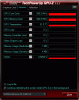
I have tried almost all of the mod and same thing happened, the memory clock increased back to 900 only when i revert back to stock bios. And yes my bios is R0142C5
Hope to hear from you soon. -
Are you sure that your settings in the nvidia tab havent been reset since you upgraded?
Maby they are set on auto nvidia optimus and not always use nvidia card when gameing. -
I don't think that is the case here, because otherwise performance in that particular benchmark would be a lot lower, like half.
My guess is, that it has to do with Nvidia's latest update to Cuda. Maybe the new drivers put more emphasis on CUDA? -
i have the same issue... since i updated gpu-z it shows for me the memory clock speed is half than it should be. i woul be happy too if we can get an answer. my was working perfectly on 900/900, and it does now, just the sensor gone mad...
-
Thinkin seriously about buy the SVS13 I7 Prenium model, just want to clear somes points !
- 1 / The SVS13 & 15 ? model have raid 0 fonctionnality in bios ? I think about put one ssd in caddy-bay + 1 stock ?
- 2/ One ram cant be change right ?
- 3/ The SD card slot is visible from boot options ? -
1- no the bios has little to no options... no raid from what i can tell. though intel rst, which is supposed to be the raid software, is installed i cant find any options for it.
2 yes one ram is soldered and one ram slot is changeable
3 idk... probably
the most current driver 306.97 is $HIT... i cant play any games they all crash the temps go through the roof. though i dont know if they get to unsafe levels... but they get HOT... im rolling back before i break things. -
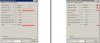
Yes, for those wondering on the Memory clock.
It's the new GPU-Z(0.6.5) that's giving us the error reading :
![[IMG]](images/storyImages/gpuzbug.jpg)
-
Guess I'm gonna stay with the 306.23 then, since it's been a good drivers.
Btw :
Changes and Fixed Issues in Version 306.97
The following sections list the important changes and the most common issues resolved since version 306.23. This list is only a subset of the total number of changes made in this
driver version. The NVIDIA bug number is provided for reference.
Windows Vista/Windows 7
- [3D Surround, SLI], GeForce 500 series: With Surround and SLI enabled, after
resuming from suspend mode and then playing video on 5 Internet Explorer tabs, the display driver unloads when disabling SLI. [878245]
- [SLI], GeForce GTX 285M: After enabling SLI mode, the NVIDIA Control Panel -
>Adjust Desktop Size and Position page does not show the connected display images to select. [724229] -
Yes, The new update of GPU-Z is faulty....
-
Hi everyone. First of all, thanks to Amal77 for your work and for following up on the BIOS mod. I tried the 900/900 mod on my S13P, and although it worked well for me (BF3 30fps in ultra ftw), I started getting throttling in Borderlands 2 and CPU temperatures of 95°c. Having read drofu's experiences, I decided to revert to stock (the one provided here) and live with 640mle performance levels.
However, I believe there may have been some consequences of my short experiment. CPU idles are at 48°c (RealTemp) and when switched to Stamina and fan priority to silent, the fan is still clearly audible (35 dB). When switched to speed it's actually quite loud at idle. I remember it was nearly silent before - but I could be wrong. In games, the cpu goes to 88°C and gpu to 80°C, which I believe is on the high end for stock.
Although I probably would've tried the BIOS mod sooner or later, I kinda regret trying it to be honest. Of course I wanted to beat the Apple Macbook Pro 2012 (a thin, portable and aesthetically attractive machine with good battery life and good gaming performance when called upon) at its own game, but I feel I've sacrificed some longevity of this laptop by experimenting. -
The question of longevity is still unanswered. However. Most... moast people have very little problems with temperature and the core is designed to clock this high, so. It would be safe to say that no damage should occur. However there may be something wrong with your computer as that temperature is very high. It could just be that the paste on the CPU needs to settle. I've seen 5-10 degrees drop after a few weeks on my desktops and laptop after the paste is allowed to cool. At the same time I also agree. The fan is silent at first and gets louder after a bit. And I don't know why
Sent from my SGH-I777 using Tapatalk 2 -
Thanks for your reply, tmckenn. Hmm..you could be right. I haven't checked temperatures prior to trying the biosmod. I didn't bother because the laptop felt cool to the touch, even under load it was only lukewarm in the top center. But I am pretty sure the fan was silent at that time - even switching to Speed would yield only mild fan speeds. Is 45°C @idle too high? I've read some posts at the users' thread that state similar numbers -- although most seem to report 30-35°c at idle.
Of course, this could be a normal process independent of the biosmod. Temperatures may settle, as you suggested. I run games pretty often, about 2 hours a day. My previous laptop (Vaio CW) also gradually got hotter, and its fan got a bit louder too progressively. But this only happened after about a year in its life, this S13P is only 2 months old.
Pure speculation: I have the feeling that the S13(P) may not be designed for sustained high performance. At least, not my sample anyway. This may be the reason Sony went for an underclocked 640M-LE in the first place. As these chips come from the same wafer of the 640m, 650m and 660m, some (most?) of you guys may have gotten lucky and gotten 640/650 level parts. Others may have gotten lower quality chips - which would pass 640m-le quality standards, but cannot perform at higher levels.
Anyway, I'm sticking with stock. I really like the S13P (it's like a Macbook Air/Ultrabook and an Alienware/Asus G series all in one package) and I hope this will last. Performance compromises are reasonable and I'm not going to let it run games at 95/80°C for hours on end. -
Are you using the i7-3520M?
What is your ambient temperature?
Btw, my CPU idle at 5x c while GPU around 42c when the A/C is off, ambient around 29-30c.
Did you monitor your GPU temp before this(before MODding)?
Looking at your current stock BIOS highest temp, it may not seems that weird if your ambient is high and you're using the i7-3520M at 100% limitation.
But, if you're using the i5 instead of the i7, then it may seems hotter than normal, but again, depend on the ambient.
As for the fan noise, mine seems silent on stamina mode even when the CPU is around 50-57 c and GPU around 42 c.
But offcourse, you could be right on the chip quality. Some may gotten a low quality one, while most gotten the good quality sample, based on the successful rate I'm seeing from the download counter on my rapidshare account, which is over 1000 downloads.
Sony Vaio S Bios Mod For Gt640m Le
Discussion in 'VAIO / Sony' started by Amal77, Jul 14, 2012.


![[IMG]](http://imageshack.us/photo/my-images/838/gpuzbug.jpg/)
