 Problems? See this thread at archive.org.
The funny thing is, my GPU temps have settled nicely. 70-75C even after sustained loads on 900/900. It is the CPU that is getting really hot with temps between 87-93C even when limited to 90%.
It used to go no higher than 79C, both before and during my 1000/1000 mod.
It is almost like the CPU paste is getting worse. I was planning on repasting it anyway, but it is still strange.
-
Well my friends, my time with the Sony VAIO S15 was very short lived. I just returned it for a refund today, I simply could not stand the orange-gate issue when doing photo editing or multi media.
I have just purchased a Lenovo W530 with a full HD display that does 95% of the Adobe RGB colour space.
SPECS:
Processor Intel Core i7-3820QM Processor (8M Cache, up to 3.70 GHz)
Operating system Windows 7 Professional (64 bit)
Operating system language Windows 7 Professional 64 - English
Display type 15.6" FHD (1920 x 1080) LED Backlit AntiGlare Display, Mobile Broadband Ready
System graphics NVIDIA Quadro K2000M Graphics with 2GB DDR3 Memory
Total memory 4 GB DDR3 - 1600MHz (1 DIMM) <<< Upgrading this to 12MB myself can go to 32GB
Keyboard Keyboard Backlit - US English
Pointing device UltraNav with Fingerprint Reader for Color Sensor, Smart Card Reader
Camera 720p HD Camera with Microphone
Hard drive 500GB Hard Disk Drive, 7200rpm
Micro hard drive (mSATA) 16GB mSATA Solid State Cache Drive
Optical device DVD Recordable
System expansion slots Express Card Slot & 4-in-1 Card Reader & Smart Card Reader
Battery 9 Cell Li-Ion TWL 70++
Power cord 170W Slim AC Adapter - ANZ
Bluetooth Bluetooth 4.0 with Antenna
Integrated WiFi wireless LAN adapters Intel Centrino Ultimate-N 6300 AGN
Integrated mobile broadband Mobile Broadband upgradable
Got all this for $400 more than I paid for my Sony VAIO S15 so I am happy with that. I simply couldn't stand the orange, apart from that it was a very good laptop.
Keep up the work Amal77 you have really helped many people here out with the GPU OC. -
you'll be happy with that quadro for office tasks that it seems your into.
-
Dear Amal, thanks for your reply. My S13P has the i7. Ambient temperatures are 18°c, in cold rainy Europe
 . Im glad to hear your idle temperatures are 50°C as well, I guess I can be relatively at ease about that, then.
About the fan, maybe it is a poor bearing that causes the low-pitched, but noticeable whirring. I can live with it, its the exact same noise my CW made.
When I was still at 900/900, I set my processor to 90%, and I raised the laptop to allow some airflow beneath it. This fixed the throttling. Because the performance was excellent (10-15 fps gains across the board at max details) I initially considered leaving it at 900/900. However, the chassis felt consistently hot under load and when I checked the temperatures they were 95°/80°C.
I concur with Jaccows theory that the higher temperatures may have led to paste degradation or a similar process. I think we have the same specs (S13P, i7, 256GB ssd, 2gb 640mle) and those temperatures you are describing (with, relatively speaking, higher cpu temperatures) are exactly what Ive been seeing.
Anyway, I will continue to monitor things at stock. Somehow, I feel the modified stock is a bit faster than original stock. Battlefield 3 for example was only playable on low @1600x900, but now I can go up to high. I havent done standardized test runs or 3DMark. Ill run some benchmarkstonight(Sleeping Dogs, Shogun 2) and maybe flash to 900/900 again for a quick benchmark session. -
Is the Vaio S13 fan with the bios mod or stock quiet when just playing music or web surfing since I don't like the fan being too loud when doing writing on MS word or web browsing or watching video.
-
When it was new, my S13P was silent in stamina (fan only audible if I put my ear next to it). Now it emits a quiet hum, faintly audible in a silent room but not audible in quiet, public surroundings (class, office, library)
-
For the record I use the 800/900 mod which I feel is the best balance of temperature and performance. GPU has never exceeded 74 degrees, even after several hours of gaming.
It depends how you set the fan mode in Stamina and Speed mode - by default Stamina mode will be very quiet because the GPU is disabled. Just flip the switch to "Speed" when gaming. -
Thanks but i need to correct you, the gpu is also disabled when on speed mode because this laptop has optimus right? So unless you do some gaming or benchmarking that requires the activation of the geforce card then the fans should still be quiet on speed switch mode via optimus since it is only using the intel hd 4000 when web surfing etc...
Stamina mode just totally disables the gpu and optimus altogether since it will only run the intel hd 4000 regardless.
But my question is, leaving it on Speed mode and optimus, will the fan be quiet when just web browsing or playing music/video using the intel hd 4000? -
Oh, now I understand your question. I thought you wanted to "lock" it to quiet mode. Yes, it is quiet when using the HD4000, although it's a bit louder than on Stamina mode, especially when set to "Priority to Ventilation".
-
Yup, similar specs.
My cpu idles somewhere between 35-41C or 40-44C with the external battery. -
Mine idle around 5x°c on an ambient of 26°c-30°c.
So, yours should be idling around 4x°c. Make sure there's not much activity on the CPU.
May I know your idle temp for the GPU?
Also, can you just run a Furmark, and run the "Benchmark Preset : 720", and share us your max temp results on Stock BIOS and BIOS MOD?
That would at least give us a picture on your GPU cooling. That is if you don't mind, and have the time.
As for the CPU, just download and run Prime95 for 10 minutes, and share us your max temp of the CPU. Just run Prime95 only, without furmark or anything.
It's quite hard to compare with yours without knowing what you're running and so on.
-
Same specs, same european 18-19°C ambient temperature:
idle: 40-44°C
prime95: 80-81°C
for comparison. I think the specs are the same.
notice i have propped up the laptop in order to allow the air to flow around the hinge..
-
Mine on Prime95 after more than 10 minutes, ambient 26-28°C :
100% CPU limitation : 88°C max
90% CPU limitation: 69°C max
This i7-3520M is a very hot CPU indeed. Good thing we can limit them. -
Prime95 after 11 minutes:
Ambient temp: 23°C
90% CPU limitation:
Core 1 max: 75°C
Core 2 max: 84°C
Mine is lying flat on a wooden table and has plenty of room to breathe on the side. It just runs hotter.
Strangely the 100% test got me the exact same results. -
Stock (modified): 500/900.
Ambient temperature: 24.5°C
Flat on wooden desk.

****
CPU1/CPU2/GPU max temperatures:
CPU 100%
Idle, stamina: 42-42-/
Idle, stamina after benchmarks: 51-51-48
Idle, speed: 46-46-/
Prime95 after 10 minutes: 88-91-60
Sleeping Dogs, benchmark: 82-83-71
Borderlands 2, Three Horns Valley, PhysX Medium on cpu: 94-95-81 (average: 91-92-81) - chassis hot
****
CPU 90%
Prime95 after 11 minutes: 86-90-60
Borderlands 2, Three Horns Valley, PhysX Medium on cpu: 87-89-80 - chassis hot
****
Performance:

Sleeping Dogs: average: 23 fps
Borderlands 2: 1600x900, Physx Med, 4x Anisotropic, Ambient Occlusion Off: 22-31 fps. 11-18 fps in heavy physics situations (lots of flags, rubble, Maya's phaselock effect)
Shogun 2: 1080p High Benchmark: 11-20 fpsAttached Files:
-
-
Hi all heres the report from sony.
Please find below the diagnostic done on your unit.
1. Failure
Unit has been returned within the same year.
2.Diagnostic
Unit turning off only while performing video hardware burntest. Reviewed all the GPU and RAM speed parameters. Overclock performed on the graphics card wich cause the unit to become unstable and turn off.
3. Technical comments
To estimate motherboard. Overclock performed on the video chip and caused the unit to fail. Graphic chip unstable.
Overclock definition:
Overclocking is a term applied to the fact to operate a computer component to a speed above the original design speed. Literally meaning "raise the clock" . The component that is issually applied this technique is the processor, but also useful for accelerating memory cards and video devices.
Troubleshooting
The main problem is that the computer simply wont work. Increasing the processor speed is not magic. It could work but I couldnt too, usually it will refuse to boot and will block programs. Moreover, in case that it works the first time, it may cause problems over the time due to three electronic circuit characteristics:
1. Increased heat: By increasing the operating speed, it increases the quantity of electricity passed through the circuit, and therefore, the heat from the same, that in case of failure it can cause excessive and even permanent defects on the chip.
2. Electro-migration: This is an ambiguous concept. It is known that higher operating speeds cause a type of erosion on micro circuits. This erosion can cause defects over the time and obviously to force the processor at a higher frequency can greatly accelerate this process. However, it is clear that this process is relevant in the (short) life of a microprocessor.
3. Altered global configuration: To force the micro frequency implies in many cases to increase the frequency of other components: memory, motherboard, video card.
4. Equipment warranty: To perform overclocking to the processor or to modify its factory settings of any component results in the automatic loss of the warranty.
For further assistance please contact us at 866-357-6230.
So what do you guys think?
I'm just going to return it to the store I bought it from, or use amex. I figured it wouldn't be worth the hassle. -
Sounds like rubbish to me mate. They are saying the unit has been overclocked but don't mention how they come to that conclusion, have you asked them?
Did you make sure that the flash back to standard stock speed bios worked by checking the GPU speeds after flashing back to stock?
That report doesn't really tell you anything about how they have established that the GPU has been overclocked, ask them to show you in-person what reporting software they are using to establish that the GPU has been OC'ed, I would be doing this. We are talking about voiding your warranty on a $1000+ laptop and having to then go through the long AMEX process, why would you just take this without at least asking them to show you how they came to the conclusion, I know I wouldn't.
They need to have hard evidence to void your warranty, so ask to see it. -
Has anyone tried Dark Souls on their VAIO? It's just not running well at all. I get 20 fps barely, and it doesn't seem to keep the 3d clocks by default, and when I force them, performance doesn't change a bit.
Edit: I got it to work finally. Had to force global settings in Nvidia control panel and force it to use high performance mode. I can now play it 1080p with smaa at around 30 FPS, though I dropped back to 720p since I'll rather have the performance. Oh and I'm using the fps fix to disable vsync. -
Hi Erwin,
Your Prime95 results on 100% CPU, does seems a bit high.
Have you make sure that your GPU is not idling on full clock?
My results on Prime95 are 87-88-55, on an ambient of 26-28°C.
My results on sleeping dogs are 88-89-76. GPU on 1000/1000.
As for the results on 90% CPU, you might have doing it wrongly by looking at the temp results you're getting.
Use tools like Open Hardware Monitor or CPU ID CPU-Z, to make sure your clock is on 90%(Max 2.5GHz).
Definitely should get lower than that. Mine never exceed 69°C after almost 20 minutes of Prime95.
Btw, just for the fun, I did the same Sleeping Dogs Benchmark as yours.
Here are the comparison for your Stock BIOS(500/900) VS BIOS MOD(1000/1000) :
![[IMG]](images/storyImages/sleepingdogscomparison.jpg)
-
You're definitely sure that you have revert it back to stock right?
The report there still doesn't show any proof of it being OC. -
Drofu, it seems really strange they can see higher clocks if you switched back to stock bios..what country are you in?
Amal, I found out something.

For some strange reason, when I changed the % of processor state, my core multiplier remained stuck at 36x in speed mode. Then I checked the "minimum processor state" and I found out it was set at 100%! This may have been my own *dumb* mistake, I may have set it at 100% directly after I bought the laptop, so even before the BIOS MOD - but completely forgot about it. When I changed that to 90%, the multiplier finally went down to 25x.
Prime95: 71-74-59
Borderlands 2: 77-79-72
Considering these much, much improved numbers, I will try 800/900 and report back. -
Just what I thought.
Yes, please do report back on your results.
Btw, the results on Prime95 alone should be a bit lower if you don't run the GPU-Z or other apps that makes the GPU clock on full speed even without utilization.
It doesn't matter now, since we can get the picture on how well your cooling is. It does look normal. -
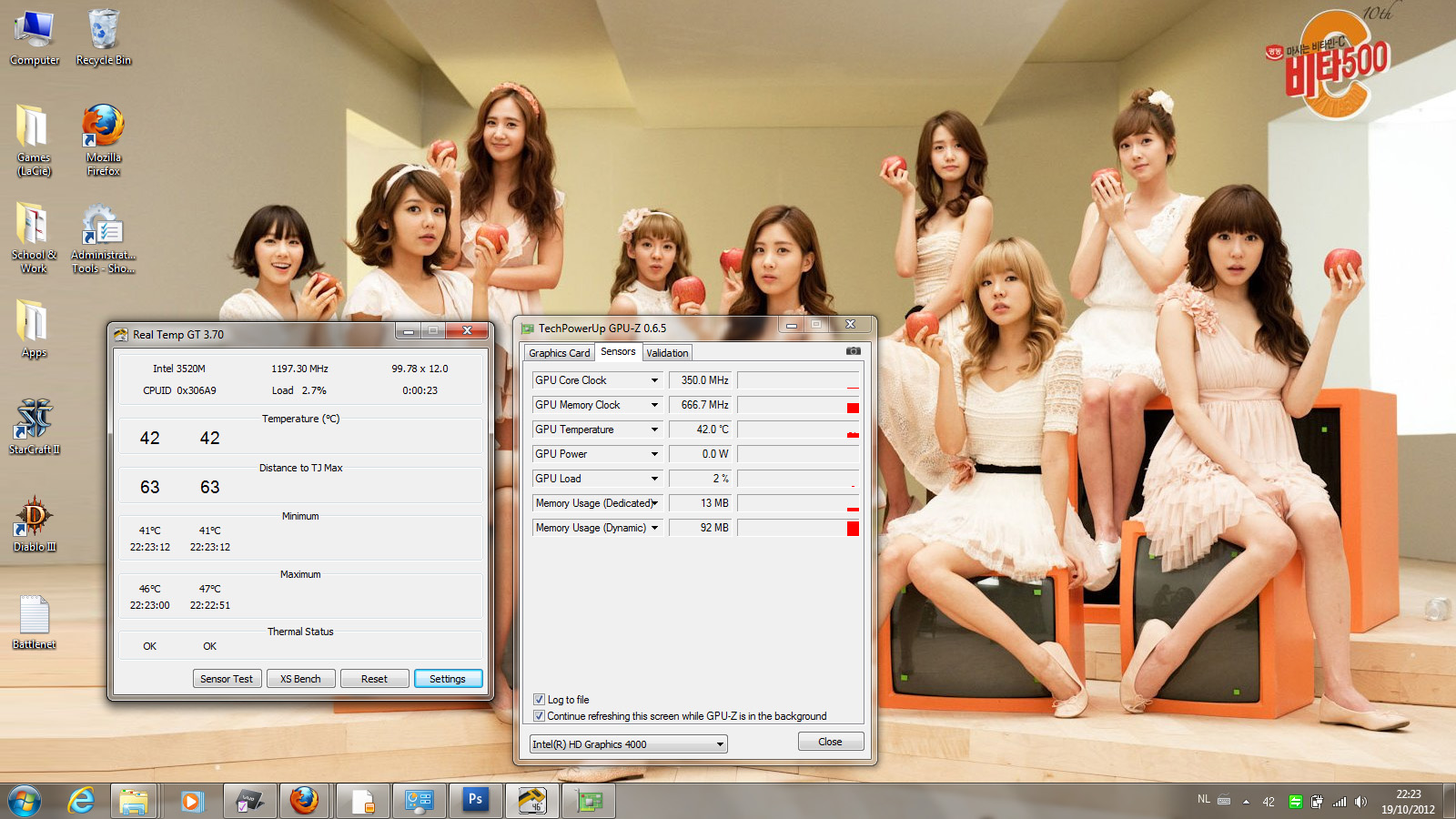
CPU 90% (correctly set, cpu modifier at 25x, 2,5 ghz)

Borderlands 2 : 77-79-72. Performance: 28-41 fps
Sleeping Dogs: 75-77-73. Performance: 25.9 fps
Battlefield 3 (ultra, hbao): 79-81-76. Performance: 18-26 fps
The Witcher 2 (High preset, 1600x900): 75-76-72. Performance: 14-18 fps.
Shogun 2 1080p High Benchmark: 13-20 fps (average 15.4125 fps)
Idle, speed: 52-52-46
Idle, stamina: 51-51-/
Performance boost and *happy camper* are back! ^_^ And temperatures are marvelously controlled. I could probably go to 900/900 or even 1000/1000 but everything is playable to me right now, so I'll stay at 800/900. Thank you Amal (terima kasih!) and everyone for your follow up.
PS, you guys probably noticed, but I love snsd ^_^ lol -
Glad to help.
Btw, noticed that your GPU is running on 570MHz instead of 800MHz.
Have you make sure it is running on 800MHz all the time while you're in game?
Have you done the steps from the first page?
ADDITIONAL INFO 1 :
You may experience that when you run benchmark, games, or any application, but your Clock seems to be not at par as the Base clock.
Please follow the instructions
Make sure you set to priority to ventilation :
![[IMG]](images/storyImages/priority.png)
AND :
Nvidia Control Panel -> Manage 3d Settings -> Select the app you want to run full clock -> Select high performance nvidia processor on the option 2 -> Select Prefer Maximum Performance for the Power management mode.
![[IMG]](images/storyImages/programa.png)
OR
Nvidia Control Panel -> Manage 3d Settings -> Global Settings -> Select Prefer Maximum Performance for the Power management mode.
Now, all the app should run in Maximum clock.
![[IMG]](images/storyImages/globale.png)
In case you haven't. -
Am I seriously the only person who isn't having any cooling issues at all? My room is 23 degrees C right now and when playing BF3 at 1920x1080 (external monitor) at Medium settings CPU and GPU temps never exceed 78 degrees C. I'm running the 1000/1000 BIOS mod.
-
Hi,
I wanted to know if it's necessary to limit d processor....for i5...
and would like to know if my lappy is regulatin it's temp..
Plz comment on d pics.
Thanks.
gAMING
ImageShack® - Online Photo and Video Hosting
iDLe
ImageShack® - Online Photo and Video Hosting
Sometimes over d past 2 days as i open d Techpower GPU-Z, clocks move up to 900....
900 always!!!!!!!
http://imageshack.us/photo/my-images/560/900alwaysjpg.jpg/ -
Usually have issues on the i7-3520M.
Limiting it to a speed of i5-3210M boost clock of 2.9GHz(99% i7-3520M CPU) or i5-3210m base clock of 2.5GHz (90% i7-3520M CPU), will significantly reduce the overall temperature of the CPU and GPU.
Temp looks fine.
As for the full clock on idle, please make sure you don't run certain application that will increase the clock speed.
One way to check whether your idling is running on idle clock or not without using any GPU monitoring software is to monitor the CPU temperature only(core temp, etc).
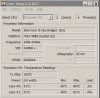
For example from your case, we can see that your CPU is idling around 46°C when the GPU is idling(0% GPU Load) at 135MHz.
Whereas your CPU will idle around 51°C when the GPU is idling(0% GPU Load) at 900MHz.
Try closing the GPU-Z and any other programs that might use 3D, and wait for a minute or two, then monitor your CPU temp.
If your CPU is idling near the 51°C area, means that GPU might still be at 900MHz.
I think you get the picture. -
Yes, U r right...
the moment i closed GPU-Z.......CPU temp went down to 40 deg...................
-
I don't have cooling issues. S15 with the 35w quad core i7. Idr the number. I7-3612qm?
Sent from my SGH-I777 using Tapatalk 2 -
do you guys have a way to test power draw? if so can someone test 60p refresh rate vs 40p in the intel panel?
-
Amal, I did set those settings, thanks. GPU-Z gives some strange readings for me.
-
Yup, because the i7-3612QM doesn't produce a lot of heat.
Here are a comparison :
![[IMG]](images/storyImages/tempiz.jpg)
That's about 9°C differences from an i7-3520M to an i5-3210M.
While only 1°C differences from an i7-3612QM to an i5-3210M.
Edit : Temperature differences might vary depending on type of test. Like I post a few pages back, the i7-3520M is waayy hotter(around 18°C) when it is on 100% compared to 90% by running Prime95.
Maybe you can do a test for us on Prime95 for more than 10minutes on 100% CPU limitation of the i7-3612QM?
I see... Try the previous version 0.6.4 to make sure..
Because your Sleeping Dogs benchmark FPS results seems a bit low at 25.9fps.
Though I may be wrong, coz I'm just assuming it based on the data.
-
Just got an SVS131190S, popped in an SSD and put win 8 pro from msdn on the machine. Games ran great like a lot of these youtube videos show, but that would last maybe 30 seconds, at which point the framerate would drop considerably. I tried to look at some readings from MSI afterburner, and it seemed the card reached a max temp of 70C. I was wondering if at that temperature the system automatically switched to using the on-board intel hd 4000? I'm in the process of restoring win 7 home from the vaio restore discs (7 dvd's ???) onto the SSD so I'll have all the factory settings on there to test it again. I should mention I tried the 950core/1k mem, 900core/1k mem, 1k core/1k mem versions of the bios. All 3 had the same issue. I then tried flashing back to stock with the link you posted, and even still, games had the same issue, it just took an extra 45-60 seconds before the framerate died (also when the gpu hit 70C). Games tested: borderlands 2, civilization 5, battlefield 3.
I was using this driver:
Version 306.97 - WHQL
Release Date Wed Oct 10, 2012
I had a few questions because of this little story:
1. Is anyone running win 8 pro who has solved this issue or can point out what I did wrong?
2. What version of nvidia driver would you recommend?
3. Any other advice? -
From first page.
Make sure you set to priority to ventilation :
-
Thanks will try that. I didn't have that option in win 8.. had issues getting vaio control center working despite downloading from sony.
EDIT: I've tested the same games as mentioned and haven't noticed any slowdowns after 5 mins. Looking great so far. Just using the stock nvidia drivers from May 2012. Thanks again. -
Hey guys,
Just to let you know that I've just ordered this: NotePal U2 - Cooler Master
Will let you know how much C° I saved
-
hoping to hear how this works for you!
-
So without the Vaio Control Center, but with the old stock drivers it also works?
-
Waiting for d post dude.......
-
https://www.youtube.com/watch?v=kfeda72L3aY&feature=youtube_gdata_player
GTA 4......
25-30 fps
900/900 mod...
Temp. 81-80-69 ...wit air flow under laptop. -
I will probably get it tomorrow... by the time to test it out and everything, I'll be probably be able to post some screen with temp and benshmark with a full review on sunday
Within this time you can read this really helpfull tread: http://forum.notebookreview.com/accessories/304671-notebook-coolers-buyers-guide.html
And here is a french review of the U3, which is the 17"+ model (haven't find an english one yet...sorry, but hey! Google trad is your friend!): P4G / [review] Cooler-master notepal U3
This is pretty interesting as most of the users get a nice 10/12C° of difference!
I've choose the U2 (14/15"+) because of the repositional fan. Because the majority of the heat is coming from the CPU, right under the screen (right on the left of the fingerprint scanner), the way this laptop cooler is made should be a really nice help!
See you sunday then
-
^ i'm not sure it'll help much. there are no air intake vents at the bottom of the 2012 S-series laptops; all the intake vents are on the right side, so the air being blown by the cooler will just hit the hard plastic at the bottom and bounce back. i'm currently using a NotePal U2 with my 2011 SA2, and it's helping a lot; but my model has air intake vents at the bottom of the laptop.
-
Hahaha crap, same here. XD
Nice catch. I never touched that one though, so I guess it is a standard setting.
EDIT: Mass Effect 3 for 1 hour.
CPU 95%
GPU 900/900
73°C and 78°C max for the CPU.
That's a lot better than 87°C and 93°C.
Prime95 hardly reached 70°C
That's one problem solved, and another one for the startpost.
Always change:
On battery min/max
On power min/max
aaaaaand
Maximum performance min/max
Offtopic: Looking at your name I am guessing you are Dutch? -
Running GPU Sensor monitors on d background while gaming GTA 4 for 2 hours straight.....
Tech Power GPU-Z

MSI Kombuster

As u can see there is a decrease of about 4 degrees, while running MSI in d background... -
The case is actually made from magnesium, not plastic, at least on the SVS15 models. It may look like plastic but it isn't.
Else I agree, for these laptops it's fairly useless to cool the bottom. -
All of them but the premium 13... that is carbon fiber
Sent from my SGH-I777 using Tapatalk 2 -
That's what I thought too, but since I have read some positive feedback from some Macbook user (Macbook does have a bottom without any ventilation on the bottom too), I thought I could give a shot too!
Even if that's only saving me 5C° or 6C°, I will be happy with that! Then I will probably be able to use my CPU at 100%!
Still waiting for it, will let you know how it goes anyway
The 13 Premium version is not made with a 100% Carbon fiber construction, it is a mix with magnesium AND carbon fiber. If you compare the top of your laptop and the bottom, you will notice the difference
-
I have actually did some simple test last time with my U3 and report it here :
http://forum.notebookreview.com/wha...s-gaming-worth-compendium-81.html#post8872222
I placed the Fan at the end of the right side of the cooler.
Haven't done a stress test yet though.
Will do when I have time.
-
How can you do things like gaming comfortably with the s13 when all ports are on the right side and the earphone all the way on the far edge fo the left side? Can you imagine having your mouse connected to the right side and if you use an ethernet cable it will get in the way if you are a right handed mouse user.
-
It's no issue whatsoever
Sent from my GT-I9000 using Tapatalk 2
Sony Vaio S Bios Mod For Gt640m Le
Discussion in 'VAIO / Sony' started by Amal77, Jul 14, 2012.




![[IMG]](http://imageshack.us/photo/my-images/195/sleepingdogscomparison.jpg/)
![[IMG]](http://imageshack.us/photo/my-images/685/priority.png/)
![[IMG]](http://imageshack.us/photo/my-images/802/programa.png/)
![[IMG]](http://imageshack.us/photo/my-images/19/globale.png/)


