 Problems? See this thread at archive.org.
With Software you can overclock up to 635 from 500. With boost it is 705.
Hardware (bios) mod, nobody knows. If anyone find an exploit, it will be possible. If not, then you can forget it, or we need the key from sony to sign it.
-
This has been covered many times before. Software core oc of win 7 and win 8 is not possible.. oc of the memory is possible on both and limited to a boost of 135 (which is actually a lot as far as memory goes)
Sent from my SGH-I777 using Tapatalk 2 -
Really? How do you do that? I only seem to get 540MHz max. on the core clock...
-
I use MSI Afterburn to oc. But don't use to to high or small "Memory Clock". 350 is a good value, if you increase the core clock to 635.
And I use the neweset nvidia driver.
Then GPU-Z shows me core clock 635 and with boost 705. -
GPU-Z displays the same clock speeds, but under load the actual core clock does not get over 540MHz. Test it out.
-
You are right. Only memorey clock.

-
Mistake. Ignore this post please.
-
Greetings! I too seem to have this problem. My 3dmark score is about 1550 (Tested multiple drivers including stock.) My gpu is throttled at 570, despite the mods showing correctly in gpuz. (When looking at max possible. When running 570 is the real max due to the throttle.)
Also, laptop bought in japan. Perhaps an issue with something in the system that is different than others?
For example, even if I clean install usung reccomended order of install on the first page of this thread, I have a centrino + wimax 6150 driver missing in device manager, that will absolutely not install. (Tried again, many drivers including the stock.) Eventually I just gave up and installed from a clone of the recovery partition to get an exact factory install on my ssd. (Sam 830.)
Could there be a difference somewhere? I will try to downclock my cpu and see if it lifts the gpu throttle next, I,ll report back.
Great job on everything so far though amal, and thank you for the great response time you usually have to user q,s, that can take a lot of your personal time, and is much appreciated. -
exellent! i bought it at Sony japan store too. i am doing alot of testing on it. i think there is a bug of thermal or power on mainboard. whatever reason that, the bios think the computer is in dangerous state or not enough power to supply and force the video card throttle down. maybe it a serious bug of Sony Japan.
any one can show me a software to control power supply to video card?
thank you, and sorry about my english! -
Hi Raziel,
Yours seems to be more normal than cuongdang's laptop.
At least you could get the normal 3DMark11 results for the clock you're running(570MHz).
You did tried all the steps in the first page(priority to ventilation, Maximum Performance, etc) right ?
Do a simple task like running furmark.
Monitor your GPU activity on GPU-Z, and see whether it runs on the supposed MOD'd clock.
If you can share some screenshot, would be nicer.
You still can't get normal 3DMark11 results on stock BIOS right?
Should be around 14xx. -
Yep, I have ventilation set to high, set system to use 640 for all tasks. Have some screenshots, but could not get one of furmark while it was running, just results and such. Don,t know how well it can be seen, but gpuz shows that my max was indeed throttled at 570 for the duration of the furmark bench. Also, set my cpu in power management to 95% in case that was the source of the issue, but no difference. I,ll post 3d mark in the morning~

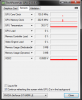
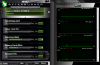
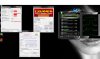
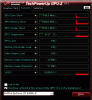
Cuongさんへ~ :hi2: パソコンは何処で買いましたのでしょうか?関係のないはずものですがうちはアマゾンだった~ :thumbsup: 後、ドライバーとかは全部「異変が在りません」と確認出来ましたか?例えうちのパソコンをFreshinstallやってからDevicemanagerにてCentrino+6150の異変何かがあったそうだった。Centrino+6150って奴は解決出来ましたか? うちはそれが直してから普通に1500位までやってきた。頑張りましょう!
-
You probably forgot to do the Prefer Maximum Performance for the Power Management Mode?
-
hi there again. I did the mod and is so freaking osom!!!! Thanx very much!. I have to ask to all vaio s users something totally out of the box here. How you prevent from getting fingerprints all over the laptop? any cool ideas.
thx! -
I double checked to be sure, but nope, I have all settings done correctly in the power management section for nvidia control and such. Still throttles at 570. Hmmmm Here are screens of 3dmark.
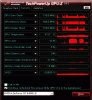

I noticed also that the gpu runs full when on just gpuz, then cuts to 570, then idles at 135. (When starting up.) In fact, there is always a break at 570 when going from higher to lower when opening gpuz and afterburner, as well as mark 3d before the test actually starts. -
I see.
Coz I can create the same scenario if I turn the power management mode to adaptive instead of prefer maximum performance.
![[IMG]](images/storyImages/programa.png)
Like the picture above, you've tried selecting furmark as the programs and making sure the settings on the lowest circle is the same?
By putting high-performance Nvidia Processor alone is not enough.
If you have done all of the above, maybe you can try a lower clock BIOS MOD just to be sure, though I doubt there will be any difference.
Please do report back. -
What is the fastest stable mod?
can you give a link?
Rather not look through 150 pages of posts...
thanks for your work =D -
Maybe you should...... look at the first post!?! Or use SEARCH!?!?!
Links there. experiment probably 950/950
Note: most people won't expend effort helping you if you won't expend a little on your own.
Sent from my SGH-I777 using Tapatalk 2 -
O.O Fixed........I have no idea why, but I got it working after enabling triple buffering settings. Fluke in my program? No idea, but fixed now woot!
Cuongさんへ~Nvidiaってやつ三つの所を変えた後出来ましたのですが。 一番目は:トリプルバッファリング オン にすること。二番目は: テクスチャリングークオリティ ハイクオリティにすること。三番目は: 電源管理モード パフォーマンス最大化を優先にすることでした。 二と三番目だけすると駄目だったみたいで、バッファリング変更することもやってみました。

-
A bit weird there.
As long as it work for you, that's what matter.
Have fun. -
HI Raziel.
tks for your advise. but i decided to gave up. i sold my computer yesterday to buy a new one.
this time i hope it will work on my new one.
you said that you buy your computer in amzone ? what is your model name? is it a computer for japaneses? i just wanted to sure that another S series of Japan havent any bug.
anyways, thank you so much.
ほんとに有難うございました。 -
Hi Amal77 and All, which version of NVidia driver currently you consider the best for your Vaio S13P?
-
Not really sure.
Been using 306.97 for quite a while.
Seems to be stable on mine. -
Hello guys, I wonder if this BIOSMOD serves for a laptop of another brand, I have a LG A550-C with a GT640M 2GB (not LE), will this MOD is for him too?
-
So still no bios mod for s13/s15 windows 8 model? What did SVL7 or Amal find out lately?
-
OK my Sony Vaio SVS13A1CGXB 13.3" laptop with Win 7 x64 and a NVIDIA GeForce GT 640M LE finally came in
Added another 4gb ram and cloned the HDD with Acronis 2013 onto a Visiontek GO 240gb SSD.
Flashed to the 900/900 bios.
With Vaio Control Center fan speed set to Balanced, 3Dmark11 gets P1900's.
With Vaio Control Center fan set to Ventilation, 3Dmark11 gets P2100's.
Works great!
Only thing to note is that if using Acronis to clone, you need 2012 or 2013 to clone the UEFI and GPT partition settings for a full working clone. -
only if you want to brick your laptop.
-
Agreed.
You must modify the specific bios specific for your laptop motherboard otherwise you will brick or ruin your perfectly working laptop. -
thank's for help!
-
I'm thinking about to purchase this laptop, but I've read some about ssd unit, could someone tell me if the vaio s series still works with sata 2 speed even when you are using a sata 3 ssd? Is there to change something in the bios?I've looked for in this thread but I'm not able to find out it. Thank you. Great forum!!
-
any one knows where to buy hdd caddy bay for the s13?? want to replace the odd with a hdd thx!
-
Guys,
any news about BIOSMOD for the windows 8 models? -
hi guys
i have just bought a S15129CJ
it is using win 8, any one know how to enter bios when restart. i press f2 but it dont work? -
Shut down your computer. Then press assist-button and there you can choose to go bios.
-
Any one else started haveing problems with their graphic cards clock dont go down when there is no load on it?
My graphic card have started getting stuck on max clock on gpu/ram even when nothing is really on. And this even happens when im in Stamina mode.
It is really annoying cos it produces alot of heat and takes power for no reason.
I cant find the source of the problem. I havent really installed anything for a while. And ive tryed closing all aplications i can in the task manager but its still stuck. It even stays stuck if i restart. But some times every now and then it starts working as normal and it clocks down like it should.
Any one else have the same issue?
And if so do you know how to fix it or what is causing it? -
tks so muck!
now waiting for mod on new bios version
-
There is always some thing that is using the GPU for that to happen. Any temp or clock-monitoring program can be the cause. Try closing those.
-
975 core x 1100 memory seem to be maximum what my machine can deliver. 2315 with Sony drivers, perhaps will be a bit more with nvidia ones.
Big thanks to Amal77 and the second modder for this wonderful discovery. Wanted to opt for HP Envy 15 (radeon 7750) but have cancelled right on time. Actually found this thread from HP discussion ^^

--
Sony Vaio SVS 15 - i7-3612m, 8GB, 128GB Kingston SSD, 2GB GT640M LE, FHD version -
Hi!
I have been searching through this thread to find the answer to my question. The question have also been asked before but i could not find an answer for it. So:
I have the SVS13A1C5E and i would like to know where I could find the bios so I could compare do a MD5 checksum? The laptop is brand new and I would relay be thankful if somebody could help me and ease my mind before i flash the bios.
Thanks in advance!
/Essin -
Sorry, still no update.
Monitor your GPU activity.
Enable the 'Display GPU activity icon in notification area' from you Nvidia Control Panel.
Sure man.
It is recommended that you monitor your GPU, and check for stability issues, especially running on 1100MHz memory.
Have fun!
Should support.
I've checked your R0143C5 BIOS, and it matches mine(svs13a15ggb). -
Ill try that.
Ive been using Afterburner to check the activity earlier.
But the thing is that this even happens when im in stamina mode and the nvidia graphics should be off completely right?
It gets locked at my clock of 850/1000. -
It is not going down to the basic clock for me as well. Though based on afterburner stats, I've noticed when the driver crashed at 1000/1000 - the GPU instantly returned to idle 135MHz (don't remember about memory, apparently idled as well). CPU-Z was switched off.
Perhaps it makes sense lowering the clocks down? Maybe only then it gets beck to idle properly? Amal77, did you experience something like that?
Maybe the trick is in Global settings for Nvidia Control Panel? I was testing it on Performance for all. Maybe if you select the app and leave the Global settings on Intel card works better?
Amal77, another quick Q: what are the every day OC settings you found optimum for your card? ~900/900 or even less? -
It shouldn't be using it on STAMINA mode unless the GPU were using it before you switch it to STAMINA.
You always have to keep monitoring the GPU if you're using the Global Settings instead of per apps.
Been using the 1000/1000 MOD for quite some time, roughly 4 months.
No issue that I know.
But this doesn't mean that it'll be stable on everyone's.
I think there are those that got lucky like mine, and have no issues on the 1000/1000 MOD.
900/900 MOD aren't that much of a difference though compared to the 1000/1000, while still much better than a stock GT 640M.
-
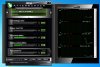
For some reason in idle - the clock isn't getting below 270 instead of 135. As if 2x multiplier is used somewhere...
Tried changing Global settings to intel card or auto select, didn't help. GPU-z is closed.
Has anyone experienced something like that? -
It happens even if i start computer in stamina mode. It can still go up and lock it self on max clock.
And the load on gpu is 0%.
It never goes below 270/405. Not sure if it should tho. But thats the lowest it will ever get.
And i cant change the setting depending on app in stamina mode. So it should be fully off.
Same for me. It never goes below 270/405, Not sure if it should tho.
Even if i freshly start the computer in stamina mode. Even then sometimes it goes up to max clock for no reason.
And if it doesent it never goes below 270/405. -
Hi Amal77,
Could you have a look if the bios from my version is different from the one used in OC bios?
SVS15116GG Bios R0142C5.
It is an .exe file - couldn't manage to compare it with the hash tool. -
Hi All
Just wondering if there is any updates on win8 bios patch I have SVS13A26PGB model Thank you! -
Thansk for a fast answer! Haven't tried to flash bios yet but I will try this week. Have a nice Christmas!
-
I'm looking to buy the Windows 7 15.5" version that's currently in the Sony clearance store, and I have a couple questions before I pull the trigger.
1) Any version that ships with Windows 7 is guaranteed to be compatible with this, correct?
2) What is the difference between the 142 and 143 BIOs?
3) Is SATA3 not working with both versions?
Thanks -
I was stable 900/900 on mine playing Diablo 3 but started to get screen artifacts and freezing after upgrading to the newest NVIDIA drivers.
Going to revert to 306.97 -
anybody know the difference between the old a new BIOS? Specifically any change in fan speed at idle? thanks
Sony Vaio S Bios Mod For Gt640m Le
Discussion in 'VAIO / Sony' started by Amal77, Jul 14, 2012.


![[IMG]](http://imageshack.us/photo/my-images/802/programa.png/)


