Problems? See this thread at archive.org.
can please somebody tell me how to get into th BIOS? Pressing "Assist button" at start - > doesn't work, as well as F2 -hold ;/
edit: If I hit "Assist", Windows just starts up. Nothing to choose from.
-
Hey, in windows you can press and hold shift, then press restart. After this you have some options.
Or shutdown your vaio. Befor you press the power button, PRESS and HOLD the ASSIST button and then the power button. Now you get the menu you want. -
Windows 7 model?
Has to be a cold boot (ie shutdown first) and you have to spam F2, not hold it -
Bumping because my question is time-critical:
Are ANY models that ship with Windows 7 guaranteed to work with this mod?
Thanks in advance! -
Will you be doing these mods to the R0143C5.0907 updated bios?
-
Try a different driver, an old drivers perhaps.
306.97?
By right it should be supported. Don't worry.
Sorry, no update.
Didn't notice any changes.
They are both quiet though.
Can't guarantee, but by right it should.
Don't see any reason why would they use the new model with windows 7.
Those on the first page are actually the same you mentioned there.
From what I can remember.
-
How low should the graphic card down clock to when im in stamina mode?
Is it 270/405? or is it bugged some how for me`? -
damn it. i just bought the s15 with windows 8...totally thought this was already compatiable with win8...would putting win7 on it work? or no?
-
Hey guys, i'm just about to buy a vaio SVS13A25P with the 640M inside. i would like to know if i can update the graphics driver directly from Nvidia without any mod, or do I have to wait for sony to release new version? thanks
-
Amal, any updates on Bios Mod on Win 8 models or still nothing?
-
Nah, tried the above one as well as Beta 310.70 - same story
Don't see any problem about it since I'm rarely on battery; just the mere fact that the speed is different was worth noting ^_^ -
Hi guys!
Amal, I'm sorry to ask you that way, but I need you to save my life!
I'll soon need to send back my S13P to Sony for a black screen problem (operating system not found...) And I'd like (need in fact...) to flash back the original Bios (I'm currently using your 900/900). But I saw that the original Bios you posted in the first page was for the SVS13A15GDB version, or mine is the SVS13A1C5E (Euro version I guess...), and I can't find the orignal bios download link for that version! Do you think the link to the bios you've posted is suitable for my version?
Thanks in advance! I'm really in the sh** and I'm really looking forward for your answer
-
By right it should be 135/405
No, it wont work. Sorry.
You can try first.
If not, then you need to mod the installer only once.
Sorry, nope.
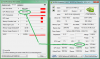
I see.. Coz mine was 135MHz on 306.97, until I upgrade it to the latest WHQL drivers which it then only drop to 270MHz..
Will try to downgrade again and see if any changes.
By right it should be the same.
Especially when the MD5 Checksum is exactly the same.
Good luck! :thumbsup: -
How do i fix that then?
And why is it that me and some others seem to have the same problem?
And is it really a problem?
Or wont i notice any difrence really in heat/battery life and so on?! -
He had the same issue with upgrading the driver to the latest ver. No rush, let the man investigate
Warmest greetings with holidays, the New Years eve and all the celebrations!!!
-
I've downgraded back to 306.97, and it does fix the idle speed.
![[IMG]](images/storyImages/31070.jpg)
![[IMG]](images/storyImages/30697.jpg)
-
so hey guys im having an issue i recently noticed just wondering if it happens to any of you guys?? well every time i change the brightness or or anything in that change power plan settings it stays but eventually resets back to how Sony had it like it will not save the settings at all it does but for a limited time or when i restart it goes back to how it was. same thing with the setting on require password on wakeup i turn it on and it last for a bit then eventually it turns off on its own......:/ thanks you
-
Hi,
I recently got a SVS1512X9 which features the new secure flash crap.
It looks like the Flash.it tool is able to read and, more importantly, write most of the SPI flash, including the BIOS region, without the intervention of the UEFI firmware and without any secure flash checks.
The /G argument can be used to create a ROM dump which will contain the BIOS region starting at offset 0x500000. The dump also contains the flash descriptor region. The ME region is zeroed out, probably because there is no read access.
I was able to dump the ROM, replace the BIOS region with one that was previously saved using Intel's FPT and flash it back. Flash.it programmed the BIOS part and restarted the machine normally. The VSS was probably reset as the BIOS settings were back to factory defaults.
The flash was performed using the /BIOS argument, which should instruct the tool to program only the BIOS region and skip the flash descriptor part, but I can't be sure it really did that.
Has anyone tried this with a modified BIOS?
You would need to dump your ROM, replace the BIOS region with the modified 3MB BIOS image (it starts at offset 0xFDF0 in the generated R0081C8.ROM) and flash the thing with the /BIOS argument. If the /BIOS argument does what it's advertised, pre-padding the 3MB BIOS file with 5MB of zeros should also work but it's a bit risky.
I used the Flash.it binary from an Acer BIOS update which can be found here: http://tinyurl.com/cfczmso.
Edit: Actually, you would have to mod the BIOS image that you dumped from your own machine, otherwise you'll lose all DMI info and who knows what else. -
![[IMG]](images/storyImages/hs.png)
Running vaio S with win8 64bit shipped... why doesnt it show that my GPU supports CUDA? :/ -
Anyone knows any reputable store or online stores that are still selling the S13/S15 that comes with windows 7 that can be bios modded under a grand?
-
Had anyone tried flashing one of the stock Windows 7 BIOSes on to a Windows 8 machine and then flashing an oc BIOS?
-
So what you are saying is, that you made a dump of your R0081C8 BIOS and then modded it using the Flash.it tool and what you got out was basically the R0080C8 BIOS and you were able to successfully flash it back onto your machine?
-
Yes, I flashed a previously backed up image of the BIOS to see how Flash.it does this and apparently it is using a different method than the InsydeFlash tool and does not perform any secure flash checks.
-
Do you know which part of the BIOS you would have to modify to increase the GPU clock speeds?
EDIT: I have no idea of modifying a BIOS myself. By the way, which program did you use to dump yours? And which Hex-Editor? -
Here are the steps, but keep in mind that I have not flashed a modified BIOS so I have no idea if this works. Best thing to do right now is to wait for someone who has the tools to recover from a bad flash to test this and report back. This guide assumes that you are running R0081C8.
- Create a bootable USB stick with DOS using something like Rufus (google for 'rufus usb') and drop flash.it.exe on it ( http://tinyurl.com/cfczmso).
- Boot from the USB stick and run "flash.it.exe backup.rom /G". You should now have a BACKUP.ROM file on your USB stick.
- Boot back into Windows and make a copy of the BACKUP.ROM file to a folder on your HDD. It may be a good idea to also make another copy of this file for safe keeping.
- Get Phoenix Tool. You can find it on Google, latest version seems to be 2.12. Run Phoenix Tool and open BACKUP.ROM. A DUMP folder will be created next to the BACKUP.ROM file. The DUMP folder contains, amongst other things, two NVIDIA BIOS files:
BE340E17-CF9E-4FFF-AD1C-A6079F9BD260_1_959.ROM - Sony IRX-6080 VGA BIOS - Version 80.07.4A.00.06
CD399147-B542-4650-92C1-E2B5D864534B_1_956.ROM - Sony IRX-6070 VGA BIOS - Version 80.07.4A.00.05
I think it was Amal77 who modded these two files a while back to bump the clocks to 950MHz. If you want to modify your own, copy the two ROM files to another folder and apply the diffs below (<offset>: <original byte> <new byte>). Don't change the files from the DUMP folder, they will be overwritten and you'll lose your changes.
BE340E17-CF9E-4FFF-AD1C-A6079F9BD260_1_959.ROM
00006FCC: 74 6C
00006FCD: 04 07
00007122: 74 6C
00007123: 04 07
00007130: E7 6C
00007131: 03 07
00015FFF: EC 6D
CD399147-B542-4650-92C1-E2B5D864534B_1_956.ROM
00006FCC: 74 6C
00006FCD: 04 07
00007122: 74 6C
00007123: 04 07
00007130: E7 6C
00007131: 03 07
00015FFF: 2D AE
- Back in Phoenix Tool, click Advanced, enable 'No SLIC' and 'Allow user to modify other modules' under 'Control Options' on the right and click Done.
- Click Go. An information popup will appear saying that you can make manual alterations to modules. Copy your modded NVIDIA BIOS ROM files to the DUMP folder and click OK. The log pane on the bottom of the Phoenix Tool window should show two lines starting with 'Changes detected in ..." and should finally report success.
- The modded BIOS is now BACKUP_SLIC.ROM. Rename this to MODDED.ROM and copy it to the USB stick.
- If you are really sure about this, you can attempt to flash it using the following command: "flash.it.exe MODDED.ROM /BIOS". The /BIOS argument is important!
BIG FAT WARNING: This procedure has not been tested and there is a high chance that it may render your laptop unusable. While this procedure doesn't touch the PEI part of the BIOS, this BIOS appear to have no recovery mechanism built into the PEI so it will be impossible to recover the BIOS without sending out the laptop to Sony or by using an external flasher.
I will not be held responsible in any way if you decide to go ahead with this and end up with a brick. -
Amal, can you verify that these are the correct changes to make and also explain which numbers control which clocks? I'd like to make sure if I'm going to be frying my laptop, I at least have the right numbers.
-
Yup, those are the right address.
Be careful if you don't know what you're doing.
Else, just use my modded VBIOS(inclusive of checksum & integrity checked) on 950MHz:
http://rapidshare.com/files/1886087536/VBIOS950.zip -
Can you explain how you arrived at those values?
-
I bought three at sony stores in alberta, canada last month. On clearance they were $750 each. Much better value IMO that being greedy and getting myself a single rMBP.
-
I bought three at sony stores in alberta, canada last month. On clearance they were $750 each. Much better value IMO that being greedy and getting myself a single rMBP.
If you have sony stores in your area, ask them to look for inventory. They will sell you another stores stock and then ship it for free to your store for pick up. -
Is it worth reverting to an old version of nvidia drivers?
I mean does it really produce that much more heat or draw more power?
I still dont really get why it changes clock up and down all the way to max when in stamina mode tho. Seems like it shouldn't since the nvidia card should be off in stamina mode.
Could it have anything to do with that i just used normal nvidia drivers and not any modded drivers?
So if i understand this right. If this actually works it should make it possible for people with the Win 8 model of the Vaio S to bios clock graphics card?
And if so. Will it still require all these steps or can it be done in just one .exe file like on the Win7 model? -
Theoretically it should work on the Windows 8 model and bypass the UEFI security. I'll give it a shot when I receive my laptop next week. Until we know more we'll probably have to go through all the steps listed but it could eventually be turned into a script of some sort. It still wouldn't be as nice as the Windows 7 flashing tool though.
-
How did you guys throttle the cpu to <90%? I'm getting decent GPU temperatures of around 70-75C using 950mhz, but my i5 3210 went as high as 90C under the same load and was hoping to find ways to get it down. This is with an ambient temperature of around 25C.
I also have to say the fan is pretty damn loud on speed. -
So I tested out this mod today with Civ V and was surprised to see that the battery was being drained even while the laptop was plugged in. Anyone have a similar experience?
CPU is an i7 and the gpu is running at 950/1000 -
In the 15" model the temperatures for my i7 3612 are not getting over 70C. The trick some users perform is decreasing Max/Min processor state to 99% (PowerOptions > Advanced Settings). Try and see if it helps.
-
That shouldent happen at all. Something is wrong.
Did you try with out the clock and see if the same thing happens?
Cos the thing is that this modd dont increase the voltage given to the gpu/memory. So battery life should not be affected really.
And for sure not enough to drag battery life out when plugged.
Have you checked if you maby have battery care function on? When that is on it wont charge battery when your above 80% or 50% depending on setting.
I would check that and if that aint it. I would revert to the original clocks and see if you have the same problem.
Also ofc check that the cable is really in the computer and in the black box on the cord. And ofc the outlet your useing works as it should. -
Thanks just gave it a try. Dropped processor down to 90% but core temperatures are still peaking at 90C under load. Is there anything else that could be done?
-
Higher clocks result in higher power consumption.
We have a power supply of roughly 90 watts.
See the following figure for an estimate of the power the i7 and i5 consume on their own
(this includes idle power consumption of the rest of the test system, so i'd say we can subtract 10-15 watts for our vaios) .
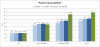
source
So our cpu of 35W TDP, display and other components consume more than half of the available power under load.
I wasn't able to obtain measurements of power consumption for different kepler cards, but it is quite safe to assume that overclocking our 20W TDP card to clock levels of a gt 650m (45W TDP) or gtx 660m (50W TDP) greatly increases power consumption ( See an overview of kepler cards for reference).
The power supply simply isn't designed for this.
I have also experienced a drain on my battery while playing using a bios mod with higher clock.
Limiting cpu performance to 90% and using the 800 MHz mod this did not occur again.
Anyway, testing with stock bios to detect any possible hardware error would be a smart thing to do. -
Since the bios mod dont increase the voltage on the gpu, and is only a pure clock increase. It will be draw the same amount of power as it would do on a lower clock also going @ 100% gpu load.
-
This is not true. The power drawn by a chip is proportional to the frequency you are running the chip at.
-
i7-3520M(35W) + GT640M LE(~20W) + etc
![[IMG]](images/storyImages/svs13ppower.jpg)
So, we have roughly about 30W(90W-56.7W) more for OC.
Copied from : Test Sony Vaio SV-S13A1Z9E/S Notebook - Notebookcheck.com Tests -
Not really getting what you are saying.
Are you saying that it consumes 30w more with the bios mod @ 100% load compared to original clocks @ 100% load? -
Did you open your sony? If your model is produced some time ago, perhaps changing the thermopaste may help - but DONT change it yourself if you are not confident about what you are doing. Better go to any computer shop, guys over there should change it for a few buckaroos I guess
Often overheating is caused by a software issue, faulty driver, windows virus etc. Could be millions of reasons but clearly 90C is too much for an i5 under gaming load.
Also check if you've enabled "priority to ventilation" in Vaio control centre.
He is saying we have 30W available to overclock our wonderful GPU - which is more than enough. -
i have a sony vaio SVS13118GAB
SVS13118GA : S Series : VAIO Notebook & Computer : Sony Middle East & Africa
would it work ?
and if it does .. can u make some step by step instructions because i have no idea how to use the BIOS thing -
Seems a bit low compared to the other measurements. Note that TDP can only be an indicator for power consumption.
From the article i assume that these measurements where taken while running 3dmark which doesn't tax the cpu.
We'd have to measure power consumption on stock bios while both cpu and gpu are on load.
Additionally, we have to take into account the other components.
The screen alone may consume as much as 5-10W.
SDD may conume about 5W when used.
I don't know how reliable this is but powertop outputs the following when cpu is under load:
Note that this is with cpu clock limited to 1,2GHz, the only stable clock i can achieve right now due to reasons i'm not sure about.
If battery drain should occur while gaming it may help to disconnect any unneeded peripherals such as external drives. -
I'm not sure whether it is on stress test or not, but it did stated on maximum load.
I wrongly use the translated version instead of the original english version :
Review Sony Vaio SV-S13A1Z9E/S Notebook - Notebookcheck.net Reviews
Another example from a UX51Z (i7-3612QM + GT650M GDDR5) :
Review Asus Zenbook UX51VZ (U500VZ) Notebook - Notebookcheck.net Reviews
Max 74.1W on 3DMark, and 90.8W on stress test.
But then again, there's a throttling going on when it reached that high, since it is also using a 90W adapter like our Vaio.
So, there's a possibility that our Vaio might face the same issue on stress test, or barely(since our OC GPU is running on a lower voltage).
Not sure during gaming though.
Will try Civ V when I have time. -
For confirmation, you don't have to change the bios when switching from Win 7 to Win 8 and vice versa right?
-
Correct...
-
Hey!
I just bought a SVS15112C5E from Sony, with a GT640M LE 2GB. It's of course with Windows 8.
I see that this mod is supposed to be used with Windows 7. Any suggestions on how to overclock with my PC?
-
Hey!
I flashed my BIOS to GPU_1000Mhz & Memory_1000MHz MOD some month ago, and everything was OK. But now I've got crashing and freezing every hour in my WoW game. Yesterday I re-flash BIOS to GPU_950Mhz & Memory_1000MHz MOD, but now GPU-Z utility show that memory clock is 500 Mhz. And also it is show that GPU does not support CUDA. Why?
Also Nvidia Inspector utility show that clock is still 1000 Mhz.
Who is rigth?
P.S. Now I again re-flash to 900Mhz & 900MHz MOD. Still have a lot of freezing and crash in WoW. GPU-Z still show 500Mhz on Memory and last temperature was 74°C.Attached Files:
-
Sony Vaio S Bios Mod For Gt640m Le
Discussion in 'VAIO / Sony' started by Amal77, Jul 14, 2012.


![[IMG]](http://imageshack.us/photo/my-images/72/31070.jpg/)
![[IMG]](http://imageshack.us/photo/my-images/32/30697.jpg/)


![[IMG]](http://imageshack.us/photo/my-images/341/svs13ppower.jpg/)