 Problems? See this thread at archive.org.
You mean 'reflash' BIOS. But why anyway?
-
Why what?
 This thread is about flashing a hacked BIOS.
-
I meant something different. The same BIOS is used both for Windows 7 and Windows 8 or I'm missing something?
-
No, W8 uses UEFI, which is why this mod doesn't work on W8 models - they don't have BIOS.
-
How far can you overclock without BIOS mod on W8 versions? I've read 570Mhz, is that true? Even when you go all out with older drivers and nVidia Inspector?
-
MSI Afterburner can OC by 135 MHz I think, which would bring you to 635. I don't think it can OC VRAM though.
-
No, Windows 8 model can't overclock. It doesnt work on my Sony Vaio S!
-
Have you tried it with the overclock utilities. Latest drivers or with the 310.90 drivers?
-
For anyone interested - my spare VAIO (BIOS Upgradeable Windows 7 Model) Sony VAIO S13 Premium S Series NVIDIA Gaming Laptop Ultrabook + Sheet Battery | eBay
-
For those who wanted to OC on the latest Nvidia drivers, you may try the Unlock version.
![[IMG]](images/storyImages/640mleunlock.jpg)
The latest Nvidia drivers seems to allow the GPU to be OC by a software OC tools. Previous 310.90 drivers won't allow at all. Weird.
So, I have unlock the clock, so you can OC to a max of 405MHz instead of 135MHz. Means that it can go up to 975MHz on the new Nvidia Drivers, such as what I'm using as per above screenshot(ForceWare 314.22).
You may OC it using Nvidia Inspector or MSI AfterBurner.
Here is the download link :
http://rapidshare.com/files/1644875857/R0143C5_UNLOCK.zip
Sorry guys, this is only for the previous Windows 7 Model Vaio S.
Also sorry to those who PM me and asked questions on this thread.
Been very busy lately, and still. -
Why is this? Doesn't Windows 8 use the same drivers?
-
I think he means that it only works for laptops which had Windows 7 (Bios: R0142C5 or 0143C5) preinstalled and not Windows 8.
Thanks for that! :thumbsup:
Did u recognize any differences in gaming between the 310.90 and 314.22? -
No, its because the new Win8 S notebooks use UEFI bios. The GPU clock is locked and only unlockable with modified bios. You must have the previous S serie (Windows 7 laptop) with old BIOS to flash the modified one and to overclock your system.
@Amal77
Did you receive my PM? Could you modify and unlock my BIOS (entire dump of my Win8 Model Flash Chip)? svl7 has a lot of work atm. -
Is this at base speed? Is there an unlocked version with 900/900 or something that allows me to OC to 1000/1130?
-
As per what JustusJonas said.
Haven't fully tested it yet on gaming.
Only tried 3DMark11 benchmark, and it does seems like an increase over the old drivers.
Yes, I did received your PM.
I'm sorry, but I can't do anything on the new Locked BIOS.
Svl7 is the man for this.
It is a 1000/1000 MOD with unlockable OC ability.
When running on 310.90 drivers, it will run on 1000/1000. Core Clock not OCable through software overclocking tools, but Memory can.
When using drivers above 310.90(314.22, etc), it will run on 570/1000. But, you may OC the Core Clock using software overclocking tools to a max of 975MHz on the Core Clock. Memory can also still be OC just like the old drivers.
Hope you get what I mean.
I will re-look into it again this weekend, and see if it can OC above 975MHz with the software overclocking tools. -
I was hoping there are software methods of overclocking the Windows 8 model, using a specific set of drivers and/or overclocking tools. So for now, the Windows 8 model can only go to 570 or 635 MHz using standard methods? No other workarounds until we get an unlocked UEFI bios?
-
No, GPU Core clock OC isn't possible with win8 model, as far as I know. I tried it with Inspector but you can only OC the memory.
-
So is this an alternative to overclocking at the bios level using the links on the first post? Or does this allow for more overclocking/ overclocking something that was otherwise not available?
-
How much of a performance dip is there between 975 and 1000? It's a real pain in the butt for me to flash BIOSes and I wanted to know if it was worth it for the newer drivers.
Can someone post 3DMark 11 Scores for 1000/1000 on 310.90 vs 975/1000 on 314.22? -
In the worst case (if the score is purely limited by the core speed): 1000 divided by 975 = 102.5 % So you'll gain 2.5 percent with 1000 vs 975. Not noticeable, I think.
-
Did a simple and quick test just now on Crysis 3.
On 1000/1000, 310.90, 1366x768 - 33FPS

On 1000/1000, 310.90, 1920x1080 - 19FPS

On 975/1000, 314.22, 1366x768 - 36FPS

On 975/1000, 314.22, 1920x1080 - 21FPS

Just for fun - On 975/1125, 314.22, 1366x768 - 38FPS

So, basically it increases around 10%(36FPS vs 33FPs) on the new driver at a lower clock on Crysis 3 simple test.
Let say if you don't like the 975MHz, and the need to OC it using OC tools. Just install back the old 310.90 driver, and you're back to 1000/1000 without the need to restart or flash any BIOS back. -
Damn you Amal now I have to flash a new BIOS >.<
Thanks, man, you're awesome. -
I've performed the display mod, and just tried the new unlocked bios you posted. Now, even after flashing back to stock bios I can not get the display to work. The backlight stays lit, so i didnt blow a fuse or anything but there is no image. While this could be coincidental and I kinked a wire or something during the exact time I shutdown and reset the laptop it seems unlikely. I think there's an issue with this mod and the display mod!!
The original mod worked. Going back to the original mod does not work either.
Any advice on how to get my display to work properly again would be highly appreciated o.o' -
Sorry, don't really get what you're saying.
This mod and display mod?
So, you're saying that your laptop lcd doesn't show anything?
How do you go back to original mod without seeing anything? Connected to another monitor?
Means that your GPU is still working but not the LCD on the laptop?
What do you mean by the original mod? Stock BIOS? -
I switched out the display with an ips display as described in another forum.
Then using the original mod on the first post I had everything working and overclocked for about a week.
Today I tried the unlocked bios you posted that allows for overclocking with the latest nvidia drivers and now nothing displays on my display. The backlight stays on, I can even change the brightness but the display stays black. No picture.
I Then hooked it up to an external monitor and reflashed the files I used for the mod that worked and the problem persist. I then tried both stock bios files posted and the problem still remains. I also tried both the newest and older version of the nvidia drivers with different combinations of bios mods.
if it wasnt for the fact that it broke during the restart to complete the installation of the bios I would think that it was a hardware issue, but nothing changed or moved in the 30 seconds in between shutdown and restart. -
Hmmm.. That's really weird.. So sorry to hear that..
By right, it only changes the clock of the GPU, nothing more. -
I agree its weird.
Having absolutely no idea what im talking about my best guess is that with the change in clock, something is drawing more power and the display is getting less power. Given that even when working properly it is already known not to work in bios and recovery, and takes a while to cut on at startup I feel like the display is already having trouble getting enough power.
If you don't have any ideas i guess I will follow through with the assumption that it is a hardware issue and begin hunting for a new lvds cable... (if you happen to know where to get one let me know!)
If anyone else has done the display mod, and has also done this bios mod successfully without any issues can you let me know? -
I have 1000@1000 custom bios R0142C5, the version of nvidia's driver is 310.9. What have i to do to install and to oc the new driver? -
Did you have the chance to revert back to the old screen and see what happens?
-
I would start by plugging it into an external monitor... That's a lot easier than tearing the laptop apart
-
Download this and install:
http://rapidshare.com/files/1644875857/R0143C5_UNLOCK.zip
Update ur driver to 314.22
Use one of the tools Amal mentioned (MSI AB or NvidiaInspector) to overclock until 975 mhz.
If u use the driver 310.90 ur card will automatically run in 1000/1000. -
It's different from my bios, i don't know if i could install it on my notebook.
-
U have the R0142C5, right? Then it will work.
-
Ok, i did it. I had an heart attack when my hard disk was not found. But i had the intuition to see if the bios had switched automatically in uefi mode, and this was the reason. Later i will try to play battlefield3.
Note: if you have an SSD driver change uefi to legacy after the flash of the bios. -
unfortunately I no longer have the old display=/
-
I've tried battlefield 3 with new nvidia driver and new unlocked bios. I think i increase my fps of 3-4 that means about 38-40 in high. I've also noticed that the WEI of windows is reduced from 6.9 to 5.3.
-
Probably because Windows only sees the GPU clock as being 500 MHz
-
Somewhere in the power settings there is an option to reduce the display hz to 40 when on battery to save batter life. Does anyone know where this setting it? I am trying to retrace all of my steps and change all settings back to stock in hopes of fixing the display after performing the latest bios mod and no longer getting a picture.
-
I've had this issue. Replace the screen with the stock screen and turn the laptop on. Let it boot up. Then switch it back out with the IPS screen
Sent from my Nexus 4 using Tapatalk 2 -
Lol. I have that feeling everytime I've created a new BIOS MOD to test out, praying nothing will go wrong.
Nice.
That pretty much shows the same improvement I get for Crysis 3, which is around 10% increased. Better than nothing.
Just ignore the WEI.
If the settings is within the OS itself, means that it will still retain the previous settings.
Howbout playing around on the BIOS settings? Coz that's what differ from your previous situation.
Since you're mentioning about the power requirement. How bout you disable the BD/DVD-ROM from the BIOS or any changes that you might have made previously on the BIOS? -
weird, guess i have to keep a stock display laying around for when this comes up.
thanks for the advice ill go purchase one -
Yeah tell me about it. I had to go purchase one too >.< Should fix the problem though.
-
How often does the issue come up for you? Im tempted to sell it and wait for the next wave of laptops to see what comes out if its common
-
I am am rather new to overclocking. I have a vaio s15 with the gt 640m Le card. I have win 7 and the bios listed at the beginning of this post. R0142c5.
The beginning of this post thread says I need to use the md5 calculator. I d/l it but have not a clue how to use it, or what to put in the blanks for checking or comparing. Help!
Sent from my SCH-I535 using Tapatalk 2 -
Using the new bios o/c to 975, I noticed that even with the power plugged in, the battery was draining, I went from 100% to 20% in about 4 hours while playing borderlands 2, did anyone experience something similiar?
-
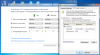
in 40Hz mode the mouse stutters ... If you change it to 40Hz the lcd screen goes black or few seconds. If I switch on a second LCD, this mode isn't supported anymore. -
I had this also at the old mod, but maybe once in 10 times gaming. U have it everytime?
-
That would be why I could not find it. Thanks
-
Can someone please tell me how do I overclock the gpu with the latest drivers? (314.xx)
-
I'm actually getting this with new mod, I also get this randomly, like 1 in 5 times.
Just needed to confirm that its not anything to do with the battery.
Thanks!
Sony Vaio S Bios Mod For Gt640m Le
Discussion in 'VAIO / Sony' started by Amal77, Jul 14, 2012.


![[IMG]](http://imageshack.us/photo/my-images/197/640mleunlock.jpg/)


