Problems? See this thread at archive.org.
If you have the window 7 version, download and run the new models mod. The link can be found on the first post under "NEW BIOS MOD : - ONLY FOR WINDOWS 7 MODEL"
This will unlock software OC to max of 405MHz instead of 135MHz. You can then OC using Nvidia Inspector or MSI AfterBurner.
-
This should only happen when you flash a new bios (or yank the cmos battery I assume)
Sent from my Nexus 4 using Tapatalk 2 -
It should work fine if you have the same BIOS number.
Here bro :
Let say if you don't like the 975MHz, and the need to OC it using OC tools. Just install back the old 310.90 driver, and you're back to 1000/1000 without the need to restart or flash any BIOS back. -
Im about to try the new mod.
But first i would like to know how the auto down clock works now?
Does it still work with the new mod and clocking inside windows instead?
In other words will the gpu down clock it self to preserve battery when its not needed that much.
Cos the older one does. When the gpu is not needed it down clocks to about 25% of the highest clock to preserve battery. -
Hy guys,
i have 2 questions.
I have the 850/100 mod for bios-version R0142C5 installed. So, now i want to use the newest nvidia drivers (314.22) and Amal77's software oc. Do i have to flash back to stock bios (R0142C5 without oc -> according to the first post) before i can flash R0143C5_UNLOCK.zip or can i flash it without going back to stock bios?
i hope you understand my austrian-english
-
No, you don't have to modify your BIOS at all. The only change is upgrading to the newest NVIDIA driver.
-
Yes, it will still work as per normal.
You may directly flash the new BIOS. -
Wow...it is working perfect...thank you Amal77
-
There is a New Bios released for the 2012 13.3 SVS. 4/03/2013 Version R1021C8. I was wondering if this BIOS can be modded for GPU MOD and also be used in windows 8? Sony eSupport - SVS13A290X - Support
-
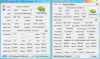
My "hardsolder 2013 model mod" is successfully. I desoldered my old BIOS flash IC (pictures from my disassembled Sony SVS1312 few pages before) read the content with FT2232H modul + flashrom.exe and sent it to svl7. He then sent me the modified flash, a new flash IC (8MByte) and a SOIC socket. With these things, I then flashed the new IC with the mod file and soldered it back to my mainboard. Now I'm able to overclock my 2013 UEFI model Vaio with software tools (Inspector). You can find my 3D Mark 11 results here (Core Clock: 950, Memory Clock: 1000 MHz)
-
Haven't try yet.
Will try to mod it when i have time.
Excellent work! :thumbsup: -
Noticing an interesting behaviour on driver 320.14 - with the new software unlock bios, it's running at 1000/1000 without any software intervention. Additionally, it seems to be impossible to get Afterburner or Nvidia Inspector to actually change the core clock away from 1000 mhz. I've not yet tested if the older fixed speed BIOSes work.
-
Sorry for the delayed response, but thanks for your help Amal77 as I am new to overclocking.
Cheers,
Dave
Sent from my SCH-I535 using Tapatalk 2 -
Just an update to my problem where with the display mod already complete the new bios mod makes my display go black with nothing but the backlight working. Hooking up the original display and then power cycling the laptop then switching back to the new display solved the issue. For anyone with the display mod done this process appears to be necessary after most bios mods
-
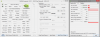
Model SVS13A25PBS(SVS13AB1SX)
Driver 320.14 Beta
Windows 8
memory 1240MHz
GPU 640MHZ but run in 499MHz
-
Simple question. What drivers version should I install after installation of Windows 8 on my SVS15 2012 model (preinstalled with Win7 Pro) to keep O/C working? I flashed the BIOS with 950/1000 MHz settings and plan to upgrade to Windows 8.
-
Answer is very simple.
Read the damn post. even for just 5 previous posts.
You have 2 options. Either install newest OC-able driver or install old stable 310.90. -
I don't want to use software O/C via MSI Afterburner or some other app. Currently I'm using Windows 7 Pro with modded BIOS with 310.90 drivers. It works on Windows 7, but what about Windows 8? The same procedure?
-
So, is there a problem with GPU-Z or Nvidia inspector if we see the GPU runing at 135MHz ? I saw that ottelo got almost the same things as me but in Direct3D I'm around 1000 and not 2200.
Attached Files:
-
-
What do u mean same procedure?
Yes, it will work with Windows 8. When u use the "old" Bios Mod, make sure Driver is 310.90.
When you use the "new" one which was posted some pages before, you can:
1. Driver 314: you have to use a OC-tool to get it working.
2. Driver 320 (beta): According to Darkimmortal there is no need to use the tools and it will run with full clock. -
Working fine. The same procedure is for Windows 8 as I can see. Had no problems so far with any drivers.
By procedure I meant only BIOS flashing and installing mentioned 310.90 drivers. -
That means it works on win8 models?
Would you please share this with us? -
No, I used my 2012 model with Windows 8.
-
When I open GPU-Z, I have a Core Clock of 999.8 MHz and a Memory Clock of 1000.0 MHz; before it use to be 1000/1000. Does anyone know if something is wrong?
-
everything is okay...999.8 = 1000 ;-)
-
And what's the problem? 999.8 MHz is totally fine. Have you installed newer version of GPU-Z meanwhile? They changed some things.
-
I can confirm that using the 320.14 drivers, the BIOS mod works fine. Running 1000/1000 without software O/C.
Using Windows 7. -
Thanks Guys.
I haven't try it yet.
Hopefully it'll still work when the official WHQL drivers release in the future. -

I confirm. Works great. -
Unfortunately, the clocks stay default when playing. Only GPU-Z shows correct values. Back to 310.90.
-
hy I just updated to 320.14 on new bios oc 1000/1000 and it seems like it staying like that, not dropping back to stock
just saying
-
Has there been any progress on a similar mod for W8 models?
-
I was playing GW2 yesterday and was running fine. Although I never checked clocks. Might need to double check tonight.
-
Tested in CS: Go. Clocks go back to default values.
-
Now i think about it, when I was doing a group event yesterday, I did drop to 10-15fps.
Will test again tonight. -
GPU-Z is not trustworthy.
The best monitor I've found is HWiNFO64 -
Agreed. Nevertheless, I get fps edrop in most games while using 320.14 drivers.
-
Will we see a new Sony Vaio S13/15 or another naming scheme for Haswell that will include a 7 series NVidia gpu that is more potent than a gt 640m le without the need to overclock it? I mean i'm willing to compromise and add maybe 0.5-1lb on top of the 3.7lb s13 or 4.4lb of s15 if a proper upper midrange class 2 gpu is included.
Obviously I also want Sony to improve the display on the s13 by removing that grainy effect and improving the contrast ratio a bit and black lvls. Also no orangegate issues on s15. -
Let's hope they do improve so.
Not sure whether they will at least put a 750M or above, coz that will proly need a larger adapter, and so on.
I'm seeing a GT 740M DDR3.
Maybe it'll do magic again in the future with a Maxwell GPU?
Edit : GT 740M DDR3 at max. -
Dear All,
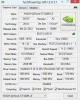
strange thing - installed new mod bios and 320.14 and found, that max boost for GPU is 570MHz
what it could be?
-
Think that is a problem with GPU-Z. Mine does the same.
Try Nvidia inspector. Should give accurate results.
Tried the 320.14 drivers again last night in Guild Wars and it looks like it does downclock the GPU for some reason. Heading back to 310.90. -
I have flashed the 1000/1000 BIOS and installed 210.90. I have set under global settings for high performance.
The core clock goes up to 1000 perfectly, but unfortunately, the memory clock stays at 500.
What's wrong?
EDIT: I'm guessing the memory clock doubles up to 1000 since I ran 3DMark and I got a combined score of 2250 with i3-3210M. Weird that it shows as 1000 for you guys in GPU-Z though. -
It's 2x500 MHz. Try NVIDIA Inspector, it will show 1000 MHz instead of 500 MHz shown in GPU-Z.
-
I was wondering a long time what caused the high usage(faster battery drain, some faulty drivers and more...)
There seems to be a bug with the new version of the bios. It causes the acpi.sys to have issues and make the system always stay at ~20 % CPU usage.
Downgrading to the older bios mod "ONLY FOR WINDOWS 7 MODEL" from the first page in this thread solved the problem.
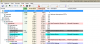
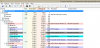
1k/1k mod (2350 points):

-
Just wondering if the win 8 mod will actually become a realty any time soon ?
-
Anyone after a 2012 Moddable S15, in the UK, send me a PM.
-
Nice observation. Also, have you tried the older bios version with the new nvidia driviers (320.18)? Did you require any external software tools (NV Inspect/Afterburner) to further overclock the core frequency?
-
What BIOS version do you have in mind?
-
This post is for everyone who has an S15 w/ Windows 8 and the new BIOS.
You CAN successfully overclock the GT 640 M LE with only nvidiainspector and a few lines of code I found on the ASUS ROG forums for a 660M
Literally there is no BIOS flashing required or BIOS swapping needed
Just one line of code in a shortcut with your desired clock speeds.
Enjoy.
Original post follows....
Yeah its locked. To get higher you need to force a pstate.
Install nvidia inspector. click overclocking and make a shotcut. "Bottom right tab"
Right click the shortcut it makes on your desktop and click properties. Change the target "Example of mine"
"C:\Nvidia Inspector\nvidiaInspector.exe" -forcepstate:0,0 -setGpuClock:0,2,**** -setMemoryClockOffset:0,0,###
**** is your core clock. example 1100mhz.
### is your memory clock offset.
When you do this you will run at the max clock the whole time you will no longer throttle and down clock for 2d. I also mage a lower clocked shortcut that i click when i don't want it to be overclocked or when im playing games on the barrery that down clocks the gpu to 500mhz -
Here's the Proof.
NVIDIA GeForce GT 640M LE video card benchmark result - Intel Core i7-3632QM,Sony Corporation VAIO score: P2382 3DMarks
Happy Clocking
Sony Vaio S Bios Mod For Gt640m Le
Discussion in 'VAIO / Sony' started by Amal77, Jul 14, 2012.