Problems? See this thread at archive.org.
Unfortunately my attemt to fix my low FPS in ARMA 3 BETA(less than half), and the slide show in crysis by installing new driver 301.42 and 320.49 failed, there are no differens. Any idears?
I won't bee doing a clean install until autum when i will by a SSD
EDIT:
-
-
Hi all!
I have question I can buy this Sony Vaio for $600:
White
3rd gen Intel® Core™ i5-3320M processor
(2.60GHz / 3.30GHz with Turbo Boost)
Microsoft Windows® 7 Home Premium
NVIDIA® GeForce® GT 640M LE (1GB) hybrid graphicswith Intel® WirelessDisplay technology
500GB (5400rpm) hard drive
6GB (4GB fixed onboard + 2GB removable) DDR3-1333Mhz
13.3" LED backlit display (1600 x 900)
CD/DVD player / burner
Can I install BIOS mod on this laptop?
I want to play BF3 on low... will it be possible with this i5?
Is it good deal?
Is it s13 or s13p?
Sorry for so much questions, but I hope that someone will answer me I have 1 day to decide... before this deal I wanted to buy W110ER or this new W230ST, but this one is beautiful (W110ER is not...) and it is still quite fast with this bios mod (Performance of W110ER?).
Cheers! -
Yes, if bios hash codes match, but you shouldn't as it is riskier that using the nvidia inspector method - so don't do it.
EDIT: NI method can also be used on w8 sony vaio's.
EDIT: On youtube search for 640m le, there are examples of oc gpus and what they can run - it can do better that low - BF4 might be very different
You might wan't to budget for a SSD upgrade at some point, can't answer what is best buy, take too much time sorry. -
I have the newest drivers and I don't have this path: C:\Users\USERNAME\nvidiaInspector\nvidiaInspector.exe
How should I OC my card? -
it's a 3rd party program that you need to install
-
thanks <3 I was trying to install your file with drivers can you look here:
http://forum.notebookreview.com/son...ial-2012-sony-s-series-owners-thread-669.html
cheers
@Edit
Is it safe to use 1000/1000 Mhz? Right now I have 950/1000 Mhz. Will I see any fps increase?
-
Thanks to everyone in this forum. I have been following it since I got my Win8 SVS13 and am so happy the new OC workaround works.
I do have two questions I'm hoping to get some feedback on.
1) I am not able to get the clock to throttle back to 135 or the memory to 405, as it was before making any changes. Even with the default shortcut and rebooting the computer it is always at 500/900 (I am using nvidia Inspector to see these values).
My question is - is it advisable to "force" it down to those levels through another shortcut for basic desktop/internet usage? Or am I stuck with it at 500/900 as the lowest now/
2) My temps are reasonable while being overclocked and running games for a few hours, but just to be on the safe side, I'm wondering if anyone can recommend a good cooling pad to use when overclocking? I ask because there are no vents on the bottom of the laptop - there is the big one at the back under the hinge of the screen, and most cooling pads expect there to be vents on the bottom of the chassis.
Thanks again everyone! -
Well, now I see it dropping back to 135/405 so disregard my question.
-
I wan't to upload pictures of my diy laptop cooler but I can't find the Albums and Pictures link?
-
Is there any way u can make a vid of the steps I'm an extreme nine when it comes to this thank you
-
Earlier i said to change max CPU speed in sony vaio center(if hot) - i ment w7: start>control panel >system management >power management> high performance> change plan setting> advanced.
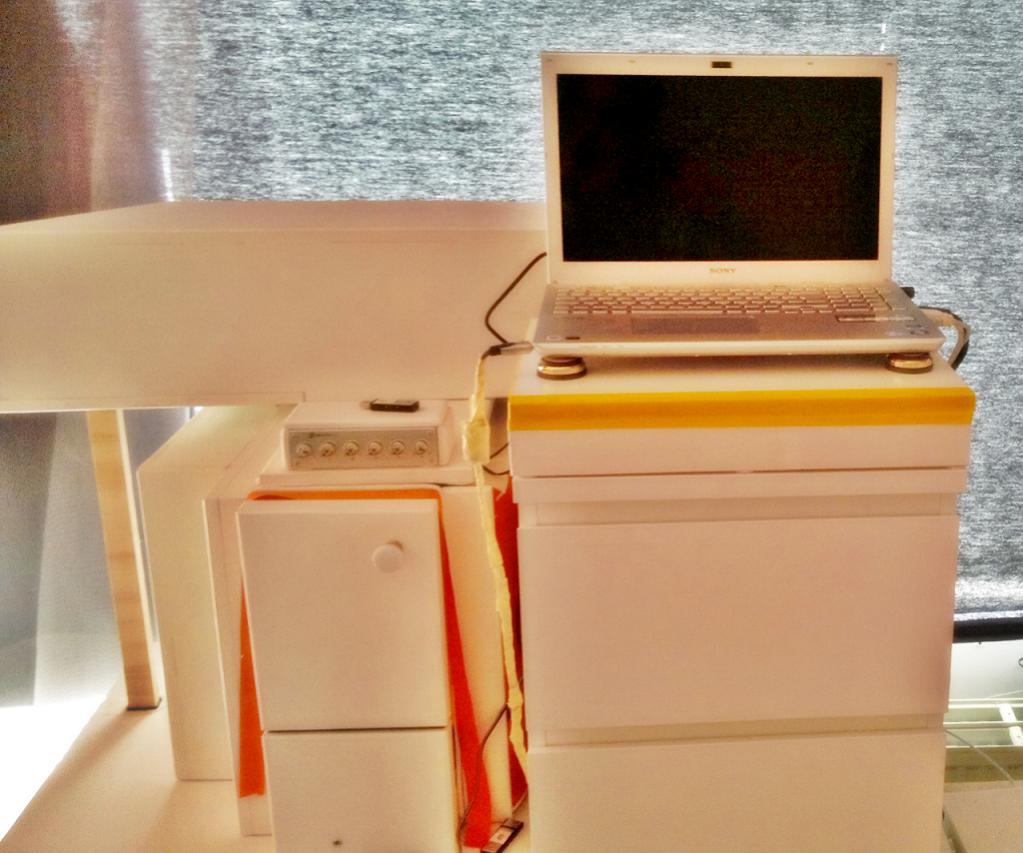
<-- My diy laptop cooler
-
I can share my diy cooler too
There you go:
![[IMG]](images/storyImages/ajry.jpg)
![[IMG]](images/storyImages/a5lo.jpg)
![[IMG]](images/storyImages/qmrm.jpg)
This cooler is not very pretty, but it works good
-
Picture have been through photoshape, which i haven't used much, so it became a bit glorified. The plate I used was unused, from a ikea TV table, so it matched exactly the furnitue. Had every thing, except had to by yellow painter tape.
My PC was an ugly black case, so I put som wood on it. Unfortunately it broke 4 month ago, so bought laptop, I will probably get it fixed when I can buy a used MB. But there are not so many games that interests me, and my health is bad, so I can waite.Attached Files:
-
-
You guys got me interested in buying a laptop stand and I think i've found a winner!
mStand360 Laptop Stand - intro
Has anyone bought the mstand 360? I think i'll buy it on friday. -
For $60 + tax ? I prefer my creation
If I will ever buy a stand/cooler it will be "Cooler Master NotePal U1"
Cheers
-
^ U1 is too small for VAIO S. U2 fits perfectly though.
-
Really? On Amazon in information there is note that U1 is for laptops up to 14"
I saw videos of U1 with macbook 13" and it was perfect for it... that why I though that it will ge good for S13
My brother use U3 with his 17.3" HP and my friend U2 with his 15.6" Asus Are you sure that U1 is too small for 13.3"?
-
in the end was a faulty gpu (burned by new drivers like someone benn saying?).
Solved by replacing system board under warranty. -
i'm using U2 with my VAIO S. it's about 0.5 inch larger in length than the S.
-
okay then, I didn't know that. I will check it in September
-
I like the design of the mstand 360. The cooler master looks generic
mstand is better from an ergonomic pov as well! -
Yea, but still I think that it is to expensive for what you get
-
ÁÖ½Äȸ»ç ¿¢Åä - ´ëÇѹα¹ ÄÄÇ»ÅÍÁÖº¯±â±â Ù£íÝ
Korean laptop accessory brand, which amaizing laptop stands, I have not found anywhere else to be as good.
Their Manager laptop stand is awesome for VAIO F series, because the exhausts is not in the back.
They have some good VAIO S picks also, but it is harder to get a good stand when the laptop blows from the back.
E.g:
Amazon.com : Actto Silver Multiple Angle Stand/Riser for Apple/HP/DELL/Acer/Toshiba/Lenovo/Sony/Asus Laptop Notebooks with Cosmos Cable Tie : Computer Monitor Stands : Computers & Accessories
could work for S as well and can raise it at many different angles.
LaptopStand.com.au: Actto - Asian leader in computer accessories
There's at least 50 different ones, but I didn't find many on English websites. -
anyone know if new win8 15" models still have orange gate screens? Now that the OC works , this is a tempting laptop again
-
It still seems to be something of a mixed bag, although I can confirm that the one I got had no orange-gate.
-
So great to see the 2013 model can be OC'd too now :thumbsup:
Would it in addition be possible to assign the shortcuts to the speed/stamina button? Speed being overclocked and stamina normal. As after a clean win8 pro install it just sits there functionless anyway... -
Do I have to paste the default target in properties every time after I quit a game to return back to 135mhz or is there a faster way?
Is it also normal if GPU Clock shows 500 while Memory Clock shows 1000 in Nvi? The Current Clock shows both as 1000 though and in GPU-Z, Gpu Core shows 950 so I assume it should be working?
Thanks -
I make a shortcut to start OC and put it in a folder called NVIDA INSPECTOR OC, so it works a bit as a plastic cap on a detonator buttom
And another shortcut with:
C:\Users\USERNAME\nvidiaInspector\\nvidiaInspector.exe -forcepstate:0,16 -setMemoryClockOffset:0,0,0
To stop OC.
Of cause path depends on where you have put nvidiainspector. -
Found my answer. Nevermind.
-
Hello.
I have a Sony Vaio S13 premium called SVS13A1C5E and im currently using the 800/900 OC.
I'm having trouble with my integrated Hd graphics. I get temperatures over 90 C(!) while gaming.
This can't be right, right?
It's set to SPEED, not STAMINA and I also have a limit of 90% on the CPU.
http://gpuz.techpowerup.com/13/08/09/7fx.png
The NVIDIA is running smooth at 75 C.
http://gpuz.techpowerup.com/13/08/09/c32.png
It also seems like theres more memory usage from the HD 4000?
Also the NVIDIA never goes above 450 in memory clock even if it says its 900 Mhz..
Please make me understand whats going on! -
Hey everyone!
I have a problem on the european model (SVS13A1C5E)
Using the 1000/1000 mod does not seem to really get the card to running at the speed (but still showing it). Benchmarks validate this.
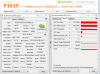
Looking all over this thread (but of course not all 194 pages) I cannot find an answer so far. Any ideas? -
Hi fellow Notebookreviewers,
It happened that my vaio s13 arrived today, 2 days earlier than expected (yaay!)
After setting the machine up had time to do some gaming.
I managed to overclock the GPU to 1220/1220 for the core and the memory respectively, which can be seen below.
I then played some Guild Wars 2, with the settings that can be seen in the screenshot.
I even tried to set both clocks to 1300 MHz, which unfortunately, the machine didn't like.
This resulted in hanging and eventually a full crash.
The weird thing with all this however is, when I set back both clocks to the normal 500 and 900 MHz, it didn't seem to have an effect on the performance in Guild Wars 2,
unlike one would expect.
Does someone maybe have an explanation what might cause this?
Having said all this, I have to say that the vaio S13 is one hell of a notebook, despite it's quite grainy screen and awful speakers
(This in comparison with my old 13.3" late 2008 unibody
MacBook)
![[IMG]](images/storyImages/9606087_gpu-z-1200-1200.gif)
![[IMG]](images/storyImages/9606088_gw004.jpg)
Attached Files:
Last edited by a moderator: May 6, 2015 -
-
At one time there were certain drivers that negated the modded BIOS overclock and put everything back to stock speeds. Has that issue been fixed in the current nvidia drivers?
I know about the nvinspector method, but since mine is flashed and works just fine I figure I should leave it that way.
But it would be nice not to have to use a really old video driver. -
Answers my question, thanks.
-
Hi. I've got a small problem. I've created two shortcuts for invidia inspector, one for default and one for overclocked GPU. But know, whenever I am idle (on "stamina" switch), nvidia inspector shows 500mhz clock. Before that it was 135 mhz, which I believe is a correct value. When I'm overclocking it shows proper value of 850 mhz (those are the settings I've chosen).
My settings for default shortcut is:
"C:\...\Nvidia Inspector\nvidiaInspector.exe" -forcepstate:0,16 -setMemoryClockOffset:0,0,0
from the main post
Any suggestions? -
Thanks so much for this Myst3ri0n! You could say I joined this forum just to thank you!
I have been following this thread for ages and I have read every single post. You made it all worth it!
-
i have the svs 15 with win7 model, now i notice there is no bios setting, where i can turn off the nvidia gpu??
i had the same model but with win8 and there was a setting for this.
is there a way to turn the gpu of in another way somehow? or is there a bios with this switch?
as far as i understood, when in stamina, the nvidia gpu is still running .. -
Anyone having issues where the clock speed would all of a sudden drop to 250? I'm using the setting from the first page and everything works great,but once in a while (while i'm playing dota2) it would get really choppy. I check GPUZ and it sensors show the GPU Core clock dropped from 999.8 to 250.
-
I had the same issue and fixed it this weekend. I did two things to fix it.
1) Go to VAIO control center and make sure that the SPEED switch settings are set to Performance instead of silence.
If that is already set then try:
2) go to the NVIDIA control panel -> manage 3D settings -> and set the preferred GPU to "high performance NVIDIA processor" and also set the power management mode to "prefer maximum performance"
The issue started when my CPU reached the high 90s and the game I was playing would crash. I tried to change the max CPU power to 90% via control panel like someone had mentioned in this guide. Right after I did that I started noticing a sudden switch from 1000 to 250 sometimes less. I think it is the laptop switching to the Intel HD when it reaches 70C
It took me a while to figure out how to fix it. I was worried that I had fried my hardware as the problem would occur even after I set the nvidia inspector to default
-
Thanks Rhuobhe for the tip.
I gave that a try and still no luck. It still drops in clock rate in the middle of the game just when we're about to clash... Not quite sure what else to try.
Does the laptop need extra cooling if it's being OC'd to 1000/1000? -
In a nutshell: yes.
In my experience with CPU heavy games like LoL and l4d2, you need to use the 95% cpu limit and a gpu core speed no higher than 835 mhz
With other games you can get away with far more, while some games e.g. bioshock infinite need even less
Sent from my GT-I9000 using Tapatalk 2 -
Thanks Darkimmortal.
I gave it a try at a lower setting (835 then 900) and it did make it more stable! -
Hi!
I have a problem with my Vaio When I play BF3 my fps are 45-58, but from time to time ( every 3-4 min) I have 17-22 fps for ~10 sec.
I'm running on 900/1000 MHz
640m LE 1gb
6 gb ram
I checked that BF3 doesn't use my 1 gb of vram, so it's not that.
Temperatures are not higher than 70 C.
When I'm checking in Resource Monitor it says that I have ~20 mb of free ram.
Does it mean that I need more ram? I'm asking because a lot of people are saying that 6gb of ram is more than enough.
What do you think guys?
Cheers
-
What's the latest version of nvidia driver that works with the overclock?
-
If you use Nvidia Inspector you can have the newest drivers
-
Reduce your oc (max with no throttling is about 850/900), use the 95% cpu limit, close lid if possible
Sent from my GT-I9000 using Tapatalk 2 -
Thanks
I will check that, but it seems that it was drivers problem. Drivers from 306.97 couses a lot of problems with BF3. Now I have 306.97 and enerything looks good so far (only 2h of playing that's why I'm not sure if it's ok).
900/1000 cause throttling? I don't have any problems
"use the 95% cpu limit" how?
@EDIT
I was wrong. I was using 950/1000 not 900/1000 and today I got blue screen after 30 min of BF3. Now I'm trying to find best MHz for my unit.
Cheers
-
There is a 320.** or higher WHQL driver directly from nvidia page, download that one - it fixes lots o stuff.
-
That's not true. I had 320.** WHQL and all problems I had was because of them. Now I'm using 306.97 and everything run like a champ.
-
Running 320.49 - sorry mushi i forgot to mention that I dropped my clock down to 950.
Glad to see you got it fixed
Sony Vaio S Bios Mod For Gt640m Le
Discussion in 'VAIO / Sony' started by Amal77, Jul 14, 2012.


![[IMG]](http://imageshack.us/photo/my-images/713/ajry.jpg/)
![[IMG]](http://imageshack.us/photo/my-images/844/a5lo.jpg/)
![[IMG]](http://imageshack.us/photo/my-images/41/qmrm.jpg/)


![[IMG]](http://www.stooorage.com/show/2409/9606087_gpu-z-1200-1200.gif)
![[IMG]](http://www.stooorage.com/show/2409/9606088_gw004.jpg)