 Problems? See this thread at archive.org.
With the new driver GeForce 327.23 from 19.9.2013 you can overclock without problems, but you can't use gpu-z to check it, it freez.
-
Ok I've downloaded 327.23 and nvidia inspector after using only the windows 7 bios mod until now. For some reason though it seems to be stuck on 570mhz now. The gpu and default clocks are showing the flashed bios specs (975mhz and 1100mhz) and it is still able to drop down to 135mhz when idle.
I tried to uninstall and go back to 310 but it seems that is also stuck on 570mhz when it didn't use to. Does the nvidia inspector have a permanent effect once I open even if it is just an exe file and wasn't actually installed?
Edit: okay so I've reverted back to stock bios and created the new inspector shortcuts, everything seems to be working fine now.
Edit: Observed it for a bit longer and it seems to downlock after about half a minute, so I jumped the gun a bit when I thought it was locked onto the OC frequency when idle. -
I have a short question about overclocking in general: Is it possible to overclock every notebook graphical-card? Or is it something different and special with the 640M LE because of its "LE" status?
-
Could someone post the link to the OC Bios files? I've been going through page by page but not finding anything. I'm only seeing files for the Windows 7 models. Thanks.
-
How do I overclock a Windows 8 VAIO S? Without BIOS MOD Afterburner lets me overclock to 635mhz. Does the Windows 7 BIOS MOD work for the newer models? SVS13290X
-
I need help. I currently have the 320.49 drivers and my overclock isn't working. on techz it shows that im running 950-1000, but the actually clock is only maxing at 570-500 which is stock. when i started to mess with the nvidia inspector it started to slow down my computer and blue screen it. how can i get the overclock to start working again?
-
http://www.megafileupload.com/en/file/458139/Sony-Vaio-SVS13-series---950-OC-edition-zip.html
that's the 950-1000
nvm. that's for windows 7. look at the first post all the way at the bottom, it explains what to do for windows 8 -
Hi, please re upload the STOCK Modded bios.
Rapidshare links are dead's (the two of the first page) -
can someone please answer, the 640 is still powered and wastes precious energy when in battery mode.
how to switch it of completely? -
hi guys,
i've posted on the S owners thread...but no one seems to bother. maybe had been asked before, or maybe had been answered... i just want to know if W8 really doesn't use the nvidia card even if i set it to priority. lets say when i run WEI assessment...and even if i use REVIT it only utilizes the built in graphics instead of the nvidia. I know that switchable graphics utilizes the hd4000 first then the nvidia card once the hd 4000 needs more boost then it kicks in. is there a way to prioritized this? i've already set on high performance graphics on my nvidia control panel...anything i've missed probably?
thanks...and sorry if this had been answered before. its just that tons of pages had passed and i cant find any answers.
Rhoel -
Hi guys, im the owner of the Fujitsu Lifebook AH532/G52 with GT 640M LE, im happy with it, but want to rise a bit Gpu clock more then +135 that oc software (NV inspector) alows me.
So my questione to you guys is is there any way w/o bios mod to overclock it more....i saw posts that indicates to overwrite target line, and change instructions for NV inspector, but it doesnt work for me, or im doing something wrong....pls help
-
Batman Arkham Origins on Stock.
Batman Arkham Origins on Nvidia 640M LE, Sony Vaio S15 - YouTube -
Has anyone attempted to install the new GeForce R331 drivers? It keeps failing on me for some reason.
-
Worked fine for me.
Can someone please reupload the stock bios? All the links are down and we don't need the mod anyway. -
The workaround doesn't seem to work with the newest drivers anymore.. or it might be because of the latest official bios and I'm not Windows 8?
-
Hello, I've been lurking for a while on this thread now and have come across a recent problem and was wondering if anyone experienced anything like this.
This happened a few days ago when I realized that when my GPU temp hits 60+ degrees C my clock speed drops down to anywhere from 135-225 MHz (depending on my OC). As soon as it drops below 60C the clock speed returns to my preset values. I have my CPU set to 95% and I know for a fact that in the past there were no problems with my clock speed set in relation to my temps up until a few days ago. Is it an Nvidia driver issue? I'm on the most up to date drivers at the moment. I don't know if there's a way to set at what time my GPU would throttle down my clock speed. I'm currently running on Windows 8.1
Thanks for your time and input! -
Check the settings in vaio control center for the cooling... Are you using "priority to ventilation" or "performance"? The behavior you describe seems to correspond to the "balanced" profile.
-
Is that option still possible with Window's 8 Vaio control center? I could never find the drivers that would display those options after upgrading from 7 to 8. Currently my Vaio control center just has system information and display selections....
Thanks for your help! -
It should be available... It is available here on windows 8.1. Have you installed all drivers correctly, especially the firmware extension parser?
-
Edit: Nevermind, after uninstalling and reinstalling Vaio Control Center it seems to have alleviated the problem...for now.
Thanks for your help guys! -
Any working mirrors for the 900/900 BIOS overclock. I'd rather have a permanent overclock that will down-clock when not under load which from my understanding the nvidia-inspector hack doesn't do...
My S is win 7 version. -
But the BIOS hack doesn't work with the drivers after 310.90..
-
Oh Really?
Thanks for the heads up, that kinda sucks. Is there a way of having a semi-permanent automatic overclock while retaining low power consumption at idle?
EDIT: I think I'd rather run modded bios and 310.90 drivers than software overclock. -
Im thinking about to update to win 8.1 . Does the software overclock still work with win 8.1 and the sony listet nvidia driver ?
Does the update to 8.1 work ,or are there other driver problems like fn button or lighting.... -
I just received my S13. The NVinspector trick works great, however the GPU throttles to 250mhz when temperature exceeds 81°C.
Here's what I did:
- Installed NVIDIA driver (from NVIDIA, not Sony) v331.65
- Set performance switch to "speed"
- VAIO Control Center > Power and Battery > Cooling and Performance for "speed" performance switch > Mode set to "Performance"
- NVIDIA Control Panel > Global settings > Power management mode set to "Prefer max performance"
Thanks :]
edit:
I upgraded to 8.1 and everything works smoothly besides my throttling issue. -
------ Try staying on Stock nVidia Driver, or install one from Sony's website. -
Same model, observing the same 81C throttling here. Any input?
Thanks -
Any ideas where I could get the stock R0142C5 bios? The link on the first page gives a file not found error. The bios on Sony website says update not needed (as also said at the first page of this topic). Thanks.
-
I installed the driver available on Vaio Update and it seems like the throttling issue disappeared
Hope this helps. -
But I guess that's a very old one compared to the latest nVidia drivers?
-
Yes it's a bit outdated (from October according do Vaio Update). And I just noticed that it actually doesn't solve the problem: still experiencing downclocks.
Edit: I set the CPU (not GPU) maximum state at 99% in Windows' power plan settings, as suggested somewhere on this forum, and no downclocks so far.
-
Assassin's Creed 4 Black Flag on Nvidia 640M LE, Sony Vaio S15 - YouTube
Running on stock BIOS.
NOT a good performance.
Our Graphic card is starting to show it's age in the next generation.
-
Does anyone have a link the stock bios? I need to revert to stock, but all the rapidshare links on the first page appear to be down.
Ash -
Hi Guys,
I have a problem with GPU temp on my S15 Vaio. And I have not even tried to OC yet! I am on 327.02 driver & Win 7 64 bit. To test the GPU I have used Far Cry 2 benchmark tool. My NVI is showing 90-92C temps at peak activity during the test (on stock 500/900 MHz settings).
Resolution is FHD and all settings on "Very High", but let's face it FC2 is not exactly the latest title. A lot of you guys report temps < 75C after OC, so obviously I am reluctand to apply the NVI overlock...
After reading this thread I have changed the settings in Vaio Control Centre/nVidia settings and Win7 CPU power management to 99% but it makes no difference at all, temp still approx 90C.
Any ideas? -
99% is not enough, needs to be 90% or 95% before it makes a difference
Lid needs to be at least half closed for ideal temps (external monitor), preferably fully closed (external keyboard too) -
Hi Darkimmortal,
CPU power @ 95% -> peak GPU temp 85C during FC2 benchmark
CPU power @ 90% -> peak GPU temp 86C during FC2 benchmark
So there is a slight difference, but is it enough?
Just to be fully clear my settings are
Vaio Control Centre->Power management->Fan settings->SPEED->Fast Fan
nVidia settings->3D settings->Global settings->Power management->Preferred max efficiency
I am wondering if these temps are "normal". Can I attempt to OC?
BTW - when I open up NVI in SPEED mode the Current GPU clock is set to 500 MHz and temp range is 58-60C even though there is no load on GPU. When I open NVI in STAMINA mode it shows 135 MHz (idle) and GPU temp is 42-43C. Should it not show this level in SPEED mode? Maybe there is a bug in NVI and these high temps during FC2 benchmark test are incorrect (higher than actual)???
Please advise.
Edit: When I switch from STAMINA to SPEED mode without NVI running I can hear the fan kick in, so I it can't be NVI causing it, I guess it's seetings in VCC/Nvidia driver -
Hey, does anyone still have a source of these bios files?
I prefer the modded bios to nv inspector. I've had zero issues with the old drivers.
All the links in the OP are dead now. -
Hi Guys,
Any ideas why mu GPU is reaching 85C+ without the mod? I checked my bios version, it's R0140C5, so not the one which is tested for modding in the first post (R0142C5). Can I safely update to this verision (my model is SVS1511N3ES)? I still intend to use NVI to overclock but maybe BIOS update would help to keep GPU temp down? I have no idea why this is happening. Any comments welcome! -
I too would greatly appreciate a refreshed link for the 1000/1000 files!
-
Scored 2322 which I feel isn't too bad considering I'm using a lowly i5 3210M
NVIDIA GeForce GT 640M LE video card benchmark result - Intel Core i5-3210M Processor,Sony Corporation VAIO
Is there a guide on how to mod the BIOS? This score was obtained running the 1000 MHz / 1000 MHz BIOS. Had no problems running the 950 MHz / 1050 MHz BIOS, which scored slightly lower, but proves there's more headroom with the memory.
Ash
-
hi, i need help with overclocking my vaio on windows 8.1
when i change the path it says there is no such destination .
help me please. -
I tested my Vaio 1050/1050 MHz, not max. clocks
NVIDIA GeForce GT 640M LE video card benchmark result - Intel Core i5-3210M Processor,Sony Corporation VAIO :thumbsup:
More test, 1070/1200MHz, not max. clocks
http://www.3dmark.com/3dm11/7982989 -
I have a SVS13a (windows 8.1). I want to overclock my GPU as I did on my Windows 7 SVS15. Does anyone know of a working overclock for the Windows 8 S series? If so where and how do I get it?
-
Probably the case of bad paste. If you've recently bought it - the machine must have been lying in the warehouse for at least a year or so. Repaste the CPU and GPU and let us know - it should do the trick. If not the paste - must be something wrong with the cooler.
On my S15 I rarely have temps higher than 70 with a nice new paste (something similar to IC Diamond). With stock paste it started getting around 80ish C during heavy gaming and it was the time to repaste. -
Hey all,
First and foremost I'd like to thank the people of this forum for recommending the VAIO S13 P to me almost 14 months ago now! It has been the perfect University/work/Gaming/Commuter hybrid and an ideal replacement for my old MacBook Pro.
Recently I've been trying to play Counter-Strike: GO on the laptop but even with all NCPanel settings on 'performance' including the power management setting , and in-game settings on low in 640x480 (my eyes hurt) I was still experiencing FPS drops from 120 to 30 depending on the game load.
SO yesterday I installed nVidia Inspector and GPU-Z and increased the clock to 1000/1000mhz as per the guide on page 1 of this thread. Upon doing this I noticed that my average FPS increased to around 140 but kept dropping to 60/70fps for sustained periods. I realised that the Memory Clock on GPU-Z was showing as 250mhz even though I had overclocked to 1000mhz and whenever I tried to revert it, it kept dropping back to 250mhz when under stress from gaming. I also noticed that the GPU temperature was 85*c, higher than most in this thread so I assume that the temperature of the laptop when under load causes the GPU to throttle, right?
Do you guys think it’s a case of me needing to re-paste the CPU and GPU to lower the temperature which will enable me to maintain high clock speeds? If so, is there a guide that tells me step-by-step how to open the thing up and where to apply the paste? Do I need to remove the old paste? As you can tell I’m a bit of a hardware noob.. Otherwise could it be something else? Also, how do I make the clock speeds drop when idle?
I’m running the 2012 UK Sony S13P with an i5-3210m, 8GB RAM (4 installed by myself), a 256GB SSD (installed by myself) and the 2GB 640M LE on Windows 7.
Tom -
@Amal77 & Co
Have a Q: Has anyone burned his 640m LE? -
Was browsing through solutions for the past hour or so and only found Windows 7 solutions, was very excited to see this.
I have a SVS151290X with an i7 3632QM @ 2.20GHz and 12GB DDR3 RAM running on Windows 8.1. My system specs are decent, though the GeForce GT 640M LE was really holding me back.
Followed the directions on the first page and everything is running flawlessly. Just so I can keep tabs through nvidiainspector's sensor monitoring, what temps should I be seeing? I'm seeing 45c at idle, what about under heavy load? Also, if I were to delete the application and profiles, would everything go back to stock spec? Not a bother as I saved a default profile anyway, but just for a peace of mind. Thanks! -
I am running 950/1000 combo, and was getting high 70s/very low 80s degrees of Celsius temps on almost two years old SVS151190X with i5 CPU. However, after disassembly in order to address a failing fan issue, I dusted all the components off and now am getting mid seventies. Either way, you should be far from damaging your card as the 640LE is fairly low temp performer.
-
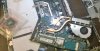
Am I the only one who had no idea that our laptops have soldered CPU? I discovered it the hard way after disassembling mine SVS 15.5 with replacement i5-3380 sitting nearby
...well, at least I got to fix my failing (LOUD
) fan in the process. Anyhow, below is the shot before I took off the heatspreaders...you can see no socket lock under either of those. Oh well, still love my Vaio :thumbsup:
-
what did you do to fix your fan? are replacement units available?
Sony Vaio S Bios Mod For Gt640m Le
Discussion in 'VAIO / Sony' started by Amal77, Jul 14, 2012.


