 Problems? See this thread at archive.org.
Please do not HIJACK this tread for something else...
-
Sorry, not my intention ... i just dont have any knowledge about ssd's. Since I'm getting the same laptop I thought this would be the right place.
-
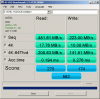
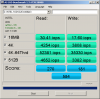
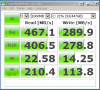
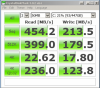
Using the following cable: A1833020A
Using the following SSD: Intel 520 Series, 480 GB Capacity
Using the following BIOS: R1031H4-HACK.ROM
Using the following Sony VAIO S Series Laptop: VPCSA2GGX
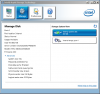
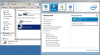
I am able to get SATA III - 6.0gbps transfer rates with the Optical Drive turned off. I need to check if I can get the same with the Optical Drive turned on.
I just checked with the Optical Drive On and I am still getting 6.0gbps.
-
Does anyone know if the hacked bios is compatible with the newer Vaios (SVS13A190X)?
-
So what is the final word on this? Seems like a lot of mixed results. Should we just buy a slower SSD since we will be running at Sata 2?
-
You can no longer buy SSDs that are SATA2 only I think.
But should you buy the best "uber-mega-too-many-words" SSD or is Intel, Crucial or Samsung sufficient - they are more than sufficient either way. -
Not Intel, now that they use sandforce
Sent from my GT-I9000 using Tapatalk 2 -
Soooo? Were there complains about Intel drives? Other than "why do you use SandForce by name"?
-
-
I'm willing to listen, but please give me something more than a very big rant on a forum, that doesn't even directly mention Intel SSDs, but SandForce in general?
-
I too want to know how you determined that any SandForce equipped SSDs are bad...
-
yep, so i am quite angry about my sony svs1513c5e .... bought for my self crucial m4 512gb and usual problem sata2/sata3 ... in "normal mode " sata2 the speed is about 275/250 and just tried the optical and sleep trick, now is working on sata 3 and speeds are 506/264... hmm... so still no solution for this problem ?
-
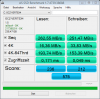
After hours of work on Weekend (Problems with usb recovery stick, backup old System, etx) i´ve switched the 320 GB HDD in my new configured VAIO S13 to a OCZ Vertex 4 256 SSD drive. As we know, Speed is SATA2 but impressive for me!
-
I've got an SVS131290X on the way and wanted to know what I need to do to enable SATA3. They upgraded me to a Bluray drive instead of the burner (but I doubt this will make the slightest difference).
Is there a bios hack or do I need to disable the ODD and get used to the Boot -> Sleep -> Awaken the laptop to get the SATA3 speeds?
Also, any word on how this effects Linux (Ubuntu Precise)?
Please let me know. -
first of all sorry for my bad writing my model : SVS151290X
just read this link and understand that there is no difference in real world between sata 2 and 3 Is A SATA 3Gb/s Platform Still Worth Upgrading With An SSD? - Are SSDs Still The Most Noticeable PC Upgrade? but there is no reason that sony does not provide us with sata 3 support, we should ask theme to give the sata 3 support back(but i don't know how we should do this) but i know that my next laptop will not be sony because of this kind of support.we paid a lot for this laptops and they are not providing us such these basic features that other brands provide without any problem. -
I'd put money on it:
- not being a locked/hidden bios setting
- not being intentional
Sent from my GT-I9000 using Tapatalk 2 -
It was definitely intentional, because Sony want their own SSD's running super-speeds compared to user-built installations. So combined with their proprietary setup (which is 2 SSD in RAID-0), you indeed get amazing high speeds...
But I think you already realized this and your post was more of sarcasm...
-
Which I would agree with, if it weren't for the fact that only some brands of SSD can work at SATA 6Gb/s in the laptop. To me this suggests a handshaking issue, which I would put down to an underspec cable (if anything is intentional by Sony, it's the wire grade of this cable) and/or electrical interference.
-
I'm following this thread already from the beginning, and I'm not aware of _any_ SSD that runs SATA-3 without using the known work-around by means of suspend/sleep -> resume method. My Samsung SSD 830 runs also SATA-3 when doing so. This could be indeed caused by a handshake which isn't covered "correctly" by Sony firmware (lucky us...).
However, there are a few SSD on which this work-around doesn't work and they remain running in SATA-2 mode.
Having said above and also already mentioned couple of times:
Don't focus too much on the SATA-2/3 issue. Except if you have a really fast SSD model, you won't feel the difference in normal usage. Except during big file copies and benchmarks. -
I think there is a difference, not in the seq. which I agree matters zilch/nada/null, but in overall responsiveness.
I have VMs starting faster on an older VAIO F2 with an older C300, that does SATA 3 (and C300 barely goes above SATA 2 speeds) than current S15 with a new m4 on SATA2. And the difference in not just noticable by "eyes", but also by the stopwatch
Something's fishy there! -
As long as I don't smell (for real) anything fishy from my S13p I'm already happy enough about it
-
That, my friend... is no excuse
-
I have a SVS151290X series laptop bought last year.It came with 750 HDD and recently i have decided to upgrade to SSD.
I have bought Samsung 840 Pro 512GB and have tried to replace the HDD but with no success so far.
My 1st attempt was to clone the SSD which worked fine for some time but after a while the system become unresponsive.So i had to go back to HDD to be able to use the laptop.
I have formatted the SDD and tried a clean install of Windows 8 from and ISO, the installation went fine until 1st restart when i got a blue screen and an error and Windows 8 won`t boot at all.I have sent the SSD for a replacement and while waiting for the new one have made the recovery DVD`s.
After receiving the new one i have replaced the HDD again with the clean SDD and have installed Windows 8 using my recovery DVD`s. The installation went fine but again after the 1st restrat it just won`t boot.
As i know AHCI is already on and i can`t find and change any setting in BIOS.
Where i`m doing wrong?
I have formatted the SSD again and cloned a freshly recovered Windows 8 from HDD , replaced the drives and run the Windows updates on SSD , after 1st restart same story again, error and windows won`t boot.
I`m desperate and tired of all this.
Any advise would be much appreciated. -
I currently have a dual-boot system with windows 8 and linux mint 15... I get SATA 3 speeds on windows 8 but not in Linux unfortunately. It may be a driver issue, I don't know... I'm not a linux expert and don't want to waste too much time looking into it. (By the way, the linux system feels faster still than the windows one, even with the SATA difference)
-
Hello everybody,
just joined the forum as I too am having the same issue: I have a 2 months old SVS1513 bought in Europe with the 320GB Hitachi drive which I swapped out in favour of a 512MB Samsung 840Pro.
To dzhoshkun's experience I'll add that neither Windows 7 Pro nor Ubuntu fresh installs work as they should: Windows install failes after randomly extracting 10% - 35% of the files and the Ubuntu distro failes to boot correctly stating it's missing files even though installation apparently went fine.
All checks I could make on both disks we tried were negative: memory on the SSDs seems perfect. Obviously Samsung and Sony support can't be contacted for this. -
840 pro doesn't work with this laptop due to the dodgy sata interface
same reason sata 6gbit/s is dodgy as hell and only works in certain circumstances
the best ssd for this laptop is the samsung 830 -
I have the 840 pro and it works... The 830 isn't available anymore anyway.
-
Guy DON'T EVER take a Sony Product ! THE WORST AFTER SALES SERVICE! Unacceptable for a big company like Sony. I am a customer and it has made me pay twice the amount of 50euros! IT IS THE WORST! I also have HP and they are the best, easy and friendly service!
-
Maybe it's just recent 840 pro's then, because there's been like 2-3 reports of this lately
-
Very eloquent, explained and useful post
-
Hi, can someone explain to me the suspend/resume hack to enable SATA3 speeds? I'm also getting SATA2 speed, Sony Vaio S SVS151290X performance with Samsung 830 256GB SSD here.
-
Disable optical drive in bios
-
Yes, I did that, and after reboot tested SATA speed again and got SATA 2 speed, no change.
Also, I posted this separately but will ask it here again: I read that this laptop has RAID 0, I understand that RAID 0 uses 2 identical hard drives or SSD's., however in the back of the laptop I only see physical space for only one SSD/hard drive. So how does RAID 0 work in this laptop?? -
Disable optical drive, restart then enter Sleep mode and resume. SATA3 will work afterwards.
-
I tested it and it works, I now get SATA3 speeds when running CrystalDiskMark. Thanks.
-
Hi,
I have a Sony Vaio SVS1312P9EB and have removed the optical drive, I have a OCZ Vertex 4 and OCZ agility 3 in the machine. However I still need to disable the "Optical Drive" (Agility 3) for SATA 3 speeds.
Does anyone have an alternative way to get Sata 3 speeds? Maybe a BIOS hack?
Thanks -
Yeah I'm in a similar boat. I have ssd's in both the regular hard drive bay and in the optical bay. I have also replaced my screen for an IPS one, so I cannot see my BIOS unless I pop the original lcd back in. Will I just have to live with SATA II for both drives. Also, is there anyway for me to disable the ODD bay when I cannot see the BIOS? Could someone post the keypresses neccessary so I can do it blind if there isn't another option?
-
UPDATE:
Even though I was able to achieve SATA3 as stated above, I found that in SATA3 mode there's a higher idle CPU utilization as compared to the SATA2 factory default. Also, performance increase is minor. Hence, it's worth it to remain with SATA2. -
Are you perhaps using an adapter case for the 2,5" drives in place of the optical drive? There was some CPU utilization issue when using those on Windows 8 machines IIRC (it should be described earlier in the thread).
-
No, it's the laptop as originally shipped from Sony, with the optical drive in place.
-
are you guys saying don't swap the dvd-rom for a hard-drive or you can't get SATA 6Gb/s (SATA 3) performance on either drive (main and swap) let alone both?
http://forum.notebookreview.com/son...012-sony-s-series-owners-thread-685.html#6845 -
Basically: yes.
It turned out that for most of us we need to have the optical station be disabled (in BIOS) in order to have SATA-3 after resume-from-standby (which is in my case).
But really...
You shouldn't bother too much about it. For most use you won't feel any speed difference with SATA-2 and SATA-3 (and definitely not when using HDD... so only with SSDs). You would observe it (I think) especially with big file copy between the two drives.
You especially will see the HUGE speed gain when using the proprietary Sony Gen3 SSD (which are 2x SSD in RAID-0 on native SATA-3). -
how do I use the Sony Gen3 SSD? Do you have both sony drives in the same internal drive bay?
Can we disable optical drive in BIOS (with the second hard drive installed where the dvd-rom was) and just get the primary drive to work at SATA-3 speeds?
What is the fix for stable SATA-3 speeds in these damn sonys without putting them to sleep and disabling optical drive? -
1. What you mean "how do I use..."
If you order (or buy) the Sony laptop with SSD, it is already in and configured for you (sometime you can choose between normal SSD and the Sony's Gen3 series SSD). It has a proprietary cable to connect to mainboard.
You cannot buy this stuff as new/extra accessorize (but you can buy it as spare part replacement).
I ordered my S13 Premium with the cheapest harddisk and replaced it myself with a Samsung SSD. I kept the optical station for now, but might maybe replace it with additional HDD.
Oh and for your info.
If you replace your optical station for a SSD/Harddisk, make sure that you get the right bracket/caddy. Because else your CPU will regulary execute clock-cycles on the SATA interface causing short loads of 0-10% spikes. This has to with some sensing circuitry that requires a resistor between two pins. Some brackets/caddies do not have this resistor.
2. If you disable the optical station, you actually disable the SATA-port. So if you have it replaced by a HDD/SDD, also this one won't show up then.
3. Nope... and actually.. with some brand/model SSD the sleep-resume trick also does NOT work.
Blame at Sony for this... it's either an internal timing/firmware issue or purely 'disable SATA-3 mode when no Sony Gen3 SSD detected' in the firmware done by Sony.
But again...
You are TOO focused on SATA-3... what makes you think you gonna feel the different during normal use?
As I mentioned before, there are only a few situations where you can observe it. -
How can we tell these apart? Are these compared in some posts? I have an adapter as I planned to replace the optical drive with the stock HDD and put an SSD in its place, but now I'm worried. Thanks in advance.
-
There is a separate topic about it...
I will have a look for it
...Found it...
See around from next page:
http://forum.notebookreview.com/son...-disassembly-odd-caddy-video-tutorial-14.html - Page 14
http://forum.notebookreview.com/son...-disassembly-odd-caddy-video-tutorial-23.html - Page 23
See also this order page
[mind that while the caddy supports SATA-3, your Vaio S will stick to SATA-2 speeds unless there will be some BIOS work around in future]:
http://hddcaddy.com/en/sony-vaio-hdd-caddy/165-sony-vaio-svs13-s13-hdd-caddy.html -
Thanks a lot.
So, these adapters that work without mods, did anyone open them to check what's the difference? i mean, it would be easier to open the caddy I have and check if it needs to be modded than to disassemble the whole laptop just to check this. -
The mod is purely a resistor (either old fashioned one or SMD) between the mentioned pins.
This is the difference on which you need to check for. Others have no connection between the pins.
So no need to disassemble... if correct you can see it on the caddy.
Alternatively you can check your CPU-load in idle (I think the provided links somewhere also mentions how to check this) -
I've a question to submit.
I've a Sony vaio s series premium 13" with a 128 Gb ssd on board.
Replacing it with a larger ssd (no Sony) using the flex cable and the caddy of the vaio s (equipped with standard sata disk) may compromise the use of raid 0? It's possible to enable raid 0 on a sata ssd or I need the proprietary ssd? -
Raid-0 is ONLY possible with the proprietary Sony SSD's (it has also another cable). There isn't a so-called 'caddy' for the SSD location. Only for the optical device location.
And to replace a the proprietary SSD for bigger (normal) SSD, you also need purchase another flat (flex) cable.
Sony Vaio S Series - SATA 3 Investigation
Discussion in 'VAIO / Sony' started by Topper59, Jul 7, 2012.


