 Problems? See this thread at archive.org.
One thing more .... Having used it ..
9.5mm 2nd SATA HDD Caddy
And having replaced the BR for a hard drive, you will not have anything to do?
-
Nothing, just replace the old ODD then it'll work perfertly.
-
Just installed R1031H4-HACK.ROM. SATA 3 confirmed, thank you all, guys! Bluetooth is missing, not even an unknown device present in device manager. Too bad, but for me SATA 3 worth it. Everything else works in terms of HW, no unusual fan noise either.
My config: SONY VPCSA 390X, Wireless: Intel Centrino Advanced-N 6230, SSD: Crucial M4-CT512M4SSD2.
Results: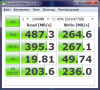
![[IMG]](images/storyImages/83941d1347047806-sony-vaio-sa-sb-sc-se-advanced-menu-bios-hack-crystal.png)
Write speed is not bright, but read speed clearly shows SATA3 (just in case, I'm on AHCI config with trim enabled, RAID speeds are a little worse). -
For now I'm keeping my ssd in sata 2, I run very well and stable, I have the wonderful technology of BT and the laptop or sit, as the many changes not only R1031H4 BT leaves me, if the noise fan is unbearable .... not worth it ....
For though many believe that there are very large it is not, probe and open programs really well, the speed of boot is the same, only notice the difference in file transfer ....
Conclucion ...
Wait for the activation of the sata 3 on my laptop without sarifical nothing ...
thank you very much -
Fan noise ? Don't know what ut talking about. My SB4 is same quiet as it was in sata2...
-
The Firmware R1031H4 cause horrendous noise in the fan
-
Mine does not even on discrete GPU. There is fan noise only under high loads, but that's the same as with the latest BIOS. Something should be different here. BTW, one friend of mine was complaining about a high noise, but then cleaned the notebook fan of dust and noise disappeared.
-
No, with the latest bios works quietly ... at least in my notebook model did not work properly, or stable bios R1031H4.
The Bios R1031H4 not raise the temperatures of my notebook, but it eliminates the BT keyboard and unconfigure, That is my case
Sony Vaio VPCSE27FX / s... -
Is there any way an advanced menu bios hack can be made for SVE14A190X?? I can provide the bios dump if needed. Or is this hack confirmed to work with mine??
Thanks in advance! -
hello, i got the same problem. My version is unknow and then the fan is never slow down. il always keep in the highest. Do you have any way to back to the original.
I want my me version back
Thanks a lot -
hello, i got the same problem. My version is unknow and then the fan is never slow down. il always keep in the highest. Do you have any way to back to the original.
I want my me version back
Thanks a lot
-
"Officially" this version is for VPC models only.
Check this link from Sony. -
Alternatively, this link to revert to an older or non-hacked BIOS
-
Can pyr0 or anyone else tell me how to load back a DUMP.ROM made with the backup tool?
I have a couple of DUMPs; recently tried to load one of them but it won't pass disguised as a valid ROM.
Thanks!! -
I am sorry that i didn't say it clearly,
The ME version in BIOS is unknow, and my computer is really got some problem, the fan is crazy working and after 1 hours it will shut down suddenly.
I wanna my ME version back, Does anyone have some soultion? -
I am sorry that i didn't say it clearly,
The ME version in BIOS is unknow, and my computer is really got some problem, the fan is crazy working and after 1 hours it will shut down suddenly.
I wanna my ME version back, Does anyone have some soultion? -
I have got he same problem as you now, and my computer's fan became crazy!!!!
help me i don't want broke my laptop -
For god save, there is someone have the same problem with me, i would like to know what you do to fix it
-
i have got the same question as you, wait for the genius to help.
-
Hey,
I just have a question. I am trying to use my SB with Linux but can't get the AMD turned off. I tried everything (vgaswitcheroo, etc.) but nothing seems to work. I found out about the BIOS hack here and would like to know if it is possible with the advanced BIOS to turn the AMD off, or would this be one of the settings able to crash my Laptop? experience anyone? thx
vpcsb2c5e
BIOS - R2087H4
Intel HD + Radeon HD 6400M/7400M Series -
Are you sure you are trying everything correctly? There are several ways to turn of the AMD card from linux, with vgaswitcheroo you need to do
as root. If that gives you a "file not found" error, you need to mount debugfs firstCode:echo OFF > /sys/kernel/debug/vgaswitcheroo/switch
again as root.Code:mount -t debugfs debugfs /sys/kernel/debug
The other way of doing it I've tested is to use acpi_call, you will have to install that from your distributions package manager, or manually compiling it yourself. you can use the provided "test_off" script to work out which command is needed to power the gpu off (cant remember it off the top of my head exactly, I think it will bebut I'm not too sure) https://github.com/mkottman/acpi_call/blob/master/test_off.shCode:echo "\_SB.PCI0.PEG0.PEGP._OFF" > /proc/acpi/call
-
thx for the fast answer!
the main problem is that I am not an expert so I can only follow tutorials, which also have to fit more or less all my premises. So, I followed quite some tutorials (and during that two week process did also some reinstalls) and it seems vgaswitchero works because the terminal tells me that the AMD is now powered off, but the energy consumption ist still >25W and the fan is constantly (loud) running (I got it in Dual-Boot and Windows is always fine). This can only mean that the AMD is still running in the background. Besides the vgaswitchero method, other methods unfortunately don't work and other power saving tools help a bit, but don't get to the root of the problem...
When I found out about the BIOS hack I thought if this works the AMD would definitely stay turned off. This would be the easiest way and save me some nerves, I don't need the AMD anyway. But I just wanted to make sure that anyone has tried it, because I really don't want to mess up my laptop... -
there is an option for the GPU in the hacked BIOS, but i would suggest not messing with it. i remember two people here bricking their laptops by changing that option.
-
as far as I understood it, it happened only to people who messed around with the Intel and not with the second graphics card? But I take your advice, you probably know it better and I don`t want to brick my VAIO because of that. Better I go without Linux...
-
Is there anyone on BIOS R1031H4 in Windows 8? Any problems? (VPCSA290X here)
-
Hi buddy,
I had the same trouble some months ago because I use Windows XP occasionally and the switch doesn't work there either, so my battery used to drain twice as fast for the consumption of the AMD video. Fortunately I found a way to hardware-disable the AMD from Pyro's (god bless you my master) unlocked bios and claim back my 5++ hs battery autonomy. The precise instrucion follows:
Advanced --> Video configuration --> Special features: DISABLE
Rest assured this setting won't brick your VAIO -- in fact, it disables the sub-menu that can make you brick it.
Mind you though, that my model is a SA, so I guess there's a 1% chance it won't work in a SB (let us know).
On a separate note to the other subscribers, it would be interesting to have a separate post where to reference all the discoveries/results we have achived by messing with the bios settings. There's a lot of new settings unlocked by the advanced menu but most of them remain cryptical at least for me. Maybe one of the admins can open such post so we can all build a wiki-like bios manual to make some use out of it. -
The hacked BIOS will do it!
My SE runs on 15-18 W in idle under Linux. The BIOS options you shuould avoid are stressed in the first post. In current kernel versions a power regression can occur with Sandy Bridge CPUs + Intel GPU in use: Kernel bug report. Keep that in mind, when you measure the power.
I checked already other options of the hacked BIOS, because I can re-flash my BIOS pretty easy now... [story starts with a bricked BIOS ]
]
-
How are you able to re-flash a bricked BIOS for Sony? -
Wow great job with that BIOS testing along with pyr0!
-
I need an advice. Pls tell me how to download Intel Management Engine (IME) into BIOS.
After restoring BIOS from ROM IME disappeared from BIOS and it causes problems with my VAIO SA. It turns off every 30 min, fan is going on 100% power all the time. Just like I mentioned the reason is missing IME (in BIOS where there is info on ME Version there is written "Unknown"). I tried to download into BIOS, but failed. Some "specialists" also tried to do so (using programmer etc.) but also failed.
I tried with Sony support, but they are not competent enough (either in US, UK, Poland...as I tried in this 3 countries) to tell anything in this case, Insyde didn't respond and so on. Sony only solution is to replace motherboard and the price of it almost equal price of a new laptop.
So once again...how to download Intel Management Engine into Vaio SA BIOS????? -
If only SATA3 could be unlocked in this awesome BIOS.
-
Has anyone tried tweaking the advanced settings under Intel IGP? Things like Aperture size, change from 256mb to 512mb, do they make any difference? I don't wanna brick my laptop
-
Did you use a dump of your old BIOS (4 MByte) or a Sony BIOS-Update file? A BIOS update does not touch special areas of your BIOS.
-
I tried both...sony bios update and 4mb ROM file. Same result...."ME Version=unknown".
-
I found two options to force a re-flash:
1. You can enable "Re-Flash" of the ME in the hacked BIOS.
2. Edit the "platform.ini" in Sony's update package.
Change also the section [UI] and [FlashComplete] to get an user interface:Code:[Region] BIOS=1 ... [B]ME=1[/B] ... ;ME default : 0. ; 0 : Don't flash. ; 1 : Flash ME region.
This requires a ME firmware in the update ROM! I don't know yet, if they put it into the update ROM.Code:[FlashComplete] Action=0 [B]Dialog=0[/B] ... [UI] [B]Confirm=1 Silent=0[/B] ...
-
I tried to do so before, but with no success. I wasn't able to do it with 4mb ROM, just only with sony (or hacked version), which is 2mb (and probably didn't contain ME).
-
Oh...I changed "ME Re-flash" in BIOS to Enabled, but still failed to "upload" ME into BIOS. Probably it's something with "permission" to get the access to ME area of BIOS.
-
If you use the latest hacked BIOS (R2087H4) pm me a link to a dump of your BIOS and I'll do a diff with mine.
-
Thx Kruegsch, but accidentally some guy solved my problem with IME. He doesn't know how to be honest...he said that it was more luck than logic action...he combined 4mb ROM with ROM from Sony site. However there appeared another problem...with sound card...it's not working (and it worked before). Windows is not able to find it. I replaced HDD with one from the other VAIO (SB1 to be precise)..no sound card. I replaced the board (the one with card reader and Realtek audio card) with one from SB1 (working one of course
)) ....no change. So I started wondering what it might be...BIOS? Something with motherboard? With cables? Hell knows. But still....VAIO SA2 doesn't turn off...so IME is working as it suppose to.
-
Hope this not off topic.
I'm running on a VPCSB1X9E and I did not need the unlocked rom because I was able to install Hackintosh on my system.
But I'd give it a try, so I installed unlocked R2087H first and that was ok, then I tried R1031H4 for enabling SATA3 but my system was lagging and it took 4 to 5 attempts to get windows up and running but still slow system, to stay on the safe side I went back to R2087H4, so no SATA3 for me unless I get it stable.
But my real problem is the following
I installed a second drive in the cd/dvd bay because I almost never use the cd/dvd. I installed a 256 GB SSD and it works fine.
But now I'd like to boot from this SSD and this does not seem to work, I set optical drive on top of the boot list but still my internal hard drive is selected first.
Is there an other way than swapping both drives.
Is there a chance having SATA3 back on the latest ROM or is this really impossible -
why don't you swap the drives physically? none of them work on SATA III speeds on the BIOS you have now, so if you want to boot from the SSD, then just swap it with the other hard drive.
-
That was one of the options.
So I tried it an hour ago but without success.
Whereas the harddisk was seen by the bios when installed in its place, replacng it with the ssd no disk is seen anymore.
On the SSD I installed hackintosh 10.8.2 and also the chameleon bootloader.
When I don't stop with the setup but let the pc boot, the chameleon bootloader shows its menu.
When I choose to boot hackintosh I get an error message (hackintosh is installed on the ssd that's now the internal drive).
When I choose Windows 7 from the menu I get an error message that the bootloader is missing.
I didn't change anything in the bios.
So what's going wrong and how to solve it? -
Interesting conversation with Sony. Nothing that you didn't already know but confirmation that they suck.
11:08 PM Connecting...
11:08 PM Connected. A support representative will be with you shortly.
11:08 PM Support session established with Henry - (C2LD).
11:08 PM Henry - (C2LD):
Hi. Welcome to Sony Online Support. I’m Henry.
11:09 PM Customer:
Hello Henry
11:09 PM Henry - (C2LD):
I understand that you are unable to enable the AHCI in the BIOS window; is that correct?
11:10 PM Customer:
It appears that there is a design flaw with my VPCSA4MFY where Sata3 and AHCI do not function with this laptop
11:10 PM Customer:
I just wanted to open a case and get a possible ETA on a fix for this bug
11:10 PM Henry - (C2LD):
Okay.
11:10 PM Henry - (C2LD):
Are you using the same factory installed Windows 7 Operating System in the VPCSA4MFY computer?
11:11 PM Customer:
From the information that I can locate from internet forums, it appears that the initial bios worked with sata3 but bluetooth did not, subsequent bios'es have fixed the bluetooth problem but have broken sata3
11:11 PM Customer:
Yes, same OS although I have reloaded it a couple times to correct this issue
11:12 PM Henry - (C2LD):
Okay.
11:13 PM Henry - (C2LD):
I have checked for all the available options only.
11:14 PM Customer:
ok
11:14 PM Henry - (C2LD):
There are no settings or options in the BIOS window to enable the AHCI.
11:14 PM Henry - (C2LD):
Hence, it cannot be enabled in the computer.
11:15 PM Customer:
Are you suggesting that this laptop lacks modern features like AHCI and SATA3 "By Design"?
11:16 PM Henry - (C2LD):
Yes, the option to enable the AHCI is not present in the BIOS window.
11:16 PM Henry - (C2LD):
Let me know if you have any further questions.
11:17 PM Customer:
Do you have a problem with me sharing a transcript of this chat?
11:17 PM Henry - (C2LD):
We do not have the option to send the chat transcripts to e-mail id.
11:17 PM Henry - (C2LD):
In this case, I suggest that you copy and save the chat transcript to a new notepad for your reference.
11:18 PM Customer:
Thats fine, I have no problem with copying and pasting it. I just want to make sure that your statement is an official sony statement about the status of this laptop.
11:19 PM Henry - (C2LD):
Yes, we are the Sony technical chat support team.
11:19 PM Customer:
Thankyou.
11:20 PM Henry - (C2LD):
You are most welcome.
11:20 PM Henry - (C2LD):
It was a pleasure assisting you.
11:20 PM Henry - (C2LD):
Wishing you a Happy Holiday Season!
11:20 PM Henry - (C2LD):
Have a great time ahead.
11:20 PM Henry - (C2LD):
Good-bye and thank you for contacting Sony Online Support today.
If you would like to be the first to know about our latest products and receive exclusive offers, please sign up for our newsletter.
11:20 PM Henry - (C2LD) has sent a link: E-mail Subscriptions
11:20 PM Henry - (C2LD) would like you to complete a brief Customer Survey. Open Customer Survey
11:20 PM Henry - (C2LD) has ended the session. -
Hello,
does this mod allow disabling Hyperthreading?
Thanks -
Soo, I installed the package. First of all, pyr0, you saved my PC. All of the SONY updats failed and I had a feeling my PC was bricked, so I didn't reboot after flashing official 2087. Your update using insydeflash was the only one which seemed to go normally. I had the wort feeling of my life, but I rebooted. Thankfully, the PC booted perfectly fine and your 2087 is nearly perfect.
Only one problem/question: I didn't install your bios for an urgent need of those options, but I want to ask: will I do any damage enabling UEFI boot on Windows 7 Ultimate with an SSD? I heard the change of MBR to GPT could cause damage. -
Hi, i have the same problem.
After bricking bios i've replaced the flash memory with a new one bought from "Grains Bios Repair" website.
I've provided my DUMP.ROM file, but it seems is missing of ME part.
Now my notebook boots up but in bios it says ME Version = unknown and fan are at 100% speed.
I've tried to reflash using the option below but it doesn't work.
Can someone help me?
[Region]
BIOS=1
...
ME=1
...
;ME default : 0.
; 0 : Don't flash.
; 1 : Flash ME region. -
Edit: I forgot to mention the error that i get when i try to flash my backup rom.
It says Region MAP not found.
Probably my DUMP.ROM doesn't have the ME Region. Can anyone give me a full 4MB bios dump that contains this part so i can try to flash back with [Region] ME=1 option? -
If i am correct, the first 2MB of a DUMP.ROM (4MB) are for Intel ME.
In my DUMP.ROM i see that the first 2MB are blank except for the header. Is it possible to have a complete dump.rom containing the ME Software? -
Hello guys
I was trying to install linux properly to my sony Vaio VPCSE23fx, I faced some problem with hybrid AMD/Intel card, then I tried to reflash my bios with hacked version and closed simple integrated Intel card. Then i realize it was completely silly solution. Now my laptop open about 20 sec without any screen signal, and then close. I am now in norway it is not that easy to find the repair support officially or not.
So could you recommend me something
Sony Vaio SA/SB/SC/SE Advanced Menu BIOS Hack
Discussion in 'VAIO / Sony' started by pyr0, Jan 28, 2012.


