Problems? See this thread at archive.org.
Updated Arcsoft Web Companion software to version 4 (meant for the new F 3D series).
-
9.2.0.1030
INF Update Utility
04/21/2011
http://downloadcenter.intel.com/Det...hipset+Software+Installation+Utility&lang=eng

-
^ The latest chipset software doesn't install any newer driver for the FZ's chipset. Installing the update does nothing if you have an earlier version of the software (only needed after a clean install).
I will update it though (I do know about the latest update).
-
Coolguy, -Rajesh, All..
Ya'all are the best. You rule and are virtuoso at it's finest!!!
Thx soooooooooo very much for the guide as well as the updates!
vgn-FZ290
Cheers! -
Any luck with this ??
Thanks -
LOL, thank you.
-
There is nothing much that I can change in the inf.
You can't expect much from a tiny lens. The webcam is good enough for chatting (with enough lighting). -
Fair enough. The only reason I asked is because those options were available on windows Vista, hence my interest
-
^ I haven't looked at the advanced property page in Vista. It's is the same Vista driver.
-
Thank you so much for this thread! I have Windows 7 X32 installed and running beautifully on my VGN-FZ180E.
-
Updated IDT audio driver to 6.10.6327.0 (from HP).
Removed the IDT control panel and equalizer settings. I was experimenting with various audio effects like SRS, Dolby Home Theater, etc. The effects by themselves worked fine, but the basic audio quality was poor.
The HP inf's have way too many custom settings. I will have to dig much deeper to know what each setting does. -
Hi man,
Unfortunately the new audio driver isn't working in HDMI mode, no audio on TV, only on notebook speakers. I'm back to the old modded one which is working well.
That's it. -
Thanks for letting me know. I will upload a working HDMI driver soon.
-
I had re-uploaded the IDT audio driver. HDMI output should work fine now.
Edit: The original 6327 driver should work fine. -
Still no luck, it doesn't work. Maybe you should let that mixer in its place, as the Windows mixer does nothing, possibly it doesn't switch from speakers to HDMI output.
-
I don't know what mixer you are talking about. The ini has the same settings as the previous driver. I just removed the IDT control panel and EQ.
Did you set the HDMI as the default device before opening the media? What happens when you play the test tone from the Playback devices?
I don't have anything to test, that's is the problem. It seems to work right in the playback devices. -
I can confirm that this driver has NO sound through HDMI.
-
^^ Double click the HDMI device in playback devices and uncheck the exclusive mode options in the advanced properies. See if this resolves the HDMI audio issue.
-
Sorry, after having checked Windows control panel, changed sound card settings and set digital audio (HDMI) as the default device I've realized that it does work actually.
In fact, I used to change the default audio device from IDT control panel, which was way more convenient than entering into W7 control panel.
It doesn't work when you try change it from the the Volume Mixer in Windows taskbar, right-down side of the screen. So you have to enter into W7 control panel.
I believe you'd better leave the IDT control panel where it was, for a faster access through W7 taskbar.
Thank you for your patience. -
Thanks for letting me know.
Setting the default device from the Windows control panel is the right way to to. Changing the device in "Volume mixer" doesn't change the default playback device.
Volume mixer just gives control over the playback volumes of various applications. You need to set the default playback device in the Windows control panel before opening Volume mixer.
I removed the IDT control panel and EQ because, I thought many people would barely use them. I will enable them later. -
Right, I would open the IDT control panel only for changing the default device, otherwise the equalizers got the speakers sound even more crappy that they normally do. Not quite a Bang & Olufsen-like sound device.
-
That would assume that one uses the equalizer ONLY when listening on the built in speakers. Not a good assumption. (Rajesh, did you catch that? big ol' grin)
Gary -
Do you use the EQ presets in the IDT control panel? I don't use them at all, even when listening through the external amp. I know that I am not an Audiophile.
I decided to remove the EQ settings when the sound got muffled (might be due to some other effect) when experimenting with the newer HP drivers. -
Presets, no. EQ sliders yes. If the new driver is muffled with them, I'm staying away from it.
Gary -
I'm not have .xml files, and folder "Function"! (S1 button not work)
http://imageshack.us/photo/my-images/684/123sm.png -
Did you install all the Sony utilities in the order mentioned in the first page?
-
you are amazing..
its work.. thanks
for vaio fz21m.. you know that, this laptop has heating problem...are you help bios update.. -
There are no known heating issues with the FZ series. If yours is running hot, it can only mean one thing: dust build up in the fan and cooling vents. Also you do need to realize that you must NEVER block the vents UNDER the machine. These are used for air intake.
Gary -
thnx for answer.. Turkey(Tr) to be the inbox can be a problem.. here because there are a lot of complaints...open to air flow and while the heatsink and fan clean, GPU and CPU temperature is not operating any program that shows the average 57 degree....95 degrees when the game play..If this value is normally no problem for this series..(vaio vgn-fz21m) also a follower of your forum will be continuously
-
What temperature is that for? GPU or CPU?
Idle temperature of 57 C is normal for the GPU. For the CPU, it should be in the 40's. -
Hi, thanks a lot for the guide- everything is working fine. Just wondering- the webcam quality has become REALLY poor. I have installed the correct driver and am using Webcam Companion 4. I have also tried using the VAIO Cam utility but same poor picture quality issue on webcam.
Is anyone else having this issue? When in VISTA- Webcam quality was perfect.
Any help would be much appreciated. Thanks a lot -
neoda1, what poor picture quality are you talking about?
The Windows 7 camera driver is the exact version same version as used with Vista. -
Hi, thanks for your reply. I realise that but the quality when I go on webcam or even use Arcsoft Webcam Companion, the quality is really distorted compared to how it used to be before. I understand the drivers are same but possibly something to do with the settings?
I have changed the quality to highest pixels but still, the quality is quite blurry compared to before. I have read around the net a few other people are having similar issues. Any ideas? -
Aren't there two different cameras in the various incarnations of the FZ models? Could it be the wrong driver?
Gary -
Just updated my 2007 FZ11Z following the guide and it works perfectly
Spec today is:
Windows 7 64 with SP1
T9500 CPU installed to replace the original T7300
4Gb Crucial DDR2 memory PC2-6400
Hitachi 7200 500Gb HDD
Intel 5300agn wireless card.... 300Mbps on N-draft
3rd antenna installed in lid
Original 8400M GT GPU (works fine as I don't game)
Lindy Express card USB 3.0 x 1
New "azerty" keyboard
WinDVD10 works perfect with 186.91 WHQL driver
Ricoh Webcam works perfect
All FN keys working
Vaio Control Centre works
S button works
AV button works
Cold start to google search ready... 59 seconds
Shut down 15 - 20 seconds -
Nvidia driver 270.61 worked great but not with WinDVD10... stuttered and jerky... so went back to 186.91 WHQL for 64
Next mod is Crucial SSD C300 or M4 -
Try to uninstall and reinstall PDVD. That did the trick for me.
-
"Try to uninstall and reinstall PDVD. That did the trick for me." ???
Sorry, PDVD is what... Power DVD ? I don't seem to have that.
Are you talking about a Sony Utility or a software package ?
Great if you could be more specific
Thx
-
So you recommend Power DVD to replace WinDVD10
-
My bad. I've read your post too fast and thought u were talkin about PowerDVD.
U could try to uninstall/reinstall WinDVD then. Who knows, it could work too. -
Updated Nvidia driver to version 275.33 WHQL. Added support for all Vaio AR and AW GPU's
-
Excellent, just installed the 275.33 driver for my low spec 8400M GT with the modified INF file and ... yes it works great.
Downloaded the trial version of PowerDVD11 and it works with 275.33... great.
After using 186.91 as a fall back, I may well stick with the 275.33.. -
Huge thanks to Rajesh for the information/guide/software provided
-
You are welcome. Glad that you have everything working.
-
Hi, no word on the webcam quality of the fz31m? Is anyone else experiencing any quality issues with the webcam quality?
Also- it appears that "Magic-i Visual Effects 2 HD" -ie: the HD version is out as per: Magic-i Visual Effects 2 HD — A fun and entertaining chat experience!
Is there a way to install that instead of just the normal version?
Thanks Rajesh! -
I don't have any issue with the webcam. I don't take pictures with it. You can't expect much quality with a tiny lens.
You can install the new Magic-i visual effects as a trial version, but not as a full version, unless Sony provides an update (I highly doubt it). -
Updated Toshiba Bluetooth stack to the latest version available from Toshiba.
-
Hello,
Many thanks to coolguy and others who made this guide. It is a great work, for those who know how to use it.
I have 1 question though, for the special button. I don't really use it, but knowing it is not working it get's a little frustrating.
So I'll tell what I did, so you can tell me if I did it wrong or not.
1st of all I opened the following file " CurrentSettingProfileData.xml " with "edit" and checked that CurrentSetting MachineID is 18999 .
2nd
I copied rest of the files at the specified folders.
3rd
I did a restart of the system.
4th
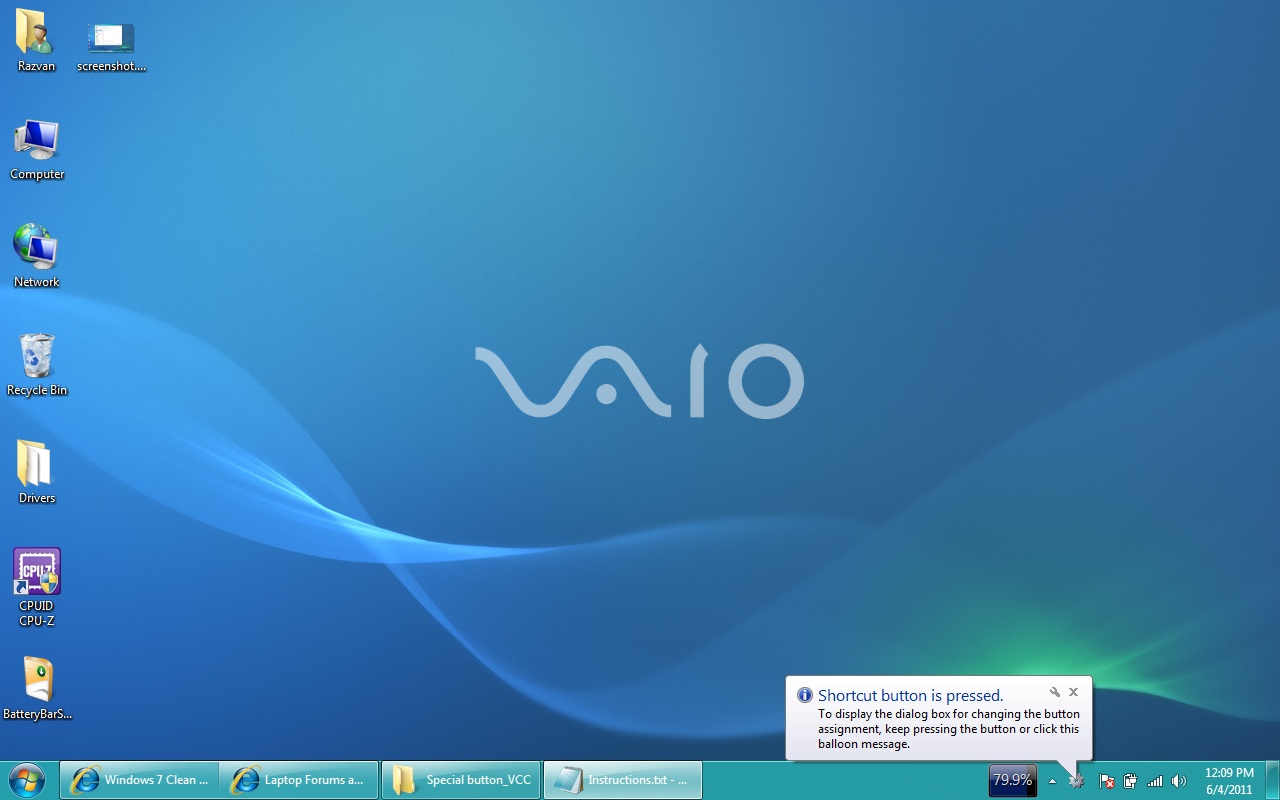
I pressed the S1 ( this how is tagged my special button on my FZ21m Vaio ) and got he following ballon notification as showned on the attached "screenshot 1". I tried to press again the special button , even holding it pressed or pressing again an keep it pressed but nothing happend.
5th
To get Vaio Control Center opened, I had to click the ballon.
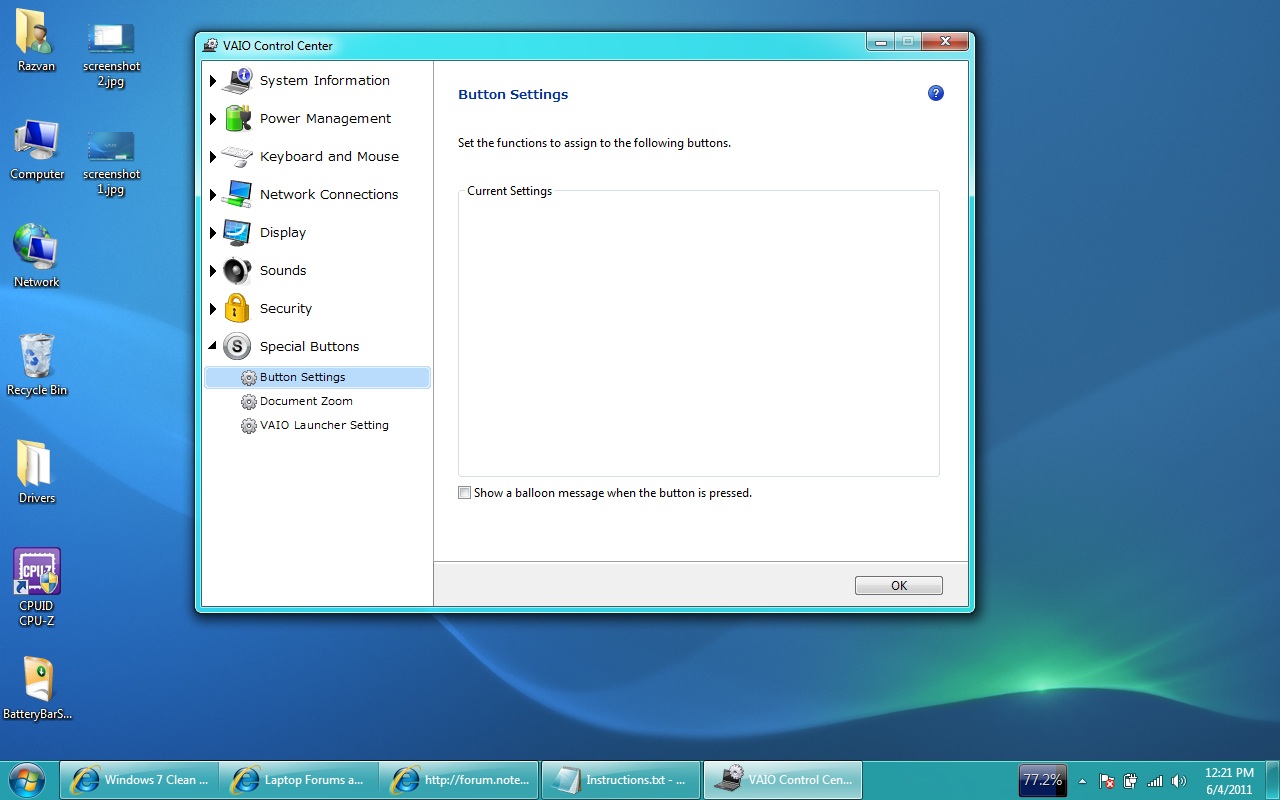
Once VCC opened, I noticed that there are no functions to set, at Button Settings tab. (see "screenshot 2").
Do you know why it is not showing anything ?
I did a search of this thread, but didn't found anyone with this issue.
My VAIO is FZ21M , europe version.
I installed all of the drivers specified except:
16. Vaio Power Management 4.0.0.08240 (optional - not needed):
19. Marvell Network Controller driver update (optional):
20.1. WebCam Companion® 4 Software
20.2. ArcSoft Magic-i Visual Effects Software 2.0.1.83
Thank you for your efforts. Even this doesn't gets fixed it is still much apreciated.
Sincerely,
Razvan C.Attached Files:
-
-
So I installed everything... including the non MS drivers for the NVIDIA on my VAIO FZ18M
But I was watching youtube videos, and my screen just started flickering.. I thought it was bad contact but the flickering until it just went black and came back with a message: NVIDIA kernell crashed and now has restarted...
Is that supposed to happen? Am I taking the computer a little too far? Because before I didn't have this issue with my screen. I mostly did the update because bluetooth didn't work and MS Word seemed to have graphic issues.
My pc has burned out before and they have replaced my motherboard with a "non-faulty" NVIDIA chip. So what's the issue or solution? -
Does this happen frequently? Try the MS Update Nvidia driver.
Windows 7 Clean install Guide for Vaio FZ
Discussion in 'VAIO / Sony' started by coolguy, Oct 28, 2009.