Problems? See this thread at archive.org.
Totally. In 2 months when I'm due for another hinge tightening, I'm going to line the drive in rubber. There's plenty of space in the Fenvi adapter for that. In the meantime, use HDD Scan to manually spin down the drive.
-
I just set the HDD power down settings in windows pretty aggressive, since the stock Vaio Z SSD RAID is so fast, it has a negligible hit on performance that I can tell so far.
Can you circle and / or post pics where you have to do the hinge tightening? Good thing the Vaio Z is so easy to open, eh? -
I referred newmodeus to your concerns in your post, with the following reply:
-
I'm asking a mod to delete this message. Posted by mistake.
-
Hello, I'm going to order the VPC-Z13 and also want to use the Newmodeus caddy for a 2nd HDD. The Z13 I want to order here in Germany is a model without an optical drive.
My question: is it possible to use the caddy, or is something internally missing (adapter etc.) in the notebook because of the missing optical drive? Has anybody experiences with such a model? -
The model that comes without an optical drive, uses the optical drive bay for a standard SATA disk. It DOES NOT simply replace the SSD with an HDD, since the Sony SSD is a non-standard size. There's no point buying another caddy, because Sony will be providing one themselves.
-
Yes, except the problem is for those with models With an optical drive. Unless Sony offers their version of a optical drive bay caddy. Would be great to have Sony's official version, which is sure to be lighter in weight and fit properly.
-Ed -
Ah, thanks a lot. So I should be able to replace the HDD in the optical drive bay with my SSD.
And the area, where in the "SSD-Raid-Versions" the SSDs are located is just left empty? Could it be filled with a 1.8 mSATA SSDs? -
Hi,
I have both the Sony Vaio Z133GX/B. I want to add a second SSD (256GB) since the base model came only with 2X64 GB. I have read the thread and I saw that the caddy works with Z11 and Z12.
Does it works with Z13?
Also there is a problem with the new SSD ?
Does he have to be a specific brand or I can chose any SSD ? -
I already asked at Newmodeus and they confirmed that their optical drive bay caddy (article SONY-2BAY-Z11) is also compatible with the Z13.
Since this is a normal SATA connector any SSD should work fine. -
Yeah that newmodeus Z11/Z12 caddy works fine in my Z13. I installed it about 6 weeks ago. In the end I installed a Hitachi Travelstar 500GB 7200rpm HDD in there. Around the same time I also ordered an OCZ Vertex 2 240GB SSD but have returned it unopened - I became afraid of the SSD reliability (all brands/model) after reading all the reviews on the net
 Even the Seagate hybrid SSD-HDD has pages of problems. I wish people with no problems with SSDs will post their reviews - otherwise all I see are reviews from the people with SSD problems everywhere! So I decided to use a regular platter/mechanical drive here
My 3rd HDD holds the data/documents only. Most of the time this HDD is not even on (auto suspend/sleep with power management). The 2 main SSDs run everything. My outlook PST files are running on the SSD and occasionally I back it up to the HDD using a batch file.
bye -
Planning to do this exchange myself so figured I'd write a roundup of the available options people have chipped in with.
# Fenvi Caddy - $14
- A few people (Yehob, ZugZug, Nando4 & more) have this and seem happy with it. Edwood and Travfar mentioned problems/bad build quality.
Pic's of Z-series vs Fenvi faceplates: http://forum.notebookreview.com/sony/469244-z11-replace-dvd-hdd-working-solution-18.html#post6869886
Pic's once installed: http://forum.notebookreview.com/sony/469244-z11-replace-dvd-hdd-working-solution-19.html#post6875636
(Those pics are really bad however. Could really do with some nice clear ones)
Buy from: eBay - New & used electronics, cars, apparel, collectibles, sporting goods & more at low prices (I have also noticed ebay listings with 'Thinkpad' printed in the bottom right of the caddy instead of Fenvi but i suspect their the same.)
# Newmodeus Caddy - $40ish exc. P+P.
- Bezel is a better fit than the Fenvi one.
Pics: http://forum.notebookreview.com/6878186-post196.html
Buy from: Sony : NewmodeUS, Hard Drive Caddys for Notebooks
# Ultrabay III - $60 exc. P+P?
- Leaves a small gap 5mm x 1.5mm gap on right side of drive bay.
Pics: http://forum.notebookreview.com/sony/469244-z11-replace-dvd-hdd-working-solution.html#post6041521
Buy from: Lenovo - Find accessories for your laptop and desktop - Storage - 43N3412
# Notes:
- Speed of the 2nd HDD is as normal. No slowdown from using the Vaio's 'DVD' SATA connector.
- DVD replacement appears applicable for all Vaio Z-Series models from Z5xx-z8xx & Z1x-Z5x.
- Instructions on how to remove the DVD drive and fit a 2nd HDD caddy. (Newmodeus orientated):
Sony Vaio Z installation guide 18
-Video on replacing the DVD and fitting a 2nd HDD:
YouTube - Add a 2nd Hard Drive to a Sony VAIO Z11, Z12 Laptop
Hope this proves helpful. In anyone feels inclined might be useful to add somewhere on the front page of the thread. -
I want to do something slightly different with my VPCZ1, I want to upgrade my DVD drive to a DVD/BR combo drive. So, if anyone here has a spare drive after they have replaced their DVD/BR drive using the instructions in this thread, please PM me the make and model of the drive, and I might buy it off you.
-A -
Hi all,
I have just fitted the newmodeus adapter to my Vaio Z11 (2x64 samsung drives) with a crucial reall ssd 256 gb because a) i was running out of space and b) no matter the drives gc i still think no trim is a bad thing in the long end. Unofortunately, although i made a mirror of the raid logical partition to the crucial drive i can't boot from it! I looked at this thread and it seems some folks had similar problems, it seems the sony bios hard codes the hdd boot to sata0 which is fixed to one of the samsung drives. Is there anything i can do to fix this without destroying the raid array, setting drives to AHCI (patched bios) and reinstalling windows (so that they place the boot record on one of the samsung drives) (which is a no-no since i dont have an additional win7 licence and i cant be bothered with configuring the environment all over again)?
cheers -
bump, anyone, a solution for booting out of the additional drive without reinstalling windows??
-
Just wondering if there was ever a definitive answer on booting from a caddy drive... Is it a matter of Bios version? Raid Config (ie...JBOD)? Not possible?
Has anyone besides ozbimmer (see quote below) successfully booted from the caddy?
Also, how are we using the term JBOD? I generally use it to mean a bunch of drives that are logically represented as one drive to the OS but aren't in any kind of raid. Ie...combining a 1TB and 500GB drive to create a 1.5TB drive in Windows. Some people seem to be using it to mean a bunch of separate drives behind a raid controller. I ask because I can't find any way of creating a single logical drive from multiple physical drives in the Intel configuration. I can only create a striped array (RAID-0) or have the drive be completely independent.
Thanks
-
What's the current status with the caddy and the battery issue? Is it fixed or is it the same?
-
What battery issue? I've been running with a caddy hdd for months. No problems. -
Just went to newmodeus and picked up the caddy since they are local. The fit isn't perfect but since its on the under side you won't notice it. Also if you guys use the code from their facebook page you get 5% off.
-
hi, first post on this forum, just had to respond to this one cuz it has been very helpful to me.
some of this has already been posted by a few ppl, but id just like to add my 2c and confirm what most ppl are saying. anyway, i just purchased and installed the newmodeus caddy with a 500gb scorpio blue (5400, NOT 7200). so far so good. (google for a coupon code for 5% off the newmodeus caddy) i have let the battery drain from full charge, and according to BatteryBar, the difference in battery life is negligible. a few observations/notes:
1. installing the caddy requires a bit of bending, filing, light drilling, etc. so dont be afraid to get messy.
2. as others have said, and posted in pics, its not a perfect fit, but since its on the underside, i barely notice.
3. some people have said that the hdd is a tight fit in the caddy, for me it was a perfect fit, no problems.
4. consider that external optical drives are about ~30$, external hdd, are more expensive and troublesome. from what i hear, they wear out faster, and sometimes need two usb ports. also consider that having a 128gb ssd raid with all the essentials, and another 500gb platter hdd for movies, etc is a great balance btwn performance and budget.
5. probly been posted already, but great guide here: Sony Vaio Z installation guide 18
6. adds a SLIGHT amount of noise from hdd, but no more than any other average laptop. might be ever so slightly depressing to us vaio z owners who are used to a dead silent pc.
i could post pics, but they pretty much look just like the ones posted already. let me know if u have any Qs. -
hey there. welcome! hmm... why did you have to bend/file/drill it? I didn't have to do that..
bye. -
i had to bend part of the rail from the optical drive to fit the caddy, had to drill out the holes a bit on the rails, and had to file down a plastic/carbon fiber peg that held the optical drive in place. otherwise the caddy would sit too high up.
-
I didn't have to file down or drill anything out. I just follow the instructions on their website.
-
Thanks everyone for all the posts here - this was a great mod that I also did on my VAIO. Sorry if I missed it, but how would I go about connecting my Blu-Ray that I pulled out of the Sony and connecting it externally?
I got the cable slimSATA-USB-C07 from newmodeus, but when connecting it Windows 7 doesn't find a driver. Also, the Blu-Ray drive is basically bare when pulling it out - the disc is open to the world and I didn't know if anyone made an external enclosure for it.
Thanks -
I just put the newmodeus caddy in last night! Was a bit nervous taking apart my relatively new and very expensive laptop but all worked out in the end.
I don't think the fit is amazingly super accurate, in fact the bezel bit of mine even seems to be very slightly curved. But I do think the colour is almost exactly the same, you can't notice that it's not completely perfect, and I am generally very happy with the end result. I must admit to having used a small amount of duct tape where the bracket from the DVD screws to the caddy at the front, as the bracket itself is very bendy and pulls away from the caddy. This seems to have made the fit very straight.
Only problem now is to get all the special my documents links in windows to go straight to that hard drive! -
^ did you boot it up and go "arrrgh my new HDD is missing!!!" ?
(before running Disk Mgmt)
Yeah I've got a couple of hot links to jump over to the new D drive to read/save the files. It's a very convenient way.
Hmmmm. Duct tape. Huh?!
bye -
No worked straight away actually! Was there in My computer when I booted. Is that lucky?
How did you get them to go straight to the new drive? -
oh no mine is still the old fashion way (not direct). I put a couple of links in the main c:.....documents folder and they're something like this...
00-Data Drive <-- this goes to the root directory
00-Office <-- this goes to the work subdirectory and there'll be more subdirectories in there
00-XYZ Various Documents <-- goes to our major account's documents (XYZ is not their real name though)
00-Home <-- this jumps to the home/personal stuff, etc.
So whenever File Explorer or any software opens/points to the Documents folder I can click on any of the hot links and drop right into the correct spot...
bye. -
Sorted it now. I actually love having this caddy, so much more useful than a DVD!
-
Ever since I took the DVD drive out from the Z laptop to install the caddy/HDD, I've been wondering what to do about the leftover drive. A week ago I ordered a generic USB-type enclosure/case from amazon. After it arrived I kind of modified the optical drive's frame to fit it in there. The USB enclosure also came with a replacement front bezel for the drive but 3 of its 4 clips didn't match the Z's drive (neither did the button and pin hole)... so I decided to use the original bezel. Since the Z's optical drive is about 2/3 the height of a normal optical drive there is a gap at the top and this drive will of course flop around in there. I found some 3M Bumpon material from a previous project. It's 1/16" thick and I stuck them together as 3 layers (3/16" total height) and sliced it to 1/8" deep. The width is about the width of the opening and this becomes the space filler.... and now the drive sits in there just right. Below is what it looks like. Works great and I've got one more optical drive now
Attached Files:
-
-
The Z's optical drive is a 9.5mm sata unit. There's US$11.50-delivered 9.5mm sata-to-USB optical drive enclosures if you wanted a slimmer result.
-
Anyone find a suitable flat bezel with push button that works with the stock Sony Z DVD drive? It's a bit of a PITA to have to use a paperclip to eject the drive or do it software. Would be nice to have direct push button access, not to mention cleaner look from the front.
-
Chiming in here after putting an Hitachi 7K500 in my VPCZ1290X with the Newmodeus adapter. BTW, adding to the discussion, the adapter is definitely meant to use only the smaller bracket, using only the left/front corner screw internally and secured additionally by one of the base screws used to reattach the keyboard/palmrest assembly (the one closest to the front right corner of the laptop). So it's held in place by 2 screws total, both toward the front of the laptop.
Feels very secure once reassembled, and I concur with those who say the fit is good. Sits proud maybe a fraction of a millimeter and reveals a small gap on the underside only, toward the rear, because the DVD faceplate actually has a little extra wedge back there that the Newmodeus adapter faceplate doesn't. That said, you can't tell unless you turn the laptop over (or I can't).
My questions, however, are about power mgmt. I had, for whatever reason, set my Z to never power down my SSDs either on battery or plugged in. Im guessing I read that in a guide somewhere here, and that SDDs really never need to be powered down. Clearly I needed to do something for the new HDD, but through Windows Power Mgmt (or Sony's PM tool, which just layers over the Windows PM), you can only set global rules, AFAICT. So now I have a pretty aggressive setting, particularly on battery.
Questions:
- Will powering down in any way hurt the SSDs?
- Is there any way to automatically power down the HDD, and not the SSDs (and not manually)?
- Is the replaced HDD actually being controlled by DVD power mgmt, and not HDD power mgmt? [Edit: I just realized that there is a VAIO-specific DVD power mgmt tool with the options of On/Auto Off. I guess I want to know if this is what I should use and not HDD power mgmt, or both.]
- Any other recommendations for power mgmt with this setup?
Thanks in advance. -
For some reason Windows doesn't power down my HDD at all across sleeps. So if I close the lid to sleep and wake it back up, the HDD won't spin down anymore. So I rigged my Z to send the HDD the sleep command whenever it gets a wake event. This tells the HDD to sleep on it's own after being idle for a period of time. Works great.
-
Hmm, I'll have to experiment with this. I just edited my above comment since I realized there is specific DVD power mgmt, but the only options are on or auto off. I'm not sure how this affects the HDD versus the actual HDD power mgmt in Windows, which by default would not affect whatever's plugged in to the DVD drive port, I assume.
travfar, what do you have as power mgmt settings? -
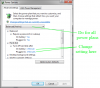
@Jasman I have the same HDD. To control the HDD power it's in the "Change advanced power settings" utility. The HDD powers downs and powers up later just fine when we need it to. See the attached pix. Have fun. Bye.
Attached Files:
-
-
That's the setting I originally changed. Thanks for the feedback, but I still have some questions (see my original post above).
-
Hey there. It's pretty much "no's" to your questions
1. No
2. No
3. No - it's the HDD setting.
4. It depends on your usage pattern or preference
(5.) The DVD power management does not affect the HDD setting.
bye
p -
Thanks, Phil. That should be useful information for others on this thread, too.
Cheers,
Josh -
Hi!
What kind of SATA port are we talking about for the Z12, 3 GB/s or 6 GB/s?
I am asking as choice of SSD (for ODD replacement) is strongly dependend on the interface. It does not make sense to buy one of the fastest and most expensive ones if SATA port is limiting to the speed I may also get from a cheaper one. -
Z12 is a Series-5 chipset whose SATA ports are SATA-II. Need the one-gen newer Series-6 chipset to gain SATA-III link capability.
-
Anyone with a quad-ssd setup tried the solution above to lower the cpu usage when the hdd turns off?
-
Hi All,
I read through the entire post, lots of info there, thank you.
I have a question or two as it is still not clear to me.
I have a Z13 in 128Gb config (64+64). From the info above I understand that there is room for two drives (not counting one in optical bay).
1- So can one add another Sony 64+64 in there?
I understand that a 256 config has just that - 2 sets of 128 (64+64).
2- If yes would I need two connectors as well?
3- would a Z11 128 Samsung work for that?
Thank you. -
I did this earlier on in the year and all has been working well. Windows didn't put the HDD to sleep so I use hdparm to do it "manually". Something about the latest Windows 7 update has killed all that and now my HDD won't stay asleep anymore. I remember people talking about this issue many months ago. Was there any resolution?
-
bump
If you guys plug a 512 GB or equivalent Crucial SSD into the newmodeus or equivalent CD-caddy, be sure to hit F2 to get into the BIOS setup to set the boot order to "Internal Hard Disk Drive" or it sometimes cannot boot. It will try to boot to the new data drive which does not have an operating system... and just hangs up or eternally waits there if we have it set to boot to "Internal Optical Disc Drive" (already assigned a drive letter to the new SSD). It took me half an hour to retry/reboot many times to figure this out and i thought i had to RMA an SSD After resetting to "Internal Hard Disk Drive" (the 128GB/RAID0) it boots/works perfectly each time! (It actually boots fine with any BIOS setting when I had a Hitachi 500GB/7200RPM platter drive in there but not with this SSD.)
-
I have a Z11, 128gb (2x64) raid array, BIOS R3031c3
got the Newmodeus HDD caddy and installed a Crucial M4 512GB.
I cant find these symptoms anywhere on the thread. when I install it the bios recognizes it, and so does windows 7. I set up the partition and format it , and it works very well and fast. it is installed as a single non-raid disk
If I reboot it, the Bios boots very slowly and I have the Bios set to show the raid array, and I can see the disk is not there. when windows boots, (takes a long time) I get about 25% CPU use on a "system" process. but windows does not see the disk. (not surprising, the Bios does not either)
if I remove it, install the original dvd drive, boot up, and the system knows about the optical drive, then then install the caddy again, I get one boot up where it works correctly. the next reboot it does not.
so it seems the Bios handles the disk when it discovers it the first time, but not after that.
I am booting from the raid array, the boot order is the HDD first. I get the feeling I am missing something obvious here
any suggestions would be appreciated -
@guardlights, yeah that's strange it's supposed to boot up really quick. I have a similar setup (other than the first 2 smaller SSDs and Z13), with the same BIOS and newmodeus caddy. It feels like the new M4 might be missing a drive letter assignment on yours (use Computer Management / Disk Management utlity in Windows to double check or set this drive letter. Let it be drive D: or anything it wants to be).
If we go inside the BIOS setup, the new 512GB drive does not show up (only the first 2 smallers SSDs are listed there).
However if the "show RAID drives/setting during boot-up" is enabled, the 512 GB drive has to be listed. It should be something like this...
RAID Volumes:
ID... Name..................... Level........... Strip ....... Size ... Status .. Bootable
0 ... the-original-RAID-name ...RAID0(stripe)... 128KB.... (size GB)... Normal....Yes
Physical Devices:
Port.. Device Model ........... Serial #............. Size......... Type/Status(Vol ID)
0 .... the-small-SSD ........... its-serial-number ... (size GB) ... Member Disk(0)
1 .... the-new-big-512GB-SSD ... its-serial-number ... 476.9GB ..... Non-RAID Disk
2 .... the-other-small-SSD...... its-serial-number ... (size GB) ... Member Disk(0)
^It should show up in the middle as a non-RAID drive. Good wishes to you... -
Phil
Let me answer the second question first
my raid setup from the BIOS page looks exactly like yours, with the 512G drive in port 1.
Now for the first question, when I first installed the SSD, it had a drive letter, in fact if I remove the disk from the caddy and plug it into a USB interface, it works fine, and all the files are there, but the system assigns the drive letter.
as I said, the first time the Z detects the drive in the caddy, all is great, I moved 57GB of photos to the drive. after reboot, I get the issue. but if I replace the DVD drive, boot up, power down and then re-install the SSD in the caddy, its back and good, until I reboot.
so there is something about initial detection that the BIOS likes, and after that, it does not.
How come no one else has this issue, of working 1 time but not 2 or more times? -
oh. I see - that's good your new drive has a drive letter.
What about setting the boot order to "Internal Hard Disk Drive" in the BIOS? (i had this problem when new; about 4 messages above and that solved the problem on mine back then.)
Z11 - Replace DVD with HDD - Working Solution
Discussion in 'VAIO / Sony' started by ZoinksS2k, Mar 20, 2010.