Problems? See this thread at archive.org.
)
Today is the first time i have used Win10 and it just the same as Win8.1 but with an different GUI, From Win7 to Win8 was great once you had modded it to look like Win7.
And the Action Center stops working on the taskbar
John.
-
-
Thanks, I'll do a couple of disk benchmarks with the current Microsoft Driver, and then I'll download the 8.1 Intel RST driver - do a comparison.
-
Seems after some searching, Microsoft completely nerfing OneDrive was intentional and not soon to be fixed if ever, as it's a design choice for the sync engine. Reverting back to 8.1, such a disappointment as I liked the rest of what I saw. But, having multiple devices, OneDrive has just become too important in my flow to use the new crappier version.
Microsoft truly is "one step forward, two steps back..."saturnotaku likes this. -
No, I was specifically talking about the free upgrade from earlier versions.
-
During the update procedure at one point (after phase 2) the system restarted, the screen remained black and there was no HDD activity. Manually rebooted and everything resumed fine afterwards. So far I really miss the Aero and the, as it seems, advanced language options. Still can't activate even after I've installed some updates. Definitely a second OS as of now, might not change in future.
-
Happened to me too but I didn't restart, it ended up rebooting just fine after 5 mins, you need to be patient sometimes my friends as Micro$h4ft keeps us in the dark with nothing on the screen as the installation is happening in the background
-
I left it for like 15 minutes, and was checking the HDD light regularly. There wasn't a single blink, so I just decided to go ahead and reboot and hope that everything would be fine. It was thankfully.
alexhawker and Spartan@HIDevolution like this. -
can anyone verify if the gtx 800m series drivers work fine with windows 10? about to do the upgrade, but ive read some crap online and i dont want to upgrade and then not be able to game
also what about programs that were designed for windows 8 that don't have a 10 version? they should work fine right>? -
7260ac bt portion not working with windows update driver~~
-
Answered my own question.
Here you go.
https://www.microsoft.com/en-us/software-download/windows10Last edited: Jul 29, 2015 -
Liking Windows 10 OK so far, was a pain to upgrade though (if you've read my earlier posts). I've done a few benchmarks in comparison to Windows 7 (I'm using the latest Windows 10 driver that came out today - 353.62). Numbers in Bold type below are the significant differences.
Windows 7:
F1 2012: 80
Tomb Raider: 67
Metro Last Light: 52
Bioshock Infinite: 78
Batman Arkham Origins: 47
Batman Arkham Knight: 42
3DMark11: 6595 (Graph 6739, Phys 6766, Comb 5509)
Firestrike: 4183 (Graph 4703, Phys 6633, Comb 1756)
SkyDiver: 13201 (Graph 16297, Phys 6518, Comb 14888)
Crystal Disk Mark 4K Random Read: 39MB/s
Windows 10:
F1 2012: 79
Tomb Raider: 67
Metro Last Light: 51
Bioshock Infinite: 78
Batman Arkham Origins: 44
Batman Arkham Knight: 42
3DMark11: 6542 (Graph 6727, Phys 6493, Comb 5475)
Firestrike: 4214 (Graph 4733, Phys 6650, Comb 1778)
SkyDiver: 13015 (Graph 16138, Phys 6366, Comb 14714)
Crystal Disk Mark 4K Random Read: 29MB/s
All game benchmarks are essentially the same on Windows 10 in comparison to Windows 7 apart from a 6% drop in performance on Arkham Origins (although I think there's something wrong with the install on that game since the update because I was only able to run it once, freezes on launch now - need to reinstall).
A 4% drop in Physics score in 3DMark11. 2% drop in Physics score in SkyDiver. Strange that Physics score is lower because wprime1024 is exactly the same between Windows 7 & 10. 10MB/s drop in 4K Read performance for SSD.
Windows 10 boots a lot faster than Windows 7 and it feels quite snappy, will keep it for now & see how I get on with it. Not too happy with the reduction in some of the benchmarks, gaming performance seems OK though with the exception of Arkham Origins, but I think the game needs to be reinstalled.triturbo likes this. -
Thanks for the heads up about this. I use OneDrive on my home and work computers, both Windows and Mac, and keep different folders synced for different purposes. Looks like I'll be sticking with Win 8.1 for the foreseeable future.
-
Like Mr.Fox found, windows 10 CPU benchmark definitely lowered for w.e reason. My 2760qm only got 5.9k instead of 6.3-6.4k in 3d mark 11.
Sent from my 306SH -
My brother's PC was going a bit wonky on Windows 7. It decided to randomly upgrade itself to Ultimate edition for no particular reason after he had activated the installation using a Home Premium key. Of course, it couldn't be downgraded without a clean install and so was stuck in an unactivated limbo.
So I helped him out with the reinstall. Luckily, he still had a Windows 7 Professional DVD lying around from his old workplace. Installed that but nothing worked at first. The keyboard didn't even work - had to use the on-screen keyboard in accessibility settings. Really awkward.
I installed Windows 10 and suddenly everything just worked. Everyone likes to hate on the automatic driver installations but I got to say, they can come in really handy! His PC just works now, no extra drivers needed. That's not to say that I don't think there should be an opt-out.
Again, as with my laptop, the upgrade went without a hitch. -
i upgraded. cortana is fun, layouts are pretty. text seems sharper in a lot of apps and the '' task view'' thing is pretty cool
-
waiting for people with aftermarket GPUs to chime in more.
-
Just judging by my experience with an aftermarket GPU I had to choose the 'Reset Option' to repair the operating system after a mostly unsuccessful update, so that was almost like a clean install. That could be worse case for you perhaps. I've been messing about with Windows 10 most of the day testing it & trying to get things sorted - the Xonar U7 USB soundcard I use only worked properly using a very specific version of a Windows 8 driver, so that took some time & research to put right. I can't say I'm happy with Windows 10 - I'm mostly frustrated by it after messing about with it for hours, but I've been unlucky in comparison to others in this thread, but I'll see how I like it in the coming days.
-
I'm still worried about getting black screens on boot.
Sent from my HTC One using Tapatalk -
I had a black screen on boot after first upgrading in place. I could only get out of it by using ctrl-alt-del => Task Manager => accessing File Explorer through that to try & fix it => in the end had to do a reset to fix it, couldn't fix it from within windows. Then of course I had to reinstall all my programs, but was able to keep user data during the reset.
-
My black screens = no signal and no backlight. Can't see anything.
Sent from my HTC One using Tapatalk -
Ah, that's something completely different then. If you try it, make sure you have a back up plan - Macrium Reflect!
-
Hopefully this hasn't already been mentioned, and someone may find this useful.
If you hate the Windows 10 desktop icons like I do, you can change them back to look like the Windows 8.x icons. What you need to do is copy out of the Windows\System32 folder on a Windows 8.x install a file called imageres.dll. Save it somewhere other than Windows\System32 within Windows 10. For example, save it to the desktop.
Then in Windows 10 when you go to the area where you can change the icons, manually point it to the file imageres.dll you copied from Windows 8.x. You can then switch all of the icons back to what they looked like in Windows 8.x.
EDIT: It looks like you have to save the file somewhere that you intend to keep it. If you change the icons, and then move or delete the imageres.dll file afterwards, the icons will go blank after awhile.Last edited: Jul 29, 2015Ashtrix likes this. -
I'm confused now because that's my situation. I have a retail Windows 8.1 Pro key i'm using. I want the free upgrade to Windows 10. If Microsoft is going to convert my retail 8.1 Pro key to OEM status with Windows 10 then I think i'll rethink my upgrade.
-
I upgraded without any issue, the whole process was pretty seamless. I got Windows 10 from here and upgraded over my 8.1 install. I have a Gigabyte P34W V3 with GTX 970m.
-
just downloading the ISO now. will see how i go...will need a spare drive to use.
-
Clean install was easy. Good stuff.
-
Upgrade was surprisingly painless on my Duo 11. There are a few day-one glitches, especially with Edge, but I have to say, the concepts of how things are laid out is a gigantic leap forward from Win8, both in a traditional desktop environment and in a tablet environment. I liked the concept of a single OS that was flexible along with a convertible tablet, but the execution was really lacking in Win8; this basically nails it, and has made me fall back in love with my VAIO Duo 11.
-
Same here. Tried many different things including downloading drivers from Lenovo and Intel website - nothing seems to work. The device does not even show up within device manager. and instead a "Unknown USB device (Device Descriptor Request Failed)" shows up. I have a X240 with Intel Dual Band 7260 AC with Bluetooth 4.0 chip.
-
Is it just me or W7 trupms that "thing" in loads of areas???
The font rendering is horrible, Scaling is far worse than even W8, CPU idle usage is insane... Should I go on -
This is my second day of using Windows 10, it's definitely growing on me now I know where I can access various operating system settings. The gaming benchmarks I've done so far have been pretty much the same as Windows 7, and apparently there's gonna be a performance & stability update in October, so that might improve performance. When I've done a significant amount of real world gaming I'll report back with my general impression.
Kade Storm likes this. -
guys cannot activate??? i had activated win 8 and even upgraded win 8.1 too why 10 isnt activated?
-
Good news is, Win 10 upgrade icon in taskbar is GONE. Not going to touch Win 10 for a while. Just don't need that stinkin' headache.
-
It disappeared on my primary system and is still on my P79. I wanted to try it on the P79 but it does not like my current Windows 7 Pro KEY. No huge loss there but annoying. I am hesitant on putting on my production machine as it is primarily a Linux machine now with dual boot on the main SSD drive.
-
Thanks for doing that but guess what? It still doesn't answer the question. LOL, thanks MS for muddying the waters. So the short answer of whether I can transfer my retail license is: Yes you can, No you can't.
Question #1 :
If I use a retail license of Windows 7 or 8.1, which can be transferred from one machine to another, to upgrade to Windows 10 for free can I then transfer that underlying Windows 7/8.1 license to another machine and upgrade it to Windows 10 as well since Windows 7/8.1 is no longer in use on the other machine? (23 June 2015)
NO - you can't !
-------------------------------------------------------------------------------------
Question: #3 :
If I purchased my copy of Windows 7 or 8/8.1 as a retail license from a store (brick and mortar or online/digital) and I upgrade to the free Windows 10 can I transfer that to a new computer under the retail licensing? (23 June 2015)
YES - you can ! -
That is correct, in either case the one license is converted to just one license of Windows 10 and can not be converted too two licenses. In #1 you would make a Windows 10 machine and eventually make a second one. Once you do the conversion, in either case, you loose the right to install the old converted license to any machine.
So #3 is your answer, because you used a retail key you are allowed to transfer it to a new computer just as if it were a retail license of Windows 10. Just as with the original key though it can be used on one machine at a time and you have to deactivate it from the old one. -
I noticed yesterday when I upgraded to Windows 10 that my copy was also not activated. I decided to leave it and activate it manually later, but I checked back today & it's been activated automatically in the meantime. Maybe you just need to leave it for a day & it might activate itself. (I left my laptop connected to the internet overnight to download some games, so maybe try leaving it on overnight connected to the internet).Last edited: Jul 30, 2015
-
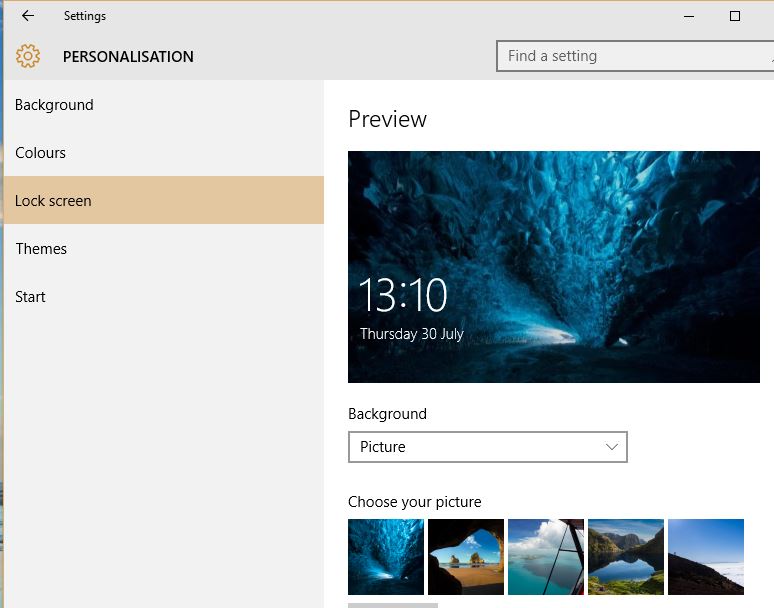
Couple of questions for anyone who's been using Windows 10. When my profile picture displays on the lockscreen, it's clearly not at the original quality; is there any method to improve the quality of this image? Also, i can't work out how to change the lockscreen image, at the moment it's stuck on that awful blue Windows logo.
-
Right click the Desktop, click Personalise and select the picture you want.
Attached Files:
CivicJDM likes this. -
-
Ahh yes, i see what you mean there but i made a slight mistake with my question. What i meant to say was the login screen rather than the lockscreen. Apologies, but thanks for the help anyway!
-
Guys managed to update my laptop and tablet and it was already activated straight away ...
but there is another problem ... problem with fonts and scaling display ..
In display settings I have set size to 125% because 100% would be very tiny ..
But all icons are slightly bigger which is fine, but fonts like in device manager or when I have notice pop up in window installations or any the fonts are horrible blurred like when you watching 3D film without glasses ..
Anybody know how to sort this out ? in win 8/8.1 didn't have this issue .. -
I might try it on my ASUS netbook before installing it proper
-
-
My fonts and icon sizes and appearances were messed up initially, but then I restarted the PC and they were OK.
-
they didn't solve it at all
-
you need regedit for that, annoyed me as well, customization option is so damn lacking.
http://www.tenforums.com/tutorials/...ground-image-enable-disable-windows-10-a.html
http://winaero.com/blog/disable-log...n-windows-10-without-using-third-party-tools/CivicJDM likes this. -
do u know how to sort blurred font?
-
is there a way of scheduling my win 10 update at a later date? im only getting july 30 to aug 1 as choices
-
this win 10 is big disappoint ! horrible UI !
-
Go back to W7 ... That's what I am doing right now
Windows 10
Discussion in 'Windows OS and Software' started by WhatsThePoint, Sep 30, 2014.