Problems? See this thread at archive.org.
People will always recognize unwanted rubbish, even when offered for free... :O)
What's next, give away their Gloomia phones too? lol
" Windows 10's growth tempo has fallen behind that of Windows 7's during its first five months after release"
http://www.computerworld.com/articl...-get-pushy-about-upgrading-to-windows-10.html
-
finally figured out how to get cisco vpn client to work with win 10.
hmscott likes this. -
Care to share with others with your findings ?
-
Yes, please do share, and post your findings/steps in a new thread.
-
-
-
I'm thinking to create a backup my Windows 7 and install Windows 10 just for out of curiosity but does it worth my time? I heard it deletes pirate software. Does it also delete not installed ones?
-
it doesn't delete pirated software. i have an app or two just as a curiousity and it hasn't been removed.
-
Nice, I was hoping that it doesn't. Do you have updates enabled?
-
windows yes
drivers no -
I see. I heard Windows 10 finds drivers itself and installs them but could you do it without driver updates enabled?
-
you can block driver updates with o&o shutup 10.
-
lol good app name. Thanks, gonna try it in a few days.
-
You really want to take that chance. I know I wouldn't want to. You really don't know what they are spying on or reporting on.
-
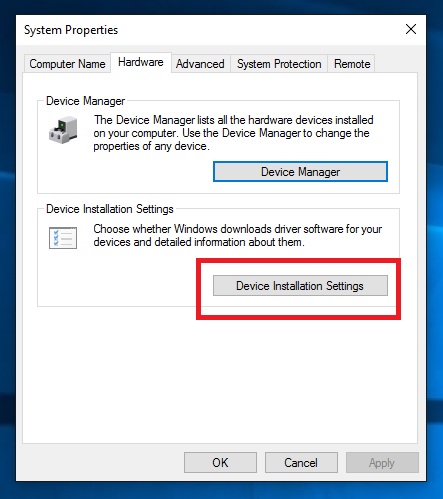
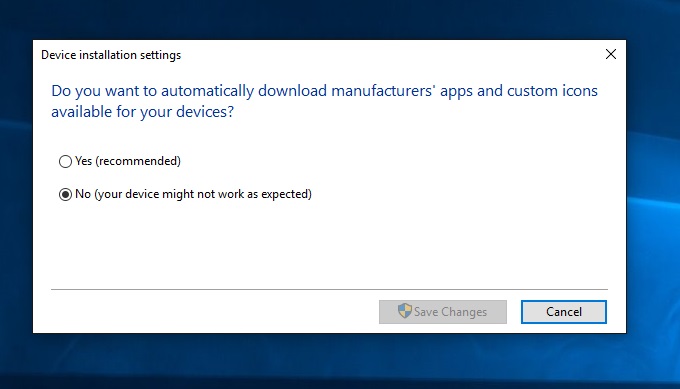
This can be disabled from within Windows. Go into System properties, Advanced system settings. Click on the Hardware tab, then Device Installation Settings. From there you can turn off automatic driver updates. See attached screenshots.
Attached Files:
-
-
I haven't done a comparison on Windows 10 what functions overlap between O&O Shutup and DWS, but I would also check out Destroy Windows Spying.
Destroy Windows Spying works on Windows 7/8/10 and blocks IP's through the firewall and host file (the Shutup part), but also disables background processes known to communicate "telemetry".
There are other functions that only work on 7/8 and 10 respectively. On Windows 7/8 it disables Windows 10 updates, and on Windows 10 it can uninstall Metro Apps. There are likely other goodies for Windows 10, but I haven't tried it there yet.
I have tried / use a few programs on Windows 8.1, but DWS has all the features in one app, except for the GWX Control panel monitoring function to watch for changes in the Windows Update Manager that MS triggers to re-enable Windows 10 Upgrade.
Destroy Windows Spying - Windows 7/8/10 - new update 12/30/15
http://dws.wzor.net/
https://github.com/Nummer/Destroy-Windows-10-Spying/releases
GWX Control Panel Windows 7/8 - 12/30/15
http://ultimateoutsider.com/downloads/
Here is the log output from DWS using the latest version on Windows 8.1:
[INFO] Add to hosts - statsfe2.update.microsoft.com.akadns.net
[INFO] Add to hosts - fe2.update.microsoft.com.akadns.net
[INFO] Add to hosts - s0.2mdn.net
[INFO] Add to hosts - survey.watson.microsoft.com
[INFO] Add to hosts - view.atdmt.com
[INFO] Add to hosts - watson.microsoft.com
[INFO] Add to hosts - watson.ppe.telemetry.microsoft.com
[INFO] Add to hosts - vortex.data.microsoft.com
[INFO] Add to hosts - vortex-win.data.microsoft.com
[INFO] Add to hosts - telecommand.telemetry.microsoft.com
[INFO] Add to hosts - telecommand.telemetry.microsoft.com.nsatc.net
[INFO] Add to hosts - oca.telemetry.microsoft.com
[INFO] Add to hosts - sqm.telemetry.microsoft.com
[INFO] Add to hosts - sqm.telemetry.microsoft.com.nsatc.net
[INFO] Add to hosts - watson.telemetry.microsoft.com
[INFO] Add to hosts - watson.telemetry.microsoft.com.nsatc.net
[INFO] Add to hosts - redir.metaservices.microsoft.com
[INFO] Add to hosts - choice.microsoft.com
[INFO] Add to hosts - choice.microsoft.com.nsatc.net
[INFO] Add to hosts - wes.df.telemetry.microsoft.com
[INFO] Add to hosts - services.wes.df.telemetry.microsoft.com
[INFO] Add to hosts - sqm.df.telemetry.microsoft.com
[INFO] Add to hosts - telemetry.microsoft.com
[INFO] Add to hosts - telemetry.appex.bing.net
[INFO] Add to hosts - telemetry.urs.microsoft.com
[INFO] Add to hosts - settings-sandbox.data.microsoft.com
[INFO] Add to hosts - watson.live.com
[INFO] Add to hosts - statsfe2.ws.microsoft.com
[INFO] Add to hosts - corpext.msitadfs.glbdns2.microsoft.com
[INFO] Add to hosts - compatexchange.cloudapp.net
[INFO] Add to hosts - a-0001.a-msedge.net
[INFO] Add to hosts - sls.update.microsoft.com.akadns.net
[INFO] Add to hosts - diagnostics.support.microsoft.com
[INFO] Add to hosts - corp.sts.microsoft.com
[INFO] Add to hosts - statsfe1.ws.microsoft.com
[INFO] Add to hosts - feedback.windows.com
[INFO] Add to hosts - feedback.microsoft-hohm.com
[INFO] Add to hosts - feedback.search.microsoft.com
[INFO] Add to hosts - rad.msn.com
[INFO] Add to hosts - preview.msn.com
[INFO] Add to hosts - ad.doubleclick.net
[INFO] Add to hosts - ads.msn.com
[INFO] Add to hosts - ads1.msads.net
[INFO] Add to hosts - ads1.msn.com
[INFO] Add to hosts - a.ads1.msn.com
[INFO] Add to hosts - a.ads2.msn.com
[INFO] Add to hosts - adnexus.net
[INFO] Add to hosts - adnxs.com
[INFO] Add to hosts - az361816.vo.msecnd.net
[INFO] Add to hosts - az512334.vo.msecnd.net
[INFO] Add to hosts - ssw.live.com
[INFO] Add to hosts - ca.telemetry.microsoft.com
[INFO] Add to hosts - i1.services.social.microsoft.com
[INFO] Add to hosts - df.telemetry.microsoft.com
[INFO] Add to hosts - reports.wes.df.telemetry.microsoft.com
[INFO] Add to hosts - cs1.wpc.v0cdn.net
[INFO] Add to hosts - vortex-sandbox.data.microsoft.com
[INFO] Add to hosts - oca.telemetry.microsoft.com.nsatc.net
[INFO] Add to hosts - pre.footprintpredict.com
[INFO] Add to hosts - spynet2.microsoft.com
[INFO] Add to hosts - spynetalt.microsoft.com
[INFO] Add to hosts - fe3.delivery.dsp.mp.microsoft.com.nsatc.net
[INFO] Add to hosts - cache.datamart.windows.com
[INFO] Add to hosts - db3wns2011111.wns.windows.com
[INFO] Add to hosts - settings-win.data.microsoft.com
[INFO] Add to hosts - v10.vortex-win.data.microsoft.com
[INFO] Add to hosts - win10.ipv6.microsoft.com
[INFO] Add to hosts - ca.telemetry.microsoft.com
[INFO] Add to hosts - i1.services.social.microsoft.com.nsatc.net
[INFO] Add to hosts - msnbot-207-46-194-33.search.msn.com
[INFO] Add to hosts - settings.data.microsof.com
[INFO] Add to hosts - telecommand.telemetry.microsoft.com.nsatc.net
[INFO] Add hosts MS complete.
[INFO] Add Windows Firewall rule: "104.96.147.3_Block"
[INFO] Add Windows Firewall rule: "111.221.29.177_Block"
[INFO] Add Windows Firewall rule: "111.221.29.253_Block"
[INFO] Add Windows Firewall rule: "111.221.64.0-111.221.127.255_Block"
[INFO] Add Windows Firewall rule: "131.253.40.37_Block"
[INFO] Add Windows Firewall rule: "134.170.115.60_Block"
[INFO] Add Windows Firewall rule: "134.170.165.248_Block"
[INFO] Add Windows Firewall rule: "134.170.165.253_Block"
[INFO] Add Windows Firewall rule: "134.170.185.70_Block"
[INFO] Add Windows Firewall rule: "134.170.30.202_Block"
[INFO] Add Windows Firewall rule: "137.116.81.24_Block"
[INFO] Add Windows Firewall rule: "137.117.235.16_Block"
[INFO] Add Windows Firewall rule: "157.55.129.21_Block"
[INFO] Add Windows Firewall rule: "157.55.130.0-157.55.130.255_Block"
[INFO] Add Windows Firewall rule: "157.55.133.204_Block"
[INFO] Add Windows Firewall rule: "157.55.235.0-157.55.235.255_Block"
[INFO] Add Windows Firewall rule: "157.55.236.0-157.55.236.255_Block"
[INFO] Add Windows Firewall rule: "157.55.240.220_Block"
[INFO] Add Windows Firewall rule: "157.55.52.0-157.55.52.255_Block"
[INFO] Add Windows Firewall rule: "157.55.56.0-157.55.56.255_Block"
[INFO] Add Windows Firewall rule: "157.56.106.189_Block"
[INFO] Add Windows Firewall rule: "157.56.121.89_Block"
[INFO] Add Windows Firewall rule: "157.56.124.87_Block"
[INFO] Add Windows Firewall rule: "157.56.91.77_Block"
[INFO] Add Windows Firewall rule: "157.56.96.54_Block"
[INFO] Add Windows Firewall rule: "168.63.108.233_Block"
[INFO] Add Windows Firewall rule: "191.232.139.2_Block"
[INFO] Add Windows Firewall rule: "191.232.139.254_Block"
[INFO] Add Windows Firewall rule: "191.232.80.58_Block"
[INFO] Add Windows Firewall rule: "191.232.80.62_Block"
[INFO] Add Windows Firewall rule: "191.237.208.126_Block"
[INFO] Add Windows Firewall rule: "195.138.255.0-195.138.255.255_Block"
[INFO] Add Windows Firewall rule: "2.22.61.43_Block"
[INFO] Add Windows Firewall rule: "2.22.61.66_Block"
[INFO] Add Windows Firewall rule: "204.79.197.200_Block"
[INFO] Add Windows Firewall rule: "207.46.101.29_Block"
[INFO] Add Windows Firewall rule: "207.46.114.58_Block"
[INFO] Add Windows Firewall rule: "207.46.223.94_Block"
[INFO] Add Windows Firewall rule: "207.68.166.254_Block"
[INFO] Add Windows Firewall rule: "212.30.134.204_Block"
[INFO] Add Windows Firewall rule: "212.30.134.205_Block"
[INFO] Add Windows Firewall rule: "213.199.179.0-213.199.179.255_Block"
[INFO] Add Windows Firewall rule: "23.102.21.4_Block"
[INFO] Add Windows Firewall rule: "23.218.212.69_Block"
[INFO] Add Windows Firewall rule: "23.223.20.82_Block"
[INFO] Add Windows Firewall rule: "23.57.101.163_Block"
[INFO] Add Windows Firewall rule: "23.57.107.163_Block"
[INFO] Add Windows Firewall rule: "23.57.107.27_Block"
[INFO] Add Windows Firewall rule: "23.99.10.11_Block"
[INFO] Add Windows Firewall rule: "64.4.23.0-64.4.23.255_Block"
[INFO] Add Windows Firewall rule: "64.4.54.22_Block"
[INFO] Add Windows Firewall rule: "64.4.54.32_Block"
[INFO] Add Windows Firewall rule: "64.4.6.100_Block"
[INFO] Add Windows Firewall rule: "65.39.117.230_Block"
[INFO] Add Windows Firewall rule: "65.39.117.230_Block"
[INFO] Add Windows Firewall rule: "65.52.100.11_Block"
[INFO] Add Windows Firewall rule: "65.52.100.7_Block"
[INFO] Add Windows Firewall rule: "65.52.100.9_Block"
[INFO] Add Windows Firewall rule: "65.52.100.91_Block"
[INFO] Add Windows Firewall rule: "65.52.100.92_Block"
[INFO] Add Windows Firewall rule: "65.52.100.93_Block"
[INFO] Add Windows Firewall rule: "65.52.100.94_Block"
[INFO] Add Windows Firewall rule: "65.52.108.29_Block"
[INFO] Add Windows Firewall rule: "65.52.108.33_Block"
[INFO] Add Windows Firewall rule: "65.55.108.23_Block"
[INFO] Add Windows Firewall rule: "65.55.138.114_Block"
[INFO] Add Windows Firewall rule: "65.55.138.126_Block"
[INFO] Add Windows Firewall rule: "65.55.138.186_Block"
[INFO] Add Windows Firewall rule: "65.55.223.0-65.55.223.255_Block"
[INFO] Add Windows Firewall rule: "65.55.252.63_Block"
[INFO] Add Windows Firewall rule: "65.55.252.71_Block"
[INFO] Add Windows Firewall rule: "65.55.252.92_Block"
[INFO] Add Windows Firewall rule: "65.55.252.93_Block"
[INFO] Add Windows Firewall rule: "65.55.29.238_Block"
[INFO] Add Windows Firewall rule: "65.55.39.10_Block"
[INFO] Add Windows Firewall rule: "77.67.29.176_Block"
[INFO] Add Windows Firewall rule: "WSearch_Block"
[INFO] Ip list blocked
[INFO] Disabled task: Microsoft\Office\Office ClickToRun Service Monitor
[INFO] Disabled task: Microsoft\Office\OfficeTelemetryAgentFallBack2016
[INFO] Disabled task: Microsoft\Office\OfficeTelemetryAgentLogOn2016
[INFO] Disabled task: Microsoft\Windows\Customer Experience Improvement Program\KernelCeipTask
[INFO] Disabled task: Microsoft\Windows\Customer Experience Improvement Program\UsbCeip
[INFO] Disabled task: Microsoft\Windows\Power Efficiency Diagnostics\AnalyzeSystem
[INFO] Disabled task: Microsoft\Windows\Shell\FamilySafetyMonitor
[INFO] Disabled task: Microsoft\Windows\Shell\FamilySafetyRefresh
[INFO] Disabled task: Microsoft\Windows\Application Experience\AitAgent
[INFO] Disabled task: Microsoft\Windows\Application Experience\ProgramDataUpdater
[INFO] Disabled task: Microsoft\Windows\Application Experience\StartupAppTask
[INFO] Disabled task: Microsoft\Windows\Autochk\Proxy
[INFO] Disabled task: Microsoft\Windows\Customer Experience Improvement Program\BthSQM
[INFO] Disabled task: Microsoft\Windows\Customer Experience Improvement Program\Consolidator
[INFO] Disabled task: Microsoft\Office\OfficeTelemetry\AgentFallBack2016
[INFO] Disabled task: Microsoft\Office\OfficeTelemetry\OfficeTelemetryAgentLogOn2016
[INFO] Disabled task: Microsoft\Windows\Application Experience\Microsoft Compatibility Appraiser
[INFO] Disabled task: Microsoft\Windows\DiskDiagnostic\Microsoft-Windows-DiskDiagnosticDataCollector
[INFO] Disabled task: Microsoft\Windows\Maintenance\WinSAT
[INFO] Disabled task: Microsoft\Windows\Media Center\ActivateWindowsSearch
[INFO] Disabled task: Microsoft\Windows\Media Center\ConfigureInternetTimeService
[INFO] Disabled task: Microsoft\Windows\Media Center\DispatchRecoveryTasks
[INFO] Disabled task: Microsoft\Windows\Media Center\ehDRMInit
[INFO] Disabled task: Microsoft\Windows\Media Center\InstallPlayReady
[INFO] Disabled task: Microsoft\Windows\Media Center\mcupdate
[INFO] Disabled task: Microsoft\Windows\Media Center\MediaCenterRecoveryTask
[INFO] Disabled task: Microsoft\Windows\Media Center\ObjectStoreRecoveryTask
[INFO] Disabled task: Microsoft\Windows\Media Center\OCURActivate
[INFO] Disabled task: Microsoft\Windows\Media Center\OCURDiscovery
[INFO] Disabled task: Microsoft\Windows\Media Center\PBDADiscovery
[INFO] Disabled task: Microsoft\Windows\Media Center\PBDADiscoveryW1
[INFO] Disabled task: Microsoft\Windows\Media Center\PBDADiscoveryW2
[INFO] Disabled task: Microsoft\Windows\Media Center\PvrRecoveryTask
[INFO] Disabled task: Microsoft\Windows\Media Center\PvrScheduleTask
[INFO] Disabled task: Microsoft\Windows\Media Center\RegisterSearch
[INFO] Disabled task: Microsoft\Windows\Media Center\ReindexSearchRoot
[INFO] Disabled task: Microsoft\Windows\Media Center\SqlLiteRecoveryTask
[INFO] Disabled task: Microsoft\Windows\Media Center\UpdateRecordPath
[INFO] Remove and Hide update KB2952664
[INFO] Remove and Hide update KB2976978
[INFO] Remove and Hide update KB2990214
[INFO] Remove and Hide update KB3021917
[INFO] Remove and Hide update KB3035583
[INFO] Remove and Hide update KB3042058
[INFO] Remove and Hide update KB3044374
[INFO] Remove and Hide update KB3050265
[INFO] Remove and Hide update KB3065987
[INFO] Remove and Hide update KB3065988
[INFO] Remove and Hide update KB3068708
[INFO] Remove and Hide update KB3075249
[INFO] Remove and Hide update KB3075851
[INFO] Remove and Hide update KB3075853
[INFO] Remove and Hide update KB3080149
[INFO] Remove and Hide update KB3083324
[INFO] Remove and Hide update KB3083325
[INFO] Remove and Hide update KB3083710
[INFO] Remove and Hide update KB3083711
[INFO] Remove and Hide update KB3088195
[INFO] Remove and Hide update KB3093513
[INFO] Remove and Hide update KB3093983
[INFO] Remove and Hide update KB3102810
[INFO] Remove and Hide update KB3112336
[INFO] Remove and Hide update KB971033
[INFO] Remove and Hide update KB976932
[WARNING] GWX NOT FOUND <== already removed by GWX Control Panel
If you do try O&O ShutUp and DWS on Windows 10, please come back and let us know how they overlap / which functions are unique to each, and which ones you used. Please post the DWS.log output too Last edited: Jan 6, 2016saturnotaku likes this.
 -
I know what people are saying for Windows 10 and I believe most of them are correct. As for myself I just looked for a bit but virtual machine apps don't deliver proper, real life performance. I'm not planning to use it more than a week but it feels kinda wrong to me to bash it without trying. I want to try first and bash later

Sure, will do. Wow, it amazes me that people created many apps to prevent spying thing. It seems the situation gets worse.hmscott likes this. -
I agree. I tried it for about a week and went back to W7. I might try it again in 6 months to see if M$ fixed a lot of the bugs.
Ha...you don't know the half of it. Lots of threads on here about it. -
I've been looking for another program that blocks the telemetry in Windows 7/8, as most of the ones out there are only for W10. I used Spybot Anti-Beacon, but it has a bug in it that causes high CPU usage for no reason, and I couldn't get the portable edition to work at all.
I will definitely give Destroy Windows Spying a shot on my wife's and parents' machines. I may even do it on mine, but O&O Shutup10 has been working really well for me.hmscott likes this. -
I'm trying to run some benchmarks on a new laptop with Windows 10. I was randomly getting lower than expected results, and then running wPrime noticed that several threads were lagging behind other ones. Well Windows Modules Installer Worker was consuming up to 35% of my CPU! Even when you have a high usage task running, it decides to go ahead and run that stupid thing?
hmscott likes this. -
That's a Windows Update task isn't it? If so, then that could happen once in a while, only when something is updated in Windows & one of the apps (I'm guessing here) - in which case it's not so much of a deal? I've never had a significantly lower than expected benchmark result - if you're consistently (randomly) getting low benchmark results then sounds like there's some kind of an issue with the installation.
-
It's a clean install and basically sat idle for 24 hours before I touched it again. I usually do that with a new machine to let Windows set up caching everything and checking updates, etc.
But it fired up several times when I went to run benchmarks. Frustrating though when you're trying to get repeatability. Even after it did that, I let it sit an hour, then fired up some more benchmarks and it decided to run again during it. Stupid. I've never had that with Win 7 or Win 8.1. It should at least wait if there's a high load running, but it just cannibalizes what it wants. It's not consistently low benchmarks. Without it running, it's as expected.Last edited: Jan 7, 2016hmscott likes this. -
Yeah, I see what you mean - strange though, I've not had that.
-
I noticed this behavior of "Windows Modules Installer Worker" / Windows Update - Fast Track / "telemetry" activity through my Virtualbox/Vmware CPU host utilization while using Windows 10 Insider versions hosted on Windows 8.1.
This also happened on Windows 8.1 with "Windows Modules Installer Worker" when Windows update was downloading the Windows 10 Upgrade "as pre-install" even though I hadn't signed up for or requested the Windows 10 Upgrade on Windows 8.1.
I used GWX Control panel to stop the Windows 10 Upgrade annoyances on Windows 8.1:
http://ultimateoutsider.com/downloads/
For Windows 10 you might try O&O Shutup and Destroy Windows Spying to disable and block the updates and telemetry background processes.
O&O Shutup
https://www.oo-software.com/en/shutup10
Destroy Windows Spying
http://dws.wzor.net/
https://github.com/Nummer/Destroy-Windows-10-Spying/releases
NBR Thread on:
Updates to hide to prevent Windows 10 Upgrade / Disable Telemetry
http://forum.notebookreview.com/thr...-windows-10-upgrade-disable-telemetry.780476/
Related privacy alert's about Windows 10
As you have found, that parasitic resource usage is annoying, and useless for the person paying for the collection of the data, you.
Here is a small part of what that privacy invading telemetry tells them:
"Here are a few fun facts on what people have been doing on Windows 10:
- Over 44.5 billion minutes spent in Microsoft Edge across Windows 10 devices in just the last month.
- Over 2.5 billion questions asked of Cortana since launch.
- Around 30% more Bing search queries per Windows 10 device vs. prior versions of Windows.
- Over 82 billion photos viewed within the Windows 10 Photo app. ****
- Gaming continues to grow on Windows 10 – in 2015, gamers spent over 4 billion hours playing PC games on Windows 10. Gamers have streamed more than 6.6 million hours of Xbox One games to Windows 10 PCs.
https://blogs.windows.com/windowsex...ws-10-now-active-on-over-200-million-devices/
Detailed dossiers of personal activity data are collected from every Windows 10 PC, filed, stored, and collated with a unique ID - easily cross referenced by Windows 10 license - which is cross-indexable by registered license owner.
I am sure MS have a highly defenceable shield of privacy for their own servers that store our data, which no hacker can penetrate
**** There was an article posted on NBR early in the Windows 10 release about how monitoring the network traffic back to MS showed that browsing directories and opening jpegs resulted in network packets being sent to MS for each listing and file access / opening / closing. Now we get confirmation that is really happening from MS themselves.
I can't find the source article, but found this Reddit thread about similar findings, and the authors video has been removed from youtube.com:
https://www.reddit.com/r/videos/comments/3j0mhs/windows_10_is_spying_on_every_image_you_look_at/
Here are article's from that same time frame:
http://arstechnica.co.uk/informatio...ndows-10-just-cant-stop-talking-to-microsoft/
http://www.theguardian.com/technolo...iable-data-microsoft-despite-privacy-settings
http://www.dailymail.co.uk/sciencet...iable-information-tech-giant-told-not-to.html
And remember, you gave MS explicit approval to invade your privacy to do this data collection when you agreed to the EULA - a requirement before allowing the installation of Windows 10. You can't install Windows 10 without agreeing to the EULA. Read it.
Microsoft Privacy Statement
https://www.microsoft.com/en-us/privacystatement/default.aspx
"Your privacy is important to us. This privacy statement explains what personal data we collect from you and how we use it. It applies to Bing, Cortana, MSN, Office, OneDrive, Outlook.com, Skype, Windows, Xbox and other Microsoft services that display this statement. References to Microsoft services in this statement include Microsoft websites, apps, software and devices."
...
"Finally, we will access, disclose and preserve personal data, including your content ( such as the content of your emails, other private communications or files in private folders), when we have a good faith belief that doing so is necessary to:
- comply with applicable law or respond to valid legal process, including from law enforcement or other government agencies;
- protect our customers, for example to prevent spam or attempts to defraud users of the services, or to help prevent the loss of life or serious injury of anyone;
- operate and maintain the security of our services, including to prevent or stop an attack on our computer systems or networks; or
- protect the rights or property of Microsoft, including enforcing the terms governing the use of the services - however, if we receive information indicating that someone is using our services to traffic in stolen intellectual or physical property of Microsoft, we will not inspect a customer's private content ourselves, but we may refer the matter to law enforcement."
Last edited: Jan 8, 2016 -
No luck so far with o&o stopping drivers.
Attached Files:
-
-
That's what I heard as well. Did you try Destroy Windows Spying?
DWS has a Windows 10 mode and functions, check out the tabs in the app, select Professional Mode, and then you can enable/select individual operations within the run. I am hoping it would solve the problem.
I also heard installing Group Policy settings (like O&O) doesn't work, updates keep happening.
DWS also blocks IP's through hosts and Windows Firewall. I took the blocked IP's/IP ranges and converted them to each different firewall I use.
If you have a 3rd party firewall installed on Windows the Windows firewall isn't used and the individual customizations installed in the Windows Firewall might not get picked up by the 3rd party software - Norton Security doesn't, for example.
It's worth a try
I gave up on Windows 10 as soon as I saw the EULA, tossed away months of Insider Windows 10 usage, it immediately looked like a swamp of pain.
Sorry to see it's still on that path.Last edited: Jan 8, 20166730b and toughasnails like this. -
https://www.cvedetails.com/top-50-products.php?year=2015
looks like Mac OSX wins in the most vulnerabilities department with 384!
Windows 7-8.1 have half as many while Windows 10 only has 53.
glad to not be using mac! -
And they're the ones that always were supposed to be the safest - times a' changing! (talking Mac)
-
And XP not even making it on the list, must be the most secure of all OS' :O)
or it's maybe the uncategorized #39, anyway very secure.toughasnails likes this. -
Regarding forced driver update\install
No luck stopping it with either shutup or dws. Windows firewall only. Looks like driver install is completely tied to normal kb install, everything gets trough if update is enabled. Apart form the driver issue, looks like using a combination of shutup & dws will give the user very good control over any w10 pc.hmscott likes this. -
I had O&O Shutup 10 installed and still same crap. I was also running a benchmark in desktop, full CPU usage and system decided to restart on me to do an update, even though I had it set to notify me to install updates. Gah! Seriously. Running through a bench of x264 which loads CPU at 60-100% throughout, all cores. And Win 10 just says, meh, let's just restart anyhow. My experience so far has been nothing short of annoying with Win 10. Not only that, I installed Office 365 and the icons are nowhere to be found in the start menu.
toughasnails and hmscott like this. -
Microsoft literally put balls on enthusiasts, like it or not.
Their point of view is: PCs are overperformanced now with all those SSDs and quad CPUs so lets make that power to work on us while average Joes won't notice anything and at worst they will think that nowadays hardware is still not fast enough which brings continuous demand on new computers with Windows next years.
That's what they think and they already proved they don't give a cr@p about us, users who not just like to OWN their computers (as long as it's full performance) but also who know how to notice when it's not the case.
I will not allow ANY PC OS to download what it wants whenever it wants. It's not Android phone which Wi-Fi I can disable anytime and continue playing online game/downloading stuff on computer. -
Microsoft Changes Its Mind, Decides To Nag Business Customers To Upgrade To Windows 10 After All.
http://consumerist.com/2016/01/14/m...customers-to-upgrade-to-windows-10-after-all/hmscott likes this. -
What are the Windows Firewall / host entries you used to block updates?
-
This doesn't surprise me at all. I really don't think M$ is seeing the numbers they were hoping for so they had to do something.
-
Skylake users given 18 months to upgrade to Windows 10.
http://arstechnica.com/information-...ers-given-18-months-to-upgrade-to-windows-10/ -
Skylake users given 18 months to upgrade to Windows 10
And next generation processors, including Intel's Kaby Lake, won't be supported in old Windows. -
If you do not want our new junk, you will be forced. M$ best strategy
hmscott likes this.
-
It's reasonable to think Windows 7 will eventually be unsupported & not include the latest feature sets - it's an older product & companies have to release new products with new features to stay in the market - same goes for Windows 8 but that should take longer. With Windows 10 being free at the moment, then the only complaints will come from people that hate Windows 10 for one reason or another.
-
Check out the user comments
NattWise
"You know, they had mellowed out and even managed to weasel out of it for a while, but Microsoft is definitely back on my **** list."
TFXR
"Devious."
adipose
"WTF"
dlux
Jane! Get me off this crazy thing!
http://arstechnica.com/information-...8-months-to-upgrade-to-windows-10/?comments=1
"Microsoft, take out the Privacy Invading, Spying on our every action, Big Brother Orewellian crap, or we won't upgrade to Windows 10, ever."
BatCrapCrazyWise
"So to be clear, when i do my new build and use a Skylake or a Kaby Lake processor, i have to upgrade to win10?
If so...
**** that...
Ubuntu it is...
Gaming be damned."Last edited: Jan 16, 2016Papusan likes this. -
Meh, I've decided to nuke my 8.1 (I made a Reflect backup just in case) and move to 10. I have an 8.1 Pro license so a lot of the annoyances of 10 don't apply to me.
Its not like Google doesn't have access to all of my information, much more information than Microsoft is asking for...
With that said, the forced upgrade stuff is garbage.toughasnails likes this. -
Well if I didn't already know that Sager didn't replace my motherboard, the fact I wasn't asked for a product key for my clean install confirmed it without a shadow of a doubt since I killed my RAID array and went back to having two separate SSDs which means that there would be no data left whatsoever. Has anyone tried using their 8.1 install side by side? The product key is actually different for Windows 10. I'd be happy if I could have one SSD with 8.1 and one with 10.
-
The 8.1 Home and Pro versions independently installed are treated the same by MS.
It's the Enterprise versions and Windows Pro machines that are members of those domains that have been given a pass up until now from MS's shenanigans.
But, that has ended as well...like days ago. Good timing
Microsoft changes rules of Windows 10 upgrade game
"Expands notifications and automatic upgrades to domain-joined small business PCs"
http://www.computerworld.com/articl...changes-rules-of-windows-10-upgrade-game.html
"Microsoft yesterday again changed the rules of its better-upgrade-to-Windows 10 game, announcing that some business PCs running the professional editions of Windows 7 and Windows 8.1 would soon begin seeing notifications to migrate to the newest OS."
And, didn't you literally just today get a stable running vBIOS/Nvidia driver combo on Windows 8.1, after months of instability?
Now you want to start all over with Windows 10 and suffer long term instability again?
Have fun
Last edited: Jan 16, 20166730b likes this. -
My experience with full install on a new non-activited laptop was that it activated immediately without prompting. I didn't need to intervene.
So I don't think you can be sure unless you copied down the license from the old motherboard and compared it to the new one.
You will need to confirm with Microsoft whether you can continue to use Windows 8.1 on a computer that has already upgraded to Windows 10.
I know you can revert back to Windows 8.1, but I don't know if they let you bounce between them multiple times in a day
-
I have another license for 8.1 Pro I can use if need be, no biggie.
Honestly I'll probably just put Linux on the other drive. KDE's Pulse 5 desktop looks pretty promising for a nice (and desperately needed) overhaul of the GUI.
As for stability, Windows 10 with 361.43 is running just fine. I honestly think that the voltage issue was something that I just never noticed before because I wasn't benching. It likely was there the whole time. And even with the loss of the RAID0, its blisteringly fast.
Activation requires a product key unless you have already installed 10 on that machine. Setup didn't even prompt me for one at all through the process and it gave me a digital entitlement as soon as it connected.
Anyway, so far I'm really liking the changes that I've seen. The only thing that I had to do was uninstall the 7260 AC driver and use the one Clevo provided - for some reason the latest ones from Intel were capping me between 80-90Mbps while the ones Clevo offer peak around 190Mbps (I pay for 150). I also had to install the airplane mode driver, the control center, and the X-Fi MB3 software but everything else, even the touchpad which is always a hassle, worked out of the box. That fall update really changed a lot of things in 10 for the better IMO.hmscott likes this. -
Actually, looks like Windows 10 is faster than 8.1, especially when it comes to physics.
http://www.3dmark.com/compare/fs/7227189/fs/7220781#
I noticed the frame rate is a lot more stable too, it wasn't jumping up and down like it did on 8.1. I think Microsoft has made some pretty serious advances with the fall update. Whatever they're doing, it looks like they are finally working on the CPU performance that they wrecked so badly in 8/8.1 vs 7.hmscott likes this. -
-
Windows 10 is still worse than Windows 7. I don't believe he runs Windows 8.1hmscott likes this.
-
Shenanigans:
"Deception or tomfoolery on the part of carnival stand operators"
rofl+++hmscott likes this. -
Win 8, 8.1 and the new Win X Malware edition is created for touch screens
Ashtrix and toughasnails like this.
Windows 10
Discussion in 'Windows OS and Software' started by WhatsThePoint, Sep 30, 2014.