 Problems? See this thread at archive.org.
I've don the Small FFT test. Power consumption jumps up to 52W bufore I panic and change the power limit to 40W. But otherwise, temperatures jump to 65C, rising up to 80C before I stop the test. Only PL1/2 lights up in limit reasons.
An i7-8550 U reaching 80W is really alarming. Even my 8250U runs at most 52-53W with no undervolt. Seems like 4.0GHz requires an extremely high voltage. The 8250U and 8550U are identical processors anyway, just one processor requires a higher voltage. 8th Gen CPUs aren't anything special. If you compare with 6th gen i5-6200U and 7th gen 7200U, the 8th gen 8250U has double the cores, resulting in less double the performance at double the power when tested at the same clock speed. Because that's just Intel being desperate on 14nm+++++++++ and struggling on 10nm whilst AMD is set on 7nM by 2019.
But normal consumers don't know this.
That being said, it really don't think that laptop hardware is designed to run at 2x or even 3x the power it was designed for (Ahem manufacturers designing for 15W when 8th gen U cpus clearly require 30+W to perform well. Power Limits are scattered everywhere in the BIOS. ThrottleStop has access to one of them. RW-Everything and XTU have access to another one. Remember, if your laptop has a hidden power limit it is really difficult to mitigate this without knowing the datasheet for your BIOS. I tried to control my right fan but nothing would work, I could only control the left fan, so I ended up doing a hardware modification. (disconnecting the PWM lead of Fan 1 and connecting it to the PWM header of Fan 2).
EDIT: Hitting PROCHOT after 2 and a half minutes either means you let the TDP sky high or that's some terrible cooling. Probably the latter because ThrottleStop TS Bench only draws about 30W for me
-
It handled it pretty well, then. Mine lights up every alarm in under a sec then lights itself off after a while lol
I'm not sure if I saw 80W, it was too quick. But I kinda remember seeing 80W. Maybe it was 60W and my eyes deceived me?
4GHz needs around 35W. It seems doable, but obviously this cooling can't handle it for long. Good enough for a 10s burst, but can't run a stress test with it.
I'm skeptical with AMD. They're introducing great changes for the market, but they're still "new" at leading this game, and can't afford too much R&D. Intel coasted for too long on Sandy Bridge, and is now paying for it. Time for Intel to step up on R&D, which won't be difficult since they're absurdly rich. Like AMD plus 10
I love competition. For one, they made the U processors 4c/8t, and HQ processors 6c/12t.
Looking forward to see my laptop become absurdly obsolete in the following years, honest
My previous Y50 had an interesting "feature" that it would NEVER put its fans on 100%. 99°C? Yeah, just run the fans at what, 50%?
However, when updating the BIOS, the fans would be extremely loud, and you knew it could do something more than that puny original output.
ppl found out that if you disconnected the PWM cable, the fan would run at 100%. And they found out that they could buy some small temperature-activated switches on Aliexpress. They glued the little temp switch on the heatsink pipes and voila, it would turn on at 100% for a couple of seconds on the chosen switch temperature. I did it on mine at 75°C and it was amazing. Instead of running at 90°C, it would run at, behold, 70°C.
Why Lenovo didn't do it originally baffles me.
Sometimes I think some brands are dumb
Or we're not seeing the big picture.
Terrible cooling is a compliment.
![[IMG]](images/storyImages/maxresdefault.jpg)
Can't blame them, though. It was designed for 15w, and does the job at 15w greatly. There's just not much headroom. It hit PROCHOT at 32~33W, 3.7GHz.
I found that 3.5GHz sits below 90°C on ThrottleStop 1024M test. It's good enough without changing the thermal paste.
which I totally don't wanna do, because last time I changed the thermal paste on my previous Y50, the best I managed to get was 1°C higher than the stock thermal paste, after trying several new methods, previously unknown to me (I'm a mustard drop guy)
And I used the Gelid GC Extreme.
BTW I'm still impressed with that XTU trick. Thanks
![[IMG]](images/storyImages/OXnZzdM.png) Last edited: Jun 13, 2018
Last edited: Jun 13, 2018 -
Hi folks. I want to use Throttlestop to limit my turbo multiplier and undervolt my cpu. I know how to set both of those in FIVR - but my question is: do I need to press the "Turn On" button on the throttlestop front page for those multiplier limits and the udnervolting to take effect, or do they take effect immediately on saving, even if I don't "Turn On"? Also, do I need to reload Throttlestop every time I restart for those same multiplier limit/undervolt to take effect?
Many thanks for your help! -
Turn on/off only affects Clock Modulation, Chipset Modulation, and Set Multiplier in the main interface.
-
-
Hello guys, I have a problem with ThrottleStop, after I restored Windows 10 and followed this guide to start it on startup, now it no longer appears in the taskbar but remains only in the background, I followed the guide carefully but nothing more appears.
Any suggestions to solve this problem?
-
All of a sudden ThrottleStop showing that my CPU is working at 0 mhz. Haven't had any issues with it up until now.
![[IMG]](images/storyImages/Capture.jpg)
On a PowerSpec 1510.
Any thoughts about what might be causing this? -
Choose the option called "When I log in" instead of the option called "At startup".Jieockv likes this.
-
Thanks for the answer but even so it does not work out
EDIT: Finally I solved! in addition to the option you told me I also changed this "if you want access to the user interface, make sure," Run only when user is logged on "is checked" and it worked ...Last edited: Jun 14, 2018 -
Older win 10 builds didn't have this problem and newer builds sometimes breaks working SW.
Also, select Configure for Windows 10.Jieockv likes this. -
Thoughts, only?
It seems to be losing the Bus clock for some reason. Maybe your board isn't refreshing it correctly, or throttlestop is having a very weird time retrieving it.
Shouldn't do any harm. Just consider the first number and multiply it by 100 (which is probably your Bus clock) e.g. 31.75 x 100 = 3175MHz, ~3.2GHz
------
I just found out that by changing the white box with a 0 in the "TDP Level Control" line, on TPL window, to 2, boosts my minimum TDP before throttling from 15W to 25W, which is precisely what I needed!
And it sticks after rebooting, sleeping and removing the charger, unlike XTU.
Love this program. -
Hey All and sir @unclewebb. Apologies in advance of this has been asked before. Is it completely safe for TS to run continuously even if one isnt stressing the their laptop/pc out? I read that the VRM's (above the CPU- small black chips- there are 5) take strain, get super hot and work much harder when the CPU is undervolted? Is this a Myth or is it true? Should I be worried. VRM's are very sensitive to heat etc.? Please inform me. Much appreciated and great work on TS.
-
Che0063 has answered that already:
31336, raz8020, Vasudev and 1 other person like this. -
Thank you so much I'll continue to keep undervolting on even on idle
-
Is that a CONCAVE CPU staring me in the eye there?
Since when are CPU cores CONCAVE? -
Or the lamp above could be....circular?
-
Or could be both?
I saw an alienware setup that was shown with a (square/flat lamp, and the same curve (same exact curve) appeared on the CPU at the edges.
Was a thread way back on the Alienware temp differential 6820hk thread. So I stand by convex.Vasudev likes this. -
Yeah, All silicon is convex, more like a pyramid. Of course Intel BGA is equal. They are just lower binned chips.Vasudev likes this.
-
Found the Problem... dont touch the min cache clock with Throttlestop. If you do you get sound latency from hell...
-
It's a i7 7700HQ 2.8 Ghz to 3.8 Turbo. One of the hottest CPU's ever created
-
Hey @unclewebb , could the "Alarm" profile change have some delay before exiting it? Like, after an alarm is hit, it'll hold the alarm profile for 5-10 seconds.
I have made two profiles, one for when the DTS is over 7, and other when the GPU hits 68°C. The latter one works pretty fine (whenever I'm gaming, it reduces processor speed so my puny heatsink can manage both CPU and GPU stress), and the other one when the CPU overheats by whatever reason.
However, both suffer from the same issue: Whenever the requirement cease to exist, it immediately changes to whatever profile it was before, most of the time causing a burst of CPU speed and thus, heat. E.g. whenever I quit a game, immediately the GPU gets turned off, temperature reading gets to 0 and ThrottleStop changes the profile to default. Where my CPU was running at 2.6Ghz @ 82°C, it now spikes to 4GHz @ 96°C.
Same thing with the DTS. When it hits 93°C, it changes to a less powerful profile, and it drops to 80°C, but then it's outside of the DTS range, so it turns back to the high performance profile, which spikes to 93°C again. This keeps going back and forth, and the temps seems to increase over timetriturbo likes this. -
I also do the same thing and enjoy it, in continuous loading/working in CPU, hit the temperature I set, go back the lower performance to let it cool and this keeps going back and forth. (although it may be different that my purpose is to avoid hitting the PL2 trigger point in my case, it is the long story). I am just curious using TS is to get the highest CPU performance with stability regardless the temperature, it should be the original function of TS.
Thus, why do you want to get 5-10 seconds delay? You cannot get the highest performance of your CPU in this case. Without loading the CPU temperature will be dropped significantly and the "back and forth" will be stopped. -
How did it die? Did you overclock that 4700HQ and for how long?
I have my Y50 overclocked to 4.1Ghz all cores, 4.4 1/2 cores via TS and I don't want to kill it too fast. I want it to last until 8c/16t from Intel and/or the true successor to Pascal appears. -
Because whenever it hits the alarm temperature, it lowers the clock, then the temperatures goes down, then it returns to the stock profile. This all happens under 1/2 second.
It doesn't keep the laptop from overheating beyond the point I set.
Say I had set it to slow down when at 90°C. Whenever it hits 90°C, it enters the HOT profile. However, as soon as it enters HOT profile, it immediately falls back to 80°C. ThrottleStop then changes to the default profile, which then jumps to 90°C. After a while, it doesn't "go back" to 90°C anymore, but 91.. 92... 93... so it doesn't work as I planned.
The best way I found to counter this was to set an Turbo limit low enough that it would "detect" an extended task (by time) and reduce the CPU to a bearable power (25W). However, if for any reason the temperature goes high without hitting that time limit, it wouldn't be limited until it hit 94°C, which is the PROCHOT of this system. I don't want it to hit that high.
On a beautiful day, I was loading my programs and then it turned off, like if I had forgotten to plug the charger and the battery died.
But it was connected to the charger.
I'm not sure what died on it. Whenever I connect the charger, I can hear a distinct "pop" inside the laptop. Same "pop" you hear when you connect the power cord to the charger after a while, though a little faint. It wasn't under stress at the moment.
However that Y50 saw a couple of internal modifications, went a long time bottomless sitting upside down on a desk, had broken hinges, broken touchscreen, was using spotty RAM, unlocked BIOS on a shady site etc etc. Anything must have killed it. I can't really say if ThrottleStop had any play on it, however I used a pretty high VCCIN (I remember the "number" was 2142, but I don't really remember which value it was exactly) for more than an year.
I don't remember clocking it that high. It used to run at 3.7 or 3.8GHz IIRC. Didn't find a way to overclock it beyond that, and even if I did, it was nuts, because whenever I was gaming, I'd have to slow down to 2.6GHz so it wouldn't hit 100°C and shutdown. All cores had to be limited to 3.3GHz because I felt 90°C was too hot for extended loads.
The 4700HQ is pretty nice, but I feel that this 8550U, even though it's a puny 15W CPU (that can be brought up to 40W with ease), it does many tasks MUCH faster than my previous 4700HQ, most notably video encoding. The last video I had encoded in the Y50 took around 5 minutes to complete (4700HQ @ 2.8GHz CPU+ GTX860M CUDA), while the new Ideapad 320 (8550U @ 3.6GHz + MX150 CUDA) took 3 minutes, even with a weaker GPU. It's amazing.
The 8th gen U processors are 4c/8t, which is nice.
btw, if you can run CineBench R15 CPU test on it and report your results, I'd love to see how it would compare to the 8550u. The results I see on the internet are around 500~510 points. My 8550u, after "unlocking" it to 25W, gets 757
-
Sounds like an issue with the power stages, probably.I clock mine at 3.8 GHz with a heavy -90mV offset and a voltage target of 1.05V. (3.8Ghz at ~0.9675V) during gaming sessions.
I have modded mine in several ways like adding extra metal parts to the heatpipes, soldering extra capacitors for the CPU and GPU, unlocked BIOS and thicker wires for VCCIN to handle the extra current.
Also the CPU and GPU have had their thermal paste changed to Conductonaut.
The highest I've ever obtained on the 4720hq was 825cb. This is at 4.4Ghz, cache at 4.3 and using 2133 MHz RAM (overclocked 1600 MHz sticks).
As for the 757cb score, that's a really nice efficiency improvement! My Dell M4700 with a 3940XM and 1866 CL10 RAM achieves 771cb... at 4.3Ghz and drawing ~70W!pressing likes this. -
I absolutely don't know. I thought it could be something on any VRM or something, but this happens as soon as the plug is connected. If I put my ear on the charger while it's connected, I can clearly hear like an capacitor charging and discharging. Something's shorted
Never heard/seen such mods. I thought the VRM wiring was inside the PCB waffle, and looking at the opened y50 board right in front of me, I can't imagine adding extra capacitors. That's very impressive to say the least. Where did you see this stuff? Maybe I can do the same on this 320, in order to add some longevity to it, as I'm running beyond the default 15w.
And that's a pretty strong undervolt. All I could manage on the Y50 was around -45mV. -47.5mV would throw WHEA errors randomly over time
Haven't heard of this one either. Is it liquid metal? I'm still rocking an old Gelid GC Extreme. It's good, but nowhere near liquid metal performance.
~800 was exactly what I expected from the 4700HQ! Definitely the new U processors aren't that bad now, and they're pretty power efficient! Respectable score at 25W.
I wonder how good it would be if the 320 had the Y50 cooling.
The single shared heatpipe doesn't help at all here..villahed94 likes this. -
Oh, i see. 10 degree changes @ 1/2 second should be something abnormal in thermal dissipation. Did you change the thermal paste?
BTW, in my personal view, I do not have good comment for Lenovo IdeaPad. ThinkPad series is much better since it is from IBM. -
Actually, unless it is Digital VRM(it should be used in high-end motherboard), adding extra capacitors(not chip capacitors) may not help and may get worse since it will change the characteristic of the VRM(because of L/C dynamic characteristic), switching power supply is not same as the linear power supply. Also, VCCIN does not consume so much current, should be under 2A, and it is connected by "plane" inside the PCB, not the trace on the PCB. It is actually meaningless to use thicker wires to connect it.
-
Nope, didn't want to mess with it. Last time I changed my previous Y50 thermal paste, it actually increased the avg temperature (I was recommended to use the Gelid GC Extreme, and that's what I used).
Steep degree changes are rather normal, I think, when the frequency changes. I can quickly go from 90 to 60 in a second, if the frequency drops a lot (from 3.6 to 1.5GHz, for example)
I've had good experiences with IdeaPad (IdeaPad Y500). It lasted until I screwed into the LVDS cable and it caught fire (I removed the backplate with the laptop on for minor adjustments and didn't fit the display cable correctly). After removed the display, it still works. My GF is studying on it on an external display, at this exact moment. She also plays The Sims 4 on it from time to time. I have it since 2013 and works great, feels great, runs great and nothing else (other than the blatant missing display) gives it's a 5 year old laptop. The original battery still holds 2:30hrs!
However, my "non Ideapad, but it was obviously an Ideapad" Y50, was cheap. Felt cheap, even though it was full metal and had rubberized surface. Also had a terrible hybrid HDD. It had everything to be good, but it sucked on build quality. Wasn't cheap, though.
I gave Lenovo the benefit of doubt on this Ideapad 320. Also nobody else had this hardware for this budget in Brazil. I'm liking it so far, though everything new is good. We'll see if it lasts a couple of years. This device alone will define if I'll ever consider any IdeaPad again.
However I'm totally behind ThinkPad being great. It is definitely built to last. I initially went for it, but it was way beyond my budget
pressing likes this. -
So I think it is abnormal and the problem should be the contact between the CPU die and the heatsink / heatpipe.
-
Is it normal that PL2 sometimes stays on in yellow/red and limits CPU to max 2.8 GHz? Is this software related and not a issue with my CPU or settings? Rebooting Windows 10 1803 (all updates installed) stops the flag in limits. I have a Kabylake i7 7700HQ CPU. Thanks all.
-
Anyone?? PL2 flashing red/yellow in Limits. Cant get past 26 W on Stress test and I'm limited to 2.8 GHz.
What setting have enabledfor this to happen
-
I have a i7 6700hq processor and it has turbo clocks at 35, 33, 32, 31 for 1,2,3,4 cores respectively. In intel extreme tuning utility it doesn't allow me to overclock beyond these clock speeds in turbo. But somehow in ThrottleStop, I get the chance to overclock each to 35,35,35,35 for 1,2,3,4 cores respectively. Is this overclock actually functioning or is it just some bug in ThrottleStop?
-
It's not a bug - however, though you can request 35,35,35,35 in TS, this processor is locked and won't go over 31 when all 4 cores are active. You can see this when you run TS bench. However, TS will allow you to undervolt (I currently have CPU and Cache at -140.5) This makes a huge difference in temperatures. I can run mine flat out indefinitely converting pictures and videos without exceeding 75 C.
Enjoy!
Joe -
That one is very strange indeed. Possible short circuit. Might want to take it to an electronics technician to give it a check.
This is what I meant by rewiring. As you can see, the connector melted due to the high current draw, which is higher than those tiny wires can handle.
Those thicker wires should help it draw more current safely.
Yes, It's liquid metal. Really good but also dangerous. I killed a Y50 motherboard with it by accident.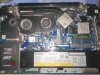
These are my ThrottleStop settings, and AFAIK they work better on late 4710HQs or 4720HQs (silicon improvements).

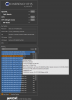
825cb is the maximum I've obtained from this CPU. -
Eh, it died. I'm a wannabe electronic technician, and fiddling with this multilayer stuff is beyond me. And anything beyond me is too expensive to repair lol
I'd buy another board, but the case was pretty damaged around the display hinges anyway.
It has already paid itself in these years. It deserves a rest.
Oh, you mean the power connector. Thicker wires indeed help with more current. I should've done the same thing
BTW, very ingenious heat sink modding. Looks ugly, but I bet it works very well with the Y50's metal bottom. Another thing I should've done lol
I used to run at ~2.1 VCCIN to trick the system into running at greater clocks by faking the current TDP.
I'm rather certain that's what killed it, in the end
I'm so tempted to go liquid metal, but I'm afraid of spills. I've heard of the insulating tape/nail polish trick, but still gives me the shivers
Has it significantly reduced temperatures? Like -10°C or something?
Oh it's a 4720HQ. Mine was a 4700HQ. From the history there, seems the 4700HQ would be even weaker.
Ah, bummer. It's dead anyway. -
Hi, anyone with 7700hq have any tips for me to do on throttle stop? i am tired from overheating and it's always stuck at 0.78GHz
not sure what to do.
max power is 18W -
PL2 continuously flags red/yellow flashing on idle intermittently. A reboot of windows 10 helps and fixes the problem but it starts again etc. How do I prevent the PL2 flag was flagging continuously even without stressing the laptop up. PL2 also limits TDP and Max frequency to 2.8 GHz... @unclewebb @Vasudev @Pete Light
-
Try setting a value(s) as you see in TPL window. The setting if for 6700HQ CPU or similar HQ chips from intel.
GreatD likes this. -
Thank you so much, will try that later after work. This should stop the flag PL2 from flashing red yellow etc on idle?
I checked FIVR and undervolted CORE to 130 mV- and 130 cache and IGPU 35 mV etc. Would to low undervolting cause this flag PL2 as well??
SST is on 84 and jumps to 128 but that's normal though -
never undervolt iGPU. Use same undervolt values on cpu,cache,analog IO & system agent. If you have discrete GPU then you can use intel power balance to give more power to CPU than iGPU. You can see my settings in screenshot in post#7997.
Its better to disable hibernate as well.
SST shouldn't change from 84 to 128 unless you didn't click Save button.Last edited: Jun 21, 2018 -
Awesome... What must I change Analog IO and System to? What undervolt is safe for the HQ processors namely the i7 7700HQ.
I find that changing SST doesnt allow me to change it, Windows 10 automatically adjusts it on it's own and I have no control at all. Even if I activate it to 0 for example it wont stay there and it just goes to 84 SST for example.Vasudev likes this. -
What value did you set analog IO and system agent to? Surely these cant undervolt to much??
-
Use same undervolt values for everything.
-
Wont changing IO analog or system agent to over -130 mV damage the CPU??
-
I'm using -125mV on AC mode and -145.5mV on battery mode with turbo disabled.
-
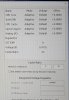 Ok so I much change all to -125 mV offset?? As that's my current undervolt for core and cache for my i7 7700HQ CPU
 -
-
I just noticed that even with TS in monitor mode, some settings are applied, such as "Speed Shift - EPP". Is this desired behaviour? I didn't expect it.
TS 8.60 / Win10 1803 / 8700K
The ThrottleStop Guide
Discussion in 'Hardware Components and Aftermarket Upgrades' started by unclewebb, Nov 7, 2010.


