 Problems? See this thread at archive.org.
It's still flagging PL2 in red under Limit Reasons. Please help
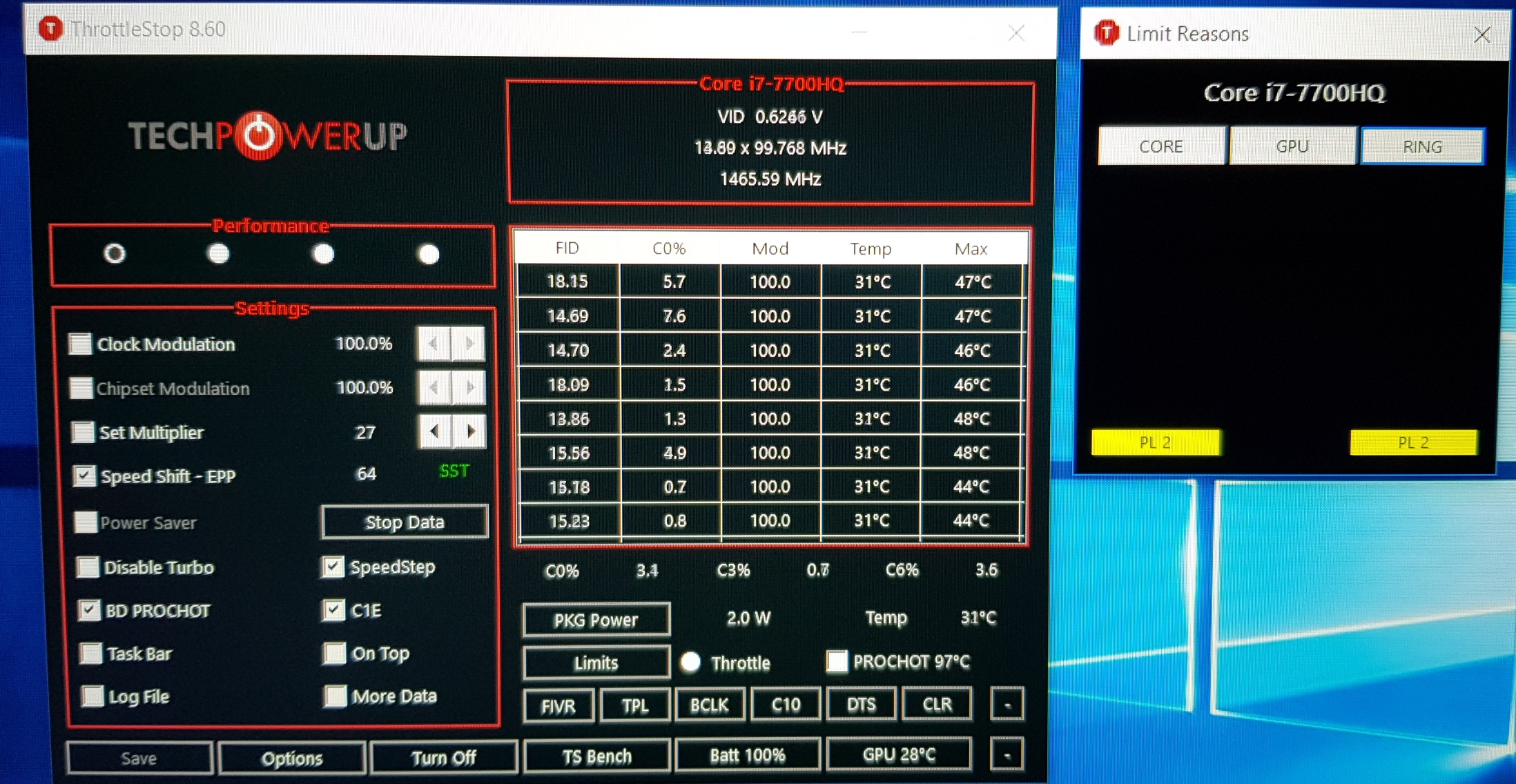
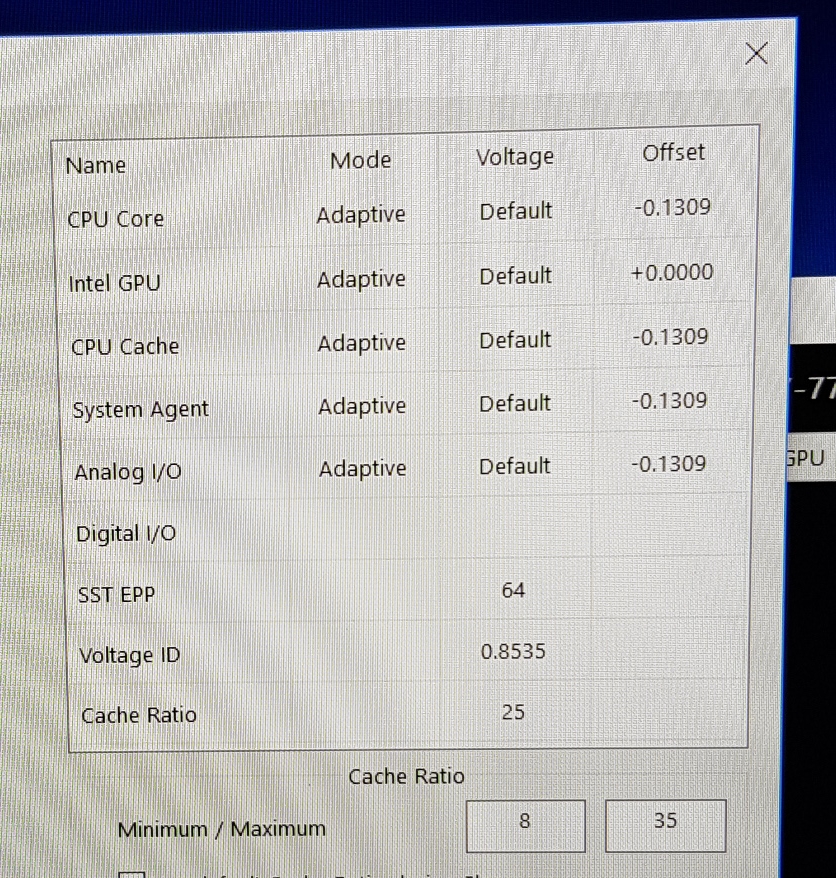
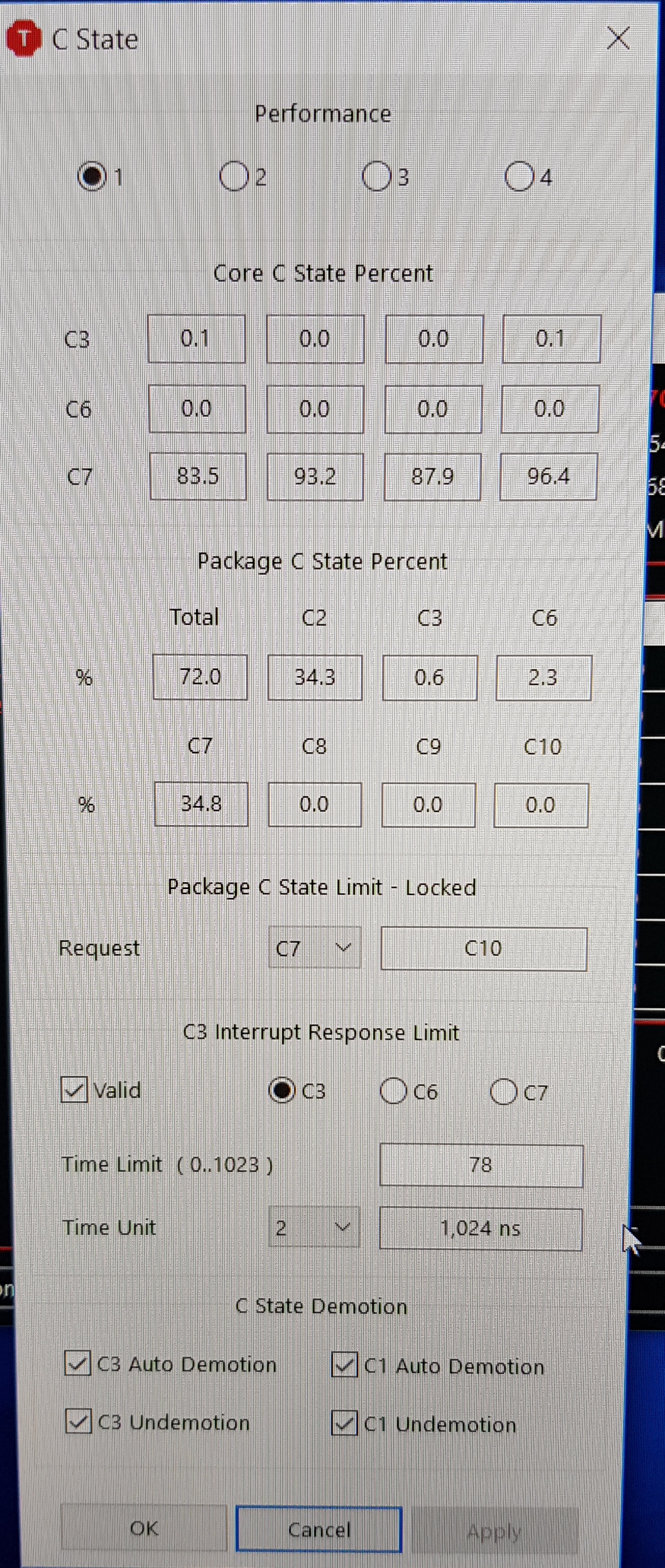
-
I'm seeing C state package is set to C7 instead of C10? Why is that?
Click on Core,Ring and GPU in Limit reasons. Most probably it will go away once refreshed. -
It cant be changed as its locked on CPU. I'll change it back to C10 but no change and I have refreshed it but still PL2 keeps popping up in red as pictures above. Faulty Motherboard??
-
Uncheck BD PROCHOT, Speedstep and C1E afterwards hit Save and run 64m TS bench using 8 threads.
In TPL window, uncheck Clamp option. During benching see if PL1/2 flashes yellow/red. -
Isn't that PL2 flag the Power Limit 2 flag? It's the short turbo limit, isn't it?
Should be tweakable in XTU -
Oh. So it cant be removed in TS, just XTU? It is Power Limit 2
-
IIRC TS doesn't handle it due to a bug or something. XTU does handle it
![[IMG]](images/storyImages/2RQHXsu.png)
Short Power Max is PL2 -
Well there's your issue, your short/long turbo power limits are set low, at 44W/26W, that's what a U series CPU is all about. Limited power.
If your want to raise the threshold at which you see PL2, slide them, and turbo timer, higher to the right. By 10W at a time to test stability and temperatures.
If those values stick and aren't overwritten by firmware, setting them all to unlimited should mean PL2 is never seen again. But that will amount to a big overclock since you're removing the power limits. -
I'm fine with mine lol I'm just showing him where to look.
I can unlock the TDP of this U processor, however it's not thermally feasible.
AFAIK the 8th Gen U series are toned down 45W TDP processors
it was originally 15W. 26W is enough for 3.4GHz at a constant 75°C -
Oh right, my bad, I somehow managed to confuse you both and thought that was HIS screenshot...
-
Thanks @GTMoraes. Will try that. May I please ask what causes PL2 flags to flash yellow/red on idle? I also noticed when plugging in the AC adapter in the laptop causes the flag PL2 to appear in Core and Ring continually... What causes it? Thanks
-
Can I just select disable and the flag wont appear again and wont limit my TDP and Frequency to 2.8 GHz? Correct
-
Maybe so. Try it and see what happens
I don't have the slightest idea. These things shouldn't be continuously "on alarm". On my system, when it's yellow it's nearing the limit, and red when the threshold has been reached -
Could it possibly be caused my undervolting the CPU to much??
-
You can always undo the undervolt and see if the alarms go away
-
I tried that but it stays on and flashes yellow/red when I open up apps etc. Its does intermittently though, I'll reboot windows and it sometimes go away if i plug in ac adapter it flags again... all of that. Annoys me out. My M.B was just replaced in my laptop. They tested it and all is working fine but my temps still seem high at 86- 93 C degrees with the new TIM and that's why I'm using TS to reduce them but PL2 makes my CPU non operational basically :/
-
It's the same principle as I mentioned previously except you have a different CPU. PL2 is the turbo power limit. You can raise PL2 it so the CPU runs closer to maximum turbo multiple.
However, if you're running ~90C on an undervolt, you don't have much thermal headroom to increase power limits anyway unless you repaste with a top end paste or liquid metal.
If you do want your CPU to run faster, you can either set the short and long turbo power (and turbo time window) higher in XTU, or in the TPL settings window in Throttlestop.Vasudev likes this. -
Package power limits in TPL window in TS actually control PL1/PL2 values.
-
My TDP is not existent when I'm PL2 flagged and im not even looking for better performance as my thermals are not to good for my laptop. All I want is to be able to go over 2.8 Ghz without stressing the laptop to much. I'm flagged even on idle and I have no idea why. I shouldn't be flagged PL2 on idle, it makes no sense. My TDP stays below 10 for a 45 W i7 7700HQ but I'm PL2 throttled when I've just started or booted up windows 10. Its intermittent as it sometimes goes away when i reboot or it doesnt etc. All I want to do is stop the PL2 from appearing on idle.
-
I've tried that sir and im still getting flagged PL2 on Limit reasons for Core and Ring. I'll try with XTU as well as you saidVasudev likes this.
-
Do you get any warnings related to CPU in windows event viewer?
-
What's the PL2 setting and what's the package power when you start a 100% cpu load (E.g. TSBench 1024m)?
Hwinfo report section for the CPU will show your PL2 setting without setting or changing it before TS runs (turn off autostart script if you have one)
To check if TS settings are the cause rename the INI file and relaunch, see if anything changes.
Resetting Bios and uninstall/reinstalling XTU are other things to try -
 PL2 didnt activate when I booted into windows this time.
Max TDP was 32 W on the testVasudev likes this. -
This score is on par with my 8550U. There might be some throttling, but it doesn't seem that much (the 7700HQ should be just 10% faster than the 8550U)
-
Anyone ever have an issue where an overclock gets stuck on a 7820hk? For some reason, mine is stuck at 39x on all cores, and it won't budge regardless of what I have set in the turbo ratio limits. When I reinstalled XTU to try to change it there, it no longer gives me the option to change it (it's greyed out). Also, as weird as this may sound, my bios no longer has the option to change it there either. Strangest thing...
If it helps, it's an EVOC (Clevo) PA71-HS-G. -
The screenshot you posted does not show that. ThrottleStop shows that none of your cores or threads are stuck using the 39 multiplier. Speed Shift is allowing your CPU multiplier to adjust just fine.
In the Turbo Power Limits window it shows that Speed Shift is enabled. The recommended range is 1 to 41. You set the max to 39 so regardless of your other settings, when loaded, your CPU will be limited to the 39 multiplier. You have an unlocked K CPU. If you are going to be playing with the multiplier, set the Speed Shift Max value sky high so it does not interfere with obtaining maximum performance.pressing, Vasudev, raz8020 and 1 other person like this. -
Ok, I’m a donk. Didn’t even see that setting. I’ll set it up properly now. Thanks so much for the help!
Sent from my iPhone using Tapatalk -
For me, ThrottleStop only controls one place where the TDP is set. Not sure where exactly though. Help @unclewebb ?
But it does not change this.
My CPU has a PL1 limit of 15W. I can change that in Throttlestop TPL settings, but the setting only applies if the value in TS TPL is LOWER than the one in FED15900. Intel XTU changes this, but it might also change something else. I haven't mucked around in XTU for a long time.
If the TS TPL is HIGHER than the Power Limit in FED15900, the system will use the power limit in FED15900.
Eg. 30W set in RW-Everthing, 25W set in ThrottleStop - CPU will use a maximum of 25W.
30W set in RW-Everything, 50W set in THrottleSTop - CPU will use a maximum of 30W.
So I never touch the TPL window because it unfortunately is not much use to me. -
Interesting. So I get a suspiciously similar 1024M score (~160 seconds) with a suspiciously similar power consumption (32W) Well that's a lie. My CPU drew 31.5W on average. That's the 8250U vs 7700HQ for you. The voltage was rock solid hovering around 0.9800v exactly. Though I did have a -110mV undervolt. WHat undervolt did you have @GreatD
My liquid metal application is getting awry again. I really need to do a proper application.Vasudev likes this. -
This is the one significant limitation of ThrottleStop. The WinRing0 driver that TS uses does not have access to the Memory Mapped IO (MMIO) so TS cannot change FED159A0. Many manufacturers do not set this memory location so ThrottleStop can do its thing without any problems and this is not a limitation at all.
If a manufacturer does set FED159A0 to default values, ThrottleStop will not be able to take the CPU beyond the default TDP value set in the MMIO. If there is no way to adjust this in the bios, the only other option is to use Intel XTU which has access to both the MSR register in the CPU like ThrottleStop has but XTU also has access to this MMIO location. That's a sad moment when I have to put my tail between my legs and recommend the competition.
You could also hack away with RWEverything and manually edit this value. I think someone wrote a RWEverything script to adjust the MMIO power limits so they could avoid XTU.
Just an FYI. In the MMIO location FED159A4 (just beside FED159A0) is where the short term turbo power limit is stored. Your screenshot shows 00428160 at this location. The 8160 is the important part. The 8 means this power limit is enabled. 0x160 hex is equivalent to 352 decimal. You need to divide that by 8 to convert it into Watts (352/8). That means the short term power limit is set in the MMIO to 44 Watts.
I have been on a forum road trip lately, trying to help other users with TS. Trudi on linustechtips had a truly sad running Clevo N850EP6. It has a Core i7-8750H but it was stumbling along like a drunken sailor when trying to run Cinebench. A few tweaks with TS has really helped the cause. Good reading and lots of pics. If you have an 8750H and you want to learn know more about how to setup ThrottleStop, check it out.
https://linustechtips.com/main/topic/940162-i7-8750h-laptop-cinebenching-450cbLast edited: Jun 25, 2018 -
Impressive difference in Temps between you and me.
If I run the 1024 test with infinite TDP (which would run at 30.5~31W), it would finish the test at around 85 to 90°C. Subsequent tests would quickly hit 90+
Yours won't even get past 65 lol
![[IMG]](images/storyImages/wANnS25.png)
I might end up jumping in the liquid metal bandwagon.
For me, ThrottleStop can only extend how long the processor can run "free" before throttling (Turbo Power Limit), and up to a certain point (can't set it to infinite like XTU). I use XTU just to set the TDP, but I wish TS could do it on its own
Oh, TS also "unlocks" the TDP editing on BIOS so XTU can change it without restarting, which is good, because sometimes when the system crashed or something, XTU would reset the TDP back to 15W, and in order to increase it again, I'd have to ask for it to "unlock", then reboot, to then be able to change. With the "TDP Level Control" checkbox marked on TS, XTU can always edit the TDP.Last edited: Jun 25, 2018 -
Regardless of the limitations, Throttlestop has been a really useful tool for me and it is the first program I install when I reinstall Windows. It has probably saved me hundreds of hours of battery life over the years and given me at least a 20% boost on every CPU I've run it on (On one of my laptops Acer decided to limit turbo boost to 2.3 when it could actually go to 2.7GHz lolz) so thank you once again for this software.
For me, manually editing the RW-Everything value is still way faster than waiting for XTU to load. -
And its not like my laptop can handle 40W from the CPU either. Temperatures spike to 80C within the first minute.
Prime95 Small FFT (idk, it was the first option) makes the CPU utilize 41W at 3GHz. I once unlocked all the power limits and saw my 8250U use 53W and my friend's 8550U use 57W. Scary. -
Thanks! It helps the system by giving more "thermal mass" and area to dissipate.
I read somewhere that 2.0VCCIN is the max safe limit for Haswell. Dunno if that's what killed it in the end.
It reduced temps about 15-20C! Before this, it would temp throttle even at 37x with short loads. Now it can sustain 38x almost indefinetly, and ~42x-43x in short bursts. -
How can I check the current value of Speed Shift - EPP (without using TS)? My Google-fu has failed me.
EDIT: To clarify, by value I mean 0 - 255.Last edited: Jun 26, 2018 -
@unclewebb
I'm not sure if it's been done before, but I made an InnoSetup script for installing ThrottleStop and setting it to run at login. There is a build available to download or you can clone the repo and build yourself. I tried to keep it pretty simple, so if I don't notice an update it's easy for anyone to create a new installer.
https://github.com/slupton89/ThrottleStopInstallerLast edited: Jun 26, 2018 -
You can notify @unclewebb
-
Good day everyone.
So I was playing today with undervolting an i5-5200u on a Lenovo z70 laptop. I was gradually going down with the voltage offset on CPU core and cache until I reached -100mV, testing for stability after every change of 10mV. All was stable, without crashes or freezes. But then I had to restart the laptop for some reason. The problem is it started freezing after reaching desktop. Eventually I was able to open Throttlestop and get the voltages back up a little before it froze. Now on -70mV it's ok again also during reboots of the system.
Now until now I thought that Throttlestop applies it's changes only after it starts and reads changed values from it's config files, but it really looked like it was applying the undervolt on system start causing the freezes without starting Throttlestop yet.
Is this possible or there's another issue somewhere?
Kind regards -
I've had similar issues with my Ideapad 320. It somehow seems to overwrite BIOS settings and store the undervolt there, so it's undervolted since POST.
My laptop was barely reaching the windows logo, it would instantly restart. Luckily I could reach BIOS and reset everything to default. That cleared the undervolt and allowed me to enter Windows again
Try that and see if it helps -
In TS with 8750H the program allows to put 41 in all the six cores but this not take any effect right?
-
This information can be found in the IA32_HWP_REQUEST register which is MSR 0x774 bits[31..24]. Intel calls these bits, Energy_Performance_Preference. This register is fully documented in the Intel public documentation. In Windows you can use RWEverything to read MSR registers. You can play around with ThrottleStop and watch how these bits change.
Definitely not. ThrottleStop does not write anything to the bios, ever. What might be happening is Windows has a hybrid shutdown feature. Either the bios is broken and it is not zeroing the voltage registers like it is supposed to do or you are not fully shutting down Windows. If you have a chance, hold down the Shift key on the keyboard and select Shutdown so Windows does a proper shutdown. Better yet, disable the hybrid shutdown option. If you have Win 10 on a SSD, does anyone really need the hybrid feature?
@slupton - Thanks for the installer. I thought about doing this but never got around to it. I am an old school user. I just like downloading a zip file and dragging and dropping some random files onto my desktop or into a folder somewhere. I know some users prefer an installer so I will keep that in mind.
At the moment I do not believe that this will do anything. If I do not own the hardware and I am not sure what is possible, I like to leave options like this open for people to experiment with. With previous CPU generations, you could run an early microcode and perhaps take advantage of a feature like this. I have not heard of any 8750H success stories like this so far. -
Hello guys! I have Asus laptop with Intel i5-3230m cpu. Stock 2,6ghz and boost 3,2ghz. Is it possible to undervolt it, in order to reduce temperature. Thank you for your time
-
I will look into it. I think I've seen something about fastboot in bios, I believe this is it. Anyway in my case it looked like a full shutdown, and Throttlestop was not running after the restart. Is there any easy way to check if this hybrid shutdown is enabled?
Kind regards -
Certainly not hybrid shutdown, as I've discovered this after the laptop crashed due to too low voltage, and it rebooted because it was too unstable. The BIOS held the undervolts
-
Wow, that's poor design. Do you have an embedded battery? Is there any hole that you can push? My laptop does not have a CMOS battery, rather it relies on power from the embedded battery to keep time, bios settings, etc.
-
ThrottleStop writes voltage information directly to registers within the CPU. Nothing is ever changed or written to the bios.
The job of the bios is it is supposed to zero all of the voltage registers when you boot up. It is possible that the voltage information that was written to the CPU did not get properly reset. After a blue screen, my laptop does not have this problem. After resuming from stand by or hibernate mode, my CPU is always reset to default voltages.
Here is how you can check how your laptop handles voltages. Exit ThrottleStop and open up HWiNFO or HWMonitor on the desktop. Enter sleep or hibernate and then when you resume, have a look at what voltages your CPU is at. Are they the same as before or did they zeroed out? Do the same test but this time reboot. You will have to restart your monitoring app when Windows starts back up.
I am not sure if Hybrid Sleep is part of the problem. Have a look in the Power Options for this setting and do some more testing.
![[IMG]](images/storyImages/YqNcvW2.png) raz8020 likes this.
raz8020 likes this. -
Though sleeping does indeed restore the undervolt offset back to 0, rebooting or shutting down doesn't.
I've disabled Hybrid sleep, rebooted without letting TS autostarting, and undervolts still stuck (seen on HWiNFO). If I restore BIOS to default, the undervolt gets reset
-150mV causes instant lock-up with a short burst of crazy artifacts on the screen, then reboot. The laptop would reboot again indefinitely whenever it was supposed to reach the Windows loading. I can only enter the BIOS, restore it to Defaults, and it then is able to start Windows normally.
I've not tried extreme undervolts due to fear of completely bricking the laptop, if I'm unable to reach the BIOS any further.
Not sure if it's the same thing, but manually setting the TDP on XTU also sticks until I either restore BIOS defaults or let XTU reset it when its watchdog detects a crash -
Hmm. "with a short burst of crazy artifacts on the screen" You really aren't giving me much confidence in the IdeaPad lineup now All my laptops simply freeze and do nothing when I undervolt too much.
settings on XTU are supposed to be applied ONLY by the XTU program itself, so that means after logon.
I assume this is off?
maybe its time for a BIOS update, if available? Psst. Reset all settings in Windows and your BIOS - you wouldn't want that undervolt sticking during your BIOS Update! -
Full Disclosure, that was probably the Intel GPU undervolt that did it.
Hah, I remember that once I undervolted Analog I/O, and the screen went nuts. When it restarted itself, it came back with the screen flickering and fading in, at the Lenovo logo pre Windows.
Needless to say, I've never touched it again.
Over-Undervolting 99% of the time just locks up and reboot in 0.5 seconds, though
Either XTU applies changes without starting, because I've disabled its startup (a service maybe?) or its changes stick on the BIOS
I ran with this off, too, and happened the same thing. In any case, Fast Startup doesn't apply for reboots and crashes
It's updated to the latest. And I forgot to undo the undervolt before updating it lol
Luckily it went smoothc69k likes this. -
Just how bad can Windows' "ENHANCED" display scaling be? LOL
The ThrottleStop Guide
Discussion in 'Hardware Components and Aftermarket Upgrades' started by unclewebb, Nov 7, 2010.


