 Problems? See this thread at archive.org.
Looks great. Thank you very much.
Everything seems to work well except all core ratios cannot be changed, only the first 8 of 16 cores due to the UI. What you could do that would satisfy most and eliminate the need to enlarge the UI to all core is just add a check box to sync all cores, similar to the "Group Tuning" feature in the ASUS Windows software (shown in screen shot below). That way anyone could set all cores the same regardless of how many cores they have. Other than that, this is the only suggestion I have at this time. Great job, as usual.
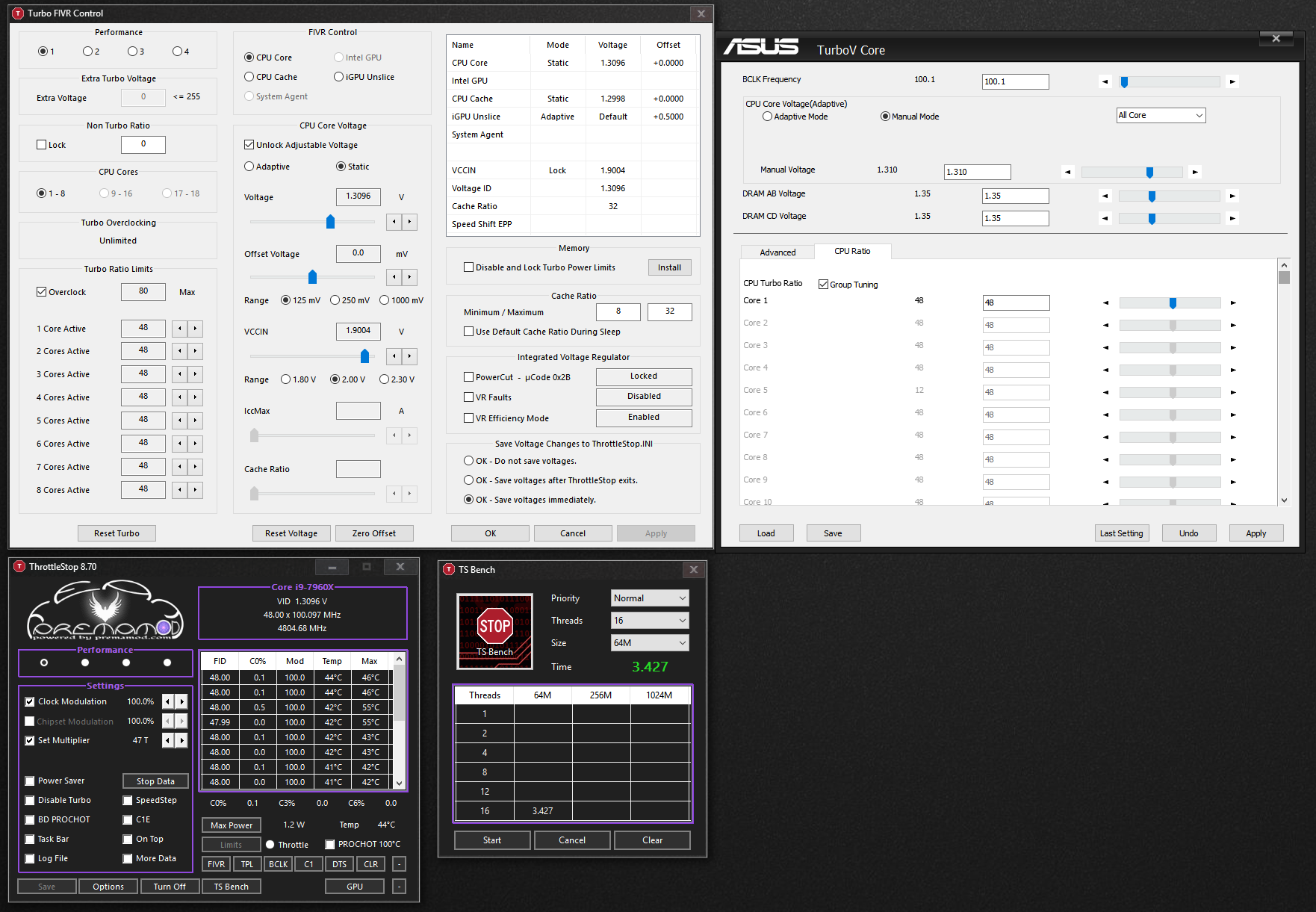
-
-
Simple and effective. And saves tons of time in the process. Only a MSI Bios programmer would be crazy enough to want different mulitpliers for all 12 cores or 16 cores (or more!).
-
Was looking for a higher Vccin to see if it worked.
Along with 2 cores still missing from bench.
-
This new version seems to have fixed the problem I had about not saving the UV after waking up the system (problem I had even with XTU)
Another thing I noticed,the ICCMax TS reports is 70A, and apparently my 7700HQ, should be 66A:
I dont remember messing with this value in the BIOS, but I tried so many options I could be wrong, I just dont remember touching any ICC option or setting a value to 70. Just informing you, since a 4A increase isnt that big I guess.
Which value do you guys get with a 7700HQ? -
Good catch. So, VCCIN slider works/moves, but any value above 1.9004 seems to be ignored. VR Efficiency Mode keeps turning itself back on. If I add a check, apply, remove check, apply it is "disabled" temporarily (if the UI is accurate). Under CPU cores, 9-16 and 17-18 are greyed out. 9-16 should be unlocked for me, and 17-18 unlocked for your 7980XE. Would still be kind of nice to have an option to sync all cores.
@unclewebb - Under "Memory" there is Disable and Lock Turbo Power Limits. Is that supposed to be something else, or is the heading "Memory" just need to be changed?
-
@Mr. Fox - I added a FIVR - CPU Cores section so someday users might be able to access the Turbo Limits for CPUs with 16 cores. This new feature is not hooked up yet. It might allow you to access cores 9 to 16 someday in the future.
I tried to do some testing but my laptop was not too happy when I was exploring the VccIn outer limits for you. Requests beyond 2.30V were being ignored by my CPU. I saw a few too many BSODs before I gave up testing. No plans to pursue this further.
To test the Power Cut feature, you first need to Apply a fixed VCCIN voltage. The Power Cut feature might work after that but not sure what it will do. I would think that Intel fixed the 4th Gen Haswell bug by the time they released the 7980XE.
I unlocked the VR Faults and VR Efficiency boxes for you. Check them, hit Apply and see if either of them become Enabled.
Maybe a few years from now I will be able to afford some 16 core or 18 core hardware. Without proper documentation or hardware to play with, writing software like TS is too time consuming. I am surprised that TS works as well as it does on hardware that I have had zero access to.
The documentation link on the reddit site is for the desktop CPUs. The documentation for a mobile 7th Gen 45W CPU shows that 68A is the default max IccMax value. Check out the table on page 105.
https://www.intel.com/content/dam/w...-mobile-h-processor-lines-datasheet-vol-1.pdf
No one forces manufacturers to set IccMax to the default Intel max value. The bios guys might have simply rounded off 68A and decided to go with 70A instead. An extra 2A is not a biggy. Use TS and set IccMax to whatever value you like. I prefer setting IccMax to its max value so it does not cause any CPU throttling.
Great to hear that TS 8.70 is finally restoring your under volt values after resuming from sleep. With each new version I always try to fix up a few of the minor bugs.duttyend, Vasudev, raz8020 and 1 other person like this. -
It still seems to work pretty decent overall though. I can set the multipliers with the ASUS tool, then save the additional profiles. They seem to stick as long as I do not change the multipliers. One of the things I value most about TS is being able to set my BIOS for the overclock I want to bench at, then set three lower clocked profiles for something other than benching.
-
It is on the things to maybe do list.
In the FIVR monitoring table, beside VCCIN it shows the word Lock. This means that the VCCIN register was either locked by the bios before you booted up or you might have accidentally locked it while playing with the TS Power Cut feature. All the Power Cut feature does is it locks the VCCIN voltage.
This feature locks the turbo power limits that are located in memory. These 2 limits are different than the limits that TS has traditionally had access to. On your CPU, this feature might not work correctly. These secondary power limits might not be used by your computer so no need to touch them.duttyend, Vasudev, raz8020 and 1 other person like this. -
The Higher than 2.30V are for people that can use that feature. You wouldn't be able to because it should be locked on a laptop. It's tied in with some other settings...Speculations of course. (Or at best, send me a version for testing with that setting set higher) I have a few laptops and desktops at my disposal.
Yes, I was more giving feedback that both of these settings actually work on theApex VI board. The one not highlighted is the setting that doesn't work.
Welcome to Prema's world.
-
@unclewebb is there any test or any dump of anything that you need to see why the "VR faults" doesn't change on my MSI Throttlebook?
the checkbox is there but it doesn't do anything. It says "enabled", but checking it and hitting apply does nothing. (it remains enabled at all times even if I give the system a dirty look). I'd love to see what would happen if I was able to disable it. (Efficiency mode is also always enabled as well).
It's a GT73VR vomitbook with the 7820HK processor, by the way.
-
ThrottleStop 8.70.2
TechPowerUp Edition
https://drive.google.com/open?id=1fP7DNJQY3vpvZ3kTndpap7JScn2JteFo
This version is for the traditional folk that do not want anything purple on their desktop.
If it is already enabled then checking that box and pushing Apply is not going to change anything. It is already enabled. If clearing that box and hitting Apply does not change anything then there is nothing that you can do. I have to assume that the bios has enabled both of these and probably set some sort of lock bit so they cannot be disabled. The lock feature might be within the CPU itself. -
Could you fix Power limit lock to work with task scheduler?Vasudev likes this.
-
Seems that VCCIN is not working for me with TS. It shows locked and the value displayed in the table doesn't match what is set in the BIOS. VR Efficiency mode shows "Enabled" that is also disabled in the BIOS. Looks like that is working for you. I am running BIOS v1004. I will check tomorrow with the newer firmware on the second BIOS chip and see if that changes anything in terms of how ThrottleStop works.
Vasudev likes this. -
Wrong version of Throttlestop.
Each revision something either works or doesn't work or changes because he is trying to accommodate everyone. And in this case, it can't be done like that...He would need to make different versions for different boards. And that is just way to much work for one person on his own. -
Doesn't seem to matter which version for me. Deleted INI file and rebooted and VCCIN still doesn't match and shows locked with the wrong value displayed. But, VR Efficiency Mode shows correctly with the old Tornado version. I will try setting the BIOS to "Auto" for VCCIN and see if that changes how it interacts. Maybe having the values set does something different to block communication with ThrottleStop.
-
Nope. No difference at all. Setting everything to Auto in the BIOS changes nothing. But, now the ThrottleStop monitoring window area for voltage looks totally different. And, VCCIN is no longer there, LOL. Weird.
Last edited: Sep 11, 2018 -
What free programs can I use to stress test my CPU efficiently and not burning my laptop down?
I have an i7-7700HQ. -
Forgive my naivity, but does the 7980XE really use up to 500W, or is that just powercut interfering?Vasudev likes this.
-
-
Ok then, I think I've just about found the cause for climate change then lolPapusan, duttyend, Vasudev and 1 other person like this.
-
Not sure I actually believe in climate change by popular definition, but this is definitely man-made thermal production.
-
All very interesting, but not really what i was talking about unfortunately. It goes back to what I said about setting not lining up with what they actually are. For example. The VCCIN in Throttle Stop is actually the CPU Aux1 voltage. That's why I showed watts in the example and not voltage. The true value of VCCIN=CPU Input Voltage
@Che0063
Up to 500 Watts? More like it will use up to 1000W
Side note, You can't use the UPS when benching the 7980XE. It will shut off because the power draw is a little north of 1000W. That is just the cpu, not counting what the gpu might pull.Last edited: Sep 11, 2018 -
Well, here I am with my little 8250U and miniscule MX150 paired with some measly 8GB of 2400MHz ram with a run-of-the-mill 1080p display. With a 65W AC Adapter The entire system uses no more than 80W with power limits raised
(Yes, the battery actually drained at -15W during that stress test and during Cities Skylines to compensate for the tiny little AC adapter lol). I am literally hard limited to 4hrs of game play max before the entire battery is drained (60/15), even when plugged in hahaVasudev likes this. -
Are you using Two EVGA 1500W PSU to run that Beast? Der8auer crossed 500W few years ago, looks like consumer space needs more than 3000W PSU called Mr. Fox and JohnKsss ultimate infinite power PSU. It can theoretically support infinite wattage.
@unclewebb I'm observing freezing or slow down briefly for 5 secs. Even @judal57 has the same issue. All we did was enable Disable Turbo Locks and limits.
Is it an odd case or has AW BIOS applied limits not to bypass it via 3rd party SW? -
@Vasudev @unclewebb seems like is working now, but is working at the oposite, i have to check the box "disable and lock the turbo power limits" and is unlocked lol now i use my i7 4710hq at more than 50watts. i would like to know if i can unlock the multiplier to have for example 4ghz on all cores. the heat is not a problem since i am using liquid metal and use the AGA with a gtx 1080ti
-
Tell me how you did it when you reach home. I need to unlock it as well. Now its at 92W. I can manage only 42-45W w/o undervolt and 38-40W with undervolt.
-
with AIDA 64 stress FPU test, it pulls 57-58 watts
-
I saw it in the picture. But can my CPU OC when its locked?judal57 likes this.
-
now we need an unlocked multiplier so we can use that unlocked power propertlyVasudev likes this.
-
Just a question about SpeedShift. Can it be, that the option is ignored on some laptops? It seems there is no difference on my Dell XPS 15 9570, whatever value I use, 0-255. SST EPP value is also set randomly by bios it seems, and the value set in TS is ignored. Is there no way to force the CPU to be stuck at lowest clock speed and never to clock higher? There are situations, where I want this to be the case, and dont want any upclocking of the CPU.
-
Uncheck C1E and Speedstep in TS to get HWP-EPP working based on the value you desire for your workloads.duttyend likes this.
-
What does C1E and Speedstep, could you explain?
-
According to unclewebb, C1E was needed to allow CPU to go idle states and used by legacy CPUs and isn't needed on modern Chips anymore.
For speedshift to work completely in autonomous mode even bypassing W10 Speedshift settings, its better to disable speedstep which uses OS based P-states to allow CPU to ramp up and down the clocks acc. to load.duttyend likes this. -
So it's recommended to turn off speedstep and C1E when using high performance mode (games, etc)? And leave them on, while on light usage?
-
Not really needed, I still use Balanced power profile with Speedshift value set to 80 which ramps up clocks to max multipliers on full load and go to idle state instantly when CPU load is near zero! Put it to Zero to get highest performance mode using Balanced power profile.
Speedshift is recommended on Mobile chipsets. -
I experienced this as well and its the windows power plan which keeps changing not only sst but also the multipliers and power usage (atleast on my laptop). Setting minimum and maximum processor state to 100% will override windows settings. If you are using balanced plan, make sure you keep it on better performance.Maleko48 likes this.
-
I think I found the bug. When using the Task Scheduler, it would go off on a tangent and look for the RwDrv.sys file in a totally different directory. I will send you a fresh version of TS so you can do some testing.duttyend, cktducky, Maleko48 and 1 other person like this.
-
BLASPHEMY
I'm using this version and once I got over the lovely purple and Prema logo, I realized that the same profile saving issue I mentioned is present still. If I save on profile 2, switch to profile 1 and close/re-open the program it still opens on profile 1. That aside I have a question for you and @Johnksss as well.
The new IccMax slider exists for me, but is set at a default of 122. I set all current limits as high as they'd go in the BIOS already (all that I could find anyway), which is 8191 1/8A or 1023A, which is also reflected in the TPL window's PP0 Current Limit. Does that mean the IccMax value for 122A is reading something that doesn't exist, or something to that effect? I'd assume maxing it out like I did the rest should not affect anything else, but I figured I would simply ask first. -
I have the same issue as well. Even @judal57 said he has same problem.
EDIT: Suddenly reset Turbo doesn't work on 8.71.Last edited: Sep 12, 2018 -
Well, I used it for a day and could not run my normal over clocks. So reverted back to an earlier version. Also, iccmax for cache seems to default to 22
-
Hi, can i ask for some help?
I'm trying to use this tool but i'm stuck with a mfc120u.dll error (not found error) that i can't solve.
I've seen that an old version (850) should work, where can i find an official older versions donwload list?
And, must important, do you think it's a problem to use an old version on new hardware?
sorry for noob question, i tried to search but i could not solve the problem, TIA!
p.s. : I'm on my new xps 15 9750 [i7-8750H, 16GB, 512 SSD, 4k] maybe i should reinstall windows but now i have no time to do this.Last edited: Sep 12, 2018 -
yeah I didn't even notice the cache being so low. I also find that if I wipe the .ini file my PP0 current limit ends up at 300 despite being 1023 in BIOS, though I can set it back to 1023 in Throttlestop.
I are a confused person.
Also TSBench from 8.60+ is really good at catching errors, good job @unclewebb -
I think it takes it's reading from a different part of the bios, that's why it sets 300....Speculations of course.
-
I combed it a while ago, I just cannot find anything... unless it's either reading PL3/PL4 as PP0 current limit. But it's strange, I swore it used to read the BIOS properly before.
-
You wont find it. You would need to edit the bios to actually see where it is.
-
Absolute maximum legal value for ICCMAX is 256 amps (value=1023).
This value is honored in VR Settings->Core IA Domain, but not in the main "OC" section (in MSI Bios).
You can't enter a value higher than 1023 in Core I/A Domain but you can in the "main" OC section. But going over 1023 resets it to 70 amps (but doesn't say so).
This doesn't apply for the HDET CPU's. And I don't think this low limit exists in the Z370 and Z390 either. It's shown right in the help for AMIBCP if you open a Kaby lake Bios however.Last edited: Sep 12, 2018
The ThrottleStop Guide
Discussion in 'Hardware Components and Aftermarket Upgrades' started by unclewebb, Nov 7, 2010.


