 Problems? See this thread at archive.org.
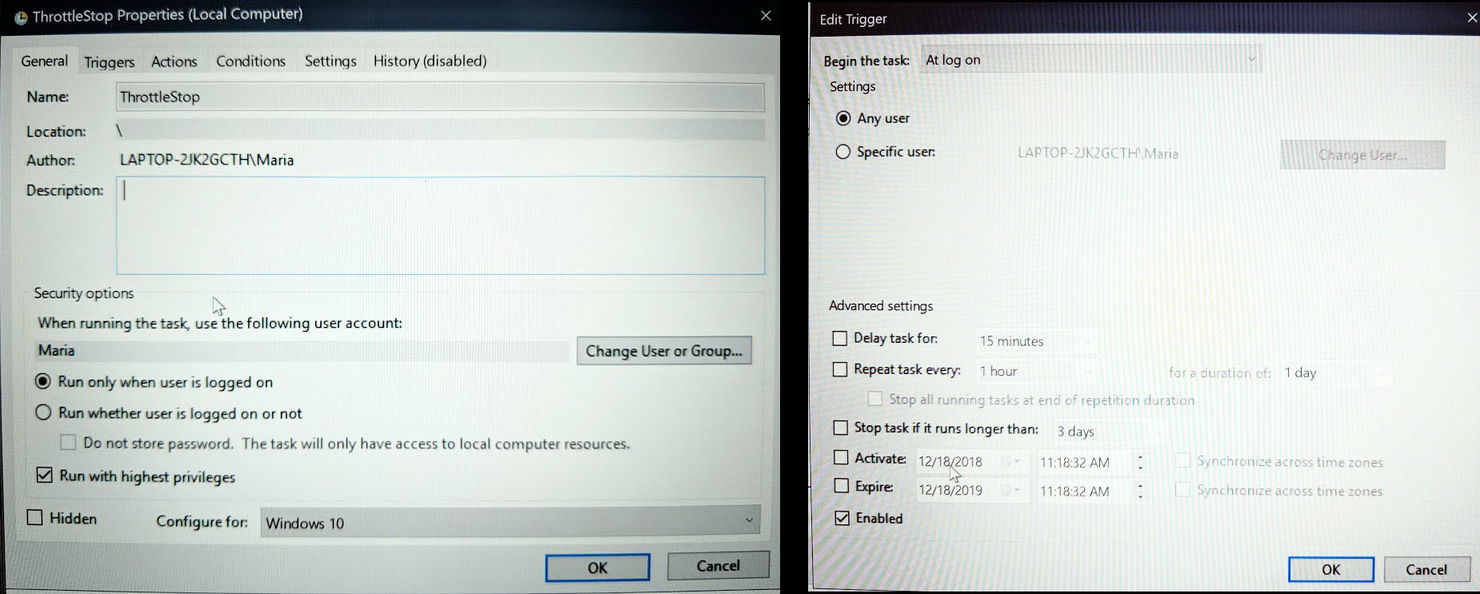
I have another question; how do we run ThrottleStop for all users (even standard / family) on Win 10? I selected a trigger to run for any user on Log On, while also trying specific users, but either way, it only runs for the admin account / user. Am I doing something wrong, or can't we run Task Scheduler for all users?
-
@Nero10578 - The 6500U is a low power CPU which was specifically designed to throttle. It was not designed to run fully loaded at its full rated speed. Some users get lucky and with a few tweaks, are able to run these at an acceptable speed but some manufacturers have these so locked down that it is difficult, if not impossible, to get beyond these limitations. I think many HP devices fall into this category.
The only setting in ThrottleStop that might be able to help is the FIVR - Disable and Lock Turbo Power Limits option. First you will need to click on the Install button to download and install the RwDrv.sys file before this feature will work.
I would also try setting the Turbo Power Limits to 25 / 25 and the Turbo Time Limit to 28 seconds. Not sure if it makes any difference but there is no need to drag the slider all the way to the max time setting. Thanks for posting screenshots of your settings.
I don't think you can run ThrottleStop for all users, some of which are in Limited (non-Admin) accounts. You could try selecting the, "Run whether user is logged on or not" option. This will run ThottleStop but you will not have access to the user interface so make sure ThrottleStop is properly setup before you do this.
@chumley - wrote a guide a long time ago about how to start ThrottleStop as a service. Perhaps that will work for you.
http://forum.notebookreview.com/threads/the-throttlestop-guide.531329/page-120#post-8728301 -
Well, bummer, I was convinced that it must have been an issue with the User accounts I changed so I reset Win10. Oh, well, that's fine if it can run TS, regardless if the interface is visible.
I tried that, but how would we know if it's actually running, through the second user's Task Manager?Last edited: Dec 18, 2018 -
Thanks for the reply, I'm trying what you suggest right now. Will report back. You're amazing making this program and then helping people for free haha.
EDIT: Holy crap I have my stress test going for almost 30 minutes now and its still holding full 3,0GHz turbo! Crossing my fingers it'll stay there! Looks like so far your suggestions worked!
Damn spoke too soon...at 40 minutes ish it started throttling again but weirdly not as much as before, now holds 2.6-2.7GHz...laptop CPUs are weird...I'm too used to running desktop CPUs full bore at overclocked speeds lol
Do you think it could be triggered by some sort of motherboard VRM or skin surface temperature sensor? HWInfo couldn't pick up any extra sensors though.Last edited: Dec 18, 2018t456 likes this. -
Some findings from my testing on my surface book 2 (13.5") with the i7 8650u CPU:
The laptop is fanless (for the CPU) so it relies mostly on a skin sensor for throttling, I noticed the following:
- On stock settings the PL1 and PL2 limits are set to 30W and 35W respectively with 2 seconds for PL2. This when plugged in, when on battery the PL2 is set to around 28W.
- The PL1 throttles down in steps as soon as the skin sensor reaches a certain temperature, it throttles in steps going lower than the CPU default PL1 of 15W depending on the battery profile (e.g. on AC with best performance the first step down is around 14W, on battery it might go down to 13W as first step down):
![[IMG]](images/storyImages/jrngLgN.jpg)
- The TPL limits work well (e.g. setting to a lower value will correctly limit the values), I could not see any difference on unchecking the clamp option though. The CPU will still throttle and override the limits if necessary
- Enabling the option to disable the limits and locking works as well, the CPU will use the given TPL limits without changing the PL1, unfortunately being a fanless laptop running a stress test makes the CPU too hot and it will correctly throttle down due to high temperature (when reaching around 95c) which is good, but the throttling n this case is a safeguard and your CPU will be running under 10W and at 400mhz
- Undervolting using the FIVR works too, unfortunately I hit some bad limits on my CPU. I can undervolt a max of around 70mv being stable, a good test to check if you are stable imho is to change the battery profiles and/or disconnecting the power cable while running the throttle stop stress test. If it's not stable enough it will most of the time freeze or BSOD. It's important to leave it idle too to test the stability.
This is the same test I did with a simple 50mv undervolt:
![[IMG]](images/storyImages/6xgsSkQ.png)
Not much difference in temperatures at this point. What helps a lot imho is to limit the PL1 and PL2 to something much lower, e.g. 20W and 25W (it will still throttle though due to the skin sensor and reach 80-85c). This will yield better performance overall I think, even though the frequency will be lower.
- An additional test that I did is undervolting the iGPU, it seems I can undervolt much more than the CPU and it does NOT seem to be coupled with the system agent (e.g. I can undervolt just the iGPU and it works from voltage readings). I didn't test the unslice yet. I need to test if lowering the iGPU voltage by any chance reduces the overall temperatures.
- The skin sensor throttling affects the GPU as well, does not matter if the CPU is not hot as soon as the skin sensor throttling kicks in the GPU will throttle together with the CPU.
- In my case the BD PROCHOT didn't seem to make much difference, but maybe I'm testing the wrong way.
- I changed the iccMax for both the Core and the Cache to the max value, didn't notice any difference in stability nor temperatures, not sure how we can test this
Some other screenshots of my settings on TS:
![[IMG]](images/storyImages/3JzXPDL.png)
![[IMG]](images/storyImages/t0RjaQj.png)
Note that I was testing with the default PL1 and PL2, I will try to test with some lower values (I got some good results using a PL1 of 20W or less). My feeling is that lowering the PL1 will allow to more undervolting, I could run at -90mv for a while and changing the power profiles without freezing (it did eventually BSOD though), while with the higher PL1 it would freeze at -80mv as soon as I would change the power profile.
@unclewebb I think there is a small bug in TS: When I change the voltage in one profile it changes the voltages in all the profiles. If I then deselect the "unlock adjustable voltage" option for one of the profiles it does not set the voltages to zero for that profile, but retains the previous voltage. In order to make it work (e.g. to have an undervolted profile and one stock) the only way is to set the "stock" profile to "unlock adjustable voltage" and slider to 0. Also a question, am I right in thinking that the TPL limits are global and not per profile?
Also some food for thoughts:
- Would it useful to have a "stock" profile that cannot be changed? This would be useful to check the stock settings detected by TS when making a lot of changes (I have a terrible memory), or maybe it would be interesting to see the delta only, with an option to reset it to default. Deleting the ini file is ok, but I'm a bit confused on which values TS would read if restarted without rebooting the machine.
- Would it be possible to log the PL1/PL2? I did some charts of the TS logs since the HWInfo charts are not so clear to read (which tools do you guys use to see the charts of the TS logs?):
![[IMG]](images/storyImages/uDCtOOg.png) Queen 6, Maleko48 and FrozenLord like this.
Queen 6, Maleko48 and FrozenLord like this. -
Just wanted to point out no it is not fanless.
-
What do you mean it is not fanless? As far as I know (and hear) the SB2 13.5" is fanless design for the CPU (which is in the tablet), it has a fan for the GPU only (in the base).
-
Oh dang I confused it with the Surface Pro lol the Book is fanlessAz4zel likes this.
-
Even with undervolting, sometimes core get to 90° Max. With this set up, and bios tweaks, i got no more throttle for now but sometimes temp can be better maybe... or i forgot some options ?
Bios unlock ; IMON Slope 50 ; Imon Offset 31999 ; Prefix "-" as Mentionned me @Falkentyne and @hackness
Here's my options, set up...
FIVR PANEL : https://imgur.com/a/hS7Zknh
Options : https://imgur.com/a/9tFHYSM
Turbo Power Limits : https://imgur.com/a/QvQXC28
Also a yellow ring "EDP other" appears while i was playing Subnautica.
thx for the help.
( You can have this game, Subnautica for free here : https://www.epicgames.com/store/en-US/product/subnautica/home until 27 december, enjoy ! ) -
Were you running Limit Reasons while testing? It might show a reason for the throttling. You can also go into the Options window and Add Limit Reasons to the ThrottleStop log file. A ThrottleStop log file is a wealth of information about what your CPU is up to. All the important stuff.
If you are undervolting, why not use HWMonitor or HWiNFO to see if the undervolt is being applied in all of your Windows profiles.
That's not a bug, that's a feature! Hard for ThrottleStop to read your mind so if you want it to do something, you have to specifically tell it to do something. If you are undervolting in one profile and want to go back to 0, you have to use the Unlock adjustable voltage and specifically tell TS to set your CPU back to 0 undervolt.
In TS 8.70, when undervolting the iGPU, I have heard that you have to undervolt the iGPU Unslice equally, not the System Agent. No 8th Gen hardware so I cannot test this theory.
The graphing software you are using will probably exaggerate the trips to 400 MHz when your CPU is thermal throttling. Keep an eye on the TS reported MHz. It does a great job averaging out the MHz when a CPU is throttling.
Your screenshot shows that your laptop manufacturer reduced the thermal throttling temperature (PROCHOT) from the Intel specified 100°C down to 90°C. That kind of stuff never makes me happy but with a fanless design, I guess it makes some sense. Not everyone likes to wear oven mitts when computing.
I would avoid pulling the power cord while stress testing with the TS Bench. It is not as demanding as Prime95 or some of the other torture tests but it is still a significant load and kind of a harsh load to hit your battery with all at once.
If your laptop is not using BD PROCHOT, having this enabled or disabled will not make any difference. Not all laptops use this. Your laptop seems to control things by adjusting the power limits.
You can test IccMax by lowering this value during a stress test. If Limit Reasons is open, you should see EDP light up in red if IccMax is set too low. Easier to just max it out and leave it so it is not a limiting factor.
Not with ThrottleStop. TS does not have any built in graphing options yet. Maybe next year. Best to just Disable and Lock the power limits in the FIVR window and then set the power limits appropriately in the TS - TPL window. This seems to work well for a lot of devices at the moment.
Thanks for posting lots of pics and data. That makes it easier for me to provide you with some meaningful feedback. A win win for both of us.Maleko48 likes this. -
It said the PL1 limit was activating in red on the CORE when it started throttling but there was no limits triggered before that when it was still in full turbo clocks and there was also EDP Other on the RING. I should log and upload here in a bit then. I'd really love to be able to pin the CPU at max turbo or something lol this thing doesn't really get hot on the CPU temps itself so I'm really confused why HP did this weird throttling behavior.
EDIT: Logged while rendering a video here.Attached Files:
Last edited: Dec 19, 2018 -
-
Hi
Do you know if Management Engine Firmware has impact on level of undervolt??6.|THE|1|BOSS|.9 likes this. -
I see your reasoning, I would argue though that if I set the voltage in one profile it should not set it the same for all the profiles. Maybe the unlocking tick could be applied to all the profiles at the same time, while the value would only be set for the specific profile. Anyway it's a minor UI thing, once you know how it works
On my system it seems to work undervolting the GPU only, I'll try some more testing to confirm this.
Yep that is strange, even though I noticed that the CPU temps can reach 100°C before the thermal throttling happens and the CPU is cut to 400MHz.
Thanks for the tip, didn't think about it. I'm keeping an eye on the battery wear level too.
Yes I will test some more on this, I can see the EDP yellow light come up all the time btw, even when idle or after resetting it. The PL2 limit also lights up in red at times even though the power drawn is less than 10W.
I meant adding the PL1 value in the log file so I can chart it
Thank you for your time and effort!! -
Here a brief gif of the limits window:
-
Not at all.. but it have an impact when you overclock your CPU above the official turbo speed and when tweaking BCLK
-
When idle at the desktop, I have also seen some laptops that turn on some of the throttling reasons immediately after resetting them. All I can think is that some power limit somewhere has been set too low. This type of throttling is more of a nuisance than a problem. If your CPU is loaded and it is throttling way below its Intel spec, that's a problem. My 4th Gen 4700MQ can get about a quarter of the way through the TS Bench without any signs of throttling. Soon after that, the PL2 limit kicks in and throttles it back. That's normal throttling. It settles in at its 47 Watt TDP rating indefinitely after that.
https://i.imgur.com/gE2icPJ.png
I would argue that it does not do this. If you set the voltage in one profile and you switch to a different profile that does not have Unlock adjustable voltage selected, ThrottleStop will keep using the same voltage that it was previously set to in the original profile.
Exactly. Too late to change it now or everyone would be confused. My way makes some sort of logical sense or at least it did at the time when I originally programmed this.
I am really not sure about this. How this works might depend on what Intel GPU you are undervolting. Some people see that the iGPU voltage has changed in the monitoring table so they are immediately convinced that it must be working. When undervolting the iGPU, I would try to run some sort of test to confirm that the iGPU really is undervolted. If you undervolt to a ridiculous level and the iGPU does not crash, that is usually a sign that the undervolt is not working. You can also look for a repeatable change in iGPU temperature to try and confirm an undervolt is working.
When a U series CPU enters a low TDP Level, its TDP will drop below the rated TDP Level. Most laptops have no way to control this. Users are at the mercy of manufacturers. You just have to hope that your CPU does not drop down into slow and sluggish mode too often. I have seen some U CPUs with a Low TDP of 7 Watts and some ultra low power devices are as low as 3 Watts. Designed to throttle. No thanks. -
Maybe I'm misunderstanding but this is what I observed:
1. Open FIVR
2. Select the 4th profile
3. Check the adjustable voltage
4. Set some undervolt and apply
5. Close the FIVR
6. Select the 4th profile and save
7. Check that the voltage is correctly applied
8. Select the 1st profile and save
-> The voltage is kept the same as point 4, e.g. as if the selected profile was the 4th. If I want the 1st profile to have no offset I have to check the adjustable voltage in the 1st profile, keep at zero offset and apply.
Yes, at the time I was checking the input voltage from HWInfo in real time with the iGPU under load and I could see the change. I'll have to do some more testing on this to double check. -
I retested with all the various voltages and you were right, the GPU does not undervolt unless the iGPU unslice is undervolted of the same amount. The system agent does not seem to be coupled to anything else. This is quite strange as I am sure that I didn't touch the unslice in the first test, but the voltage was definitely changing. Maybe it was just fluctuations and I mistakenly thought I was changing the voltage (I was playing with -80mv). Now I wonder how comes the intel XTU couples the gpu voltage with the system agent, maybe they do change the voltage of the unslice but do not show it in the UI.
Anyway temperature wise it does not seem to make a difference for the CPU and since I have a dedicated GPU the iGPU is used rarely. I'm keeping them all undervolted though since it might help a little.
Unfortunately my CPU does not undervolt much, I'm testing now a -75mv that seems stable but that's it. I can push the iGPU, the System agent and the unslice lower though (currently at -80mv). -
I am asking because I just OCed my 7700hq via bclk with help of SVET and now it is running at 3910MHz on one core and 3502 when all 4 cores. Also I needed to change a bit my ram oc. From 3000mhz to 2933mhz but thanks to bclk I have now 3022mhz on ram with The same timings as on 3000 , so a Little gain here also. I am able to push them to 3090mhz when i leave them at 3000 + 2.98% bclk but Then I need to move from cl15 to cl16 and I think there is now benefit from that.
I needed to lower my UV on core and cache a bit for stabilizing OC. but it was 20mV so it is almost unnoticable
I am on ME FW 11.8.50.3399 now and I am wondering if I benefit from some newer me firmware. And I am wondering if I update me FW to newer version my bclk oc will remain?
THE newest me fw we can both update is 11.8.60.3561 I think.
Also want to ask wy we can't co past 3%bclk? Is there some lock there?Last edited: Dec 21, 2018Maleko48 and 6.|THE|1|BOSS|.9 like this. -
Installing the latest ME FW will always have positive effects when you OC through BCLK since it will lower the microstutters on high load scenario
and yes... your BCLK will remain
I am using already this version 11.8.60.3561 which is the latest ones and it works great with BCLK OC
The reason why we all can't pass above 3% on BCLK due to iGPU... we must disable iGPU to be able to go above 3% but that's is not possible at all because
all laptops uses iGPU in order see what is happening! even if you have dGPU.. it uses the iGPU to be able to display... I'm sorry to say... me and you are stuck at 3% limit
but I'm still searching a way to bypass the 3% limit without disabling iGPU
I don't give up easily
raz8020, cktducky, Krzyslaw and 1 other person like this. -
Ok thank you for the anwser.
Can I ask for a little help?
Could you send me detailed guide for how to do an update? You can send me it by private message.
Can you also send me link for the me FW you have used?
Did you have to use Intel FIT( I don't know if I named it correctly) for unlocking BCLK on The 11.8.60.3561 or if it is done once there is no need for doing it again before update.
Thank you
BRLast edited: Dec 21, 20186.|THE|1|BOSS|.9 likes this. -
About Intel FIT.. yes I used it to unlock BCLK for my i7 6700hq but it is very powerful tool and can make your laptop a piece of junk if something goes wrong... so.. if something goes wrong... you better have your SPI programmer ready to recover your laptop from brick
About BCLK... once it is done then it is done.. you don't need to do it again
and you can update ME FW with a peace of mind
as it only update the FW and it doesn't reset your BCLK settings so... all the settings are preserved
so.. you won't lose the BCLK OC at all
About a guideline for updating intel me fw... best place to get the needed files and fw me files is from win-raid.com... here
https://www.win-raid.com/t596f39-Intel-Management-Engine-Drivers-Firmware-amp-System-Tools.html
If you already have all the files that you needed... then just look at this section [E ngine Firmware Updating] from the link that I mentioned previously.... it will tell you how to update correctly
Enjoy
Krzyslaw likes this. -
That is exactly right. If you want ThrottleStop to do something, you have to specifically tell it to do something. If Unlock adjustable voltage is not checked in a profile, ThrottleStop assumes that you do not want TS to make any changes to the voltage. Check off a box if you want ThrottleStop to do something. Do not check off a box if you do not want it to do something. To me, that makes logical sense.
ThrottleStop has always worked like this and there have not been too many complaints so I will be leaving it like this.
That's the problem. People base their conclusions on what HWiNFO is reporting. No fault of HWiNFO but these conclusions are misleading if internally, the CPU is ignoring the voltage offset request. The numbers in the FIVR monitoring table at the top right corner of the FIVR window is showing the same thing. These are only offset voltage requests. The CPU / iGPU then decides if these requests make any sense. If it makes sense, the offset voltage is applied, if it does not make sense, the voltage request is ignored or it might be partially applied and partially ignored if that makes sense.
Too bad Intel has never publicly released any proper documentation for the FIVR stuff. It is all a big secret. Thanks for doing some more testing of this. -
At idle my CPU frequency is around 4100 MHz. This is what the turbo freq is supposed to be. Whenever I run a stress test on OCCT or IntelBurn Test it immediately drops down to 2200. With IntelBurn Test it stays at 2200 and briefly goes up 3500 and then back down to 2200 over and over again until the stress test is over. With TS Bench it consistently stays at 2600 (no errors). When I try disabling turbo on TS the freq. stays at 1800.
Shouldn't it be at 4100 the whole time? Is my CPU throttling? How can I fix this? Thank you!
EDIT:
On Power: CPU Cache and Core undervolted to -105.5, iGPU -75.2
On Battery: CPU Cache and Core undervolted to -120.1, iGPU -87.9
Is it normal that I can undervolt much more on battery than on power? -
@nosauce - OCCT and Intel BurnTest are overwhelming loads for a CPU that only has a 15 Watt TDP rating. The U CPUs are low power CPUs. They are specifically designed to throttle. In these CPUs, throttling is based on power consumption.
That would be wonderful but it is highly unlikely. Yes, your CPU is throttling. Without seeing any ThrottleStop screenshots or log files, hard to say if it is throttling more or less compared to what Intel intended it to do. The IBT test goes through a phase where the load percentage stays about the same but power consumption significantly decreases. When this happens, a TDP limited CPU will speed up. When power consumption increases, the TDP limited CPU will slow down so it goes not exceed its built in TDP limit.
1800 MHz is the Processor Base Frequency according to Intel.
https://ark.intel.com/products/149091/Intel-Core-i7-8565U-Processor-8M-Cache-up-to-4-60-GHz-
So yes, if you disable Turbo Boost, the processor will run no faster than 1800 MHz.
Buy an unlocked CPU that does not have a miserly 15 Watt TDP limit.
When using ThrottleStop on a 15 Watt U CPU, I would start by enabling the FIVR - Disable and Lock Turbo Power Limits feature. There are a few other tricks that might help the cause but depending on the laptop or device, long term, it might forever be limited by its 15 Watt TDP.
Anything is possible. It depends on the voltage curve that Intel programmed into your CPU. Some CPUs will undervolt more on battery power compared to AC and some will undervolt less. It depends on what speed the CPU is running at on battery power. At the same speed, AC or battery power should not make much of a difference. On battery power, some users have their CPUs running slower so that might explain some of the difference.Last edited: Dec 21, 2018nosauce likes this. -
For anyone planning to install the latest Windows 10 build (18305.1000) please beware that it breaks throttlestop from starting by blocking WinRing0.dll. Havent found a solution yet, but reverting to previous build allows it to work again.
To get it working so far I have tried:
- performing "unblock" on all dll and sys files in throttlestop folder (properties > unblock)
- running in windows 8 compatibility mode
- running as admin
- trying older builds
I am not using Windows Defender and have tried most of the options under app & browser control, but the error persists.
@unclewebb Any ideas on what can be done to get it working? -
Thanks sir.
Downloaded Firmware from there and updated.
Everything went perfect and is perfect.
BCLK as you said remain.cktducky and 6.|THE|1|BOSS|.9 like this. -
No problem Happy to help
sharing is caring
... even during exams
-
Hi !
First time for me to put a message on this thread, but i use ThrottleStop for few years now.
I have a i7 4980HQ, it's a great CPU, but locked with this ****ty TDP limit of 47w.
I saw, the new version of TS 8.70 "support now intel crystal well : i7 4980hq".
What does it mean ? I updated my Throttlestop to this version, and i see no differences at all with the settings, effects, or whatever.
Can you explain me what change you did ?
Thanks a lot ! -
@NGX83 - When ThrottleStop starts up, it reads the CPUID from the CPU, then it looks up that ID number in a big table and tries to determine what features that CPU supports. If you run ThrottleStop on a CPU that it is not familiar with, then it has to guess what ThrottleStop features will be appropriate for that CPU. There was a bug in previous versions of ThrottleStop where it was not looking up the CPUID in the table correctly for the Crystal Well CPUs. I have never run ThrottleStop on a Crystal Well based CPU so I have no idea if this bug was serious or not. It is possible that even though the primary lookup method was broken, that the secondary method was working correctly. In other words, maybe the bug I found and corrected was not important at all.
I guess that explains why there were not more complaints about this.
Anyway, the Core i7-4980HQ has a TDP rating of 47 Watts. Most of the HQ processors throttle to their TDP limit and there is usually nothing that any software can do about this problem. Did you try enabling the new FIVR - Disable and Lock Turbo Power Limits feature? Where is a screenshot of the TPL window? Without any screenshots to look at, I have no idea how you have ThrottleStop setup.FrozenLord likes this. -
You will need a desktop board to get something out from this BGA chips http://valid.x86.fr/nlvshq
Run it as it was created... Aka soldered in a notebook and it will run as crap.
.Last edited: Dec 23, 2018 -
I have a X1 Extreme with the 8750H CPU .. I have a few questions:
1) When I use the "power slider" to "Battery Saver" Windows sets Speedshift EPP to 178. I cannot override it with ThrottleStop to a number higher than 178. When it is set to "Best Peformance" however ThrottleStop can be 100% in charge of the Speedshift EPP setting and I can set it from 0 to 255 without a problem. Is there anyway around this?
2) Speedshift EPP - is there any reason to set this to 0 even while plugged in? If I set it to 128 for example and do something that requires the system to go to full speed, won't the system automatically set all the cores to 3.9Ghz to cope with the load, so why choose 0 and have it run all cores at 3.9Ghz all the time?
3) "Disable And Lock Turbo Power Limits" - this is under "Memory" in the FIVR window. What exactly does this do? I saw unclewebb recommend this to someone and after some research I'm not 100% sure what it does, so I've left it alone.
Thanks in advance for all the help and Happy Holidays & a Happy New Year to everyone! -
Ok i see...
The "disable and lock turbo power limit feature" doesn"t work on this CPU ( like powercut i guess).
Here is a screenshot of the TPL configuration :
![[IMG]](images/storyImages/1545559129-sans-titre.png)
-
So I went around the problem of PL1 triggering and locking the CPU to 9W on my 6500U when it hits upper 70sC by setting the alarm feature to trigger a throttling profile with the SST set to 170 at 71C because it seems like if I set the alarm higher it will eventually trigger the PL1 limit anyways since throttlestop is not fast enough to catch temp spikes to upper 70s. It seems to me like the PL1 is triggered if the CPU stays at or above 75C for extended periods.
Now my 6500U stays on boost at 3GHz as long as the temps haven't climbed up, when it does it throttles only a little bit to 2.5-2.7GHz momentarily which lowers wattage use enough to lower temps and stop it from triggering the PL1 limit then comes back to 3GHz. So for anyone with an HP Spectre X360 this seems to be the best solution short of somehow modifying the BIOS. It also stops the igpu from being throttled since the 9W PL1 limit does not choke the igpu anymore.Last edited: Dec 25, 2018 -
ah, got it. Thank you for the explanations. Disabling and locking the turbo power limits gave me better results (much better speeds). Now when I run TS Bench 1024M, it runs at the max 4100 @ 40W and then goes down to 3600 @ 30W at around 25% then stays there until the end. This is with the PKG Power setting. IntelBurn Test also goes between 4100 to 3600. When I have the setting set to Max Power I get the same frequencies except it stays at 40W the whole time. So I decided to stay at PKG Power since I get the same results.
Temps max out at around the low 80's C. I'm a little disappointed since I repasted with liquid metal and thought I'd get lower temps. The fan takes a while to kick in. e.g. when I have the laptop powered down and the fan's at 0 RPM and run stress tests as soon as I boot my computer, the fan remains at 0 rpm even when the temp goes up to the 90's. It takes a while for the fans to responds (speeding up or slowing down).
This is supposed to be a 15W processor. It says, " configurable TDP of 10 W TDP-down and 25 W TDP-up". So maxing at 40W makes sense. Is it okay for a "15W processor" to regularly go up to 40W? Just a little concerned about my CPU burning/wearing out too fast.
The other thing that I noticed when I unlocked the power limits is that the iGPU doesn't undervolt (or undervolts like crazy?). Right now I have it undervolted -1000mV which doesn't seem right. Is this normal?
Thanks again. -
@unclewebb please add AVX offset! My laptop bios doesn't have this.. if anything I'll feel a lot better after adjusting this and finally testing with Prime95 w AVX
-
This is impossible.
If you want an pesudo AVX offset, you can add it manually but for voltage ONLY, not for frequency.
Set the core and cache voltages to be DIFFERENT.
The higher of the 2 voltages will be used for NON AVX instructions.
The lower of the two voltages will be used for AVX.
but of course this may be useless since you may wind up being unstable.
Note that I have NOT tested this extensively.
You can also try making the CPU cache ratio voltage higher than the CPU core voltage and see what happens if you do an AVX load.
In my very brief tests, the higher of the two was used in non AVX, regardless of which one was set higher.FrozenLord and 6.|THE|1|BOSS|.9 like this. -
If you can adjust the iGPU voltage offset to -1000mV then obviously it is not working. Sometimes the iGPU voltage and the iGPU Unslice voltage are linked. If that is the case, try undervolting these two voltages equally and see what happens. Start with a value a lot less than -1000 mV. Maybe -50 mV or -100 mV for both voltages.
A modern desktop Intel CPU can take well over 100 Watts when overclocked and will run reliably for a long, long time. CPUs are just silicon. They have no idea what speed they will run at or whether they will end up in a box that says mobile or desktop on it. 40 Watts is a joke compared to what this technology can run at 24/7. A lot of enthusiasts have been having fun with their CPUs for many years in this forum alone. Not too many casualties have been reported so far so no worries.
I would love to but without documentation or hardware for testing purposes, this will not be happening anytime soon. If I buy a new CPU to play with next year, it might not have an Intel logo on it.Vasudev, FrozenLord, Papusan and 1 other person like this. -
I already know that a long time ago and I already did a post on this thread for like 1 year ago yes.. I can confirm I see no difference on temperatures when using AVX or without AVX
Vasudev likes this.
-
That's a relief.
What is the best way to stress test the iGPU? Will TS Bench show errors? -
The HP Spectre x360 in your signature has a separate Nvidia MX150 GPU. That means there might not be a lot to be gained by undervolting your iGPU. I have not done any extensive testing of the iGPU. The TS Bench tests the CPU cores, not the iGPU. Find something simple like the Heaven benchmark, force it to run on the iGPU, drop those two voltages until it crashes or you see artifacts.
I tried doing some AVX testing on a 7th Gen non-K desktop CPU and setting an AVX offset did not seem to do anything. Maybe only CPUs with an unlocked multiplier support AVX offset.Vasudev and 6.|THE|1|BOSS|.9 like this. -
Sry, i cant read back now. Which is more stable, the 70.2 or the 70.6?
-
Pretty simple question from me... any idea how to fix this error: "Error starting service: a certificate was explicitly revoked by its issuer"
This is in connection with the rwdrv.sys file which is not being permitted to launch by my computer (presumably because the certificate it is signed with has expired). -
Not 100% sure what you are talking about, not even 50% sure but I would go with 70.6.
What version of Windows are you using and what antivirus program are you using?
I am running Windows 10 version 1803 Build 17134.472 and I am not having any troubles. For antivirus I am using the free version of Avast and to start ThrottleStop, I am using the Task Scheduler and I followed the Task Scheduler guide in the second post of this thread. The RwDrv.sys driver certificate expired long ago but on my computer, this is not being enforced.
![[IMG]](images/storyImages/cXngVfw.png)
It is possible that some newer version of Windows has put an end to this useful ThrottleStop feature. There is nothing I can do if that has happened. Maybe the WinRing0 driver and ThrottleStop will be the next thing that gets disabled by Windows 10. Sad times for 2019 if that happens.Last edited: Dec 29, 2018 -
Windows 10 Build 17763.195
It may also have to do with the fact that I installed the driver using TS 8.70.6 while under task scheduler (instead of manually running ts) - maybe it doesn't have sufficient permissions or something? The procedure was:
- Stop the TS service
- Unpack 8.70.6 to the TS folder (overwriting the old version 8.60).
- Start the TS service. Notice the new feature and how to install it.
- Stop the TS service.
- Unpack the rwdrv.sys file to the TS folder.
- Start the TS service and tick the checkbox.
- Error dialog shows upon ticking the checkbox.
Is there anyway to delete the rwsys.drv service after its installed? I get the error dialog every startup now even if TS isn't running. Is it a simple regsvr32 /u command?
Edit: Realised I used the wrong terminology. When I use "service" above I mean the TS task in task scheduler - didn't want to confuse the point. - Stop the TS service
-
How did you install that driver?
The file should only be downloaded and saved inside the Throttlestop folder ;-)
Installing it might cause Windows to actually check the signature. (just as a guess) -
Should I ever touch the ICCMAX values in the FIVR panel?
Does it do anything? -
If you're getting constant or intermittent PL1/PL2 flags being triggered then you can use TS to put a higher value of Iccmax.
-
@unclewebb I'm getting really strange spikes alternating constantly from 2.4W->6-7W while idling on my desktop doing absolutely nothing and thus my battery life has fluctuated wildly. I've tried disabling my antivirus and p much every startup process. I've followed the undervolt guide to a T. Very stable -.150 on core/cache and -.121 on igp/sysagent on my 8750H processor in my aero 15x laptop. I feel like this issue became more prominently noticed after the recent windows update to 1809, but I can't be sure.
Either way, I would love to hear from experts here on how I can stabilize my idle power consumption at a reasonable lower value.
I have a samsung 970 pro nvme installed as the primary OS drive, and it's the only drive showing any usage in hwmonitor64.
Here are screenshots of my Throttlestop and windows power settings (note: I set the max power state to 100% on battery and plugged in b/c I heard that EPP enabled in TS controls this):
https://imgur.com/a/bcWomkg
https://imgur.com/a/WJAapo8
https://imgur.com/a/hsvXjCl
https://imgur.com/a/mB2QBoh
https://imgur.com/a/O5cyMBG
https://imgur.com/a/knef3QF
-I've also tried it with autonomous disabled and there was no perceivable effect on anything
TLDR; I'm being very aggressive in my power management on battery yet I'm somehow averaging ~5hrs or less battery life on a 94Whr battery D:
Edit: After a restart I'm getting even stranger behavior. On battery I'm now idling at 11-12W.
Edit: Strangely enough I got my PKG reading to stabilize around 3-4W by unchecking the Taskbar checkbox on the main menu of Throttlestop. I'm not even kidding, I toggled it off and the W reading just dropped immediately. I still would like to figure out how to get my idle power consumption to be a lot lower though.
Heeeeelp. xD. Thanks in advance and happy new years!Last edited: Dec 30, 2018 -
Your images are broken. Use Imgur or similar.
The ThrottleStop Guide
Discussion in 'Hardware Components and Aftermarket Upgrades' started by unclewebb, Nov 7, 2010.


![[IMG]](http://www.noelshack.com/2018-51-7-1545559129-sans-titre.jpg)


