Problems? See this thread at archive.org.
This is not a problem with TS. You are missing critical Microsoft Redistributables. These can be downloaded direct from Microsoft. This question and more have been answered many times throghout this 1,000+ page thread and elsewhere on the forum. Search is your friend- http://forum.notebookreview.com/search/24920989/?q=mfc120u.dll&o=relevance
-
mfc120u.dll Error
https://support.microsoft.com/en-us/help/4032938/update-for-visual-c-2013-redistributable-package
@onrblbl - Head to the above site to download the 2013 Visual C++ Redistributable packages.
If you are using a 64 bit operating system, you will need to install BOTH the x86 and the x64 versions.
If you do not want to use Speed Shift then do not check this option in ThrottleStop. Disable Speed Shift in the bios and disable Speed Shift in ThrottleStop. After you make a Speed Shift change in ThrottleStop, you will have to reboot so the CPU has a chance to reset itself. -
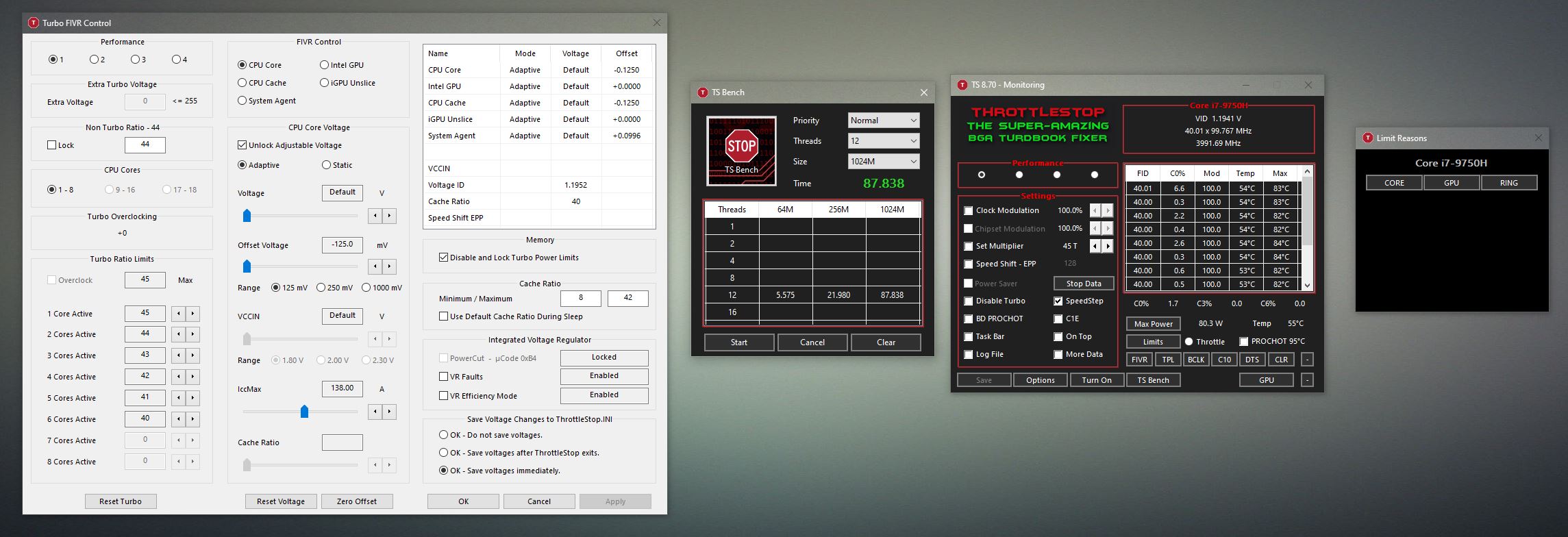
Here's a -275mV undervolt on core, -125mV on cache. Nice temps, too.
TongFang is making all of the better-known turdbook manufacturers look really bad. A little extra love from @unclewebb and @Prema also goes a long way.
@B0Bunclewebb, tilleroftheearth, relobe and 2 others like this. -
What is the verdict @Mr. Fox ? There has always been debate about ThrottleStop's ability to set the CPU core offset higher than the CPU cache offset. In some situations, on some CPUs, this does not seem to make any difference while on other CPU models, users have claimed that there is a definite advantage.
Some say that a -125 mV cache offset with a -275 mV core offset will show the same performance and CPU temperatures as an offset of -125 mV cache, -125 mV core. In this case, maybe the ThrottleStop request is denied and the CPU just uses the numerically lower value for both core and cache. Are there any benchmarks that are repeatable and show a clear advantage of going much higher on the core offset or any specific benchmarks that show no improvement? Perhaps with or without AVX might make a difference.
If there is an advantage, I wonder why Intel XTU and most desktop motherboards sync these voltages. Why does Intel not let you adjust them independently? The truth is out there. Maybe you can find it. Perhaps Intel just wanted to keep things simple at the expense of ultimate performance.
Almost forgot. TongFang for the win! Dell could learn a thing or two. Maybe get back in the game for enthusiasts, no pun intended.ha1o2surfer, ole!!!, Papusan and 2 others like this. -
My conclusion is that it is advantageous and to me the proof is in the pudding. Now, what the actual effect is might not be as clear, but it doesn't really matter in the grand scheme of things because the outcome is that performance and stability are the same, but the temps are better with the core and cache voltages set independently. That was also true for me on my Clevo DTRs with 6700K, 7700K and 8700K. (Never owned 9900K to find out, but probably so.) I know Brother @Johnksss also found that to be true. It can have a significant effect on thermals.
If you see the HWiNFO64 sensors in the screenshot I posted, they are reflecting the undervolt applied by ThrottleStop as well. So, whatever is actually happening, whether or not the sensors agree with the BIOS, the temps are clearly better and the performance is basically identical as setting the same offset value on core and cache.
I do not use an AVX offset with my desktop or the laptop. Core ratio is the same with AVX load running with a 0 offset.
I also wonder why Intel specs are to sync the voltage. But, I never have a surprised look on my face because OEMs and ODMs excel at being stupid. More often than not, there is a better way of doing things than what they have decided to make a standard. Most of the overclocking-centric desktop enthusiast mobos allow them to be set independently.
As always... YMMV. In situations where it is deemed to not be advantageous by an individual, it may be that their opinion was formed in a scenario that is platform specific due to firmware castration or inadequate thermal management. So, it might be true in some cases, but not in other cases, depending on the product being used.
@EasyCPU developer is finding similar success setting a significantly greater core offset using his utility, so I think there is definitely something to it.Last edited: Oct 25, 2019unclewebb, EasyCPU developer, 4W4K3 and 1 other person like this. -
Hi
Could yo make another test but with with cache ratio set from lowest value not 40 - 42.
I am looking for some stability test from you.
Because I have idea on waht is going on.
On my msi ge72vr with 7700HQ I was able to push UV on core much lower than cache but it was only when I pushed my cache ratio to max 35 and If I remember it was working
When it was default 8-35 I had whea bsod.
Also do you have speed step enabled in bios and what are your settings for c states?
I mean it was only beneficial when cache was pushed higher.Last edited: Oct 26, 2019 -
Makes you wonder why so many laptop owners are brain washed. Intel XTU does not allow setting these voltages independently. You would think that improved temps is something everyone would want in a laptop.
My 7th Gen desktop board also has the core and cache offsets locked together in the bios. I guess Asus must have been drinking the blue Kool-Aid that Intel was passing around at one of their tech conferences. It has always been possible to access these 2 voltages independently since the 4th Gen Haswell was introduced.
I was not thinking about AVX offset. I was wondering if the temperature advantage you are seeing by setting the core and cache offset voltages independently has anything to do with the type of code being run. I thought I heard something like that a long time ago but it is all a blur. Maybe only code with a heavy dose of AVX instructions benefits from a big difference in offset voltages or maybe the opposite is true. Not too important, just curious.Mr. Fox likes this. -
I am not sure what the default cache min and max are for the 9750H. I'll have to find that info and then I can test that to see if it has issues running stock cache ratio like you did.
-
OK, it looks like the default cache min/max for this CPU is 8 and 42. I set the BIOS values to zero (auto) and that is what they are when I delete the ThrottleStop.ini file prior to launch. I reapplied the core and cache undervolts and it is perfectly stable. I do not know if that is what you are looking for or not. See attached screen shots.
Yes, I have SpeedStep enabled in the BIOS. SpeedShift is currently disabled, but I don't see a great deal of difference enabled or disabled. I have c-states enabled in the BIOS, but "enhanced c-states" is disabled. I also have both the latency and time values for each c-state set to 1. I have all of the power limits set to 1000W just so there will be no limit to the amount of power the CPU can draw other than its own functional limitations.Attached Files:
unclewebb and tilleroftheearth like this. -
-
for the 2 screenshot. do they reflect same voltage reading under hwinfo during load?
-
That's what mine does any time I try to use separate cache/core voltages, it only does whatever the cache is set to. I've yet to get any gain in temps or voltage readings when going with a higher core than cache undervolt.
-
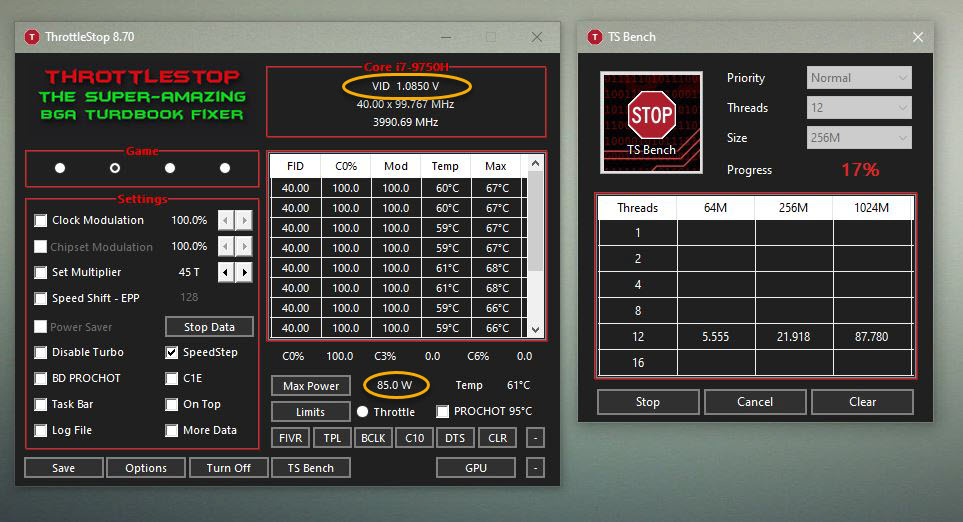
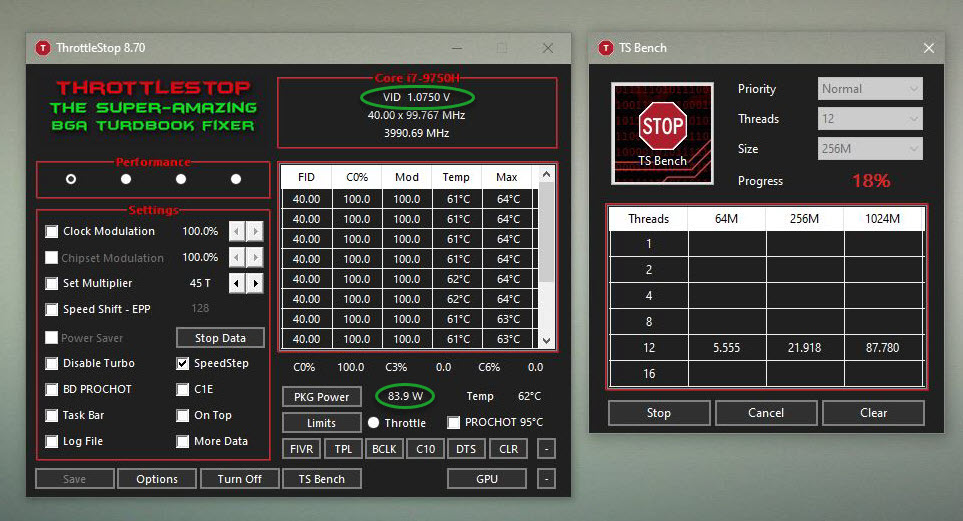
The VID under load is slightly less, and so is the power draw (watts) with the core voltage set lower than the cache voltage. The difference is not a lot, but the load temps are also lower, which is really the only reason it actually matters.
Attached Files:
ole!!! and tilleroftheearth like this. -
-
Is that reproducible? Undervolting by an additional .15v and the resulting .01v drop seems like a margin of error to me.
-
It is on my laptop. I have already shown it several times. Not sure it will be the same on every brand. Might vary by whatever firmware cancer a machine is running. It may also have something to do with other BIOS settings I am using in conjunction, including the -100mOhm LLC.tilleroftheearth and 4W4K3 like this.
-
Sorry so you mean it's reproducible? That 0.01v doesn't seem to be a realistic finding when trying to undervolt by an additional 0.15v...
*on edit* is the -100mOhm LLC on both TS settings?Mr. Fox likes this. -
Yes, I have that set in the BIOS.
There is not much that is realistic where laptops are concerned, because most of what we have the joy of dealing with resembles a sadistic joke. I've never found voltage settings applied in a laptop BIOS to be precise. Even with 6700K, 7700K and 8700K the voltage settings were seldom precise. If you do not lock down the VDROOP, set spread spectrum to 0%, use static voltage and set LLC really tight, the BIOS settings are seldom close to what you want and expect them to be and you have to run load tests to find out what voltage really gets applied. then overshoot values applied as "settings" LOL.
It is also difficult to find confidence in sensor accuracy. When you see a change in behavior or results (like temps) and do not see a remarkable change in the sensor readings, I question whether the sensors are accurate. I also think part of the time the sensors are reporting a value for a different component than what their label suggests.Last edited: Oct 27, 2019custom90gt likes this. -
Is it safe to run Speed Shift at 0 all the time or will it have a negative impact on the CPU in the long run?
-
My BLCK is 99.76 8 lol so random?
Dell G7 7588 -
Should not hurt anything at all. With an unlocked processor you're better off having it disabled. Having it enabled doesn't do much, and if you are overclocking anything it actually impairs performance.Papusan and Fire Tiger like this.
-
A user on TechPowerUp was having trouble with his Dell XPS not coming out of sleep mode reliably. I suggested that his ThrottleStop under volt might be a little too aggressive. Does anyone else have this problem? He thought about writing some complicated script to try to get ThrottleStop to take care of this problem. I told him that a script probably would not work so I added a new feature to ThrottleStop that resets the CPU voltage and overclock just as the CPU enters sleep mode. If a CPU cannot go into and exit sleep mode reliably at default voltage settings then there is something wrong.
If anyone has this problem, send me a message so we can do some testing.
![[IMG]](images/storyImages/q1zngIx.png)
Sure, why not? Intel designs their CPUs so they can safely run at full speed, 24/7, for years. No need to worry. Most Intel CPUs become obsolete long before they are close to dying.
I might have to write a program to get to the bottom of this. Maybe users could chip in and buy me an oscilloscope. Is the real BCLK 99.767, 99.768 or 99.769 MHz? A true mystery. Only some engineer at Intel knows what is really going on.ha1o2surfer, Papusan, Maleko48 and 4 others like this. -
I have experienced this firsthand with several core m 5y10 & 5y71 tablets. Used to black screen going out of sleep mode but backing off on undervolts fixed this.
There is a basis for this; I'm a big nerd so I looked at the FIVR paper a while ago (attached). It's written for haswell but still relevant here.
Intel shuts off phases on the FIVR under lighter loads which naturally means rougher transients (fig 1). Fig 3 is FIVR ramping to nominal from off state, Fig 2 is an example of Vdroop on iGPU rail (8.5A load). Probably when waking from sleep the FIVR is like fig 3, but the combination of high 'idle'-ness of the CPU (fig 1) plus the sudden load of the OS trying to shuffle everything (fig 2) leads to a big voltage drop that crashes you before the resume process can complete; hence no blue screen, just forever black.
![[IMG]](images/storyImages/screenshot-369.png)
![[IMG]](images/storyImages/screenshot-370.png)
![[IMG]](images/storyImages/screenshot-371.png)
This feature you implemented would probably be useful to have for the public, there are a few of us out here who I'm sure would tune to every last milivolt given the option to do it.
EDIT: Actually, I think this even makes sense as an option enabled by default.
I think a a lot of people see their BCLK slightly under 100 and always wonder what's going on, but the answer is obscure. Of course, it's due to spread spectrum, but hardly anyone knows this because nobody talks about it. I think the phenomenon of crashing at idle (or sleep) despite being stable at load is also something that is pretty clear (no it's not just your imagination) once someone explains to you how FIVR works, but again hardly anyone knows because nobody talks about it. I think discussions on forums like these really has merit and there should be a better way to collect all the information that gets lost in these boards.
I have not posted in this forum in a while so I have two unrelated notes for you:
1) Do you think it would be possible to implement different PL1/PL2 for the 4 different profiles? Sometimes I find myself switching to the 4 different profiles because I have different EPPs set for all of them and want to either tune for performance or for heat/battery life. This already works a great deal but I find that it's imperfect. I think the best way to conceptualize what I'm trying to do is consider the EPP as a slope for the CPU's 'clock speed' vs 'demand' graph; EPP changes the slope but PL1 ultimately caps the Y-axis. It is nice to be able to adjust the slope for each profile, but having a different cap on heat output for each profile would be good too. I know there is already a proxy for this in being able to set the IccMax values for core/cache/igpu, but not all workloads hit each part of the processor in the same ratios so doing this is imprecise, either it leaves performance/power envelope on the table or takes up too much of it. Does that make any sense?
2) I saw a few pages ago you are stopping work on throttlestop. I think that's fair, you post very frequently here and have been very responsive to users despite the fact that there is no need for you to do so. We all appreciate your work a great deal, which is an understatement. Throttlestop is really essential software. Have you considered making some sort of donation page more visible? Even in the about box. I think that would be very fair.Attached Files:
-
-
Hi
First of all, English is not my language but I hope it can be understood.
I will share my data with a new PC: ASUS ROG STRIX SCAR III G531GV (i9759H RTX2060) for references.
After reading a lot I dared with the Undervolt and although the processor lottery was not the best (it is only stable at -110v), I have very good temperatures:
![[IMG]](images/storyImages/Captura2.png) [/url
[/url
![[IMG]](images/storyImages/Datos.png)
![[IMG]](images/storyImages/Captura.png)
The fan mode was halfway through, Performance, but there is still another more aggressive mode called Turbo.
Greetings and thanks to all who help with these guides.Last edited: Nov 4, 2019Mr. Fox likes this. -
@HORRIFIDO - Thank you for posting your results. No throttling in Limit Reasons looks good.

But you will need to work harder to keep up with @Mr. Fox
His 9750H is running great!
When your computer is idle, stop Windows background tasks. Watch the ThrottleStop C0%. The lower, the better. Fewer tasks running in the background can improve your results and will help your laptop run even cooler.
![[IMG]](images/storyImages/13tcN2Sl.png)
-
Yes, he was very lucky with his processor, -250mV is incredible.
I would like to know why my "Turbo Boost Power Max" are so high compared to those of others and if I should modify them (if it works for anything).
I've also noticed that @Mr. Fox has "Disable and Lock Turbo Limits" installed, what is it and how should we use it?
Grateful again
Mr. Fox likes this. -
Mr. Fox has set his core offset voltage much higher than his cache offset voltage. You can try doing this too. Some users get better temperatures by doing this without hurting stability. His cache offset voltage is very similar to what you are using.
Maybe Asus finally figured out how to design a decent laptop. If the bios is setting your turbo power limits to 90 Watts, that is a good thing. That shows Asus has some confidence in their heatsink and fan being able to properly cool your CPU without overheating or throttling.
The Disable and Lock Turbo Power Limits feature is only necessary if your laptop has a throttling problem. If nothing is lighting up in Limit Reasons, you should be OK.
Thanks @margroloc for the FIVR info. Always interesting to know how something works.
PL1 & PL2 adjustment for each profile is a good idea. Unfortunately, the things to do list has not progressed any during the last year. Freeware programming is a hobby that I have mostly walked away from. It might be a month or a year or never before I get back into programming again.
I did write a few lines of code last week. First time I have done any programming in over a year. I plan to do some more testing this week of the new zero offset voltage option when entering sleep mode. It seems to be working OK. I will send you a download link when it is ready.
Donation ware software was a financial dead end. I removed the Donate button from ThrottleStop years ago due to lack of use. Imagine walking into a huge football stadium with 100,000 people. Each and every one of them are using your software. Many of them are using your software on multiple devices and have been using ThrottleStop for over a decade. Some have shared ThrottleStop with family and friends.
Wonderful. When you beg your fans to support ThrottleStop development, only 1 in 100,000 bother to buy you a hamburger. The other 99,999 look away. Walking out of that stadium was humiliating. No plans on going back.
The new Ice Lake processors continue to use FIVR voltage control and ThrottleStop appears to support these new CPUs. Here is a website that does some under volting on a new Ice Lake, Core i3-1005G1. It is not in English so you will need to use Google Translate.
http://oc.jagatreview.com/2019/10/t...-undervolting-core-i3-1005g1-hp-14s-dq1013tu/
ThrottleStop 8.70.6 is not reporting the BCLK correctly and the Limit Reasons button is disabled but at least voltage control is still working.Papusan, tilleroftheearth, Fire Tiger and 2 others like this. -
Hi, again
Today I disconnected the notebook and these errors appeared:
![[IMG]](images/storyImages/Captura.jpg)
Is there any way for ThrottleStop to go into Battery mode when disconnecting? -
@unclewebb if I set Uncore voltage to +125mv in BIOS do I also need to apply this in Throttlestop or would this result in a 250mv increase?
Same for the core voltage offset, can I set the same core offset in BIOS as in Throttlestop? -
ThrottleStop 8.71
https://drive.google.com/open?id=13oct4bjb0L-YObhuNocjVsnNroyIsmLc
New Features
- new option to set FIVR offset voltages to zero when entering Windows Sleep mode.
- reporting of maximum multiplier in FIVR Turbo Ratio Limits.
- updated link to The ThrottleStop Guide (2019) at Ultrabook Review.
![[IMG]](images/storyImages/JUqe7Iz.png)
![[IMG]](images/storyImages/ontVLXV.png)
Only a couple of minor updates. This new feature will zero the offset voltage just before entering Sleep mode which might help the CPU resume from Sleep mode more reliably. Some laptops have problems resuming when using under volts that are on the edge of stability.
The other feature should show the default maximum turbo multiplier.
This version is not signed. If you do not need these new features, I would continue using TS 8.70.6.
@snixel - I have no idea what laptop you have or what CPU model. I also have no idea what your bios voltage options are doing to your CPU. I know some desktop motherboards have voltage options in the bios that completely bypass the FIVR voltage options that ThrottleStop lets you access. When that is the case, making adjustments in ThrottleStop will not make any voltage changes to your CPU. All you can do is your own hands on testing. Try finding a forum specific to your motherboard or laptop. Monitor voltages with HWiNFO or HWMonitor. If you can control your CPU voltage using the bios, maybe you do not need to be running ThrottleStop. -
Hi guys, just chiming in after doing extensive testing over the last couple weeks in an effort to completely eliminate throttling. XPS 9570 w/ i7-8750H, repasted with Noctua NT-H1. The repaste did make an appreciable difference with temps.
Tested with Prime95 default torture test for one hour. Stable @ -248mV core, -124mV cache.
Just ran a suite of benchmarks back-to-back. Zero limiting in TS. It appears the 16 thread 1024M test was brutal with a couple of cores, inflating the max temp, but still keeping it under throttle threshold.
The TS bench scores are first-run. No re-running to try for a better time, just testing for any throttling.
FIVR:
TPL:
Chrome and HWinfo64 were open as I was doing the benching. Here's the HWinfo64 log. IA max turbo limit and IA turbo attenuation were tripped, but that is to be expected.
Attached Files:
-
-
Can you see if offset voltage is added if you start up ThrottleStop with cleaned out INI file?
-
Oh nice. A new version of TS. Gonna have to grab that.
Here's a tiny overclock with 9750H using BCLK and 0% Spread Spectrum.
And, yes... those are the Tongfang CPU temps with Cinebench R20... only using max fan speed.
https://hwbot.org/submission/4277940_mr._fox_cinebench___r20_core_i7_9750h_3305_marks
@B0B
https://hwbot.org/submission/4278431_mr._fox_cinebench___r20_core_i7_9750h_3353_marks
![[IMG]](images/storyImages/0UcqKFe.jpg) Last edited: Nov 10, 2019
Last edited: Nov 10, 2019 -
-
How do you upgrade Throttlestop? I know it's a simple method, just can't remember. Thanks
Sent from my Pixel 3 XL using Tapatalk -
-
Yes it does. Thank you
Sent from my Pixel 3 XL using Tapatalk -
Just wanted to share a weird thing here.
I have a Lenovo e490s laptop, with an I7-8565u processor (Quad Core, Turbo 4.6 Ghz).
I was able to undervolt it to -95mv with complete stability at TS Bench Single Core (The most demanding for stability).
The thing here is that this laptop is a 15w TDP laptop so it will always throttle a lot whenever more than one core is needed.
So just tried an underclock limiting it to 3.9 Ghz (Turbo) and increasing undervolting to -120mv.
The results are that except for single core test, on each multi core test the results are better this way (because of fixed TDP limit and additional undervolt achieved).
Additionally the computer runs much cooler and haven't noticed any slowdown or crash at all.
So, my guess is that for this kind of TDP limited laptops buying an I7 is a waste of money.
Now wondering if I will leave it running as an I5 with more L3 cache or undo all these changes.Last edited: Nov 10, 2019Maleko48 likes this. -
Are you using the FIVR - Disable and Lock Turbo Power Limits feature? This feature allowed a similar Lenovo C930 with an i7-8550U to achieve maximum performance with no throttling until it reached the thermal throttling temperature. Definitely no power limit throttling. It was not my laptop so i did not perform any heroic measures trying to get the temps under control. With some liquid metal, who knows, maybe it could have sustained full speed indefinitely.
![[IMG]](images/storyImages/eo0J744.png)
I always like finding a reason to show what ThrottleStop is capable of and also show how a low power U CPU should run!
If you want a Lenovo version of ThrottleStop, download the following image, rename it to logo.png and copy that file into your ThrottleStop folder.
https://i.imgur.com/6SRGMOu.png
@Mr. Fox - Great to see ThrottleStop reporting your BCLK accurately to 3 decimal places. At 102.7 MHz, you have probably hit the wall. Looking good.
Edit - Good news. I just got confirmation that the new zero offset voltage option works like a charm on a Dell XPS 15. No more hangs when resuming from sleep mode.
Last edited: Nov 10, 2019Maleko48, tilleroftheearth, Papusan and 1 other person like this. -
Here's a logo for anyone that wants it.
Attached Files:
Last edited: Nov 10, 2019cktducky, unclewebb, tilleroftheearth and 1 other person like this. -
-
I'm sorry if this has been asked before, but I think my Google skills for some reason are not working right now.
I will get flashy red triggers for "VR THERMAL" in the limits-window after a while under heavy load like stress tests on an undervolted I7-9750H with increased PL1 limit (45 to 60w). I can also briefly spot this during the short turbo boost time window. CPU temps are well within range and even across the cores (high 70s in the most intensive modern games). As to be expected, I see no classic thermal throttling at all.
I'm guessing, but just guessing, that vr thermal points to volt regulators and that there might be poor contact between the heatsink and some of these. Or that I'm simply pushing things beyond the limitations of the cooling solution. The heatsink is one of the typical shared ones and GPU temps are very comfortable due to the gimped max wattage of max-q RTX cards. But, before I try to investigate and strip things down, it would be a good thing to know if I'm actually on the right track re the volt regulators
-
Be sure you have this box checked and the RwDrv.sys file in the ThrottleStop folder. It won't fix a thermal problem, but it will help with the current and power limit nonsense. Does HWiNFO64 give you any clues as to how hot other components are getting? It could be the core temps are OK, but something else is about to go up in smoke. What system are you having these issues with? It certainly could be an inadequate thermal management solution is causing it. It could also be goofed up firmware causing some problems.
Last edited: Nov 11, 2019 -
Hey! Thanks for your reply!
It's a rebranded barebone, basically a stock Clevo P970RN "17.3 medium slim type device, with the 9750h, RTX2080 max-q, 16 x 2 gb RAM, two nvme drives and one sata SSD. All sensor readings I am able to pull through different apps seems to be within reasonable limits and fairly equal. Chassis gets hot in certain places as is to be expected when it's so thin. Run it propped up for gaming and other heavy tasks. Also repasted CPU/GPU, but left the stock pads over the other components. I use Obsidian control station and fan control to get balanced speeds for more normal use.
The device runs fairly good so far (had it a few days only), had a black screen reboot crash which I think was because of to heavy-handed uv on CPU cache. CPU core seems to be able to take loads and loads of uv like reported with some 8750h's. Seeing some confusingly inconsistent behavior though, on the uv's and TS Bench errors/no errors. Cannot get it to crash or throw errors no matter what I do in Prime or Aida64 stability test. One day it'll take no matter what uv and pass TS Bench long multi/single with no errors endlessly. The next day it'll error out like crazy.
I have done the RwDrv.sys thing and I am able to adjust PL1 limit, but PL2 seems partially locked, I can lower it, but it won't pull more than around 70w even if I up it. So I think "Disable and lock..." is working?
Here's a screenie from Hwinfo showing the limits it's hitting, in particular IA/GT VR Thermal Alert.
![[IMG]](images/storyImages/hwinfo_vr_thermal_alert.jpg)
-
Howdy. I can see the thermal alerts are there, but do you see an actual corresponding temperature for the GT (Intel iGPU), IA or Ring VRMs? Curios if the alert is false or accurate based on whether or not the corresponding thermals are out of scope. If the temps are not high, the firmware could be configured to trip an alert (and trigger throttling) at a temperature that is lower than it should be. If that is the case, ThrottleStop might not be able to address that kind of firmware engineering error. If the temps are, in fact, too high then the throttling is helping protect the system from damage.Last edited: Nov 11, 2019M4cr0s likes this.
-
Poor cooling of your voltage regulator seems to be the root cause of your throttling problem. I think Limit Reasons reports this throttling reason. Open it up and see if something lights up in red. Does this happen immediately under heavy load or does it take a while? When using Limit Reasons, exit HWiNFO.
Here is why I like it when people post lots of screenshots.
![[IMG]](images/storyImages/w3w6vSC.png)
The reported max multis are missing for cores 5 and 6. Programming on my 4 core CPU does have some limitations. Minor bugs like this are inevitable.Papusan likes this. -
@unclewebb & @Mr. Fox
Thanks for your input, much appreciated. The various temperature readings for the CPU package and IA/GT cores are at max 78-80 under stresstesting. An important detail though, is that I never get these limit triggers during normal use as in modern games. Nothing seems to put that high consistent strain on the CPU.
I need to dismantle this thing and see what I can figure out and perhaps modify/improve. Hmm. Where can I find non-conductive thermal glue and fix up the whole thing with whatever copper I have lying around?
-
This is one of the better thermal adhesives: https://www.amazon.com/Arctic-Silver-Premium-Adhesive-ASTA-7G/dp/B0087X7262 and it is electrically conductive. The ceramic type (same brand) probably is not, but it also does not transfer heat as effectively.
If you shield surrounding surfaces with Kapton tape prior to applying it that should avoid any shorting of components. It will also prevent the adhesive from getting stuck to surfaces you don't want it stuck to. A good example is putting Kapton tape around the die of a PCH chip if you want to permanently glue a copper heat sink to the PCH die.
The non-conductive (electrically) adhesives are generally not very good at thermal conductivity. I did a lot of searching at one point and none of the thermal adhesives are fantastic at thermal conductivity, including those that are electrically conductive. But, for gluing copper heat sinks onto components that don't get super crazy hot and will benefit from a piece of copper being added for passive cooling, they are good enough to get the job done.Last edited: Nov 11, 2019Papusan likes this. -
Good info! I remembered that AS had a thermal adhesive from way back in "the old days" when I was torturing Athlons and Durons, but wasn't sure it still existed. Impossible to source nationally though, but found some on eBay. Could get useful for other projects as well. I do want to put some shims on my NVMEs and something on the PCH too.
Had a closer look at the mobo and just from looking at the cooling pads bulging out there seems to be good contact mostly, albeit poor coverage a couple of places. Hard to say if it makes any difference, I don't know much about all these little thingies. I might try to either cut some off the original heatsink, or jam or rig something in under it, at least temporary, to see if it makes any difference.
This is the CPU portion of the combined heathsink. Power plug is right next to it on the left. I'll cut some copper shims and see if I can work something reliable out.
![[IMG]](images/storyImages/cpuareap970.jpg)
-
I've tried that feature in the past. The thing is that with this laptop it only works after my computer has gone to sleep and woken up. You told me back before that this thing happens with some laptops.
It's a great feature, anyway! -
@unclewebb i've been playing with the latest Throttlestop on a i5-1035G4 and it seems to support the undervolting just fine just reporting the clockspeed incorrectly.. If you want to leverage my machine for anything, let me know! My Ice Lake sample is pretty unstable after -65mv or so.
-
Hello all, I want to share my today experience with TS. Month ego I installed TS on friend of mine Lenovo E540 because she told its running very hot which is true. Today I looked closer on her temperatures meanwhile by simply click OCing her tablet on 35x on all cores.
WOW -This is big sotware achievement .. Anyway during TS bench temps bumped to 94C in 3 seconds with multi quickly decreased to 30x or 28x -
The i7-4712mq is supposed run at 3300 MHz (1 core), 3200 MHz (2 cores) and 3000 MHz (3 or 4 cores) with limitted OC +2 bin - so is not 35 on all cores actually bit strange? I read some Dufus past project about OC by lowering microcodes on Haswel but it wason E cpu if I remmember correctly.
This machine would be nice without its horrible throotling, I also noticed it hasnt PL locks toogled, so I could increse numbers howewer i wanted, Secondly I seen for the fist time TDP overcome limits, it was hitting over 40W.
MY stupid question is, will undervolting figure out high temps? My point is repaste cpu and set TCC max to zero at bios is all I could play here. Sory for bad english and Enjoy TS
-
ThrottleStop 8.70.6 crashes Windows with a BlueScreen with Windows 10 Build 19013 - actually the BlueScreen stems from the RwDrv.Sys. The Windows Update for 19013 cannot be installed with ThrottleStop or that version of the driver. I guess the latest version of the driver can be obtained here: http://rweverything.com/changelog/ but that is also from 2017.
I would not recommend using ThrottleStop with the newest Windows 10 Build (Insider Slow).
Crash Dump details:
STACK_TEXT:
ffffec87`559565f8 fffff807`69e149df : 00000000`00000050 ffffffff`ffffffd0 00000000`00000002 ffffec87`559568a0 : nt!KeBugCheckEx
ffffec87`55956600 fffff807`69c93276 : fffff807`6a724400 00000000`00000002 ffffec87`55956920 00000000`00000000 : nt!MiSystemFault+0x1e674f
ffffec87`55956700 fffff807`69df0f20 : 00000000`00000103 00000000`00000000 00000000`00000009 00000000`00000000 : nt!MmAccessFault+0x366
ffffec87`559568a0 fffff807`69c65c56 : ffffdb02`47637d90 fffff807`6a3ad019 fffff807`6a13ef00 ffff9584`6058ce20 : nt!KiPageFault+0x360
ffffec87`55956a30 fffff807`85de10ac : ffffdb02`47637b30 ffff9584`4a99c890 ffff9584`43b57200 00000000`00000000 : nt!ObfDereferenceObject+0x26
ffffec87`55956a70 fffff807`6a22b779 : ffff9584`43b57100 ffff9584`3ea9cc60 fffff807`6a724400 00000000`00000000 : RwDrv+0x10ac
ffffec87`55956ab0 fffff807`69c3d205 : ffff9584`00000000 00000000`00000000 ffff9584`43b57100 ffff9584`00000000 : nt!IopLoadUnloadDriver+0xec879
ffffec87`55956af0 fffff807`69d3eed5 : ffff9584`43b57100 00000000`00000080 ffff9584`3eab0040 000fa46f`b19bbfff : nt!ExpWorkerThread+0x105
ffffec87`55956b90 fffff807`69dea46a : fffff807`64a40180 ffff9584`43b57100 fffff807`69d3ee80 00000000`00000000 : nt!PspSystemThreadStartup+0x55
ffffec87`55956be0 00000000`00000000 : ffffec87`55957000 ffffec87`55950000 00000000`00000000 00000000`00000000 : nt!KiStartSystemThread+0x2a
SYMBOL_NAME: RwDrv+10ac
MODULE_NAME: RwDrv
IMAGE_NAME: RwDrv.sys
STACK_COMMAND: .thread ; .cxr ; kb
BUCKET_ID_FUNC_OFFSET: 10ac
FAILURE_BUCKET_ID: AV_INVALID_RwDrv!unknown_function
OS_VERSION: 10.0.19013.1
BUILDLAB_STR: vb_release
OSPLATFORM_TYPE: x64
OSNAME: Windows 10
FAILURE_ID_HASH: {ae756325-cc7f-ed1f-de9c-cc341d0821f6}unclewebb likes this.
The ThrottleStop Guide
Discussion in 'Hardware Components and Aftermarket Upgrades' started by unclewebb, Nov 7, 2010.