 Problems? See this thread at archive.org.
How can I instantly check in TS, if a new Bios blocked undervolt? Do I see it in TS that it is blocked?
-
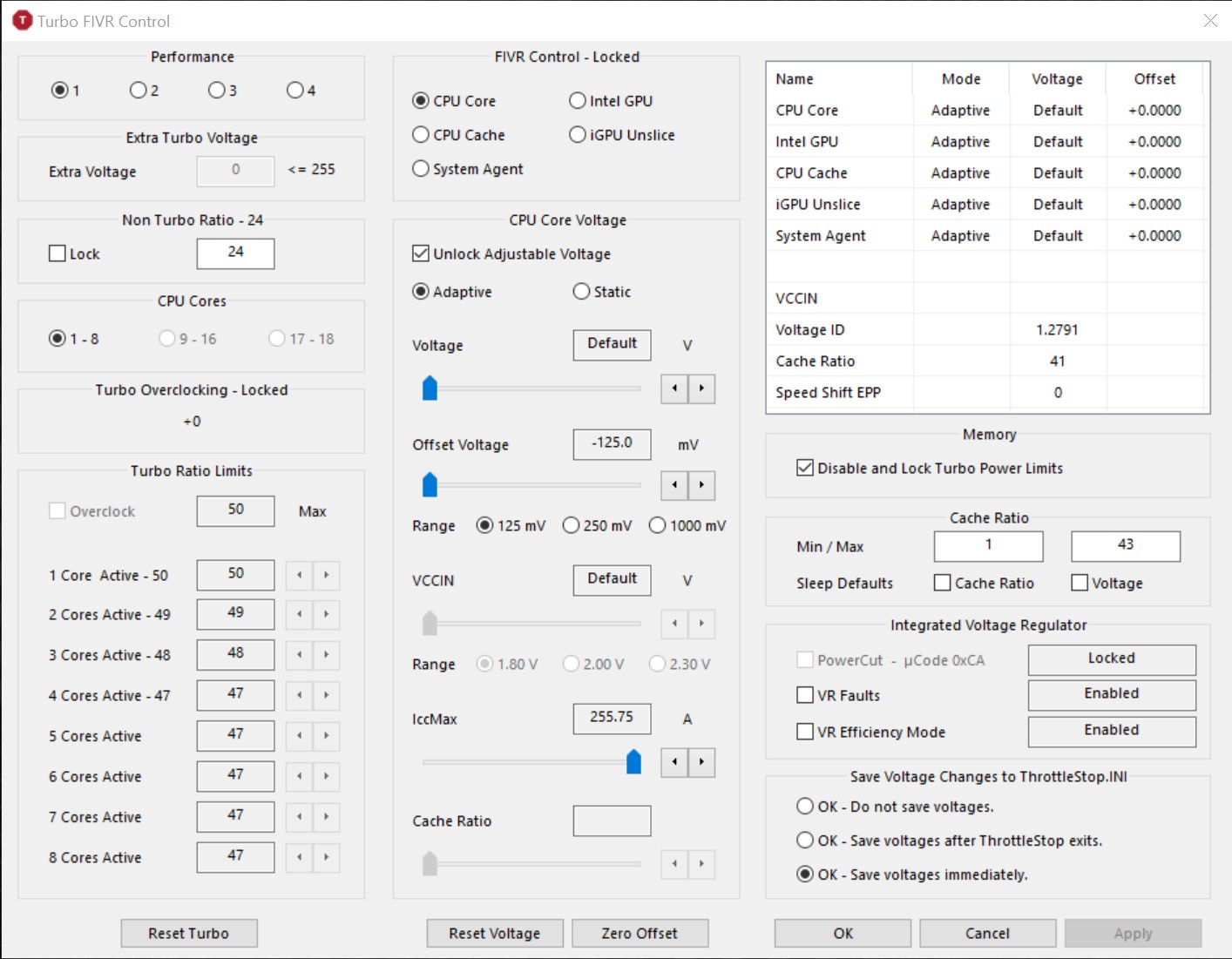
Set an under volt using ThrottleStop and press Apply. Have a look in the top right corner of the FIVR window at the monitoring table data to see if your undervolt is being applied or not. That data is updated every second. If you see a column of +0.0000 in the Offset voltage column, time to say good bye to your laptop. Big brother, aka. Intel and Microsoft, have taken over control.
If you did not install a firmware update by accident, you might be able to replace the file,
C:\Windows\System32\mcupdate_GenuineIntel.dll
with the backup copy that you made when times were good. Have you made a backup copy of this file yet? You better do so now before it is too late.
Some users with Microsoft Surface Pro laptops have already installed a firmware update and have lost both voltage and turbo multiplier control. Sad times.
The updated version of TS will also give you some instant feedback about this issue as explained above by @jotm
ThrottleStop 8.74
https://drive.google.com/open?id=1rVVD_Fb3P_L1lzqW-_3DVLoxj6IrwEuO -
this microcode I can undervolt. but the latest version I cant undervolt. do you need me to get the microcode?
zbook 17 G6Attached Files:
-
-
@purezerg - What CPU model do you have? My guess is an E-2286M.
![[IMG]](images/storyImages/y40wqSd.png)
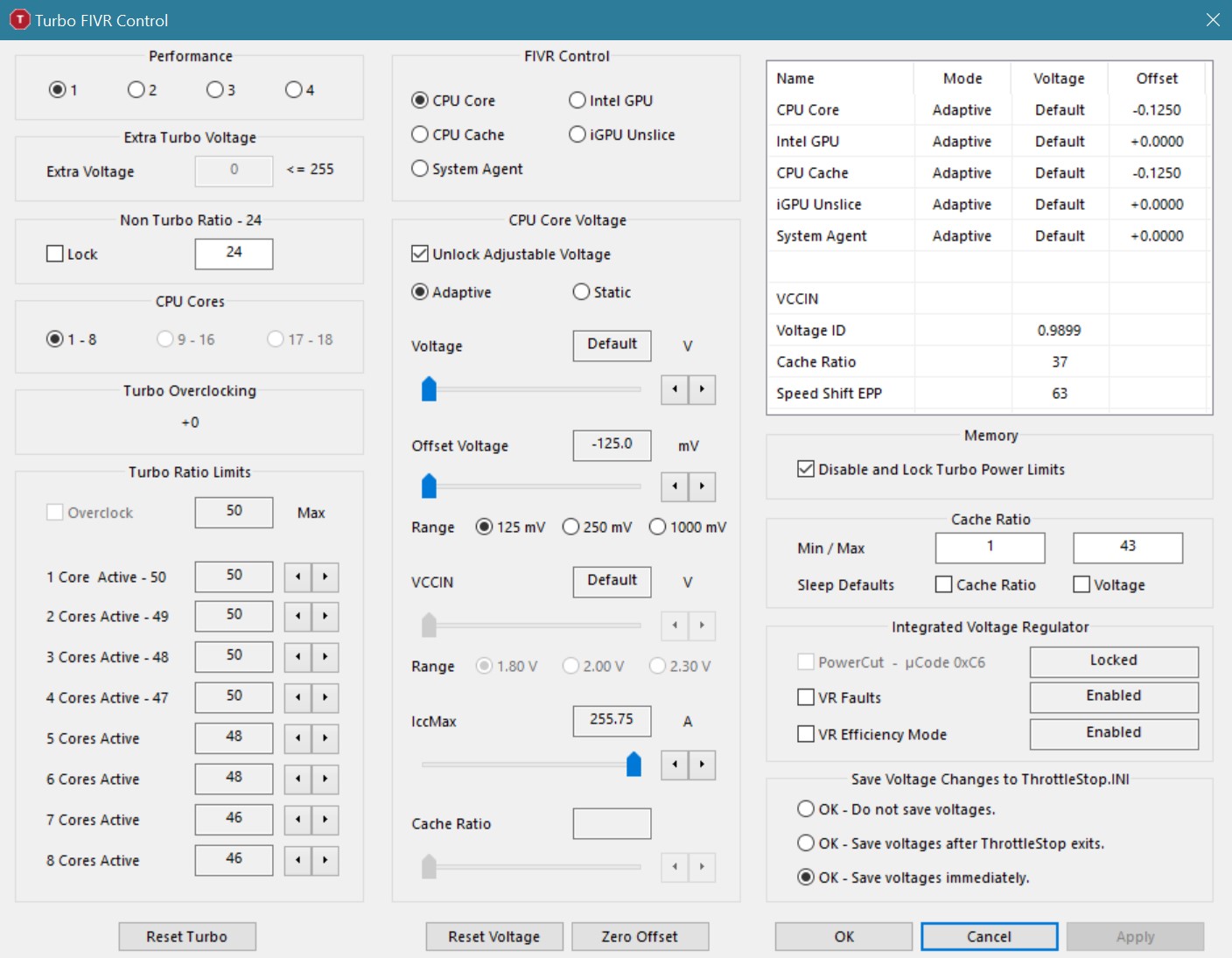
If a CPU does not support Turbo Overclocking (+0), the multipliers in the red box are usually the maximum for that CPU. Setting the turbo multipliers higher than these values usually does not increase the CPU speed any. I do not have access to any 8 cores CPUs for development purposes so it is possible that this has changed.
For a test, try running 4 threads of the TS Bench test. That should occupy 4 cores. With your settings, I would expect to see a multiplier close to 47 and not close to 50. You could also delete the ThrottleStop.INI config file, reboot and then run ThrottleStop. This will allow ThrottleStop to read the default turbo ratio values from your CPU.
After you discovered that the latest microcode blocked voltage control, were you able to go back to the previous microcode without any problems? Did you download and install the previous BIOS version from HP? Some manufacturers block the ability to go back to a previous BIOS version. -
yes it's s 2286m, yeah you are right. 4 core @ 4.7mhz ,8 core @ 4.4mhz, 16core @ 4.2mhz, 16core peaking @ 85C.
yes I am able to go back and forth both firmwares without problems. that goes the same for my zbook 15 G3 and zbook 15 studio G3.
all of them on win 10-1909 update. -
i am not able to contribute anything no form of knowledge so the least I could do is go thru the hassle of flashing twice. attached is the latest firmware that doesnt allow undervolt.
i am wondering if i can do more than -125mv. which is quite good. considering that both my studio 15 g3 ( e3-1545) and zbook 15 g3 (6820hq) cannot do more than -60mv for both core and cache. they will go into BSOD if i unplug the power adapter if i do more than -90mv for both core and cache. so as a safety net I set to -60mv. both of them having the same issue.
that said.. I do have a zbook G2 with 4940MX that i can overlock to a tune of 4.5ghz.Attached Files:
Last edited: Feb 11, 2020 -
-
this is zbook studio G3 with E3-1545. this is the last unlocked firmware. the next version is locked voltage
Attached Files:
-
-
Is it normal to have FID at max while C0% is not?
-
@purezerg - Your testing shows that microcode 0xC6 allows undervolting on your CPU. These were released on Nov 12, 2019.
https://www.intel.com/content/dam/w...rmation/SA00270-microcode-update-guidance.pdf
I think the next batch of updates were released on Dec 10, 2019. This is probably when microcode 0xCA was released that blocks voltage and turbo ratio adjustments on your 2286M.
Thanks for confirming that you can go back to the previous BIOS version without any issues.
It looks like your default turbo multipliers are 50, 49, 48, 47, 47, 47, 47, 47 from top to bottom in the ThrottleStop FIVR window. Going higher than these values will probably not accomplish anything.
I like having the multiplier (FID) at max even when the CPU is idle. It does not make a huge difference to power consumption because when idle, most mobile CPUs are set up so that the idle cores go into the low power C7 state automatically. In C7, the FID is 0 so whatever monitoring software is reporting does not apply to what the cores are doing 99% of the time. Forcing the active core to run dead slow makes for a miserable computing experience. I prefer fast instead.
If you want a slow CPU, adjust your Windows Power Plan to Balanced or adjust your Speed Shift EPP to somewhere between 80 and 128. Your question did not include any screenshots so I am not sure what options are available in your situation. -
0xC6 was released on available on Oct 9, 2019
0xCA released on available on Nov 7, 2019
is there like a general consensus on which intel gen can undervolt? eg, 6000 series etc. up to 10th gen. i see most people able to do -125mv on their 6xxx series but i havent been able to do more than -60mv reliably. i do unplug and replug my power quite often else it goes into BSOD. i had always thought it was nvidia and often my 6820 does stutters if i go higher than -75mv.
that said i do have a schedule task. that when detects power unplug it checks for TS and restart TS if it quits when I unplug the AC.
-
ThrottleStop allows FIVR voltage control of Intel CPUs from the 4th Gen to the 10th Gen. Some CPU families can under volt more than others. Even if a guide existed, you would still need to test your own CPU to see what it is capable of. All CPUs are unique.
HP might get access to microcode updates from Intel a month earlier than when Intel releases them to the general public. Not sure. Maybe this is why HP laptops have been the first ones to report loss of voltage control after a firmware update.
If you are having this problem, try following the ThrottleStop Task Scheduler Guide.
http://forum.notebookreview.com/threads/the-throttlestop-guide.531329/#post-6865107
There are a few options in the Task Scheduler that are grayed out. Most people assume that this means these options are not active when in fact, the opposite is true. The Guide will explain this. When a task to start ThrottleStop is setup properly, you should not need to create a task to restart ThrottleStop. It should stay running when you unplug your laptop.
I see you have your turbo time limits set to 49152 seconds. My first question is why? The default value is 28 seconds. The way this works is that it will run at the Short power limit of 100 Watts for 28 seconds and then it will throttle down to the 60 Watt power limit indefinitely after that. The time value you have selected is equivalent to over 13.5 hours. I know some guide somewhere on the internet said maxing out the time value is a good idea but you do not need to do this. If the CPU finds a time value that looks a little crazy, it might decide to ignore it.
When Speed Shift is enabled (ThrottleStop shows SST in green), that means the Set Multiplier function no longer works. The Power Saver feature goes back to the Core 2 Duo era and it also depends on Set Multiplier. Neither option is going to do anything when Speed Shift is enabled. Modern CPUs save power by using the various low power C states. Easiest way to reduce power consumption is keep a close eye on what apps are running in the background. individual cores should be spending 99% of their idle time in the low power C7 state.
With the long power limit set at 60 Watts, the PP0 Current Limit should probably be set higher than 56 Amps.
Thanks for your help. Users will appreciate this information as more and more manufacturers start locking down their laptops with microcode updates. -
Hi Unclewebb, is there any reasons that you can think of why the "set multiplier" works when my particular laptop is only on battery. When plugged in the set mulitpler does nothing. If I understand correctly, that feature might have been a legacy feature for Core2Duos?
-
@ha1o2surfer - What CPU are you talking about? Post some screenshots so I can see how you have ThrottleStop setup. Set Multiplier works with a lot of the newer CPUs as long as Speed Shift is not enabled. Put a load on the CPU when testing. It is also possible that if you are using the Windows Balanced power profile or similar, this is going to interfere with how Set Multiplier works. You might have something like that going on.
-
I am running a Dell XPS 9550 (6300HQ) on a recent BIOS 1.12.0 dated 3 oct 2019. It still undervolts fine, with ThrottleStop's FIVR screen showing uCode 0xCC.
Dell has a newer BIOS 1.13.1 dated 6 jan 2020. I have not tried that lol.unclewebb likes this. -
For the 6300HQ, the last probably safe microcode is 0xD4. This one was part of the Intel November release that I found in the guide I posted above. The next one after that is probably going to block voltage control.
If you are feeling lucky, go try doing the January 2020 update. Do it for the team!
Honestly, I would not touch any 2020 firmware / BIOS / microcode update with a 10 foot pole. I like being able to under volt my laptop or do whatever I want with it. -
Hey unclewebb, when i check my limits on ts (like when im running tsbench) it shows pl2 on core and edp other on ring flashing red, is there anyway to get these not to show up?
Attached Files:
-
-
@THE-HL - PL2 is the short term turbo power limit. Try increasing that in combination with the FIVR Disable and Lock Turbo Power Limits feature.
You are already triggering thermal throttling. Without improved cooling, you are near max performance. -
Hello.
I am attempting to undervolt a Lenovo T490s (i5-8265U) to reduce burned fingers.
I have ThrottleStop 8.72, and undervolting the CPU cache appears to work (~20s better on 1024M TS Bench with -100mV, and at -110mV the system BSoDs), but undervolting the CPU core doesn't appear to work (-750mV doesn't cause a crash, which is impossible, and more reasonable numbers have no effect on the TS Bench or the VID readings).
The "FIVR Control" panel doesn't show "FIVR Control - Locked", but it does show under Integrated Voltage Regulator "PowerCut - uCode 0xB8 Locked".
1. Am I suffering from the dreaded Intel anti-undervolt lock?
2. If not, do you have any idea what's going on here?
Faithfully,
m9m -
For many CPUs, undervolting core and cache the exact same amount seems to work better, i.e. -100 mV for both core and cache. If they are not identical, the CPU has a tendency to ignore one or both undervolts. Have you tried that?
Of course, you can see the actual undervolt in the window (upper right in FIVR), so you can tell if the undervolt is being implemented.
Good luck,
Joe -
As in increase the turbo time limit? and how is it that im hitting thermal throttling and high temp numbers even though my pc is not even hot?
-
@magic9mushroom - Definitely start by adjusting the core and cache offset voltages equally. There is no way you can adjust the core and cache both to -750 mV. You are right that adjusting only the core offset to -750 mV is not going to do anything.
I do not think so. Look in the monitoring table in the top right corner of the FIVR window. Check the voltage Offset column. If you apply an undervolt and something shows up in the Offset column, your CPU is not being prevented from undervolting.
I did not say anything in my reply about the turbo time limit.
CPUs are tiny and have large amounts of current flowing through them. Hot spots are inevitable. When a microscopic spot on your CPU hits 90°C, you will probably not feel fire and flames shooting out the back of your laptop. It might feel a little warmer but that is about it.
Think about it. When you turn the oven on, the side of the oven will feel a little warmer. If you put your hand on the oven heating element that is glowing red, it is definitely going to feel a lot hotter. Want to try that experiment or would you prefer to just trust me on this one?
I still remember placing my calibrated thumb directly on a Pentium III and then pushing the on button. I just could not believe that a CPU could possibly get that hot. Monitoring software must be wrong. In a matter of seconds, I managed to save my thumb and my CPU from permanent damage. Lesson learned and never forgotten. -
Hmmmm I see, I thought it could be a misread but thanks for clarifying
-
Haha, I did that with an Athlon in early 00's, learned my lesson
-
@unclewebb ts set multiplier doesnt work no more, even with delete .ini & cold reboot still no luck. only method i could still control it is with speedstep but since its not part of any profile i cant toggle between ghz.
do you know the cause might be? i can set multiplier but then it still runs at the max clock.. -
@ole!!! - How about post some screenshots that show this problem? That is easier than me having to write a wall of text trying to guess what the problem might be.
Is Speed Shift enabled?
For me, a Non Turbo Ratio setting of 1 will disable Set Multiplier. Default is 0.tilleroftheearth likes this. -
Two guys on the XPS forum at NBR said the latest BIOS update for the XPS 9550 would not block voltage control. @Techland and @_sem_ thanks.
Today, I updated XPS 9550 6300HQ BIOS to 1.13.1 and indeed voltage control was not blocked in ThrottleStop (e.g. the offset column on the upper right of FIVR screen showed undervolt as I had entered in FIVR control section).
Details of BIOS from Dell page"
File Name: XPS_9550_1.13.1.exe (06 jan 2020)
File size: 9.83 MB
"This update addresses the Intel Security Advisories INTEL-SA-00241, INTEL-SA-00260, INTEL-SA-00254, INTEL-SA-00219, INTEL-SA-00220, and INTEL-SA-00270. A security advisory is a statement when a product is impacted by a security vulnerability and a remedy is available."Last edited: Feb 18, 2020 -
I also tried changing the speed shift to other values such as 0 and highest value in the settings allows no dice. even with cstate off no luck too. it use to work with older versions.unclewebb likes this. -
@ole!!! - Your screenshot shows SST in green which means Speed Shift is enabled. The Set Multiplier function has no control of the CPU multiplier when Speed Shift is enabled so do not check that option. All Intel CPUs have always worked like this so perhaps a recent Windows update or BIOS update has enabled Speed Shift for you. Do you remember enabling Speed Shift in ThrottleStop or in the BIOS?
When Speed Shift is enabled, the only control over the maximum multiplier is going to be through the Speed Shift Max value in the TPL window. This is a global ThrottleStop setting so you will not be able to set different values for different profiles. Maybe someday.
You have a beautiful 5.0 GHz - 8 core CPU. Why would anyone want to slow something like that down? That is like making your thoroughbred horse pull an apple cart on his days off between races. Not cool.
Seriously though, if you want your CPU to run cooler when lightly loaded, enable the core C states in the bios (C3, C6 and C7). Use a Speed Shift EPP value of 0 and let your CPU run at its full rated speed, even when idle. Use the Windows High Performance power profile. The C states will take care of light load and idle power consumption so your CPU will run cool. If you really must slow your CPU down a little when idle, go with an EPP setting of 80. Combine this with the Windows High Performance power profile and ThrottleStop should be able to maintain EPP at 80. Do some temperature testing to confirm that this is a useful thing to do.
If you are using the Balanced power profile, you likely have ThrottleStop and Windows constantly fighting over the Speed Shift EPP value that the CPU is trying to use. Open up the FIVR window and have a look at the monitoring table to see who is winning the fight. Most of the time, I think Windows will be in control. Only check the Speed Shift EPP option in ThrottleStop when you are using a Windows power profile that does not interfere with the EPP setting that ThrottleStop is trying to use. The FIVR EPP monitoring data will confirm this.
People get hung up on seeing low MHz or a low VID value when idle but when the C states are enabled, this is pointless. When a core enters C7, it is basically in a dormant state. It is disconnected from the internal clock so it is sitting there at 0 MHz and it is disconnected from the voltage rail so it is getting 0 volts. Whatever monitoring software is reporting for MHz and volts does not apply to the cores sitting in C7. As long as your system does not have a lot of background junk running on it, you can have individual cores spending as much as 99% of their idle time in C7. Fiddling around with idle MHz and idle VID voltage is not going to improve upon this in any meaningful way.
I am assuming that you disabled hyper threading in the BIOS on purpose. Make sure CPU-Z reports 8 Cores - 8 Threads.
Thanks for the screenshot. I always like seeing TS report a perfect 100.000 MHz BCLK value, especially on a CPU that I have never had my hands on. The TS BCLK algorithm reports the measured BCLK without any cheating or rounding of data. That beats the hell out of all those monitoring programs where the supposedly measured BCLK wanders around aimlessly.
@pressing - Looks like the update you installed does not contain a fix for SA-00289. That is the bad one to watch out for that disables under volting.Last edited: Feb 16, 2020Papusan, tilleroftheearth, pressing and 1 other person like this. -
its a bit more complicated on my set up but I tried a bunch of combination including the ones you mentioned such as max turbo at 0, speedstep disabled etc no dice.
heres a new screenshot with me deleting .ini file and doing a cold shutdown/ startup.
I have window cstate completely disabled and coreparking all turned off. last thing I want is have window control my system. best is to leave everything at max performance in bios + window power profile, then let TS a single software control it so when problem arise it is simple troubleshoot, as well as strike balance for max performance, or max power saving and ease of use, which imo should be the target of every user if they have an unlocked bios.
as for why I wish to downclock, there are things i wish to do such as test fan cable, laser thermometer the cpu heatsink see the temperature without a fan ruining my measurement. keeping the clocks at say 20x will allow passive cooling. where as 50x will trigger thermal shutdown on a laptop heatsink trying to passive cool it.
edit: HT disabled through bios.Last edited: Feb 16, 2020 -
In that screenshot, Speed Shift is disabled. That's good. For Set Multiplier to work, you need to enable SpeedStep. In theory, that should give you control of your multi. Make sure the Non Turbo Ratio is set to 0.
I like enabling the core C states in the bios. They can reduce temps significantly when lightly loaded and will not hurt performance as long as you set your CPU up so it is running at full speed. With 8 cores, there are probably going to be a lot of time when you are not using all 8 of them. To me it makes sense to have unused cores truly sitting in an idle state.
Many desktop users hate the C states because they combine them with the Windows Balanced profile. Try enabling the C states in the bios and use them with your CPU set to run at full speed. Compare idle temps and fan noise, etc.Last edited: Feb 16, 2020ole!!! likes this. -
yea in that screen shot it shows running at 48x, but multiplier portion is 44x and even with a brand new .ini file with cold startup, its not working with non max turbo at 0 and speedstep disabled. do you know anything else might be causing this? if i set to 44x, it use to go just 44x.
-
That is what is causing this. SpeedStep has to be enabled. Try enabling SpeedStep in ThrottleStop and if that does not work, you will need to enable SpeedStep in the BIOS.
@pressing - Forgot to ask you. After you updated the BIOS, what microcode version does ThrottleStop report in the FIVR window?Last edited: Feb 16, 2020 -
my original settings is with speedstep enabled lol i think bios is enabled as well let me check again then.
@unclewebb
alright man this is messed up, my findings are opposite lol. my bios has speedshift enabled by default and if i leave speedshift off in TS "enable speed shift" box unchecked, I can control multiplier just fine. soon as i check that box and turn on speed shift I can no longer control the multiplier, it just stuck at the cap set in that profile...
pls help me with your wisdom lol.
so first one has speed shift enabled and once box is clicked, it grays out and I cannot uncheck it.. if i do that I can no longer control multiplier until delete .ini and cold shutdown + restart.
2nd screenshot, I leave that box unchecked in TPL window but I MUST checked those two boxes in red, otherwise multiplier control will not work.Last edited by a moderator: Feb 17, 2020unclewebb likes this. -
Once you enable speedshift you need to turn off the computer to disable it.
-
Speed Shift and SpeedStep are two completely different ways to control the CPU speed. For the Set Multiplier function to work, Speed Shift has to remain disabled and SpeedStep has to remain enabled.
If you use ThrottleStop to enable Speed Shift, the moment you do that, your Set Multiplier setting and the SpeedStep setting are ignored. The only way to disable Speed Shift is you must reboot and make sure Speed Shift is disabled in the BIOS. That is why ThrottleStop shows this setting as grayed out. As soon as you enable Speed Shift, there is no simple way to disable it. Only a reboot will disable it. This is how Intel designed this CPU feature. It is not TS being dumb.
In your screenshot above, you have checked the Speed Shift EPP box but this is not going to do anything because Speed Shift is disabled.
You have to use one or the other, not both. You cannot use a combination of the old school SpeedStep and the new and improved Speed Shift. The newer Speed Shift supersedes anything SpeedStep related.
When ThrottleStop shows SST lighting up in green, Speed Shift is enabled.Last edited: Feb 16, 2020ole!!! likes this. -
thats where i got confused with shift/step. another question, i find that turning on speedshift in TPL window and in main window with a value of 1 gives much better idle temp than just enabling cstate. is there a reason why that is?
-
@ole!!! - I love screenshots. Show me your comparison. Make sure it is a fair comparison and you are only changing one variable. The load (C0%) should be very similar. If you are comparing EPP values, make sure the rest of the C states are enabled in both tests or the rest of the C states are disabled in both tests.
When Speed Shift is enabled, open up the FIVR window and have a look in the monitoring table to see what EPP value the CPU is actually using. If you are using a Windows Balanced power profile, the CPU might not be using the EPP value (1) that you are requesting in ThrottleStop. If you are going to be playing with the Speed Shift EPP value in ThrottleStop, best to use the Windows High Performance power profile to reduce the chance of Windows and ThrottleStop interfering with each other. There is only one CPU and it only has one Speed Shift EPP register.
When you enable C states in the bios, open up the C states window in ThrottleStop and make sure that your CPU is actually using the appropriate C states. If they are disabled in the BIOS, check the ThrottleStop C state window. It should show lots of 0.0 values. Some BIOS options may not work correctly, especially if it is a modified BIOS. Some BIOS versions like to use terms like AUTO which can vary. That is why it is best to use ThrottleStop to double check what state the CPU is really in.
ThrottleStop can only report 4 of your 8 cores in the C state window but when idle, it should give you a pretty good idea if your C states are working correctly or not. An idle CPU should have individual cores spending 99% of the time in C7 if this is enabled. -
all on 44x/35x for core/cache and -125mv for quick test, cpu fan completely turned off, all passive cooling.
-
-
@ole!!! - Intel CPUs are inefficient when held down to 800 MHz. To minimize power consumption and heat, the ideal CPU would be able to instantly go from 800 MHz to full speed, process what ever needs to be processed and then immediately go back to 800 MHz or better yet, enter one of the low power C states like C7 which automatically shuts down the majority of the core to save power.
Older versions of Windows used SpeedStep. The Balanced profile did a poor job of letting the CPU ramp up to an efficient speed when needed. Intel decided to take control of this important task away from the operating system. Speed Shift allows the CPU to manage itself. It can get up to speed much faster when needed to. This provides a better user experience and it also allows the CPU to operate at a more efficient speed when a task needs to be processed.
I think this is what you are observing. Not only does Speed Shift allow the CPU to get up to speed much quicker, it also allows it to return to an idle state much quicker when there is nothing that needs to be processed. Check out the VID voltage reported by ThrottleStop in the examples above. When SpeedStep is controlling things, the reported VID voltage is 1.10 volts. When Speed Shift is controlling the CPU, the VID voltage has dropped down to 0.73 volts. I think if you ran a couple of log files with your CPU mostly idle, you would see a big decrease in the reported VID voltage. Less average voltage is the reason your CPU is running cooler.
If you want your CPU to run cooler when idle or lightly loaded, go into the bios and enable C3, C6, C7 and test again.
In your example above, you have set the Speed Shift EPP request variable to 1. You appear to be using the Windows Balanced power profile. Open up the FIVR window and have a look in the monitoring table. The Speed Shift EPP value reported in that table is the value that the CPU is actually using. Is your CPU using an EPP value of 1? If it is not the same EPP value as your request value, that means Windows is in control of EPP. If Windows is in control, do not check the Speed Shift EPP box in ThrottleStop. If you want ThrottleStop to be in control of EPP, try using the Windows High Performance power plan. Repeat this test to see whether Windows or ThrottleStop is controlling EPP.tilleroftheearth likes this. -
i have to use both speed shift + c1e box in order to get lower idle voltage than c1e which is the reason i find odd, but it does make sense since speed shift just came out within last 2-3 yrs and it's purposes is just like you mentioned, ramp up clock and down much quicker for responsiveness and power saving.
i am using performance profile with all coreparking demote everything disabled so window is told to use max at everything. I do not want window to touch anything i set in bios much less i set in TS, i want TS to control my machine, the EPP value in FIVR is 1 like my request box. I can set this to say 0 for cstate off, or higher value but 1 is like having both and its nice.
i also find it interesting that i can check the box power save in TS that will limit me to 12x but the power consumption is similar to idle with speedshift EPP1 + C1E. -
@unclewebb What Interrupt Response Limit inside C3, C6, C7 should I set to make my cores sleep more frequently or go to C10 as soon as possible?
Surface Pro 7 i5 -
I cannot argue with that statement. Nice to still have that level of control in 2020. I have a feeling that Microsoft, Intel and many of the major manufacturers are working hard to take user control out of user's hands this year.
A low multi used to be important when idle but modern Intel CPUs have other ways to save power. A slow CPU is inefficient and can end up wasting more power than it saves.
@Marocco2 - Never had my hands on a laptop with a 10th Gen CPU that uses C10. On my 4th Gen CPU, I have the IRL time values in ThrottleStop set to 64, 96 and 192. Why? No idea. For many CPUs, changing these values does not seem to make any significant difference. You will have to do some hands on testing to see if changing these from their default value is a good thing to do. Post some pics if you discover something new.tilleroftheearth and ole!!! like this. -
Hi!
I would have a stupid question, I got a Zenbook 14 with i7 10510U.
I did some undervolting on CPU Core (-150mV), it works fine, but every guide is different about CPU Cache voltage. I left it on default, will it harm anything? Why it should be the same as CPU Core?
If I try to lower CPU Cache voltage, it starts freezing at -80-100mV, is this normal? The cores are stable on -150mV.
Thanks for help!
![[IMG]](images/storyImages/zJQMFVz.png) pressing likes this.
pressing likes this. -
@UDPSendToFailed - With many of the 5th to 9th Gen CPUs, the core and cache offset voltages need to be adjusted equally. When you adjust only the CPU Core offset voltage all by itself, are you sure that is doing anything? Does it make your CPU run cooler after doing this? On older Gen CPUs, adjusting only the CPU core offset did not accomplish anything. It would show the reduced voltage in the monitoring table but the actual voltage going to the CPU did not change one bit. The voltage only changed when adjusting core and cache at the same time.
Maybe the 10th Gen CPUs are different. Maybe core and cache can be adjusted independently of each other. I do not own one so I am not sure. Go run something simple like the built in TS Bench benchmark program and while this benchmark is running, adjust the CPU core voltage all by itself and try to prove that this is accomplishing something. If you do not notice any difference, you should be adjusting the core and cache equally.
Adjusting all of the Turbo Ratio Limits up to 49 is probably not doing anything either. The newer version of ThrottleStop will show you what the default values are for these settings. Going beyond the default values will not overclock your CPU. The maximum multipliers are fixed in the U series CPUs.
ThrottleStop 8.74
https://drive.google.com/open?id=1rVVD_Fb3P_L1lzqW-_3DVLoxj6IrwEuO
With the newer version, post a screenshot or two so I can make sure that it is working correctly on your 10th Gen CPU.Papusan, UDPSendToFailed, tilleroftheearth and 1 other person like this. -
Hi unclewebb, thanks for reply!
You were right, lowering the CPU Core voltage alone is useless, I set it to -1000mV for testing, nothing happened, so it was just placebo.
I didn't know the default Turbo Ratio Limits, that's why I set them to max, I modified them while testing some settings in Turbo Power Limits window, luckily it's all unlocked by default, no need to mess with BIOS modding.
I'm not sure if TPL does anything useful or it's a placebo too. In AIDA64 the changes show up, and setting the default 51W to 100W for example, eliminates almost all red blinking of EDP OTHER in Limit Reasons window, only goes to red under stress testing. Leaving them on default 51W makes EDP OTHER blink red at almost any load, opening Start Menu for example. Here are some screenshots while moving the mouse pointer, I don't know if this is normal or not:
![[IMG]](images/storyImages/pNVgQ83.png)
![[IMG]](images/storyImages/Spo80qO.png)
Sadly it doesn't reach the max 4 core Turbo clock (4.3GHz) under full load, doesn't matter which setting I change:
![[IMG]](images/storyImages/ig5zcfY.png)
After about a minute it starts to throttle even more, going down to 2.6GHz and lower over time, the TJmax is 100℃, so I don't understand why.
Downloaded the version you sent, it looks like working fine, just as the previous version did, I had no issues with it. Here are the screenshots of all tabs on default settings: https://imgur.com/a/6tqnLVy
Edit: I don't know if this is AIDA64's bug or not, setting Turbo Time Limit to high values makes it go in negative.
![[IMG]](images/storyImages/a7C8peg.png) Last edited: Feb 19, 2020unclewebb likes this.
Last edited: Feb 19, 2020unclewebb likes this. -
@UDPSendToFailed - Try using the FIVR -Disable and Lock Turbo Power Limits option.
Set the time limits to the default 28 seconds. Avoid maxing out the time limits in TS.
Try increasing all of the IccMax limits.
You need to try and get beyond the power limits before you can see the max multi in a 4 core test. Hopefully the above tips help. Thanks for the pics.
For undervolting, try starting with -75 mV for core and cache. If stable, go further. This helps keep power consumption down which should increase turbo boost.Papusan, UDPSendToFailed and tilleroftheearth like this. -
@unclewebb
Thanks, the Disable and Lock Turbo Power Limits option and increasing IccMax values did the trick, it's now able to reach 4.3GHz with 4 cores loaded. Doesn't this fry the VRMs or something else? The power consumption goes over 50 watts for a 15W TDP CPU, I don't know if the laptop's power circuits and the 65W charger can handle this or not. I'm not going to run it on max load 24/7, just trying to optimize for the best performance. : P This is the result after changing Cores IccMax from 70A to 100A and Cache to 6A to 10A:
![[IMG]](images/storyImages/eOdOKhV.png)
At undervolting, I have tried -70mV equally for cores and cache, it gave me instant freeze and BSOD, looks stable on -55mV. -
Awesome results. How long can you run 4 cores at 4.3GHz?unclewebb and UDPSendToFailed like this.
The ThrottleStop Guide
Discussion in 'Hardware Components and Aftermarket Upgrades' started by unclewebb, Nov 7, 2010.




-preview.png)


