 Problems? See this thread at archive.org.
@Eason - Here is some even more interesting information concerning the XPS 15 7590 and many other Dell laptops. Thanks to @pressing for sharing this info.
https://www.reddit.com/r/Dell/comments/fzv599/xps_7590_160_uefi_unlock_undervolting_and_remove/
@Karalux - Have you tried using the FIVR - Disable and Lock Turbo Power Limits feature? If you have installed the RwDrv.sys file into your ThrottleStop folder and you have checked that option and you have increased the ThrottleStop turbo power limits and you are still seeing throttling, the only possible fix is using the PowerCut feature.
When idle, set a fixed VCCIN, usually about 1.80V, press Apply and then check the PowerCut feature and press Apply again to lock the CPU power consumption at a fairly low value. Now you should be able to go sky high with no turbo power throttling.
-
-
I asked a question yesterday but I didn't explain what I was talking about, sorry.
It was that I was following these instructions to prevent the microcode from being modified in possible updates in the future.
I couldn't change the owner and stopped at this part. I put my account name but it was not accepted, I don't know what I'm doing wrong.
And what is the reason for keeping a copy of the microcode? How can this help me?
(sorry for bad english, I'm using google translator) -
-
Hi, about setting the value of prochot, I mistakenly set it to 98, then my system suddenly became slow then I realized that the value should be 2 instead of 98. I tried it and it worked but should I be worried about anything else? It seems normal now..
-
Thank you unclewebb, ill try fiddling with VCCin, even though i was a little scared to do so without knowing what is the default VCCin voltage for 4702mq. Is there any risk of damaging something by setting this value too high?
VTnK just click on Choose names button and choose Administrator amd apply everything. It will give admin access to editing and deleting whatever files you need, thats how i got rid of automatic microcode updating too. There is no need to keep microcodes, they are universal and can be found on the internet, although not always easily. If you need some, especially Haswell microcodes, feel free to ask me.Last edited by a moderator: Apr 16, 2020VTnK likes this. -
It is normal now. You can set the PROCHOT Offset to whatever you like. The maximum you can set the offset to is 63 so that would have your CPU thermal throttling at 37°C (100°C - 63°C). I did some Prime95 and TS Bench stress testing with the PROCHOT Offset at 63. No surprise, my CPU was running like a slug. It was throttling so bad that not only was it running at its minimum speed but it was also throttling internally. The C0% normally shows pretty close to 100% when full load testing but with PROCHOT Offset at 63, the C0% was down around 25%. It was so bad that most monitoring software like CPU-Z could not even detect just how bad it really was. The only time a CPU would normally throttle this bad is if the heatsink accidentally fell off.
The good news is that I do not think anyone has ever hurt a CPU by running it too slow or too cool.
Maybe. Anything is possible. When working on this feature, I remember setting my 4700MQ as high as 2.30 Volts. Public documentation is non existent so I needed to find an appropriate max value. I am always willing to take one for the team before releasing any software for public use. Years later, my 4700MQ is still running just fine. The ThrottleStop VCCIN feature shows a range of up to 2.30 V. Trust me. That setting has been fully tested.
![[IMG]](images/storyImages/XMIRBEr.png)
I have read on desktop overclocking forums that a general rule of thumb is that you should have the VCCIN input voltage about +0.5 V higher than the CPU core voltage. My 4700MQ is not 100% stable with the VCCIN set to 1.75 V so I usually recommend 1.80 V to be on the safe side. Some 4th Gen MQ CPUs can run way lower like 1.50 V for VCCIN. Play around with this setting and see if there is any advantage to setting VCCIN voltage high or low. I think I remember that setting the VCCIN a little on the high side reduced reported power consumption. You could actually run faster before power limit throttling kicked in. Kind of the opposite of what one would expect to happen.Papusan, skflsdkjfld and tilleroftheearth like this. -
TS 8.75 beta 2 seems to work fine on my Dell XPS 9550 6300HQ
My XPS stock had
AC Timer Resolution = 15.62
AC Timer Res [0.. 16] = 16
I can manually set the AC Timer Res to 0 and the Timer resolution goes to 0.50 as you display above.
What does that do? What benefits might this bring? I don't see any change in DPC latency from Latency Mon FYI
EDIT - I can bump PROCHOT from factory 97*C to 100*C also.
Thanks!Papusan and tilleroftheearth like this. -
Still didn't change
Edit: It keeps fluctuating b/n 7-8.5
Edit 2: Rebooted pc went back to default value of 15.63Last edited: Apr 16, 2020 -
@zilla0617 - Post a screenshot of the Options window. I cannot fix a problem if I cannot see it.
Did you remember to push the OK button when you exited the Options window? The OK button means you want to keep the changes you have made. The X in the top right corner means the same as the Cancel button. Do not save any changes.
@pressing - I just explained everything I know about timer resolution a couple of pages ago.
http://forum.notebookreview.com/threads/the-throttlestop-guide.531329/page-1130#post-11004436
It might be useful for some games or benchmarks. Most users do not need access to this setting. Thanks for letting me know that it works. Now I just need to convince @zilla0617Papusan, tilleroftheearth and pressing like this. -
@unclewebb Lol...I belive you I just can't get mine to stick. Thanks for your help
Attached Files:
-
-
@zilla0617 - After you push OK in the Options window and then re-open the Options window, does it continue to show 15.63 ms?
An AC Timer Res request of 0 should result in the CPU using the lowest possible Timer Resolution which is typically 0.5 ms. On my computer, any request from 1 to 15 results in exactly that amount in ms. A request of 8 gets me 8 ms, etc. A request of 0 gets me the minimum which is 0.5 ms and a request of 16 gets me the max which is 15.625 ms. I know I have played with this setting on older computers and some timer values are not supported. Try a few different Timer Request values like 1 or 2, etc. Always press OK to close and then re-open the Options window so it can update.
I have never seen it before but it is possible that a computer does not support or allow any adjustment of this value.
Are you running Windows 10? What version? If you are running one of the Insider versions, perhaps this feature is disabled. Are you using ThrottleStop on a laptop? What CPU model do you have? Are you running any virtualisation software or any special antivirus program?
Something is not quite right. -
Hmmm, its weird but as soon as went to game, changing the ac timer changed the timer resolution. It was not responding before hence the image I sent. Im running windows 10 pro on the latest April update from two days ago dell xps 9550 6700HQ
Edit: I just checked the setting and it reverted back to 15.63 ms while the AC Timer remains at 0. During my gaming session while the charger was plugged, timer resolution read 0.50. I'm not sure what's going on...Last edited: Apr 16, 2020 -
They probably don't think they have to since I would imagine their stance would be it's not a supported feature in their eyes.
-
Is it possible that MSI Afterburner triggers Power limit throttling?
I've managed to get a stable undevolt in my i5 8300H, temps doesn't go over 73ºC. The problem start when I rise the turbo limits over 36 and do some stress testing with TS Bench...I always get PL1 error in the 256M test. I tried all sort of configs with no luck, raising ICCMax, TPL short and long... Today I found out I just get the throttling with MSI Afterburner running, if I close it I can pass the test without any error and no throttling. -
The AC Timer Res request is only available when you are plugged in and running on AC power. When running on DC power, (battery power), the Timer Resolution will automatically be set to the highest value, 15.625 ms for maximum battery run time. There is an INI option available to change this while on DC power if needed but it is not recommended.
I think you just answered your own question. Do not run MSI Afterburner. Problem solved. It puts a more significant load on your computer compared to ThrottleStop. -
That makes sense, thank youtilleroftheearth and unclewebb like this.
-
Hummm..the thing is if I lower the turbo limit to 36 for example, the Package Power doesn't go above 43W, how is it possible that throttling occur if I'm not exceding the 45W?
So is not possible to have both the CPU and GPU undervolted without getting power throttling? -
I have a Dell Latitude E5470 with Intel Core i7-6820HQ CPU. Under load it shuts down quite fast. I seems that any throttling there might be is not working as intended or not as agressively as it should.
- Should the computer be able to throttle the CPU and GPU back by itself before having a heatstroke?
- How can I control and make the throttling more aggressive to avoid shutdowns?
So far I've had the thermal paste re-done, switched Turbo off and undervolted the CPU with ThrottleStop by -140,6mV. In BIOS the following are enabled: SpeedStep, C-States, Hyperthreading. Now it's not reaching shutdown limit as fast but would reach with a 5+ minutes of running Prime95 torture test. Also playing old Far Cry 2 makes the computer shut down because it's loading the GPU side more.
I did a throttling configuration of my own with ThrottleStop: When CPU heat reaches DTS 7 (93 C) I have it switch to another profile with Speed Shift value 250. This keeps the heat in 92-95 range and doesn't shutdown at least from 10 minutes of Prime95 torture. I haven't yet tried with a GPU side load test.
Screenshots of Prime95 running and reaching my throttling limit:
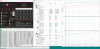
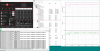
-
There are lots of different reasons for throttling. Turbo power limit throttling is only one reason. Open up the Limit Reasons window. Watch for anything in red. Turn the Log File option on in ThrottleStop. Show me a record of your CPU throttling.
Most people do not know this but Intel sets the thermal shutdown temperature to approximately 130°C.
![[IMG]](images/storyImages/5KFXoSf.png)
Some OEMs have decided to ignore that setting and have created their own shutdown temperatures so shutdown occurs at a peak core temperature of 100°C. I guess they are all cowards and are afraid to trust Intel. The whole point of setting the shutdown temperature that high was so a user would never have to worry about a random shutdown unless things were really, really, really out of control. 100°C is not an out of control temperature for a CPU.
You are a perfect candidate to try out ThrottleStop's new PROCHOT Offset feature. I have not done any hands on testing of this new feature on a 6th Gen CPU but in theory it should work.
ThrotteStop 8.75 beta 2
https://drive.google.com/open?id=1NF3xMO_u5E4vvCu-Ua8IDcIBxO1OaHO2
Download, unzip and copy the new ThrottleStop.exe file into your ThrottleStop folder. You can make a back up copy of the previous version if you wish but no real reason to do that.
Open up the Options window and you will probably see that the current PROCHOT Offset is set to 2. This has thermal throttling starting at 98°C which does not give you any wiggle room between thermal throttling and thermal shutdown at 100°C. Start by getting rid of all of the other ThrottleStop tricks that you have been using. No need for a second profile with different Speed Shift settings, etc. Simply adjust the PROCHOT Offset to 5 and go do some testing. This will bring the thermal throttling temperature down to 95°C and should give you enough wiggle room so you never, ever hit 100°C regardless of load. You can dial in as much offset as you like. I think 5 should be enough but maybe for gaming, if you do not want 95°C of CPU heat in your system going to your GPU, dial in an offset of 10 or 15. Like magic, PROCHOT Offset will be your ticket to full control of your poorly engineered Dell laptop.
![[IMG]](images/storyImages/uWTuevk.png) Papusan, t456, pressing and 1 other person like this.
Papusan, t456, pressing and 1 other person like this. -
Code:DATE TIME MULTI C0% CKMOD CHIPM BAT_mW TEMP VID POWER 2020-04-17 21:34:38 37.00 14.2 100.0 100.0 0 63 1.0128 15.5 2020-04-17 21:34:39 32.16 41.6 100.0 100.0 0 70 1.0205 21.0 2020-04-17 21:34:40 37.00 100.0 100.0 100.0 0 71 0.9476 39.5 2020-04-17 21:34:41 37.00 100.0 100.0 100.0 0 71 0.9469 40.2 2020-04-17 21:34:42 37.00 100.0 100.0 100.0 0 72 0.9525 40.1 2020-04-17 21:34:43 37.00 100.0 100.0 100.0 0 71 0.9475 40.3 2020-04-17 21:34:44 37.00 100.0 100.0 100.0 0 71 0.9468 40.0 2020-04-17 21:34:45 37.00 100.0 100.0 100.0 0 72 0.9569 41.0 2020-04-17 21:34:46 37.00 100.0 100.0 100.0 0 72 0.9469 39.7 2020-04-17 21:34:47 37.00 100.0 100.0 100.0 0 73 0.9467 40.5 2020-04-17 21:34:48 37.00 100.0 100.0 100.0 0 72 0.9492 40.7 2020-04-17 21:34:49 37.00 100.0 100.0 100.0 0 73 0.9507 40.3 2020-04-17 21:34:50 37.00 100.0 100.0 100.0 0 72 0.9474 40.4 2020-04-17 21:34:51 37.00 100.0 100.0 100.0 0 73 0.9475 40.5 2020-04-17 21:34:52 37.00 100.0 100.0 100.0 0 73 0.9458 40.9 2020-04-17 21:34:53 37.00 100.0 100.0 100.0 0 74 0.9462 40.3 2020-04-17 21:34:54 37.00 100.0 100.0 100.0 0 74 0.9456 40.7 2020-04-17 21:34:55 37.00 100.0 100.0 100.0 0 74 0.9468 40.7 2020-04-17 21:34:56 37.00 100.0 100.0 100.0 0 74 0.9459 40.6 2020-04-17 21:34:57 37.00 100.0 100.0 100.0 0 74 0.9475 40.7 2020-04-17 21:34:58 37.00 100.0 100.0 100.0 0 74 0.9467 40.6 2020-04-17 21:34:59 37.00 100.0 100.0 100.0 0 75 1.0155 41.0 2020-04-17 21:35:00 37.00 100.0 100.0 100.0 0 75 0.9484 40.5 2020-04-17 21:35:01 37.00 100.0 100.0 100.0 0 74 0.9459 40.8 2020-04-17 21:35:02 37.00 100.0 100.0 100.0 0 73 0.9459 40.6 2020-04-17 21:35:03 37.00 100.0 100.0 100.0 0 75 0.9459 40.8 2020-04-17 21:35:04 37.00 100.0 100.0 100.0 0 75 0.9490 40.6 2020-04-17 21:35:05 35.48 100.0 100.0 100.0 0 70 0.9084 37.2 2020-04-17 21:35:06 34.49 100.0 100.0 100.0 0 72 0.8910 34.7 2020-04-17 21:35:07 34.61 100.0 100.0 100.0 0 71 0.9087 35.0 2020-04-17 21:35:08 34.66 100.0 100.0 100.0 0 70 0.9080 34.8 2020-04-17 21:35:09 34.74 100.0 100.0 100.0 0 71 0.9076 34.7 2020-04-17 21:35:10 34.69 100.0 100.0 100.0 0 72 0.9078 35.0 2020-04-17 21:35:11 34.82 100.0 100.0 100.0 0 71 0.9093 34.7 2020-04-17 21:35:12 35.03 100.0 100.0 100.0 0 70 0.9366 34.9 2020-04-17 21:35:13 35.00 100.0 100.0 100.0 0 72 0.9098 35.1 2020-04-17 21:35:14 35.00 100.0 100.0 100.0 0 71 0.9083 34.5 2020-04-17 21:35:15 34.87 100.0 100.0 100.0 0 71 0.9827 35.1 2020-04-17 21:35:16 35.01 100.0 100.0 100.0 0 72 0.9709 34.6 2020-04-17 21:35:17 35.00 100.0 100.0 100.0 0 70 0.9126 35.4 2020-04-17 21:35:18 35.00 100.0 100.0 100.0 0 70 0.9128 35.0 2020-04-17 21:35:19 35.38 89.7 100.0 100.0 0 71 0.9449 34.4 2020-04-17 21:35:20 36.94 62.6 100.0 100.0 0 73 0.9685 31.8 2020-04-17 21:35:21 37.00 71.6 100.0 100.0 0 72 0.9552 33.8 2020-04-17 21:35:22 37.00 76.9 100.0 100.0 0 72 0.9606 34.7 2020-04-17 21:35:23 36.40 30.5 100.0 100.0 0 55 0.9904 19.4 2020-04-17 21:35:24 36.80 15.5 100.0 100.0 0 61 0.9779 16.1 2020-04-17 21:35:25 36.65 12.0 100.0 100.0 0 55 0.7625 13.8 2020-04-17 21:35:26 36.87 24.3 100.0 100.0 0 65 0.9802 19.3 2020-04-17 21:35:27 36.72 22.2 100.0 100.0 0 57 0.9941 18.9
![[IMG]](images/storyImages/JXwHaLr.jpg) Last edited: Apr 17, 2020
Last edited: Apr 17, 2020 -
Tried v 8.75 beta2 and: awesome, thanks @unclewebb! The throttling works exactly as expected: when the temp hits PROCHOT limit the CPU clock gets dialed down just a bit. My profile-switching-tricks decreased the speed from 2,7GHz to something like 1,5GHz when it hit the temp limit. I deleted my old .ini and started with a fresh one.
I ran the first test round with PROCHOT offset 5 and CPU voltages -140,6mV. It was fine until my screen blacked out but that might have been because I also undervolted GPU by -160mV...
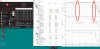
Second test round with PROCHOT offset 8, CPU -140,6mV and GPU -125mV, no problems except Prime95 said there was an error. Maybe I'll put both voltages at -125mV, should be fine then.
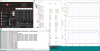
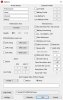
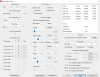
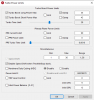
Now I'll try what happens with TurboBoost on. I want my GHz, I've paid for them!
unclewebb likes this. -
Solid. Raised voltages to CPU -135mV, GPU -125mV, SpeedShift to 60 and 10 minutes of Prime95 passed succesfully. Right when the stresstest started CPU peaked at 3,6GHz but temp hit almost immediately the PROCHOT limit.
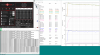
Now I could set Speed Shift to 0 as well, right? Throttling takes care of the heat anyway, no point in putting brakes for the CPU anymore.
This Dell is like they put a racing engine in a VW Beetle but didn't put racing suspension, tires or anything else... But once more - thank you @unclewebb! -
@David Dvorak - Your log file shows that your CPU is being throttled down to 35 Watts. In the TPL window (TPL screenshot?), if your long and short term turbo power limits are both set higher than 35 Watts and you have checked the FIVR - Disable and Lock feature (you have) then that means your laptop is using the EC to force your CPU down to the 35 Watt level. Some laptops are left wide open so ThrottleStop can be used to perform its magic. Other laptops are thoroughly locked down and there is nothing ThrottleStop, Intel XTU or any other software can do about it. From what you have shown me so far, it looks like your laptop is locked down. There is no fix for this problem. When under volting the Intel GPU, you usually need to under volt the Intel GPU and the iGPU Unslice equally.
Thank you for testing this new feature on a 6th Gen CPU. I think I have one of those somewhere in the house but too lazy to find it let alone install it.
It brings a smile to my face when I see a very practical use for a new ThrottleStop feature. Now you can get rid of all those other band aids you were using. Increase the power limits and set Speed Shift however you like. The PROCHOT Offset feature will take care of everything for you. I love simple solutions.
Your 6820HQ also supports limited overclocking. If you check the Overclock box in the FIVR window, you can increase your turbo ratios +4 bins to 40, 38, 37, 36. That will get you a nice little boost in light load performance with no more worries about over heating. Have fun with your new and improved laptop. Papusan, David Dvorak and apa64 like this.
 -
Yes, both TPL short and long are set to 50 and 90. What would be the EC?? Even if the EC is forcing the throttling, why it just happen with the MSI Afterbuner running? Does it have any conection??
-
@David Dvorak - I do not know what sensors MSI Afterburner is reading or what it might be doing to upset things. I have heard about similar issues before but never found a solution for users.
https://ark.intel.com/content/www/u...-8300h-processor-8m-cache-up-to-4-00-ghz.html
The 8300H has a low TDP mode of exactly 35 Watts. HWiNFO might be able to read what TDP Level your CPU is operating in. TDP Level 0 is the normal 45 Watt mode and if the CPU enters TDP Level 1, then the TDP drops to 35 Watts and throttling begins. Not a lot of OEMs are using this CPU feature recently but any OEM can be using this.
Without MSI Afterburner running and with your turbo power limits set to 50 and 90, can you run at 50 Watts? When does ThrottleStop report PL1 throttling? If the TS Bench cannot get your power consumption high enough then use Prime95 Small FFTs. It will get you there! -
Either your heatsink is faulty, or it's just not adequate enough to cool that processor... Sadly I wouldn't be surprised if it's the latter, but shutting down that fast seems like too much, even for Dell.
Is that processor stock or your own upgrade?
You've done pretty much all the useful things you could, the only thing left is trying a new heatsink or modding it for better cooling :/
It really should not reach 100 degrees and shut down like that...apa64 likes this. -
I did the test with Primer95 and with MSI Afterburner running reaches 60W...this are the results:
![[IMG]](images/storyImages/7428pmz.jpg)
While throttling:
![[IMG]](images/storyImages/7XKxG3c.jpg)
Log data:
Code:DATE TIME MULTI C0% CKMOD CHIPM BAT_mW TEMP VID POWER 2020-04-18 13:33:01 29.71 100.0 100.0 100.0 0 65 0.8752 34.7 2020-04-18 13:33:02 29.85 100.0 100.0 100.0 0 64 0.8785 34.4 2020-04-18 13:33:03 29.80 100.0 100.0 100.0 0 64 0.8533 34.9 2020-04-18 13:33:04 29.74 100.0 100.0 100.0 0 64 0.8524 34.8 2020-04-18 13:33:05 29.72 100.0 100.0 100.0 0 64 0.8524 35.3 2020-04-18 13:33:06 29.65 100.0 100.0 100.0 0 64 0.8527 34.8 2020-04-18 13:33:07 29.88 100.0 100.0 100.0 0 64 0.8763 34.9 2020-04-18 13:33:08 29.76 100.0 100.0 100.0 0 65 0.8743 34.8 2020-04-18 13:33:09 29.73 99.8 100.0 100.0 0 64 0.8744 34.8 2020-04-18 13:33:10 29.83 100.0 100.0 100.0 0 65 0.8735 35.0 2020-04-18 13:33:11 29.75 100.0 100.0 100.0 0 63 0.8810 34.9 2020-04-18 13:33:12 29.84 100.0 100.0 100.0 0 63 0.8796 34.9 2020-04-18 13:33:13 29.98 100.0 100.0 100.0 0 63 0.8837 34.8 2020-04-18 13:33:14 30.34 100.0 100.0 100.0 0 65 0.8992 34.7 2020-04-18 13:33:15 30.55 100.0 100.0 100.0 0 65 0.9004 34.6 2020-04-18 13:33:16 30.82 100.0 100.0 100.0 0 63 0.8728 35.4 2020-04-18 13:33:17 29.76 100.0 100.0 100.0 0 63 0.8528 34.9 2020-04-18 13:33:18 29.94 100.0 100.0 100.0 0 62 0.8760 34.9 2020-04-18 13:33:19 35.82 16.7 100.0 100.0 0 60 0.9996 16.7 2020-04-18 13:33:20 36.76 16.2 100.0 100.0 0 61 0.9779 16.0 2020-04-18 13:33:21 36.97 21.9 100.0 100.0 0 52 0.9967 19.2 2020-04-18 13:33:22 36.97 14.9 100.0 100.0 0 59 1.0349 16.0 2020-04-18 13:33:23 36.95 20.2 100.0 100.0 0 57 0.9927 18.5 2020-04-18 13:33:24 36.90 12.7 100.0 100.0 0 60 0.9888 15.0 2020-04-18 13:33:25 36.72 13.5 100.0 100.0 0 53 0.9969 15.2 2020-04-18 13:33:26 36.88 18.0 100.0 100.0 0 57 0.9722 17.3 2020-04-18 13:33:27 36.96 16.3 100.0 100.0 0 54 1.0597 16.2 2020-04-18 13:33:28 36.78 13.5 100.0 100.0 0 59 0.9988 14.2 2020-04-18 13:33:29 36.73 16.0 100.0 100.0 0 55 0.9968 15.9 2020-04-18 13:33:30 37.00 14.2 100.0 100.0 0 58 0.9788 15.9 2020-04-18 13:33:31 31.56 13.1 100.0 100.0 0 48 0.6843 13.7 2020-04-18 13:33:32 36.84 14.1 100.0 100.0 0 58 0.9789 15.6 2020-04-18 13:33:33 36.70 13.5 100.0 100.0 0 49 0.7195 15.0 2020-04-18 13:33:34 36.92 13.6 100.0 100.0 0 58 0.9790 15.3 2020-04-18 13:33:35 36.70 13.5 100.0 100.0 0 48 0.9491 14.8 2020-04-18 13:33:36 36.91 13.2 100.0 100.0 0 57 0.9984 15.1 2020-04-18 13:33:37 36.80 13.6 100.0 100.0 0 51 0.8785 15.2 2020-04-18 13:33:38 36.80 14.4 100.0 100.0 0 55 1.0002 15.7 2020-04-18 13:33:39 34.74 27.0 100.0 100.0 0 66 0.8962 17.8 2020-04-18 13:33:40 37.00 100.0 100.0 100.0 0 75 1.0253 58.1 2020-04-18 13:33:41 37.00 100.0 100.0 100.0 0 78 1.0272 59.1 2020-04-18 13:33:42 37.00 100.0 100.0 100.0 0 78 1.0427 59.2 2020-04-18 13:33:43 37.00 100.0 100.0 100.0 0 81 1.0223 59.9 2020-04-18 13:33:44 37.00 100.0 100.0 100.0 0 80 1.0255 60.5 2020-04-18 13:33:45 37.00 100.0 100.0 100.0 0 78 1.0350 59.8 2020-04-18 13:33:46 37.00 100.0 100.0 100.0 0 78 1.0276 59.5 2020-04-18 13:33:47 37.00 100.0 100.0 100.0 0 82 1.0311 59.8 2020-04-18 13:33:48 37.00 100.0 100.0 100.0 0 84 1.0212 61.0 2020-04-18 13:33:49 34.92 100.0 100.0 100.0 0 66 0.8735 52.6 2020-04-18 13:33:50 29.41 100.0 100.0 100.0 0 65 0.8535 34.2 2020-04-18 13:33:51 29.63 100.0 100.0 100.0 0 64 0.8872 34.8 2020-04-18 13:33:52 29.61 100.0 100.0 100.0 0 67 0.8861 34.7 2020-04-18 13:33:53 29.67 100.0 100.0 100.0 0 66 0.8921 34.7 2020-04-18 13:33:54 29.90 100.0 100.0 100.0 0 65 0.8799 34.7 2020-04-18 13:33:55 30.00 100.0 100.0 100.0 0 64 0.8787 34.8 2020-04-18 13:33:56 29.81 100.0 100.0 100.0 0 64 0.8871 34.5 2020-04-18 13:33:57 29.78 100.0 100.0 100.0 0 64 0.8790 34.8 2020-04-18 13:33:58 29.92 100.0 100.0 100.0 0 64 0.8538 34.9 2020-04-18 13:33:59 29.94 100.0 100.0 100.0 0 64 0.8807 34.8 2020-04-18 13:34:00 29.81 100.0 100.0 100.0 0 66 0.8816 34.9
-
The CPU is stock, this is a refurbished business laptop. The heat shutdown was even worse initially but new thermal paste helped a bit. Googling around with keywords "E5470 overheat" revealed others with the same problem. Yeah, I think that the cooling now is not working as it should but with ThrottleStop I have now a good workaround for the hardware problem.
-
Did you do some testing with and without MSI Afterburner running? In theory, it should not make any difference whether MSI Afterburner is running or not. Your screenshot shows that your CPU can run at 60W but the question is, can it maintain 60W indefinitely?
A laptop that is not being power limited will be able to run at 60W indefinitely. Your screenshots show that you are being capped right at 35W. That should not be happening. During the same Prime95 test, does this happen if you do not start MSI Afterburner. -
When doing the stress test without MSI afetrburner the TDP just reaches 57W and throttles down to 45W
![[IMG]](images/storyImages/cdRmj9x.jpg)
Code:DATE TIME MULTI C0% CKMOD CHIPM BAT_mW TEMP VID POWER 2020-04-18 19:49:51 12.94 10.5 100.0 100.0 0 34 0.6425 7.7 2020-04-18 19:49:52 23.78 3.6 100.0 100.0 0 35 0.7773 3.0 2020-04-18 19:49:53 36.88 77.2 100.0 100.0 0 67 1.0245 41.5 2020-04-18 19:49:54 37.00 100.0 100.0 100.0 0 68 1.0212 55.8 2020-04-18 19:49:55 37.00 100.0 100.0 100.0 0 67 1.0270 55.6 2020-04-18 19:49:56 37.00 100.0 100.0 100.0 0 69 1.0199 56.4 2020-04-18 19:49:57 37.00 100.0 100.0 100.0 0 70 1.0188 56.2 2020-04-18 19:49:58 37.00 100.0 100.0 100.0 0 71 1.0216 55.8 2020-04-18 19:49:59 37.00 100.0 100.0 100.0 0 72 1.0187 55.7 2020-04-18 19:50:00 37.00 100.0 100.0 100.0 0 71 1.0203 56.2 2020-04-18 19:50:01 37.00 100.0 100.0 100.0 0 71 1.0208 56.3 2020-04-18 19:50:02 37.00 100.0 100.0 100.0 0 73 1.0237 55.4 2020-04-18 19:50:03 37.00 100.0 100.0 100.0 0 73 1.0201 56.3 2020-04-18 19:50:04 37.00 100.0 100.0 100.0 0 73 1.0198 56.6 2020-04-18 19:50:05 37.00 100.0 100.0 100.0 0 74 1.0206 55.9 2020-04-18 19:50:06 37.00 100.0 100.0 100.0 0 74 1.0201 56.6 2020-04-18 19:50:07 37.00 100.0 100.0 100.0 0 75 1.0195 55.5 2020-04-18 19:50:08 37.00 100.0 100.0 100.0 0 75 1.0193 57.2 2020-04-18 19:50:09 37.00 100.0 100.0 100.0 0 75 1.0193 55.8 2020-04-18 19:50:10 37.00 100.0 100.0 100.0 0 75 1.0187 56.5 2020-04-18 19:50:11 37.00 100.0 100.0 100.0 0 77 1.0186 56.6 2020-04-18 19:50:12 37.00 100.0 100.0 100.0 0 76 1.0205 56.7 2020-04-18 19:50:13 37.00 100.0 100.0 100.0 0 76 1.0221 56.0 2020-04-18 19:50:14 37.00 100.0 100.0 100.0 0 77 1.0188 56.8 2020-04-18 19:50:15 37.00 100.0 100.0 100.0 0 77 1.0211 55.9 2020-04-18 19:50:16 37.00 100.0 100.0 100.0 0 77 1.0200 56.2 2020-04-18 19:50:17 37.00 100.0 100.0 100.0 0 77 1.0197 56.5 2020-04-18 19:50:18 37.00 100.0 100.0 100.0 0 78 1.0216 56.4 2020-04-18 19:50:19 37.00 100.0 100.0 100.0 0 79 1.0199 56.8 2020-04-18 19:50:20 37.00 100.0 100.0 100.0 0 79 1.0188 55.7 2020-04-18 19:50:21 37.00 100.0 100.0 100.0 0 79 1.0201 56.2 2020-04-18 19:50:22 37.00 100.0 100.0 100.0 0 79 1.0198 56.8 2020-04-18 19:50:23 37.00 100.0 100.0 100.0 0 79 1.0214 55.9 2020-04-18 19:50:24 37.00 100.0 100.0 100.0 0 80 1.0187 56.4 2020-04-18 19:50:25 37.00 100.0 100.0 100.0 0 80 1.0206 56.3 2020-04-18 19:50:26 37.00 100.0 100.0 100.0 0 81 1.0208 55.9 2020-04-18 19:50:27 37.00 100.0 100.0 100.0 0 81 1.0209 56.9 2020-04-18 19:50:28 37.00 100.0 100.0 100.0 0 81 1.0199 55.5 2020-04-18 19:50:29 37.00 100.0 100.0 100.0 0 81 1.0228 56.6 2020-04-18 19:50:30 37.00 100.0 100.0 100.0 0 81 1.0199 56.4 2020-04-18 19:50:31 37.00 100.0 100.0 100.0 0 82 1.0283 56.3 2020-04-18 19:50:32 37.00 100.0 100.0 100.0 0 82 1.0225 56.2 2020-04-18 19:50:33 36.05 100.0 100.0 100.0 0 73 0.9550 52.0 2020-04-18 19:50:34 34.40 100.0 100.0 100.0 0 75 0.9763 44.7 2020-04-18 19:50:35 34.21 100.0 100.0 100.0 0 75 0.9559 44.9 2020-04-18 19:50:36 34.41 100.0 100.0 100.0 0 74 0.9639 44.9 2020-04-18 19:50:37 34.28 100.0 100.0 100.0 0 75 0.9550 44.8 2020-04-18 19:50:38 34.30 99.9 100.0 100.0 0 75 0.9552 45.0 2020-04-18 19:50:39 34.42 100.0 100.0 100.0 0 74 0.9825 44.7 2020-04-18 19:50:40 34.50 100.0 100.0 100.0 0 74 0.9810 44.6 2020-04-18 19:50:41 34.63 100.0 100.0 100.0 0 73 0.9769 45.4 2020-04-18 19:50:42 34.45 100.0 100.0 100.0 0 75 0.9827 44.7 2020-04-18 19:50:43 34.37 100.0 100.0 100.0 0 75 0.9753 44.9 2020-04-18 19:50:44 34.30 100.0 100.0 100.0 0 76 0.9584 44.9 2020-04-18 19:50:45 34.36 100.0 100.0 100.0 0 75 0.9761 45.1 2020-04-18 19:50:46 34.34 100.0 100.0 100.0 0 76 0.9583 44.7 2020-04-18 19:50:47 34.38 100.0 100.0 100.0 0 74 0.9779 44.8 2020-04-18 19:50:48 34.37 100.0 100.0 100.0 0 72 0.9802 45.3 2020-04-18 19:50:49 34.67 100.0 100.0 100.0 0 75 0.9763 44.9 2020-04-18 19:50:50 34.34 100.0 100.0 100.0 0 77 0.9558 44.7 2020-04-18 19:50:51 34.40 100.0 100.0 100.0 0 75 0.9817 45.0 2020-04-18 19:50:52 34.62 99.9 100.0 100.0 0 76 0.9600 44.4 2020-04-18 19:50:53 34.61 100.0 100.0 100.0 0 74 0.9792 45.2 2020-04-18 19:50:54 34.41 100.0 100.0 100.0 0 76 0.9775 45.0 2020-04-18 19:50:55 34.43 100.0 100.0 100.0 0 75 0.9569 44.6 2020-04-18 19:50:56 34.54 100.0 100.0 100.0 0 75 0.9558 45.3 2020-04-18 19:50:57 34.43 100.0 100.0 100.0 0 75 0.9772 44.9 2020-04-18 19:50:58 34.47 99.9 100.0 100.0 0 75 0.9563 44.8 2020-04-18 19:50:59 34.42 100.0 100.0 100.0 0 75 0.9557 44.9 2020-04-18 19:51:00 34.41 100.0 100.0 100.0 0 77 0.9565 45.3
-
If you are running the exact same Prime95 test as before, that would suggest that MSI Afterburner really does put a significant and unnecessary load on the CPU.
Throttling down to 45W is normal. Throttling down to 35W is not. You could ask the programmer of MSI Afterburner why this might be happening but I am pretty sure he would have no idea.
Long term, your CPU is limited to 45W so you might as well enter that value into ThrottleStop for the long turbo power limit. For the short power limit, maybe try 59. Perhaps some magic combination will allow your CPU to run without entering cTDP-down 35W mode. You might be forced not to run MSI Afterburner.
Can you post a screenshot of your TPL window?Papusan, David Dvorak and tilleroftheearth like this. -
hi @unclewebb and @David Dvorak,
i've a i5 8300H too, i'll doing some test and i'll show you the resultsDavid Dvorak and unclewebb like this. -
TS 8.75 beta 3
Beta Testing Finished
- added Nvidia GPU MHz monitoring to the GPU button and to the log file.
- first attempt to correct 10th Gen Ice Lake BCLK reporting.
- added real time timer resolution reporting in the Options window.
First person to post a 10th Gen Ice Lake screenshot wins a prize if it shows a correct looking BCLK. No hardware to test with so I took my best wild guess to fix this problem.
When trying to help users with throttling problems, sometimes it is hard to tell whether the CPU or the Nvidia GPU is throttling so I finally added Nvidia MHz monitoring to the log file. This should make life much easier. Using two different programs was a pain in the butt. I have always been a fan of the TS log file. I think it will be even more useful now.
Code:DATE TIME MULTI C0% CKMOD CHIPM BAT_mW TEMP NVIDIA GPU VID POWER 2020-04-18 22:49:41 35.09 5.7 100.0 100.0 0 49 980 34 1.0457 8.9 2020-04-18 22:49:42 35.65 14.3 100.0 100.0 0 48 980 34 1.0463 16.9 2020-04-18 22:49:43 34.71 4.3 100.0 100.0 0 43 980 36 1.0457 6.4 2020-04-18 22:49:44 35.37 1.5 100.0 100.0 0 42 980 36 1.0458 3.6 2020-04-18 22:49:45 35.34 1.1 100.0 100.0 0 41 980 37 1.0457 3.4
![[IMG]](images/storyImages/wETfC8v.png) Last edited: Apr 22, 2020Papusan, intruder16, zilla0617 and 5 others like this.
Last edited: Apr 22, 2020Papusan, intruder16, zilla0617 and 5 others like this. -
Unclewebb, i still have problems with PL2 throttling, i enable powercut but i suspect that it bugs out and doesnt really enable because i still get normal PKG power readings (couple times it worked and showed only up to 1.5W or so). While using laptop for simple tasks its fine, but once i start a game, it still keeps max cpu frequency but Throttlestop shows throttling PL2 when i exit game and for example run TS bench (frequencies drop). Any ideas why powercut doesnt enable? Couple times i managed to enable it properly but it seems just random to me. It looks like my laptop doesnt like having 37W TDP cpu running at over 60w hah
pressing likes this. -
First test: MSI afterburner is not running. No red lights in Limit Reasons.
Second test: MSI afterburner is running. No red lights in Limit Resons
-
![[IMG]](images/storyImages/ZtCJ7Rg.png)
Humm, ok, I will try those values and do some testing.
Hi Akern, thanks for your help. The thing I see here is even if there's not red lights in your screenshot, the yellow ones point that there has been some throttling during the testing. Can you post the log file of your test?? -
Hi @David Dvorak, i'm the same guy from the Akern account, sorry for not replying earlier but unfortunately my account has been banned.....yhea, for no reason, no explanations....i'm veeeery upset for this I don't know what I did wrong.
BTW i repeated the tests and get the logs. This is from TEST 1 (afterburner not running)
and This is from TEST 2 (afterburner was running)Code:DATE TIME MULTI C0% CKMOD CHIPM BAT_mW TEMP VID POWER 2020-04-19 17:27:12 25.07 3.1 100.0 100.0 0 34 0.8883 2.4 2020-04-19 17:27:13 21.18 2.9 100.0 100.0 0 34 0.9044 1.9 2020-04-19 17:27:14 27.82 3.2 100.0 100.0 0 34 0.8617 2.6 2020-04-19 17:27:15 19.85 2.3 100.0 100.0 0 33 0.8840 1.4 2020-04-19 17:27:16 38.60 54.3 100.0 100.0 0 78 1.0297 23.6 2020-04-19 17:27:17 39.00 100.0 100.0 100.0 0 80 1.0298 48.1 2020-04-19 17:27:18 39.00 100.0 100.0 100.0 0 81 1.0289 49.4 2020-04-19 17:27:19 39.00 100.0 100.0 100.0 0 82 1.0273 49.5 2020-04-19 17:27:20 39.00 100.0 100.0 100.0 0 82 1.0284 49.0 2020-04-19 17:27:21 39.00 100.0 100.0 100.0 0 82 1.0232 49.5 2020-04-19 17:27:22 39.00 100.0 100.0 100.0 0 82 1.0238 50.0 2020-04-19 17:27:24 39.00 100.0 100.0 100.0 0 84 1.0236 48.9 2020-04-19 17:27:25 39.00 100.0 100.0 100.0 0 84 1.0234 49.6 2020-04-19 17:27:25 39.27 57.2 100.0 100.0 0 42 0.8694 33.6 2020-04-19 17:27:26 21.75 0.6 100.0 100.0 0 38 0.8766 0.7 2020-04-19 17:27:27 21.37 0.6 100.0 100.0 0 38 0.8826 0.7 2020-04-19 17:27:28 22.20 1.9 100.0 100.0 0 38 0.8783 1.6 2020-04-19 17:27:29 22.08 1.1 100.0 100.0 0 37 0.8838 0.8 2020-04-19 17:27:30 22.07 2.5 100.0 100.0 0 38 0.8839 1.6
Code:2020-04-19 17:47:25 36.18 5.7 100.0 100.0 0 39 0.8702 11.2 2020-04-19 17:47:26 36.12 6.8 100.0 100.0 0 40 0.8719 11.8 2020-04-19 17:47:27 34.89 5.9 100.0 100.0 0 40 0.8601 11.0 2020-04-19 17:47:28 33.54 6.2 100.0 100.0 0 40 0.8525 11.4 2020-04-19 17:47:29 34.71 5.7 100.0 100.0 0 40 0.8666 10.9 2020-04-19 17:47:30 38.66 62.1 100.0 100.0 0 85 1.0240 35.5 2020-04-19 17:47:31 39.00 100.0 100.0 100.0 0 86 1.0291 54.4 2020-04-19 17:47:32 39.00 100.0 100.0 100.0 0 86 1.0249 55.0 2020-04-19 17:47:33 39.00 100.0 100.0 100.0 0 87 1.0231 55.9 2020-04-19 17:47:34 39.00 100.0 100.0 100.0 0 89 1.0250 55.3 2020-04-19 17:47:35 39.00 100.0 100.0 100.0 0 89 1.0226 55.5 2020-04-19 17:47:36 39.00 100.0 100.0 100.0 0 86 1.0321 55.3 2020-04-19 17:47:37 39.00 100.0 100.0 100.0 0 89 1.0262 55.5 2020-04-19 17:47:38 39.00 100.0 100.0 100.0 0 91 1.0232 55.5 2020-04-19 17:47:39 39.02 92.3 100.0 100.0 0 78 1.0648 53.9 2020-04-19 17:47:40 39.64 9.1 100.0 100.0 0 46 0.8778 14.4 2020-04-19 17:47:41 38.26 5.3 100.0 100.0 0 46 0.8807 11.2 2020-04-19 17:47:42 34.71 5.6 100.0 100.0 0 44 0.8667 11.1 2020-04-19 17:47:43 37.14 4.4 100.0 100.0 0 44 0.8766 10.3 2020-04-19 17:47:44 36.60 4.8 100.0 100.0 0 44 0.8717 10.5 2020-04-19 17:47:45 36.86 4.7 100.0 100.0 0 44 0.8726 10.5 2020-04-19 17:47:46 36.76 4.5 100.0 100.0 0 44 0.8741 10.4 2020-04-19 17:47:47 37.31 4.7 100.0 100.0 0 44 0.8577 10.3 2020-04-19 17:47:48 37.02 8.8 100.0 100.0 0 44 0.8708 12.2
-
New beta 8.75 b3 works fine on 6300hq i5.
unclewebb and tilleroftheearth like this. -
Next time you enable PowerCut and it is not working, can you show me a screenshot of your FIVR window?
After you resume from sleep or hibernate, the PowerCut feature will be reset so you need to manually enable PowerCut once again.
@Akern1 - Your testing seems to show that running MSI Afterburner is contributing an extra 5W or 6W of power consumption. This can be enough on some systems to trigger premature turbo power limit throttling. You guys both have an 8300H but if you have different laptop models or even different BIOS versions, the exact same CPU can run completely different depending on how each OEM setup the CPU in the BIOS.Last edited: Apr 19, 2020Papusan likes this. -
Hey, does anyone know which 10th gen H Intel laptops support undervolting and which ones do not?
Thanks. -
@seanwee - Not sure what 10th Gen models support undervolting. This can change depending on what BIOS version is installed.
All I know for sure is that there is a tremendous amount of performance possible, even from the lowly 10th Gen, 15 Watt U series CPUs.
![[IMG]](images/storyImages/NQHgK5G.png)
The default 92°C PROCHOT temperature was holding this beast back. The new PROCHOT Offset feature in TS 8.75 lets a person bump the throttling temperature up to 100°C. That will really unleash the beast.
If you buy a laptop that cannot perform like this, send it back.Papusan, tilleroftheearth, cktducky and 2 others like this. -
Whew, that's a high power limit.
As for the temp, I'd liquid metal the laptop. -
Yeah, thanks @unclewebb, the BCLK is working fine. Thanks.
-
Mmm ok Understood. If you look at my screens from a page ago you can see i have some yellow light in limit reasons, most of them are there even if i'm not stress testing the CPU (like PL1/PL2 on CORE and EDP OTHER on CORE,GPU and RING colums).
@David Dvorak said these are signs of throttling, so are they a problem? do you have any suggestions on how to get rid of them? -
Hi @Akern1, as @unclewebb said, even if we have same CPU we probably have different laptop models, bios, etc., so it's difficult making a valid comparison, but anyway thanks for your help
To get rid of the throttling you can try activating "Disable and lock turbo power limit" in FIVR options and maybe lowering the turbo ratio limits to get the TDP lower and decrease the temps, but wait for @unclewebb advise better.Akern1 likes this. -
Thanks for testing that for me. Can you post a picture so other users can see?
Yellow boxes in Limit Reasons are signs of throttling. In a perfect world, the Limit Reasons window would always be black. Many laptops have things lighting up in yellow on a regular basis. On some laptops, you may be able to control some of these by adjusting ThrottleStop. Some CPUs are hyper sensitive and seem to trigger yellow boxes regardless of how ThrottleStop is setup.
It is only a problem if these boxes are red. That indicates throttling in progress and your CPU will be running at less than its rated speed. How big of a problem depends on how severe the throttling is. If your CPU needs to drop 100 MHz, no big deal. If the CPU speed drops in half due to throttling, it is time to look into things.
The logs you posted show that you are only fully loading your CPU for about 8 seconds. I think Cinebench R20 is a good real world, full load test for laptops.
https://www.maxon.net/en-us/products/cinebench-r20-overview/
While this test is running, you can watch the Limit Reasons window for things lighting up in red and you can watch the CPU multiplier being reported by ThrottleStop. At full load, your CPU should be able to maintain the full 39.00 multiplier. You might run into thermal problems or turbo power limit throttling during this test. A computer that can run at its full rated speed during this test without significant throttling usually does well when gaming or performing most other real world tasks.
NotebookCheck likes to test laptops by running Cinebench R15 in a loop. Some laptops really crap the bed after the first run and show a big drop in long term performance.
https://www.notebookcheck.net/Dell-...-8565U-MX150-Convertible-Review.372576.0.htmlLast edited: Apr 20, 2020Akern1 likes this. -
I know about sleep reset, now it throttles every time i enter any game with PowerCut on. I think without powercut everything is fine, but i need more testing. Im adding my FIVR and TPL screens as you requested. And adding proof that my cpu can work at 4.2MHz stable without throttling. I found some hidden TDP bios settings and tried to change it seems it doesnt help with PowerCut throttling problem.
![[IMG]](images/storyImages/0bG4qRk.jpg)
![[IMG]](images/storyImages/alXJGVC.jpg)
![[IMG]](images/storyImages/nw7VObY.jpg)
![[IMG]](images/storyImages/tWp29F1.jpg) unclewebb likes this.
unclewebb likes this. -
Thanks man, I'm always glad to help!!
I don't know enough about "Disable and lock turbo power limit" feature; is it safe to use? because from what i know, this feature prevent my laptop from dropping down to a safe 30/35 Watts (so i can get rid of power limit throttling i guess) but can damage the battery permanently...don't know...i'm afraid of messing up and explode whith my laptop
but i'll wait for @unclewebb for better advise -
https://imgur.com/a/XKcabCK These are my current bios settings, last two pictures show the TDP settings that i have only recently found. Any idea how to kill the damn PL2 throttle?
-
@Karalux The purpose of the PowerCut feature was to get beyond any power limit throttling. Your turbo power limits are not locked so do you even need to use PowerCut? Reboot and leave the VCCIN at its default setting. Load the CPU and see if you get any throttling. What power value does this happens at?
It is difficult to know what BIOS setting is interfering with PowerCut. This feature takes advantage of a bug within Intel 4th Gen CPUs. You accidentally fixed that bug.
Are you sure you should be using ThrottleStop? Most laptops are pretty tough. They can take some abuse.Papusan likes this.
The ThrottleStop Guide
Discussion in 'Hardware Components and Aftermarket Upgrades' started by unclewebb, Nov 7, 2010.


