 Problems? See this thread at archive.org.
Thank you,
It works !
24 cores
-
Post some screenshots. I might notice something that needs a tweak. I am sure Intel will be impressed that I am ThrottleStopping their 12 year old Xeons.Papusan, dmanti, 4W4K3 and 1 other person like this.
-
Dell Latitude 7490 with the latest BIOS has all voltage menus locked

Nothing can be done right? besides downgrading the BIOS. -
With the XPS 7590 and many other Dell laptops, you can edit the UEFI variables to unlock CPU voltage control.
https://www.reddit.com/r/Dell/comments/fzv599/xps_7590_160_uefi_unlock_undervolting_and_remove/ -
Here is an interesting bug that was recently discovered by slack3Y on TechPowerUp.
ThrottleStop is only reporting the first 2 threads of his 6 core - 12 thread CPU. After some detective work, it turns out that Razer Cortex - Game Booster decided to change the Windows task affinity of ThrottleStop. This blocks ThrottleStop from reading monitoring data from all 12 threads. Thanks Razer.
That is a real sleazy thing to do to a top notch monitoring program like ThrottleStop. Any program that deliberately attacks other programs without notice or justification is at the bottom of the barrel. If you have this problem, now you know what company you need to talk to and what software you should delete from your computer.Papusan, berkkocaturk, ellalan and 3 others like this. -
The TPL window has been at the spa getting a make over. It is almost ready for Valentine's Day.
![[IMG]](images/storyImages/oo8IBrY.png) Papusan, Krzyslaw, FrozenLord and 5 others like this.
Papusan, Krzyslaw, FrozenLord and 5 others like this. -
Thank you very much for this great tool and keeping it maintained
I think that I have found a bug:
I am running a Tornado F5 (MSI 16L1), a Z170-based device, and an Intel 9700F.
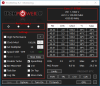
The CPU is working correctly after a bios mod, but Throttlestop is not detecting the AVX offset correctly.
My bios is set up with an AVX offset of 4, which works fine from what I can see.
E.g. my Uncore multiplier is the selected 4 below my core multiplier under load.
This offset of 4 does even work when the device throttles due to the CPU being a 65W one.
Yet the AVX offset is being shown as 0 and is greyed out:
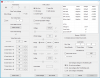
(I have reduced the multiplier to reduce the impact this power throttling has.)
Is there anything else that I can provide to possibly help you fix the bug?
Thank you
-
Do the non K CPUs support AVX Offset? When ThrottleStop queries the CPU AVX Offset register, if the CPU reports an error code, ThrottleStop will disable this option so it cannot be accessed. Your BIOS might have an AVX option but that does not guarantee that it works.
The best way to test this is to set the AVX Offset to a big number in the BIOS so you can clearly see if this works or not. For my test I used an AVX Offset of 24 and I ran Cinebench R20 which uses the AVX instruction set. Easy to see that my 50 multiplier has been reduced by 24 so it is sitting at 26.00 while running Cinebench.
When you test this, reboot and disable ThrottleStop from starting. Use a different monitoring tool like CPU-Z.
You should be able to set the turbo power limits in the TPL window to whatever you like. I have seen 10th Gen 65W CPUs run at over 150W. Most laptops would not be happy if the power limits were set sky high.
In the non K CPUs, the maximum Uncore multiplier is usually 3 less than the maximum multiplier. The 9700F has a maximum 45 multiplier when 8 cores are active so the max uncore multiplier should be somewhere around 42. Your FIVR screenshot shows a 42 multiplier for Cache Ratio in the monitoring table but that might just be a coincidence. Not sure if it is possible to go higher than 42. When AVX Offset is working and set to a big number, my 10th Gen also drops the maximum cache ratio.Papusan, FrozenLord, dmanti and 1 other person like this. -
I am currently trying to resolve some issues I am seeing from ThrottleStop. I have been running the Limit Reasons today while playing some games, and noticed that most of the time during the first 20 minutes of the game, my cores are running at around 3.9ghz, and I do have some small thermal throttling due to some spikes from mid 80 to mid 95-100 once in a while on core 0 and core 1. However, after about 15 minutes I start getting a red bar for PL1 under both CPU and GPU, and I see the cpu running at between 3.4 ghz and 3.6 ghz. I currently have the CPU set to -180 on core and -110 on cache (but did change it to -140 on both and then back to 0 on both and still see this issue) and I have no undervolting done on the GPU at all. Any idea what could be causing this? Have added a link to pics of the FIVR settings in ThrottleStop.
https://imgur.com/xpS0d4h
I also have my Speed Shift - EPP setting set to 0. -
@Mikel Millard - Show me a picture of ThrottleStop when PL1 is red. The only thing I can suggest is you should check the FIVR - Disable and Lock Turbo Power Limits box.
Now the bad news. Look at the FIVR screenshot you posted. At the top of the FIVR window it says FIVR Control - Locked.
![[IMG]](images/storyImages/74yemEf.png)
That means your computer has locked CPU voltage control. The undervolt you are trying to use is not working. Look at the FIVR monitoring table in the top right corner. Look at the Offset column. It shows +0.0000 from top to bottom. All of your voltages are at their default values.
Post some screenshots of the TPL window. Did you try to increase your turbo power limits?Papusan likes this. -
@unclewebb Thank you for that, I didn't even notice that the Offset column showed the +0.0000 values. I will have to look into how I can setup the undervolting then for my unit. I have an Alienware M17 R2 with 2070 Max-Q gpu and i7-9750 cpu. That would probably explain why I haven't seen any thermal differences with the undervolting.
Throttlestop with the PL1 red (couldn't get it with having the GPU red, that one occurs less frequently): https://imgur.com/Yr0U8Ql
TPL Window: https://imgur.com/SZRPmu5
For the TPL window, those are the default values when I installed TS, I haven't modified any of the values in that window.Last edited: Feb 12, 2021 -
Try finding a previous BIOS version that supports CPU voltage control. With some Dell laptops, you can modify a couple of UEFI variables to unlock this feature.
https://www.reddit.com/r/Dell/comments/fzv599/xps_7590_160_uefi_unlock_undervolting_and_remove/
I am not familiar with the Alienware throttling methods but I am familiar with what Dell is doing to some of their other laptop models. Your Dell Alienware appears to have a similar feature. When the temperatures get high, instead of depending on Intel thermal throttling which works fantastic, Dell has created their own throttling method. Intel's method maintains maximum performance. The CPU only throttles as much as necessary while always maintaining the CPU at a safe temperature. Most users barely notice any reduced performance when Intel thermal throttling kicks in.
The Dell throttling method is not so nice. When the CPU gets hot, it uses the EC to engage its power throttling method. One user I was helping earlier today had his expensive Dell with a high performance 8950HK being limited to as little as 13W. This type of throttling is definitely noticeable. It is horrible. The guy I helped was choked that he paid over $3 grand for a laptop that at times performs like a low end netbook.
I have heard about this problem from several Dell laptop owners. Your screenshot shows a 45W CPU being throttled to 27W. This problem might get worse. I have seen some Dell laptops lock the power limit to as little as 5W. No software can fix this problem. Time to contact Dell, get in line and start complaining.Papusan, tilleroftheearth, berkkocaturk and 2 others like this. -
It turns out you are right :-(
I had read that AVX Offset would be supported starting with the 7th gen of Intel's CPUs and had always envied them, as my 6700K did not even show the option in BIOS.
When I recently switched to the 9700F, the option became visible, but it seems to not do anything :-D
I have checked with Cinebench R20 and have set my BIOS' AVX Offset to 20:
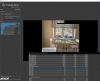
That is a too high multiplier on Uncore and CPU - so I think that you are right and the AVX Offset is in fact not supported on this CPU.
Thank you for clarifying
-
I tested a Core i5-7600 non K and the AVX register could not be accessed. If a person writing the BIOS has a K series CPU in their computer, they might not realize that AVX offset is not available on the non K CPUs.
Your screenshot also shows a difference of 3 between the core multiplier (37) and the uncore multiplier (34). With the K series CPUs you can run these two multipliers equally but for non K, a difference of 3 seems to be the standard.Papusan, tilleroftheearth, Mr. Fox and 1 other person like this. -
Download tool called: Uefi tool, load your bios. Use find option and seek for part of your bios which is called SETUP. Right click on it and click extract as is.
Than download tool called IFR extractor. Load the file that you have extracted from uefi tool and into the ifr program. Ifr tool will convert file from uefi tool into txt file in which you can find all uefi varibles.
Than look for this varibles
Bios lock
Cfg lock
Rtc lock
Sgx bios guard
Overclocking lock
Write coresponding varibles so you could set them to disable state in RU program
Find also option calledoverclocking feature and xtu interface. Both varibles must be set to enable for the UV to work on some laptops.
Probably apart from cfg lock and Overclocking lock you need also disable rest of locks and enable xtu interface for the UV to work.Last edited: Feb 14, 2021tilleroftheearth likes this. -
Thanks a lot @unclewebb for throttlestop 9.3
TPL windows looks much in style
https://www.techpowerup.com/download/techpowerup-throttlestop/
- Added 10850K / 10900K support including a new Turbo Group access window.
- Updated the TPL window and added an option to disable turbo power limit control.
- Added the ability to clear the TPL Lock options if accidentally locked.
- Updated the TS Bench and the C State window for the 10 core CPUs.
- Enabled Limit Reasons support for 10th and 11th Gen CPUs.
- Improved access to the Windows power plans.
- Added access to the PROCHOT offset variable.
- Added AVX offset control for unlocked K series CPUs.
- Added reporting, logging and control of Thermal Velocity Boost and V-Max Stress.
- Added clickable monitoring table headings, including minimum temperature and APIC ID.
- Double click the monitoring table for an extended view if you have more than 8 threads.
- Disabled Set Multiplier access when Speed Shift is enabled.
- More obvious feedback in the FIVR window when CPU voltage control is locked.
- Fixed log file data writing so log file data gets written to the correct day.
- Changed and fixed the logo selector.
Last edited: Feb 15, 2021ellalan, Papusan, tilleroftheearth and 1 other person like this. -
ThrottleStop 9.3
https://www.techpowerup.com/download/techpowerup-throttlestop/
New Features
- added 10850K / 10900K support including a new Turbo Group access window.
- updated the TPL window and added an option to disable turbo power limit control.
- added the ability to clear the TPL Lock options if accidentally locked.
- updated the TS Bench and the C State window for the 10 core CPUs.
- enabled Limit Reasons support for 10th and 11th Gen CPUs.
- improved access to the Windows power plans.
- added access to the PROCHOT offset variable.
- added AVX offset control for unlocked K series CPUs.
- added reporting, logging and control of Thermal Velocity Boost and V-Max Stress.
- added clickable monitoring table headings, including minimum temperature and APIC ID.
- double click the monitoring table for an extended view if you have more than 8 threads.
- disabled Set Multiplier access when Speed Shift is enabled.
- more obvious feedback in the FIVR window when CPU voltage control is locked.
- fixed log file data writing so log file data gets written to the correct day.
- changed and fixed the logo selector. -
Thanks, UncleWebb! Works like a champ so far.Papusan, tilleroftheearth and unclewebb like this.
-
Thank you for all the information. That really sucks the way they decide to do their own throttling. So far, at least, I haven't noticed any FPS issues with any of the current games I play, so hopefully I don't end up having too much issue with it. I will take a look at some of that information to try and unlock undervolting, I also got some help on reddit that shows how I might be able to possibly roll back the BIOS to a version that allows me to undervolt.
I did have another question pertaining to the GPU. On the limit reasons (only while playing WoW), I also get the red bar lighting up under GPU for PL1. Why would the power be getting limited to my GPU if it isn't overheating? The temp on the GPU isn't going any higher than 70 while playing WoW on max graphics, yet sometimes while playing it shows the red bar for PL1 (nearly impossible to get a screencap of the Limit Reasons showing it since almost as soon as I leave WoW the red bar turns to yellow and then disappears before I can screen cap it). Any ideas on what could be causing that? I haven't modified any of the FIVR values for the GPU at all for my machine. -
Thank you very much for this new version
I am currently testing my CPU using TS Bench and have realized that "random" frequency is only available when SpeedShift is enabled.
If SpeedShit is not enabled, the dropdown shows only "Fixed".
Is this a bug on my end or is this the intended behavior?
Additionally, I would like to propose a small addition to TS Bench that allows random thread counts as well.
Right now, TS Bench will use the preset amount of threads and is able to vary the frequency (which is a great feature!).
My idea is that due to the way Intel CPUs are designed, the CPU might use different frequencies for different thread counts.
While TS Bench is already capable to test frequency switches for a fixed amount of threads, I would love to have TS Bench also test a random number of threads.
Hopefully, this would allow a more thorough testing of the CPU in regards to stability in the context of shifting loads.
Thank you for your consideration.Last edited: Feb 17, 2021 -
Are you playing on a Nvidia GPU or are you playing on the Intel GPU. The Limit Reasons GPU data only applies to the Intel GPU.
It could be a hyper sensitive sensor or perhaps Dell set the Intel GPU power limit too low. If you are using the Nvidia GPU for gaming, hopefully whatever Dell did will not cause you any problems.
ThrottleStop does have a hidden feature that might allow you to increase the Intel GPU power limit. Open the ThrottleStop.INI configuration file and add this line.
IGPU=100
Start ThrottleStop after you do this and it will try to lock your Intel GPU power limit to 100W. Best to set this to a big number. Intel GPU throttling is not necessary. If you decide that you want to change this value, you will need to shut down your computer so the CPU can reset this value. ThrottleStop locks this register to prevent any other software from making changes to it.
The TS Bench Random MHz feature uses Speed Shift Technology to randomly vary the CPU speed. If you have an older CPU that does not support Speed Shift or if you have a newer CPU but Speed Shift is not enabled, you will not be able to use the Random MHz option. In those situations, I thought it would be best to hide the Random option. I thought no one would ask about a feature if the feature did not exist. I guess I was wrong.
Your suggestion about a random thread option sounds interesting but I do not think it is necessary. I like running a 10, 12 or 16 Thread test on my CPU that supports 20 threads. Windows schedules the TS Bench tasks somewhat randomly. There is a Windows algorithm that might try to keep each TS Bench thread on the same core but you can watch C0% and see that these tasks move around randomly as the test runs. This already simulates real world usage. Cores and threads are constantly starting, stopping and going back and forth between the C0 and C7 states.
I do not think that randomly changing the number of TS Bench threads would make much of a difference. The TS Bench test works well as is when trying to find some stable voltage settings.Papusan, FrozenLord and tilleroftheearth like this. -
Made some new modification today with my HP Spectre x360 8705G.
CPU throttled hard at first due to bad thermal paste from factory.
After repaste with Thermalright TF-X, CPU temp still reaches 100 but increases much slower. Now the limiting reason is VR thermal.
VRM is covered with thermal pad then another thin piece of copper on the top for passive cooling. Replaced the thermal pad with fujipoly xr-m and bridged the copper heat sink to cpu/gpu heatsink and bottom panel.
Throttle problem doesn’t end here. Stock multiplier for 1C-4C is 41/39/38/37. Overclockable to 47/45/44/43. Power limit disabled and PL1 PL2 boost time all set to max.
Stress test with Prime 95 small fft.
1 thread works perfectly fine at 4.7G with +0.025v for hours and never throttles.
2-5 threads will throttle because of EDP Other.
6-8 threads will throttle because of VR Current.
IIRC VR current is physically limited by the VRM. What about EDP Other? Is it possible to fix that?
PS: I know I shouldn’t overclock with cheap laptop but this is just an experiment for fun
-
In main windows - Under processor ID there is A VID Voltage - how can I rely on it - cos it shows what CPU expect is getting but real Voltage is only VR VOUT sensor shows?
And what it must be switch off in BIOS to overclock and then use Throttlestop for undervolting CPU, for example i9-10900k to best prepare:
These settings are OFF: power limits off, cpu cvid support off, c-state controls off, package power time off, short and long - after this setups VID shows quite big amounts Voltage and VR OUT (even Vcore) - reasonable for example.
PS. And for example this settings are still questionable ON or OFF like csm support, bclk adaptive voltage, turbo per core limits, active's turbo ratios, cpu flex ratio override, frequency clipping tvb, gt vr, ia vr? -
Did you max out the TPL Current Limit / Power Limit 4 and all of the the IccMax sliders. Some computers have limits hiding within that ThrottleStop cannot get to.
On a desktop board, VID Voltage is a meaningless number so ignore it. Monitoring VR VOUT would probably be best. I like the VCore number in HWiNFO64. It gives me a general idea of how much voltage is going to the CPU.
Most people worry too much about voltage. I just add voltage until stable. If you have to increase the voltage way, way up to go 100 MHz faster then you have reached the limit of your CPU. At this point, it is not worth bothering going any faster for everyday use. Stability testing will quickly show you if your voltage is good or bad. An accurate voltage number reported by software is useless information if your computer is not stable.
For CPU voltage control in ThrottleStop, on an Asus board, you need to enable CPU SVID Support. After that, I set Adaptive Voltage in ThrottleStop to Default and then a simple negative offset voltage is good enough for me. Run a few TS Bench tests to check for errors and you can get your voltage really close to where it should be without too much work.
I boot up at an all core 50X multiplier. The FIVR Turbo Ratio Groups in ThrottleStop allows me to overclock and run whatever speed I want. I prefer all core overclocks most of the time but ThrottleStop is flexible. You can run a different multiplier depending on how many cores are active. The Defaults button makes it easy to stagger the turbo ratios to their default values for your CPU. You can switch speeds on the fly without having to reboot. When using SVID voltage, you can switch speeds and the voltage will adjust yourself. You can make small offset voltage tweaks after that in ThrottleStop if you feel the need to.
I like C States enabled. They allow me to always run at full speed without full voltage going to the CPU. Voltage automatically drops to 0 V when a core enters C7. Power consumption and temps are great when the core C states are enabled. I also enable package C2.
![[IMG]](images/storyImages/i4tnKgl.jpg)
You can adjust all of the package power limits in the ThrottleStop TPL window. When the BIOS has a disable option, it is probably setting both of the power limits to the maximum value which is 4095W. This and the turbo time limit can be set to whatever you want. Instead of using an AVX offset, it would make more sense to just set the long term turbo power limit to whatever your cooler can manage. Maybe 250W or 275W for an AIO if you want to keep the temps from going crazy during a Prime95 Small FFTs torture test.
I have CSM Support off. Most people do not overclock the BCLK on a K series CPU so I do not enable BCLK Adaptive Voltage.
Frequency clipping (V-Max) and TVB can be toggled on and off in the ThrottleStop FIVR window so what you set them to in the BIOS is not important. I have both of these disabled so CPU speed is consistent. Flex ratio can also be adjusted in the FIVR window.
Post a screenshot of those settings. Not sure how I have those setup. My BIOS is a little different than what you are using.
I find that ThrottleStop does a great job with the 10850K / 10900K. Some people are old school and think that using any software to control their desktop CPU is just wrong. I disagree. Most hard core overclockers would be really surprised just how far you can get by only using ThrottleStop. I prefer making the majority of changes in ThrottleStop so I do not have to reboot over and over again when tuning. The end results are very competitive whether you use ThrottleStop or only the BIOS settings.
Papusan, senso, tilleroftheearth and 1 other person like this. -
Yep maxing out the IccMax sliders did the trick. No more EDP Other. But then VR current kicks in Can't do much with physical limitation.
-
what's up all, I am new here and this is my first post, so I hope someone can throw me a bone and help me out lol.
so my setup (laptop) is an MSI GE66 i9-10980HK, and I have been using throttlestop since version 9.2 (newbie to the max!) and I have followed the guides here and there to do a few things to my CPU, namely undervolt and set some profiles. since updating to 9.3 today, I noticed that my ts-bench scores seem to be worse, and opening FIVR (I haven't changed anything settings wise from 9.2) I noticed two new settings, which are v-max stress (which was enabled when I opened it) and thermal velocity boost (was disabled). I do not know what these settings mean with respect to my CPU, but I have not changed the default clock values on my performance profile, which I attached a screenshot of. so my question(s) are what do these settings mean and should I be enabling/disabling them? I tried looking them up but still am confused as to if I should change them. I would like to note that I do strive for max performance on my laptop, and I only changed SST to 0 and gave it a small undervolt. so any help to shed light on these new settings and how I should handle them would be really appreciated! thanks in advance
edit: I added a screenshot but I do not think it formatted right and I do not see a way to insert the image into this postLast edited: Feb 19, 2021 -
@BayonetworK - Here is a link to your screenshot.
https://i.imgur.com/mvGLRlq.jpeg
When V-Max Stress is enabled in the FIVR window, the CPU will slow down 100 MHz if the voltage is too high. I do not like things slowing down so I leave that option clear.
Thermal Velocity Boost (TVB) is the same thing. If TVB is checked, the CPU will slow down if it hits 70°C. That is not a dangerous or even high temperature for an Intel CPU so I leave that box clear too.
The TS Bench is completely different. If you look at the heading in the TS Bench, the size of each test was increased by 25% so it should take longer to complete.
![[IMG]](images/storyImages/aPNMkv7.png)
I also added a couple of tests for the 10 core - 20 thread CPUs and an infinite option for those that like to test overnight. Infinite is not truly infinite but hopefully it is long enough to prove something good or bad.
The core and cache offset voltages do not have to be set equally. Many people get better results when the core offset is set to a much bigger number compared to the cache offset. Not many 10980HK owners have posted any results here so you will have to do your own testing. Use Cinebench R20 since it uses the AVX instructions and appreciates a bigger core offset.
https://www.techpowerup.com/download/maxon-cinebench/
Checking the FIVR - Disable and Lock Turbo Power Limits box is always a good idea. The less throttling the better.Papusan, dmanti and BayonetworK like this. -
bro thank you for taking the time to respond to my questions so quickly, I truly appreciate it. in any event, I did not pay attention to the increase in the size of the testing in the ts-bench, which totally clears that up (I'll make sure I pay attention to those details going further) also, thanks for pointing that out about the differences between core/cache voltages, as I found so many different opinions on whether they should be equal or different, so this is from the horses mouth lol. a couple additional questions if you don't mind: should I keep SST at 0 for max performance, and if I check disable and lock turbo power limits box, does that lead to any danger in processor longevity? (the box was unchecked, did you mean to check it for reduced throttling?) thanks again man
-
Intel CPUs are well protected. 1,000,000+ people downloaded ThrottleStop last year and this thread has been active for 10+ years. Hard to find stories of CPUs grenading in this forum or any forum because of any tweaks made with ThrottleStop.
Set SST to 0 for maximum CPU speed. An EPP setting of 80 or 84 works well. This lets the CPU slow down when lightly loaded. Laptop owners seem to like this. When plugged in, I prefer full speed. You do not have to check the Speed Shift EPP option in ThrottleStop. Most recent laptops running Windows 10 can manage Speed Shift EPP OK. When Speed Shift EPP is not checked, you can look in the FIVR monitoring table to see what EPP value your CPU is using.
When I am working on TS, I make a lot of changes randomly and after a few months go by, I kind of forget what I changed or when I changed it. No worries that your CPU slowed down! I had to adjust the TS Bench size a little so the size of the test would be equally divisible by both 10 and 20.
Using different voltages has proven to work well on the 8750H and 9750H. You will have to do some thorough testing on your CPU to see if this tradition continues.
Intel CPUs have multiple turbo power limits. Some laptops use one or two of these and some laptops use all three. I never know what laptop uses what throttling method so for a generic tool like ThrottleStop, I try to come up with generic solutions for throttling problems. Put a check mark in the Disable and Lock box to disable the secondary (unnecessary) turbo power limits. This will do no harm. The primary limits in the TPL window will still be in control. Your CPU should live a long and healthy life.Papusan and BayonetworK like this. -
awesome, thank you for explaining those things to me, and I checked disable and lock turbo power limits in FIVR to *hopefully* reduce throttling, although before buying this laptop I read that the bios could be unlocked to enable a plethora of overclocking options (which was true) and I have a lot to learn about this process, but at least my laptop will allow all of these things to work. lastly, I attached a screenshot of my TPL window, could you let me know if I need to change anything here to reduce throttling, and if so, I can mess with it as I go forward until I find what works for this machine. thanks!
-
Unclewebb, I have one for you. I got an intel NUC with Intel Core i7-10710U. The default BIOS settings set the PL1 (sustained) and PL2 (burst mode) levels to 30W and 64W respectively. Meanwhile the PL1 Time Window is set to 28 seconds by default. This thing at even 25% load is just pounding the fan. I know that's NOT right. For this, what are more realistic-I'm not going to melt to the earth's core-settings should this be?
-
I am using a Dell XPS 15 9560 (7700hq cpu) with an older version of bios that allows undervolting. I was wondering if I could change the boost clock wattage in the TPL tab and if it will work for my cpu?
-
@BayonetworK - Your 200W power limits will help prevent any throttling. Turn on the Log File option in ThrottleStop when testing so you have an accurate record of your CPU performance. This is the best way to see if you have any throttling issues. Copy and paste the data to www.pastebin.com or attach a log file to your next post and I will have a look at it for any issues. You have a significant temperature difference between cores. Your laptop might be a candidate for some new thermal paste.
https://i.imgur.com/RthVwWk.jpeg
Sounds like some idiot at Intel thought it would be a good idea to cheap out on the heatsink. After that bad decision, they decided to add a fan that screams like a banshee to cover up the mess they created. I wonder how much money this design decision saved them.
The 10710U has a 15W TDP rating. With unlocked power limits, it can run at over 50W. You might need to buy some ear plugs if you ever run it at full load and full speed. You can set the power limit to whatever you want to keep it from getting too irritating. This is about all you can do if the real problem is bad design.
When idle at the desktop, check the ThrottleStop C states data. Some computers have too much stuff running in the background 24/7. Are cores spending 99% of their idle time in core C7? They should be.
Did you try doing this? What problem are you trying to solve? Some of the recent XPS laptops are setting restrictive power limits internally that will override any of the settings that ThrottleStop lets you access. The only way to find out what your laptop is capable of is to do some testing. Check the FIVR - Disable and Lock Turbo Power Limits box and adjust the power limits in the TPL window and see what happens.Papusan likes this. -
well, I don't want to overclock. I do want to drop the fan noise to something more tolerable at such a light load
It's a linux core based hypervisor running 2 critical VM servers (on nvme) and has about 9 other virtual machines that go on and off as I need.
I think 30/45 might be a good start point. my 2 servers don't place much of a load on it. It hovers from 15-30% utilization. If I turn off "turbo boost" in the bios, the fan noise literally stops.
There's some fan adjustment stuff as well, but the power limits I know are JUST TOO HIGH for a machine in a 5in square box. -
Is there any solution to crash at idle or light load after undervolt? Prime95 small fft is stable at every multiplier from 8 to 41 but sometimes the system still hangs. Not BSOD but frozen desktop. Haven't touched the voltage on GPU. Only core and cache are undervolted. Tried the random frequency TS bench but that didn't catch any of the crash.
-
Yeah, there is. Back off on the undervolt.
-
What CPU and what voltages are you trying to use? The 8705G?
It is quite common for a voltage that is full load stable not to be stable when a CPU is idle. Follow the wise advice of @tilleroftheearth
If your computer is freezing after an undervolt, you have probably gone too far. The CPU is asking for some more voltage.Papusan and tilleroftheearth like this. -
As has been pointed out: that's a too low undervolt for you.
Your CPU needs a minimum amount of voltage to work and can crash in idle as well, as it will likely drop down the voltage when switching to a lower power state.
Consequently, you need to up the voltage again, to achieve stability in idle as well.
If you have undervolted to reduce heat during full load scenarios, and if you have access to AC Loadline and DC Loadline, you can try reducing those values.
AC / DC Loadlie is basically trying to counteract your motherboard's resistance, which lowers voltage, by applying additional voltage.
The effect of Loadline increases with the applied load, i.e. Loadline will add barely any voltage in idle mode but will add a lot of voltage during full load.
As a direct consequence, if you are crashing in idle (and therefore need more voltage in that specific scenario) but want lower voltage under load, you can try to lower AC / DC Loadline.
The challenge is that it is not always available to the user as part of the BIOS - if it is, you can experiment, but similar to voltages, you should avoid too high values.
My devices (Intel 6700K, 8250U, 9700F) are coping just fine with a value of 60, which I would propose as a maximum if you want to fiddle around.
Lower values (down to 1, as 0 will default to Intel's values) mean lower resistance which leads to Loadline adding less voltage on top - i.e. lower voltage under load.dmanti likes this. -
-140.6mV on core and cache 8705G. Full load stable voltage is around -175mV. The weird thing is the crash isn't a typical BSOD. It's frozen screen sometimes recoverable after a sudden black screen. It's like a GPU TDR crash but I didn't touch any iGPU or dGPU voltage. My rough guess is that cache ratio goes to max while core ratio is low and the cache needs more voltage. iGPU uses the cache which causes a graphic crash. Looking at the event viewer didn't give any info on the crash. IIRC core and cache are linked so I need to satisfy cache first.Last edited: Feb 22, 2021
-
Sadly HP won't let user touch any of these advanced settings. I think I can still modify BIOS option through grub with setup_var https://github.com/AndersTrier/grub-with-setup_var but not gonna experiment now since it's still possible to brick the bios.
-
yet ANOTHER win for Throttlestop!
I purchased an HP 830 G7 (13.3 inch), with the 10810U, 64GB of ram. Throttlestop takes the CPU from 17watts @ 1.7ghz to 3.5ghz @ 50watts all 6 core turbo! Freaking fabulous. Now the temps are not that good but HP lets you disable intel's DPTF so temps be dammed! The limit reasons is PL2 and it'll sit at 100c for hours while drawing about 42watts. The VRMs are cooled but the little heatsink can't be bothered to handle this CPU.
This CPU badly needs undervolting but that's 100% locked out sadly.
![[IMG]](images/storyImages/wVE08FY.png)
For anyone searching, the HP 840/830 G7 series has 2 4x lane thunderbolt 3 ports. This information is impossible to find so I took a gamble. Also, it supports dual sided nvme drives, so 4TB/8TB drives fit. I have the sabrent 4TB, also impossible information to find
EDIT: also, the fan noise is very quiet for what this system can cool..
Notebook Checks review of this exact model.
![[IMG]](images/storyImages/pgUlZII.png)
In practice the fan is never at full speed, since DPTF is disabled.
EDIT AGAIN: yes, the CPU can run at 64 watts LOL RIP poor VRMS.
![[IMG]](images/storyImages/RXgkysn.png) Last edited: Feb 25, 2021pressing, tilleroftheearth and unclewebb like this.
Last edited: Feb 25, 2021pressing, tilleroftheearth and unclewebb like this. -
ThrottleStop Limit Reasons should show VR TEMP or VR CURRENT alerts before they catch on fire. Any warnings like that?
The 10th Gen U series are the last of the beastly 15W processors. The 11th Gen U have completely disabled CPU voltage control and have a few other features that I would not want to touch with a 10 foot stick. Have you tried any UEFI mods to unlock voltage control on your 10th Gen?
Here is an example of a 4 core 10th Gen U running wild. Happy to see that the 6 core CPUs also have some amazing potential.
![[IMG]](images/storyImages/NQHgK5G.png) ha1o2surfer likes this.
ha1o2surfer likes this. -
Oh wow 4.3ghz all core turbo at 53 watts, that is actually really good. I did not know the 11th gens have FIVR disabled. that is a huge bummer, I had a 1135g7 in an envy 14, and that thing ran alright, with unlocked limits, it ran upwards of 40 watts but the voltage was hovering around 1.2v. so bad.
As far as VRM warnings, it has never even shown up so that's means no history either of overheating VRMs I guess. after an hour of full TS Bench load, I only see PROCHOT 99, no other limits! This is with both PL1 and PL2 set at 65watts.
I have seen that EFI shell loader for the dell folks, I'm still doing some learning and researching on how to go about doing that. I used to use the RU efi boot method and changed the values to modify IMON slopes for my old HP x360 since that had EC throttling I couldn't get past. Once I learn how to go about unlocking FIVR controls I'll report back!
Thank you for all you do!unclewebb likes this. -
If I pull out my imaginary slide rule, if it takes 53W to run 4 cores at a decent speed then your 6 cores are probably going to need 80W.
Good luck with cooling that. The VRMs might have a spontaneous eruption. Some HP engineer is probably already shocked at what you have accomplished so far.
Have you tried running Cinebench R20? A 6 core 8750H or 9750H are over 3000 points. I think you are beyond that.
https://www.techpowerup.com/download/maxon-cinebench/ha1o2surfer likes this. -
LOL exactly, that 4 core is doing way better than my 6 core! You're making me rethink the 6 core, I only got it cause of the massive amount of VM's I run on a daily basis. but I'm sure the 4 core would be the better choice for gaming. "gaming"
I have lots of those little thermal pads covering every VRM, and every inch of exposed heat pipe and they are touching the metal bottom panel. I haven't tried it with a cooling pad or fan yet but that may be cheating ha! Yeah HP doesn't play the EC throttle game, lucky for us, you always find the key! lol
oh yeah R20!, after work I'll be doing a R20 run cause I may run no power limits and a fan....and maybe the back panel off to be safe lol
look at that small heatsink...
![[IMG]](images/storyImages/csm_MG_1461_55b7200c62.jpg) FrozenLord likes this.
FrozenLord likes this. -
Easy enough to find out. Run msconfig, click on the Boot tab, press the Advanced options... button, check Number of processors and you can switch your 12 thread CPU to an 8 thread CPU. Reboot and you should have a 4 core CPU with hyper threading ready for testing. Run CPU-Z to check for cores and threads or open the TS - C States window to see how many cores are active.
The 6 core CPUs automatically shut down unused cores so manually disabling cores in msconfig might not make any noticeable difference when gaming.
Someone forgot to tell the HP engineers that Intel's 15W low power CPUs are really 60W CPUs in disguise. Kind of like my Intel desktop CPU. It comes with a 125W TDP rating but it can go over 300W when pushed hard. Percentage wise, you are beyond that.pressing, Papusan and ha1o2surfer like this. -
How have I never heard of this before. I always just parked them manually which didn't always work. totally trying that tonight haha
I would basically have an 10510U. My 4 core turbo is 4.3ghz lol. I really wish I could hit 4ghz on all 6 cores but the CPU wont draw above 65 watts. -
Cinebench R20 Results are in. The weak heatsink really hurts this machines score, but it is better than my HP 840 G5 (with an 8550u at 4ghz all core turbo, which scored 2000)
Let the cooling mods/Undervolting begin
![[IMG]](images/storyImages/eTWAgYh.png)
-
Ive been trying to look through my bios settings but I don't see anything related to 0xCA or undervolting. I'm not even sure what it would be called. Lenovo calls it CFG Lock and Dell seems to call it Overclocking Lock. Searching for XTU also yields no results. Seems MSR 0x150 is the plundervolt lock bit but I obviously can't change that in RWEverything.
EDIt: I disabled Intel SGX and my Microcode Rev changed from 0xCA to 0xE0 in Throttlestop. No idea what that means, still searching around though.
In RWEverything, MSR 0x150 changed from 1 to 5 too
Someone please yell at me If the wheel has already been invented hahaLast edited: Feb 25, 2021 -
That MSR is the overclocking mailbox. Reading and writing voltages and a whole lot more all goes through that single register. When CPU voltage control is locked, you can read voltage info from that register but you cannot write any new voltage info to that register.
Setting MSR 0x194 - bit[20] is usually what locks MSR 0x150.
I thought you would easily hit 3000 points in R20. I guess you will need improved cooling to make that happen.
The ThrottleStop Guide
Discussion in 'Hardware Components and Aftermarket Upgrades' started by unclewebb, Nov 7, 2010.


