Problems? See this thread at archive.org.
Ofcourse, but can't i change something in TDP? I tinkered with the Watts a bit, but i was not sure how to (read a lot of info).
-
Ok, the cache ratio is actually the culprit for that! Thank you for noting it.
The "ring down bin" is only in the new TS version I guess right? Because at the moment I have the "thermal velocity boost" checkbox in that place. Moreover I'm wondering: does that setting overrides what you set in the FIVR cache window? Because I've never tried to give the cache the same ratio as the cores. I've always found that limiting the cache ratio to lower values granted way more stability. I have my cache limited to 31x while cores can get to 38x or 40x in my OC profile but now I'm asking myself if that's too much of a difference.
Also, what are the two sleep defaults checkboxes under the cache ratio min/max in the FIVR windows doing? Because checking/unchecking does not even proc the "apply" button of the window as if I made no change. -
You can try. Set both power limits, PL1 and PL2 to 25. Make sure the Long Power PL1 and Short Power PL2 boxes are both checked.
Turn on the Log File option in ThrottleStop. Try to watch a video. The log file will show what speed the CPU is running at. If your CPU is over loaded then there is no magic trick in ThrottleStop that is going to fix that problem.
The Sleep Defaults option sets the cache ratio and the CPU voltage to default values just before the computer enters sleep mode. These settings are restored when you resume. This can help fix problems where a computer will hang when entering or exiting sleep mode. Handy if you have that problem. These settings cannot be applied until after you exit the FIVR window. That is why the Apply button does not work. The default voltage and cache feature works only after your press OK.
I just sent you a new version of TS with the Ring Down Bin feature. Good luck with testing.Last edited: May 5, 2021 -
Did what You said. Turned Throttlestop On.
alternate: https://ibb.co/hC41hgn
It stutters, when trying to watch a 1080p/60 twitch stream with an FPS game.
It is not 100 C0% all the time... is there hope, maybe?
Should i adjust turbo time limit slider? Maybe check box "Diable Power limit control"?
Sorry for being noob, not every day I get to ask this to developer. Who can know best, right?
Thanks for Your input, mister @unclewebb! I and thousands of other people really appreciate You taking the time of Your day to help noobs like us. -
You can copy and paste log file data to www.pastebin.com and then post a link here so I can see the entire log file.
What I see so far is that your CPU is running at its maximum speed. It appears to be not powerful enough for 1080p60. Modern CPUs and GPUs are specifically designed for tasks like this. The older stuff, not so much.
There is no need to adjust anything in ThrottleStop. Your CPU is running at its full rated speed. It is like trying to pull a big trailer up a mountain grade with a small car. Even with the accelerator pedal planted firmly on the floor, there is nothing else you can do to go faster.Papusan likes this. -
Arigato!
Namaste!
btw, i will try to overclock my laptop in bios, once i get my modded bios file and flash it. Challenges there but.... i gotta play 1080p60 stream, its gotta happen!
throttlestop.log - Pastebin.com
Thank You and very good luck to You, kind ser! -
You have a locked processor. A modded BIOS file is not going to unlock a locked processor. You might brick your laptop. It will not make your laptop run any faster. The log file shows that your CPU is already running at its full rated speed. That is all it can do.
-
how do You know? I mean, can You post a link or smth?
Thank You. sir!Last edited: May 5, 2021 -
If, as it appears, your processor is at its maximum, it may be time to look for other causes of stuttering, including other applications in the background, old video drivers, slow internet connection...At one point I had a nasty stuttering problem that was fixed by disabling HPET in Device manager (it's not necessary anymore). Keep us posted.
-
A Pentium N3540 is an ultrabook/netbook CPU. It isn't in the same class as the higher-end mobile or desktop chips that are able to overclock. The advice you're being given is solid; flashing a modded BIOS that is advertised as unlocking overclocking will, at best, do nothing. There is a very real possibility that it will brick your laptop.Vistar Shook and unclewebb like this.
-
If some was able to unlock this Cpu we would see the proof on the bot. But nothing show up. You can compare your bench results and see if they match what you should get https://hwbot.org/hardware/processor/pentium_n3540/Spartan@HIDevolution likes this.
-
@Papusan
Thanks
Highest CPU result is an overclock, ridiculous one, but still - Bus Speed from 83.33MHz which is a common one, like mine, to 83.55MHz
https://hwbot.org/submission/3084999_m1rror_cpu_frequency_pentium_n3540_2673.49_mhz
You will lough and say that's not an overclock, but somehow that russian guy achieved it, so he must have overclocked the Bus Speed.
Also, I think, maybe Intel Pentium n3540 is such an old CPU, it wasn't popular then, and isn't popular (not like Celeron n3540, judging by my "research") now because of being a budget deal, that not many people have it, the one's that do simply havent tried to mod the bios. (Maybe that russian guy did, idk )
If i flash a modded bios, instead of using CPU burst to achieve 2667MHz, i could overclock the thing manually with all the voltage increases etc.
So i did find a site where they state that the Intel Pentium n3540 is locked
Intel Pentium N3540 (cpuboss.com) , which means what? I know i cannot change any values in BIOS because there are none, BUT if I actually look at the BIOS.rom in any bios mod utility, there are oh, so many options.
Should i try to flash the modded BIOS which for sure unlock many options in BIOS for me or You think it is a sure brick fest? @Papusan @Gumwars @Jdpurvis @unclewebb
Thanks for Your input. and, ahem sorry to bring this up probably in the wrong thread.
God blessLast edited: May 5, 2021Papusan likes this. -
That is most likely monitoring error. Even if it is accurate, a +0.25% overclock on a 7 year old processor is not going to make any difference.
Your CPU is already running at its maximum rated speed.
Your CPU is not using CPU burst. It is running at full speed all of the time because you raised the turbo power limits.
Good luck with the BIOS mod.Last edited: May 6, 2021Papusan and FrozenLord like this. -
Tl;dr: this device is not meant for overclocking and will not speed up significantly even if you manage to not brick it with the new BIOS.
It will not be able to run YouTube videos at 1080p60 under the given circumstances.
As has been pointed out, this is not going to help you much.
Think of the BIOS as a platform that is the same across all devices - some of those devices might have an unlocked CPU and will therefore require options in the BIOS to do so.
For this reason, your BIOS might very well show options for that when viewed with UEFITool or similar tools, but that does not mean that your CPU accepts those settings.
Intel has locked down most overclocking options a long time ago and allows them only on unlocked CPUs (the model name of those usually ends in K).
When trying to overclock a locked CPU, the CPU will simply ignore higher than default multipliers - i.e. refuse to overclock.
There is the alternative to not go via multipliers but via the Base Clock (previously called front side bus), which is a more unstable and risky way of approaching this topic.
The reason being that your computer's main components are using this clock (hence base clock) and that slightly increasing the frequency might lead to instability not only in your CPU but also in other devices.
Additionally, due to this base clock being shared, it will be very limited in the overclock achievable - think in the order of a few tens of MHz, if it works at all.RefleXx likes this. -
Hi everyone, throttlestop 9.3 doesn't seem to be able to adjust the limits in gemini lake cpus, while doing it manually through rweverything, the usual Apollo Lake MSR writes and this write I quoted works perfectly. Will you implement it in throttlestop too?
Thank you
Maleko48 likes this. -
It has nothing to do with raising turbo power limits in throttlestop. It was running that frequency, before i raised them. It is called CPU burst officially, but since the multiplier is maxed out (not by me, previous owner) it runs at max frequency all the time.
Well, this is getting me depressed. FFS, how is it possible that a laptop from 2014/15 cannot play a 1080p/60 stream? I don't get it, Twitch started in 2011, somebody had to be streaming that resolution by 2014... -
Without documentation or hardware to play with, I will probably not be adding this to ThrottleStop. If RW Everything works, just use that.
I am glad you finally agree.
These were terrible low end processors back then. Nothing has changed since then. They are still terrible. They were half as powerful compared to Core i technology running at the same speed.Hillbrane, Papusan, Maleko48 and 1 other person like this. -
You know i meant to say at "this" frequency. We all know it's not max
-preview.png)
-preview.png)
-
We all know that this IS the max. That is the maximum speed these CPUs run at.
CPU-Z is not 100% accurate on these older CPUs. A 0.2 MHz bus speed variation in that screenshot is normal and within the margin of error. If you think you can overclock these CPUs more, install a modified BIOS and post a screenshot.
Better yet, start a new thread. This is the ThrottleStop thread. ThrottleStop cannot be used to overclock your N3540.Vistar Shook, Papusan, FrozenLord and 1 other person like this. -
although unrelated to TS if your sole aim is it to watch Twitch 1080p/60fps streams you might wanna check out
https://streamlink.github.io/ with https://streamlink.github.io/streamlink-twitch-gui/
That combo is more efficient than the crappy browser viewer.
For the chat you can use https://chatty.github.io/
Streamlink helped my old 720qm to run the new html5 streams. before i had no problems with the flash variant on the browser. Source of the problem was that the new variant didn't use the dedicated graphics card with the html5 browser player.
streamlink passes the stream to a video player of your choice (VLC, media center, etc.) which in turn usually supports hardware acceleration of a wide variety.Last edited: May 7, 2021 -
Hey @unclewebb
My neighbors gave me their laptop to "optimize" so after a fresh windows install and drivers. I ran TS and this was the interface it looks like it is reading stuff wrong.
Just wanted to report it.
![[IMG]](images/storyImages/MhhKYVL.png)
-
this is a bomb!!
Thank You very much!!
@unclewebb
Ok, thanks anyway.Vasudev likes this. -
Thank you. I might have fixed that recently. I will send you an updated version if you want to do some testing.
Edit - All fixed.
Last edited: May 8, 2021Vistar Shook, FrozenLord, Vasudev and 2 others like this. -
I just said what worse can happen and did the imon trick under full load (probably 70w -100w) power usage it shows 20W which got me wondering what is the imon formula is slope 50 just multiplies it by 0.5 and -31999mV lowers wattage reading by that amount ? in Which order are they done first divide it and minus ?
By the way after imon slope performance is only affected by PROCHOT throttling and all power throttling is solved
The power ac charger issue continues anytime I run both cpu and gpu loads like games my battery runs out even when connected to AC power.
1.135A x 225V = 255W power draw from the wall and at the same time it is losing battery percentage
Even when I am not using USB power I only have SSD no HDD. I am not using internal screen wifi is off etc.
![[IMG]](images/storyImages/57DfQfi.jpg)
LM and better AC charger is kind of necessary for better performance at this point for me. Waiting for city lockdown laws to bring the laptop to warranty
Also I still continue to discover stuff about this laptop if you want to read http://forum.notebookreview.com/thr...bps-gddr6-instead-of-14gbps-but-is-it.835918/Last edited: May 9, 2021Maleko48, Vasudev, seanwee and 1 other person like this. -
I always like hearing about a success story.

You could try setting the offset to 0 and just use a slope of 50. This way it would be simple to multiply the reported power consumption by 2 to get the actual power consumption. I have never tried doing this so proceed with caution. It should work in theory.FrozenLord, Maleko48, Vasudev and 3 others like this. -
Awesome, now to shunt the gpu
It doesn't actually half the reported wattage since imon only affects the reported current. Its only half the equation since Power = Voltage x Current.
The cpu voltage still jumps around anywhere from 0.6 to 1.2v which greatly affects the power reporting. -
Going a little fast. I would like to but power issues wont let me. Even if I get 280W charger It might not be enough.
Not that I am going to do it but can you show me the shunt to be modded?
![[IMG]](images/storyImages/VxRE2w1.jpg)
I do not understand this part isn't the shunt a known resistance for to read voltage and calculate the current via V/R=I to know the current? Could you explain what the imon slope effects I am curious. -
Basically these two. I won't clutter the thread with the steps. Feel free to Dm me if you decide to go through with it.
The imon slope is for the cpu. The shunt mod only affects the gpu. The two are independent of each other.
Imon slope just affects the current reporting of the cpu. I mon slope = Current monitoring Slope
You can watch buildziod's video to know how a shunt mod works
Basically, imon slope bypasses/increases cpu power limit, shunt mod bypasses/increases gpu power limit.Vistar Shook, dmanti and berkkocaturk like this. -
Power = Voltage x Current
Based on that equation, if you reduce the right side of that equation by 50% then the left side will also be reduced by 50%. Voltage going up or down does not matter. Half as much reported current will result in half as much reported power consumption.Vistar Shook likes this. -
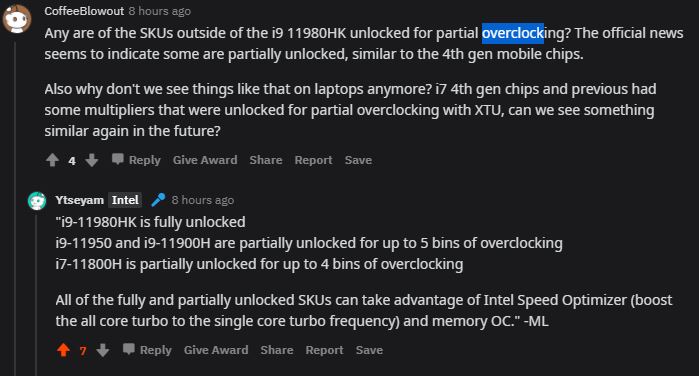
There is an AMA w/Intel Employees over on Reddit that has some interesting information about the just announced Intel Tiger Lake 11th Gen H processors https://www.reddit.com/r/intel/comments/na00cv/ama_with_intel_11th_gen_intel_core_hseries_mobile/
The most relevant question for us is regarding Undervolting, since previous posts on this thread seemed skeptical it would be possible
https://www.reddit.com/r/intel/comm...3?utm_source=share&utm_medium=web2x&context=3
they had also claimed that a few non HK models were unlocked for partial overclocking
https://www.reddit.com/r/intel/comm...1?utm_source=share&utm_medium=web2x&context=3Attached Files:
Last edited: May 12, 2021Vistar Shook, Vasudev, FrozenLord and 1 other person like this. -
-
I just updated TS for the 11th Gen H series. Hopefully voltage control is not locked out like the 11th Gen U and G7 series.
If anyone has access to an 11th Gen H, send me a screenshot of CPU-Z and I will send you a TS beta so you can do some testing.Vistar Shook, FrozenLord, tilleroftheearth and 4 others like this. -
Just came here to offer up this article to see whether it looks like the voltage control is back
https://www.notebookcheck.net/Intel...ormance-gap-with-AMD-Ryzen-5000.537971.0.html
Absolutely absurd that they would disable it for G7 just to enable it again for the next set. Depending on the outcome, I might consider returning this XPS13 for a XPS15 if I can in fact undervolt, or better if they release a H series XPS 13 but not sure how likely that is. Assuming I can return this due to the fact it cooks my legs.... -
How helpful really is that reply they posted? OEM being Dell or HP for example? Makes it sound like they haven't at all disabled it in G7 and the fact we can't do anything is totally up to the manufacturer? As UW can't just adjust the UEFI values as he usually does, makes it seem like they have in fact physically done something to prevent it from being done.Vistar Shook likes this.
-
Maybe @B0B or Jarrodtech have them for review.
Can older Skylake CPU use new version after 9.3 w/o any issues?Vistar Shook and SlickDragon like this. -
TS 9.3 continues to support as many Intel CPUs as possible going back to the Core 2 Duo era in 2006 or 2007. I do not own a wide variety of hardware so if you ever have any issues, post some screenshots so I can have a look.
TS 9.3 works great on the majority of Core i CPUs since 2008. There are some 18 core Xeons that are not supported at all because I have never had access to any hardware like that. There are also some low power Atom CPUs that ThrottleStop may not fully support. My closets are full of CPUs so I finally stopped spending my own money on CPUs that I really do not need.
That is my best guess for the U and G7 series. Either that or Intel came up with some new way to lock out CPU voltage control. It might be years before Intel's latest secrets show up on some dark web site.Vistar Shook, Vasudev, SlickDragon and 1 other person like this. -
Some interesting remarks from the Reddit AMA intel did recently. Quoting them below
9-11980HK is fully unlocked
i9-11950 and i9-11900H are partially unlocked for up to 5 bins of overclocking
i7-11800H is partially unlocked for up to 4 bins of overclocking
All of the fully and partially unlocked SKUs can take advantage of Intel Speed Optimizer (boost the all core turbo to the single core turbo frequency) and memory OC
Reg undervolting:
"Undervolting requires the ability to overclock enabled in the bios, which is up to the OEM. So it could be available on all partially or fully unlocked SKUs depending on OEM design."Vistar Shook, FrozenLord, Vasudev and 2 others like this. -
Ok good news, i just saw Dave2d's latest video on the new Intel 11th Gen laptops from Asus, and he CONFIRMS that they have Undervolting! @1:45
So there it is, confirmation from an actual known and respected Reviewer that Undervolting has not been eradicated by Intel as many of us feared would happen!!
P.S- Not sure how to link it to the timestamp, NBR is just accepting the youtube url, but not the time marked. So just skip to to 1:45 till someone tells me how to link the time here.Porter, Vasudev, tilleroftheearth and 1 other person like this. -
But future uCodes can disable undervolting after 6-8 months since reviewers will be on 12th Core Intel or AMD with radeon/RTX GPUs.
Dell has locked out undervolting on my 6700HQ on latest Bios and I'm using VMware cpu patcher to apply latest uCode w/o disabling undervolt. -
I'm really glad my Gigabyte 6700HQ has not been blessed with this attention.
-
Ok great news, we have confirmation and screenshots of successful Undervolting of 11th Gen Tiger Lake H from a great Redditor named u/Kungsgrillen under the Gaming Laptops subreddit in this thread - https://www.reddit.com/r/GamingLapt..._gp66_11th_gen_i711800h_internals_back_cover/
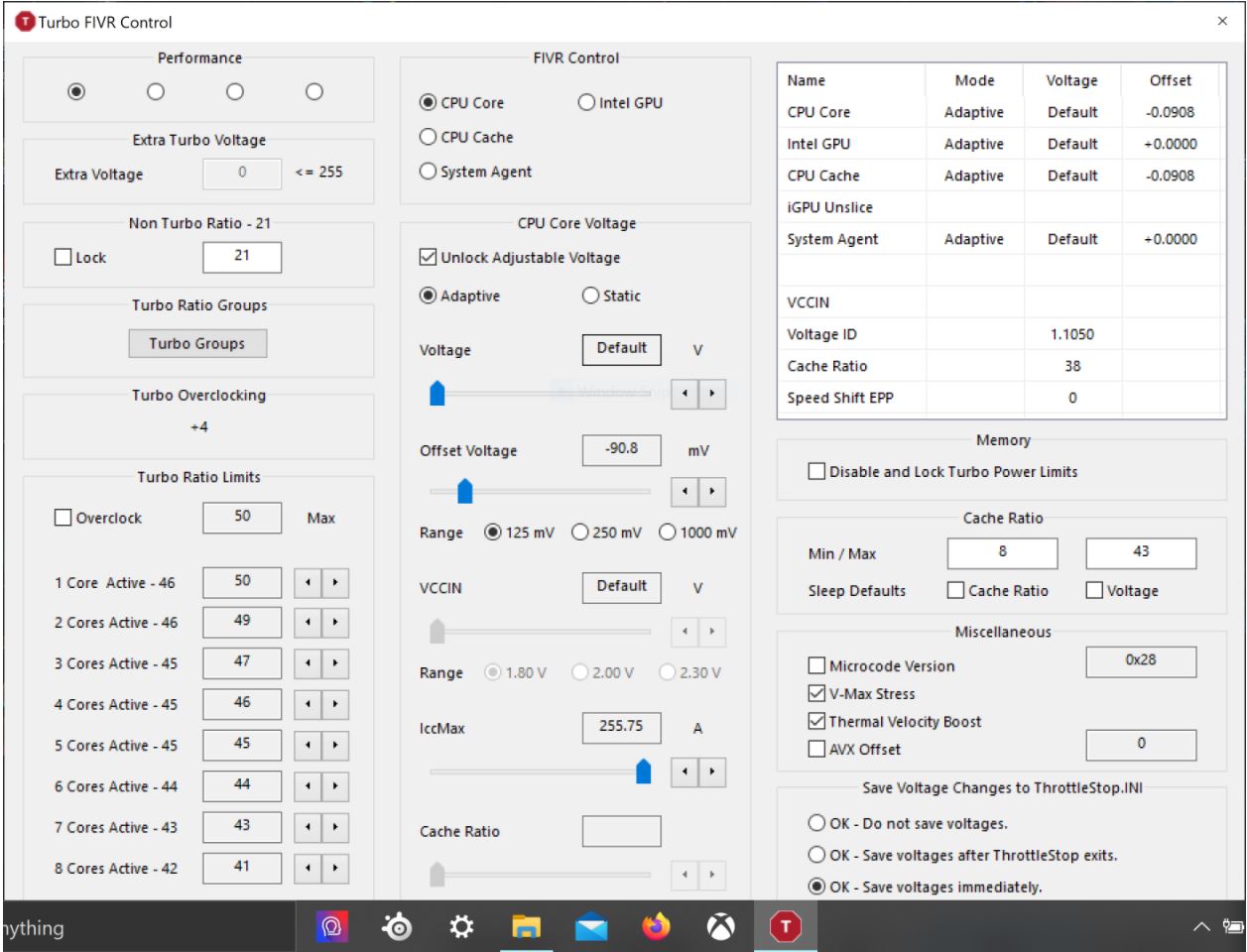
Kungsgrillen had to go into the Bios and change Overclocking Locked under Advanced to Cpu Lock Configuration, and it changed the previously locked ThrottleStop to fully unlocked. Here is ThrottleStop Unlocked on 11th Gen- https://ibb.co/NKS45nG .
Here is the main tab of TS with the 11800H- https://ibb.co/m4qbr0L. Here was it locked before the Bios change- https://ibb.co/x1Tfpvy
I believe this screenshot also shows evidence of Cpu Overclocking being Unlocked, since the Turbo Multipliers are able to be increased by up to +4 on this 11800. That is why it is showing a 50 Multiplayer when normally its 46 Max. So the single change in the Bios enabled both Undervolting and up to a +4 Turbo Overclock Multiplayer for the Cores. This was w/ a MSI GP66
Edit- Another user with Msi GP66 was able to Overclock up to 4.6 Ghz on all core turbo with the 11800 in this thread- https://www.reddit.com/r/GamingLaptops/comments/nfn0no/msi_gp66_intel_i7_11800h_tiger_lake_rtx_3070/Attached Files:
Last edited: May 19, 2021raz8020, Vistar Shook and unclewebb like this. -
-
@SlickDragon - Thanks for sharing and thanks for posting lots of links to where all this information came from. It looks like ThrottleStop is going to continue to be a useful tool for the new 11th Gen H series.
Some of Intel's 3rd and 4th Gen CPUs used to support limited overclocking so nothing totally new here. The 4700MQ supports +2 bins, the 4800MQ was +4 bins and the 4900MQ was +6 bins. Great to see Intel adding this useful feature back to their 11th Gen non K CPUs.
TS 9.3 does not yet officially support 11th Gen H. Most of the important stuff like CPU voltage control appears to already be working. The latest beta will unlock a few minor things like the Limits button. Maybe I will release an update next week.
Edit - I just posted an invite on Reddit. Hopefully a new 11th Gen H user joins NBR so I can do some beta testing. TS probably works fine as is but it is always nice to see some overclocking action.
Last edited: May 19, 2021raz8020, FrozenLord, Vistar Shook and 4 others like this. -
Hi Unclewebb. Got a question about the red "PROCHOT" text on the main screen.
Mine has PROCHOT in red but I do not see anything in limits other than TVB. Is that normal?
And once PROCHOT is red, does it revert back to grey? I assume red means it is hitting the thermal limit and constantly throttling.Attached Files:
-
-
Unclewebb,
can we copy values used from one setup to another?
For instance, I used Performance to undervolt, change turbo ratios and turbo power limits. Whenever I want the cpu to "slow" down, I use Battery, which I have also tweaked (turbo ratios down to 25).
I want to use Game as a profile specific to Apex Legends (the one FPS that heats up cpu way above the rest). Already changed the name of the profile, but I want to copy (via ini file or the UI) all the settings/values from Performance to this one (and make slight changes).
My bing search on this yielded no results, thus far. -
If there is any thermal throttling, even for a millisecond, PROCHOT will light up in red on the main screen of ThrottleStop. This seems to be the most accurate indicator of any thermal throttling. Limit Reasons works well but it is not updated as frequently as the PROCHOT indicator is updated within the CPU.
This setting is like a big red flag. If you are busy playing a game, you do not have time to monitor ThrottleStop. When finished gaming, if you see PROCHOT in red, then you immediately know that there must have been some thermal throttling going on.
When a thermal throttling episode is finished, you can click on where it says PROCHOT in red. This will reset the PROCHOT flag within the CPU. This is how to turn the PROCHOT indicator from red back to gray. I added a new feature to the next version of TS. Pressing the CLR button in ThrottleStop will also clear the PROCHOT indicator at the same time. That should save me some time.
Sure, you can do whatever you want.
Will it work? Maybe. It depends on what settings you decide to copy. I have been randomly adding things to the INI file for 12+ years. I have no idea what is hiding in that closet. An unorganized mess is an understatement. Adding some INI management options to ThrottleStop so a user could copy and paste and backup their profiles would be a great idea but ThrottleStop does not have any features like that yet. Trying to manually copy your settings from one profile to another is bound to break something and should probably be avoided.Papusan, chaugh, tilleroftheearth and 2 others like this. -
The answer is no, then.
I had looked inside the ini file, obviously, and wasn't sure of what to do. Decision was to not mess with it.
Thank you. -
One last question. I've read that unchecking "thermal velocity boost" in FIVR will mean the CPU can run TVB clocks beyond 65c.
That seems amazing and a free "overclock" for non K CPUs/ This seems like a no brainer that everyone with CPUs with TVB should be unchecking.
Are there any reason why not everyone is unchecking this by default.. maybe cause instabilities with undervolted settings?
Thanks! -
That is correct.
I like maximum CPU speed so I agree with you. Checking the Thermal Velocity Boost box in ThrottleStop is bad. Full speed is good.
The Intel marketing department came up with a nice name for this throttling feature. Premature Thermal Throttling is a more accurate name for this feature and how it works but that is not nearly as sexy as Thermal Velocity Boost. When Premature Thermal Throttling is checked, the CPU will slow down 100 MHz when it reaches 65°C or 70°C. When this box is not checked, no more throttling at these low temperatures. That is how the engineers designed this feature. When enabled within the CPU, it slows the CPU down.
Squeezing the last possible 100 MHz out of an Intel CPU can take a lot of extra voltage to run reliably. In a laptop, more voltage equals more heat. I can understand if someone does not want an inferno on their lap, they should consider leaving the Thermal Velocity Boost box checked.dmanti, pressing, FrozenLord and 4 others like this. -
I am working on a new feature so users will be able to easily toggle the C states on and off.
Environmentalists might set up a protest outside of my house but musicians will appreciate the reduced latency. Will the improvement in 4K Read and Write times be useful for gamers? Maybe. I know anyone that likes to run a bench or two will appreciate this new option.
All it took was a couple of AS SSD tests to convince me that this would be a useful feature to add to ThrottleStop.
Can you spot the difference in 4K performance?
Last edited: May 21, 2021pressing, dmanti, Vistar Shook and 3 others like this. -
Hello @unclewebb, what are good undervolt values for a i7-8550U laptop (ASUS Vivobook S14) with a MX150? For now, I have an offset of -0.1006V for both the CPU core and cache, and -0.0508V for the Intel GPU. My idle temps are around 45C.
The laptop performs fine mostly, but I often get STORE_DATA_STRUCTURE_CORRUPTION BSODs, especially when running Civ VI (the only game I play). I also got that BSOD once when ThrottleStop was turned off (tray icon was green). Do any ThrottleStop settings 'stick' even though it is turned off?
I tried running `memsched`, but no errors were found. Any tips would be helpful.
The ThrottleStop Guide
Discussion in 'Hardware Components and Aftermarket Upgrades' started by unclewebb, Nov 7, 2010.