 Problems? See this thread at archive.org.
Thanks for the tips, that's good to know.
And yes, I had to disable the virtualization options in my BIOS to get TS working in Windows 11.
-
Not working after I updated to Windows 11 either. Unfortunate that WSL2 seems to be breaking throttlestop, as we use it for development and I can not go without it. WSL2 didn’t break throttlestop on 10 for me so something must’ve changed between 10 and 11.
-
Some of the developer versions of Windows 10 that automatically enabled WSL2 used to break ThrottleStop. I am not sure if that is an issue for Windows 11.
The next thing to try is disabling Virtualization in the BIOS. -
Unfortunately disabling virtualization isn’t an option for me, as a substantial amount of the software that we use needs it
-
I thought that might be a problem. You can try using Intel XTU. If ThrottleStop cannot access your voltages then I doubt XTU is going to work but it hardly ever hurts to try XTU.
-
I have tried XTU before on Windows 10, but it would bluescreen my laptop whenever it entered modern standby which was problematic. I ended up rolling back to Windows 10, and throttle stop went right back to working perfectly. Hopefully the public release of Windows 11 won’t have this problem as I very much would like to continue undervolting my work and personal laptops.
-
I think this is a new feature of Windows 11 that will not be going away. Running apps in a VM is wonderful for stability and reliability. This will be the selling point for the masses. Improved stability, no more BSOD, upgrade now.
The only problem is that it breaks apps that need to access the hardware directly like ThrottleStop does. Everything important in the FIVR window needs access to a single register in the CPU and that one register seems to be blocked.
Windows 10 has been rock solid as long as I am not trying to overclock my CPU to the moon. No plans to upgrade to Windows 11.4W4K3 and tilleroftheearth like this. -
I've heard that having "nvidia GPU" checked is causing polling/waking of the GPU every 5 seconds that kills battery life. Has anyone experienced this?
-
I think Nvidia has recently made a change to their driver. ThrottleStop used to be compatible with Optimus but now it is not. If Nvidia GPU is checked in ThrottleStop, this might keep the Nvidia GPU constantly awake which is bad for power consumption and heat.
I do not know what Nvidia driver first caused this problem. You will need to disable Nvidia GPU monitoring if this is causing a problem.
When not waking up the GPU, ThrottleStop will show GPU -- °C in the button on the main screen.
![[IMG]](images/storyImages/c64ofzZ.png)
Maybe this can be blamed on a Windows Update. This used to work great for years and years.Last edited: Jul 1, 2021dmanti, BayonetworK, FrozenLord and 1 other person like this. -
Wow! My GPU doesn't need that much monitoring! There is a 10 watt reduction in package power from unchecking the box. Thanks!tilleroftheearth likes this.
-
The PKG (Package) Power that ThrottleStop reports is only for the Intel CPU. Whether the Nvidia GPU is active or not should not make any difference to this number.
What sort of testing did you do and what power consumption data are you reporting? -
I'm ashamed to say, very little testing - just noting package power in TS. And you are right, NVIDIA activity should not affect power usage for the Intel package. Perhaps something else happened to affect power usage. I will play with it a bit more and let you know what I find out.unclewebb likes this.
-
yep, I was having an issue with my gpu getting constantly pinged along with increasing system latency like crazy, the driver is 471.11, and nvidia really blew it this time with this driver, I had to revert to 466.77, because there were other oddities occurring in my system, so I really hope that next driver has fixed the issues (or they reverted whatever they did)unclewebb likes this.
-
@unclewebb
So remember when I re-flashed a custom BIOS onto a Asus TUF machine with i7-11370H and couldn't get anywhere with undervolting.. Well I just picked up the new Asus Zephyrus M16 with i7-11800H and it has a fully unlocked BIOS from the factory and it appears this is basically a K processor.. I can overclock all cores to 5ghz and do full undervolting with Throttlestop (once you turn off Overclocking Lock inside BIOS).
This is going to be a sought after laptop once it's known it's fully unlocked at the OEM level. sheesh. It's crazy fast. I don't see the point in the i9 model now. Since when is the new Tiger Lake H series fully unlocked?!? Intel is bringing the enthusiasts back???!?dmanti, unclewebb, BayonetworK and 2 others like this. -
@Diversion - The turbo ratio limits should show how many bins of additional turbo boost are available. The K series are unlimited. Your H series might show +4 Bins.
tilleroftheearth likes this. -
Guys, help me please understand the following situation:
I've got Acer Triton 500. i7 8750H, 2080MAXQ. 180W Adapter. According to specs CPU PL1 is 45W and GPU is 80W and 90W in overclock mode. When I play games, my gpu is 80-90W. When I stress test CPU it's 45W as promised. But then I've launched FPU test in AIDA and powerMAX for GPU, take a look:
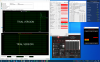
Take a look. I've got 90W on GPU, that's right as promised, but CPU went down from 45W to 30W. Why? 45+90 = 135W and 30+90 = 120W. Both values are far from AC limit of 180W.
The same thing can be seen in real games that load not only GPU but also CPU-demand, like Battlefield V:
Believe me, GPU is 90W. And CPU is constantly 30W.
Acer added some limitations? Like when GPU is loaded CPU and get over 30W?Last edited: Jul 8, 2021 -
If you change your Link State Power Mode in Windows from 'Max Power Savings' to 'Off' or another lesser setting you'll likely see more CPU power draw (as well as heat) in-game.
Your PL1/PL2 are Red/Yellow as well as EDP Other/POWER indicating a few throttling areas. Can you modify the related fields in FIVR/TPL menus?
Acer may have implemented some configurable TDP which drops to 30W at a certain power/temp? You can sometimes disable cTDP within BIOS or even ThrottleStop. -
Tried... Do I need to reboot? I've just applied new settings and retested them. Again CPU went down from 45 to 30W.
Changing PL1 doesn't change real behaviour. Changing PL2 works, but the time limit doesn't affect anything, so it eventually goes from PL2 to PL1. -
It shouldn't require a reboot. The change takes place immediately on my Win10 machine. There's likely an overruling setting from the BIOS keeping the LSPM in one mode rather than switching.
It sounds like power limit and time limit are locked in BIOS (F2 on boot) . You may be able to change these still. Do you have a configurable Power & Performance screen like shown here? - https://community.acer.com/en/discussion/556179/how-to-edit-tdp-limit-in-bios -
This one from unlocked bios which I done have. And as i know you can’t flash it software way. Guess my laptop is locked like bank vault

-
Unfortunately, it is a very common practice for laptops to be built in a way that does not allow the CPU and GPU to function at maximum power output simultaneously. Maxing out the GPU will, in most cases, throttle the CPU power back. That really sucks and I wish they would stop doing this, but it is becoming more common than less common. Even high end systems that have more than ample power supply and don't need to do that still do it. My first enounter with this problem on a high end DTR was on the Alienware 18. Running benchmarks that would place the maximum possible load on the CPU and GPU simultaneously (like 3DMark 11) would cause the CPU clock speeds to plummet.
I have no respect for the people that design laptops because they seem to be not very good at what they do and they tend to apply one size fits all compromises to all models. They all run too hot and have performance issues because they're just not very good at what they do, and I think most of them simply don't care if the products they design and build never perform at their peak ability.Last edited: Jul 7, 2021FrozenLord and tilleroftheearth like this. -
Try putting the laptop to sleep and then awaken it and see if it changes the power manipulation.tilleroftheearth likes this.
-
I was wondering if anyone knows (if it is normal or not) that my max value temps for my processor (i9 10980HK) vary so greatly? for example, core 0 max = 192F, core 1 = 174F, and core 2 = 203F. and other cores are wildly different, inbetween 174-203. is this something I should be concerned with? does it mean that I need to repaste my laptop? I have an MSI GE66 10SGS
Last edited: Jul 11, 2021 -
Hi everyone, I've been using TS for a couple of years now and it always did what it's supposed to do, but I've noticed some things that I want to understand more about.
I've managed a very good undervolt on my i7-7700HQ (Lenovo Y520 laptop), -244 mV on the core and -144 on cache (stable after stress testing using Prime95 and gaming), this was before I did a fresh install of Win10 yesterday, when I installed TS and applied the same undervolt, whenever I stress test it using Prime95, my laptop becomes unresponsive once I stop the stress test (small FFTs), which forces me to hold down the power button to shutdown my laptop.
After a couple changes, tests and crashes, I settled at an undervolt of -230 mV on core and -140 mV on cache, perfectly stable, no crashes.
My temps right before I stop the stress test are below 80C, so that's pretty perfect.
So what changed? other than doing a fresh install! are the electrical components on my motherboard not "in shape" anymore :')
Another question, I noticed that Unclewebb sometimes says to increase the IccMax to max, for my CPU and based on its spec sheet, the IccMax should be limited to 68.00A which is the case for me, am I missing something?
Link to screenshots of my TS settings:
https://imgur.com/a/aLM9KoQ
Thanks in advance.Last edited: Jul 9, 2021 -
I got undervolt working on Windows 11. I had to block Windows Update from installing WSL2 Linux Kernel 5.10 in order to keep the undervolt. The moment the updated WSL2 insider kernel is installed for 11 it breaks the undervolt, at least for me.
-
For most CPUs, -144 mV on the cache has proven to be on the very edge of stability. You might be stable one day and not the next. Your stress test temps are fine so there is no reason to run your CPU this close to the edge. Give your CPU some more volts. I would set the cache to an offset of -125 mV or maybe -130 mV like everyone else is using.
I prefer performance over safety. Any spec in the spec sheet that might limit maximum performance is a spec that I would ignore.
You can set IccMax however you like. If you think setting IccMax higher than 68A is going to damage your CPU then leave it set to 68.00A. I prefer setting IccMax to 255.75A for the core and the cache. Setting IccMax sky high ensures that it will never limit maximum performance.Qattos likes this. -
Thanks a lot for your reply.
I think I'll do this and probably push my core undervolt even more.
The thing is I'm not concerned about my CPU, it's the VRMs that scare me, I could be wrong and they're probably not related to this at all, but wouldn't they have a limit on how much Amperage they can handle?
Excuse my ignorance, I'm just trying to learn more.
Thanks again. -
This is just one experience but I can reliably say I've had my PL1/2/3/4 Power Limits in TS & BIOS set to 999975W, 255A, etc basically everything turned up. DDR4 OC'd @ 1.35v. System Agent +.125mV.
I have over 120 hours benchmarking 3DMark, several hundred more hours in Steam gaming, countless hours actually using the laptop for research, projects, 3D printing, etc. Certainly not all, but many of these hours were at all core Turbo, ~60W CPU draw, ~115W GPU draw, ~230W PSU maxed out. Purchased in 2019, the laptop still has 96% battery health today, 99% NVME life on both drives, and it will still hit within margin of error on all posted Benchmark results today as it did on day 1. I truly don't believe there's been any degradation yet, in these last 2 years. I plan/hope to use it for at least 3 more years.dmanti, unclewebb, tilleroftheearth and 1 other person like this. -
Thank you for sharing your experience, it's reassuring.
I'll increase IccMax a bit and see if it has any effects, then go from there. -
Hello there! I'm looking to buy a new 2-in-1 laptop to replace my current (Dell 5290 2-in-1). I'm rocking the whole eGPU setup with thunderbolt 3, but right now my cpu is the bottleneck via PL1 throttling, and throttlestop couldn't disable the throttling.
What are known 2-in-1 laptops which Throttlestop works excellently well on? I've seen unclewebb mention the C930 many times, are there other 2-in-1's which behave as well in terms of performance?
Thanks for the help! -
Andddd it broke again after I rebooted, even after blocking WSL2 kernel updates. Both my work and personal laptops are Dell Latitudes and Dell XPSes respectively, and I've seen similar reports from Alienware and Dell owners that undervolts no longer seem to be working correctly despite it still working on other brands such as Lenovo and Asus, so I have a feeling undervolting breaking on Dell laptops might be a common story on Windows 11 preview.unclewebb likes this.
-
@unclewebb the latest 9.3.1 beta have conflict with one of the fan control software I use on the P870TM machine. using older version like 8.7 is still fine and fan control is no problem, switching to 9.3.1 and it couldn't detect CPU temperature for some reason.
is there a way to figure out whats causing it? -
Can ThrottleStop 9.3.1 report your temperatures correctly or is it the fan control software that cannot read your temperatures correctly? If ThrottleStop has a problem, post a screenshot of the problem.
If the fan control software is broken, depending on what version of ThrottleStop you use, I will not be able to fix that problem. What fan control software are you using?
ThrottleStop 8.7 uses the WinRing0 driver to access the CPU registers. The fan control software might be using the same driver. Sometimes Windows 10 will block any software from starting correctly if it is using this driver. That might be the root of the problem.
Try running RealTemp 3.70 before running the fan control software.
https://www.techpowerup.com/download/techpowerup-real-temp/
RealTemp also uses the WinRing0 driver. This might allow the fan control software to work correctly and then maybe you can use ThrottleStop 9.3.1 without any problems. Your fan control software might be able to open the WinRIng0 driver if RealTemp has already opened it.
Just taking some wild guesses based on what you have told me. RealTemp has not been updated in 9 years so it will not work 100% correctly on new hardware but it might be good enough to solve the WinRing0 problem.
WinRing0 was wonderful in its day but it has too many issues, including security issues. I will never be using WinRing0 in any future versions of ThrottleStop.FrozenLord likes this. -
hey, so running RealTemp 3.70 in conjunction with fan control work just fine. the fan control software can detect the CPU temperature thus can control fan speed based on the temperature.
with TS 8.72 its fine also, only problem seems to be with 9.3.1 (have not tried 9.3 yet). with 9.3.1 beta running, fan control software report no CPU temp though I can still control fan speed manually through the program, it simply will not detect CPU temp with that version of TS running. -
I am curious. it's been a while since the plundervolt. are there still laptops that allow undervolting via TS even with the new 10/11th gen CPUs?
-
@ole!!! - With RealTemp 3.70 running and your fan control software reporting CPU temperatures correctly, what happens when you start ThrottleStop 9.3.1? Does the fan control software stop reporting CPU temperatures?
Versions of ThrottleStop before 9.0 used the WinRing0 driver. All of the ThrottleStop versions 9.0 and newer use a different driver.
YES!!!
This thread would have died a while ago if ThrottleStop no longer worked. Many MSI laptops allow you to easily enable CPU voltage control in the BIOS for 10th and 11th Gen mobile CPUs. The new 11th Gen H series can use ThrottleStop to undervolt and there is also limited overclocking available.
There are tricks you can use for many Dell laptops to unlock CPU voltage control.
https://brendangreenley.com/undervo...hermals-battery-life-and-speed/#cpu-undervolt
Do lots of research before buying anything new. Hopefully you can find out what is possible before you buy.FrozenLord and tilleroftheearth like this. -
oh wait what??? bios mod? argh.... using HP. i went thru his tutorial. until the UEFI Overclocking Lock bit.. thats where I guess HP is different.
-
https://pasteboard.co/KbjtEvT.jpg
https://pasteboard.co/KbjuEZN.jpg
My Chip is a i9-10980HK and and I want to get the most out of ThrottleStop. My objective is running cooler to be able to lower the speed of the fans while still being able to game. I have control of the fans but has anyone got any good settings for best temp.
To date I know I can offset stable at -125 core and I disable turbo. Any other helpful ThrottleStop settings from anyone with similar chips or objectives to try.
Thanks !
Also a big thank for this wonderful software -
You bought a high performance CPU. Please do not tell anyone that you are using ThrottleStop to cut your CPU performance in half. I do not want this wonderful program getting a bad reputation.
When you undervolt, I would not bother adjusting the Intel GPU or iGPU Unslice voltages. The Intel GPU is not being used when gaming so there is no point. Intel GPU power consumption while sitting at the desktop is minimal. There is very little to be gained. If you undervolt the Intel GPU too much, this can interfere with stability when undervolting the CPU cores.
On most Intel CPUs, when you undervolt the CPU core you also need to undervolt the CPU cache. I would always start by undervolting these two equally. Some people get improved temperatures or performance by setting the core offset voltage higher than the cache offset voltage. If the cache offset voltage is stable at -100 mV than your CPU might still be stable with the core set to -175 mV or -200 mV.
Your screenshot shows that you have set the voltage to 0.0020 V. That does not make any sense. Drag the slider all the way to the left so it shows Default.
Windows 10 has a screenshot snipping tool built into it. Hold down the Windows key on the keyboard and while that is held down, push the Shift key and the S key at the same time. You will end up with a much higher quality screenshot compared to a cell phone pic of your screen. After you take a screenshot, you can use CTRL + V to immediately paste your screenshot image into a forum window like I did above.
I just learned about this Windows 10 feature. I feel more productive already.dmanti, FrozenLord and tilleroftheearth like this. -
Ty for the warm feedback I will give this a go
.
The underholding's to keep the Mrs happy you see gaming the best I can from the living room without the fans being too loud. lol -
Gaming profile
https://ibb.co/f1rDtvh
https://ibb.co/3d4hZB4
Thanks this is with game running hold 80c seems pretty good. Fan's are set fairly moderate.
Quiet browsing profile
https://ibb.co/wzF98Hm -
Some people think that you cannot undervolt and overclock the new 11th Gen H series. I am happy to say that they do not know what they are talking about.
Here is a happy user getting the most out of his 11800H with the help of ThrottleStop.
A laptop that scores 5775 in Cinebench R20 is kind of insane. Check out how that score compares to a fully overclocked 10700K desktop CPU.
https://hwbot.org/benchmark/cineben...Id=processor_6075&cores=8#start=0#interval=20 -
Even more insane if you compare it to my 10th gen 10875h cb20 score which is ONLY 4734 and this is at 4.43GHz all core.
At what all core boost this 11800h worked?
I wasnt aware of a such big difference. In most reviews it was performing around 10870h and with even lower scores than mine.
But 1000points more is sick if this is at similar clocks.
Be aware that with perfect tweaked os and some good memory and mem oc and real time priority It should be around 6000points. HOLY F***
And I assume it is MSI lap?
Btw I tought that there were no such high changes in the 11th gen cpus besides it has 8MB more L3Last edited: Jul 16, 2021 -
If you view the video on YouTube, he mentions some details about how he got this kind of performance. He says he is using a 46 all core multiplier. Not sure if he is able to fully maintain that on all 8 cores for the entire Cinebench run but probably yes.
Most reviews are written by people that have no idea how to extract maximum performance out of a mobile CPU. This guy that did the video definitely knows what he is doing. He is using the IMON slope trick to lower the reported power consumption. You are likely correct that he has an MSI laptop that has this feature hidden away in the BIOS.
His ambient temperature is 30°C. With some AC his score can only improve.
I thought in some benchmarks like Cinebench R20, the 11th Gen H has a 20% improvement in IPC compared to the 10th Gen H series. Do not quote me on that. Something is definitely going on when his 11th Gen mobile CPU at 4600 MHz is able to beat 10th Gen desktop CPUs running at 5400 MHz. That is a 17% improvement right there. The desktop users on HWBot likely have faster memory too so a 20% increase in performance at the same clock speeds sounds believable.Papusan likes this. -
First time ThrottleStop user here and I'm running into something I don't quite understand. Well I think I know what might be up but want to verify.
Everything I've read so far indicates that the undervolt will only apply when ThrottleStop is running. However, both HWMonitor and HWiNFO64 show the undervolt as still applied even when I stop ThrottleStop (and yes I've restarted both HWMonitor and HWiNFO etc.)
Is this expected? I'm guessing that ThrottleStop pokes the CPU register and, as long as nothing else pokes it later, the policy will remain in effect until next reboot. Is that the case? -
Hmm, I deselected that option and then Exited TS through its context menu in the tray and the undervolt is still there?
In any case, as long as things are reset back to 0 upon reboot I don't mind much. -
The settings are applied and set inside your CPU, which is why they do not reset when closing Throttlestop (which is not needed after applying those values).
To reset them, you need to restart the device, as it will only then reload the voltage settings.
Alternatively, you can store the default values in Throttlestop as one profile and apply the settings via that route (= actively applying the settings).Last edited: Jul 19, 2021 -
That is the best explanation.
Some users wanted to use ThrottleStop to set their CPU voltages but they also wanted to be able to exit ThrottleStop so it was not consuming any CPU cycles. That is why ThrottleStop makes no attempt to reset anything when it exits. If one is OCD about CPU cycles, I would use the Stop Data option and I would disable any system tray icons. ThrottleStop is extremely lean when setup like that.
If you want to go back to zero offset voltage, setup a profile that specifically requests this. You need to check the Unlock Adjustable Voltage option and set all of the offsets to 0.0 mV.
I think the "Do Not Reset FID/VID on Exit" option only applies to the older Core 2 Duo CPUs from about 13 years ago.Papusan, Vasudev and tilleroftheearth like this. -
a run down of my situation. I have a zbook G6. updated bios cant be downgraded. they said all the mainboards now starts at 1.7.1 straight from the factor, current latest version is 1.9.0. it's only 1.2.2 that doesnt have the plundervolt patch.
i have a 3 year 1 to 1 warranty on the zbook + 2 years of unconditional repair on it. part of the corporate account thingy.
so I gave them an ultimatum either find a way to allow me to downgrade to 1.2.2 or swap to a G7.
today they gave me a call. they do have a "special" bios just for me that allows voltage adjustment. but it's bounded to the board CT number and UUID. so for those with zbook, do note that you can demand it also..
in regards to upgrade, yes they have done it for me before.. I had a zbook G1, that they swap to a G2 unit for me. it was due to the thunderbolt bugs of TB1 and TB2 that they did the swap for me.. (TB1/TB2) was a very different spec compared to mac/apple/dell. it didnt allow TB networking/GPU
will update once the tech guy arrives and does the thing for me.Vasudev, FrozenLord and tilleroftheearth like this.
The ThrottleStop Guide
Discussion in 'Hardware Components and Aftermarket Upgrades' started by unclewebb, Nov 7, 2010.


