 Problems? See this thread at archive.org.
Hi there,
I have got a small wish to make regarding Throttlestop.
My One XPlayer arrived and it is using an Intel i7 1165G7 - which is somewhat nice, even despite the lack of undervolting.
The device offers a turbo mode (28W max under continuous load) and a normal mode (20W max continuous).
However, while I can't change those values via Throttlestop, the device will basically reverse them almost immediately, I am able to set PL1 and PL2 via Power Control Panel).
This way, the values stick.
Is there anything I can do to help you test / debug / experiment with this situation?
Thank you very much in advance
-
-
@FrozenLord - Have you tried checking the FIVR - Disable and Lock Turbo Power Limits box? After you do this, have you also tried using the Turbo Power Limits Lock option in the TPL window? Once these power registers are locked, the only way to unlock them is by rebooting.
It is possible that a driver is writing a power limit 100 or 1000 times per second to the power limit register which will override anything that ThrottleStop is requesting. Hopefully locking both power limits will solve this problem.
Those are the only power limits that I know about. If those are both locked and your device is still using a different power limit than what you have set in ThrottleStop, there are no other tricks that I know of to solve this problem.Papusan likes this. -
btw, to all, especially those with 8c. what's the delta difference in temp of all your cores. the min and max when doing stuff like TS bench.
trying to figure out if my HS is seated evenly. -
My 9700F will show a maximum delta of 5°C to 6 °C after 8c loads (TS Bench, OCCT, ...) between cores.
This delta stays the same after multiple repastes.
However, I have one hot core (#3) and one cold one (#7). -
Intel rates their core temperature sensors to be accurate to +/- 5°C.
Too many people think that these sensors are 100% accurate, space shuttle quality sensors. They are not. Some variation from core to core is normal.
Some heatsinks are poorly engineered. You will need to be extremely lucky to get even contact pressure when a manufacturer includes a heatsink that looks like this. A 3 point mount is what a company uses when they really do not give a crap about cooling.
![[IMG]](images/storyImages/K88ofEI.png) Papusan, FrozenLord and tilleroftheearth like this.
Papusan, FrozenLord and tilleroftheearth like this. -
Some users have had questions about the PL1 and PL2 Power Limit data that HWiNFO reports compared to what ThrottleStop reports.
There are two separate sets of turbo power limits. There are the MSR turbo power limits that ThrottleStop lets you adjust in the TPL window and there is a secondary set of turbo power limits called the MMIO power limits. ThrottleStop does not give you access to adjust the MMIO power limits to a specific value. Instead, the FIVR Disable and Lock option can be used to prevent the CPU from using the secondary MMIO power limits.
After checking Disable and Lock, when you restart HWiNFO, it no longer reports any PL1 or PL2 Power Limit data.
What about the MSR power limits? They still exist. Time for some testing.
After a reboot, with the FIVR - Disable and Lock box clear, I used RW Everything to set the PL1 and PL2 MMIO power limits to 256W. HWiNFO reports this correctly. After that I used ThrottleStop to set the PL1 and PL2 MSR power limits to 96W. I used the TS Bench to create some load and as expected, the CPU power limit throttled based on the lower 96W limit.
This test confirms that HWiNFO is only reporting its PL1 / PL2 Power Limit data from one of the two sets of turbo power limits. I think HWiNFO should be updated so it reports both the MSR and MMIO turbo power limits. Even better would be to read both sets of power limits, compare them, and then report the lowest value since it is the lowest value that forces the CPU to power limit throttle. -
Hello!
I've made some adjustments to my T480 (8350U, MX150, BIOS version 1.31) using throttlestop including:
- Set my Short and Long Power limits to 35 W
- Checked 'Disable and Lock Turbo Power Limits'
- Locked a PROCHOT offset of 6
When running Cinebench R15, it starts at 33 W and drops down to 25 W after ~28 seconds, which is also my Short Boost time limit. However changing this to 60 seconds seemed not to do anything. Very oddly though, running ThrottleStop's TSBench had a sustained 33-35 W TDP for more than a few minutes! Not sure what's going on there.
I'm not very knowledgeable, but perhaps this is the EC enforcing these limits? In an old reddit thread, someone was able to run cinebench R15 without going down to 25 W (using Throttlestop, of course, and on an older BIOS version). So it seems like it should be possible.
Any ideas? -
I like testing out the competition. QuickCPU has lots of features but the memory usage is off the charts compared to TS.
@Papusan and I prefer apps that are nice and lean.
dmanti, Gumwars, FrozenLord and 3 others like this. -
Are there still plans to make profiles for the TPL window? This is a first for me but I want to make a profile for battery only mode. Legion 7i with i9-11980HK is brutal on the battery, even with iCUe disabled. Only thing I can think of is to set PL1 extremely low but I won't want to have to do it manually.
-
That is on the things to do list. Per profile power limits is a feature that I will never use so it will likely be a few more months before I get around to finishing this. I only use one profile on my desktop computer with both power limits set to 4095W.
Perhaps you could try setting up a profile with lower IccMax limits. This is an indirect way to reduce and control the maximum power consumption. Try lowering both the core and cache IccMax values.
With IccMax set to 100A, my 10850K is throttling along at 69W. The same TS Bench - 16 Thread test is normally around 185W when there are no limits.
FrozenLord and Papusan like this. -
I read an interesting post on the Dell forum that I would like to share.
https://www.dell.com/community/Alienware/m15-R6-Cannot-Undervolt/m-p/8003173
You have to be on your toes when dealing with some companies. They can give you features like undervolting and just as easily take them away.
It is always best to block any BIOS updates. Too risky. ThrottleStop is your friend. BIOS updates are not.Papusan, Gumwars, tilleroftheearth and 1 other person like this. -
I found a setting in the MSI unlocked BIOS, hopefully that does it. I do NOT want to lose the ability to UV on the 11th gen Intel.Vasudev likes this.
-
I was helping a user on another forum and came across some advice from Dell.
https://www.dell.com/support/kbdoc/...-precision-m4800-with-intel-speedstep-enabled
This advice seems to come up frequently so I thought I would comment here about this.
The Windows Number of processors setting refers to the number of logical processors. If you have a 4 core CPU and you open up the Task Manager you should see,
4 Cores
8 Logical processors
If you follow Dell's advice and set the Number of processors to 4, after you reboot, the Task Manager will show,
2 Cores
4 Logical processors
Why would Dell recommend disabling half of the CPU? Is it a trick to control one of their laptop models that runs too hot or is their tech team truly this stupid? I left a comment there so they could get their bad advice fixed up but my comment magically disappeared.
FYI, it is always best to clear the msconfig - Number of processors box and reboot. This will allow Windows to discover all of the available cores and threads.Papusan, FrozenLord, Vasudev and 1 other person like this. -
I experienced a rare PF in nonpaged area crash in rwdrv.sys, similar to this: https://www.sysnative.com/forums/th...ged_area-caused-by-driver-ntoskrnl-exe.31385/
My TS version is 8.70, the RwDrv.sys was provided by another forum member. I would appreciate advice? What is rwdrv.sys (it was needed to enable control over turbo power limits in my i7-8750h), is there an official source?
Edit: I understand rwdrv.sys is no longer needed by TS 9.0+ - should take some time to upgrade...Vasudev likes this. -
Maybe 30 seconds. Download, unzip, copy new ThrottleStop.exe into your ThrottleStop folder. Restart ThrottleStop. Done.
This is why I used to make expiring versions of ThrottleStop. Forcing updates did not go over too well with users so I quit doing this.
The newer TS versions do not use RwDrv.sys or any of the WinRing0 driver files. All of that old junk can be deleted. TS 9.3.1 is better in every way. The new driver is self contained and it does not have the security vulnerabilities that the older drivers have. The Disable and Lock Turbo Power Limits feature no longer requires any additional drivers. It works as is.
Someone today again complained that ThrottleStop was not able to start. The problem is Malwarebytes. They never contacted me. They just decided that ThrottleStop is bad so have blocked it from starting. If you like Malwarebytes, you will have to contact them to complain. I am not going to bother.Papusan, dmanti, FrozenLord and 2 others like this. -
I was going to write this but you beat me to it. When doing this you don't even have to mess with the task scheduler. Honestly I usually take screenshots of the FIVR and TPL windows and just rebuild a new INI each time. Maybe that doesn't do anything but I'm not the program writer and don't want to chance some carryover issue reusing the old INI. Also I copy the old files into an "old" directory in case I run into issues or just want to try the old version out to check some thing out.Vasudev likes this.
-
It has been too long since I took a look at TS version upgrade. Which part of TS 9.3.1 is in beta or testing phase? Is it platform timer?
I really have a odd issue, whenever the screen goes to sleep due to inactivity my BGA never comes out of it. Happens on Linux and Windows 10 21H1. Could it be ACPI or firmware issue. I don't like updating BIOS which disabled undervolting.
Its horrible to see Workstation laptop are more of a joke for Dell now. Its a cash cow with crippled hardware.Papusan likes this. -
Beta usually means that the changes are fairly minor so not really worth telling the world about the new version. If you are interested in any of the new features, this version is for you.
ThrottleStop 9.3.1
New Features
- added feature to disable all C states higher than C1.
- added access to Ring Down Bin setting.
- enabled Limit Reasons for Skylake X.
- fixed power plan list for languages other than English.
- changed system timers being used.
The timers that were changed are just performance monitoring timers. They are used to determine what speed your CPU is running at. These timers either work and report your CPU speeds correctly or they do not work. They should work correctly on most Core i CPUs. There might be some Atom CPUs where the previous timers ThrottleStop was using work better than the new timers. I do not have access to any Atom hardware so I have stopped worrying about them.
Not sure what could be causing your screen sleep issue. -
@erfz I merged your thread here so you can get some advice.
What does the Limits window say when the chip drops to 25W?
Charles -
Oh I didn't know beta software can be minor release as well.
What's this ring down setting? In C6/c7 option, what is C states AC On or off. I tried putting it to ON but it reverts to OFF. Dunno why demotion or some option was unchecked. -
If you check Ring Down Bin, this will make sure that the cache is always kept 300 MHz slower than the core. If the maximum core speed is 5000 MHz, the maximum cache speed will be limited to 4700 MHz. If the CPU core needs to power limit throttle to 4500 MHz, the cache will also decrease in speed to 4200 MHz so the 300 MHz difference is always maintained. Enabling this setting improves stability. It is very useful for 10th Gen desktop K series CPUs.
The C States - AC Off On setting makes a one time change to your current Windows power plan. If you check C States - AC and choose the Off option, when you press Apply, you should see all of the C states disappear in the C states monitoring table. If you want your C states back, do the opposite. Check C States - AC, choose On, press Apply and your C states will return. The Windows power plan keeps track of this setting. Your request is not kept track of in ThrottleStop. It is always a one shot deal. Handy when you are doing some benching and you want to squeeze out another FPS or two.
This only works if the BIOS has originally enabled all of the C states.
The Demotion and Undemotion options do not seem to make any significant difference to most modern CPUs. When you first run ThrottleStop, if there is no ThrottleStop.INI configuration file found, ThrottleStop will read the Demotion / Undemotion state from the CPU. Some of these options will be checked and some might not be checked. Every computer is different.
For power saving, I use these settings. I do not have any hard evidence that these are the best possible settings. Any repeatable difference is difficult to measure.
Last edited: Aug 9, 2021 -
I think I got the issue why I was having sleep of death it is because the option reset voltages to 0 when sleep/wake was unchecked.
-
If you need to use this feature, that is a good sign that your offset voltages are on the knife's edge of stability. Probably a hair over the edge.
-
A couple of minor updates. I added separate reporting of the two sets of turbo power limits to ThrottleStop.
I also think I fixed the Disable and Lock Turbo Power Limits feature for the 11th Gen CPUs. Thanks Brad for providing me with some very useful info.
https://bradshacks.com/Papusan, tilleroftheearth and etern4l like this. -
Damn.. I brought it down from -125mV to -110mV after plundervolt microcode update. It seems I may need to go down further to -100mV.Papusan likes this.
-
-
Thanks Kevin. Its been like the user in YT mentioned I never knew DPTF crap was the issue. Damn, DPTF really helped my throttling issue on ivybridge and in Skylake and above I didn't expect updated drivers to introduce power throttling. Let me try this tweak.
+rep added.Papusan likes this. -
A user on another forum gave this a try but his laptop is an HP and it uses different IDs. You might have to manually edit the registry to prevent Windows from reinstalling drivers for this garbage. Hopefully the new TS power reporting can bring some more attention to what manufacturers are really doing.
-
As for DPTF I think it depends on how it is configured and implemented in bios, as for example I have tried enable DPTF in msi ge75 bios and installed latest drivers and to my supprise my cpu performance is exactly the same while my cpu power draw is a bit lower. All benches shows the same values.
But I will retest once again with DPTF on and off.
Attention
Do not apply LM as in the video above, as if you do it like that guy with this dell **** you just ask for bricked machine. AT LEAST HE USED NAIL POLISH...
GUYS... PLEASE USE FOAM TO MAKE SOME BARIER THAT WILL PREVENT YOU FROM SHORTING ON MOBO.
SERIOUSLY IT IS NOT WORTH TO RISK LAPTOP, BESIDES DELL!!Vasudev, unclewebb and tilleroftheearth like this. -
Hello I have a hard time understanding TPL settings and warnings. Since I bought my laptop I did some undervolting and Throttlestop was running in the background ever since. I usually don't play high end games lately I played Mass Effect Andromeda (probably most demanding game I played) and there were some FPS drops so I checked on TS and the situation was something like the below picture. I thought -125mV was maybe too much for this game there were not enough power so I decreased it to -80mV FPS drop was gone the game was smooth but the below warnings were more frequent, in the end I think those warnings are not saying I have not enough power but I'm drawing too much according to the limits. The thing is I don't remember setting any limits and I don't understand it either.
So my questions are should I disable the limits, what are those 3 warnings mean and could you please explain this TPL window in general?
Edit: There was a problem with the images sorry aboutLast edited: Aug 14, 2021 -
The 8750H has a 45W TDP rating. In the TPL window, the default setting for most computers would be PL1=45W and PL2=56W. Some computers set these limits higher than that.
You have set both of your power limits to 24W. Why did you do that? This setting causes power limit throttling which means your CPU is forced to slow down. When this happens, PL1 or PL2 will light up red in the CORE column of Limit Reasons. You will also see EDP OTHER light up red under the RING column. You can ignore the RING column. The CORE column is the important one to watch.
When you lower the undervolt from -125 mV to -80 mV, this increases the voltage going to the CPU. More voltage equals more power consumption. Less voltage equals less power consumption. If the CPU is consuming more power, it is going to power limit throttle more and run slower. You do not want power limit throttling so set the undervolt back to -125 mV.
You do not have to set the core and cache voltages equal to each other. Many 8750H CPUs run great with the cache at -125 mV and the core at -175 mV to -200 mV. -
I actually don't remember editing anything under TPL, but maybe I was copying something and did and don't remember it now. I lowered undervolt because my FPS was dropping and I thought there was not enough power without realizing TS was limiting it to 24. My core and cache is set to -125mV and -50.8mV for quite some time now I remember my core gave me a blue screen when it was around -145mV but maybe that was due to TPL too. So should I just set both limits to 45W then? And can you tell me why this power limit is needed, is it just for to prevent high temps?
Edit: I've read your post on page 773 about TPL and 2021 guide linked below your message, I've set PL1=45 and PL2=56. However I couldn't find anything on Miscellaneous section if nothing's wrong in my setup in that section I think I'm set. Thank you for your explanationLast edited: Aug 14, 2021 -
It looks like DPTF was removed from BIOS and uninstalling the driver gave me extra 2W power.
-
Most of the stuff in the Miscellaneous section can be ignored. Hopefully setting the power limits properly can get you some more performance. Turn on the Log File option in ThrottleStop and go play a game for at least 15 minutes. This will record how your CPU is running. When finished testing, exit the game and then exit ThrottleStop. Your log file will be in your ThrottleStop / Logs folder. Attach a log file to your next post and I will have a look for any problems.
Set the core and cache to -125 mV. If that is not stable, set them both to -100 mV or -75 mV. Once you find a setting that is stable, then try increasing only the core in steps of -25 mV.Last edited: Aug 15, 2021 -
Note: I can't find any way to upload log files I guess there is permission problem for new users. I have 3 different log files explained below should I just post them as texts?
I created 3 profiles;
One for browsing non-gaming stuff (Tier 1: High Performance not selected, Speed Shift at 128, Turbo Disabled),
One for low-end gaming (Tier 2: Speed Shift at 128, Max Turbo:3.1),
One for high-end gaming (Tier 3: Speed Shift at 0, Max Turbo:3.4).
For Tier 1 I started with -125, -125 got a blue screen started from -75, -75 slowly got to -150mV Core and -115mV Cache. Used it about 40 minutes opened multiple tabs twitch and youtube stuff there were no problems
For Tier 2 I started with -145, -90 opened up a game (Legends of Runeterra) 5, 10 minutes later game crashed with a warning, no blue screen though. Went down to -145mV Core, -80mV Cache for 20 minutes there were no problems started logging then the same thing happened about 10 minutes later. Then I went down to -140mV Core, -75mV Cache started logging played for 25 minutes nothing happened.
For Tier 3 I started with -135mV Core, -70mV Cache. Started logging, opened up a game (Mass Effect Andromeda), also started MSI Afterburner for overclocking GPU, and played for 30 minutes nothing happened except rare FPS drop to 50s (FPS was set 60 with NVIDIA Control Panel)
Note: I started writing this after closing the second game every app was still open and TS was in Tier 3, while I was writing this I wanted to check the speed shift of Tier 1, I clicked on Tier 1 but did not hit save then clicked on Tier 3 again about 3-4 seconds later I got a blue screen
Then the laptop restarted I selected Tier 1, wrote this whole thing again I wanted the drag the browser got blue screen again. Now Tier 1 is set to -145.5mV Core and -105.5mV Cache. I guess I tested Tier 1 for very low conditions but I still don't understand what happened at the crash after the last game since I didn't hit save for Tier 1. -
Use pastebin.com and share the link here.
Papusan, Vasudev, makif7 and 1 other person like this. -
Tier 2 Crash:
https://pastebin.pl/view/3efae460
Tier 2:
https://pastebin.pl/view/31ee734e
Tier 3:
https://pastebin.pl/view/3d5f2e11 -
ThrottleStop 9.4
https://www.techpowerup.com/download/techpowerup-throttlestop/
- fixed the FIVR - Disable and Lock MMIO feature for 11th Gen CPUs.
- added separate reporting of the MSR and MMIO power limits.
- added feature to disable all C states higher than C1.
- added access to the Ring Down Bin setting.
- enabled Limit Reasons for Skylake X.
- updated driver for improved security.
- fixed power plan list for languages other than English.
- changed system monitoring timers being used. -
I guess there is nothing wrong with these right?
-
Here is an interesting example from @FrozenLord
![[IMG]](images/storyImages/9Z5xXNO.png)
He is lucky that his computer includes a turbo button so he can get beyond the 11W, previously hidden, power limit. Some laptop owners have not been so lucky. I expect being able to lock out this secondary power limit is going to be a useful new TS feature for quite a few 11th Gen owners. The new MMIO power limit data is updated in real time so you can watch if your computer is doing anything funny with this power limit. There is nothing funny at all about paying for a 4000 MHz laptop and watching it throttle down to 800 MHz. The MMIO power limit data will help explain why throttling problems like this are happening.
@makif7 - My apologies for not answering sooner. I have been busy lately working on the new version of ThrottleStop.
I have a difficult time following all of your changes. I find it a lot easier to try and come up with one core and cache voltage setting that runs reliably with no BSOD problems. Maybe somewhere around -75 mV for the cache and -125 mV for the core.
Use a consistent voltage setting like this for a few days to test for stability. Based on your testing, I think a voltage setting close to these values is going to work best for your computer. You do not have to find the perfect voltage settings. It is OK to use a little bit of extra voltage. No matter what speed you are running the CPU at, whether turbo boost is enabled or disabled, you always want the CPU to be 100% stable. You should be able to change profiles or play any game or do anything without your computer ever crashing.
There might be some games that will run reliably with less voltage and some games might need more voltage. Instead of adjusting the voltages and CPU speed, just find one voltage that works for everything.
Your Tier 3 log shows the CPU running at a consistent 3400 MHz. Your temperatures are mostly under 80°C so I would run your CPU faster. A core temperature of 90°C is just as safe as 80°C.
Your Tier 2 log file shows the CPU running at 1100 MHz to 1200 MHz. When a laptop is plugged in, I prefer to use the High Performance power plan and run the CPU at full speed. You can use ThrottleStop to run your CPU at whatever speed you like. A fast CPU is an efficient CPU so when plugged in, it does not make much difference to power consumption.Last edited: Aug 17, 2021 -
No problem, at all. I thought anything above 85 was bad at a long run (I usually play at least 3-4 hours at a time) so whenever I went over 80 I started limiting some stuff. I'll try to use Tier 3 values for everything, thanks for all the help.unclewebb likes this.
-
Intel has been setting the default thermal throttling temperature to 100°C for the overwhelming majority of CPUs produced during the last 10 years. If this was not safe, Intel would have lowered this temperature years ago to prevent their CPUs from going ka-boom. It is hard to find reports of heat exhausted Intel CPUs on the forums. Most users worry too much about their CPU temperature when they really do not need to.Last edited: Aug 18, 2021
-
Thank you very much for another nice update!
If possible, could you please give a new layout of the FIVR window some thought?
I am running TS on my OneXPlayer (the one with the 1165G7, and no worries - the 11W is not default but my BIOS setting for longer battery life - the 28W PL1 which I am now able to override was default and limiting, however).
This device is using a rather nice 1600p display, which at 8.4" is rather small, so I use 200% scaling.
This results in a 800p display, similar to the GPD Win or Aya Neo.
Unfortunately, the Turbo values are displayed in the same window as are FIVR (which can't be changed for 1165G7).
The window is too big for this screen, making it unusable, as I can't hit apply / ok:
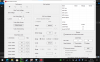
Thank you
-
@FrozenLord - If you play around with the Windows 10 Compatibility settings, you might be able to prevent ThrottleStop from being scaled so much. I always use 100% scaling so I have never tried using these settings.
All ThrottleStop windows, including the FIVR window, allow you to left click on any open spot within the window so you can drag the window wherever you like. The entire window is designed so you can drag it around just the same as if you were clicking on the title bar. This allows access to any part of the FIVR window, including the OK / Apply buttons, even when your screen is scaled to 200%.
The programming tools I am using are rooted in the Windows 95 era. Things like 4K screens and proper scaling were still decades into the future. Apps built with older technology like this do not scale well. Microsoft has put a little bit of effort in improving this but there is only so much they can do. There is no easy way to fix ThrottleStop so it looks nice at 200%. I do not have enough time or hardware to completely rewrite the ThrottleStop user interface. A major redesign like this would be great but it is probably never going to happen.
I do plan to look into your other idea. I plan to add a feature so you can sync the MSR and MMIO power limits. I prefer to disable the MMIO power limits but being able to sync and adjust the MSR and MMIO turbo power limits might be useful to someone. -
I was not aware of that, but that is very useful and makes using TS at 200% possible.Vasudev, tilleroftheearth and unclewebb like this.
-
I am so used to being able to grab ThrottleStop and drag it from any corner that I sometimes try to do the same thing when using other apps. Not sure why more apps do not include this useful feature. It only takes a handful of lines of code to implement it.
I have almost got your other idea up and running. I will try to send you a beta later today if all goes well.
-
@unclewebb
on 9.3 one of the changelog mentioned "added AVX offset control for unlocked K series CPUs." is that K/unlocked CPU specific? or bios dependent? I asked because broadwell xeons seem to be completely locked, where as haswell xeons allows cache overclocking and voltage adjustment on the same server system.
another question about TPL window, the profile adjustment in TPL window doesn't seem to save TPL profile. meaning I'd need to change the PL1/2 value each time if I wish to adjust them, having profile would work wonders without having to type values each time.
thanks again for your great work! -
I know that the AVX Offset feature works correctly on my 10850K. I never use it but I know it works.
AVX Offset is not available on my 4th Gen Haswell laptop. 4th Gen Haswell and 5th Gen Broadwell are similar. AVX Offset might have been first introduced with Intel's 6th Gen CPUs. I do not have access to enough hardware to know what CPUs are supported. I think I remember trying AVX Offset on my i5-7600 but it was not supported. If this was a 7th Gen K, AVX Offset would work but this was a non K CPU so there was no AVX Offset.
Per profile power limits is nearing the top of the things to do list.Vasudev, FrozenLord, ole!!! and 1 other person like this. -
@unclewebb, I'd just like to say thanks for developing ThrottleStop through the ages: I've used it to great effect over three different laptops, through enabling undervolting, disabling power caps or maximising efficiency, and I've never seen anything else like it.
I just got a new Dell Precision 7560 that exhibited unwarranted throttling to 35 W while running CineBench, and turns out there was MMIO throttling, which was fixed by disabling it in ThrottleStop 9.4. My new CPU absolutely trounces my Coffee Lake Xeon and it stays there! I just wish I could undervolt it though, pity Intel completely disabled undervolting instead of fixing the vulnerability...Last edited: Aug 23, 2021Vasudev, ole!!!, tilleroftheearth and 1 other person like this. -
You are welcome. Developing ThrottleStop is half hobby and half obsession.
As far as I know, TS continues to work on CPUs from the Core 2 Duo era. Intel turning out more or less the same thing for so many years has made development easy.
You probably can if you disable the lock bit. It gets a little complicated but is probably doable. Wouldn't that be nice?
https://brendangreenley.com/undervo...hermals-battery-life-and-speed/#cpu-undervolt
I like the new TS MMIO feature. I was helping a user on another forum with his throttling problem. It was really easy to see what was going on. His MSR PL1 was set to 70W which looked great. The MMIO power limits told the real story. MMIO PL1 set to 25W was killing performance. A 9750H is a slug when limited to 25W. Constant throttling while gaming was the result.
One check mark in the Lock box fixed this problem.
![[IMG]](images/storyImages/TyAHt8d.png) Last edited: Aug 22, 2021Papusan, Vasudev, Ionising_Radiation and 1 other person like this.
Last edited: Aug 22, 2021Papusan, Vasudev, Ionising_Radiation and 1 other person like this.
The ThrottleStop Guide
Discussion in 'Hardware Components and Aftermarket Upgrades' started by unclewebb, Nov 7, 2010.


