 Problems? See this thread at archive.org.
MMIO is great, especially for people with laptops using Intel Dynamic Tuning (DPTF) - which is affecting performance, however on mine laptop it's used to control not only performance but also fan loudness.
-
-
Not seeing AVX offset on 6700HQ. I think it supports only subset of models.
-
AVX Offset only seems to be supported on the unlocked K series CPUs.
The 6700HQ has a locked maximum multiplier like my i5-7600 so no AVX Offset. -
Before upgrading to TS 9.4, I deleted all the old TS folder I setup. Are there any other related files elsewhere on the system that should be deleted? For example, I don't remember where the RwDRv.sys was stored or any of those WinRing0 files might be.
Thanks. -
@pressing - No worries. The WinRing0 and RwDrv.sys files are relics of ThrottleStop's past. Starting with ThrottleStop 9.0, you do not need any of those old driver files. All of the necessary drivers are contained in ThrottleStop.exe. When you run ThrottleStop for the first time, if it does not find a ThrottleStop.INI configuration file, it will create a new one. Those are the only two files you need.
If you see any of those old driver files, it would be best to delete them.pressing likes this. -
What would the WinRing0 drivers look like? WinRing0.sys?
BTW - TS 9.4 works fine on Dell XPS 9550 (6300HQ). -
Everything ThrottleStop related would have been in the previous ThrottleStop folder that you deleted. You can search your C drive for WinRing0 or RwDrv.sys
You will probably not find anything unless some other software on your computer is still using these drivers. -
I saw a story on Slashdot about Common File Dialogs (In a program running as Admin) being used as a starting point to run other programs as Admin. Since the Common File Dialog uses the full Explorer shell, you can right click to open directories in Explorer as Admin, launch powershell as Admin, change permissions, and do all sorts of things that aren't appropriate for a file picker.
In the story, there was an installer (running as Admin) that automatically started after plugging in a Razer mouse, it used a Common File Dialog (can run other programs as Admin) for picking what directory to install to, and was thus a local privilege escalation attack.
Anyway, back to Throttlestop.
Throttlestop requires Admin to run so it can load its driver, and also happens to create a Common File Dialog when you click the "Log Folder" button (on the Options window). This can be an unexpected way to run programs as Admin on a computer with Throttlestop running. -
The Log Folder button in ThrottleStop only allows you to select folders. I am not sure how or if this feature could be used to run a .exe file.
Edit - This is definitely a security vulnerability and the feature above that one is even more dangerous.
This vulnerability means all versions of ThrottleStop should be deleted immediately. If anyone needs a safer version of ThrottleStop, let me know and I will release a version that has these dangerous features locked out.
Thanks for the info.Last edited: Aug 26, 2021Papusan, Gumwars, dmanti and 1 other person like this. -
Here's an example, open the Folder picker, hold Shift and Right Click on "Desktop". You'll see commands "Open Command Window Here" (runs cmd) and "Open in New Process" (runs explorer). It's confusing, because some commands only appear while holding shift.
tilleroftheearth likes this. -
Definitely a security vulnerability.
![[IMG]](images/storyImages/UzvOmyc.png)
Edit - A more secure version of ThrottleStop with these features disabled will be available shortly.
You will still be able to choose where the Log Folder is saved but you will need to do this the old fashioned way by editing the INI file. Maybe someday I will write a more secure file folder picker to replace the not so secure Microsoft version
![[IMG]](images/storyImages/gpeGPyB.png) Last edited: Aug 26, 2021Papusan, dmanti and tilleroftheearth like this.
Last edited: Aug 26, 2021Papusan, dmanti and tilleroftheearth like this. -
Hello. I would like to ask for a little information about the ThrottleStop program. I have not personally tried out this program just yet, but may in the very near future.
I currently have a Dell Latitude D620 with a Core 2 Duo - T7600 on XP. It's worked perfectly fine for the last 10 years for me, with "RM Clock" in terms of undervolting and lower temps. (1.0875V on 11x to 14x instead of 1.18)
I might consider getting a slightly newer laptop with 1st, 2nd, or 3rd gen Intel Core i3/5/7 (windows XP Pro only for personal reasons)
I have my eye on this ebay user as there's alot of Dell Latitude and Precision M models ranging between all 3 gens. Have not figured out what, yet.
https://www.ebay.com/sch/m.html?_ss...&_trksid=p2046732.m570.l1313&_nkw=xp&_sacat=0
I've spent the past few weeks doing a ton of research on wikipedia, and many other sites on every single one of these model numbers for things like problems/issues, tempatures, users experiences, etc.
I intend on wanting to undervolt for lowering temps, "not" overclocking, so I wanted to ask the ThrottleStop author @unclewebb a few questions if I may.
** What is the last supported version of your program for XP ? I found one post of someone on XP using I think version 8.50, however it was apparently a 30 day trial or something, and you removed the trial from 8.60+ ?? I dont know for sure though, and if 8.60 or above is supported or not. (or whenever the trial was removed)
** More importantly, i seen a few older posts (i cant possibly try checking through 13,000+ posts in this thread) That your program only supported CPU's starting from Haswell and above ? Which would be 4th gen ...while XP only can handle as high as 3rd gen (ivy bridge) from what I understand.
I do not know if you've got support for 1st gen, 2nd gen (sandy bridge), and/or 3rd gen (ivy bridge) now ??
I read that some CPU's are impossible to undervolt cause they might be permenately locked through BIOS or by design. So I wouldn't want to pick a certain core I model only to find out by mistake that nothing can be done with it at all. i'd like to know what range of 1st-3rd gen models those might be, if possible maybe. So I dont make any wrong choices.
My apologies for this very long post.
-
You'll be taking a gamble depending on the exact combination of manufacturer/model/BIOS of the notebook you choose. There isn't a list that can tell you what to look out for.
If your current 'ancient' setup works fine, including Win XP, why do you want to change it? -
These old laptops are rugged and built like tanks. Many have really good screens too. Unfortunately, many of these also have some horrendous throttling problems. Hopefully you do not end up with a lemon. As far as I know, most of the throttling problems during this era can be solved by using ThrottleStop.
Intel removed the ability to software undervolt from the 1st, 2nd and 3rd Gen mobile CPUs. There is no software available, including ThrottleStop, that can give you any control over the CPU voltage.
I have no idea. I have not used Windows XP on a regular basis for more than 10 years. I no longer own any older computers that are running XP so there is no way for me to test this.
If your Latitude D620 is running XP, try running various versions of ThrottleStop on it. The main TechPowerUp site has a long list of older versions that you can try.
https://www.techpowerup.com/download/techpowerup-throttlestop/Papusan likes this. -
I have a 2007 MacBook Pro Core2Duo T7500. On Bootcamp it runs ThrottleStop just fine. The CPU is quite eager to undervolt, which helps heat. The thermal paste on that MacBook was very dry so repasting gave another major heat improvement.
I can't remember which version of ThrottleStop I am using; it certainly works on Windows 10. But I can't remember if I ever used XP or Win7 on that laptop with ThrottleStop.
FYI- I put some holes at the bottom of the MacBook. ThrottleStop & repasting might be enough for you
http://forum.notebookreview.com/threads/extreme-thermal-mods-2007-macbook-pro-3-1.810471/ -
ThrottleStop 9.4.2
https://www.techpowerup.com/download/techpowerup-throttlestop/
New Features
- added ability to sync MSR and MMIO power limits.
- disabled Log Folder dialog.
- disabled Run Program After Profile Change feature.
-----------------------------------------------------------------------
I think most users are running ThrottleStop from an account with Administrator privileges. The recent security issue discovered by @Dwedit on the previous page might be a non issue.
http://forum.notebookreview.com/threads/the-throttlestop-guide.531329/page-1326#post-11115270
This release disables two features that many users probably do not use anyway. You will need to manually edit the INI file if you want to write the log file to a folder other than the default ThrottleStop / Logs folder.
Code:LogFileDirectory=C:\Users\John Doe\Desktop\Logs
4W4K3, Papusan, FrozenLord and 1 other person like this. -
Hmm i see @ unclewebb - Real bummer to hear all the first 3 gen's are restricted/blocked like that. That's what i was afraid of.
Dang..
Well i gave it a try to test the program you said. Starting with 8.60. It did not open at first, then i noticed the folder with a 8.50 version with the trial period removed, so i replaced the file in main folder, and it worked. So that's good to know. This looks way more complex to use compared to RMClock. :|
@tilleroftheearth - Well, I do some gaming, not a whole lot, but some things i use - the gamecube/wii emulator "dolphin" and the playstation 2 emulator "pcsx2" for playing some games for example. These are pretty demanding. I usually get only between 10 to 30 FPS on most things. I figured i'd get some better performance on a bit more powerful CPU/GPU.
I'm very lucky i did "not" have the Nvidia Quadro (it's integrated intel here) in this Latitude D620 to be honest, because the whole "g84" or "g86" line of Nvidia products for both desktops/laptops i've read, suffers from failures. Thats kinda why i been trying to very carefully lookup info on everything i can about any of these Nvidia gpus in all these E and M series laptops. -
Hello @unclewebb , wonder if adding this would be too out of the scope of TS:
https://www.reddit.com/r/MSILaptops/comments/jf0bwx/adjusting_battery_charge_level_without_dragon/ -
Another thing I found is that if you have your DPI set to enlarge things, the FIVR window becomes too big to fit on the screen. Fortunately, I'm handy enough with Resource Hacker to edit that dialog and shrink it down to fit on the screen.
-
As recently mentioned in this forum, if any ThrottleStop window is too big for your screen, you can left click anywhere on any open spot on any ThrottleStop window and you can drag the window. This allows you to access any of the buttons at the bottom of any window. Any open space on the entire window is equivalent to the title bar. This allows you to drag the window anywhere you like on your screen.
Resource Hacker sounds like a good idea too.
I do not know how to access and program the Embedded Controller (EC). I know how to use RW Everything but that is about it. Maybe someday in the distant future I will know more about the EC. No plans at the moment to add any EC control to ThrottleStop.
It is not that it is restricted or blocked. CPU voltage control is not possible for the 1st, 2nd and 3rd Gen Core i CPUs. Software cannot be used to control a feature if that feature does not exist in the hardware. Intel added software voltage control to their 4th Gen Haswell and newer CPUs.Papusan, FrozenLord and tilleroftheearth like this. -
sorry for my wrong wording. i understand. That kinda changes my plans a bit now.
- the only other thing i had on my mind was a "latitude M4400" i found that has Core 2 Duo - T9900 which appears to be last of the series before the core i's.
-
The NoteBookFanController project has code for talking to the embedded controller.
Also, don't do this. Don't go writing random values into your embedded controller, even it looks like a good way to overrride your fan speed. Even if the computer seems to work okay, you'll get a sudden shutdown or BSOD after disconnecting or reconnecting AC power. -
Hey there,
I have recently wondered how changing the IccMax (sometimes called max current or VR Current Limit) affects different applications and games.
As this is a topic that seems a bit on the vague side, I did run some benchmarks and would like to share my results as well as encourage you to do similar runs with your devices
Some background information:
My laptop is based on an Intel 9700F (= 65W CPU) and my initial assumption was that any current over 100A is not needed.
After all U*I = P should hold, i.e. if my CPU is allowed to consume a maximum of 65W and I have set a static voltage of 1.185V, my current should be limited to around 55A (65 / 1.185).
I am using an Imon Offset of -30.000 via my BIOS, so the CPU should be allowed to consume 30A more than stock, i.e. 85A.
Setting a limit of 100A should get around all issues then, right?
However, my results beg to differ, which is why I want to share them with you
Just for context and reference:
- I did monitor the ambient temperature during my runs and it fluctuated within 1°C, i.e. 24°C to 25°C, during all runs.
- I did do two runs of each benchmark, before taking the numbers, to cache whatever can be cached
- I allowed the CPU to settle back to semi-idle temperatures (48°C for Cinebench, 58°C for Far Cry) before starting the next benchmark run
Please keep in mind that I am running the 9700F at below stock frequency, as my Tornado F5 was never meant to be used with this CPU and is (quite unfortunately) thermally limited.
To prevent thermal throttling, these are the values I use (with variances across "IccMax"):
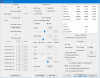
Considering that there are many ways to analyze the data, I would like to simply share my data points with you.
Cinebench R20
Current Limit Run #1 Run #2 Run #3 Run #4 Run #5 400 (= 100A) 2293 2306 2306 2297 2307 500 (= 125A) 2882 2879 2880 2880 2881 600 (= 150A) 3125 3119 3117 3125 3124 800 (= 200A) 3113 3128 3121 3127 3106
Cinebench R23
Current Limit Run #1 Run #2 Run #3 Run #4 Run #5 400 (= 100A) 5939 5943 5937 5911 5903 500 (= 125A) 7421 7432 7425 7437 7421 600 (= 150A) 7987 7946 7968 7955 7956 800 (= 200A) 8113 7978 7987 7960 7990
Far Cry New Dawn - Minimum FPS
Far Cry New Dawn - Average FPSCurrent Limit Run #1 Run #2 Run #3 Run #4 Run #5 400 (= 100A) 70 71 68 69 70 500 (= 125A) 80 80 80 80 79 600 (= 150A) 95 88 91 95 88 800 (= 200A) 94 93 91 92 93
Current Limit Run #1 Run #2 Run #3 Run #4 Run #5 400 (= 100A) 89 88 88 88 88 500 (= 125A) 99 99 99 99 99 600 (= 150A) 112 112 112 111 111 800 (= 200A) 111 111 111 111 111
My conclusion:
Even though 100A seems like it should be enough, even non-AVX workloads (see Cinebench R20) are limited by this current.
In my specific case, the current limit needs to be set at about double the expected amount, to work around throttling issues. (as can be seen, 150A is almost identical to 200A)Last edited: Aug 30, 2021 -
What I did to estimate what value should I put into ICCMAX for each profile in TS that I did (each with different clock speed on my 10875H) was to run CPU-Z AVX benchmark and was watching limit reason window. I started from 255.75 value and I was going down by 20, when it lighted in red and clocks were throttled down in avx test or limit reason showed EDP in yellow I was adding 1 to the value until It pased the avx test without any limit from the current value. After that I have added +5 to the iccmax value to be sure that I will not be throttled in other workloads.
Thanks to that I could slightly reduce heat output as P=U*I comparing just blindly set 255 value and by doing this tune during AVX test I know that I will also not be limited in non-AVX workloads.
For example for 4,4 GHz on all 8cores 16threads I didn't need 255.75 value but only 170.
on 4GHz - 130
on 3.6GHz -100 -
So does Throttlestop support Gemini Lake now?
-
I have never owned or had access to a Gemini Lake CPU. I have no idea if ThrottleStop supports these.
Try running ThrottleStop. If it starts, post some screenshots. I do not think these CPUs use the FIVR (integrated voltage regulator) so if ThrottleStop does work, the number of possible adjustments might be limited.
Edit - After 2 seconds of Google searching, I found this. It looks like ThrottleStop works on Gemini Lake.
https://www.reddit.com/r/lowendgami...proving_gpu_performance_on_the_celeron_n4100/
Post a screenshot of ThrottleStop and the TPL window.Last edited: Sep 5, 2021Papusan, Vasudev, tilleroftheearth and 1 other person like this. -
I was following a post from a few months ago where I needed to change a register to get throttlestop to work.
I was wondering if it had been added, but I don't think it has. As i still need to change the register every unlock. -
@jorgp2 - What post? What register? What feature in ThrottleStop started working after you changed this register?
You need to provide me with a lot more information including some ThrottleStop screenshots so I can see what CPU model you have. -
Hi everyone,
just got my new notebook. It is the Asus Zephyrus S17 with the Intel Core i9-11900H ...
Does TS work with that CPU, I think it should as far as I read ... one question: Is there any experience on what values to take with that CPU?
Thanks a lot. -
-
I have seen some fantastic ThrottleStop results with an 11800H. These CPUs support both voltage control and limited overclocking. Sadly, some laptop manufacturers have decided to lock these features. Post some screenshots of ThrottleStop including the FIVR and TPL windows.
The amount of undervolt available depends on if you are overclocking or not. If voltage control is not locked, start at -50 mV and do some stability testing. Intel is pushing the MHz to the max. When overclocked, there might not be much room to undervolt compared to previous generations.
Some MSI laptops include hidden BIOS features to unlock these CPUs. You can also adjust IMON slope in the BIOS which is a trick used to reduce the reported power consumption.Vasudev and Mythbuster like this. -
I recently picked up an XPS 17 9710 and I'm on a quest to prevent it from draining while running games which stress both the GPU and CPU. What I've found is that when running the device at high brightness (100%) and volume (50%), the drain occurs rapidly and eventually, Dell begins cutting the GPU's power budget to keep the thing above a certain threshold. This absolutely murders framerates. I can reset this behavior by unplugging/replugging, but it will eventually return with the continual drain.
Since Dell decided to lock the voltage control, I won't be able to pursue the undervolting route without modding the BIOS, which I don't want to do. Instead, I have my eyes set on limiting the CPU power as a means to this end. I know it sounds crazy, but I actually want to prevent my CPU from going above 25-30W when I'm playing these problematic games, simply due to the meager 130W the charger for this thing is able to pull from the socket.
I've done this already by setting my PL1 to 25 and PL2 to 30, and the results so far have been promising. Thing is, in most other use cases, I actually prefer Dell's configuration for the variable MMIO power limits they've set... and once I enable and apply my custom MSR power limits, it seems there's no way to quickly return to those stock variable MMIO limits without rebooting. Am I right on that? I may be misunderstanding - I'm a bit new to the TPL screen and have been trying to study all its settings.
My goal is to be able to use custom MSR limits when I launch said problematic games, and return to the stock MMIO behavior once I'm finished. If this can be achieved without rebooting, any help would be appreciated!
Edit: I think I might've figured it out - unless we lock/disable MMIO or sync MSR to MMIO, they're both "active", it just adopts which of the two has lower power limits. So, setting MSR to 109/109 will allow MMIO to do its thing, fluctuating between 25/35/45 and 100. Please correct me if I'm wrong!Last edited: Sep 17, 2021Vasudev likes this. -
Having a different power limit for different profiles is a excellent idea. I like to have basically unlimited Power limits when plugged in but have the default power limit that Lenovo specified on battery so the quiet and balanced profiles switch properly.
Any idea when that is coming? -
That is correct. The lowest power limit wins control of the CPU. I have no idea how your laptop handles the MMIO power limit. I prefer to disable this one. Play around in the TPL window and use whatever features that work best for your laptop.
That sounds like Dell cutting corners. They charge extra for hardware that you cannot fully use because the power adapter is inadequate. You should contact Dell and complain and get them to send you a proper adapter. The first person you talk to cannot solve this problem for you. Tell them this issue needs to be escalated.
It is like Dell never learns. Dell was doing the exact same thing with the XPS line when the 1st Gen mobile Core i was introduced. The reason I remember this is because that is when I originally started working on ThrottleStop. XPS throttling has been a common theme since 2008 and probably before that too.
Coming Soon
As soon as I start working on ThrottleStop again. Hopefully before the end of 2021.Che0063, FrozenLord, Ionising_Radiation and 3 others like this. -
Awesome! Would it be possible to have profile 1 (AC) set the MMIO limits to be disabled, and profile 4 (battery) have MMIO enabled in the future version?Vasudev likes this.
-
Unfortunately, this was an intentional design decision that was a little ahead of its time. Seeking beauty and simplicity, Dell opted only to offer USB-C charging on the new XPS laptops, pushing the spec beyond its 100W limit to 130W. On the XPS 15 this isn't an issue as the 3050Ti is configured to 45W. The XPS 17 is another story - the 3060 is configured to 70W. This was an issue on last year's model too, one which reviewers claimed Dell somehow fixed this year. Turns out there's no magical way to conjure extra wattage from the ether and instead Dell "fixed" it by re-routing some of the GPU's power budget to the battery at certain discharge thresholds. When pushing the display brightness and speaker volume, the issue is exacerbated. I plan to do a full write up at some point in the near future but also want to offer potential solutions.
Back in March, we saw the release of an updated USB-C spec which can support power delivery of up to 240W. Adopting this new port tech, along with providing a beefier charger, is the only acceptable solution to this problem. Either that or ditching their design philosophy and giving us a barrel plug.
Everything else about the laptop? Love it. Gaming isn't my primary use, so it's something I can live with. Still, the extra peace of mind is appreciated. Intel XTU can utilize profiles in the way I seek, so I'll be on that eagerly awating that TS update!tilleroftheearth likes this. -
That will never be possible. With Intel CPUs, once a power limit register is locked, it can only be unlocked by doing a sleep resume cycle or by rebooting.tilleroftheearth likes this.
-
Hello,
I'm a long time Throttlestop user and I'd really like to thank you for this awesome piece of software!
I have a couple of questions concerning a Lenovo Sandy Bridge laptop.
1) Apparently the control box for "TDP level" can't be toggled and is greyed out. I take it there's no way to adjust the TDP for sandy bridge?
2) Setting a custom value for "Long Power PL1" and "Short Power PL2" (either higher or lower than default values) seem to have no effect. I've even tried to lock the values and tried a sleep-resume cycle, but still no effect. What could be causing this? Anything else I can try?
Here is a screenshot of the relevant options set in Throttlestop.
Thanks!
Last edited: Sep 20, 2021 -
Hi,
You have the "Disable power limit control" button checked, uncheck it. -
@noric - 2nd Gen mobile CPUs were mostly locked down by the BIOS. In the TPL window, clear all of the Lock boxes, press OK and then exit ThrottleStop. Reboot your computer and then open the TPL window again. If ThrottleStop shows a lock icon on the left hand side then these settings are locked by the BIOS. You cannot use ThrottleStop to unlock or change the power limits if the BIOS has locked this register. I am guessing that the MSR power limit and the PP0 Current Limit are both locked so they cannot be adjusted. This is normal for 2nd Gen.
The 2760M has a fixed 45W TDP. It does not use TDP Level control that newer CPUs use. It also does not support Speed Shift Technology.
https://ark.intel.com/content/www/u...2760qm-processor-6m-cache-up-to-3-50-ghz.html
Is there any reason why you checked Power Balance and set both values to 31? Does that accomplish anything? The purpose of this feature is to balance the power budget between the CPU cores and the Intel GPU. Not sure if you need that feature. It was mostly intended for the low power 15W or 17W CPUs.
You can usually get very good performance out of a 2760QM with a 45W power limit. Do you have a problem that you are trying to solve?
Checking Disable Power Limit Control is the right thing to do if the power limit register is locked.Last edited: Sep 20, 2021tilleroftheearth likes this. -
@Rimmsi
Yes, that button is now checked, because I can't get PL1 and PL2 to work. Anyway, I've now uploaded the correct image of the settings I would like to apply, to avoid confusion.
Unchecked all "lock" buttons, rebooted and... confirmed, unfortunately they are locked by the BIOS...
Did someone ever investigate and/or succeeded in unlocking these power limits with a BIOS mod?
Without "Power Balance" I've found that the iGPU doesn't scale to its turbo frequency while gaming with some emulators, resulting in low fps. That option works really well! -
That is what I thought. I have never heard of any successful BIOS mods for locked 2nd Gen mobile CPUs. Does the default 45W limit cause any significant throttling? You should be able to run most tasks at full speed with 45W. What speed do you get when Cinebench R20 or R23 is running?
https://www.techpowerup.com/download/maxon-cinebench/
I have not found many people that have ever found a use for the Power Balance feature. I have thought about removing it for years. Based on your feedback, I will leave it as is. That is less work compared to removing it.
ThrottleStop has a hidden feature for the Intel GPU. In the ThrottleStop.INI configuration file, try adding this line.
IGPU=100
That sets the Intel GPU power limit sky high to 100 Watts which might help eliminate any GPU power limit throttling. If the Intel GPU power limit register is locked, this will not do anything. Not sure if this feature will be of any use to your laptop. It hardly ever hurts to try.
tilleroftheearth likes this. -
I have a feeling that the CPU frequency is a bit low while gaming with the iGPU at full speed.
2.5GHz in Cinebench R20.
Yes, please! Another example I've found: with PCSX2 (heavily cpu-bound) I set the Power Balance to 31-0, so that the iGPU is throttled and the CPU can turbo-boost a bit higher.
I'll keep this in mind in case I still see the iGPU throttled at base clock despite "Power Balance".
-
Can you post a screenshot of ThrottleStop while your computer is running Cinebench and while your CPU is throttling? I would like to see if it is power limit throttling at 45W or if something else is going on. Some people do not know how to set ThrottleStop up on older computers. Not sure if YouTube videos were a thing when the 2nd Gen were released.
tilleroftheearth likes this.
-
I just set up throttlestop and the temps are great. I'm wondering 2 things though (when using Throttlestop to undervolt m15 r4 laptop - is FID suppose to fluctuate a bit when game is on and do I need to click the "Turn On" option), regarding when I use it to play FFXIV. Also, I'm using an Alienware m15 R4 laptop in case it matters and it has an Intel i7-10870H CPU.
I undervolted the CPU core and cache by -80.1mV and changed the clock speeds on the bottom left down about 2 each (it went from 50 with 1 core active and 41 with 8 cores active to 48 with 1 core active and 35 with 8 cores active). To clarify this is the section in the FIVR that is labelled "Turbo Ratio Limits" (where it has 8 values, because my CPU has 8 cores, ranging from 1 Core Active to 8 Cores Active). While running tests (TS Bench and Cinebench) I get consistent 34.00 in the FID section on all 8 cores. But when I start FFXIV, I noticed at first the FID was 34.00 for a few minutes but then the FID goes down just a tiny put like 33.5 or 33.7 and fluctuates constantly. Is this normal? I'm new to this so I wasn't sure if it is meant to stay at 34.00 while gaming now. If this is normal, then how do you know exactly if the CPU is thermal throttling? (Just a note, the FPS in the game is good, I have it at 120 limit and it stays at 119-120 outside the major cities and 110-120 in major cities so everything in the game seems fine without any performance loss from lowering CPU voltage).
Also, since I changed the "Turbo Ratio Limits" section, do I need to select the "Turn On" option in the task bar (right click TS in task bar)? Currently the throttlestop icon is green and the "Turn On" option is unchecked. I know the undervolting is applied whether or not you have this option selected, but I was not sure about if you changed the "Turbo Ratio Limits"? I found this info regarding the Turn On/Off button: "Turn On - Turn Off controls Set Multiplier, Chipset Clock Modulation and Clock Modulation. A lot of 8th Gen CPUs that have Speed Shift enabled do not need to use any of these 3 settings. Clock modulation throttling is rarely used on modern laptops." I was not sure what Clock modulation is though, or if that is what I did?
Thanks! -
@Nore12345 - I cannot count how many different forums you have asked this same question. I think I answered it on TechPowerUp. I know I answered it somewhere.
tilleroftheearth likes this. -
Here it is:
Actually I don't know why during Cinebench it's throttling at 2,5GHz. During full load it usually throttles at 2,7GHz, for example during a HandBrakeCLI conversion:
I have also tried to disable "Power Balance" and it doesn't make any difference. -
Hi, thanks, yeah I found your responses on techpowerup. I wasn't sure which forum would lead to any response, so I tried them all heh... In any case, I will reply there once I get the logs. Thanks again for your help!
-
@noric - Try checking the Set Multiplier box so that information is sent to the CPU. Also clear the Power Saver box when testing. That is more of a feature for the much older Core 2 Duo CPUs.
-
Looking for a advice for MSI GE76 11UE with i7-11800H - better settings in BIOS and Throttlestop please?
Bios is the last, stock, overclock switch on there.
Read recommendation for bios -
Disable FIVR efficiency.
Disable FIVR Faults
is it good and anything else ?
ps. Intel GPU switch off with MUX switch - so only NVidia discrete only.
Started from -70, but -60mv found stable (in prime even by default BLEND mode).
The ThrottleStop Guide
Discussion in 'Hardware Components and Aftermarket Upgrades' started by unclewebb, Nov 7, 2010.


